Dash Peugeot Partner 2020 User Guide
[x] Cancel search | Manufacturer: PEUGEOT, Model Year: 2020, Model line: Partner, Model: Peugeot Partner 2020Pages: 260, PDF Size: 7.76 MB
Page 114 of 260
11 2
Driving
Malfunction
Dashes are displayed (flashing, initially, then
fixed) in the event of a speed limiter malfunction.
Have the system checked by a PEUGEOT
dealer or a qualified workshop.
Cruise control - particular
recommendations
For the safety of everyone, only use the
cruise control where the driving
conditions allow running at a constant speed
and keeping an adequate safety distance.
Remain vigilant when the cruise control is
activated. If you hold one of the speed setting
modification buttons, a very rapid change in
the speed of your vehicle may occur.
When descending a steep hill , the cruise
control system cannot prevent the vehicle
from exceeding the set speed. Brake if
necessary to control the speed of your
vehicle.
On steep climbs or when towing, the set
speed may not be reached or maintained.
Exceeding the programmed speed
setting
You can temporarily exceed the speed
setting by pressing the accelerator pedal (the
programmed speed flashes).
To return to the speed setting, release the
accelerator pedal (when the set speed is
reached again, the displayed speed stops
flashing).
Operating limits
Never use the system in the following
situations:
–
in an urban area with the risk of
pedestrians crossing the road,
–
in heavy traffic,
–
on winding or steep roads,
–
on slippery or flooded roads,
–
in unfavourable climatic conditions,
–
driving on a speed circuit,
–
driving on a rolling road,
–
use of snow chains, non-slip covers or
studded tyres.
Programmable cruise
control
Refer to the General recommendations on the
use of driving and manoeuvring aids and to
Cruise control - particular recommendations.
This system automatically keeps the vehicle’s speed at the cruise value
programmed by the driver (speed setting),
without using the accelerator pedal.
The cruise control is switched on manually.
It requires a minimum vehicle speed of 25 mph
(40
km/h).
With a manual gearbox, third gear or higher must
be engaged.
With an automatic gearbox, mode
D
or second
gear or higher in mode
M
must be engaged.
The cruise control remains active after changing gear, regardless of the gearbox
type, on engines fitted with Stop & Start.
Switching off the ignition cancels any
speed setting.
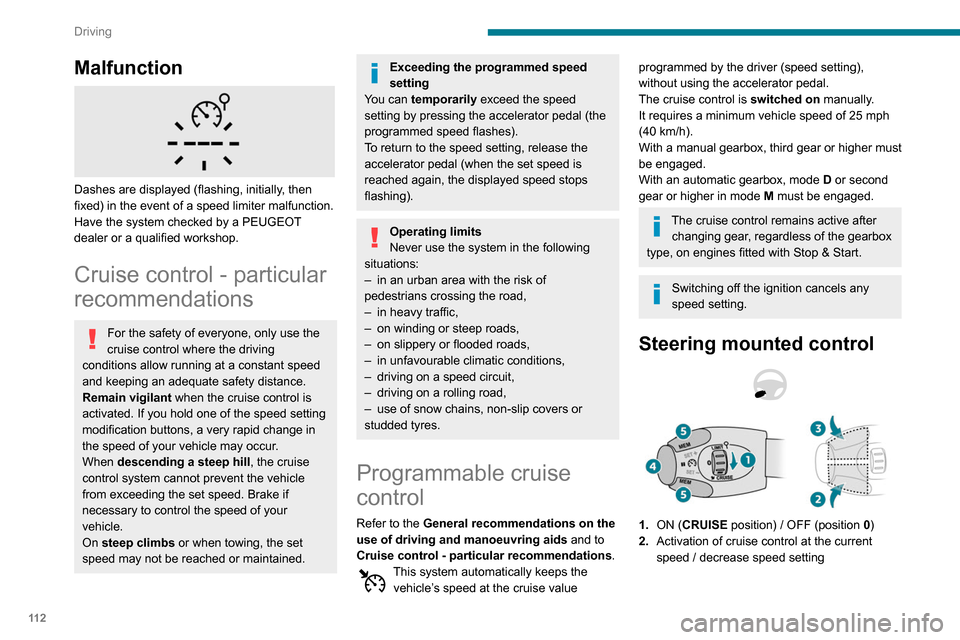
Steering mounted control
1. ON (CRUISE position) / OFF (position 0)
2. Activation of cruise control at the current
speed / decrease speed setting
3.Activation of cruise control at the current
speed / increase speed setting
4. Pausing / resumption of cruise control with
the speed setting previously stored
5. Depending on version:
Display of speed thresholds recorded using
Memorising speeds
or
Use the speed suggested by the Speed Limit
Recognition and Recommendation ( MEM
display)
For more information on Memorising speeds
or on the Speed Limit Recognition and
Recommendation, refer to the corresponding
sections.
Information displayed on
the instrument panel
6. Cruise control mode selection indication
Page 116 of 260
11 4
Driving
The selection screen closes after a few
moments.
This setting becomes the new cruise speed.
To change the cruise speed setting using the speed suggested by the Speed Limit Recognition
and Recommendation:
►
The suggested speed is displayed on the
instrument panel.
►
Press button
5 once; a message is displayed,
confirming the memorisation request.
►
Press button
5 again to save the suggested
speed.
The value is immediately shown as the new
speed setting on the instrument panel.
Temporarily exceeding the
programmed speed
If needed (when overtaking, for example) it is
possible to exceed the programmed speed by
pressing the accelerator pedal.
Cruise control is temporarily overridden and the
programmed speed setting flashes.
To return to the programmed speed, simply
release the accelerator pedal.
Once the vehicle has returned to the
programmed speed, cruise control takes over
again and the programmed speed setting stops
flashing.
When descending a steep hill, the cruise
control system cannot prevent the
vehicle from exceeding the programmed
speed.
You may have to brake to control the speed of
your vehicle. In this case, the cruise control is
automatically paused.
To activate the system again, with the vehicle
speed above 25 mph (40
km/h), press button
4.
Switching off
► Turn the thumbwheel 1 to the "0” position: the
cruise control information disappears from the
screen.
Malfunction
Dashes are displayed (flashing, initially, then
fixed) in the event of a cruise control system
malfunction.
Have the system checked by a PEUGEOT
dealer or a qualified workshop.
Adaptive Cruise Control
Refer to the General recommendations on the
use of driving and manoeuvring aids and to
Cruise control - particular recommendations.
This system automatically maintains the speed
of your vehicle at a value which you set (speed
setting), while keeping a safe distance from the
vehicle in front (target vehicle), and which has
been set beforehand by the driver. The system
automatically manages the acceleration and
deceleration of the vehicle.
With the Stop function , the system manages
the braking until the vehicle comes to a complete
stop.
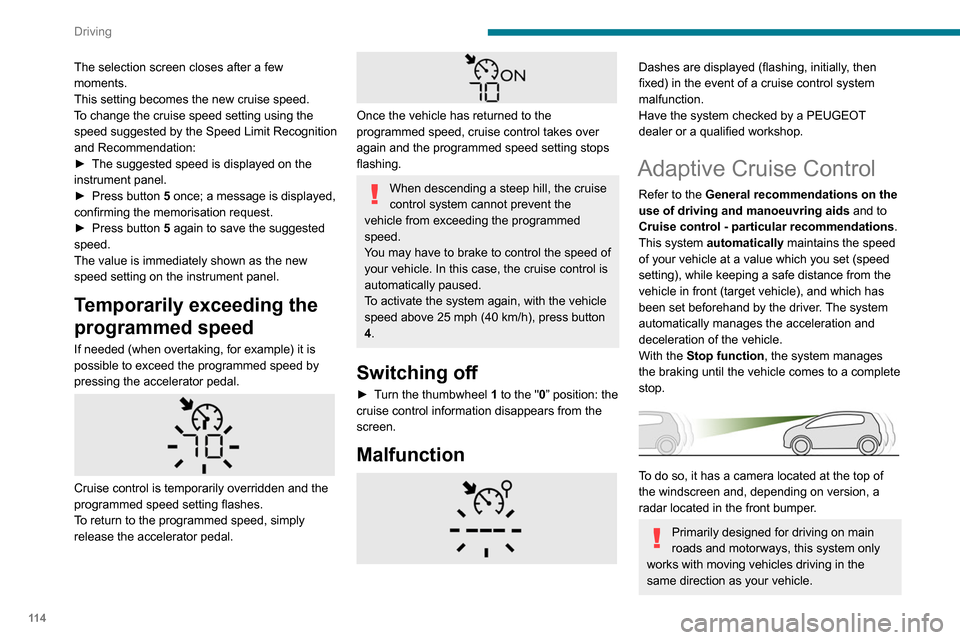
To do so, it has a camera located at the top of
the windscreen and, depending on version, a
radar located in the front bumper.
Primarily designed for driving on main
roads and motorways, this system only
works with moving vehicles driving in the
same direction as your vehicle.
If the driver operates a direction indicator
to overtake a slower vehicle, the cruise
control allows the vehicle to temporarily
approach the vehicle in front to assist the
overtaking manoeuvre, without ever
exceeding the speed setting.
Some vehicles present on the road may
not be properly seen or may be poorly
interpreted by the camera and/or radar (e.g. a
lorry), which may lead to a poor assessment
of the distances and lead to the vehicle
inappropriately accelerating or braking.
Steering mounted control
1. ON (CRUISE position) / OFF (position0)
2. Activation of cruise control at the current
speed / decrease speed setting
3. Activation of cruise control at the current
speed / increase speed setting
Page 119 of 260
11 7
Driving
6The driver must accelerate to move off again,
then reactivate cruise control.
Operating limits
Cruise control operates by day and night, in fog
or moderate rainfall.
Certain situations cannot be managed by the
system and require driver intervention.
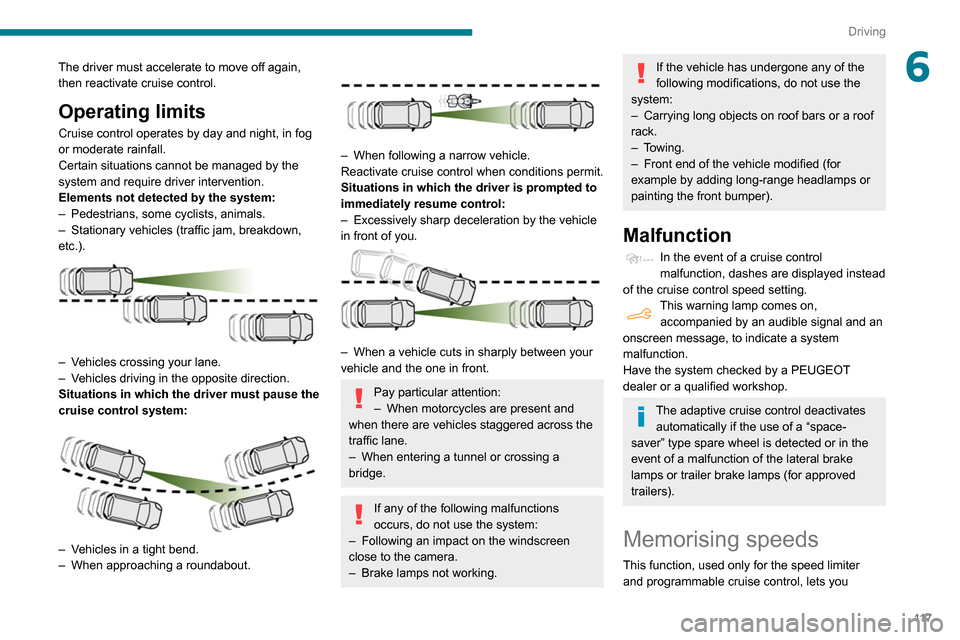
Elements not detected by the system:
–
Pedestrians, some cyclists, animals.
–
Stationary vehicles (traffic jam, breakdown,
etc.).
– Vehicles crossing your lane.
– V ehicles driving in the opposite direction.
Situations in which the driver must pause the
cruise control system:
– Vehicles in a tight bend.
– When approaching a roundabout.
– When following a narrow vehicle.
Reactivate cruise control when conditions permit.
Situations in which the driver is prompted to
immediately resume control:
–
Excessively sharp deceleration by the vehicle
in front of you.
– When a vehicle cuts in sharply between your
vehicle and the one in front.
Pay particular attention:
– When motorcycles are present and
when there are vehicles staggered across the
traffic lane.
–
When entering a tunnel or crossing a
bridge.
If any of the following malfunctions
occurs, do not use the system:
–
Following an impact on the windscreen
close to the camera.
–
Brake lamps not working.
If the vehicle has undergone any of the
following modifications, do not use the
system:
–
Carrying long objects on roof bars or a roof
rack.
–
Towing.
–
Front end of the vehicle modified (for
example by adding long-range headlamps or
painting the front bumper).
Malfunction
In the event of a cruise control
malfunction, dashes are displayed instead
of the cruise control speed setting.
This warning lamp comes on, accompanied by an audible signal and an
onscreen message, to indicate a system
malfunction.
Have the system checked by a PEUGEOT
dealer or a qualified workshop.
The adaptive cruise control deactivates automatically if the use of a “space-
saver” type spare wheel is detected or in the
event of a malfunction of the lateral brake
lamps or trailer brake lamps (for approved
trailers).
Memorising speeds
This function, used only for the speed limiter
and programmable cruise control, lets you
Page 133 of 260

131
Driving
6The blue dimension lines 1 represent the width
of your vehicle with the mirrors unfolded.
The red line 2 represents a distance of 30
cm
from the rear bumper; the two green lines 3 and
4 represent 1
m and 2 m, respectively.
The blue curves 5 appear successively; they
are based on the position of the steering wheel
and represent the turning circle radius of your
vehicle.
The orange dashes 6 represent the opening radii
of the rear doors.
Please routinely check your exterior
mirrors while driving and during
manoeuvres.
Some items may not be seen by the rear
camera.
Certain vehicles may be difficult to see
(dark colours, lamps off) when the
brightness of the screen is reduced using the
vehicle’s lighting dimmer.
The image quality may be affected by the environment, the exterior conditions
(rain, dirt, dust), the driving mode and the
lighting conditions (night, low sun).
In the presence of areas in shade, or in
conditions of bright sunlight or inadequate
lighting, the image may be darkened and with
lower contrast.
Obstacles may appear further away than
they actually are.
During parking manoeuvres and lane
changes, it is important to check the sides of
the vehicle using the mirrors.
The rear parking sensors also supplement the
information on the vehicle's surroundings.
Activation / Deactivation
The system starts when the ignition is switched
on.
► With the ignition on, press button 2 to switch
the reproduction screen on / off.
A message appears.
►
T
ake note of this message and validate
with button 1 corresponding to the “ Accept”
response.
The reproduction screen comes on.
► With the engine running, press button 2 to
switch the reproduction screen off.
The function is automatically paused (the reproduction screen becomes grey) in
reverse , above 9 mph (15
km/h).
The function restarts when the vehicle is
once more travelling at a speed below this
threshold.
Operation
► In neutral , the monitoring rear view is
displayed by default.
►
When reverse is engaged
, the visual
reversing aid is displayed on the screen (even if
it is switched off).
► To change the view , press the end of the
lighting control stalk or press the corresponding
button located below the screen.
Page 150 of 260
148
Practical information
Contact a PEUGEOT dealer or a qualified
workshop if you require advice on removing
stubborn stains requiring special products
(such as tar or insect removers).
Preferably, have paint touch-ups performed
by a PEUGEOT dealer or a qualified
workshop.
Interior
When washing the vehicle, never use a
water hose or high-pressure washer to
clean the interior.
Liquids carried in cups or other open
containers can spill, presenting a risk of
damage if they come into contact with the
controls in the dashboard and centre console.
Take care!
Bodywork
High-gloss paint
Do not use abrasive products or
solvents, petrol or oil to clean the
bodywork.
Never use an abrasive sponge to clean
stubborn stains. Risk of scratching the
paintwork!
Do not apply polish in strong sunshine, or to
plastic or rubber parts.
Free-wheeling
In certain situations, you must allow the vehicle
to free-wheel (while being towed, on a rolling
road, in an automatic car wash, or being
transported by rail or sea freight, etc.).
The procedure varies according to the type of
gearbox and parking brake.
With a manual gearbox and
electric parking brake
/
Release procedure
► With the engine running and while depressing
the brake pedal, move the gear selector to the
neutral position.
►
While depressing the brake pedal, switch off
the ignition.
►
Release the brake pedal, then switch on the
ignition again.
►
While depressing the brake pedal, press the
control lever to release the parking brake.
►
Release the brake pedal, then switch off the
ignition.
Reverting to normal operation
► While depressing the brake pedal, start the
engine.
With an automatic gearbox
and electric parking brake
/
Release procedure
► With the engine running and while depressing
the brake pedal, set the gear selector to N
.
►
While depressing the brake pedal, switch off
the ignition.
►
Release the brake pedal, then switch on the
ignition again.
►
While depressing the brake pedal, press the
control lever to release the parking brake.
►
Release the brake pedal, then switch off the
ignition.
Reverting to normal operation
► While depressing the brake pedal, start the
engine.
Keyless Entry and Starting
You must not depress the brake pedal
while switching the ignition on or off. If you do,
the engine will start, requiring you to restart
the procedure.
Advice on care and maintenance
General recommendations
Observe the following recommendations to avoid
damaging your vehicle.
Exterior
Never use a high-pressure jet wash in
the engine compartment, due to the risk
of damaging electrical components.
Do not wash the vehicle in strong sunshine or
extremely cold conditions.
When washing the vehicle at an
automatic roller-brush car wash, be sure
to lock the doors and, depending on version,
remove the electronic key.
When using a pressure washer, hold the
lance at least 30 cm from the vehicle
(particularly when cleaning areas containing
chipped paint, sensors or seals).
Promptly clean up any stains containing
chemicals liable to damage the vehicle's paint
(including tree resin, bird droppings, insect
secretions, pollen and tar).
If justified by the environment, clean the
vehicle more frequently to remove salty
deposits (in coastal areas), soot (in industrial
estates) and mud (in wet or cold areas).
These substances can be highly corrosive.
Page 151 of 260
149
Practical information
7Contact a PEUGEOT dealer or a qualified
workshop if you require advice on removing
stubborn stains requiring special products
(such as tar or insect removers).
Preferably, have paint touch-ups performed
by a PEUGEOT dealer or a qualified
workshop.
Interior
When washing the vehicle, never use a
water hose or high-pressure washer to
clean the interior.
Liquids carried in cups or other open
containers can spill, presenting a risk of
damage if they come into contact with the
controls in the dashboard and centre console.
Take care!
Bodywork
High-gloss paint
Do not use abrasive products or
solvents, petrol or oil to clean the
bodywork.
Never use an abrasive sponge to clean
stubborn stains. Risk of scratching the
paintwork!
Do not apply polish in strong sunshine, or to
plastic or rubber parts.
Use a soft sponge and soapy water or a
pH neutral product.
Gently wipe the bodywork with a clean
microfibre cloth.
Apply polish with the vehicle clean and dry.
Comply with the instructions for use stated on
the product.
Decals
(Depending on version)
Do not use a high pressure washer to
clean the vehicle. Risk of damaging or
detaching the decals!
Use a high-flow hose at a temperature
between 25°C and 40°C.
Sweep the jet of water across the surface to
be cleaned, perpendicular to it.
Rinse the vehicle with demineralised water.
Page 164 of 260
162
In the event of a breakdown
malfunction of your vehicle. Contact a
PEUGEOT dealer or a qualified workshop.
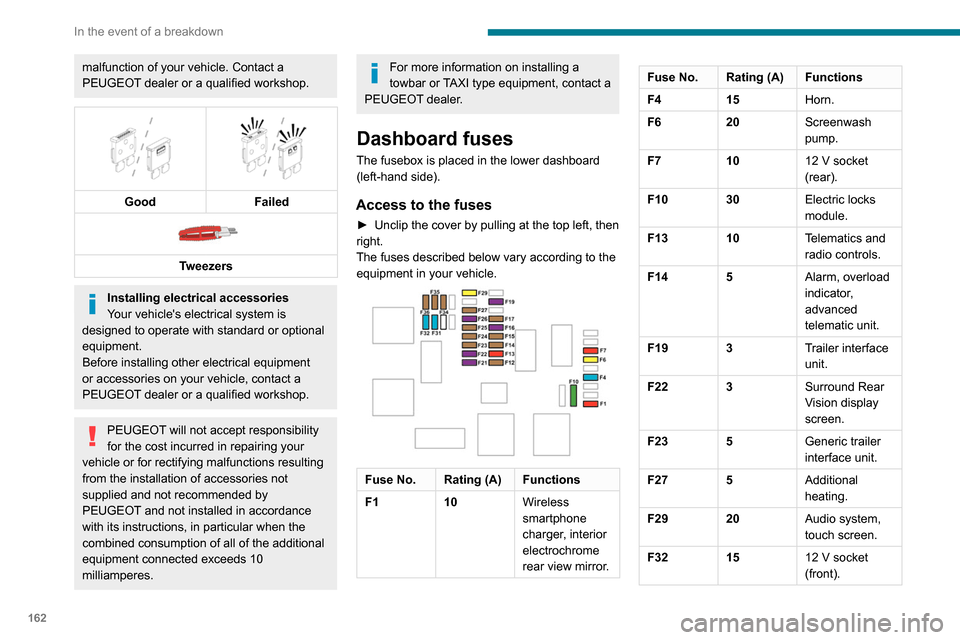
Good
Failed
Tweezers
Installing electrical accessories
Your vehicle's electrical system is
designed to operate with standard or optional
equipment.
Before installing other electrical equipment
or accessories on your vehicle, contact a
PEUGEOT dealer or a qualified workshop.
PEUGEOT will not accept responsibility
for the cost incurred in repairing your
vehicle or for rectifying malfunctions resulting
from the installation of accessories not
supplied and not recommended by
PEUGEOT and not installed in accordance
with its instructions, in particular when the
combined consumption of all of the additional
equipment connected exceeds 10
milliamperes.
For more information on installing a
towbar or TAXI type equipment, contact a
PEUGEOT dealer.
Dashboard fuses
The fusebox is placed in the lower dashboard
(left-hand side).
Access to the fuses
► Unclip the cover by pulling at the top left, then
right.
The fuses described below vary according to the equipment in your vehicle.
Fuse No. Rating (A) Functions
F1 10Wireless
smartphone
charger, interior
electrochrome
rear view mirror.
Fuse No. Rating (A) Functions
F415Horn.
F6 20Screenwash
pump.
F7 1012
V socket
(rear).
F10 30 Electric locks
module.
F13 10 Telematics and
radio controls.
F14 5 Alarm, overload
indicator,
advanced
telematic unit.
F19 3 Trailer interface
unit.
F22 3 Surround Rear
Vision display
screen.
F23 5 Generic trailer
interface unit.
F27 5 Additional
heating.
F29 20 Audio system,
touch screen.
F32 15 12
V socket
(front).Fuse No. Rating (A) Functions
F34 5 Mirror control.
F36 5 USB socket.
Engine compartment fuses
The fusebox is placed in the engine
compartment near the battery.
Access to the fuses
► Release the two latches A.
► Remove the cover.
► Change the fuse.
► When you have finished, close the cover
carefully then engage the two latches A, to
ensure correct sealing of the fusebox.
Page 178 of 260
176
Technical data
Identification markings
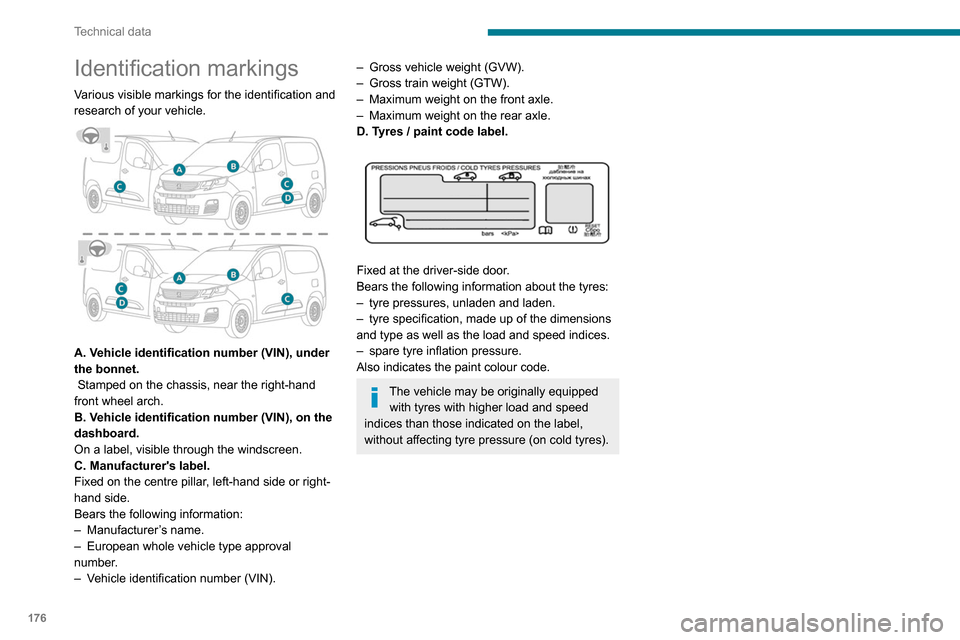
Various visible markings for the identification and
research of your vehicle.
A. Vehicle identification number (VIN), under
the bonnet.
Stamped on the chassis, near the right-hand
front wheel arch.
B. Vehicle identification number (VIN), on the
dashboard.
On a label, visible through the windscreen.
C. Manufacturer's label.
Fixed on the centre pillar, left-hand side or right-
hand side.
Bears the following information:
–
Manufacturer
’s name.
–
European whole vehicle type approval
number
.
–
V
ehicle identification number (VIN).
– Gross vehicle weight (GVW).
– Gross train weight (GTW).
–
Maximum weight on the front axle.
–
Maximum weight on the rear axle.
D. T
yres / paint code label.
Fixed at the driver-side door.
Bears the following information about the tyres:
–
tyre pressures, unladen and laden.
–
tyre specification, made up of the dimensions
and type as well as the load and speed indices.
–
spare tyre inflation pressure.
Also indicates the paint colour code.
The vehicle may be originally equipped with tyres with higher load and speed
indices than those indicated on the label,
without affecting tyre pressure (on cold tyres).
Page 232 of 260
230
Alphabetical index
Fitting a wheel 154, 156
Fitting roof bars
140
Fittings, interior
47
Flap, fuel filler
134–135
Flap, removable
51
Flashing indicators
64–65, 160
Fluid, brake
143
Fluid, engine coolant
143
Foglamp, rear
160
Foglamps
159
Foglamps, front
63, 157
Foglamps, rear
63
Folding the rear seats
46
Frequency (radio)
218
Fuel
7, 134
Fuel consumption
7
Fuel tank
134–136
Fusebox, dashboard
161
Fusebox, engine compartment
161, 163
Fuses
161–163
G
Gauge, fuel 134–135
Gearbox, automatic
94, 98–103, 145
Gearbox, manual
98–99, 103, 145
Gear lever, automatic gearbox
99–101
Gear lever, manual gearbox
98–99
Gear shift indicator ~ Gear efficiency
indicator
102
Glove box
47
G.P.S. 2 11
H
Hazard warning lamps 74
headlamp adjustment
67
Headlamp adjustment
67
Headlamps, automatic dipping
65–66, 124
Headlamps, automatic illumination
64–65
Headlamps, dipped beam
63, 157–158
Headlamps, halogen
157
Headlamps, main beam
63, 157, 159
Head restraints, front
46
Head restraints, rear
46
Heating
55–56, 58, 60–61
Heating, additional
37, 60–61
Heating, programmable
37, 60–61
Hill Assist Descent Control (HADC)
78–79
Hill Descent Control
78–79
Hill start assist
97–98
Horn
75
I
Ignition 94, 222
Ignition on
94
Immobiliser, electronic
91
Indicator, coolant temperature
16
Indicator lamps, operation
63
Indicators, direction
64
Inflating tyres 145, 176
Inflating tyres and accessories
(using the kit)
151, 153
Infrared camera
106
Instrument panel
9, 107
Internet browser
212, 216
J
Jack 153, 219
Jump starting
164
K
Key 24–27, 29–30
Key, electronic
24, 94
Keyless Entry and Starting
24, 26–29, 92, 94
Key with remote control
29
Kit, hands-free
184–185, 197, 220–221
Kit, puncture repair
150
Kit, temporary puncture repair
150–151, 153
L
Labels 4
Labels, identification
176
Lamps, front
159
Lamps, parking
65
Lamps, rear
160