auto Peugeot Partner Tepee 2016 Owner's Guide
[x] Cancel search | Manufacturer: PEUGEOT, Model Year: 2016, Model line: Partner Tepee, Model: Peugeot Partner Tepee 2016Pages: 296, PDF Size: 10.76 MB
Page 75 of 296
73
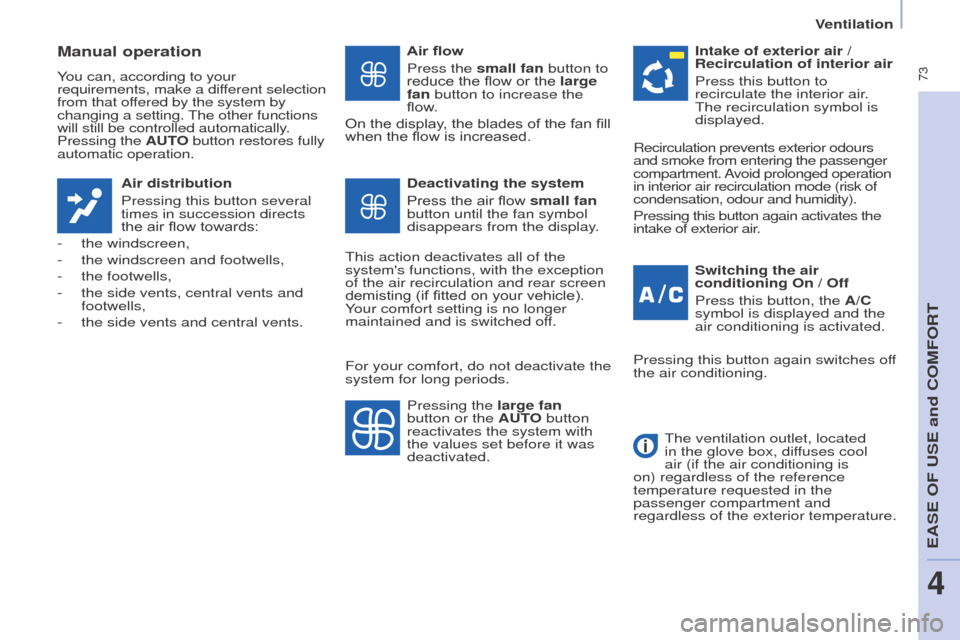
Manual operation
You can, according to your
requirements, make a different selection
from that offered by the system by
changing a setting. The other functions
will still be controlled automatically.
Pressing the Auto button restores fully
automatic operation.
Air distribution
Pressing this button several
times in succession directs
the air flow towards:
-
the windscreen,
-
the windscreen and footwells,
-
the footwells,
-
the side vents, central vents and
footwells,
-
the side vents and central vents. Air flow
Press the
small fan button to
reduce the flow or the large
fan button to increase the
flow.
On the display, the blades of the fan fill
when the flow is increased.
Switching the air
conditioning
o n / o ff
Press this button, the A/C
symbol is displayed and the
air conditioning is activated.
Deactivating the system
Press the air flow small fan
button until the fan symbol
disappears from the display.
This action deactivates all of the
system's functions, with the exception
of the air recirculation and rear screen
demisting (if fitted on your vehicle).
Your comfort setting is no longer
maintained and is switched off. Intake of exterior air /
Recirculation of interior air
Press this button to
recirculate the interior air.
The recirculation symbol is
displayed.
Pressing the large fan
button or the A
uto button
reactivates the system with
the values set before it was
deactivated. Recirculation prevents exterior odours
and smoke from entering the passenger
compartment. Avoid prolonged operation
in interior air recirculation mode (risk of
condensation, odour and humidity).
Pressing this button again activates the
intake of exterior air.
Pressing this button again switches off
the air conditioning.
The ventilation outlet, located
in the glove box, diffuses cool
air (if the air conditioning is
on) regardless of the reference
temperature requested in the
passenger compartment and
regardless of the exterior temperature.
For your comfort, do not deactivate the
system for long periods.
eASe oF uSe and CoMFoRT
4
Ventilation
Page 76 of 296
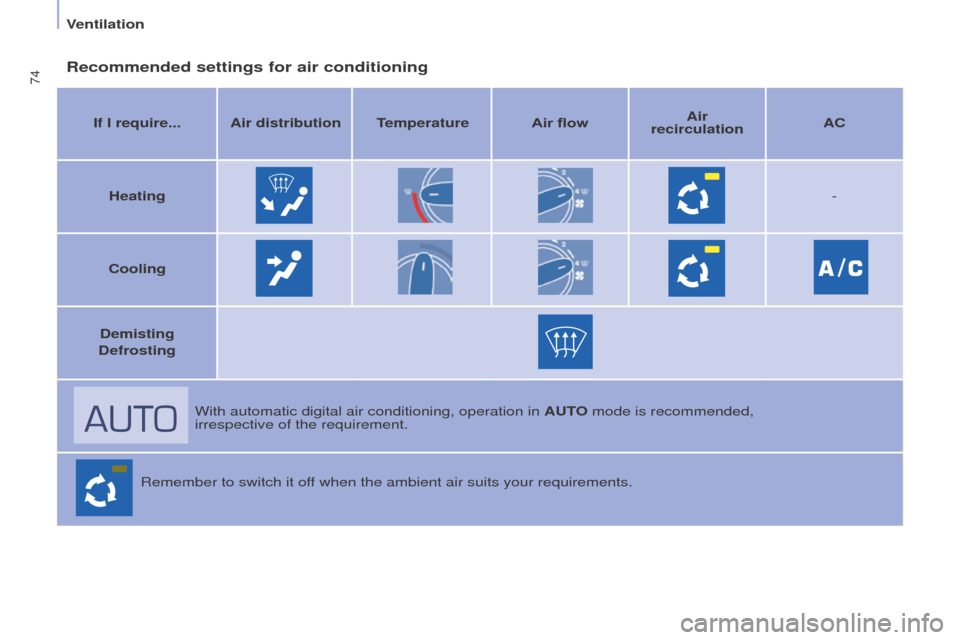
74Recommended settings for air conditioning
If I require... Air distributiontemperatureAir flow Air
recirculation AC
Heating -
Cooling
Demisting
Defrosting
With automatic digital air conditioning, operation in A
uto mode is recommended,
irrespective of the requirement.
Remember to switch it off when the ambient air suits your requirements.
Ventilation
Page 77 of 296
75
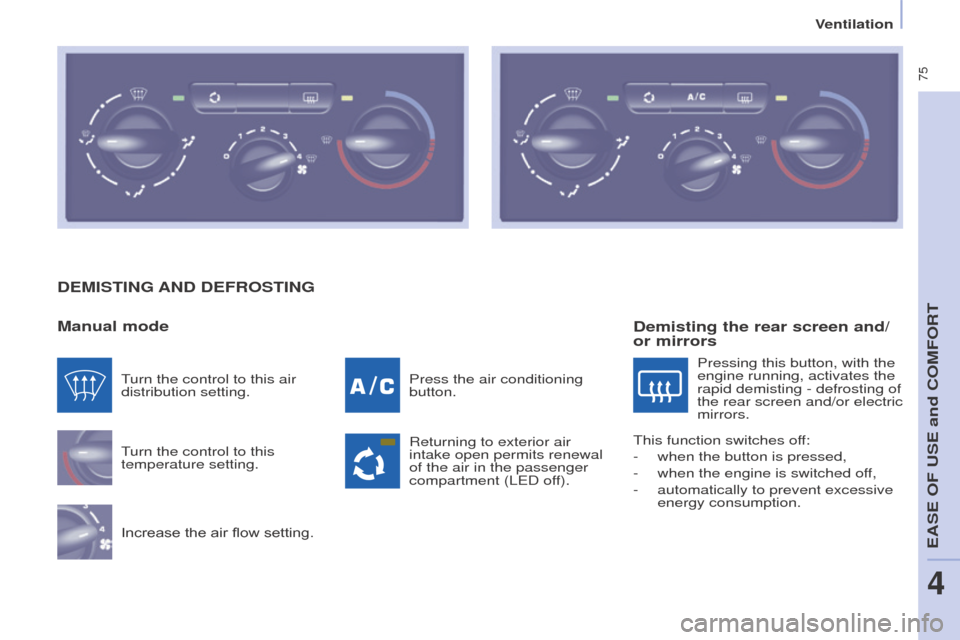
DeMIStINg AND De FR o S t IN g
Manual mode
Turn the control to this
temperature setting.
Increase the air flow setting. Press the air conditioning
button.
Returning to exterior air
intake open permits renewal
of the air in the passenger
compartment (L
e D off).
Turn the control to this air
distribution setting.
Demisting the rear screen and/
or mirrors
Pressing this button, with the
engine running, activates the
rapid demisting - defrosting of
the rear screen and/or electric
mirrors.
This function switches off:
-
when the button is pressed,
-
when the engine is switched of
f,
-
automatically to prevent excessive
energy consumption.
eASe oF uSe and CoMFoRT
4
Ventilation
Page 78 of 296
76
DeMIStINg AND De FR o S t IN g
g
oo D PRAC t IC e
Vents
"Leave them open"
For optimum distribution and diffusion
of hot or cool air in the passenger
compartment, there are adjustable
central and side vents which can
be directed sideways (right or left)
or vertically (up or down). For your
comfort while driving, do not close
them and direct the flow of air towards
the windows instead.
Air vents in the footwells and directed
towards the windscreen complete the
equipment.
Do not block the vents located at the
windscreen or the air extractor located
in the boot.
Dust filter, odour filter
(activated carbon)
This filter traps certain dust and limits
odours.
Ensure that this filter is in good
condition and have all of the filter
elements replaced regularly.
Refer to the "Checks" section of
chapter 7.
Air conditioning
In all seasons, the air conditioning
should only be used with the
windows closed. However, if the
interior temperature remains high
after a prolonged period parked in
the sun, first ventilate the passenger
compartment for a few minutes.
u
se the A u T
o
mode as much as
possible as it permits optimised
control of all of the functions: air flow,
passenger compartment comfort
temperature, air distribution, air
intake mode or air recirculation in the
passenger compartment.
o
perate the air conditioning system for
5 to 10 minutes, once or twice a month,
to keep it in good working order.
If the system does not produce cold air,
do not use it and contact a P
eugeo T
dealer or a qualified workshop.
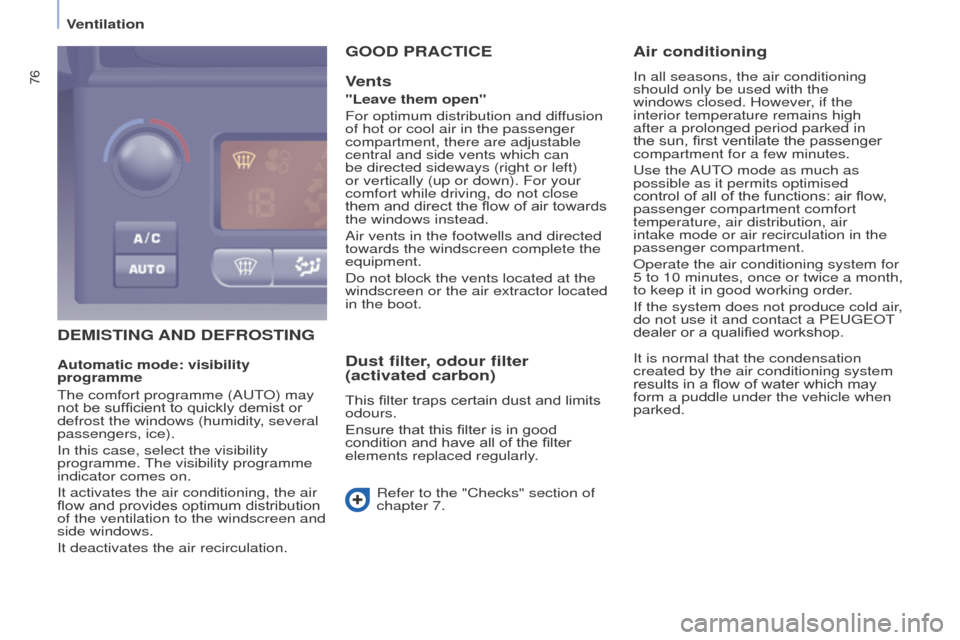
Automatic mode: visibility
programme
The comfort programme (A
u
T
o
) may
not be sufficient to quickly demist or
defrost the windows (humidity, several
passengers, ice).
In this case, select the visibility
programme. The visibility programme
indicator comes on.
It activates the air conditioning, the air
flow and provides optimum distribution
of the ventilation to the windscreen and
side windows.
It deactivates the air recirculation. It is normal that the condensation
created by the air conditioning system
results in a flow of water which may
form a puddle under the vehicle when
parked.
Ventilation
Page 106 of 296
104
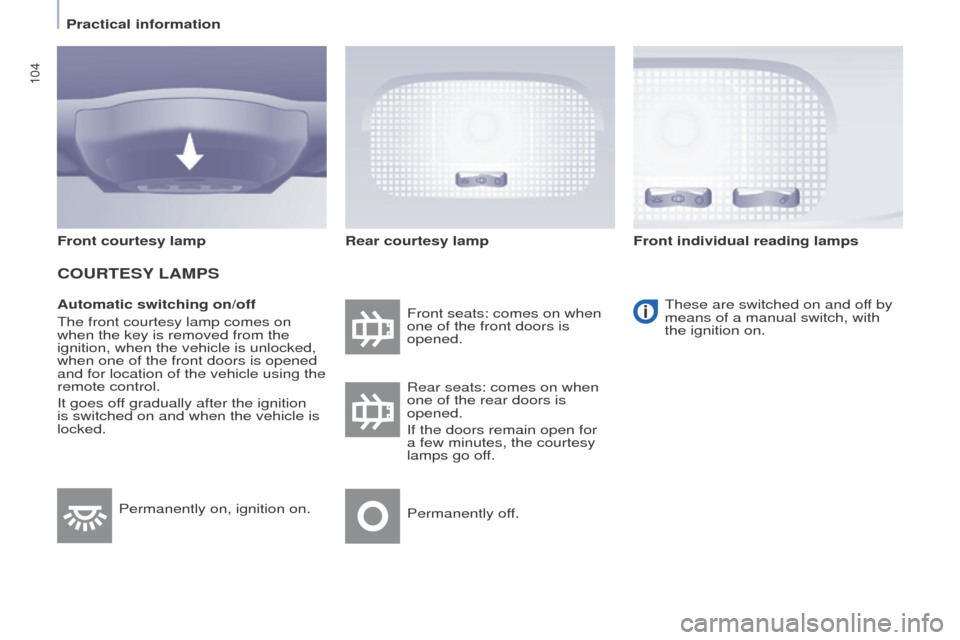
Automatic switching on/off
The front courtesy lamp comes on
when the key is removed from the
ignition, when the vehicle is unlocked,
when one of the front doors is opened
and for location of the vehicle using the
remote control.
It goes off gradually after the ignition
is switched on and when the vehicle is
locked.Front seats: comes on when
one of the front doors is
opened.
These are switched on and off by
means of a manual switch, with
the ignition on.
Rear seats: comes on when
one of the rear doors is
opened.
If the doors remain open for
a few minutes, the courtesy
lamps go off.
Permanently off.
Permanently on, ignition on.
Front courtesy lamp
CouRteSY
LAMPS
Rear courtesy lamp Front individual reading lamps
Practical information
Page 113 of 296
111
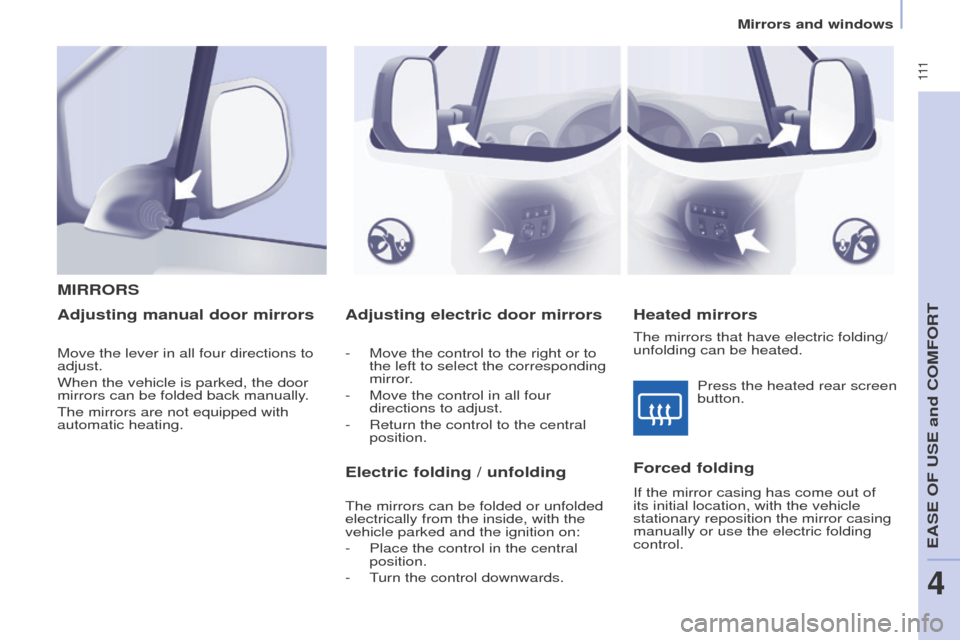
Adjusting electric door mirrors
- Move the control to the right or to
the left to select the corresponding
mirror.
-
Move the control in all four
directions to adjust.
-
Return the control to the central
position.
MIRRoRS
Heated mirrors
Adjusting manual door mirrors
Forced folding
If the mirror casing has come out of
its initial location, with the vehicle
stationary reposition the mirror casing
manually or use the electric folding
control.Press the heated rear screen
button.
Move the lever in all four directions to
adjust.
When the vehicle is parked, the door
mirrors can be folded back manually.
The mirrors are not equipped with
automatic heating.
electric folding / unfolding
The mirrors can be folded or unfolded
electrically from the inside, with the
vehicle parked and the ignition on:
-
Place the control in the central
position.
-
T
urn the control downwards. The mirrors that have electric folding/
unfolding can be heated.
eASe oF uSe and CoMFoRT
4
Mirrors and windows
Page 116 of 296
11 4
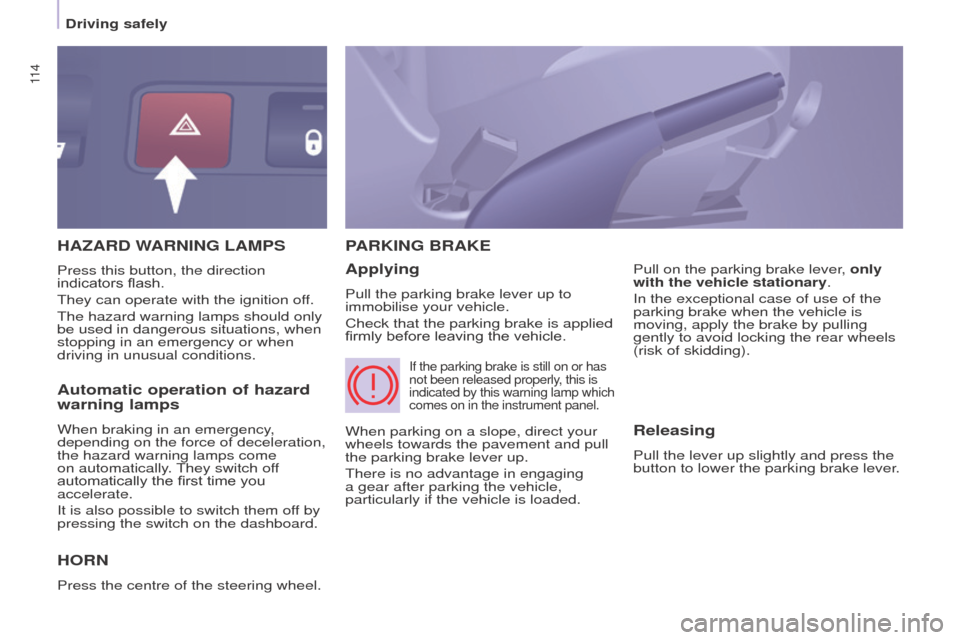
HAZARD WARNINg LAMPS
Ho
RN
Press the centre of the steering wheel.
PARKIN g BRAK e
Applying
Pull the parking brake lever up to
immobilise your vehicle.
Check that the parking brake is applied
firmly before leaving the vehicle. Pull on the parking brake lever, only
with the vehicle stationary.
In the exceptional case of use of the
parking brake when the vehicle is
moving, apply the brake by pulling
gently to avoid locking the rear wheels
(risk of skidding).
Press this button, the direction
indicators flash.
They can operate with the ignition off.
The hazard warning lamps should only
be used in dangerous situations, when
stopping in an emergency or when
driving in unusual conditions.
When parking on a slope, direct your
wheels towards the pavement and pull
the parking brake lever up.
There is no advantage in engaging
a gear after parking the vehicle,
particularly if the vehicle is loaded.
If the parking brake is still on or has
not been released properly, this is
indicated by this warning lamp which
comes on in the instrument panel.
Automatic operation of hazard
warning lamps
When braking in an emergency,
depending on the force of deceleration,
the hazard warning lamps come
on automatically. They switch off
automatically the first time you
accelerate.
It is also possible to switch them off by
pressing the switch on the dashboard.Releasing
Pull the lever up slightly and press the
button to lower the parking brake lever.
Driving safely
Page 118 of 296
11 6
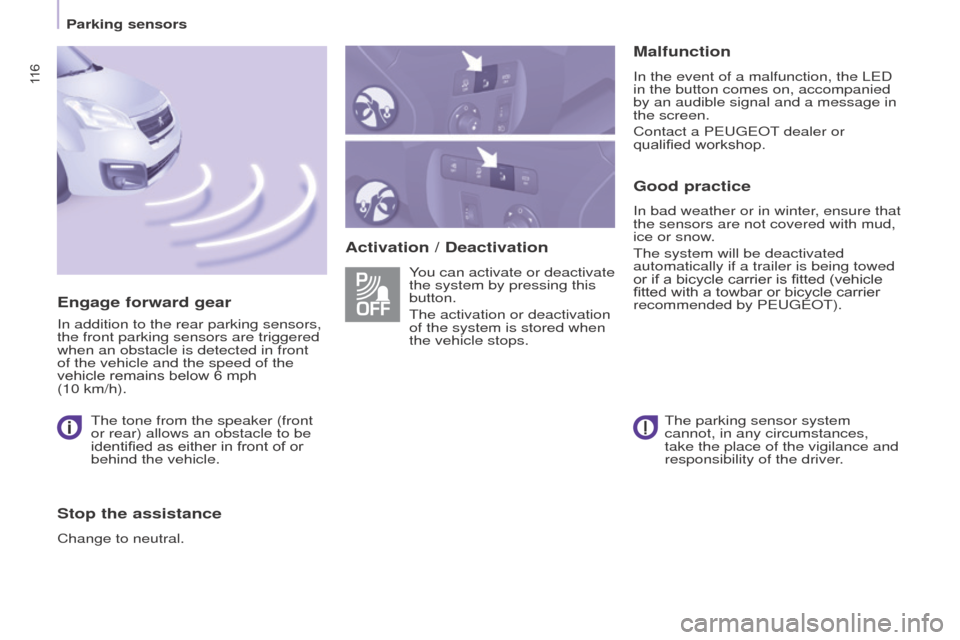
Activation / DeactivationMalfunction
In the event of a malfunction, the LeD
in the button comes on, accompanied
by an audible signal and a message in
the screen.
Contact a P
eugeo T dealer or
qualified workshop.
good practice
In bad weather or in winter, ensure that
the sensors are not covered with mud,
ice or snow.
The system will be deactivated
automatically if a trailer is being towed
or if a bicycle carrier is fitted (vehicle
fitted with a towbar or bicycle carrier
recommended by P
eugeo T).
You can activate or deactivate
the system by pressing this
button.
The activation or deactivation
of the system is stored when
the vehicle stops.
engage forward gear
In addition to the rear parking sensors,
the front parking sensors are triggered
when an obstacle is detected in front
of the vehicle and the speed of the
vehicle remains below 6 mph
(10 km/h).
The tone from the speaker (front
or rear) allows an obstacle to be
identified as either in front of or
behind the vehicle.
Stop the assistance
Change to neutral. The parking sensor system
cannot, in any circumstances,
take the place of the vigilance and
responsibility of the driver.
Parking sensors
Page 119 of 296
11 7
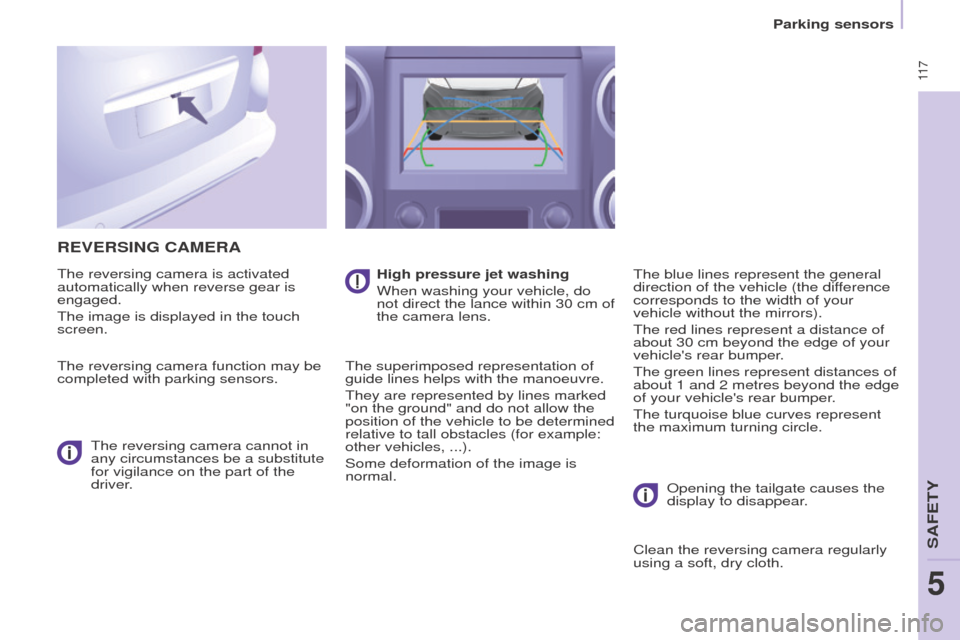
ReVeRSINg CAMeRA
The reversing camera is activated
automatically when reverse gear is
engaged.
The image is displayed in the touch
screen.
The reversing camera function may be
completed with parking sensors.The reversing camera cannot in
any circumstances be a substitute
for vigilance on the part of the
driver. High pressure jet washing
When washing your vehicle, do
not direct the lance within 30 cm of
the camera lens.
The superimposed representation of
guide lines helps with the manoeuvre.
They are represented by lines marked
"on the ground" and do not allow the
position of the vehicle to be determined
relative to tall obstacles (for example:
other vehicles,
...).
Some deformation of the image is
normal. The blue lines represent the general
direction of the vehicle (the difference
corresponds to the width of your
vehicle without the mirrors).
The red lines represent a distance of
about 30 cm beyond the edge of your
vehicle's rear bumper.
The green lines represent distances of
about 1 and 2 metres beyond the edge
of your vehicle's rear bumper.
The turquoise blue curves represent
the maximum turning circle.
o
pening the tailgate causes the
display to disappear.
Clean the reversing camera regularly
using a soft, dry cloth.
SAFeTY
5
Parking sensors
5
Page 120 of 296
ABS
ABS
11 8
ANtI-LoCK BRAKINg SYSteM
(ABS / e BFD)
The ABS and eBFD (electronic brake
force distribution) systems improve the
stability and manoeuvrability of your
vehicle on braking, in particular on
poor or slippery surfaces.
The
ABS prevents locking of the
wheels, the
e BFD provides control of
the braking pressure wheel by wheel. If this warning lamp comes
on, accompanied by an
audible signal and a message
in the screen, it indicates a
malfunction of the ABS which
could result in a loss of control of the
vehicle on braking.
If this warning lamp comes
on, together with the brake
and ST
o
P warning lamps,
accompanied by an audible
signal and a message in the
screen, it indicates a malfunction of
the electronic brake force distribution
which could result in a loss of control of
the vehicle on braking.
eMeRgeNCY BRAKIN g
ASSIS
t
ANC
e ( e BA)
In an emergency, this system enables
the optimum braking pressure to be
reached more quickly, press the pedal
firmly without releasing it.
It is triggered by the speed at which the
brake pedal is pressed down.
This alters the resistance of the brake
pedal under your foot.
To maintain operation of the
emergency braking assistance system:
keep your foot on the brake pedal.
good practice
The anti-lock braking system comes
into operation automatically when
there is a risk of wheel lock. It does not
reduce the braking distance.
o
n very slippery surfaces (ice, oil,
etc...) the ABS may increase the
braking distance. When braking in
an emergency, do not hesitate to
press the brake pedal firmly, without
releasing the pressure, even on a
slippery surface, you will then be able
to continue to manoeuvre the vehicle
to avoid an obstacle.
Normal operation of the ABS may be
felt by slight vibration of the brake
pedal.
When changing wheels (tyres and
rims), ensure that these are listed by
P
eugeo T for the vehicle. Stop as soon as it is safe to do so.
In both cases, contact a P
eugeo T
dealer or a qualified workshop.
Driving safely