key PONTIAC BONNEVILLE 2003 Workshop Manual
[x] Cancel search | Manufacturer: PONTIAC, Model Year: 2003, Model line: BONNEVILLE, Model: PONTIAC BONNEVILLE 2003Pages: 418, PDF Size: 20.24 MB
Page 178 of 418
4. The first choice to be made will be DRIVER ID 1
or 2. Press the RESET button to toggle between
your selections within a display and SELECT
to choose the current selection and move on to the
next personalization feature.
You are now in the selection mode and the DIC
is ready
to program your personal choices in memory.
Each feature that can be personalized will appear in the
display. Once you have made a selection for a
feature, the DIC will move on to the next personalization
feature.
Scroll through the following messages and feature
options:
AUTO DOOR LOCKS - OFFiON
UNLOCK - OFF/ON
UNLOCK - KEY OFF/PARK
DOOR TO UNLOCK - DRIVER/ALL
WINDOW LOCKOUT - R + PASS/REAP
KEYLESS FEEDBACK - OFF/ON
LIGHTS FEEDBACK - OFF/ON
HORN FEEDBACK - OFF/ON
DELAYED LOCKING - OFF/ON
PERIMETER LIGHTS - OFF/ON
PERIMETER LIGHTS - TIMEOUT 15 SEC
SEAT RECALL - OFF/ON
* RECALL POSITION - MEMORY/EXIT
TILT MIRROR - OFF/ON
0 DRIVER ID - OFF/ON
If you would like to exit the selection mode without
moving through each of the personalization features,
simply press a different button on the DIC or turn off the
ignition. The personal choices you made will still be
retained, even without passing through each of
the features. In order for your personal choices
to save,
you must press SELECT after making your selections.
If you happen to move past a selection you would like to
make a personal choice for, press unlock on your
transmitter or press the appropriate driver number on
the memory seat control. This will return you to the
A description of each feature programmable through the
DIC follows.
k.--i-n;-m uGylIlII,,Iy nf v, thn 'I ,v nntinn ..r""' foatt1t-P .-e--. nrnnr;lmming mode. I-. -a -.
3-63
Page 179 of 418
Automatic Door Locks
The door lock modes when shifting in and out of
PARK (P), can be changed through the DIC. You can
change these modes using different selections of
the following DIC displays:
AUTO DOOR LOCKS - OFF/ON
UNLOCK - OFFfON
UNLOCK - KEY OFF/PARK
DOOR TO UNLOCK - DRIVER/ALL
If you choose OFF for AUTO DOOR LOCKS, your door
locks will operate normally with
no automatic feature.
If you choose ON for AUTO DOOR LOCKS, ON
for UNLOCK and KEY OFF, your doors will lock every
time you shift out of PARK (P), and the doors will unlock
every time you stop and turn the ignition to OFF.
If you choose ON for AUTO DOOR LOCKS, ON for
UNLOCK and PARK, your doors will lock every time you
shift out of PARK (P), and the doors will unlock every
time you stop and shift into PARK
(P).
If you choose ON for AUTO DOOR LOCKS, and OFF
for UNLOCK, your doors will lock every time you
shift out of PARK (P), and there will be no automatic
door unlock when shifting back into PARK (P).
If you choose ON for UNLOCK and DRIVER for DOOR
TO UNLOCK, only the driver’s door will automatically
unlock when shifting into PARK (P) or turning the
key to OFF.
If you choose ON for UNLOCK and ALL for DOOR TO
UNLOCK, all doors will automatically unlock when
shifting into PARK
(P) or turning the key to OFF.
To change modes do the following:
1. Move the arrow on the display between the
selections by pressing the RESET button.
2. Once you have made your selection, press the
SELECT button and your choice will be retained
in memory.
See
Programmable Automatic Door Locks on page 2- 13
for more information about this feature.
3-64
Page 180 of 418
Window Lock Out
The number of passenger windows locked out by the
window LOCK switch can be programmed through
the DIC.
If you choose R + PASS, all three passenger window
switches will be inactive when the window LOCK switch
is enabled.
If you choose REAR, only the two rear passenger
window switches will be locked out when the window
LOCK switch is enabled.
To change modes do the following:
1. Move the arrow on the display between R + PASS
and REAR by pressing the RESET button.
2. Once you have made your selection, press the
SELECT button. Your choice will be retained in
memory.
For more information on this feature, see “Window Lock
Out” under
Power Windows on page 2-20.
Security Feedback
By choosing different combinations of these selections,
you can choose the type
of transmitter activated
feedback when locking and unlocking your vehicle with
your transmitter. Each time you make a selection by
pressing the RESET button, press the SELECT button
to record your choice.
@ KEYLESS FEEDBACK - OFF/ON
LIGHTS FEEDBACK - OFF/ON
HORN FEEDBACK - OFF/ON
If you choose
ON for KEYLESS FEEDBACK you will
also need to choose LIGHTS and/or HORN FEEDBACK.
You can select the following modes:
If you choose OFF for KEYLESS FEEDBACK, you
will receive no security feedback when locking or
unlocking your vehicle.
If you choose ON for KEYLESS FEEDBACK and
ON for LIGHTS FEEDBACK, the exterior lamps
will flash twice when unlocking your venicie
and once when locking your vehicle.
3-65
Page 181 of 418
If you choose ON for KEYLESS FEEDBACK and
ON for HORN FEEDBACK, your horn will chirp
when locking and unlocking your vehicle.
If you choose ON for KEYLESS, LIGHTS and
HORN FEEDBACK, your exterior lamps will
flash twice at the first unlock button press, your
exterior lamps will flash twice and your horn
will chirp once at the second unlock button press,
and the exterior lamps will flash once and the
horn will chirp once when locking your vehicle.
For more information on this feature, see “Security
Feedback under
Remote Keyless Entry System
Operation on page
2-6.
Delayed Locking
The delayed locking feature, which delays the actual
locking of the vehicle, can be made active or inactive
through the DIC. When DELAYED LOCKING
- OFF/ON
appears on the display, use the RESET button to
toggle the arrow between OFF and
ON. When you have
made your choice, press the SELECT button to record
your selection.
Perimeter Lighting
When the button with the unlock symbol on the
transmitter is pressed, the Daytime Running Lamps
(high-beams at reduced intensity), parking lamps and
back-up lamps will turn on
if it is dark enough according
to the Twilight Sentinel@
.
You can control activation of this feature by choosing
OFF
or ON when the PERIMETER LIGHTS choice
is displayed on the DIC. Make your choice by pressing
the RESET button and record your choice by pressing
the SELECT button. You will then be prompted
to
choose a TIMEOUT period.
The PERIMETER LIGHTS TIMEOUT feature can be
changed
to the desired setting by using the RESET
button to toggle from
5 to 30 seconds. Each toggle will
increase the time by five seconds. Once the desired
timeout
is displayed, press the SELECT button to record
your choice and move on to the next personalization
feature.
For more information on this feature, see “Perimeter
Lighting” under
lnterior Lamps on page 3-16.
For more information on this feature, see Delayed
Locking
on page 2-12.
3-66
Page 182 of 418

Memory Seats
If your vehicle has this feature, the memory seat and
mirror positions will be recalled for the identified
driver when the remote keyless entry transmitter is used
to enter the vehicle.
You can program this feature to be active by choosing
ON when the SEAT RECALL choice appears, or
inactive by choosing
OFF when the SEAT RECALL
choice appears on the DIC. Make your choices
by pressing the RESET button and store them to
memory by pressing the SELECT button.
You can also program this feature
to recall your
memory seat position or the exit seat position.
Memory Position: Choose ON when the SEAT
RECALL choice appears and then choose
MEMORY when the RECALL POSITION choice
appears.
Ex!! PesW?!?: Chwse ON when the SEAT
RECALL choice appears and then choose
EXIT
when the RECALL POSITION choice appears.
The seat will move when you enter the vehicle after
unlocking it with a remote keyless entry transmitter.
This will allow for easy entry.
For more information on this feature, see
Memory Seat
and Mirrors on page 2-48.
Outside Curb View Assist Mirror
If your vehicle has this feature, the outside curb view
assist mirror, which tips the passenger mirror while the
vehicle is in REVERSE
(R), can be made active or
inactive through the DIC. When TILT MIRROR
-OFF/ON
appears on the display, use the RESET button to
toggle the arrow between
OFF and ON. When you have
made your choice, press the SELECT button to record
your selection. For more information on this feature, see
Outside Curb View Assist Mirror on page 2-39.
Driver ID
This feature displays the DRIVER ID, as identified by
the
DIC. If this feature is ON, the DRIVER ID will
be displayed every time the ignition
is turned on. If the
DRIVER ID
is OFF, the DRIVER ID can be displayed
by pressing either a button on the remote keyless entry
transmitter or a memory seat button.
3-67
Page 184 of 418
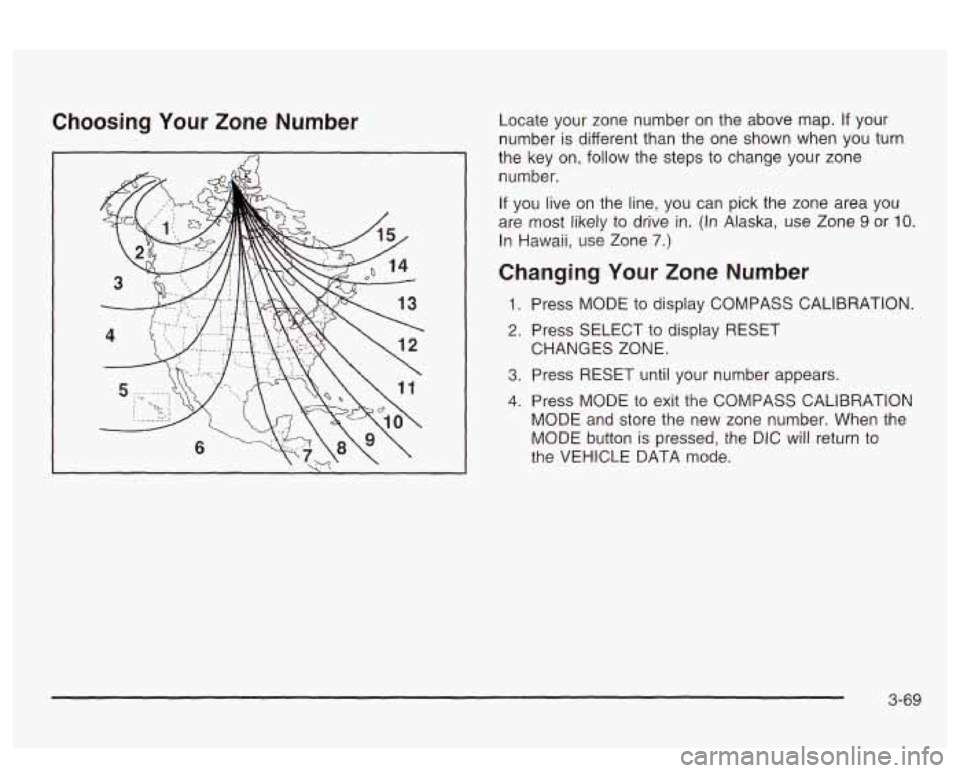
Choosing Your Zone Number Locate your zone number on the above map. If your
number
is different than the one shown when you turn
the key on,
follow the steps to change your zone
number.
If you live on the line, you can pick the zone area you
are most likely to drive
in. (In Alaska, use Zone 9 or IO.
In Hawaii, use Zone 7.)
Changing Your Zone Number
1. Press MODE to display COMPASS CALIBRATION.
2. Press SELECT to display RESET
3. Press RESET until your number appears.
4. Press MODE to exit the COMPASS CALIBRATION
MODE and store the new zone number. When the
MODE button is pressed, the DIC will return to
the VEHICLE DATA mode. CHANGES ZONE.
3-69
Page 220 of 418
Drunken Driving
Death and injury associated with drinking and driving is
a national tragedy. It’s the number one contributor to
the highway death toll, claiming thousands of victims
every year.
Alcohol affects four things that anyone needs to drive a
vehicle:
Judgment
Muscular Coordination
Vision
Attentiveness.
Poiice records show
that almost half of all motor
vehicle-related deaths involve alcohol.
In most cases,
these deaths are the result of someone who was
drinking and driving. In recent years, more than
16,000 annual motor vehicle-related deaths have been
associated with the use of alcohol, with more than
300,000 people injured.
Many adults
- by some estimates, nearly half the adult
population
- choose never to drink alcohol, so they
never drive after drinking. For persons under
21,
it’s against the law in every U.S. state to drink alcohol.
There are good medical, psychological and
developmental reasons for these laws. The
obvious way to eliminate the leading highway
safety problem is for people never to drink alcohol and
then drive. But what
if people do? How much is “too
much”
if someone plans to drive? It’s a lot less
than many might think. Although it depends on each
person and situation, here is some general information
on the problem.
The Blood Alcohol Concentration (BAC) of someone
who
is drinking depends upon four things:
+ The amount of alcohol consumed
0 The drinker’s body weight
The amount of food that is consumed before and
during drinking
The length of time it has taken the drinker to
consume the alcohol.
According to the American Medical Association, a
180 Ib
(82 kg) person who drinks three 12 ounce (355 ml)
bottles of beer in an hour will end up with a BAC
of about
0.06 percent. The person wouia reacn ‘rile
same BAC by drinking three 4 ounce (120 ml) glasses
of wine or three mixed drinks if each had 1 - 1/22 ounces
(45 ml) of a liquor like whiskey, gin or vodka.
4-3
Page 250 of 418
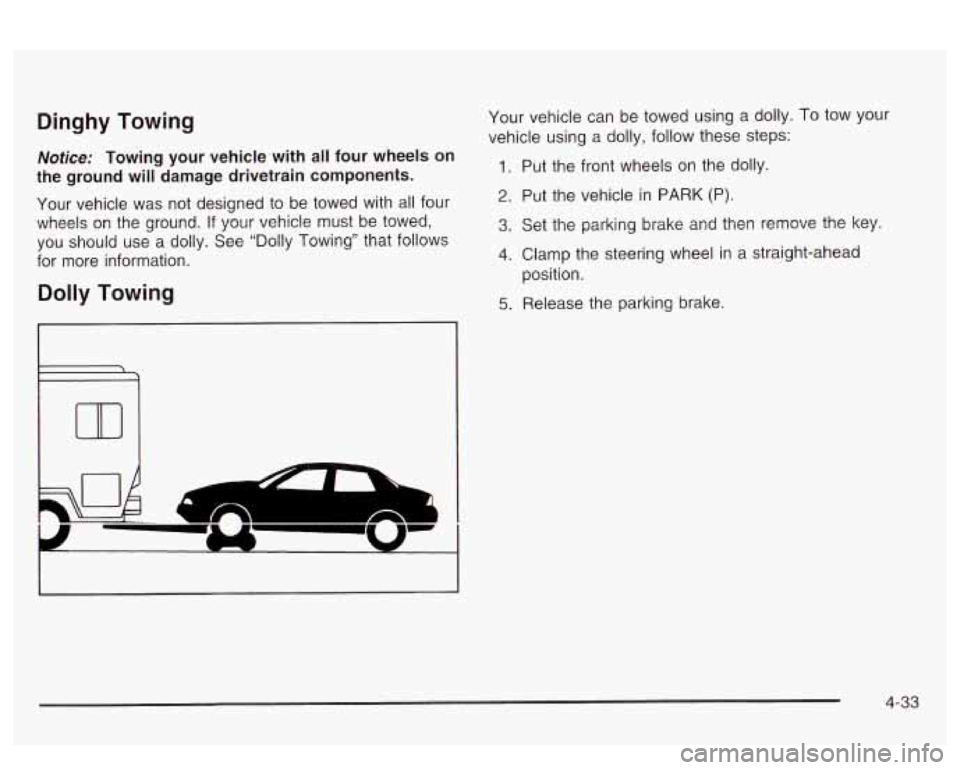
Dinghy Towing
Nofice: Towing your vehicle with all four wheels on
the ground will damage drivetrain components.
Your vehicle was not designed to be towed with all four
wheels on the ground.
If your vehicle must be towed,
you should use a dolly. See “Dolly Towing” that follows
for more information.
Dolly Towing
Your vehicle can be towed using a dolly. To tow your
vehicle using a dolly, follow these steps:
1. Put the front wheels on the dolly.
2. Put the vehicle in PARK (P).
3. Set the parking brake and then remove the key.
4. Clamp the steering wheel in a straight-ahead
5. Release the parking brake.
position.
4-33
Page 269 of 418
If your vehicle has the optional Driver Information
Center (DIC), the CHECK
GAS CAP message will be
displayed
if the fuel cap is not properly reinstalled.
Notice: If you need a new fuel cap, be sure to get
the right type. Your dealer can get one for you.
If you get the wrong type,
it may not fit properly.
This may cause your malfunction indicator lamp to
light and may damage your fuel tank and emissions
system. See “Malfunction Indicator Lamp” in
the Index.
Fuel Door Lock
On models having the optional theft-deterrent system,
the fuel door is locked and unlocked together with
the driver’s power door lock.
To unlock the fuel filler
door, use the power door lock button or the remote
keyless entry transmitter (if equipped). If your
vehicle has a fuel door lock, the fuel door can be
opened manually
in case of an electrical power
failure.
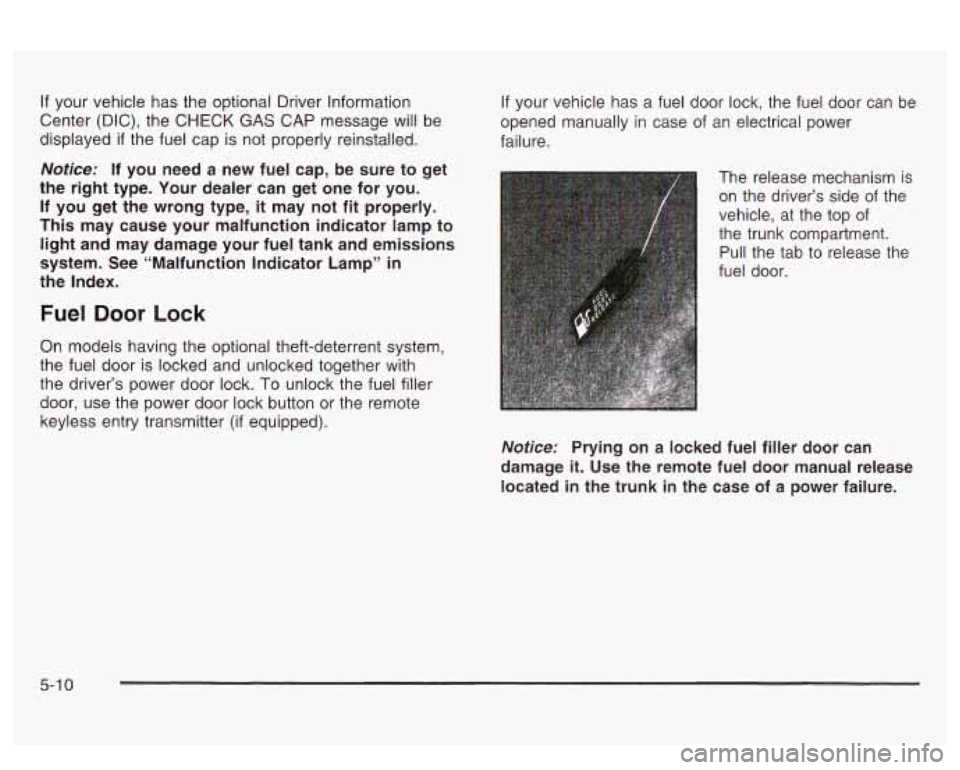
The release mechanism is on the driver’s side of the
vehicle, at the top of
the trunk compartment.
Pull the tab to release the
fuel door.
Notice: Prying on a locked fuel filler door can
damage
it. Use the remote fuel door manual release
located in the trunk in the case of a power failure.
5-1 0
Page 299 of 418
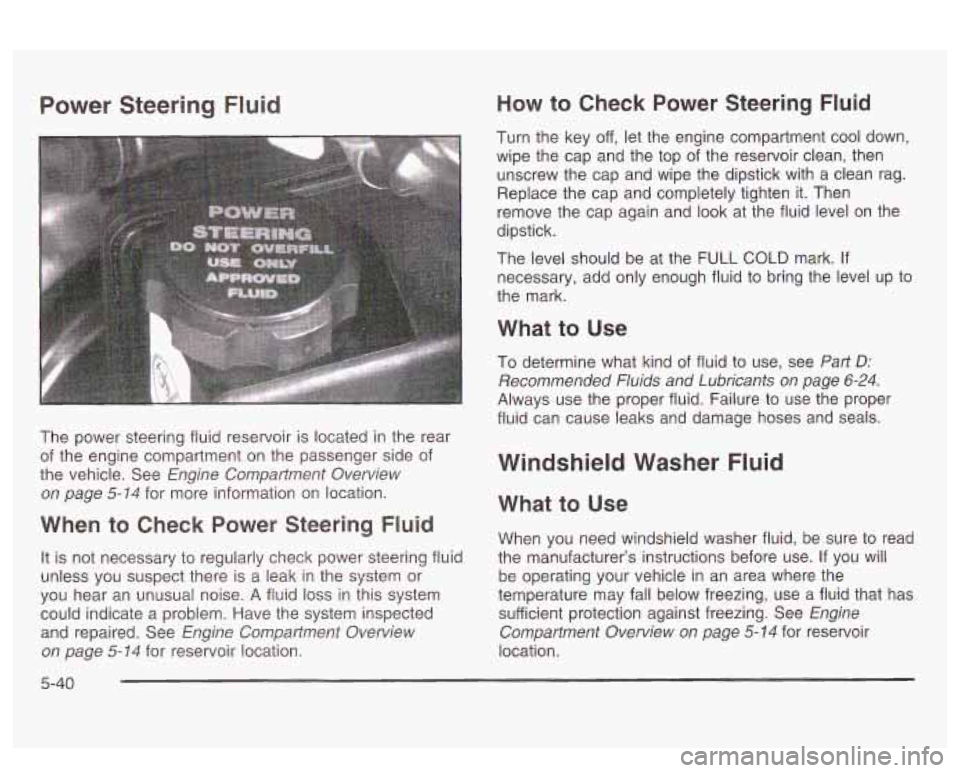
Power Steering Fluid
The power steering fluid reservoir is located in the rear
of the engine compartment on the passenger side of
the vehicle. See
Engine Compartment Overview
on page
5-74 for more information on location.
When to Check Power Steering Fluid
It is not necessary to regularly check power steering fluid
unless you suspect there is a leak in the system or
you hear an unusual noise. A fluid
loss in this system
could indicate a problem. Have the system inspected
and repaired. See
Engine Compartment Overview
on page
5- 74 for reservoir location.
How to Check Power Steering Fluid
Turn the key off, let the engine compartment cool down,
wipe the cap and the top of the reservoir clean, then
unscrew the cap and wipe the dipstick with a clean rag.
Replace the cap and completely tighten
it. Then
remove the cap again and look at the fluid level on the
dipstick.
The level should be at the
FULL COLD mark. If
necessary, add only enough fluid to bring the level up to
the mark.
What to Use
To determine what kind of fluid to use, see Part D:
Recommended Fluids and Lubricants on page 6-24.
Always use the proper fluid. Failure to use the proper
fluid can cause leaks and damage hoses and seals.
Windshield Washer Fluid
What to Use
When you need windshield washer fluid, be sure to read
the manufacturer’s instructions before use.
If you will
be operating your vehicle in an area where the
temperature may fall below freezing, use a fluid that has
sufficient protection against freezing. See
Engine
Compartment Overview on page
5-14 for reservoir
location.
5-40