AUX PONTIAC BONNEVILLE 2003 Owners Manual
[x] Cancel search | Manufacturer: PONTIAC, Model Year: 2003, Model line: BONNEVILLE, Model: PONTIAC BONNEVILLE 2003Pages: 418, PDF Size: 20.24 MB
Page 85 of 418
Power Windows
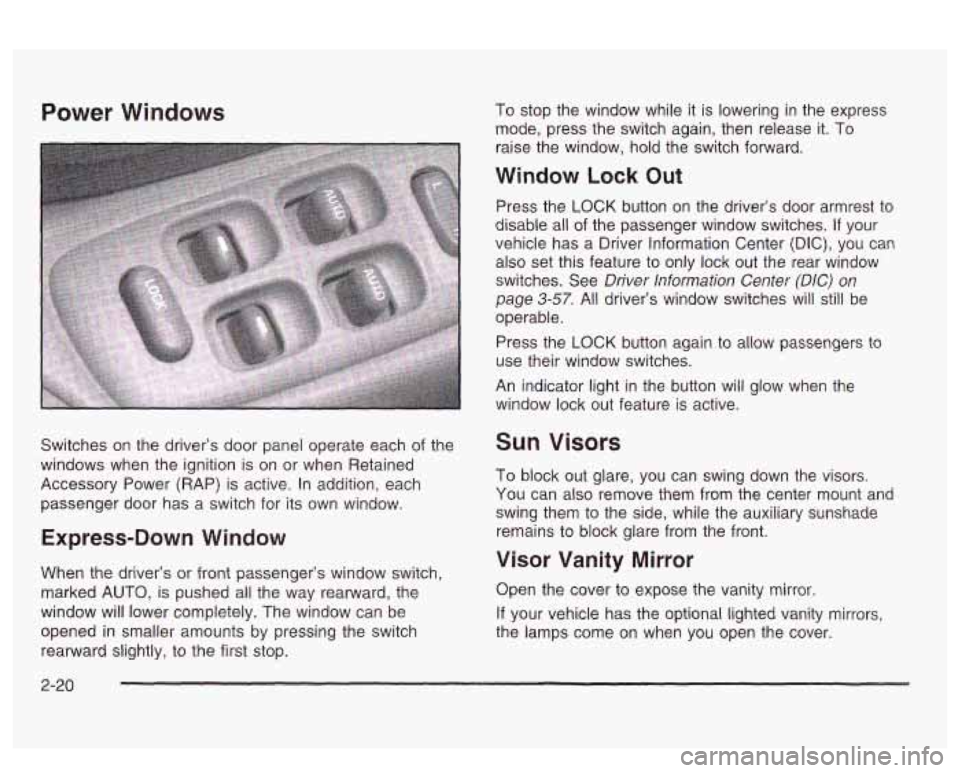
Switches on the driver’s door panel operate each of the
windows when the ignition
is on or when Retained
Accessory Power (RAP) is active. In addition, each
passenger door has a switch for its own window.
Express-Down Window
When the driver’s or front passenger’s window switch,
marked
AUTO, is pushed all the way rearward, the
window will lower completely. The window can be
opened
in smaller amounts by pressing the switch
rearward slightly, to the first stop. To
stop the window while it is lowering in the express
mode, press the switch again, then release it. To
raise the window, hold the switch forward.
Window Lock Out
Press the LOCK button on the driver’s door armrest to
disable all
of the passenger window switches. If your
vehicle has a Driver Information Center
(DIC), you can
also set this feature to only lock out the rear window
switches. See
Driver Information Center (DIC) on
page 3-57. All driver’s window switches will still be
operable.
Press the
LOCK button again to allow passengers to
use their window switches.
An indicator light in the button
will glow when the
window lock out feature is active.
Sun Visors
To block out glare, you can swing down the visors.
You can also remove them from the center mount and
swing them to the side, while the auxiliary sunshade
remains to block glare from the front.
Visor Vanity Mirror
Open the cover to expose the vanity mirror.
If your vehicle has the optional lighted vanity mirrors,
the lamps come on when you open the cover.
2-20
Page 196 of 418
SEEK v : Press the down arrow while playing a
CD to go to the start of the current track
if more
than eight seconds have played. Press the up arrow to
go to the next track. If you hold the button or press
it more than once, the player will continue moving
backward or forward through the disc.
SCAN v : Press and hold one of the arrows for
more than two seconds until SCAN and the track
number appear on the display and you hear a beep.
The disc will go to the next track, play for a few seconds,
then go on to the next track. Press this button again
to stop scanning.
RCL (Recall): Push this buttcn to see how long the
current track has been playing.
To change the default on
the display (track or elapsed time), push the knob
until you see the display you want, then hold the knob
until the display flashes. The selected display will
now be the default. While elapsed time is showing, CD
TIME will appear on the display.
BAND: Press this button to listen to the radio when a
CD is playing. The inactive CD will remain safely
inside the radio for future listening.
A (Eject): Press this button to eject a CD. Eject may
be activated with either the ignition or radio
off. CDs
may be loaded with the radio and ignition
off if this
button
is pressed first.
Compact Disc Messages
CHECK CD: If this message appears on the radio
display and the disc comes out, it could be for one of
the following reasons:
You’re driving on a very rough road. When the road
becomes smoother, the disc should play.
The disc is dirty, scratched, wet or upside down.
The air is very humid. if so, wait about an hour and
try again.
If the CD is not playing correctly, for any other reason,
try a known good CD.
If any error occurs repeatedly or
if an error can’t be
corrected, contact your dealer. If your radio displays an
error message, wrire it down ana proviae
ii io your
dealer when reporting the problem.
CD AUX (Auxiliary): Press this button to play a
compact disc when listening to the radio. CD will appear
on the display when a compact disc is loaded.
3-8 1
Page 212 of 418
A SEEK : Press the down arrow while playing a
CD to go back to the start of the current track
if
more than eight seconds have played. Press the up
arrow and it will go to the next track on the disc.
If the
button is pressed more than once, the player will
continue moving backward or forward through the disc.
A SCAN 7 : Press and hold either arrow for more
than two seconds until TRACK SCAN appears on
the display and you hear a beep. You will hear the first
few seconds of each track on the current disc. The
scan symbol will appear on the display and T will blink
to indicate track scan mode. Press either arrow
again, to stop scanning.
To scan all loaded discs, press and
hoid either SCAN
arrow for more than four seconds until DISC SCAN
appears on the display and you hear a double beep.
You will hear the first few seconds of track one on each
disc. The scan symbol will appear on the display
and
D will blink to indicate disc scan mode. Press either
SCAN arrow again, to stop scanning.
AM FM: Press this button to listen to the radio when
playing a CD.
TAPE AUX, CD AUX or CD TAPE: Press this button to
play a CD
if you have a magazine loaded in the
changer when listening to the radio. You can also press
this button to switch between a cassette tape, a CD
in the compact disc player and a CD in the
trunk-mounted CD changer,
if these sources are loaded.
Compact Disc Messages
If an error appears on the display, an error has occurred
and the compact disc temporarily cannot play.
The CD changer will send an error message to the
receiver to indicate one of the following:
NO CDS: An empty magazine is inserted in the CD
changer. Try the magazine again with a disc loaded on
one of the trays.
CHECK CD: If this message appears, it could be one
of the following:
You’re driving on a very rough road. When the road
The disc IS dlrty, scratcnea or wet.
becomes smoother, the disc should play.
The air is very humid. If so, wait about an hour and
try again.
3-97
Page 352 of 418
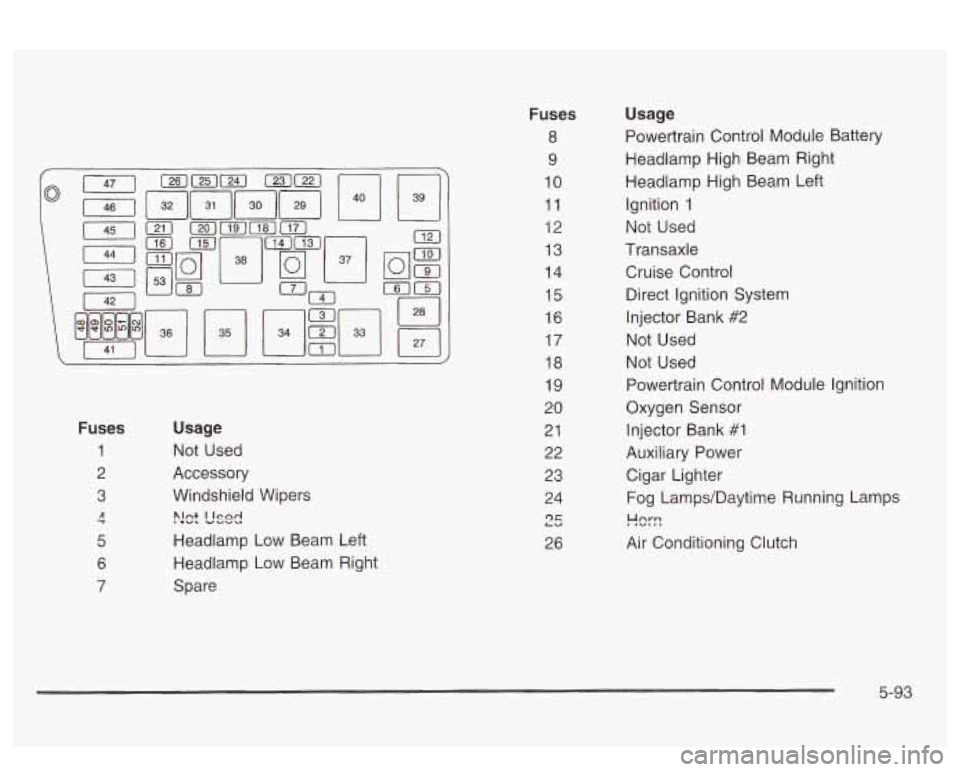
Fuses
1
2
3
7 A
5
6
7
Usage
Not Used
Accessory
Windshield Wipers
>!ct L'sd
Headlamp Low Beam Left
Headlamp Low Beam Right
Spare
Fuses
8
9
10
11
12
13
14
15
16
17
18
19
20
21 22
23
24
r)r LU
26
Usage
Powertrain Control Module Battery
Headlamp High Beam Right
Headlamp High Beam Left Ignition
1
Not Used
Transaxle
Cruise Control Direct Ignition System
Injector Bank
#2
Not Used
Not Used
Powertrain Control Module Ignition
Oxygen Sensor
Injector Bank #1
Auxiliary Power Cigar Lighter
Fog Lamps/Daytime Running Lamps
!-!%-!
Air Conditioning Clutch
5-93