change time PONTIAC G8 2009 User Guide
[x] Cancel search | Manufacturer: PONTIAC, Model Year: 2009, Model line: G8, Model: PONTIAC G8 2009Pages: 356, PDF Size: 1.83 MB
Page 143 of 356
XM Radio ID:If tuned to channel 0,
this message alternates with the
XM™ Radio 8 digit radio ID
label. This label is needed to
activate the service.
Unknown:If this message is
received when tuned to channel 0,
there could be a receiver fault.
Consult with your dealer/retailer.
Check XM Receivr:If this message
does not clear within a short period
of time, the receiver could have
a fault. Consult with your
dealer/retailer.
XM Not Available:If this message
does not clear within a short period
of time, the receiver could have
a fault. Consult with your
dealer/retailer.Bluetooth®
Vehicles with a Bluetooth system
can use a Bluetooth capable
cell phone with a Hands Free
Prole to make and receive phone
calls. The system can be used
while the key is in ON/RUN or
ACC/ACCESSORY position.
The range of the Bluetooth system
can be up to 30 ft. (9.1 m). Not all
phones support all functions, and not
all phones are guaranteed to work
with the in-vehicle Bluetooth system.
See gm.com/bluetooth for more
information on compatible phones.
Voice Recognition
The Bluetooth system uses voice
recognition to interpret voice
commands to dial phone numbers
and name tags.Noise:Keep interior noise levels to
a minimum. The system may not
recognize voice commands if there
is too much background noise.
When to Speak:A short tone
sounds after the system responds
indicating when it is waiting for
a voice command. Wait until
the tone and then speak.
How to Speak:Speak clearly in a
calm and natural voice.
Audio System
When using the in-vehicle Bluetooth
system, sound comes through the
vehicle’s front audio system
speakers and over-rides the audio
system. Use the audio system
volume knob, during a call, to change
the volume level. The adjusted
volume level remains in memory for
later calls. To prevent missed calls, a
minimum volume level is used if the
volume is turned down too low.
Infotainment 6-25
Page 144 of 356
Bluetooth Controls
Use the buttons located on the
steering wheel to operate the
in-vehicle Bluetooth system. See
Audio Steering Wheel Controls
on page 6-36for more information.
%(Voice In):Press to answer
incoming calls, to conrm system
information, and to start speech
recognition.
{(Call End):Press to end a
call, reject a call, or to cancel an
operation.
Pairing
A Bluetooth enabled cell phone
must be paired to the in-vehicle
Bluetooth system rst and then
connected to the vehicle before it
can be used. See the cell phone
manufacturers user guide for
Bluetooth functions before pairing
the cell phone. If a Bluetooth phone
is not connected, calls will bemade using OnStar
®Hands Free
Calling, if available. Refer to
the OnStar owner’s guide for more
information.
Pairing Information:
Up to ve cell phones can be
paired to the in-vehicle
Bluetooth system.
The pairing process is disabled
when the vehicle is moving.
The in-vehicle Bluetooth system
automatically links with the rst
available paired cell phone in the
order the phone was paired.
Only one paired cell phone can
be connected to the in-vehicle
Bluetooth system at a time.
Pairing should only need to be
completed once, unless
changes to the pairing
information have been made or
the phone is deleted.
To link to a different paired phone,
see Linking to a Different Phone
later in this section.Pairing a Phone
1. Press and hold
%for
two seconds. The system
responds with “Ready”
followed by a tone.
2. Say “Bluetooth”. The system
responds with “Bluetooth
ready” followed by a tone.
3. Say “Pair”. The system responds
with instructions and a four digit
PIN number. The PIN number
will be used in Step 4.
4. Start the Pairing process on the
cell phone that will be paired to
the vehicle. Reference the
cell phone manufacturers user
guide for information on this
process.
Locate the device named
“General Motors” in the list on
the cellular phone and follow the
instructions on the cell phone
to enter the four digit PIN number
that was provided in Step 3.
6-26 Infotainment
Page 158 of 356
9(Fan Control):Turn clockwise
or counterclockwise to increase or
decrease the fan speed. Turn the
knob all the way counterclockwise
to turn the system off.
Temperature Control:Turn
clockwise or counterclockwise to
increase or decrease the
temperature inside the vehicle.
Air Delivery Mode Control:Turn
the knob to change the current
airow mode.
Select from the following:
0(Vent):Air is directed to the
instrument panel outlets.
1(Bi-Level):Air is divided
between the instrument panel
outlets and the oor outlets.
d(Floor):Air is directed to the
oor outlets with some air directed to
the windshield and side window
outlets.
4(Defog):Air is directed to the
windshield, oor outlets, and
side window vents. Use this mode
to clear the windows of fog or
moisture and warm the passengers.
5(Defrost):Air is directed to
the windshield, with some air
directed to the side window vents.
Use this mode to quickly remove fog
or frost from the windshield.
When defrost is selected, the air
conditioning turns on automatically to
improve defrosting performance. In
this mode the air conditioning cannot
be turned off and the recirculation
mode cannot be turned on.
Air Conditioning
#(Air Conditioning):Press to
turn on or off. An indicator comes on
when the air conditioning is on.
The fan must be on to use the air
conditioning.The air conditioning cannot be
turned off in defrost mode. If
#is
pressed, the indicator light
ashes three times and the air
conditioning stays on.
For quick cool down on hot days,
select the following settings
together:
1. Press
#to turn on the air
conditioning.
2. Press
/to turn on the
recirculation.
3. Select the coolest temperature
and highest fan speed.
4. Open the windows briey to
let hot air escape and then
close them.
5. Once the vehicle’s interior cools
down, turn off the recirculation,
and select
0. This maintains the
best comfort level during
extended driving.
7-2 Climate Controls
Page 159 of 356
The air conditioning system removes
moisture from the air, so a small
amount of water might drip under the
vehicle while idling or after turning off
the engine. This is normal.
The air conditioning should be
turned on for at least ve to
ten minutes once every two weeks
to lubricate the air conditioning
seals, even in the winter.
Recirculation
/(Recirculation):Press to
change the air intake between
recirculated air and outside air.
An indicator light comes on when
the recirculation is on.
The recirculation mode recycles
interior air and is not recommended
for extended use. If it is used for
a long period of time, the system
automatically lets some fresh air into
the vehicle for ventilation.The recirculation mode cannot be
turned on in defrost mode. If
/is
pressed, the indicator light ashes
three times and recirculation
stays off.
Rear Window Defogger
The rear window defogger uses a
warming grid to remove fog from the
rear window. It only works when
the ignition is in ON/RUN.
+(Rear Window Defogger):
Press to turn on or off. An indicator
comes on when the rear window
defogger is on. The rear window
defogger turns off automatically if it
is left on.
Notice:Do not use anything
sharp on the inside of the rear
window. If you do, you could cut
or damage the warming grid, and
the repairs would not be covered
by the vehicle warranty. Do not
attach a temporary vehicle
license, tape, a decal or anything
similar to the defogger grid.
Passenger Compartment
Air Filter
The vehicle has a passenger
compartment air lter that lters the
outside air entering the vehicle.
The lter removes contaminants,
such as pollen and dust. See
your dealer/retailer for more
information.
Climate Controls 7-3
Page 163 of 356
Air Conditioning
#(Air Conditioning):Press to
turn the air conditioning system on or
off. The
#appears in the display
when the air conditioning is on.
When the air conditioning is turned
off
#OFF appears in the display.
The air conditioning cannot be turned
off in defrost mode. If
#is pressed,
the indicator light ashes three times
and the air conditioning stays on.
For quick cool down on hot days,
open the windows to let the hot air to
escape. After a few minutes, close
the windows so the system will work
more effectively.
The air conditioning system removes
moisture from the air, so a small
amount of water might drip under the
vehicle while idling or after turning off
the engine. This is normal.The air conditioning might
automatically turn off during heavy
acceleration or towing with your
vehicle, but the
#will still display.
Recirculation
/(Recirculation):Press to
change the air intake between
recirculated air and outside air.
An indicator light comes when
the recirculation is activated.
The recirculation mode recycles
interior air and is not recommended
for extended use. If it is used for
a long period of time, the system
automatically lets some fresh air into
the vehicle for ventilation.
Do not use the recirculation mode
if occupants are smoking.The recirculation mode cannot
be turned on in defrost mode.
If
/is pressed, the indicator light
ashes three times and recirculation
stays off.
Pollution Mode:Press and hold
the
/button for four seconds to
turn the pollution mode on or off.
When it is activated, Pollution Mode
Activated appears in the display.
When it is turned off, Pollution Mode
Inactive appears in the display.
This mode can be set when
the vehicle speed is less than
9 mph (15 km/h). Recirculation
will automatically turn on to
help prevent exhaust fumes from
entering the vehicle in slow moving
traffic.
Climate Controls 7-7
Page 172 of 356
The length of time the heater should
remain plugged in depends on
several factors. Ask a dealer/retailer
in the area where you will be
parking the vehicle for the best
advice on this.
Automatic Transmission
Operation
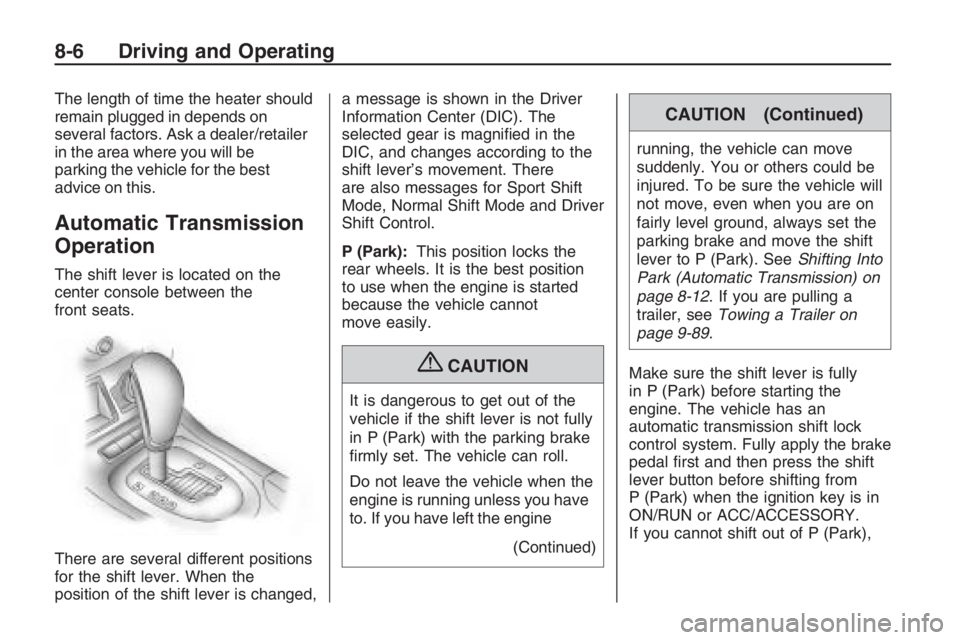
The shift lever is located on the
center console between the
front seats.
There are several different positions
for the shift lever. When the
position of the shift lever is changed,a message is shown in the Driver
Information Center (DIC). The
selected gear is magnied in the
DIC, and changes according to the
shift lever’s movement. There
are also messages for Sport Shift
Mode, Normal Shift Mode and Driver
Shift Control.
P (Park):This position locks the
rear wheels. It is the best position
to use when the engine is started
because the vehicle cannot
move easily.
{CAUTION
It is dangerous to get out of the
vehicle if the shift lever is not fully
in P (Park) with the parking brake
rmly set. The vehicle can roll.
Do not leave the vehicle when the
engine is running unless you have
to. If you have left the engine
(Continued)
CAUTION (Continued)
running, the vehicle can move
suddenly. You or others could be
injured. To be sure the vehicle will
not move, even when you are on
fairly level ground, always set the
parking brake and move the shift
lever to P (Park). SeeShifting Into
Park (Automatic Transmission) on
page 8-12. If you are pulling a
trailer, seeTowing a Trailer on
page 9-89.
Make sure the shift lever is fully
in P (Park) before starting the
engine. The vehicle has an
automatic transmission shift lock
control system. Fully apply the brake
pedal rst and then press the shift
lever button before shifting from
P (Park) when the ignition key is in
ON/RUN or ACC/ACCESSORY.
If you cannot shift out of P (Park),
8-6 Driving and Operating
Page 184 of 356
And, of course, actual stopping
distances vary greatly with the
surface of the road, whether it is
pavement or gravel; the condition of
the road, whether it is wet, dry, or icy;
tire tread; the condition of the brakes;
the weight of the vehicle; and the
amount of brake force applied.
Avoid needless heavy
braking. Some people drive in
spurts — heavy acceleration
followed by heavy braking — rather
than keeping pace with traffic.
This is a mistake. The brakes might
not have time to cool between
hard stops. The brakes will wear out
much faster if you do a lot of
heavy braking. If you keep pace
with the traffic and allow realistic
following distances, you will
eliminate a lot of unnecessary
braking. That means better braking
and longer brake life.
If your vehicle’s engine ever stops
while you are driving, brake normally
but do not pump the brakes. If you
do, the pedal could get harder topush down. If the engine stops, you
will still have some power brake
assist. But you will use it when you
brake. Once the power assist is used
up, it can take longer to stop and the
brake pedal will be harder to push.
Adding non-dealer/non-retailer
accessories can affect your vehicle’s
performance. SeeAccessories
and Modifications on page 9-3.
Antilock Brake
System (ABS)
Your vehicle has the Antilock Brake
System (ABS), an advanced
electronic braking system that will
help prevent a braking skid.
When you start the engine and
begin to drive away, ABS will check
itself. You might hear a momentary
motor or clicking noise while this
test is going on, and you might even
notice that the brake pedal moves
a little. This is normal.If there is a problem with ABS, this
warning light will stay on. See
Antilock Brake System (ABS)
Warning Light on page 4-16.
Let us say the road is wet and you
are driving safely. Suddenly, an
animal jumps out in front of you.
You slam on the brakes and continue
braking. Here is what happens
with ABS:
A computer senses that the wheels
are slowing down. If one of the
wheels is about to stop rolling, the
computer will separately work
the brakes at each wheel.
ABS can change the brake pressure
to each wheel, as required, faster
than any driver could. This can help
you steer around the obstacle while
braking hard.
8-18 Driving and Operating
Page 185 of 356
As you brake, the computer keeps
receiving updates on wheel speed
and controls braking pressure
accordingly.
Remember: ABS does not change
the time you need to get your
foot up to the brake pedal or always
decrease stopping distance. If
you get too close to the vehicle in
front of you, you will not have time to
apply the brakes if that vehicle
suddenly slows or stops. Always
leave enough room up ahead
to stop, even though you have ABS.
Using ABS
Do not pump the brakes. Just hold
the brake pedal down rmly and
let antilock work for you. You might
hear the antilock pump or motor
operate, and feel the brake
pedal pulsate, but this is normal.
Braking in Emergencies
With ABS, you can steer and
brake at the same time. In many
emergencies, steering can help
you more than even the very best
braking.
Electronic Stability
Program
The vehicle has the Electronic
Stability Program (ESP®) that assists
with directional control of the vehicle
in difficult driving conditions by
reducing engine power and applying
the brakes to individual wheels. This
is especially useful in slippery road
conditions. The system operates if it
senses that the rear wheels are
spinning too much, are beginning to
lose traction or if it senses that the
vehicle is not moving in its intended
direction. It turns on automatically
every time the vehicle is started.When ESP is working, this light
and the STABILITY CONTROL
ASSISTANCE message will come on
and the ESP CTRL message will be
displayed at the bottom of the DIC.
The STABILITY CONTROL
ASSISTANCE message will remain
on while the system is working
until the
3button is pressed to
display the trip computer. The
ESP CTRL message stays on at the
bottom of the DIC while the
system is working.
Driving and Operating 8-19
Page 190 of 356
In the steering or cornering skid, too
much speed or steering in a curve
causes tires to slip and lose
cornering force. And in the
acceleration skid, too much throttle
causes the driving wheels to spin.
If your vehicle starts to slide, ease
your foot off the accelerator pedal
and quickly steer the way you want
the vehicle to go. If you start steering
quickly enough, your vehicle may
straighten out. Always be ready for a
second skid if it occurs.
Of course, traction is reduced when
water, snow, ice, gravel, or other
material is on the road. For safety,
you want to slow down and
adjust your driving to these
conditions. It is important to slow
down on slippery surfaces because
stopping distance is longer and
vehicle control more limited.
While driving on a surface with
reduced traction, try your best to
avoid sudden steering, acceleration,
or braking, including reducing vehicle
speed by shifting to a lower gear.Any sudden changes could cause
the tires to slide. You might not
realize the surface is slippery until
your vehicle is skidding. Learn to
recognize warning clues — such as
enough water, ice, or packed snow
on the road to make a mirrored
surface — and slow down when you
have any doubt.
Remember: Any Antilock Brake
System (ABS) helps avoid only the
braking skid.
Driving at Night
Night driving is more dangerous
than day driving because some
drivers are likely to be impaired — by
alcohol or drugs, with night vision
problems, or by fatigue.
Night driving tips include:
Drive defensively.
Do not drink and drive.
Reduce headlamp glare by
adjusting the inside rearview
mirror.
Slow down and keep more space
between you and other vehicles
because headlamps can only
light up so much road ahead.
Watch for animals.
When tired, pull off the road.
Do not wear sunglasses.
Avoid staring directly into
approaching headlamps.
Keep the windshield and all glass
on your vehicle clean — inside
and out.
Keep your eyes moving,
especially during turns or curves.
No one can see as well at night as
in the daytime. But, as we get
older, these differences increase.
A 50-year-old driver might need
at least twice as much light to see
the same thing at night as a
20-year-old.
8-24 Driving and Operating
Page 214 of 356
Engine Oil Life System
When to Change Engine Oil
This vehicle has a computer system
that lets you know when to change
the engine oil and lter. This is
based on engine revolutions and
engine temperature, and not
on mileage. Based on driving
conditions, the mileage at which an
oil change will be indicated can
vary considerably. For the oil
life system to work properly, you
must reset the system every
time the oil is changed.
When the system has calculated
that oil life has been diminished,
it will indicate that an oil change is
necessary. The Service Engine
Oil message will be displayed.Change the oil as soon as possible
within the next 600 miles (1 000 km).
It is possible that, if you are driving
under the best conditions, the oil life
system might not indicate that an oil
change is necessary for over a year.
However, the engine oil and lter
must be changed at least once a
year and at this time the system must
be reset. Your dealer/retailer has
trained service people who will
perform this work using genuine
parts and reset the system. It is also
important to check the oil regularly
and keep it at the proper level.
If the system is ever reset
accidentally, you must change
the oil at 3,000 miles (5 000 km)
since the last oil change. Remember
to reset the oil life system whenever
the oil is changed.
How to Reset the Engine Oil
Life System
The Engine Oil Life System
calculates when to change the
engine oil and lter based on vehicle
use. Whenever the oil is changed,
reset the system so it can calculate
when the next oil change is required.
If a situation occurs where you
change the oil prior to the Service
Engine Oil message being displayed,
reset the system.
After changing the engine oil, reset
the system:
1. Turn the ignition key to ON/RUN
with the engine off.
2. Fully press and release the
accelerator pedal three times
within ve seconds.
If the Service Engine Oil
message does not appear,
the system is reset.
If the Service Engine Oil message
displays, reset the system again.
9-10 Vehicle Service and Care