light PONTIAC GRAND AM 2003 User Guide
[x] Cancel search | Manufacturer: PONTIAC, Model Year: 2003, Model line: GRAND AM, Model: PONTIAC GRAND AM 2003Pages: 354, PDF Size: 16.3 MB
Page 88 of 354

A warning chime will sound if you open the driver’s door
when the ignition is
off and the key is in the ignition.
Notice: If your key seems stuck in OFF and
you can’t turn it, be sure you are using the correct
key; if
so, is it all the way in? Turn the key only
with your hand. Using
a tool to force it could break
the key or the ignition switch.
If none of this
works, then your vehicle needs service.
B (ACCESSORY): This position unlocks the transaxle.
It also lets you use things like the radio and windshield
wipers when the engine is not running. To use
ACCESSORY, turn the key clockwise to the first
position. Use this position
if your vehicle must be pushed
or towed, but never try to push-start your vehicle.
C (ON): This position is where the key returns to after
you start your engine and release the key. The
ignition switch stays in ON when the engine is running.
But even when the engine is not running, you can
use ON to operate your electrical accessories and to
display some instrument panel warning lights.
Retained Accessory Power (RAP)
Your vehicle is equipped with a Retained Accessory
Power (RAP) feature which will allow the radio to
continue to work up to
10 minutes after the ignition is
turned to
OFF.
Your radio will work when the ignition key is in ON or
ACCESSORY. Once the key is turned from ON to
OFF,
the radio will continue to work up to 10 minutes or
until the driver’s door is opened.
Starting Your Engine
Automatic Transaxle
Move your shift lever to PARK (P) or NEUTRAL (N).
Your engine won’t start in any other position
- that’s a
safety feature. To restart when you’re already moving,
use NEUTRAL (N) only.
Notice: Don’t try to shift to PARK (P) if your
vehicle
is moving. If you do, you could damage the
transaxie.
shift to PARK (Pj oniy when your
vehicle
is stopped.
D (START): This position starts the engine. When the
engine starts, release the key. The ignition switch
will return to ON for normal driving.
2-1 9
Page 97 of 354
NEUTRAL: Use this position when you start or idle
your engine.
REVERSE (R): To back up, press down the clutch
pedal and
lift up on the ring on the shift lever to shift into
REVERSE
(R). Let up on the clutch pedal slowly
while pressing the accelerator pedal.
Notice: Shift into REVERSE (R) only after your
vehicle
is stopped. Shifting into REVERSE (R) while
your vehicle is moving could damage your
transaxle. The repairs would not be covered by your
warranty.
Also, use REVERSE (R), along with the parking brake,
for parking your vehicle.
Once the shift lever is in REVERSE (R), the ignition can
be turned to OFF and the key removed.
S ft Speec'
If you skip a gear when you downshift, you
could lose control
of your vehicle. You could
injure yourself or others. Don't shift down
more than one gear
at a time when you
downshift.
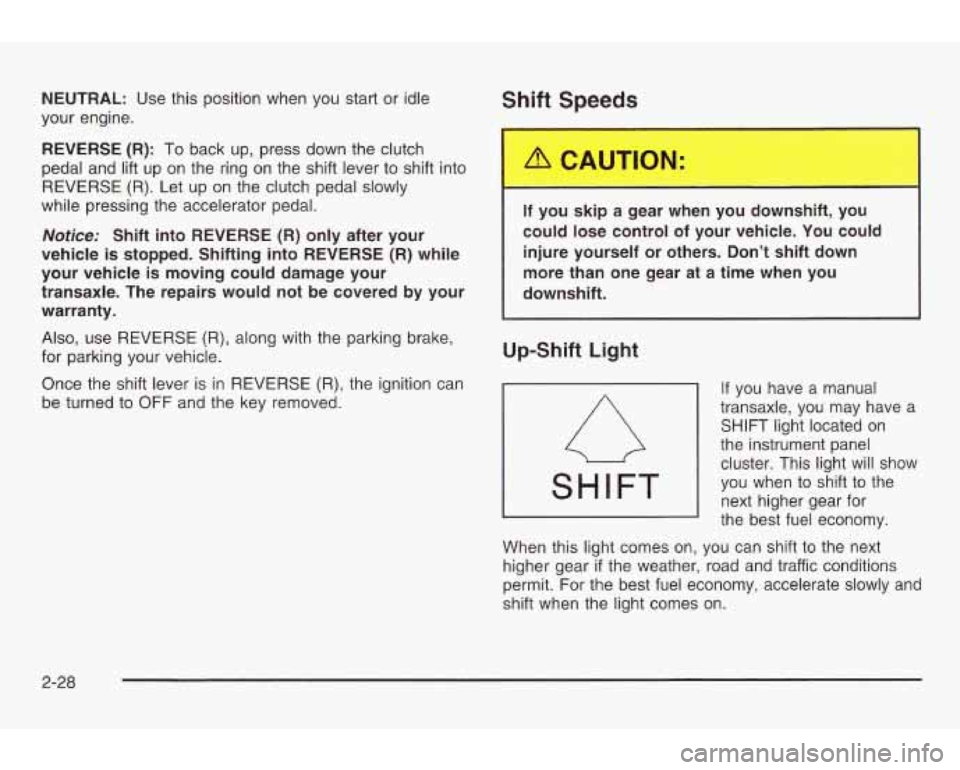
Up-Shift Light
If you have a manual
transaxle, you may have a
SHIFT light located on
the instrument panel
cluster. This light will show
you when to shift to the
next higher gear for
the best fuel economy.
When this light comes
on, you can shift to the next
higher gear
if the weather, road and traffic conditions
permit. For the best fuel economy, accelerate slowly and
shift when the light comes on.
2-28
Page 98 of 354
Parking Brake
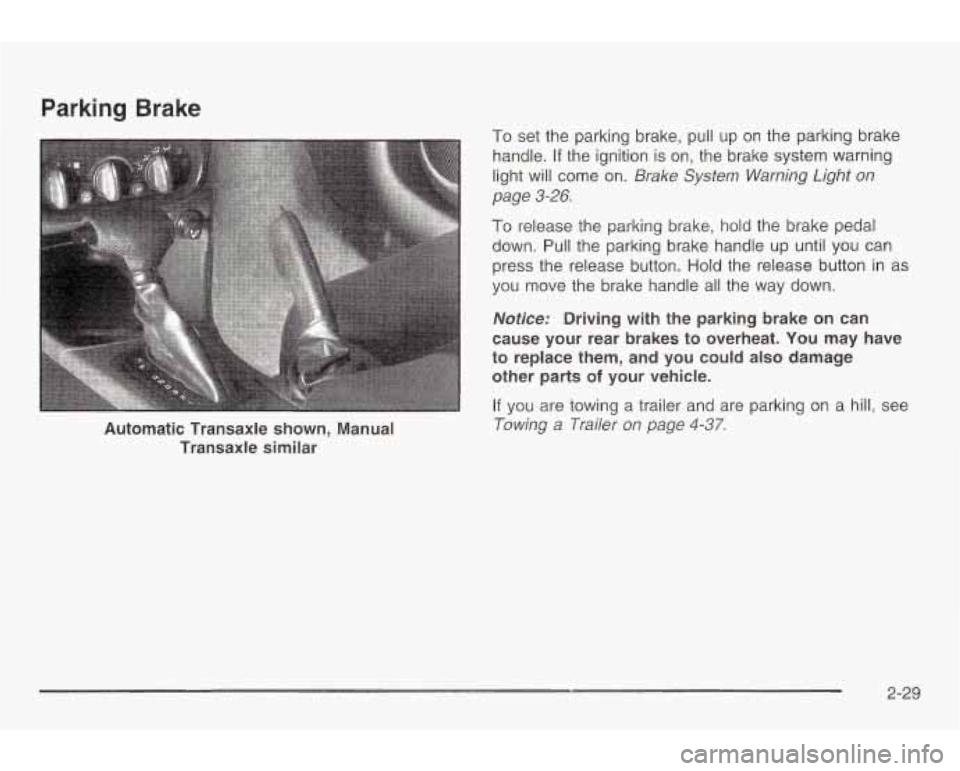
Automatic Transaxle shown, Manual Transaxle similar
To set the parking brake, pull up on the parking brake
handle.
If the ignition is on, the brake system warning
light will come on.
Brake System Warning Light on
page
3-26.
To release the parking brake, hold the brake pedal
down. Pull the parking brake handle up until you can
press the release button. Hold the release button in as
you move the brake handle all the way down.
Nofice: Driving with the parking brake on can
cause your rear brakes to overheat. You may have
to replace them, and you could also damage
other parts
of your vehicle.
If you are towing a trailer and are parking on a hill, see
Towing a Trailer on page 4-37.
2-29
Page 108 of 354
Section 3 Instrument Panel
Instrument Panel Overview ............................... 3.2
Hazard Warnin Flashers
................................ 3.4
Other Warning !bevices
................................... 3.5
Horn
............................................................. 3.5
Tilt Wheel
..................................................... 3.5
Turn Signal/Multifunction Lever
......................... 3.6
Exterior Lamps
............................................. 3.13
Interior Lamps
.............................................. 3.16
Ashtrays and Cigarette Lighter
........................ 3.17
Climate Controls
............................................ 3.18
Climate Control System
................................. 3.18
Outlet Adjustment
......................................... 3.21
Warning Lights, Gages and Indicators
............. 3-22
Instrument Panel Cluster
................................ 3.23
Speedometer and Odometer
........................... 3.24
Tachometer
................................................. 3.24
Safety Belt Reminder Light
............................. 3.25
Air Bag Readiness Light ................................ 3.25
Charging System Light
.................................. 3.26
Up-Shift Light
............................................... 3.26
Erake QlQtT! -J -.-. !n!=lrning Light ........................ ~ 3-76 .
Warnin Light ........................................... 3-28
Warning Light
........................................... 3.28
Active Light
.............................................. 3.29
Low Coolant Warning Light
............................ 3.30
Anti-Lock
Brake System
Enhance
c? Traction System
Enhanced Traction System
Engine Coolant Temperature Gage
3.3~ rl on ..................
Malfunction Indicator Lamp ............................. 3.31
Oil Pressure Light
......................................... 3.34
Low Oil Level Li ht
....................................... 3.35
Securit Light:
............................................... 3-36
Service Vehicle Soon Light
............................ 3-36
Fuel Gage
................................................... 3-37
Audio System(s)
............................................. 3-38
Data Systems RDS)
.................................. 3-38
Change Engine
ail Light ................................ 3-35
Low dsher Fluid Warning Light
..................... 3-36
Setting the Time for Radios without Radio
Setting the Time
1 or Radios with Radio 3-39
........................... 3-39
.............................. 3-43
Radio with Cassette and CD
.......................... 3-55
Theft-Deterrent Feature
Theft-Deterrent Feature (Non-RDS Radios)
..................................... 3-68
(RDS Radios)
........................................... 3-68
MUUIW ULCCI II ly VVI IGGI VU1 ILI WIG v vv A . .A .- C'&-A~;~~ \Alhnnl Pnmtrnlrr Qxa .......................
Understanding Radio Reception ...................... 3-70
Care of Your Cassette Tape Player
................. 3-70
Care of Your CDs ......................................... 3-71
Care of Your CD Player
................................ 3-72
Fixed Mast Antenna ...................................... 3-72
XM Satellite Radio Antenna System
................ 3-72
DAB Radio Antenna System 3-11 Chime Level Adjustment ................................ 3-72
n Tn ...........................
3- 1
Page 110 of 354
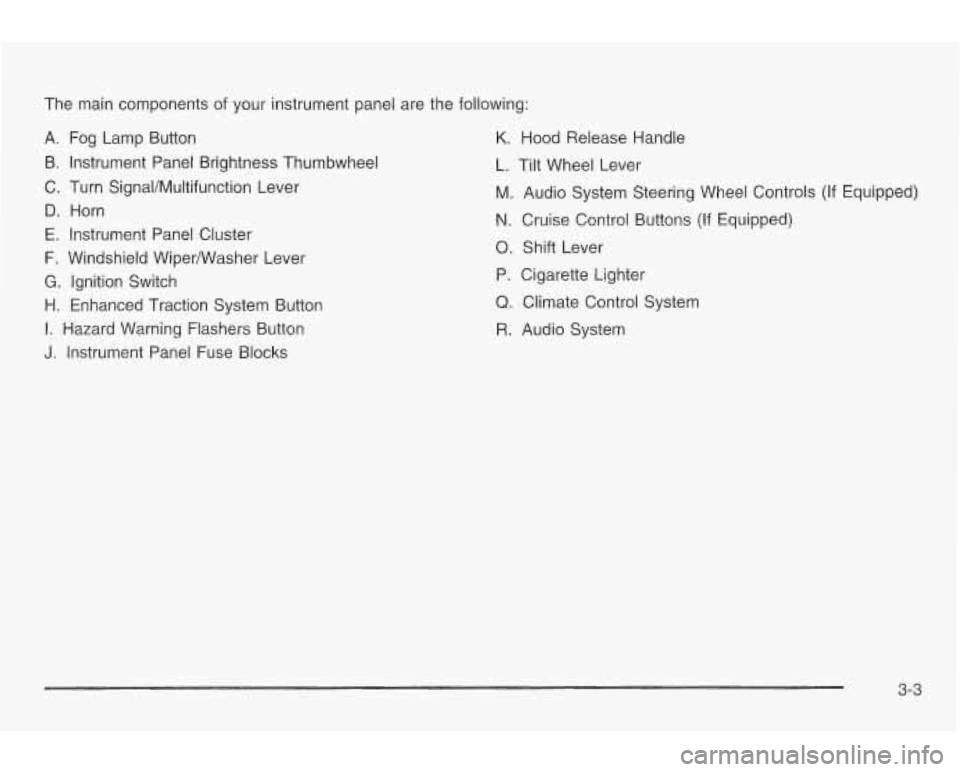
The main components of your instrument panel are the following:
A. Fog Lamp Button
B. Instrument Panel Brightness Thumbwheel
C. Turn SignaVMultifunction Lever
D. Horn
E. Instrument Panel Cluster
F. Windshield WiperNVasher Lever
G. Ignition Switch
H. Enhanced Traction System Button
I. Hazard Warning Flashers Button
J. Instrument Panel Fuse Blocks
K. Hood Release Handle
L. Tilt Wheel Lever
M. Audio System Steering Wheel Controls (If Equipped)
N. Cruise Control Buttons (If Equipped)
0. Shift Lever
P. Cigarette Lighter
Q. Climate Control System
R. Audio System
3-3
Page 114 of 354
An arrow on the instrument
panel cluster will flash in
the direction of the
turn or lane change. Headlamps On Reminder
If you open the driver’s door and turn off the ignition
while leaving the lamps on, you will hear a warning
chime.
Weadlamp High/low-Beam Changer
~~ ~~~
To signal a lane change, just raise or lower the lever
until the arrow starts to flash.
Hold it there until you
complete your lane change. The lever will return by itself
when you release it.
As you signal a turn or a lane change, if the arrows
flash rapidly, a signal bulb may be burned out and other
drivers won’t see your turn signal.
If a bulb is burned out, replace it to help avoid an
accident.
If the arrows don’t go on at all when you signal
a turn, check for burned-out bulbs and then check the
fuse. See
Fuses and Circuit Breakers on page 5-81.
To change the headlamps from low beam to
high beam, push the turn signaVmultifunction lever
away from you.
When the high beams are
on, a light on the
instrument panel cluster
also will be on
if the
ignition is in
ON.
To change the headlamps from high beam to low beam,
pull the turn signal lever toward you.
3-7
Page 115 of 354

Flash-to-Pass
This feature lets you use your high-beam headlamps to
signal
a driver in front of you that you want to pass.
To use it, pull the turn signaVmultifunction lever toward
you until the high-beam headlamps come on, then
release the lever to turn them
off.
Windshield Wipers
You control the windshield wipers by moving the lever
with the wiper symbol on it up or down. For a single wiper cycle,
push the lever down
to MIST,
then release it. For more cycles, hold the lever down
longer.
For steady wiping at low speed, move the lever up
to
the LO position. For high-speed wiping, move the lever
up further, to
HI. To stop the wipers, move the lever
to OFF.
You can set the wiper speed for a long or short delay
between wipes. This can be very useful in light rain
or snow.
Move the lever
to INT (Intermittent), then turn the inner
band, labeled INT
ADJ (Intermittent Adjustment),
and choose the delay you want. Turn the inner band up
for shorter delay times between wiper cycles. Turn
the band down for a longer delay time between wiper
cycles.
Remember that damaged wiper blades may prevent you
from seeing well enough to drive safely.
To avoid
damage, be sure to clear ice and snow from the wiper
blades before using them. If they’re frozen to the
windshield, carefully loosen or thaw them. If your blades
do become damaged, get new blades or blade inserts.
Heavy snow or ice can overload your wiper motor.
A circuit breaker will stop the motor until it cools. Clear
away snow or ice
to prevent an overload.
3-8
Page 117 of 354
The cruise control will turn off if any of the following
occur:
The brakes are applied,
the clutch pedal is applied (manual transaxle),
the automatic transaxle is shifted to NEUTRAL (N),
the parking brake is applied, or
e the brake system warning light is on. If your vehicle
is in cruise control when the enhanced
traction control system,
if your vehicle has this feature,
begins
to limit wheel spin, the cruise control will
automatically disengage. See Enhanced Traction
System
(€E) on page 4-9. When road conditions allow
you to safely use it again, you may turn the cruise
control back
on.
Setting Cruise Control
Cruise control can be dangerous where
you can’t drive safely at a steady speed.
So, don’t use your cruise control on
winding roads
or in heavy traffic.
Cruise control can be dangerous on
slippery roads. On such roads, fast
changes
in tire traction can cause
needless wheel spinning, and you could
lose control. Don’t use cruise control on
slippery roads.
If you leave your cruise control on when yc re
not using cruise, you might hit a button and go
into cruise when you don’t want to. You could
be startled and even lose control. Keep the
cruise control switch
off until you want to use
cruise control.
1, Press cruise ON OFF. An indicator light will come
2. Get up to the speed you want.
3. Press the SET COAST button and release it.
4. Take your foot off the accelerator pedal.
on when ON OFF is pressed.
3-1 0
Page 119 of 354
Passing Another Vehicle While Using
Cruise Control
Use the accelerator pedal to increase your speed.
When you take your
foot off the pedal, your vehicle will
slow down
to the cruise control speed you set earlier.
Using Cruise Control on Hills
How well your cruise control will work on hills depends
upon your speed, load and the steepness of the
hills. When going up steep hills, you may have to step
on the accelerator pedal to maintain your speed.
When going downhill, you may have
to brake or shift to
a lower gear to keep your speed down. Of course,
applying the brake takes you out of cruise control. Many
drivers find this to be too much trouble and don’t use
cruise control on steep hills.
Ending Cruise Control
There are four ways to turn off the cruise control:
Step lightly on the brake pedal.
Press the cruise control RESUME ACCEL button
and the SET
COAST buttons at the same time.
Press cruise ON OFF.
Push the clutch pedal if you have a manual
transaxle.
Erasing Speed Memory
When you turn off the cruise control or the ignition, your
cruise control set speed memory is erased.
3-1 2
Page 120 of 354

Exterior Lamps
The lever on the left side of the steering column
operates the exterior lamps.
-g- (Exterior Lamps): Turn the outside part of the
lever with the symboi on
it, to operate tne iamps.
The exterior lamp control has three positions:
pf (Parking Lamps): Turning the control to this
position turns
on the parking lamps, together with the
following.
0 Sidemarker Lamps
0 Taillamps
e License Plate Lamps
0 Instrument Panel Lights
- - ED (Headlamps): Turning the control to this position
turns on the headlamps, together with the previously
listed lamps and lights.
AUTO: Turning the control to this position turns the
headlamps, taillamps and parking lamps on and
off automatically, while the ignition is on, by sensing
how dark it is outside. For more information see
“Automatic Headlamp System” later in this section.
Daytime Running Lamps (DRL)
nq~time R~Inning l_~~y.np (DRL) r,a.n make it ewier for
others to see the front of your vehicle during the
day. DRL can be helpful in many different driving
conditions, but they can be especially helpful in the short
periods after dawn and before sunset. Fully functional
daytime running lamps are required on all vehicles
11131 add in Canada. firnt CI
3-1 3