ECO mode PONTIAC GRAND PRIX 2004 User Guide
[x] Cancel search | Manufacturer: PONTIAC, Model Year: 2004, Model line: GRAND PRIX, Model: PONTIAC GRAND PRIX 2004Pages: 432, PDF Size: 2.99 MB
Page 160 of 432
Average Speed:The average speed is displayed in
miles per hour (mph) or kilometers per hour (km/h).
The average speed is calculated from the various
vehicle speeds recorded since the last reset of this
menu item. To reset the average speed, press the
set/reset button. The display will return to zero.
Press the trip odometer button again to advance to
the next screen.
Time Elapsed:This screen can be used as a
stopwatch. The display can show the hours, minutes,
seconds and hundredths of a second. The elapsed time
indicator will record up to 99 hours, 59 minutes and
59 seconds, then it will reset to zero and continue
counting.
To set the time elapsed function use the following
procedures:
1. Press the trip odometer button for less than two
seconds to start or stop the timer.
2. Press and hold the trip odometer button for more
than two seconds to reset the timer back to zero.Set/Reset
r(Set/Reset):Press this button to set or reset a
mode item when using the trip odometer or option
buttons.
Options
4(Options):Press this button to access the Date,
Language, Display Units, Daytime Display
Enhancements, Engine Oil Monitor System, Tire
In¯ation Monitor System, Compass Calibration and the
Personal Programming modes.
Date:This menu lets you select the date.
The time is set through the radio. See
Setting the Time
on page 3-88for more information.
To set the date use the following procedure:
1. Press the options button until the date is displayed
on the DIC.
2. Press the set/reset button to scroll to the second
position in the year, releasing the button when the
correct digit appears.
3. Press the set/reset button to advance to the ®rst
position in the year, releasing the button when the
correct digit appears.
4. Press the options button to advance to the months
of the year.
3-56
Page 163 of 432
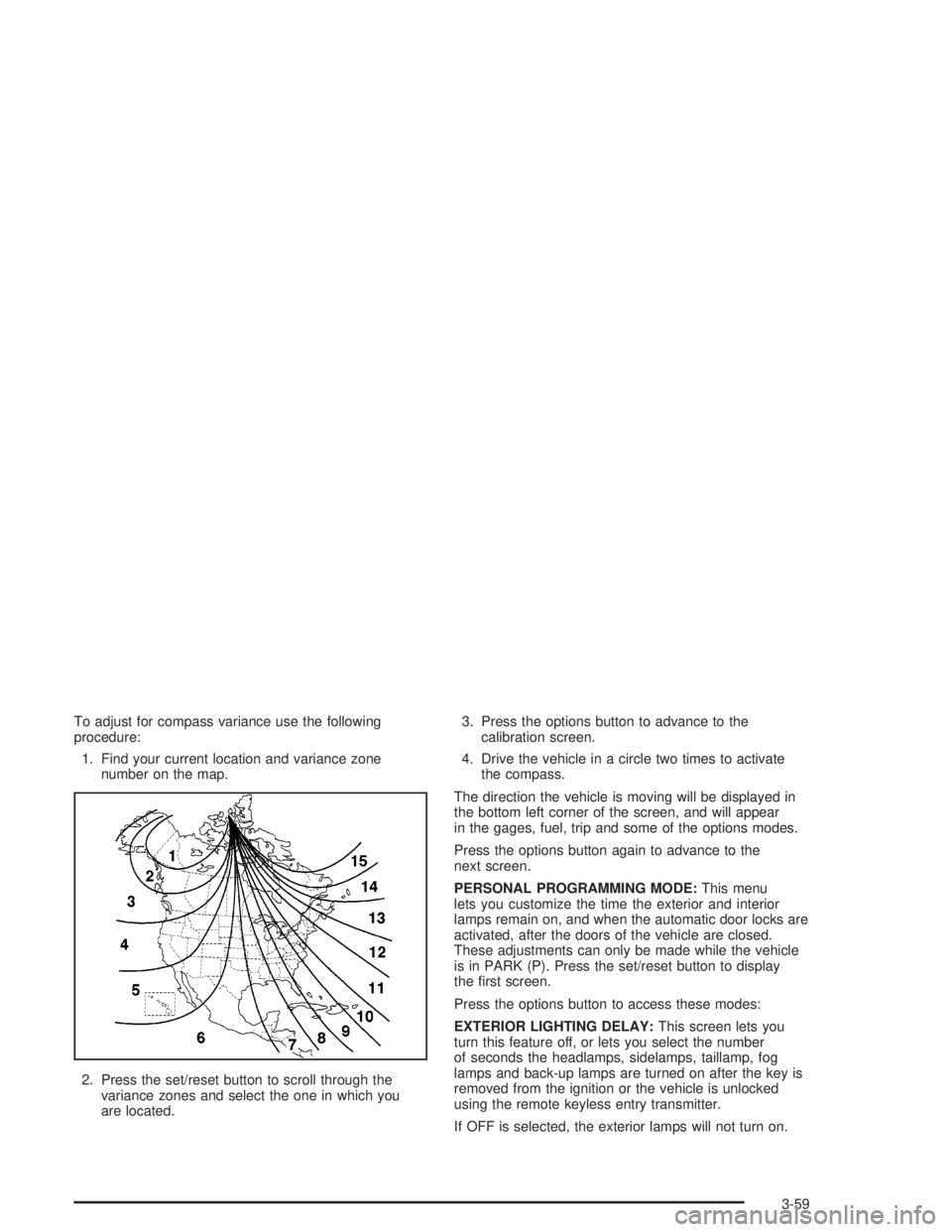
To adjust for compass variance use the following
procedure:
1. Find your current location and variance zone
number on the map.
2. Press the set/reset button to scroll through the
variance zones and select the one in which you
are located.3. Press the options button to advance to the
calibration screen.
4. Drive the vehicle in a circle two times to activate
the compass.
The direction the vehicle is moving will be displayed in
the bottom left corner of the screen, and will appear
in the gages, fuel, trip and some of the options modes.
Press the options button again to advance to the
next screen.
PERSONAL PROGRAMMING MODE:This menu
lets you customize the time the exterior and interior
lamps remain on, and when the automatic door locks are
activated, after the doors of the vehicle are closed.
These adjustments can only be made while the vehicle
is in PARK (P). Press the set/reset button to display
the ®rst screen.
Press the options button to access these modes:
EXTERIOR LIGHTING DELAY:This screen lets you
turn this feature off, or lets you select the number
of seconds the headlamps, sidelamps, taillamp, fog
lamps and back-up lamps are turned on after the key is
removed from the ignition or the vehicle is unlocked
using the remote keyless entry transmitter.
If OFF is selected, the exterior lamps will not turn on.
3-59
Page 164 of 432
If a time delay is selected, the lamps will turn on
(for the time selected), when the key is removed from
the ignition, or the key is removed from the ignition
or when the vehicle is unlocked using the remote
keyless entry transmitter.
To program this mode use the following procedure:
1. Press and release the set/reset button to scroll to
the selection you want to program. Choose from
OFF, or 15, 30, 60, or 90 seconds.
2. Press the options button again to advance to the
next screen.
INTERIOR LIGHTS WHEN DOOR CLOSED:This
screen lets you select this feature to be turned OFF
or ON.
If OFF is selected, the interior lamps will turn off
immediately when the ignition is OFF and the last
open door is closed.
If ON is selected, the interior lamps will stay on for
about 25 seconds after the vehicle's ignition is off and
the last open door is closed.
To program this mode use the following procedure:
1. Press and release the set/reset button to scroll to
either OFF or ON.
2. Press the options button again to advance to the
next screen.INTERIOR LIGHTS WHEN KEY REMOVED:This
screen lets you select this feature to be turned OFF
or ON. This feature enables the interior lamps in
the vehicle to turn on for about 25 seconds after the key
is removed from the ignition.
If OFF is selected, removing the key from the ignition
will not cause the interior lamps to turn on.
If ON is selected, removing the key from the ignition
will cause the interior lamps to be turned on for about
25 seconds.
To program this mode use the following procedure:
1. Press and release the set/reset button to scroll to
either OFF or ON.
2. Press the options button again to advance to the
next screen.
AUTO DOOR LOCK:This screen lets you select this
feature to be turned OFF or ON.
If OFF is selected, all automatic door locking is disabled.
The doors will always need to be locked manually
before driving, to increase occupant safety.
If ON is selected, the vehicle's doors automatically lock
when the doors are closed and the vehicle is shifted
into DRIVE (D).
3-60
Page 165 of 432
To program this mode use the following procedure:
1. Press and release the set/reset button to scroll to
either OFF or ON.
2. Press the options button again to advance to the
next screen.
AUTO DOOR UNLOCK:This screen can be used if
ON was selected for the AUTO DOOR LOCK feature.
This screen lets you select this feature to be turned
off, used for the driver's door only, or for all the doors.
If OFF is selected, none of the doors will unlock
when the vehicle's transaxle is shifted into PARK (P).
If DRIVER is selected, only the driver's door will unlock
when the vehicle's transaxle is shifted into PARK (P).
If ALL is selected, all the doors will unlock when
the vehicle's transaxle is shifted into PARK (P).
To program this mode use the following procedure:
1. Press and release the set/reset button to scroll to
either OFF, DRIVER or ALL.
2. Press the options button again to advance to the
next screen.AUTO DOOR LOCK ON:If DRIVER or ALL was selected
on the AUTO DOOR UNLOCK screen, this screen lets
you select when the vehicle's doors will unlock. The
choices are when the key is removed from the ignition or
when the vehicle is shifted into PARK (P).
If KEY-OUT is selected, the auto door unlock will
function when the key is taken out of the ignition.
If PARK is selected, the auto door unlock will function
when the transaxle is shifted into PARK (P).
To program this mode use the following procedure:
1. Press and release the set/reset button to scroll to
either KEY-OUT or PARK.
2. Press the options button again to advance to the
next screen.
DELAYED LOCKING:This screen lets you select
whether this feature will be turned OFF or ON. The key
must be out of the ignition for this feature to work.
If OFF is selected, there will be no delayed locking of
the vehicle's doors.
If ON is selected, the locking of the vehicle's doors will
be delayed by 25 seconds after a power door lock
switch is pressed while the door is open, or the LOCK
button on the remote keyless entry transmitter is
pressed while any door is open.
3-61
Page 166 of 432
To program this mode use the following procedure:
1. Press and release the set/reset button to scroll to
either OFF or ON.
2. Press the options button again to advance to the
next screen.
REMOTE LOCKS FEEDBACK:This screen lets you
select this option to be turned OFF, or lets you choose
from two methods of veri®cation, LIGHTS or LIGHTS
and HORN, that indicate the vehicle's doors are locked
when the LOCK button on the remote keyless entry
transmitter is pressed.
If OFF is selected, this feature will not be programmed.
If LIGHTS is selected, the exterior lamps will ¯ash
when the lock button on the remote keyless entry
transmitter is pressed.
If LIGHTS and HORN is selected, the exterior lamps will
¯ash when the lock button on the remote keyless
entry transmitter is pressed, and the horn will sound
when the LOCK button on the remote keyless entry
transmitter is pressed again within ®ve seconds of the
previous command.
To program this mode use the following procedure:
1. Press the set/reset button to scroll to OFF, LIGHTS
or LIGHTS and HORN.
2. Press the options button again to advance to the
next screen.If the vehicle does not have a content theft-deterrent
system, the next screens with PROGRAMMED
FINISHED and DISPLAY OFF will appear.
If the vehicle does have a content theft-deterrent
system, the next screen will appear.
THEFT DETERRENT:Your vehicle may be equipped
with a content theft-deterrent system. Once it is
turned on, the system will activate if someone tries to
enter the vehicle without using the remote keyless entry
transmitter or the correct key. It will also activate
when an incorrect key is used in the ignition. This screen
lets you select this feature to be turned OFF or ON.
If OFF is selected, the theft-deterrent system will
not function.
If ON is selected, the theft-deterrent system will be
activated.
To program this mode use the following procedure:
1. Press the set/reset button to scroll to OFF or ON.
2. Press the options button again to advance to
the next screen.
3-62
Page 168 of 432
Fuel
.(Fuel):Press this button to access the Average
Fuel Economy, Instantaneous Fuel Economy and Fuel
Range modes.
AVG ECONOMY (Average Fuel Economy):This
screen will display the approximate average miles per
gallon (mpg) or liters per 100 kilometers (L/100 km).
This number is calculated based on the number of mpg
(L/100 km) recorded since the last time this menu
item was reset.
To view the average fuel economy for the vehicle follow
this procedure:
1. Press the set/reset button to reset to zero.
2. Press the fuel button again to advance to the next
screen.
INST ECONOMY (Instantaneous Fuel Economy):
This screen displays the current fuel economy at
a particular moment and will change frequently as
driving conditions change. Unlike average fuel economy,
this screen cannot be reset.
Press the fuel button again to advance to the next screen.RANGE:This screen displays the approximate number
of remaining miles or kilometers you can drive without
refueling. This estimate is based on the average fuel
economy for the amount of fuel remaining in the fuel tank
and the current driving conditions. This estimate will
change if driving conditions change. For example, if you
are driving in traffic and making frequent stops, the
display may read one number, but if you enter the
freeway, the number may change even though the same
amount of fuel is in the fuel tank. This is because different
driving conditions produce different fuel economies.
Generally, freeway driving produces better fuel economy
than city driving.
If the fuel tank contains less than 2 gallons (7.6 L),
the LOW FUEL message will appear on the DIC screen.
Fill the fuel tank as soon as possible to avoid running
out of fuel.
See ªLow Fuelº under
DIC Warnings and Messages on
page 3-65.
3-64
Page 169 of 432
DIC Warnings and Messages
These messages will appear if there is a problem in
one of the vehicle's systems. They will override
any other mode or screen the DIC may be in.
Some messages allow you to erase them from the
DIC screen. To do this you must acknowledge
the message. To acknowledge or clear the message
from the screen, press the set/reset button on the DIC.
See
DIC Controls and Displays on page 3-45for
DIC button descriptions.
Other warning messages are not allowed to be erased
until the problem indicated by the warning message
is taken care of. When the problem indicated by
the message is resolved, it can be acknowledged and
the screen can be reset.
Be sure to take any message that appears on the
DIC screen seriously and remember that clearing the
messages that are able to be acknowledged, will
only make the message disappear, not the problem.
A/C OFF FOR ENGINE PROTECTION
This warning message appears when the engine coolant
becomes hotter than the normal operating temperature.
To avoid added strain on a hot engine, the air
conditioning compressor is automatically turned off.
When the coolant temperature returns to normal, the air
conditioning compressor will turn back on. You can
continue to drive your vehicle.
This warning message will display while the ignition
is in RUN. A chime will sound for two seconds when
this message is displayed. Press the set/reset button
to acknowledge this warning message and to clear
it from the screen.
This message will continue to display if it has not been
acknowledged when the engine is turned off. It will
also re-display for three seconds if the message has
been acknowledged, but the condition still exists
when the engine is turned off.
The message will re-appear when the engine is turned
on and the condition still exists.
3-65
Page 190 of 432
STARTING DISABLED DUE TO
ELECTRONIC THROTTLE CONTROL
This warning message will appear when there is
a malfunction with the electronic throttle control which
prevents the vehicle from starting. Have the vehicle
serviced by your dealer.
This warning message will only appear while the
ignition is in RUN, and will not disappear until the
problem is resolved. A chime will sound for two seconds.
This warning message cannot be acknowledged.
STARTING DISABLED DUE TO
THEFT SYSTEM
This warning message will appear when the system
detects a malfunction in the content theft-deterrent
system and prevents the vehicle from starting.
This warning message will only appear while the
ignition is in RUN, and will not disappear until the
problem is resolved. A chime will sound for two seconds.
This warning message cannot be acknowledged.
THEFT SYSTEM NOT PROGRAMMED
This warning message will appear if the theft deterrent
system has not been programmed through the DIC.
See ªPersonal Programmingº under the options mode in
DIC Controls and Displays on page 3-45for information
on how to set the theft-deterrent system.
This warning message will display only while the ignition
is in RUN. Press the set/reset button to acknowledge
this warning message and to clear it from the screen.
This message will continue to display if it has not been
acknowledged when the engine is turned off. It will
also re-display for three seconds if the message has
been acknowledged, but the condition still exists
when the engine is turned off.
The message will re-appear when the engine is turned
on and the condition still exists.
3-86
Page 198 of 432
Setting Preset PTYs (RDS Only)
The six numbered pushbuttons let you return to your
favorite program types (PTYs). These pushbuttons have
factory PTY presets. You can set up to 12 PTYs (six FM1
and six FM2) by performing the following steps:
1. Press BAND to select FM1 or FM2.
2. Press PROG TYPE to activate program type
select mode.
3. Turn the SELECT knob to select a PTY.
4. Press and hold one of the six numbered pushbuttons
until you hear a beep. Whenever you press that
numbered pushbutton, the PTY you set will return,
if program type select mode is activated.
5. Repeat the steps for each pushbutton.
RDS Messages
ALERT!:Alert warns of national or local emergencies.
When an alert announcement comes on the current
radio station, ALERT! will appear on the display. You will
hear the announcement, even if the volume is muted
or a compact disc is playing. If the compact disc player
is playing, play will stop during the announcement.
You will not be able to turn off alert announcements.
ALERT! will not be affected by tests of the emergency
broadcast system. This feature is not supported by
all RDS stations.
INFO (Information):If the current station has a
message, INFO will appear on the display. Press this
button to see the message. The message may display
the artist and song title, call in phone numbers, etc.
If the whole message is not displayed, parts of it
will appear every three seconds. To scroll through the
message at your own speed, press the INFO button
repeatedly. A new group of words will appear on
the display with each press. Once the complete
message has been displayed, INFO will disappear
from the display until another new message is received.
The old message can be displayed by pressing the
INFO button until a new message is received or
a different station is tuned to.
3-94
Page 209 of 432
Setting Preset PTYs (RDS Only)
The six numbered pushbuttons let you return to your
favorite program types (PTYs). These pushbuttons
have factory PTY presets. You can set up to 12 PTYs
(six FM1 and six FM2) by performing the following steps:
1. Press BAND to select FM1 or FM2.
2. Press PROG TYPE to activate program type
select mode.
3. Turn the SELECT knob to select a PTY.
4. Press and hold one of the six numbered pushbuttons
until you hear a beep. Whenever you press that
numbered pushbutton, the PTY you set will return,
if program type select mode is activated.
5. Repeat the steps for each pushbutton.
RDS Messages
ALERT!:Alert warns of local or national emergencies.
When an alert announcement comes on the current radio
station, ALERT! will appear on the display. You will hear
the announcement, even if the volume is muted or a
cassette tape or a compact disc is playing. If the cassette
tape or compact disc player is playing, play will stop
during the announcement. You will not be able to turn off
alert announcements.
ALERT! will not be affected by tests of the emergency
broadcast system. This feature is not supported by all
RDS stations.
INFO (Information):If the current station has a
message, INFO will appear on the display. Press this
button to see the message. The message may display
the artist and song title, call in phone numbers, etc.
If the whole message is not displayed, parts of it will
appear every three seconds. To scroll through the
message at your own speed, press the INFO button
repeatedly. A new group of words will appear on the
display with each press. Once the complete message has
been displayed, INFO will disappear from the display until
another new message is received. The old message can
be displayed by pressing the INFO button until a new
message is received or a different station is tuned to.
3-105