audio PONTIAC VIBE 2010 User Guide
[x] Cancel search | Manufacturer: PONTIAC, Model Year: 2010, Model line: VIBE, Model: PONTIAC VIBE 2010Pages: 318, PDF Size: 1.7 MB
Page 125 of 318

Care of The CD Player
Use a marking pen to identify CDs,
do not add labels.
Do not use CD lens cleaners; they
could damage the CD player.
Notice:If a label is added to
a CD, or more than one CD is
inserted into the slot at a time,
or an attempt is made to play
scratched or damaged CDs, the
CD player could be damaged.
While using the CD player, use
only CDs in good condition
without any label, load one CD at a
time, and keep the CD player and
the loading slot free of foreign
materials, liquids, and debris.
If an error displays, see “CD
Messages” later in this section.
Playing an MP3 CD-R Disc
Radios with the MP3 feature
are capable of playing an MP3
CD-R disc. See MP3 on page 6-11
for more information.
CD Messages
If the CD ejects, it could be for one
of the following reasons:
•The CD player is very hot. When
the temperature returns to
normal, the CD should play.
•The road is very rough. When
the road becomes smoother,
the CD should play.
•The CD is dirty, scratched, wet,
or upside down.
•The air is very humid. If so, wait
about an hour and try again.
•The format of the CD might not
be compatible. See ‘‘Using an
MP3’’ later in this section.
•A problem may have occurred
while burning the CD.
•The label could be caught in the
CD player.
If any error occurs repeatedly or if
an error cannot be corrected, contact
your dealer/retailer. If the radio
displays an error message, write it
down and provide it to your dealer/
retailer when reporting the problem.
MP3
MP3 CD-R Disc
MP3 Format
The MP3 player will only play CD-R
discs. It can read and play a
maximum of:
•50 folders
•11 folders in depth
•50 playlists
•10 sessions
•255 files
All folders, playlists, sessions and
files over the maximum are ignored.
Record an MP3 disc:
•Onto a CD-R disc.
•Record playlists with
an .m3u or .wpl extension.
•Do not mix standard audio and
MP3 files on the same disc.
•Record the entire disc at once.
•Finalize the disc when recording
an MP3 disc with multiple
sessions.
Infotainment System 6-11
Page 126 of 318
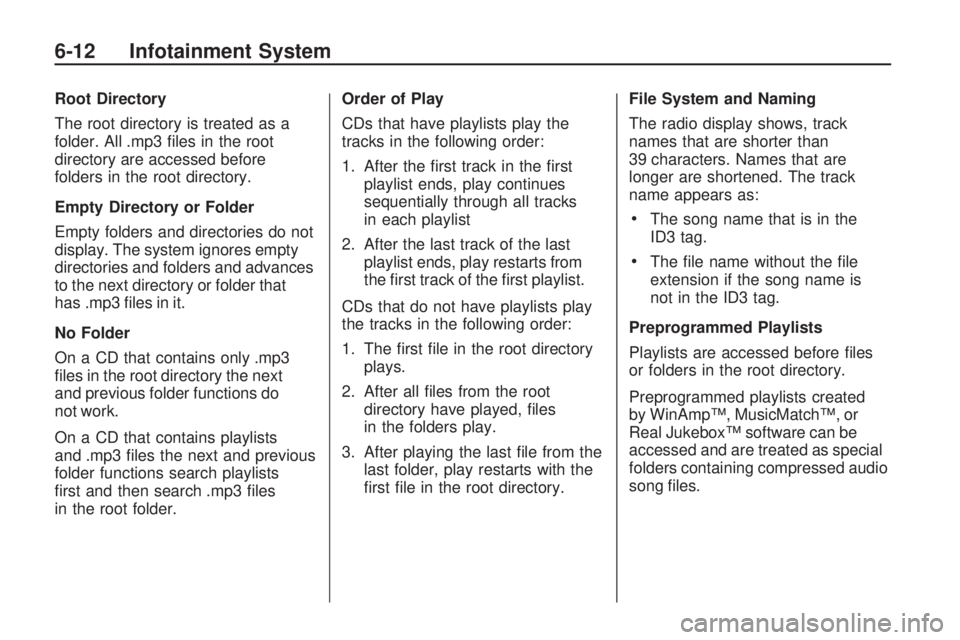
Root Directory
The root directory is treated as a
folder. All .mp3 files in the root
directory are accessed before
folders in the root directory.
Empty Directory or Folder
Empty folders and directories do not
display. The system ignores empty
directories and folders and advances
to the next directory or folder that
has .mp3 files in it.
No Folder
On a CD that contains only .mp3
files in the root directory the next
and previous folder functions do
not work.
On a CD that contains playlists
and .mp3 files the next and previous
folder functions search playlists
first and then search .mp3 files
in the root folder.Order of Play
CDs that have playlists play the
tracks in the following order:
1. After the first track in the first
playlist ends, play continues
sequentially through all tracks
in each playlist
2. After the last track of the last playlist ends, play restarts from
the first track of the first playlist.
CDs that do not have playlists play
the tracks in the following order:
1. The first file in the root directory plays.
2. After all files from the root directory have played, files
in the folders play.
3. After playing the last file from the last folder, play restarts with the
first file in the root directory. File System and Naming
The radio display shows, track
names that are shorter than
39 characters. Names that are
longer are shortened. The track
name appears as:
•The song name that is in the
ID3 tag.
•The file name without the file
extension if the song name is
not in the ID3 tag.
Preprogrammed Playlists
Playlists are accessed before files
or folders in the root directory.
Preprogrammed playlists created
by WinAmp™, MusicMatch™, or
Real Jukebox™ software can be
accessed and are treated as special
folders containing compressed audio
song files.
6-12 Infotainment System
Page 127 of 318

Music Navigator
The music navigator feature lets
MP3 CDs play in order by artist or
album.
•The MP3 player scans the disc
to sort the files by artist and
album ID3 tag information.
•It can take several minutes to
scan the disc depending on
the number of MP3 files recorded
to the CD-R.
•The radio starts playing while the
disc is being scanned.
•After the scan is finished, the
disc starts playing.
Playing an MP3
The MP3 player can play the
smaller 3 inch (8 cm) single CDs
with an adapter ring.
1. Insert a CD label side uppartway into the slot.
2. The CD player pulls the CD in and begins playing. 3. The CD stays in the player if the
ignition or radio is turned off.
4. If the CD was the last source selected, it resumes playing
when the radio is turned on.
Y(EJECT): Press and release to
eject a CD. Once the disc is ejected
it can be removed. If the CD is not
removed after several seconds the
CD player automatically pulls the
disc back into the player and starts
playing.
ySEEK TRACKz: Press to
go to the start of the current track,
if more than ten seconds have
played. Press
zto go to the next
track. Holding or pressing
yorz
multiple times will cause the player
to continue moving backward or
forward through the tracks on
the CD.
(FWD REV)(Fast Forward/
Fast Reverse): Press and hold
(
to advance playback quickly within a
track. Release
(to resume playing
the track. Press and hold
)to
reverse playback quickly within a
track. Release
(to resume playing
the track.
BAND: Press to listen to the radio
when a CD is playing.
INFO (Information): Press when
an MP3 CD is loaded, then press
the button below the Song, Artist,
Album, or Folder label to view the
information.
CD/AUX (CD/Auxiliary): Press to
play a CD when listening to the radio.
Press the CD/AUX button again and
the system begins playing audio from
the connected portable audio player.
If a portable audio player is not
connected, “No Aux Input Device”
displays.
Infotainment System 6-13
Page 128 of 318

RDM (Random):Press the button
below the RDM label to hear
the tracks in random order.
S c(Previous Folder): Press
the button below to go to the
first track in the previous folder.
c T(Next Folder): Press
the button below to go to the first
track in the next folder.
h(Music Navigator): Press the
button below to play MP3 files in
order by artist or album.
SORT: Press the button below the
SORT label to change between
playback by artist or album while
using the Music Navigator.
BACK: Press the button below the
BACK label to return to the main
music navigator screen.
ST(Previous/Next): Press
the button below to go to the
next or previous artist or album
in alphabetical order while using
the Music Navigator.
Auxiliary Devices
The radio has an auxiliary input
jack located on the lower right side
of the faceplate. This is not an audio
output; do not plug the headphone
set into the front auxiliary input jack.
An external audio device such as an
iPod, laptop computer, MP3 player,
CD changer, etc. can be connected
to the auxiliary input jack for use as
another audio source.
To use a portable audio player,
connect a 3.5 mm (1/8 inch) cable
to the radio’s front auxiliary input
jack. When a device is connected,
press the radio CD/AUX button
to begin playing audio from
the device over the vehicle
speakers. PWR VOL (Power/Volume):
Turn
to adjust the volume. Additional
volume adjustments may have to be
made from the portable device if
the volume is too quiet or not loud.
BAND: Press to listen to the
radio when a portable audio device
is playing.
CD/AUX (CD/Auxiliary): Press to
play a CD when a portable audio
device is playing. Press again and
the system begins playing audio from
the connected portable audio player.
6-14 Infotainment System
Page 224 of 318
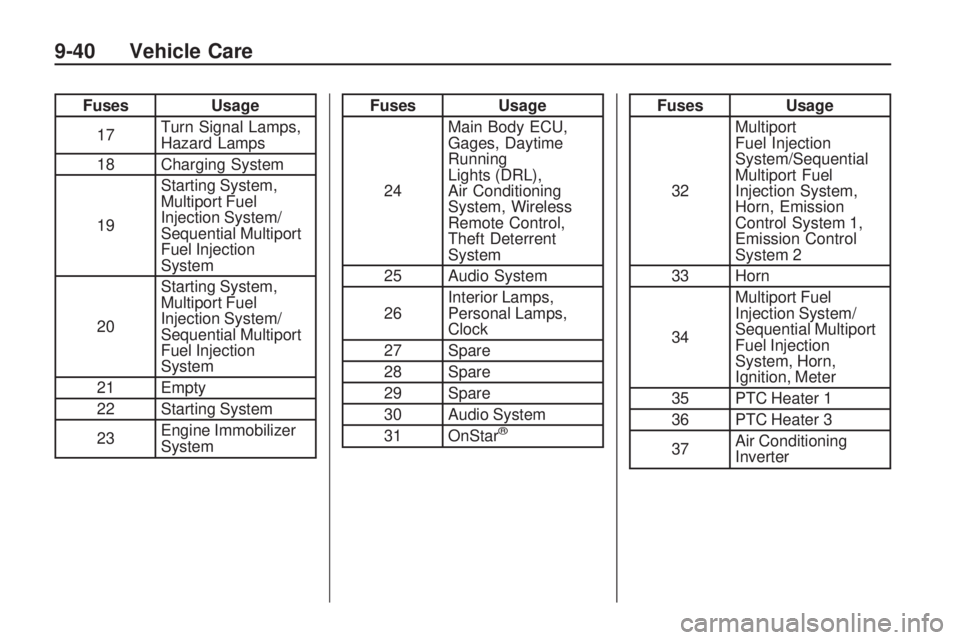
FusesUsage
17 Turn Signal Lamps,
Hazard Lamps
18 Charging System
19 Starting System,
Multiport Fuel
Injection System/
Sequential Multiport
Fuel Injection
System
20 Starting System,
Multiport Fuel
Injection System/
Sequential Multiport
Fuel Injection
System
21 Empty
22 Starting System
23 Engine Immobilizer
SystemFuses
Usage
24 Main Body ECU,
Gages, Daytime
Running
Lights (DRL),
Air Conditioning
System, Wireless
Remote Control,
Theft Deterrent
System
25 Audio System
26 Interior Lamps,
Personal Lamps,
Clock
27 Spare
28 Spare
29 Spare
30 Audio System
31 OnStar
®
Fuses Usage
32 Multiport
Fuel Injection
System/Sequential
Multiport Fuel
Injection System,
Horn, Emission
Control System 1,
Emission Control
System 2
33 Horn
34 Multiport Fuel
Injection System/
Sequential Multiport
Fuel Injection
System, Horn,
Ignition, Meter
35 PTC Heater 1
36 PTC Heater 3
37 Air Conditioning
Inverter
9-40 Vehicle Care
Page 226 of 318
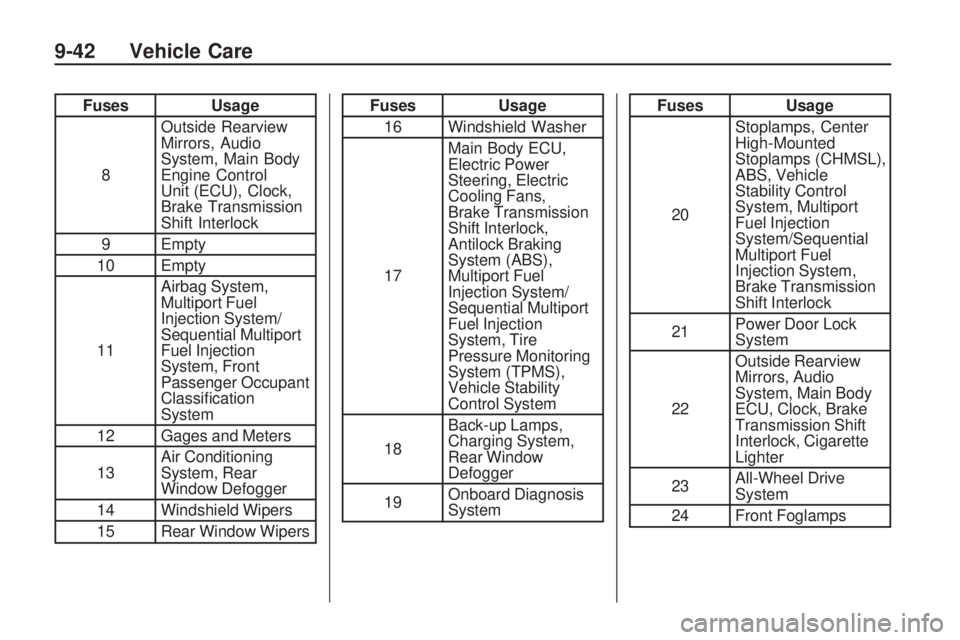
FusesUsage
8 Outside Rearview
Mirrors, Audio
System, Main Body
Engine Control
Unit (ECU), Clock,
Brake Transmission
Shift Interlock
9 Empty
10 Empty
11 Airbag System,
Multiport Fuel
Injection System/
Sequential Multiport
Fuel Injection
System, Front
Passenger Occupant
Classification
System
12 Gages and Meters
13 Air Conditioning
System, Rear
Window Defogger
14 Windshield Wipers
15 Rear Window WipersFuses Usage
16 Windshield Washer
17 Main Body ECU,
Electric Power
Steering, Electric
Cooling Fans,
Brake Transmission
Shift Interlock,
Antilock Braking
System (ABS),
Multiport Fuel
Injection System/
Sequential Multiport
Fuel Injection
System, Tire
Pressure Monitoring
System (TPMS),
Vehicle Stability
Control System
18 Back-up Lamps,
Charging System,
Rear Window
Defogger
19 Onboard Diagnosis
SystemFuses
Usage
20 Stoplamps, Center
High-Mounted
Stoplamps (CHMSL),
ABS, Vehicle
Stability Control
System, Multiport
Fuel Injection
System/Sequential
Multiport Fuel
Injection System,
Brake Transmission
Shift Interlock
21 Power Door Lock
System
22 Outside Rearview
Mirrors, Audio
System, Main Body
ECU, Clock, Brake
Transmission Shift
Interlock, Cigarette
Lighter
23 All-Wheel Drive
System
24 Front Foglamps
9-42 Vehicle Care
Page 227 of 318
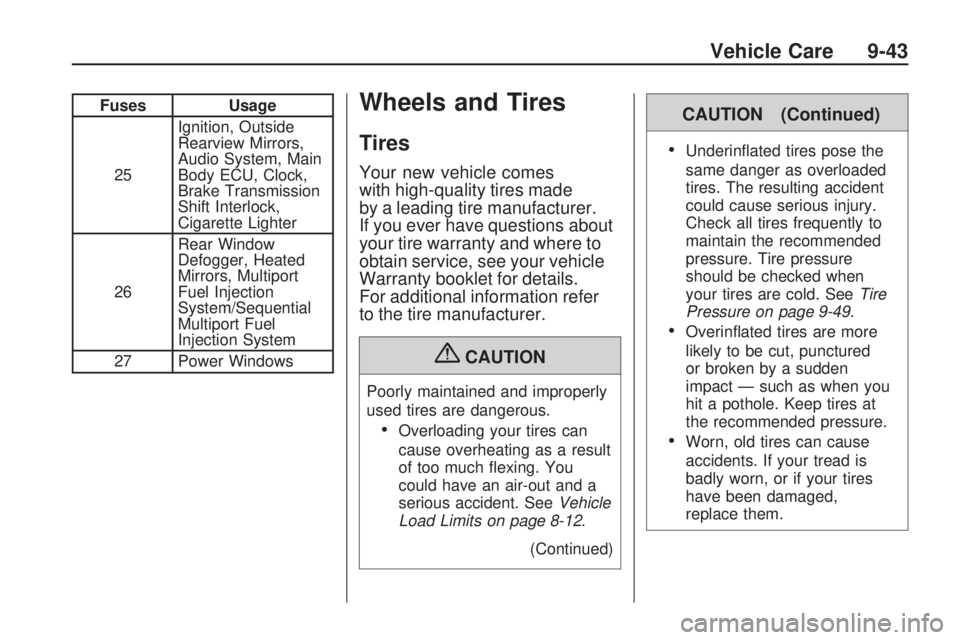
FusesUsage
25 Ignition, Outside
Rearview Mirrors,
Audio System, Main
Body ECU, Clock,
Brake Transmission
Shift Interlock,
Cigarette Lighter
26 Rear Window
Defogger, Heated
Mirrors, Multiport
Fuel Injection
System/Sequential
Multiport Fuel
Injection System
27 Power WindowsWheels and Tires
Tires
Your new vehicle comes
with high-quality tires made
by a leading tire manufacturer.
If you ever have questions about
your tire warranty and where to
obtain service, see your vehicle
Warranty booklet for details.
For additional information refer
to the tire manufacturer.
{CAUTION
Poorly maintained and improperly
used tires are dangerous.
•Overloading your tires can
cause overheating as a result
of too much flexing. You
could have an air-out and a
serious accident. See Vehicle
Load Limits on page 8-12 .
(Continued)
CAUTION (Continued)
•Underinflated tires pose the
same danger as overloaded
tires. The resulting accident
could cause serious injury.
Check all tires frequently to
maintain the recommended
pressure. Tire pressure
should be checked when
your tires are cold. See Tire
Pressure on page 9-49 .
•Overinflated tires are more
likely to be cut, punctured
or broken by a sudden
impact — such as when you
hit a pothole. Keep tires at
the recommended pressure.
•Worn, old tires can cause
accidents. If your tread is
badly worn, or if your tires
have been damaged,
replace them.
Vehicle Care 9-43
Page 258 of 318
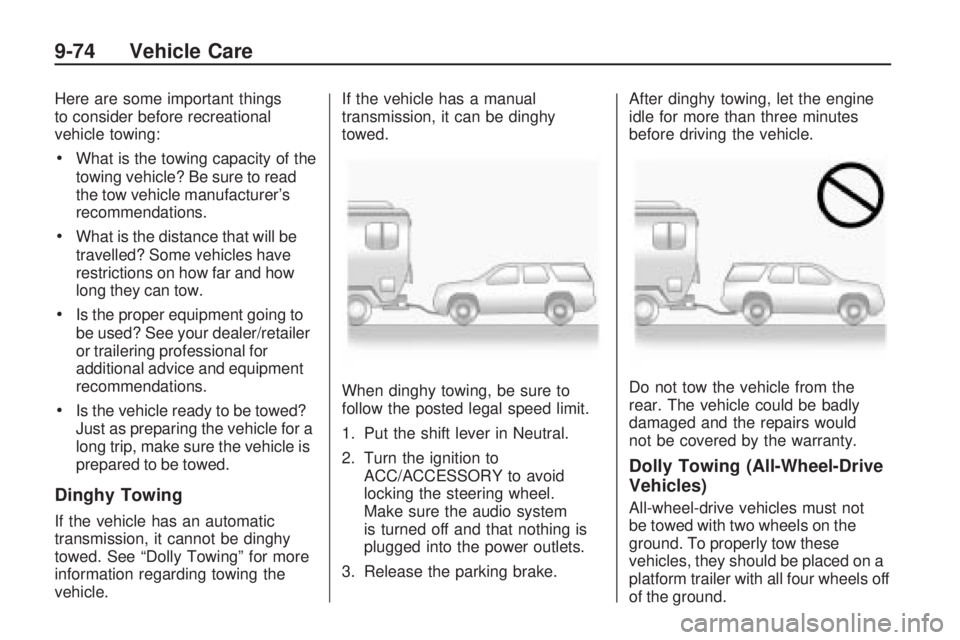
Here are some important things
to consider before recreational
vehicle towing:
•What is the towing capacity of the
towing vehicle? Be sure to read
the tow vehicle manufacturer’s
recommendations.
•What is the distance that will be
travelled? Some vehicles have
restrictions on how far and how
long they can tow.
•Is the proper equipment going to
be used? See your dealer/retailer
or trailering professional for
additional advice and equipment
recommendations.
•Is the vehicle ready to be towed?
Just as preparing the vehicle for a
long trip, make sure the vehicle is
prepared to be towed.
Dinghy Towing
If the vehicle has an automatic
transmission, it cannot be dinghy
towed. See “Dolly Towing” for more
information regarding towing the
vehicle.If the vehicle has a manual
transmission, it can be dinghy
towed.
When dinghy towing, be sure to
follow the posted legal speed limit.
1. Put the shift lever in Neutral.
2. Turn the ignition to
ACC/ACCESSORY to avoid
locking the steering wheel.
Make sure the audio system
is turned off and that nothing is
plugged into the power outlets.
3. Release the parking brake. After dinghy towing, let the engine
idle for more than three minutes
before driving the vehicle.
Do not tow the vehicle from the
rear. The vehicle could be badly
damaged and the repairs would
not be covered by the warranty.
Dolly Towing (All-Wheel-Drive
Vehicles)
All-wheel-drive vehicles must not
be towed with two wheels on the
ground. To properly tow these
vehicles, they should be placed on a
platform trailer with all four wheels off
of the ground.
9-74 Vehicle Care
Page 309 of 318

A
Accessories andModifications ...................... 9-3
Accessory Power .................8-18
Adding Equipment to the Airbag-Equipped Vehicle ....2-35
Add-On Electrical Equipment ....................... 8-50
Adjustments Seat, Front ........................ 2-4
Seat, Initial Drive ................ 2-3
Air Cleaner/Filter, Engine .......9-16
Air Filter, Passenger Compartment ..................... 7-4
Air Vents .............................. 7-4
Airbag System Check ............................. 2-36
How Does an Airbag Restrain? ..................... 2-28
Passenger Sensing System ........................ 2-29
What Makes an Airbag Inflate? ........................ 2-27Airbag System (cont.)
What Will You See Afteran Airbag Inflates? ........2-28
When Should an Airbag Inflate? ........................ 2-26
Where Are the Airbags? .....2-24
Airbags Adding Equipment to theVehicle ........................ 2-35
Passenger Status Indicator ....................... 4-13
Readiness Light ................4-12
Servicing Airbag-Equipped Vehicles ....................... 2-34
System Check ..................2-23
Alarm System Anti-Theft .......................... 1-7
All-Wheel Drive ............8-31, 9-29
All-Wheel-Drive Service Light ............................... 4-18
AM-FM Radio ........................ 6-4
Antenna Satellite Radio ................... 6-9
Antilock Brake System (ABS) ..................8-32
Warning Light ................... 4-17Anti-Theft
Alarm System .................... 1-7
Appearance Care Exterior ........................... 9-75
Interior ............................ 9-80
Ashtrays ...............................
4-8
Assistance Program, Roadside ......................... 12-6
Audio Players ........................ 6-9
CD ................................... 6-9
MP3 ............................... 6-11
Audio System Fixed Mast Antenna ............ 6-8
Audio Systems Radio Reception ................. 6-8
Automatic Headlamp System .............. 5-3
Automatic Transmission ............8-24, 8-27
Fluid ............................... 9-12
Manual Mode ................... 8-28
Auxiliary Devices ..................6-14
INDEX i-1