lock PORSCHE 911 CARRERA 2006 5.G Owner's Guide
[x] Cancel search | Manufacturer: PORSCHE, Model Year: 2006, Model line: 911 CARRERA, Model: PORSCHE 911 CARRERA 2006 5.GPages: 308, PDF Size: 3.69 MB
Page 83 of 308

Controls, Instruments
83
Stopping Engine fTurn key back to position 3.
fDo not stop engine immediately after hard or
extended driving.
Keep engine running at increased idle for
about two minutes to prevent excessive heat
build-up before turning off engine.
fTo avoid battery run-down, always remove the
ignition key from the ignition lock.
fMake sure that when you leave the car, even
briefly, you have withdrawn the ignition key.
fEngage the steering lock by moving the steer-
ing wheel to the left or right.
Turn the steering wheel to the locking position
before you switch off the engine so that you
don’t have to exert yourself when locking or
unlocking the steering.
Warning!
Danger of injury. Hot engine compartment
components can burn skin on contact.
fBefore working on any part in the engine com-
partment, turn the engine off and let it cool down sufficiently.
Engine-compartment blower,
radiator fan The radiator and radiator fans are in the front of
the car.
The engine-compartment blower is mounted on
the engine compartment lid.
Warning!
Risk of injury.
After the engine is switched off, the engine-
compartment temperature is monitored for
approx. 30 minutes.
During this period, and depending on tem-
perature, the engine-compartment blower
may continue to run or start to run.
fCarry out work in these areas only with the en-
gine off, the ignition off, and exercise extreme
caution.
Risk of injury. The radiator fans in the front
end of the car may be operating or
unexpectedly start operating when the
engine is switched on.
fCarry out work in these areas only with the en-gine switched off.
Automatic garage door The ignition system in your Porsche may interfere
with your electronically operated garage door.
fTo check this, drive your Porsche close to the
garage door. Make sure not to interfere with
the operating range of the door.
fRun the engine at different speeds.
If the garage door opens or closes without you op-
erating the garage door unit in your car, contact
the dealer who installed the automatic garage
door to have the frequency and/or coding of the
garage door signal changed or modified.
Page 84 of 308

84
Controls, Instruments
Instrument Panel USA Models Also refer to the corresponding chapters in
the Owner’s Manual.
1. Engine oil temperature gauge
2. Speedometer with analogue display
3. Tire pressure warning light
4. Turn signal indicator light, left
5. Tachometer
6. High beam indicator light
7. Turn signal indicator light, right
8. ABS warning light
9. Cooling system
Temperature gauge, warning light
10.Fuel
Level gauge, warning light
11.Engine oil pressure gauge
12.Adjustment button for instrument illumination
and trip counter
13.Odometer and daily trip mileage display
14.Automatic speed control indicator light15.Light sensor for instrument illumination
16.Airbag warning light
17.Emission control warning light
(Check Engine)
18.Central warning light
19.On-board computer display
20.Porsche Stability Management
Multifunctional PSM light
21.Brake warning light
22.Safety belt warning light
23.Tiptronic indicator
24.Clock and outside temperature display
25 Adjustment button for clockWhen the ignition is switched on, the warning
lights light up for a lamp check.
Note
Warnings that have been given are stored in the
appropriate control unit memory and can be read
out at an authorized Porsche dealer.
This information can help to warn you about situa-
tions which may be hazardous to you or your car.
Page 86 of 308

86
Controls, Instruments
Instrument Panel Canada Models Also refer to the corresponding chapters in
the Owner’s Manual.
1. Engine oil temperature gauge
2. Speedometer with analogue display
3. Tire pressure warning light
4. Turn signal indicator light, left
5. Tachometer
6. High beam indicator light
7. Turn signal indicator light, right
8. ABS warning light
9. Cooling system
Temperature gauge, warning light
10.Fuel
Level gauge, warning light
11.Engine oil pressure gauge
12.Adjustment button for instrument illumination
and trip counter
13.Odometer and daily trip mileage display
14.Automatic speed control indicator light15.Light sensor for instrument illumination
16.Airbag warning light
17.Emission control warning light
(Check Engine)
18.Central warning light
19.On-board computer display
20.Porsche Stability Management
Multifunctional PSM light
21.Brake warning light
22.Safety belt warning light
23.Tiptronic indicator
24.Clock and outside temperature display
25 Adjustment button for clockWhen the ignition is switched on, the warning
lights light up for a lamp check.
Note
Warnings that have been given are stored in the
appropriate control unit memory and can be read
out at an authorized Porsche dealer.
This information can help to warn you about situa-
tions which may be hazardous to you or your car.
Page 95 of 308
Controls, Instruments
95
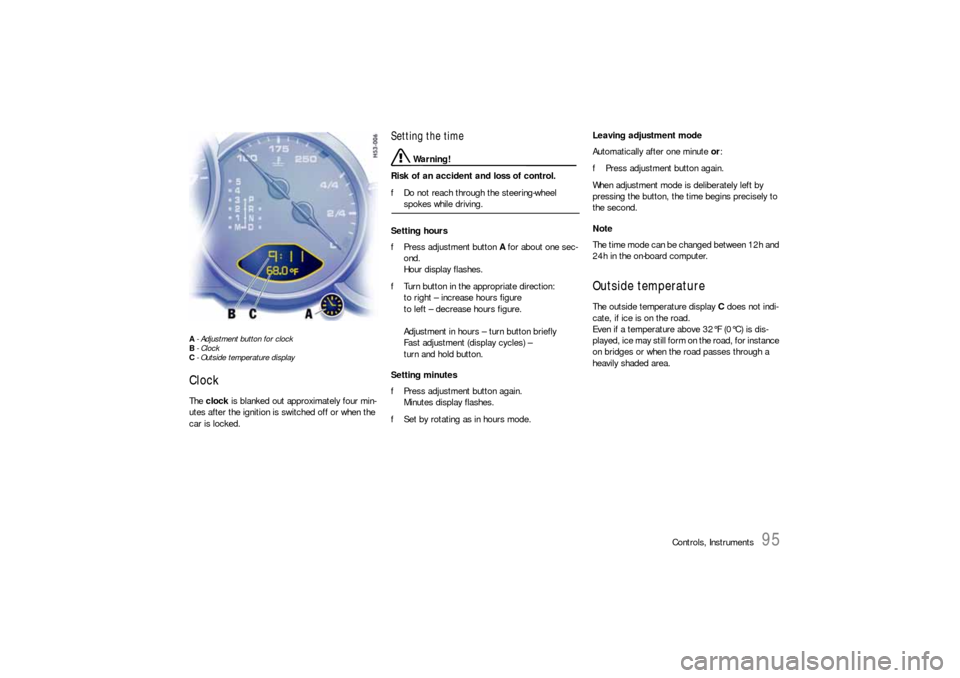
A- Adjustment button for clock
B- Clock
C- Outside temperature displayClock The clock is blanked out approximately four min-
utes after the ignition is switched off or when the
car is locked.
Setting the time
Warning!
Risk of an accident and loss of control.
fDo not reach through the steering-wheel spokes while driving.
Setting hours
fPress adjustment button A for about one sec-
ond.
Hour display flashes.
fTurn button in the appropriate direction:
to right – increase hours figure
to left – decrease hours figure.
Adjustment in hours – turn button briefly
Fast adjustment (display cycles) –
turn and hold button.
Setting minutes
fPress adjustment button again.
Minutes display flashes.
fSet by rotating as in hours mode. Leaving adjustment mode
Automatically after one minute or:
fPress adjustment button again.
When adjustment mode is deliberately left by
pressing the button, the time begins precisely to
the second.
Note
The time mode can be changed between 12h and
24h in the on-board computer.
Outside temperature The outside temperature display C does not indi-
cate, if ice is on the road.
Even if a temperature above 32°F (0°C) is dis-
played, ice may still form on the road, for instance
on bridges or when the road passes through a
heavily shaded area.
Page 122 of 308

122
Controls, Instruments
Warnings on the instrument panel and the on-board computerIf a warning message appears, always refer to the corresponding chapters in the Owner’s Manual.
Warning messages are issued only if all measurement preconditions are met. Therefore, check all fluid levels regularly –
in particular, always check the engine oil level after refuelling.
Instrument
panelOn-board
computerText display on on-board
computerMeaning/measure
Seat belt Driver and passengers must fasten their seat
belts.
Handbrake Handbrake is still on.
Ignition key
not removed
Replace battery
in ignition keyReplace the remote-control battery.
Ignition lock faulty,
please go to workshopHave the fault remedied at an authorized
Porsche dealer.
Ignition lock faulty,
visit workshop nowHave the fault remedied at an authorized
Porsche dealer.
Relieve steering Relieve the steering l o c k b y m o v i n g t h e s t e e r i n g
wheel to the left or right.
Steering locked The steering wheel lock remains engaged.
Have the fault remedied at an authorized
Porsche dealer.
Lights on
Parking light on
Page 126 of 308

126
Controls, Instruments
Sport mode failure Have the fault remedied at an authorized
Porsche dealer.
Airbag system fault Airbag is faulty.
Have the fault remedied at an authorized
Porsche dealer.
Check passenger’s seat setting Weight sensing is impaired on the front
passenger's seat (Advanced Airbag).
Correct the seating position, set the backrest
upright, do not support weight on the armrests,
or lift on the handles.
Failure spoiler control Driving stability is impaired.
Adjust your driving style. Reduce speed.
Have the fault remedied at an authorized
Porsche dealer.
Display of
selector lever posi-
tion flashesSelector lever is not engaged Tiptronic S:
Selector lever can be between two positions.
Engage the selector lever correctly.
Move selector lever to P Tiptronic S:
Move selector lever to position P before with-
drawing key from ignition lock.
Apply brake Tiptronic S:
Apply the brake when starting.
Depress clutch pedal Manual transmission:
Depress clutch pedal when starting.
Move selector lever
to position P or NTiptronic S:
The vehicle can be started only in the selector
lever position P or N.
Display of
selector lever posi-
tion flashesTiptronic emergency run Have the fault remedied at an authorized
Porsche dealer.
Instrument
panelOn-board
computerText display on on-board
computerMeaning/measure
Page 130 of 308
130
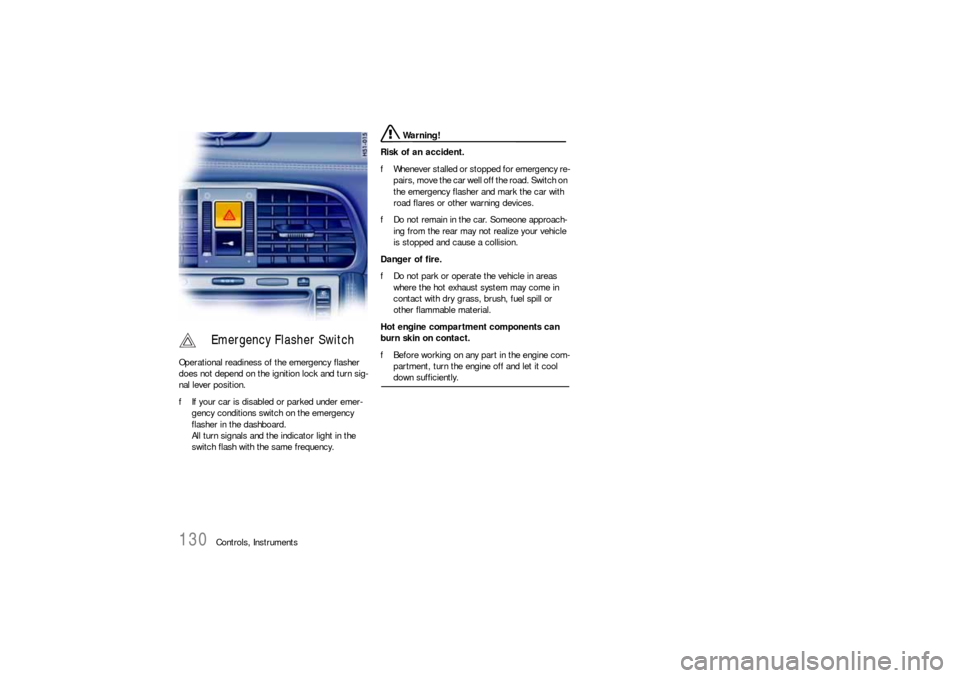
Controls, Instruments Operational readiness of the emergency flasher
does not depend on the ignition lock and turn sig-
nal lever position.
fIf your car is disabled or parked under emer-
gency conditions switch on the emergency
flasher in the dashboard.
All turn signals and the indicator light in the
switch flash with the same frequency.
Warning!
Risk of an accident.
fWhenever stalled or stopped for emergency re-
pairs, move the car well off the road. Switch on
the emergency flasher and mark the car with
road flares or other warning devices.
fDo not remain in the car. Someone approach-
ing from the rear may not realize your vehicle
is stopped and cause a collision.
Danger of fire.
fDo not park or operate the vehicle in areas
where the hot exhaust system may come in
contact with dry grass, brush, fuel spill or
other flammable material.
Hot engine compartment components can
burn skin on contact.
fBefore working on any part in the engine com-
partment, turn the engine off and let it cool down sufficiently.
Emergency Flasher Switch
Page 131 of 308
Controls, Instruments
131
If the ignition key is withdrawn and the door is
opened while the lights (not the parking light or
Welcome Home lighting) are on, a chime warns of
possible battery discharge.
In some countries, differences are possible
due to provisions of law.
Note on operation
Further individual light functions (e.g. daytime driv-
ing lights) are available in vehicles with the Sport
Chrono package.
Please observe the chapter “Individual Memory” in
the separate PCM operating instructions.
Welcome Home LightingSwitching onfMove light switch to the HOME position.
For improved visibility and security when you get
in and out of the car, the fog lights and the tail
lights remain on for a certain period of time:
–When you get out of the car, the lights are
turned on for approx. 30 seconds after the
door is opened. The off-delay time resumes
when the vehicle is locked.
On vehicles with the Sport Chrono package,
the PCM can be used to set the off-delay time.
This setting also changes the lighting period
for unlocking the vehicle.
Please observe the chapter “Individual
Memory” in the separate PCM operating
instructions.
– The lights are turned on for approx.
30 seconds when the vehicle is unlocked.
The lights go out if the ignition is switched on
or when leaving the Welcome Home lighting.
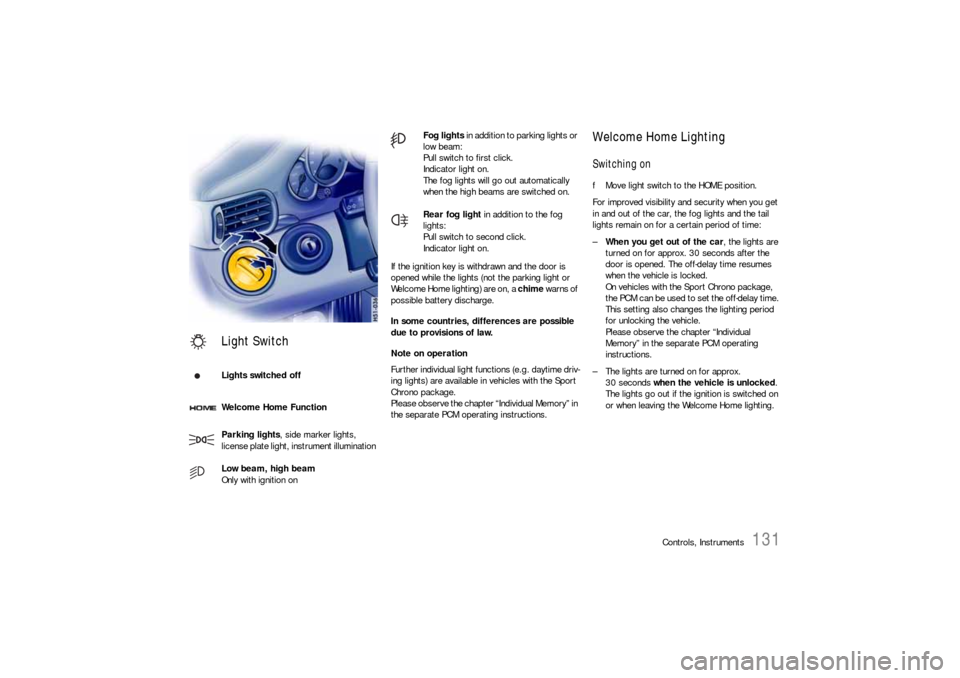
Light SwitchLights switched off
Welcome Home Function
Parking lights, side marker lights,
license plate light, instrument illumination
Low beam, high beam
Only with ignition on
Fog lights in addition to parking lights or
low beam:
Pull switch to first click.
Indicator light on.
The fog lights will go out automatically
when the high beams are switched on.
Rear fog light in addition to the fog
lights:
Pull switch to second click.
Indicator light on.
Page 143 of 308
Controls, Instruments
143
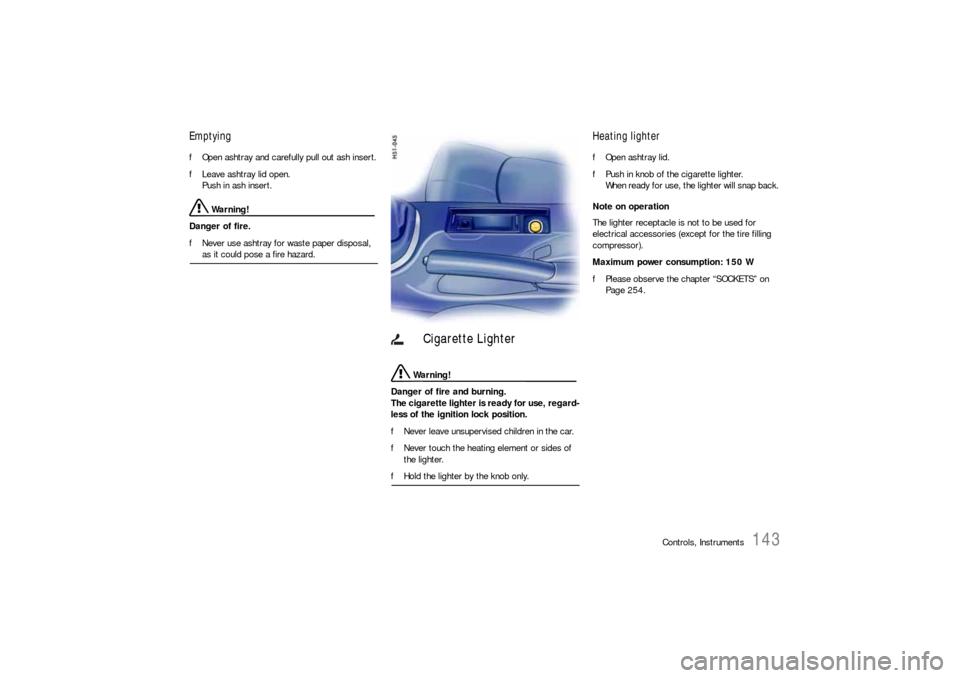
Emptying fOpen ashtray and carefully pull out ash insert.
fLeave ashtray lid open.
Push in ash insert.
Warning!
Danger of fire.
fNever use ashtray for waste paper disposal, as it could pose a fire hazard.
Warning!
Danger of fire and burning.
The cigarette lighter is ready for use, regard-
less of the ignition lock position.
fNever leave unsupervised children in the car.
fNever touch the heating element or sides of
the lighter.
fHold the lighter by the knob only.
Heating lighter fOpen ashtray lid.
fPush in knob of the cigarette lighter.
When ready for use, the lighter will snap back.
Note on operation
The lighter receptacle is not to be used for
electrical accessories (except for the tire filling
compressor).
Maximum power consumption: 150 W
fPlease observe the chapter “SOCKETS” on
Page 254.
Cigarette Lighter
Page 147 of 308
Controls, Instruments
147
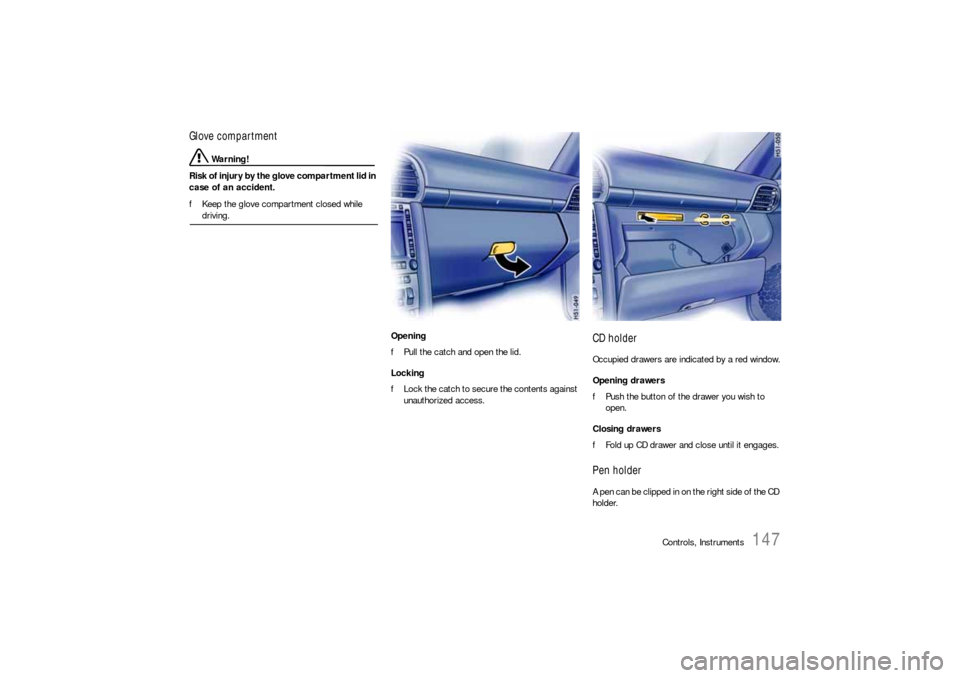
Glove compartment
Warning!
Risk of injury by the glove compartment lid in
case of an accident.
fKeep the glove compartment closed while driving.
Opening
fPull the catch and open the lid.
Locking
fLock the catch to secure the contents against
unauthorized access.
CD holderOccupied drawers are indicated by a red window.
Opening drawers
fPush the button of the drawer you wish to
open.
Closing drawers
fFold up CD drawer and close until it engages.Pen holderA pen can be clipped in on the right side of the CD
holder.