light PORSCHE 911 CARRERA 2006 5.G Repair Manual
[x] Cancel search | Manufacturer: PORSCHE, Model Year: 2006, Model line: 911 CARRERA, Model: PORSCHE 911 CARRERA 2006 5.GPages: 308, PDF Size: 3.69 MB
Page 132 of 308
132
Controls, Instruments
Automatic Headlight Beam
Adjustment Vehicles with Bi-Xenon headlights feature
automatic headlight beam adjustment.
When the ignition is switched on, the level of the
headlight beam automatically changes in accord-
ance with the vehicle load.
The level of the headlight beam is automatically
kept constant during acceleration and braking. Checking operation 1. Switch the low beam on.
2. Insert ignition key and switch ignition on.
The light beam first dips all the way down and
is then adapted to the vehicle load.
If this test item is not met, the headlight beam
adjustment system must be checked by an author-
ized Porsche dealer.
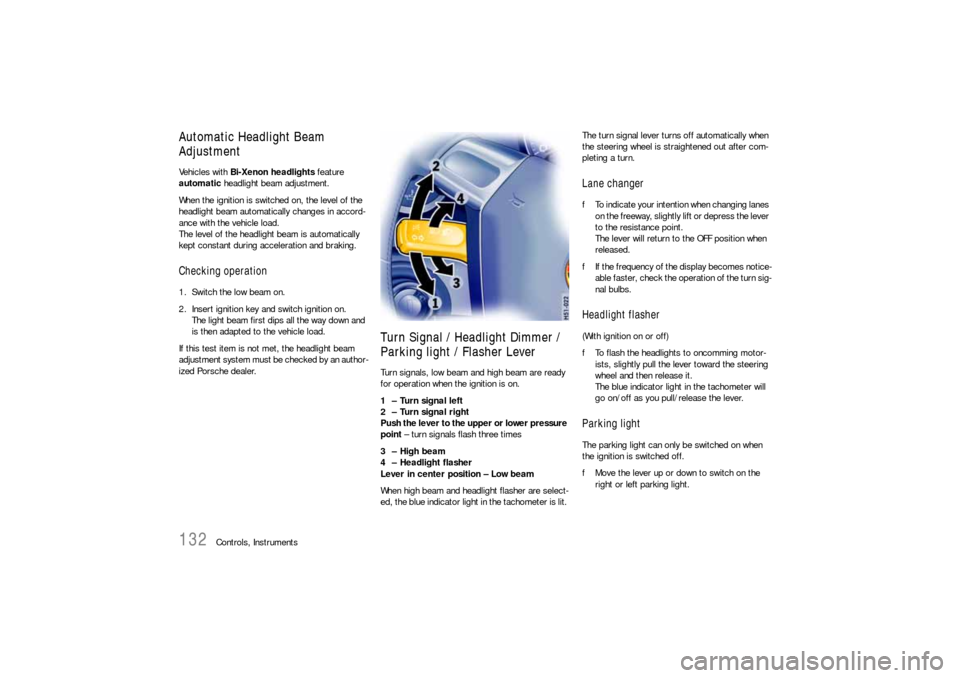
Turn Signal / Headlight Dimmer /
Parking light / Flasher Lever Turn signals, low beam and high beam are ready
for operation when the ignition is on.
1 – Turn signal left
2 – Turn signal right
Push the lever to the upper or lower pressure
point – turn signals flash three times
3 – High beam
4 – Headlight flasher
Lever in center position – Low beam
When high beam and headlight flasher are select-
ed, the blue indicator light in the tachometer is lit. The turn signal lever turns off automatically when
the steering wheel is straightened out after com-
pleting a turn.
Lane changer fTo indicate your intention when changing lanes
on the freeway, slightly lift or depress the lever
to the resistance point.
The lever will return to the OFF position when
released.
fIf the frequency of the display becomes notice-
able faster, check the operation of the turn sig-
nal bulbs. Headlight flasher (With ignition on or off)
fTo flash the headlights to oncomming motor-
ists, slightly pull the lever toward the steering
wheel and then release it.
The blue indicator light in the tachometer will
go on/off as you pull/release the lever. Parking lightThe parking light can only be switched on when
the ignition is switched off.
fMove the lever up or down to switch on the
right or left parking light.
Page 133 of 308
Controls, Instruments
133
Windshield Wiper / Washer Lever
Warning!
Danger of injury when the windshield wipers
operate unintentionally.
Risk of damage to the windshield and wiper
system.
fAvoid running the wiper blades over a dry wind-
shield to prevent scratching the glass. Spray
washer fluid on the windshield first.
A scratched windshield will reduce visibility.
fAlways loosen wiper blades from frozen glass
before operating wipers to prevent damage to
the wiper motor or blades. fAlways switch off windshield wipers in car
wash to prevent them wiping unintentionally
(intermittent or sensor operation).
fAlways switch off windshield wipers before
cleaning the windshield to avoid unintentional
operation (intermittent or sensor operation).
fDo not operate the headlight washer in car
washes.
fDo not operate headlight washer when it is
frozen.
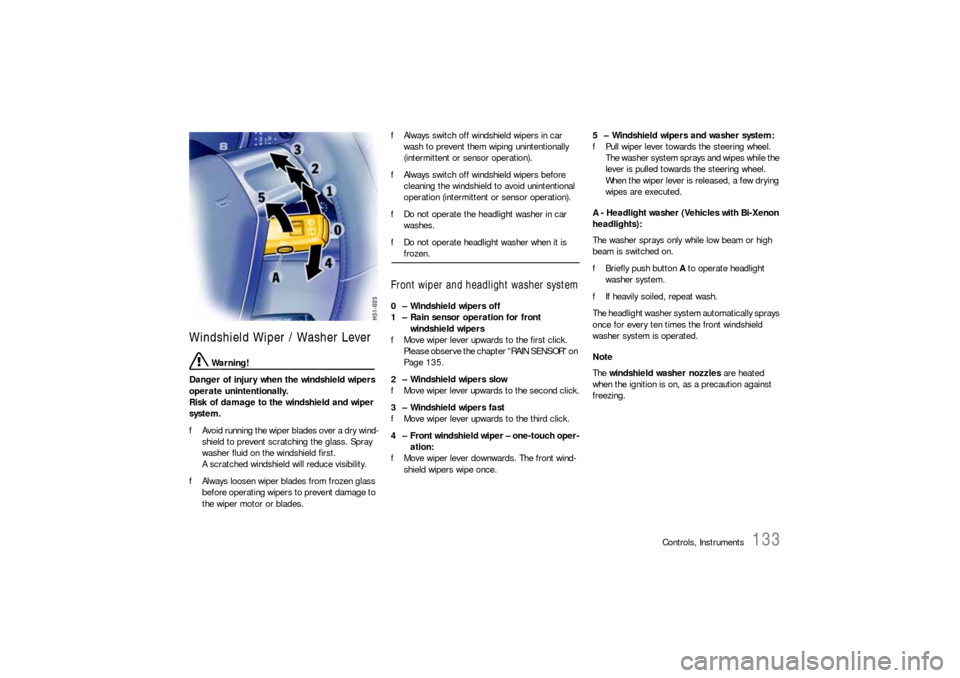
Front wiper and headlight washer system0 – Windshield wipers off
1 – Rain sensor operation for front
windshield wipers
fMove wiper lever upwards to the first click.
Please observe the chapter “RAIN SENSOR” on
Page 135.
2 – Windshield wipers slow
fMove wiper lever upwards to the second click.
3 – Windshield wipers fast
fMove wiper lever upwards to the third click.
4 – Front windshield wiper – one-touch oper-
ation:
fMove wiper lever downwards. The front wind-
shield wipers wipe once.5 – Windshield wipers and washer system:
fPull wiper lever towards the steering wheel.
The washer system sprays and wipes while the
lever is pulled towards the steering wheel.
When the wiper lever is released, a few drying
wipes are executed.
A - Headlight washer (Vehicles with Bi-Xenon
headlights):
The washer sprays only while low beam or high
beam is switched on.
fBriefly push button A to operate headlight
washer system.
fIf heavily soiled, repeat wash.
The headlight washer system automatically sprays
once for every ten times the front windshield
washer system is operated.
Note
The windshield washer nozzles are heated
when the ignition is on, as a precaution against
freezing.
Page 136 of 308
136
Controls, Instruments
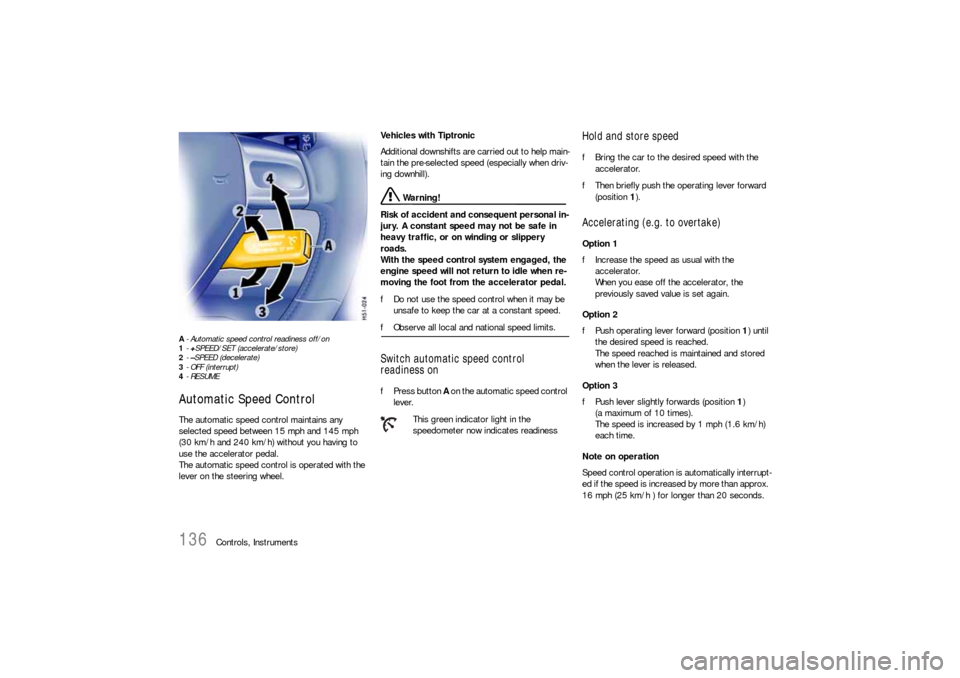
A- Automatic speed control readiness off/on
1-+SPEED/SET (accelerate/store)
2-–SPEED (decelerate)
3- OFF (interrupt)
4-RESUMEAutomatic Speed Control The automatic speed control maintains any
selected speed between 15 mph and 145 mph
(30 km/h and 240 km/h) without you having to
use the accelerator pedal.
The automatic speed control is operated with the
lever on the steering wheel. Vehicles with Tiptronic
Additional downshifts are carried out to help main-
tain the pre-selected speed (especially when driv-
ing downhill).
Warning!
Risk of accident and consequent personal in-
jury. A constant speed may not be safe in
heavy traffic, or on winding or slippery
roads.
With the speed control system engaged, the
engine speed will not return to idle when re-
moving the foot from the accelerator pedal.
fDo not use the speed control when it may be
unsafe to keep the car at a constant speed.
fObserve all local and national speed limits. Switch automatic speed control
readiness onfPress button A on the automatic speed control
lever.
Hold and store speed fBring the car to the desired speed with the
accelerator.
fThen briefly push the operating lever forward
(position 1).Accelerating (e.g. to overtake) Option 1
fIncrease the speed as usual with the
accelerator.
When you ease off the accelerator, the
previously saved value is set again.
Option 2
fPush operating lever forward (position 1) until
the desired speed is reached.
The speed reached is maintained and stored
when the lever is released.
Option 3
fPush lever slightly forwards (position 1)
(a maximum of 10 times).
The speed is increased by 1 mph (1.6 km/h)
each time.
Note on operation
Speed control operation is automatically interrupt-
ed if the speed is increased by more than approx.
16 mph (25 km/h ) for longer than 20 seconds.
This green indicator light in the
speedometer now indicates readiness
Page 137 of 308

Controls, Instruments
137
Decelerating Option 1
fPull operating lever towards the steering wheel
(position 2) until the desired speed is reached.
The speed reached is maintained and stored
when the lever is released.
Option 2
fBriefly move lever towards the steering wheel
(position 2) (a maximum of 10 times).
The speed is reduced by 1 mph (1.6 km/h)
each time.
Vehicles with Tiptronic
Additional downshifts are carried out to improve
deceleration (especially when driving downhill).
Interrupting automatic speed control
operation fPull operating lever downwards briefly
(position 3) or
fOperate brake or clutch pedal or
fSwitch Tiptronic transmission to selector lever
position N.
fPlease observe the chapter “TIPTRONIC S” on
Page 165.
The speed driven before the interruption remains
stored in the memory.
Automatic speed control operation is
interrupted automatically:
– If the set vehicle speed is exceeded by more
than approx. 16 mph (25 km/h) for longer than
20 seconds.
– If the actual vehicle speed falls to approx.
6 mph (10 km/h) below the set vehicle speed
for longer than 5 seconds (upward slopes).
– For PSM control operations.
Resuming the stored speed fBriefly push operating lever upwards
(position4).
The speed control accelerates/decelerates
the vehicle to the stored speed.
The stored speed should only be recalled when
traffic conditions and the road surface so permit.Switching automatic speed control
readiness off fPress button A on the automatic speed control
lever.
The green readiness light in the speedometer
goes off.
When the vehicle is parked and the ignition
switched off, the memory is cleared.
Important note
On upward or downward slopes, the set speed
cannot always be maintained by the automatic
speed control.
To obtain sufficient engine braking or a better en-
gine-speed range, therefore, you have to select a
lower gear.
Page 139 of 308

Controls, Instruments
139
Setting temperaturefPress button H upwards or downwards
respectively.
To suit personal comfort, the interior temperature
can be adjusted between 61°F and 85°F/16 and
29.5°C.
Recommendation: 72°F/22°C.
If “LO” or “HI” appears on the display, the system
is operating at maximum cooling or heating pow-
er.
Automatic control is no longer active.
Note
If the preselected temperature is changed, the
blower speed can increase automatically in auto-
matic mode.
The desired temperature is reached more quickly
this way.
Sensors
To avoid affecting the performance of the air-con-
ditioning system:
fDo not cover the sun sensor on the instrument
panel or the temperature sensor D.fPress button B (switch on or off).
The windshield is defogged or defrosted as
quickly as possible.
Air flows to the windshield only.
The light-emitting diode in the button lights up.
ECO – switching compressor for air-
conditioning system on and offThe air-conditioning compressor switches off
automatically at temperatures below approx.
37°F/3°C and cannot be switched on, even
manually.
Whenever outside temperatures exceed approx.
37°F/3°C, the air-conditioning compressor is
always switched on in automatic mode.
The compressor can be switched off to save fuel,
but control comfort is then limited:
fPress ECO button E.
The compressor is switched off.
The light-emitting diode in the button lights up.
fIf the interior temperature is too high, switch
compressor back on or press AUTO button.
To dry incoming air in damp weather, do not
switch off the air-conditioning compressor.
This prevents fogging of windows.
Defrosting the windshield
fPress button M upwards or downwards
respectively.
The preset blower speed is increased or
decreased.
The speed stages are indicated by a bar display.
If the button is pressed downwards at the lowest
blower stage, the blower and automatic control
are switched off. “OFF” will appear on the display
field.
Pressing the button upwards or pressing the
AUTO button switches the blower and automatic
control back on again.
Warning!
Risk of accident due to impaired vision.
In recirculating-air setting, the windows may
fog up.
fOnly select recirculating-air setting for short
periods.
fIf the windows fog up, switch recirculating-air
setting off immediately by pressing the
circulating-air button again and select the “Defrost windshield” function.
f f f
Adjusting blower speed
Recirculating-air setting
Page 140 of 308

140
Controls, Instruments Switching recirculating-air setting on or off
fPress button C.
The outside-air supply is interrupted and only
the inside air is circulated.
The light-emitting diode in the button lights up.
Over approx. 37°F/3°C
If the air-conditioning compressor was off, it
switches on automatically. The duration of recircu-
lating-air setting is not limited.
Below approx. 37°F/3°C
The air-conditioning compressor is switched off.
Recirculating-air setting is automatically ended
after approx. 3 minutes.
Air distributionThe individual air distributions can be combined as
desired.
Recommended setting in Summer:
Air distribution to central and side vents.
Recommended setting in Winter:
Air distribution to footwell and windshield.fPress button J.
The air flows to the footwell.
The selection appears on the display panel.
fPress button K.
The air flows from the central and side vents.
Vents must be open.
The selection appears on the display panel.
fPress button L.
The air flows to the windshield.
The selection appears on the display panel.
Note on operation
fOn vehicles with the Sport Chrono package,
individual air conditioning settings can be
stored on your vehicle key.
Please observe the chapter “Individual
Memory” in the separate PCM operating
instructions.
General instructions for air-conditioning
compressor– Can switch off briefly if engine is under an ex-
treme load to ensure sufficient engine cooling.
– Switches off automatically at temperatures be-
low approx. 37°F/3°C and cannot be switched
on, even manually.
– Operates most effectively with windows
closed.
If the car has been in the sun for a long time, it
is a good idea to ventilate the interior briefly
with the windows open.
– Depending on the outside temperature and hu-
midity, condensation can drip from the evapo-
rator and form a pool under the vehicle.
This is normal and not a sign of leakage.
– If uncooled air flows out when the lowest tem-
perature has been set, switch off the air-condi-
tioning compressor and have the fault repaired
at an authorized Porsche dealer. Air distribution to footwell
Air distribution to central and side
vents
Air distribution to windshield
Page 142 of 308
142
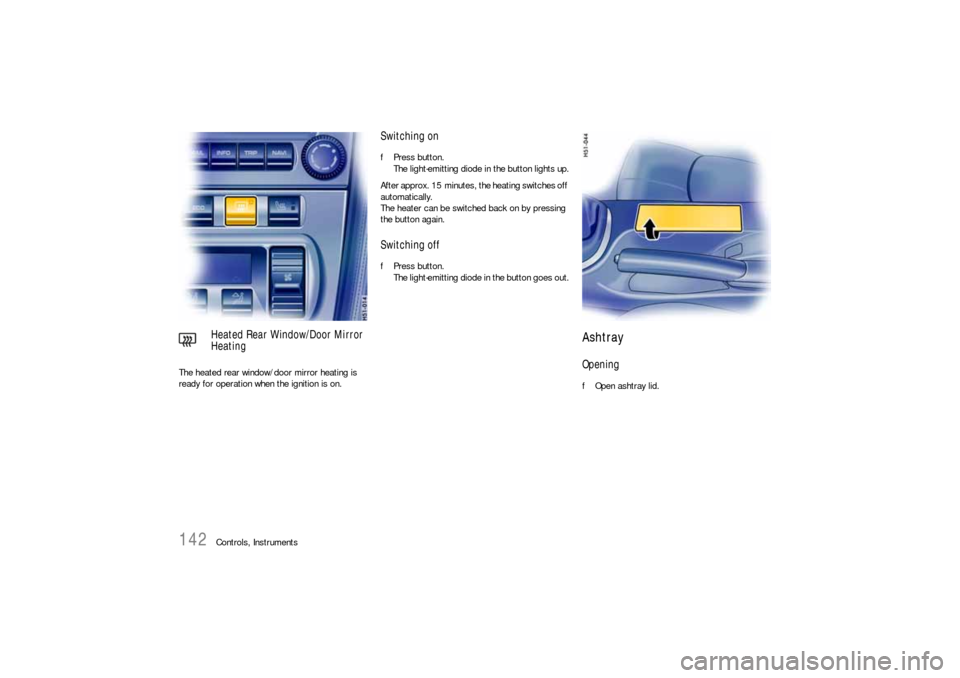
Controls, Instruments The heated rear window/door mirror heating is
ready for operation when the ignition is on.
Switching onfPress button.
The light-emitting diode in the button lights up.
After approx. 15 minutes, the heating switches off
automatically.
The heater can be switched back on by pressing
the button again.Switching offfPress button.
The light-emitting diode in the button goes out.
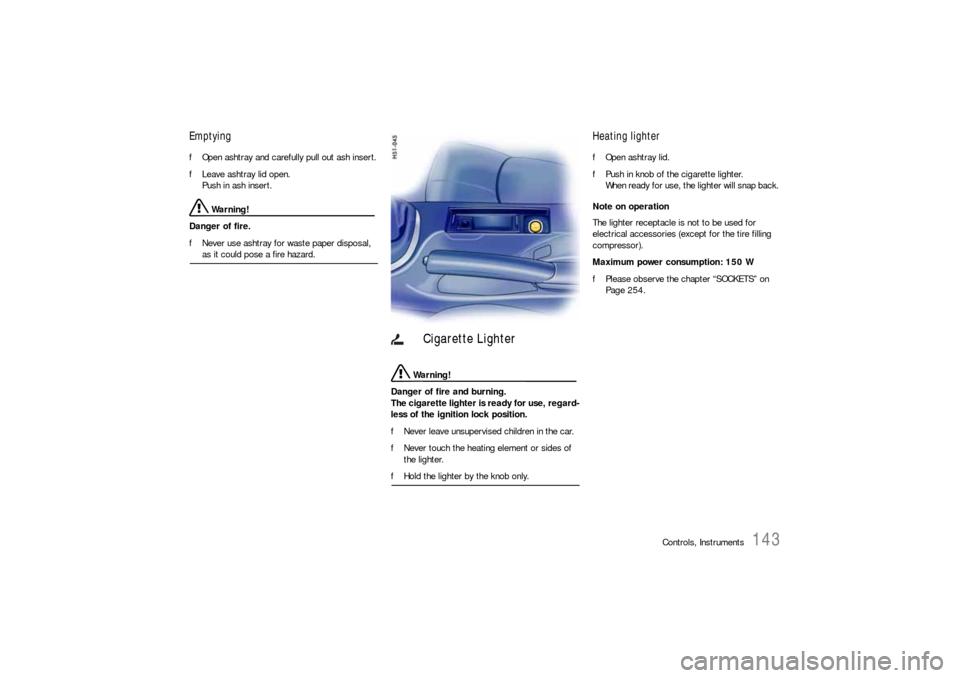
Ashtray Opening fOpen ashtray lid.
Heated Rear Window/Door Mirror
Heating
Page 143 of 308
Controls, Instruments
143
Emptying fOpen ashtray and carefully pull out ash insert.
fLeave ashtray lid open.
Push in ash insert.
Warning!
Danger of fire.
fNever use ashtray for waste paper disposal, as it could pose a fire hazard.
Warning!
Danger of fire and burning.
The cigarette lighter is ready for use, regard-
less of the ignition lock position.
fNever leave unsupervised children in the car.
fNever touch the heating element or sides of
the lighter.
fHold the lighter by the knob only.
Heating lighter fOpen ashtray lid.
fPush in knob of the cigarette lighter.
When ready for use, the lighter will snap back.
Note on operation
The lighter receptacle is not to be used for
electrical accessories (except for the tire filling
compressor).
Maximum power consumption: 150 W
fPlease observe the chapter “SOCKETS” on
Page 254.
Cigarette Lighter
Page 149 of 308
Controls, Instruments
149
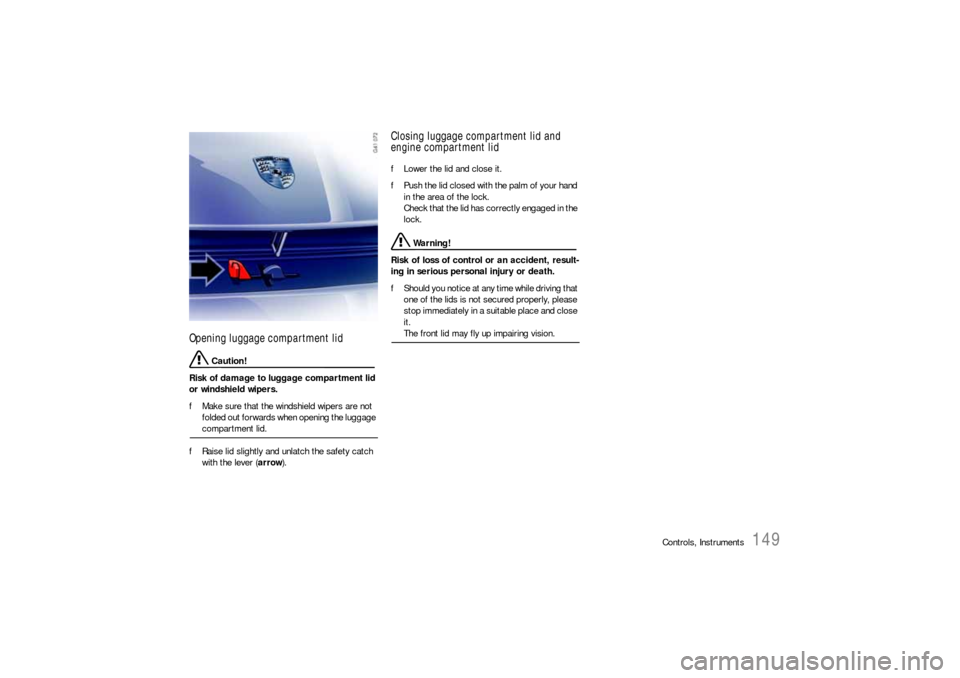
Opening luggage compartment lid
Caution!
Risk of damage to luggage compartment lid
or windshield wipers.
fMake sure that the windshield wipers are not
folded out forwards when opening the luggage compartment lid.
fRaise lid slightly and unlatch the safety catch
with the lever (arrow).
Closing luggage compartment lid and
engine compartment lid fLower the lid and close it.
fPush the lid closed with the palm of your hand
in the area of the lock.
Check that the lid has correctly engaged in the
lock.
Warning!
Risk of loss of control or an accident, result-
ing in serious personal injury or death.
fShould you notice at any time while driving that
one of the lids is not secured properly, please
stop immediately in a suitable place and close
it. The front lid may fly up impairing vision.
Page 152 of 308

152
Controls, Instruments
Trunk EntrapmentYour vehicle is equipped with an internal trunk
release mechanism.
A person trapped in the luggage compartment
can release the lid from the inside using unlocking
handle A.
The handle A is fluorescent and glows in the dark. A warning message in the on-board computer
lights up when unlocking handle A is operated.
fStop the vehicle immediately when the warning
lights light up.
fCheck the luggage compartment.
fClose the lid.Function with vehicle stationary
If the luggage compartment lid is unlocked with
unlocking handle A, the lid can be opened from the
inside immediately.
Function with vehicle in motion
If the luggage compartment lid is unlocked with
unlocking handle A when a speed of 2
mph
(3 km/h
) is exceeded, the warning message in the
on-board computer lights up.
At the same time, the lid is unlocked and the latch
striker pops into the catch-hook position.
Warning light