display PORSCHE 911 TURBO 2014 6.G Owners Manual
[x] Cancel search | Manufacturer: PORSCHE, Model Year: 2014, Model line: 911 TURBO, Model: PORSCHE 911 TURBO 2014 6.GPages: 300, PDF Size: 10.61 MB
Page 152 of 300
150 Driving and Driving Safety
Information
The engine will start automatically in certain situations, e.g. if the vehicle starts rolling, if air conditioning causes reduced comfort, or if the brake vacuum is reduced.The engine is stopped again automatically if the preconditions for stopping the engine automatically are then met again.
Exceptions for the Auto Start Stop function
The Auto Start Stop function is deactivated e.g.: – When Sport mode is activated.– When PSM is off.– In maneuvering mode.– When A/C MAX mode is activated.– When the “Windshield defrost” function is active. – At altitudes above approx. 9,843 ft. (3,000 meters)
For information on switching on and off the Auto Start Stop function:fPlease see the chapter “SWITCHING AUTO START STOP FUNCTION AND COASTING MODE ON AND OFF” on page 150.
The Auto Start Stop function is available with limited functionality in the following situations, e.g.:– If the air conditioning or passenger compartment heating is operated at a high setting or if the defrost function is run for long time periods.– If the battery charging condition is low.– On upward or downward slopes.– During internal vehicle test procedures, e.g. automatic engine checks.
Information
If one of these situations arises after the engine has stopped automatically, the engine can be restarted automatically.
Reaction after leaving the vehicle (selector-lever position D or N selected)
If the vehicle is left after an automatic stop when PDK selector-lever position D or N is engaged, an automatic engine start is executed to remind the driver that the Auto Start Stop function is still active.
In selector-lever position D, the electric parking brake is additionally engaged.
The brake warning light on the instrument panel and the indicator light on the switch light up.fPlease see the chapter “OVERVIEW OF WARNING AND INFORMATION MESSAGES” on page 129.
Reaction after leaving the vehicle (selector-lever position P selected)
If the vehicle is left after an automatic stop when PDK selector-lever position P is engaged, in order to open the garage door, for example, no automatic engine start is executed. Auto Start Stop mode is resumed if the driver closes the driver’s door and presses the brake within 30 seconds of leaving the vehicle.
If one of these requirements is not met, the engine has to be started manually. The
message “ Please start engine manually” will appear on the multi-function display in the instrument panel.fPlease see the chapter “OVERVIEW OF WARNING AND INFORMATION MESSAGES” on page 129.
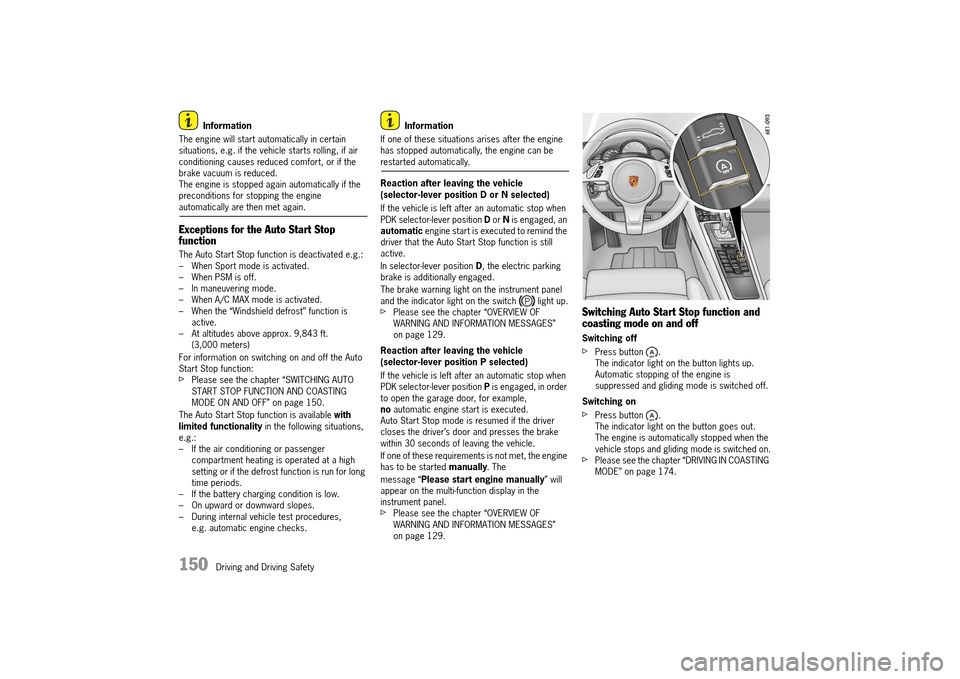
Switching Auto Start Stop function and coasting mode on and off
Switching off
fPress button . The indicator light on the button lights up.Automatic stopping of the engine is suppressed and gliding mode is switched off.
Switching on
fPress button . The indicator light on the button goes out.The engine is automatically stopped when the vehicle stops and gliding mode is switched on.fPlease see the chapter “DRIVING IN COASTING MODE” on page 174.
14_991_Turbo_21.book Seite 150 Mittwoch, 9. April 2014 2:19 14
Page 153 of 300
Driving and Driving Safety 151
Auto Start Stop function display
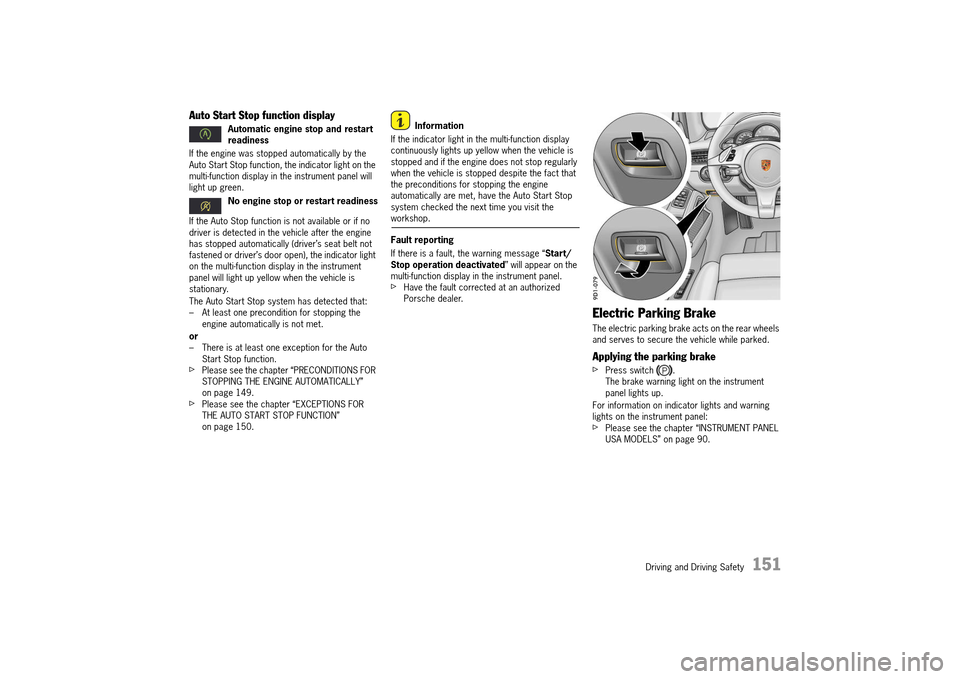
If the engine was stopped automatically by the Auto Start Stop function, the indicator light on the multi-function display in the instrument panel will light up green.
If the Auto Stop function is not available or if no driver is detected in the vehicle after the engine has stopped automatically (driver’s seat belt not fastened or driver’s door open), the indicator light on the multi-function display in the instrument panel will light up yellow when the vehicle is stationary.
The Auto Start Stop system has detected that: – At least one precondition for stopping the engine automatically is not met.
or – There is at least one exception for the Auto Start Stop function.fPlease see the chapter “PRECONDITIONS FOR STOPPING THE ENGINE AUTOMATICALLY” on page 149.fPlease see the chapter “EXCEPTIONS FOR THE AUTO START STOP FUNCTION” on page 150.
Information
If the indicator light in the multi-function display continuously lights up yellow when the vehicle is stopped and if the engine does not stop regularly when the vehicle is stopped despite the fact that the preconditions for stopping the engine automatically are met, have the Auto Start Stop system checked the next time you visit the workshop.
Fault reporting
If there is a fault, the warning message “ Start/ Stop operation deactivated ” will appear on the multi-function display in the instrument panel.fHave the fault corrected at an authorized Porsche dealer.
Electric Parking Brake
The electric parking brake acts on the rear wheels and serves to secure the vehicle while parked.
Applying the parking brake
fPress switch .The brake warning light on the instrument panel lights up.
For information on indicator lights and warning lights on the instrument panel: fPlease see the chapter “INSTRUMENT PANEL USA MODELS” on page 90.
Automatic engine stop and restart readiness
No engine stop or restart readiness
14_991_Turbo_21.book Seite 151 Mittwoch, 9. April 2014 2:19 14
Page 154 of 300
152 Driving and Driving Safety
Releasing the parking brake
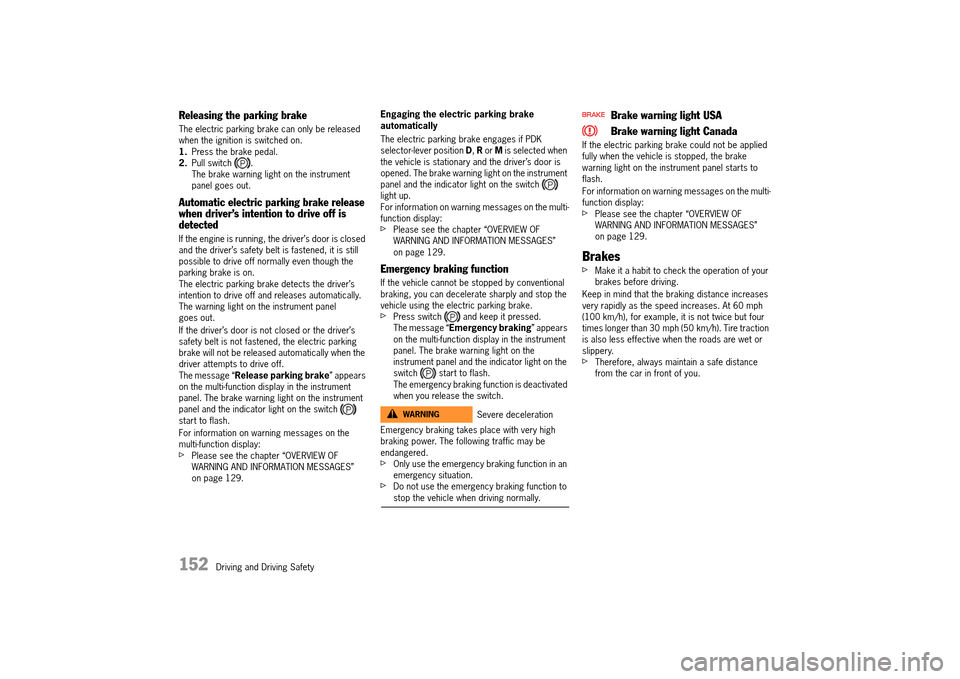
The electric parking brake can only be released when the ignition is switched on.1. Press the brake pedal. 2. Pull switch . The brake warning light on the instrument panel goes out.
Automatic electric parking brake release when driver’s intention to drive off is detected
If the engine is running, the driver’s door is closed and the driver’s safety belt is fastened, it is still possible to drive off normally even though the parking brake is on.The electric parking brake detects the driver’s intention to drive off and releases automatically.The warning light on the instrument panel goes out.
If the driver’s door is not closed or the driver’s safety belt is not fastened, the electric parking brake will not be released automatically when the driver attempts to drive off.The message “ Release parking brake” appears on the multi-function display in the instrument panel. The brake warning light on the instrument panel and the indicator light on the switch start to flash.
For information on warning messages on the multi-function display: fPlease see the chapter “OVERVIEW OF WARNING AND INFORMATION MESSAGES” on page 129.
Engaging the electric parking brake automatically
The electric parking brake engages if PDK selector-lever position D, R or M is selected when the vehicle is stationary and the driver’s door is opened. The brake warning light on the instrument panel and the indicator light on the switch light up. For information on warning messages on the multi-function display: fPlease see the chapter “OVERVIEW OF WARNING AND INFORMATION MESSAGES” on page 129.
Emergency braking function
If the vehicle cannot be stopped by conventional braking, you can decelerate sharply and stop the vehicle using the electric parking brake.fPress switch and keep it pressed.The message “ Emergency braking” appears on the multi-function display in the instrument panel. The brake warning light on the instrument panel and the indicator light on the switch start to flash.The emergency braking function is deactivated when you release the switch.
Emergency braking takes place with very high braking power. The following traffic may be endangered.fOnly use the emergency braking function in an emergency situation.fDo not use the emergency braking function to stop the vehicle when driving normally.
Brake warning light USA
Brake warning light Canada
If the electric parking brake could not be applied fully when the vehicle is stopped, the brake warning light on the instrument panel starts to flash.
For information on warning messages on the multi- function display: fPlease see the chapter “OVERVIEW OF WARNING AND INFORMATION MESSAGES” on page 129.
Brakes
fMake it a habit to check the operation of your brakes before driving.
Keep in mind that the braking distance increases very rapidly as the speed increases. At 60 mph (100 km/h), for example, it is not twice but four times longer than 30 mph (50 km/h). Tire traction is also less effective when the roads are wet or slippery.fTherefore, always maintain a safe distance from the car in front of you.
Severe decelerationWARNINGh
14_991_Turbo_21.book Seite 152 Mittwoch, 9. April 2014 2:19 14
Page 155 of 300
Driving and Driving Safety 153
Vehicles without Porsche Ceramic Composite Brake (PCCB)
Even though the brake disks consist of alloyed gray cast iron, they will unavoidably start to corrode if your car is parked for an extended period. The brakes will tend to “rub” as a result.The nature, extent and effects of corrosion depend on the amount of time the vehicle was parked, whether road salt or grit was spread and whether grease-dissolving agents were used in car washes.
If the braking comfort is noticeably impaired, we recommend having the brake system checked by experts at an authorized Porsche dealer.
Brake system function
Your Porsche is equipped with a power assisted hydraulic dual circuit brake system with disk brakes at the front and rear. Both circuits function independently. One brake circuit operates the front left and rear right wheel and the other operates the front right and rear left wheel.
If one brake circuit has failed, the other will still operate. However, you will notice an increased pedal travel when you apply the brakes. Failure of one brake circuit will cause the stopping distance to increase.
Your vehicle is equipped with an emergency function in the extreme event of a complete hydraulic failure of the brake system. If your brake pedal goes all the way to the floor, do not pump the brakes. fPush the brake pedal down firmly and hold it in that position. A mechanical linkage activates the second circuit, and you will be able to bring the vehicle to a stop.fAfter bringing your vehicle to a complete stop, avoid driving the vehicle and instead have it towed to the nearest authorized Porsche dealer for repair.
Brake system warning light
You can check the functionality of the brake system warning light by switching the ignition to the “On” position (position 1) and verifying that the warning light illuminates.
Brake warning light USA
Brake warning light Canada
The warning light in the instrument panel lights up. A message will be displayed on the multi-purpose display of the instrument panel if the brake fluid level is too low, or (if the brake pedal travel has increased) one of the two brake circuits has failed.
A greater braking pressure will be required, stopping distances will be longer and the braking behavior will change, particularly in curves.
With correctly adjusted brakes and a correctly working brake system, the pedal travel to the point of brake application should be 1-3/16 in. to 1-9/16 in. (30 to 40 mm). Whenever the brake pedal travel exceeds this value, have the brake system checked.
Brake pedal
Unsuitable or incorrectly fixed floor mats or objects can reduce the travel of the brake pedal or prevent you applying the brake pedal.fAlways check the movement of the brake pedal before driving and make sure that it is not obstructed by a floor mat or any other object.fSecure the floor mat to prevent it from sliding into positions that could interfere with the safe operation of your vehicle.Your authorized Porsche dealer will be glad to offer you floor mats of the correct size including a securing possibility.
Information
In case one of the two brake circuits fails, increased pedal travel is required to bring your vehicle to a full stop.
Brake Hydraulic Failure Recovery
WARNINGh
Obstruction of Brake Pedal
WARNINGh
14_991_Turbo_21.book Seite 153 Mittwoch, 9. April 2014 2:19 14
Page 156 of 300
154 Driving and Driving Safety
fBefore descending a steep grade, reduce speed and shift the transmission into a lower gear to control speed. fDo not “ride the brakes” by resting your foot on the pedal when not intending to apply brake pressure.fDo not hold the pedal down too long or too often. This could cause the brakes to overheat and lose braking power.
Brake booster
The brake booster assists braking only when the engine is running.
When the car is moving while the engine is not running, or if the brake booster is defective, more pressure on the brake pedal is required to bring the car to a stop.
Moisture, road salt or grit on brakes affects braking. Brakes will dry after a few cautious brake applications.
Driving through water may reduce the traction. Moisture on brakes from road water, car wash, or a coating of road salt or grit may affect braking efficiency.fCautiously apply brakes to test and dry the brakes after exposure to road water, etc.
The brake booster is ready for operation only while the engine is running. If the engine is switched off or there is a defect in the brake booster, much greater force has to be applied to the pedal when braking. fVehicles with defective brakes must not be towed and must be transported on a flat bed.
For information on towing:fPlease see the chapter “TOWING” on page 278.
Brake wear
Your car has excellent brakes, but they are still subject to wear. The rate at which they wear depends on how the brakes are used.fHave the brake system inspected at the intervals recommended in your Maintenance Booklet.
Brake system warning light
You can check the functionality of the brake system warning light by switching the ignition to the “On” position (position 1) and verifying that the warning light illuminates.
A warning message will be displayed on the multi- purpose display of the instrument panel if the brake pads are worn, excessively.fDo not continue to operate the vehicle.Have your authorized Porsche dealer inspect or replace the brake pads.
For information on warning messages on the multi-purpose display:fPlease see the chapter “OVERVIEW OF WARNING AND INFORMATION MESSAGES” on page 129.
Brake pads and brake disks
Wear on the brake pads and brake disks depends to a great extent on the driving style and the conditions of use and therefore cannot be expressed in actual miles on the road.
The high-performance brake system is designed for optimal braking effect at all speeds and temperatures.
Certain speeds, braking forces and ambient conditions (e.g. temperature and humidity) can therefore cause the brakes to “squeal”.
Unsuitable or incorrectly installed floor mats or objects can obstruct the movement of the brake pedal or prevent application of the brake pedal.fDo not obstruct the pedal travel with floor mats or other objects.
Riding the Brakes
Wet Brakes
WARNINGh
WARNINGh
Loss of Braking PowerWARNINGhBrake wear warning message USA
Brake wear warning message Canada
Obstructed Brake PedalWARNINGh
14_991_Turbo_21.book Seite 154 Mittwoch, 9. April 2014 2:19 14
Page 158 of 300
156 Driving and Driving Safety
If the current traffic situation does not allow you to drive safely at a constant speed and with sufficient distance to the vehicle in front, using the cruise control can cause accidents.fDo not use the cruise control in heavy traffic, in city traffic, on twisting roads or under unfavorable road conditions (e.g. wintry or wet conditions, varying road surfaces).fObserve all local and national speed limits.fDo not reach through the steering-wheel spokes while driving.
Switching cruise control readiness on
fPress button A on the control stalk.
Maintaining and storing speed
1.Accelerate or decelerate to the desired speed using the accelerator pedal.2. Push the control stalk on the steering wheel forward (position 1). The current driving speed is now stored as the desired speed, which will be maintained automatically.
Accelerating (e.g. to overtake)
Variant 1
fIncrease the speed as usual with the accelerator pedal.When you ease off the accelerator, the previously stored value is set again.
Variant 2
fPush the control stalk on the steering wheel forward (position 1). The desired speed is increased in steps of 1 mph (1 km/h).orPress the control stalk on the steering wheel forward and keep it pressed (position 1). The desired speed is increased in steps of 5 mph (10 km/h).
The new desired speed is displayed on the multi- function display in the instrument panel.
Decelerating
fBriefly pull the control stalk on the steering wheel towards the steering wheel (position 2). The desired speed is decreased in steps of 1 mph (1 km/h).orPull the control stalk on the steering wheel towards the steering wheel and keep it pulled (position 2). The desired speed is decreased in steps of 5 mph (10 km/h).
The new desired speed is displayed on the multi- function display in the instrument panel.
Downshifts are carried out to help maintain the pre-selected speed (especially when driving downhill).
Interrupting cruise control operation – OFF
The speed driven before the interruption remains stored in the memory and can be reactivated by pressing the control stalk.fPlease see the chapter “RESUMING THE STORED SPEED – RESUME” on page 157.fPress the control stalk down (position 3). orOperate brake pedal or move PDK selector lever to N position.
Cruise control operation is interrupted automatically:
– If the set vehicle speed is exceeded by more than approx. 16 mph (25 km/h) for longer than 20 seconds.– If Porsche Stability Management (PSM) intervenes for longer than 0.5 seconds.
Misuse of Cruise Control
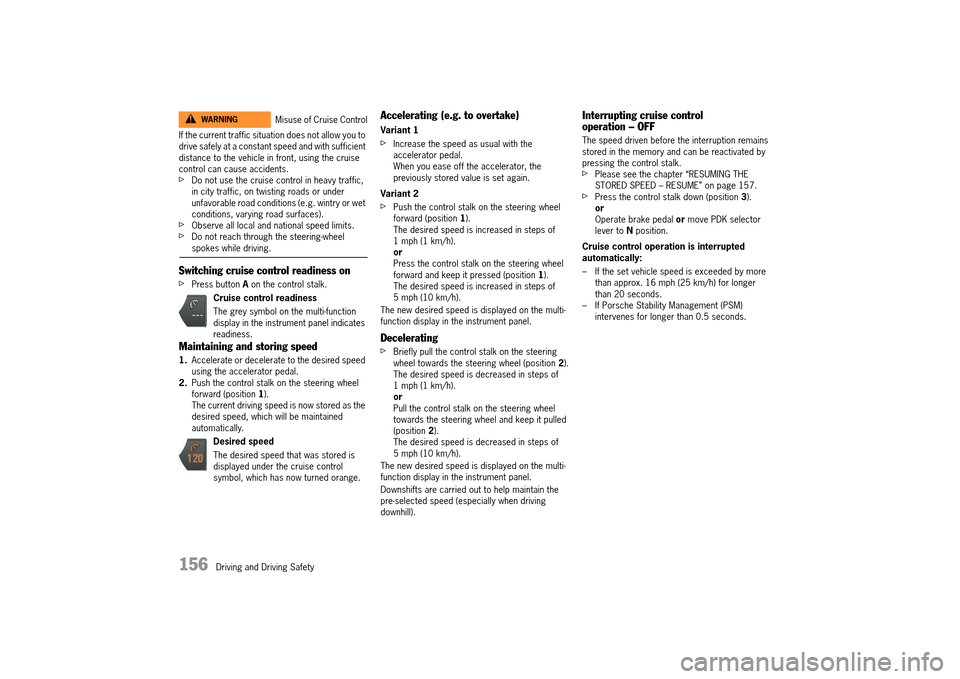
Cruise control readiness
The grey symbol on the multi-function display in the instrument panel indicates readiness.
Desired speed
The desired speed that was stored is displayed under the cruise control symbol, which has now turned orange.
WARNINGh
14_991_Turbo_21.book Seite 156 Mittwoch, 9. April 2014 2:19 14
Page 160 of 300
158 Driving and Driving Safety
Radar sensor
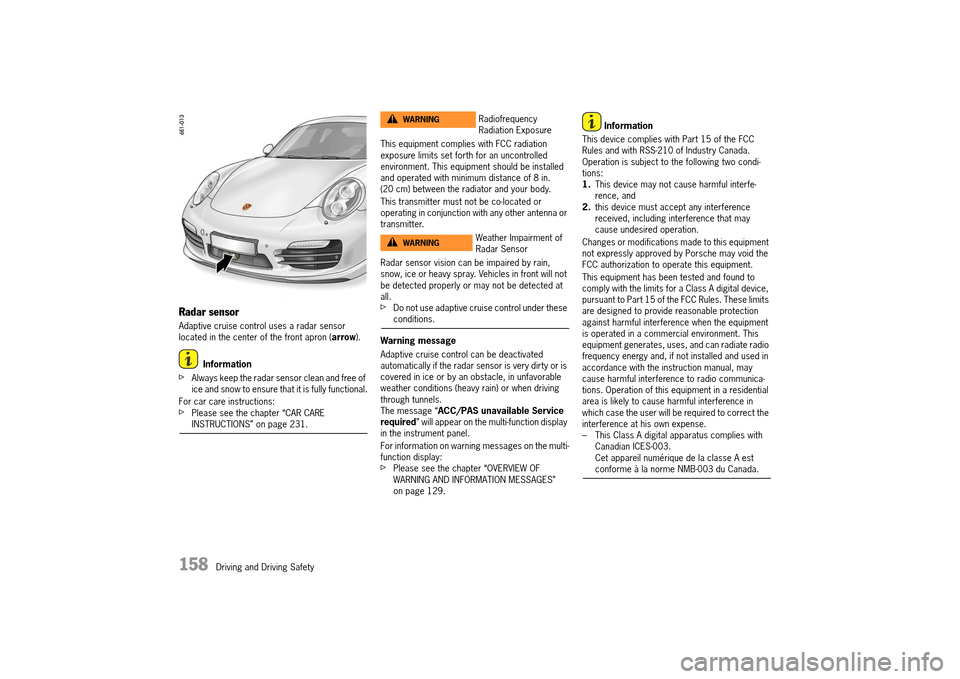
Adaptive cruise control uses a radar sensor located in the center of the front apron ( arrow).
Information
fAlways keep the radar sensor clean and free of ice and snow to ensure that it is fully functional.
For car care instructions:fPlease see the chapter “CAR CARE INSTRUCTIONS” on page 231.
This equipment complies with FCC radiation exposure limits set forth for an uncontrolled environment. This equipment should be installed and operated with minimum distance of 8 in. (20 cm) between the radiator and your body.
This transmitter must not be co-located or operating in conjunction with any other antenna or transmitter.
Radar sensor vision can be impaired by rain, snow, ice or heavy spray. Vehicles in front will not be detected properly or may not be detected at all.fDo not use adaptive cruise control under these conditions.
Warning message
Adaptive cruise control can be deactivated automatically if the radar sensor is very dirty or is covered in ice or by an obstacle, in unfavorable weather conditions (heavy rain) or when driving through tunnels.The message “ ACC/PAS unavailable Service required ” will appear on the multi-function display in the instrument panel.
For information on warning messages on the multi- function display:fPlease see the chapter “OVERVIEW OF WARNING AND INFORMATION MESSAGES” on page 129.
Information
This device complies with Part 15 of the FCC Rules and with RSS-210 of Industry Canada.Operation is subject to the following two condi-tions:1. This device may not cause harmful interfe- rence, and2. this device must accept any interference received, including interference that may cause undesired operation.
Changes or modifications made to this equipment not expressly approved by Porsche may void the FCC authorization to operate this equipment.
This equipment has been tested and found to comply with the limits for a Class A digital device, pursuant to Part 15 of the FCC Rules. These limits are designed to provide reasonable protection against harmful interference when the equipment is operated in a commercial environment. This equipment generates, uses, and can radiate radio frequency energy and, if not installed and used in accordance with the instruction manual, may cause harmful interference to radio communica-tions. Operation of this equipment in a residential area is likely to cause harmful interference in which case the user will be required to correct the interference at his own expense.– This Class A digital apparatus complies with Canadian ICES-003.Cet appareil numérique de la classe A est conforme à la norme NMB-003 du Canada.
Radiofrequency Radiation Exposure
Weather Impairment of Radar Sensor
WARNINGh
WARNINGh
14_991_Turbo_21.book Seite 158 Mittwoch, 9. April 2014 2:19 14
Page 161 of 300
Driving and Driving Safety 159
Operating principle of adaptive cruise control
No vehicle detected in front – open road driving
Adaptive cruise control operates like a cruise control system. The desired speed that was set is maintained constantly.
Vehicle detected in front – driving in traffic
If a vehicle traveling ahead of you in the same lane is detected as driving slower than the selected desired speed, adaptive cruise control will automatically maintain a set distance from the vehicle in front.
If the vehicle in front stops, adaptive cruise control will slow your vehicle down to a stop provided this is possible within the control limits of the system.Adaptive cruise control actively keeps your vehicle at a standstill.
If the vehicle in front drives off, automatic speed control and distance control can be resumed.
Speed exceeded
The speed of the vehicle can be increased at any time by pressing the accelerator.
If the vehicle is traveling faster than the speed set by adaptive cruise control (ACC), adaptive cruise control is deactivated.The message “ ACC passive” appears on the multi-function display in the instrument panel.The desired speed that was stored is retained.
After releasing the accelerator pedal, the ACC accelerates to the desired speed if there is no vehicle in front and controls the distance if there is a vehicle in front.
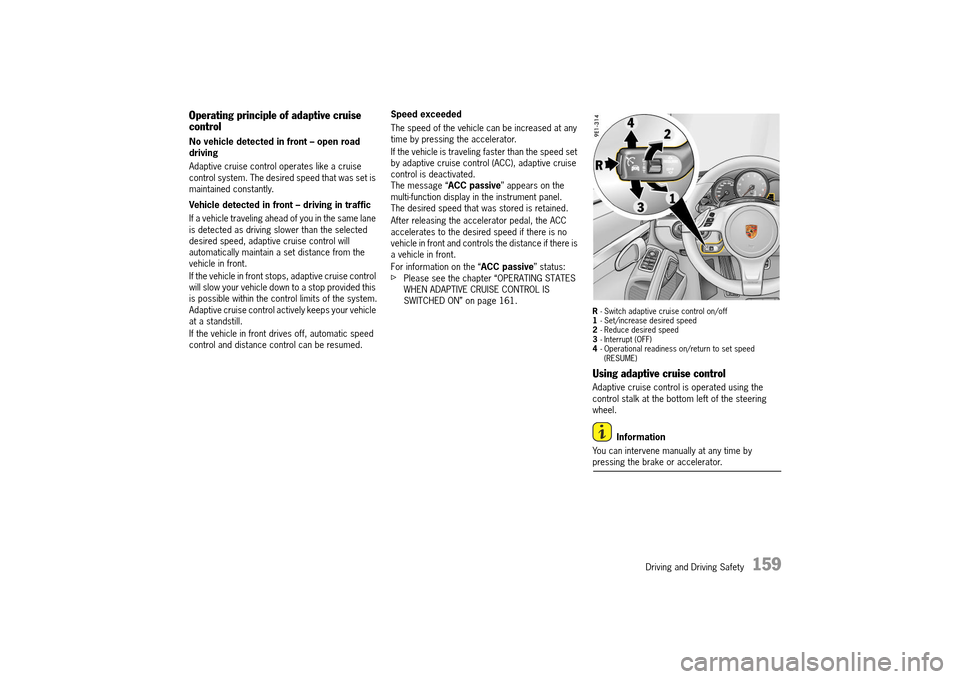
For information on the “ ACC passive” status:fPlease see the chapter “OPERATING STATES WHEN ADAPTIVE CRUISE CONTROL IS SWITCHED ON” on page 161.R - Switch adaptive cruise control on/off 1 - Set/increase desired speed 2 - Reduce desired speed 3 - Interrupt (OFF) 4 - Operational readiness on/return to set speed (RESUME)
Using adaptive cruise control
Adaptive cruise control is operated using the control stalk at the bottom left of the steering wheel.
Information
You can intervene manually at any time by pressing the brake or accelerator.
14_991_Turbo_21.book Seite 159 Mittwoch, 9. April 2014 2:19 14
Page 162 of 300
160 Driving and Driving Safety
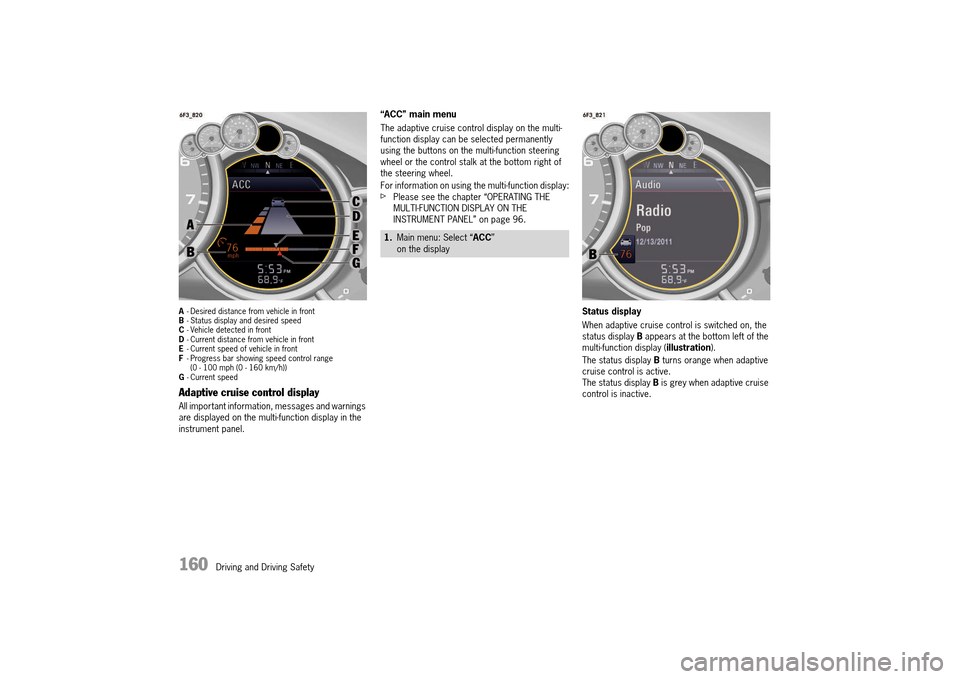
A- Desired distance from vehicle in front B - Status display and desired speed C - Vehicle detected in front D - Current distance from vehicle in front E - Current speed of vehicle in front F - Progress bar showing speed control range (0 - 100 mph (0 - 160 km/h))G - Current speed
Adaptive cruise control display
All important information, messages and warnings are displayed on the multi-function display in the instrument panel.
“ACC” main menu
The adaptive cruise control display on the multi- function display can be selected permanently using the buttons on the multi-function steering wheel or the control stalk at the bottom right of the steering wheel.
For information on using the multi-function display:fPlease see the chapter “OPERATING THE MULTI-FUNCTION DISPLAY ON THE INSTRUMENT PANEL” on page 96.
Status display
When adaptive cruise control is switched on, the status display B appears at the bottom left of the multi-function display ( illustration).
The status display B turns orange when adaptive cruise control is active.The status display B is grey when adaptive cruise control is inactive.
1. Main menu: Select “ACC” on the display
14_991_Turbo_21.book Seite 160 Mittwoch, 9. April 2014 2:19 14
Page 163 of 300
Driving and Driving Safety 161
Examples:Switching adaptive cruise control on and off
Switching adaptive cruise control on
fPress button R on the control stalk. The grey status display appears on the multi-function display.Adaptive cruise control is ready.
Switching adaptive cruise control off
fPress button R on the control stalk. “ ACC off” appears on the multi-function display.The desired speed that was stored is deleted.The desired distance is set to the default value.
Operating states when adaptive cruise control is switched on
There are three possible operating states when adaptive cruise control is switched on.
Adaptive cruise control active
Adaptive cruise control automatically regulates the speed and distance from the vehicle in front.The status display B turns orange.
Adaptive cruise control is ready
Cruise control and distance control is inactive after pressing the brakes or interrupting by pressing the control stalk downwards (position 3, OFF ). The desired speed that was stored and the desired distance that was set are retained.The status display B turns grey.
For information on resuming cruise control and distance control:fPlease see the chapter “RESUMING CRUISE CONTROL AND DISTANCE CONTROL – RESUME” on page 164.
Adaptive cruise control passive
Cruise control and distance control is inactive after pressing the accelerator.“ ACC passive” appears on the multi-function display.The desired speed that was stored and the desired distance that was set are retained.The status display B turns grey. Adaptive cruise control is active again after you release the accelerator.
Setting and changing the desired speed
Preconditions
– Adaptive cruise control is switched on. – Vehicle is moving.– No stationary objects are detected in front.
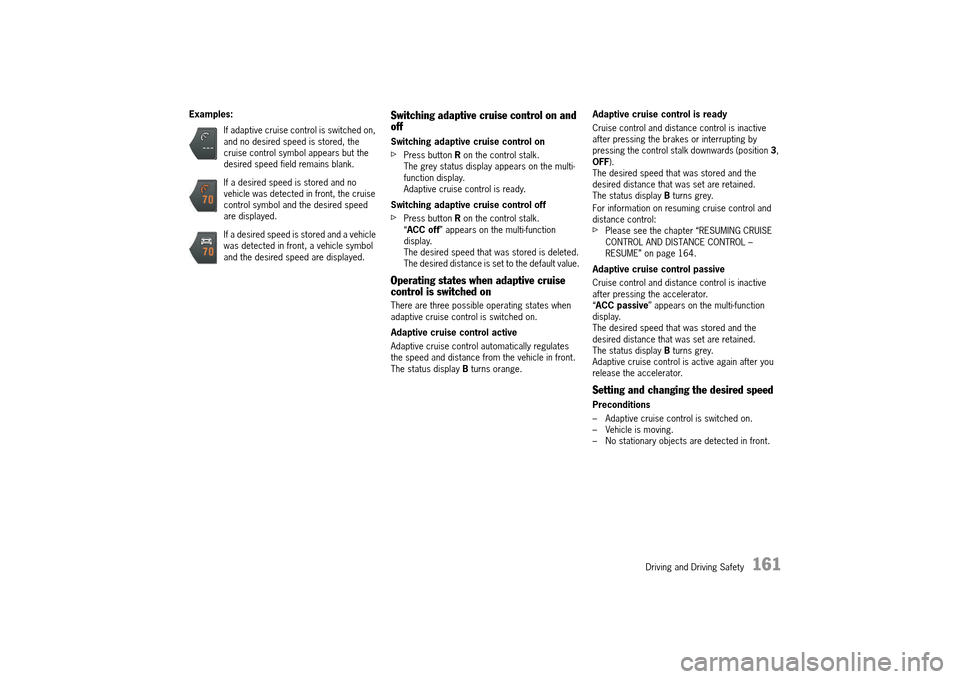
If adaptive cruise control is switched on, and no desired speed is stored, the cruise control symbol appears but the desired speed field remains blank.
If a desired speed is stored and no vehicle was detected in front, the cruise control symbol and the desired speed are displayed.
If a desired speed is stored and a vehicle was detected in front, a vehicle symbol and the desired speed are displayed.
14_991_Turbo_21.book Seite 161 Mittwoch, 9. April 2014 2:19 14