light PORSCHE 911 TURBO 2014 6.G Workshop Manual
[x] Cancel search | Manufacturer: PORSCHE, Model Year: 2014, Model line: 911 TURBO, Model: PORSCHE 911 TURBO 2014 6.GPages: 300, PDF Size: 10.61 MB
Page 97 of 300
Instrument Panel and Multi-Function Display 95
Battery/Alternator
The warning message “Generator fault Park vehicle safely ” will appear on the multi-function display in the instrument panel if the vehicle electrical system voltage drops significantly.fStop at a safe place and switch the engine off.
For information on warning messages on the multi-function display:fPlease see the chapter “OVERVIEW OF WARNING AND INFORMATION MESSAGES” on page 129.
Possible causes
– Defect in the battery charging system– Broken drive belt
Risk of engine damage.
The engine cooling does not function if the drive belt is torn.fDo not continue driving.fHave the fault corrected.fPlease contact an authorized Porsche dealer.
Check Engine
(Emission Control)
Warning light
The emission control system detects malfunctions that could cause increased pollutant emissions or consequential damage etc. well in advance.Faults are indicated by the warning light on the instrument panel which then either lights up continuously or flashes.The faults are recorded in the control unit’s fault memory.
The warning light on the instrument panel lights up when the ignition is switched on as a lamp check and goes out approx. 1 second after the engine starts.
The warning light on the instrument panel flashes to indicate operating states (e.g. engine misfiring) which may cause damage to certain parts of the emission control system.fIn this case, immediately reduce the engine load by easing off the accelerator pedal.
In order to avoid consequential damage to the engine or the exhaust-gas cleaning system (e.g. catalytic converter):fPlease contact an authorized Porsche dealer.
Risk of damage to the emission control system.
If the warning light on the instrument panel continues flashing even when you have eased off the accelerator pedal, the emission control system may overheat.fStop as soon as possible in a safe place.Make sure that combustible materials, such as dry grass or leaves, cannot come into contact with the hot exhaust system.fSwitch off the engine.fHave the fault corrected at an authorized Porsche dealer.
Acoustic Signals
A speaker in the instrument panel generates acoustic signals.The warning message “ Instrument cluster/ Park Assist audio fault Service required ” will appear on the multi-function display in the instrument panel if a speaker fault occurs.The speaker cannot generate acoustic signals.fPlease see the chapter “OVERVIEW OF WARNING AND INFORMATION MESSAGES” on page 129.
Warning message
NOTICE
NOTICE
14_991_Turbo_21.book Seite 95 Mittwoch, 9. April 2014 2:19 14
Page 101 of 300
Instrument Panel and Multi-Function Display 99
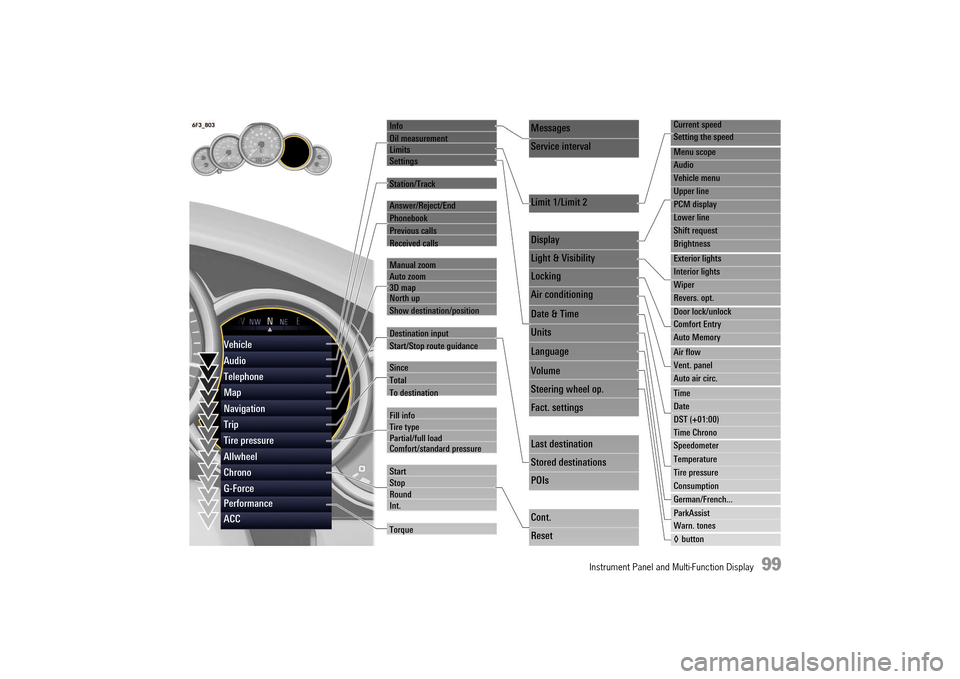
Info
Oil measurement LimitsSettings
Station/Track
Answer/Reject/End
Phonebook
Previous calls
Received calls
Manual zoom Auto zoom3D map North up
Show destination/position
Destination input
Start/Stop route guidance
Since
Total
To destination
Fill info Tire typePartial/full load Comfort/standard pressure
Start StopRoundInt.
Torque
Current speed
Setting the speed
Menu scope
Audio
Vehicle menu
Upper line
PCM display
Lower line
Shift request
Brightness
Exterior lights
Interior lights
Wiper
Revers. opt.
Door lock/unlock
Comfort Entry
Auto Memory
Air flow
Vent. panel
Auto air circ.
Time
Date
DST (+01:00)
Time Chrono
Speedometer
Temperature
Tire pressure
Consumption
German/French...
ParkAssist
Warn. tones
◊ button
Messages
Service interval
Limit 1/Limit 2
Display
Light & Visibility
Locking
Air conditioning
Date & Time
Units
Language
Volume
Steering wheel op.
Fact. settings
Last destination
Stored destinations
POIs
Cont.
Reset
Vehicle
Audio
Telephone
Map
Navigation
Trip
Tire pressure
Allwheel
Chrono
G-Force
Performance
ACC
14_991_Turbo_21.book Seite 99 Mittwoch, 9. April 2014 2:19 14
Page 107 of 300
Instrument Panel and Multi-Function Display 105
Trip Menu
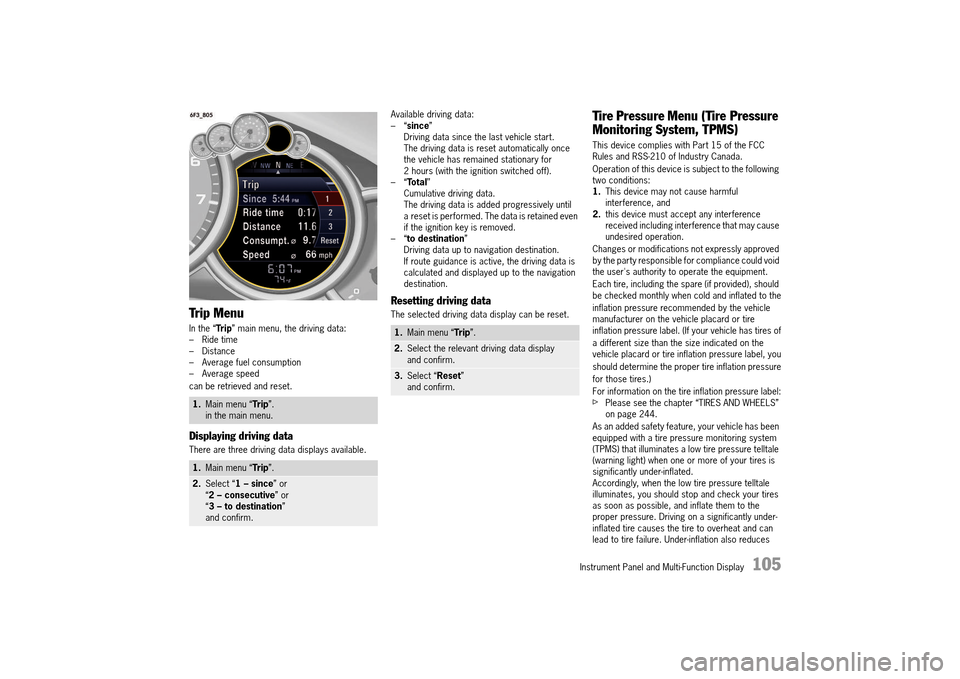
In the “Trip” main menu, the driving data: – Ride time– Distance– Average fuel consumption– Average speed
can be retrieved and reset.
Displaying driving data
There are three driving data displays available.
Available driving data: –“ since” Driving data since the last vehicle start.The driving data is reset automatically once the vehicle has remained stationary for 2 hours (with the ignition switched off).–“ Total” Cumulative driving data.The driving data is added progressively until a reset is performed. The data is retained even if the ignition key is removed.–“ to destination” Driving data up to navigation destination.If route guidance is active, the driving data is calculated and displayed up to the navigation destination.
Resetting driving data
The selected driving data display can be reset.
Tire Pressure Menu (Tire Pressure
Monitoring System, TPMS)
This device complies with Part 15 of the FCC Rules and RSS-210 of Industry Canada.
Operation of this device is subject to the following two conditions:1. This device may not cause harmful interference, and2. this device must accept any interference received including interference that may cause undesired operation.
Changes or modifications not expressly approved by the party responsible for compliance could void the user's authority to operate the equipment.
Each tire, including the spare (if provided), should be checked monthly when cold and inflated to the
inflation pressure recommended by the vehicle manufacturer on the vehicle placard or tire inflation pressure label. (If your vehicle has tires of
a different size than the size indicated on the vehicle placard or tire inflation pressure label, you
should determine the proper tire inflation pressure
for those tires.)
For information on the tire inflation pressure label:fPlease see the chapter “TIRES AND WHEELS” on page 244.
As an added safety feature, your vehicle has been equipped with a tire pressure monitoring system (TPMS) that illuminates a low tire pressure telltale (warning light) when one or more of your tires is significantly under-inflated.Accordingly, when the low tire pressure telltale illuminates, you should stop and check your tires as soon as possible, and inflate them to the proper pressure. Driving on a significantly under-inflated tire causes the tire to overheat and can lead to tire failure. Under-inflation also reduces
1. Main menu “Trip”. in the main menu.
1. Main menu “Trip”.
2.Select “1 – since” or “ 2 – consecutive” or “ 3 – to destination” and confirm.
1. Main menu “Trip”.
2.Select the relevant driving data display and confirm.
3. Select “Reset” and confirm.
14_991_Turbo_21.book Seite 105 Mittwoch, 9. April 2014 2:19 14
Page 108 of 300
106 Instrument Panel and Multi-Function Display
fuel efficiency and tire tread life, and may affect the vehicle’s handling and stopping ability.
The display as well as the settings for the Tire Pressure Monitoring System take place on the multi-function display.
However, the tire pressure must still be set manually on the wheel.fPlease see the chapter “TIRE PRESSURE FOR COLD TIRES (68 °F/ 20 °C)” on page 287.
Driving the vehicle with low tire pressure increases the risk of a tire failure and resulting loss of control. Furthermore, low tire pressure increases rate of wear of the affected tires.Please note that the Tire Pressure Monitoring System is not a substitute for proper tire maintenance, and it is the driver's responsibility to maintain correct tire pressure, even if under-inflation has not reached the level to trigger illumination of Tire Pressure Monitoring System low tire pressure telltale. Low tire pressure reduces the road safety of the vehicle and destroys the tire and wheel.
Tire Pressure Monitoring System gives a warning about a pressure drop caused by natural diffusion as well as about a gradual loss of pressure caused by foreign objects.Tire Pressure Monitoring cannot warn you about tire damage that occurs suddenly (e.g. flat tire due to abrupt external effects).fWhen a red tire pressure warning appears, stop immediately in a suitable place and check the tires for damage. If necessary, remedy the damage with a tire sealant.fDo not by any means continue to drive with defective tires.
fSealing the tire with tire sealant is only an emergency repair so you can drive to the nearest specialist workshop.The maximum permitted speed is 50 mph (80 km/h) .fDo not drive with tires in which the tire pressure drops again very quickly. In case of doubt, have tires checked by a specialist workshop.fDefective tires must be replaced immediately at an authorized Porsche dealer.Tires must never be repaired under any circumstances.fIf Tire Pressure Monitoring System is defective (e.g. defective wheel transmitter), contact an authorized Porsche dealer immediately and have the damage repaired. The tire pressure will not be monitored at all or will be monitored only partially when Tire Pressure Monitoring System is defective.
For information on warning messages on the multi- purpose display:fPlease see the chapter “OVERVIEW OF WARNING AND INFORMATION MESSAGES” on page 129.fIncomplete entries or selection of the wrong tires on the multi-purpose display affect the accuracy of warnings and messages.The settings in the tire pressure menu must be updated following a wheel change or changes in vehicle loading.fUse only the pressure differences shown in the “ Fill info” display in the Tire pressure menu or from the corresponding tire pressure warning when correcting the tire pressure.fTires can lose air over time without a tire defect being present. A tire pressure warning
will then appear on the multi-purpose display.Check the tire pressure at the next opportunity.
Warning light
Your vehicle has also been equipped with a TPMS malfunction indicator to indicate when the system is not operating properly.The TPMS malfunction indicator is combined with the low tire pressure telltale.When the system detects a malfunction, the telltale will flash for approximately one minute and then remain continuously illuminated. This sequence will continue upon subsequent vehicle start-ups as long as the malfunction exists.When the malfunction indicator is illuminated, the system may not be able to detect or signal low tire pressure as intended.TPMS malfunctions may occur for a variety of reasons, including the installation of replacement or alternate tires or wheels on the vehicle that prevent the TPMS from functioning properly.fAlways check the TPMS malfunction telltale after replacing one or more tires or wheels on your vehicle to ensure that the replacement or alternate tires and wheels allow the TPMS to continue to function properly.
Maintaining Tire Pressure
WARNINGh
Attention to TPMS Malfunction Indicator
WARNINGh
14_991_Turbo_21.book Seite 106 Mittwoch, 9. April 2014 2:19 14
Page 109 of 300
Instrument Panel and Multi-Function Display 107
The warning light in the instrument panel lights up: – When a loss in pressure has been detected.– In the event of a defect in Tire Pressure Monitoring or a temporary fault.– When learning new fitted wheels/wheel transmitters, as long as the vehicle’s own wheels have not yet been recognized.
The tire pressure warning light on the instrument panel goes out only when the cause of the fault has been rectified.
Overview of tire pressure monitoring functions
Tire Pressure Monitoring offers the following functions: – Display of the actual tire pressure when stationary and while the vehicle is in motion.– Tire pressure warnings in two stages (yellow and red warning).– In the “TPMS” menu, the settings “Fill info” (display of the deviation from the required pressure, refill pressure), “Tire type”, “Full load” and “Comfort press.” are available when the vehicle is stationary.
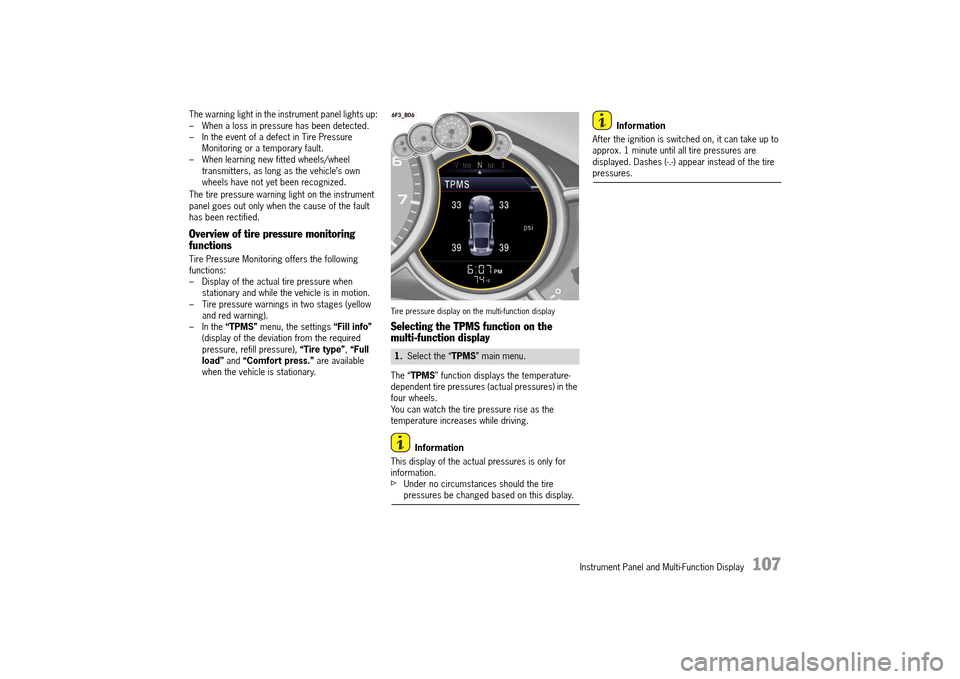
Tire pressure display on the multi-function display
Selecting the TPMS function on the multi-function display
The “ TPMS” function displays the temperature- dependent tire pressures (actual pressures) in the four wheels.You can watch the tire pressure rise as the temperature increases while driving.
Information
This display of the actual pressures is only for information.fUnder no circumstances should the tire pressures be changed based on this display.
Information
After the ignition is switched on, it can take up to approx. 1 minute until all tire pressures are displayed. Dashes (-.-) appear instead of the tire pressures.
1. Select the “TPMS” main menu.
14_991_Turbo_21.book Seite 107 Mittwoch, 9. April 2014 2:19 14
Page 113 of 300
Instrument Panel and Multi-Function Display 111
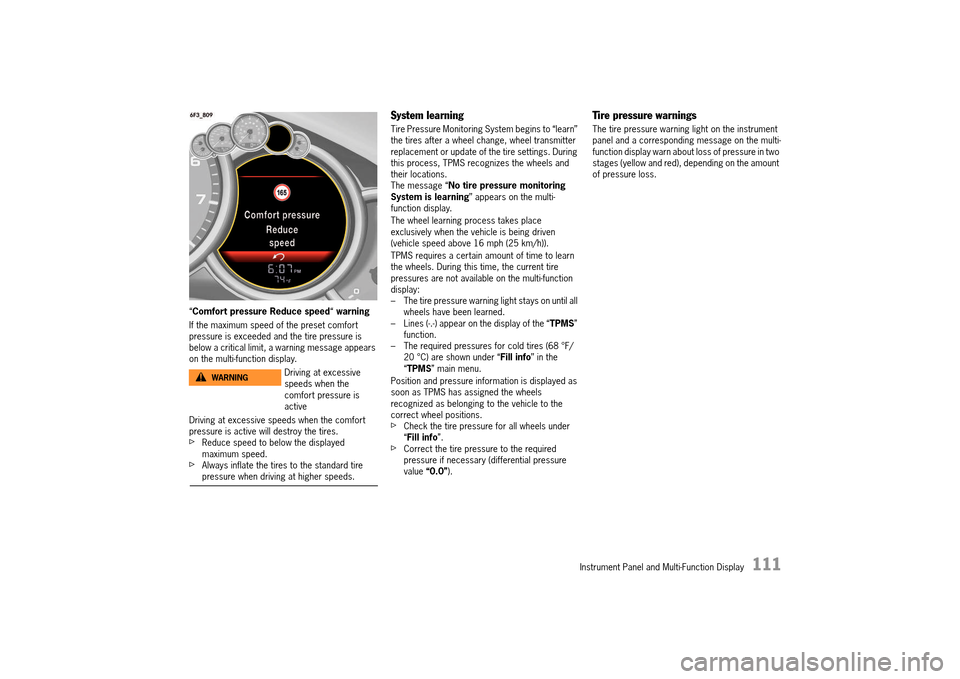
“Comfort pressure Reduce speed“ warning
If the maximum speed of the preset comfort pressure is exceeded and the tire pressure is below a critical limit, a warning message appears on the multi-function display.
Driving at excessive speeds when the comfort pressure is active will destroy the tires.fReduce speed to below the displayed maximum speed.fAlways inflate the tires to the standard tire pressure when driving at higher speeds.
System learning
Tire Pressure Monitoring System begins to “learn” the tires after a wheel change, wheel transmitter replacement or update of the tire settings. During this process, TPMS recognizes the wheels and their locations.The message “ No tire pressure monitoring System is learning ” appears on the multi- function display.
The wheel learning process takes place exclusively when the vehicle is being driven (vehicle speed above 16 mph (25 km/h)).
TPMS requires a certain amount of time to learn the wheels. During this time, the current tire pressures are not available on the multi-function display:– The tire pressure warning light stays on until all wheels have been learned.– Lines (-.-) appear on the display of the “ TPMS” function.– The required pressures for cold tires (68 °F/20 °C) are shown under “ Fill info” in the “ TPMS” main menu.
Position and pressure information is displayed as soon as TPMS has assigned the wheels recognized as belonging to the vehicle to the correct wheel positions.fCheck the tire pressure for all wheels under “ Fill info”.fCorrect the tire pressure to the required pressure if necessary (differential pressure value “0.0”).
Tire pressure warnings
The tire pressure warning light on the instrument panel and a corresponding message on the multi-function display warn about loss of pressure in two stages (yellow and red), depending on the amount of pressure loss.
Driving at excessive speeds when the comfort pressure is active
WARNINGh
14_991_Turbo_21.book Seite 111 Mittwoch, 9. April 2014 2:19 14
Page 114 of 300
112 Instrument Panel and Multi-Function Display
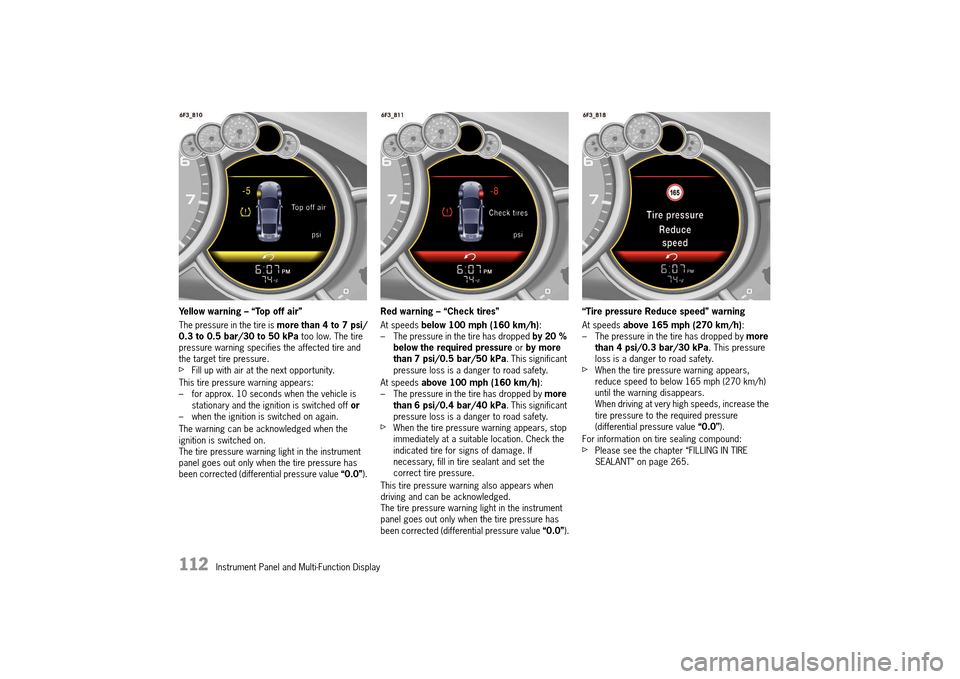
Yellow warning – “Top off air”
The pressure in the tire is more than 4 to 7 psi/ 0.3 to 0.5 bar/30 to 50 kPa too low. The tire pressure warning specifies the affected tire and the target tire pressure. fFill up with air at the next opportunity.
This tire pressure warning appears: – for approx. 10 seconds when the vehicle is stationary and the ignition is switched off or – when the ignition is switched on again.
The warning can be acknowledged when the ignition is switched on.The tire pressure warning light in the instrument panel goes out only when the tire pressure has been corrected (differential pressure value “0.0”).
Red warning – “Check tires”
At speeds below 100 mph (160 km/h): – The pressure in the tire has dropped by 20 % below the required pressure or by more than 7 psi/0.5 bar/50 kPa . This significant pressure loss is a danger to road safety.
At speeds above 100 mph (160 km/h): – The pressure in the tire has dropped by more than 6 psi/0.4 bar/40 kPa . This significant pressure loss is a danger to road safety.fWhen the tire pressure warning appears, stop immediately at a suitable location. Check the indicated tire for signs of damage. If necessary, fill in tire sealant and set the correct tire pressure.
This tire pressure warning also appears when driving and can be acknowledged. The tire pressure warning light in the instrument panel goes out only when the tire pressure has been corrected (differential pressure value “0.0”).
“Tire pressure Reduce speed” warning
At speeds above 165 mph (270 km/h): – The pressure in the tire has dropped by more than 4 psi/0.3 bar/30 kPa . This pressure loss is a danger to road safety.fWhen the tire pressure warning appears, reduce speed to below 165 mph (270 km/h) until the warning disappears.When driving at very high speeds, increase the tire pressure to the required pressure (differential pressure value “0.0”).
For information on tire sealing compound:fPlease see the chapter “FILLING IN TIRE SEALANT” on page 265.
14_991_Turbo_21.book Seite 112 Mittwoch, 9. April 2014 2:19 14
Page 115 of 300
Instrument Panel and Multi-Function Display 113
Warning light
The warning light in the instrument panel lights up: – When a loss in pressure has been detected (warning light: lights up continuously).– In the event of a defect in TPMS or a temporary fault (warning light: flashes for 60 seconds, then lights up continuously).– When learning new fitted wheels/wheel transmitters, as long as the vehicle’s own wheels have not yet been recognized (warning light: flashes for 60 seconds, then lights up continuously).
A warning message also appears on the multi- function display in the instrument panel.fPlease see the chapter “OVERVIEW OF WARNING AND INFORMATION MESSAGES” on page 129.
The tire pressure warning light on the instrument panel goes out only when the cause of the fault has been rectified.
Changing a wheel and replacing tires
fNew wheels must be fitted with radio transmitters for Tire Pressure Monitoring System. Before tires are changed, the battery charge condition of the wheel transmitters should be checked.fPlease contact an authorized Porsche dealer.fSwitch off the ignition when changing a wheel.
The tire settings on the multi-function display must be updated after changing a wheel.If the tire settings are not updated, the message “Tire change? Update settings” is displayed on the multi-function display.fUpdate the multi-function display settings the next time the vehicle is stationary.
Pressure increase as the result of temperature increase
In accordance with physical principles, the tire pressure changes as the temperature changes.For every 18 °F (10 °C) change in temperature, the tire pressure increases or decreases by around 1.5 psi/0.1 bar/10 kPa.
Partial monitoring
Monitoring of the other wheels is continued if there is a fault in one or two wheel transmitters.– The tire pressure warning light lights up.– The message “Restricted monitoring” appears on the multi-function display.– No tire pressures are displayed on the multi-function display for wheels with faulty wheel transmitters.
No monitoring
In the event of faults, Tire Pressure Monitoring System cannot monitor the tire pressure. The warning light on the instrument panel lights up and a corresponding message appears on the multi-function display.
Monitoring is not active: – In the event of a defect in TPMS or if more than 2 wheel transmitters are defective.– If wheel transmitters for Tire Pressure Monitoring System are missing.– During the learning phase after the tire settings have been updated.– After a wheel change without updating the tire settings.– If more than four wheel transmitters are recognized.– If there is external interference by other radio sources, e.g. wireless headphones.– If tire temperatures are too high.fPlease see the chapter “OVERVIEW OF WARNING AND INFORMATION MESSAGES” on page 129.
14_991_Turbo_21.book Seite 113 Mittwoch, 9. April 2014 2:19 14
Page 122 of 300
120 Instrument Panel and Multi-Function Display
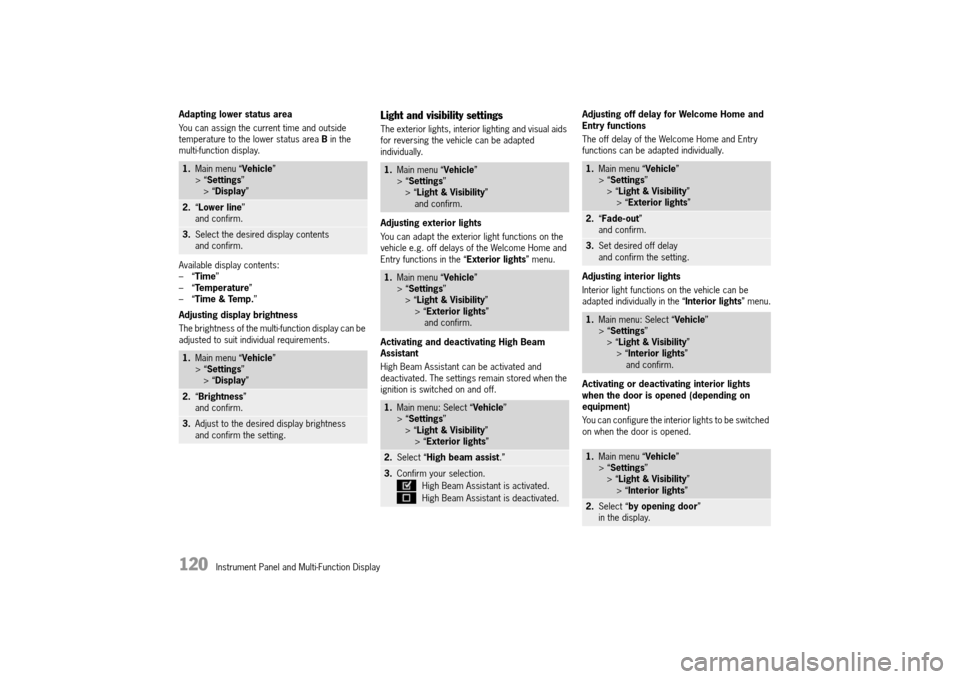
Adapting lower status area
You can assign the current time and outside temperature to the lower status area B in the multi-function display.
Available display contents: –“ Time” –“ Temperature” –“ Time & Temp.”
Adjusting display brightness
The brightness of the multi-function display can be adjusted to suit individual requirements.
Light and visibility settings
The exterior lights, interior lighting and visual aids for reversing the vehicle can be adapted individually.
Adjusting exterior lights
You can adapt the exterior light functions on the vehicle e.g. off delays of the Welcome Home and Entry functions in the “ Exterior lights” menu.
Activating and deactivating High Beam Assistant
High Beam Assistant can be activated and deactivated. The settings remain stored when the ignition is switched on and off.
Adjusting off delay for Welcome Home and Entry functions
The off delay of the Welcome Home and Entry functions can be adapted individually.
Adjusting interior lights
Interior light functions on the vehicle can be adapted individually in the “ Interior lights” menu.
Activating or deactivating interior lights when the door is opened (depending on equipment)
You can configure the interior lights to be switched on when the door is opened.
1. Main menu “Vehicle” > “ Settings” > “ Display”
2.“Lower line” and confirm.
3. Select the desired display contents and confirm.
1. Main menu “Vehicle” > “ Settings” > “ Display”
2.“Brightness” and confirm.
3. Adjust to the desired display brightness and confirm the setting.
1. Main menu “Vehicle” > “ Settings” > “ Light & Visibility” and confirm.
1. Main menu “Vehicle” > “ Settings” > “ Light & Visibility” > “ Exterior lights” and confirm.
1. Main menu: Select “Vehicle” > “ Settings” > “ Light & Visibility” > “ Exterior lights”
2.Select “High beam assist.”
3.Confirm your selection.
High Beam Assistant is activated.
High Beam Assistant is deactivated.
1. Main menu “Vehicle” > “ Settings” > “ Light & Visibility” > “ Exterior lights”
2.“Fade-out” and confirm.
3. Set desired off delay and confirm the setting.
1. Main menu: Select “Vehicle” > “ Settings” > “ Light & Visibility” > “ Interior lights” and confirm.
1. Main menu “Vehicle” > “ Settings” > “ Light & Visibility” > “ Interior lights”
2.Select “by opening door” in the display.
14_991_Turbo_21.book Seite 120 Mittwoch, 9. April 2014 2:19 14
Page 123 of 300
Instrument Panel and Multi-Function Display 121
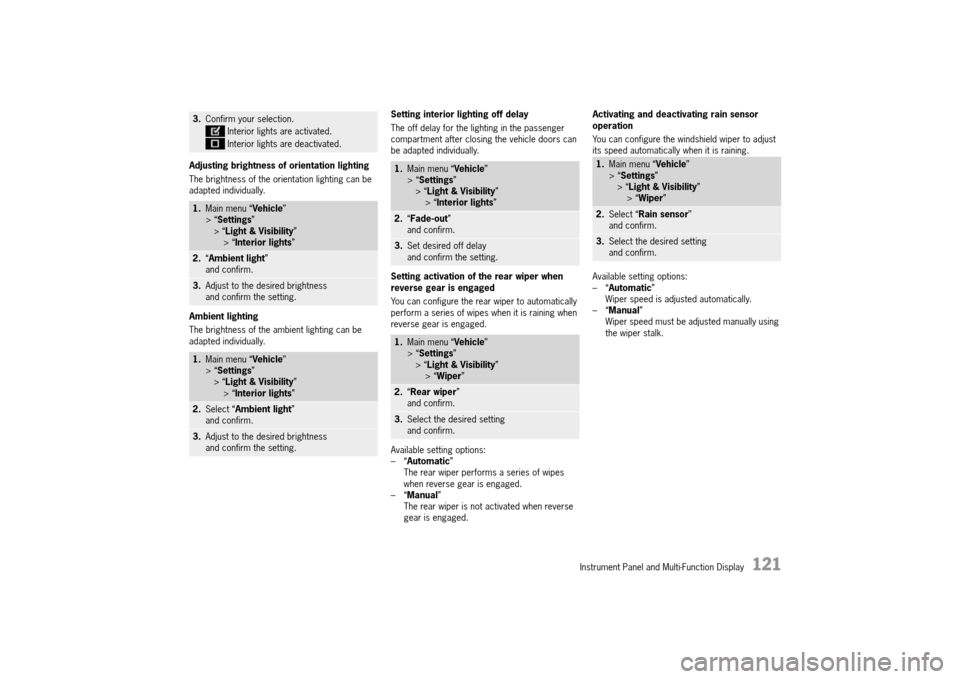
Adjusting brightness of orientation lighting
The brightness of the orientation lighting can be adapted individually.
Ambient lighting
The brightness of the ambient lighting can be adapted individually.
Setting interior lighting off delay
The off delay for the lighting in the passenger compartment after closing the vehicle doors can be adapted individually.
Setting activation of the rear wiper when reverse gear is engaged
You can configure the rear wiper to automatically perform a series of wipes when it is raining when reverse gear is engaged.
Available setting options: –“ Automatic” The rear wiper performs a series of wipes when reverse gear is engaged.–“ Manual” The rear wiper is not activated when reverse gear is engaged.
Activating and deactivating rain sensor operation
You can configure the windshield wiper to adjust its speed automatically when it is raining.
Available setting options: –“ Automatic” Wiper speed is adjusted automatically.–“ Manual” Wiper speed must be adjusted manually using the wiper stalk.
3. Confirm your selection.
Interior lights are activated.
Interior lights are deactivated.
1. Main menu “Vehicle” > “ Settings” > “ Light & Visibility” > “ Interior lights”
2.“Ambient light” and confirm.
3. Adjust to the desired brightness and confirm the setting.
1. Main menu “Vehicle” > “ Settings” > “ Light & Visibility” > “ Interior lights”
2.Select “Ambient light” and confirm.
3. Adjust to the desired brightness and confirm the setting.
1. Main menu “Vehicle” > “ Settings” > “ Light & Visibility” > “ Interior lights”
2.“Fade-out” and confirm.
3. Set desired off delay and confirm the setting.
1. Main menu “Vehicle” > “ Settings” > “ Light & Visibility” > “ Wiper”
2.“Rear wiper” and confirm.
3. Select the desired setting and confirm.
1. Main menu “Vehicle” > “ Settings” > “ Light & Visibility” > “ Wiper”
2.Select “Rain sensor” and confirm.
3. Select the desired setting and confirm.
14_991_Turbo_21.book Seite 121 Mittwoch, 9. April 2014 2:19 14