light PORSCHE 911 TURBO 2014 6.G Repair Manual
[x] Cancel search | Manufacturer: PORSCHE, Model Year: 2014, Model line: 911 TURBO, Model: PORSCHE 911 TURBO 2014 6.GPages: 300, PDF Size: 10.61 MB
Page 124 of 300
122 Instrument Panel and Multi-Function Display
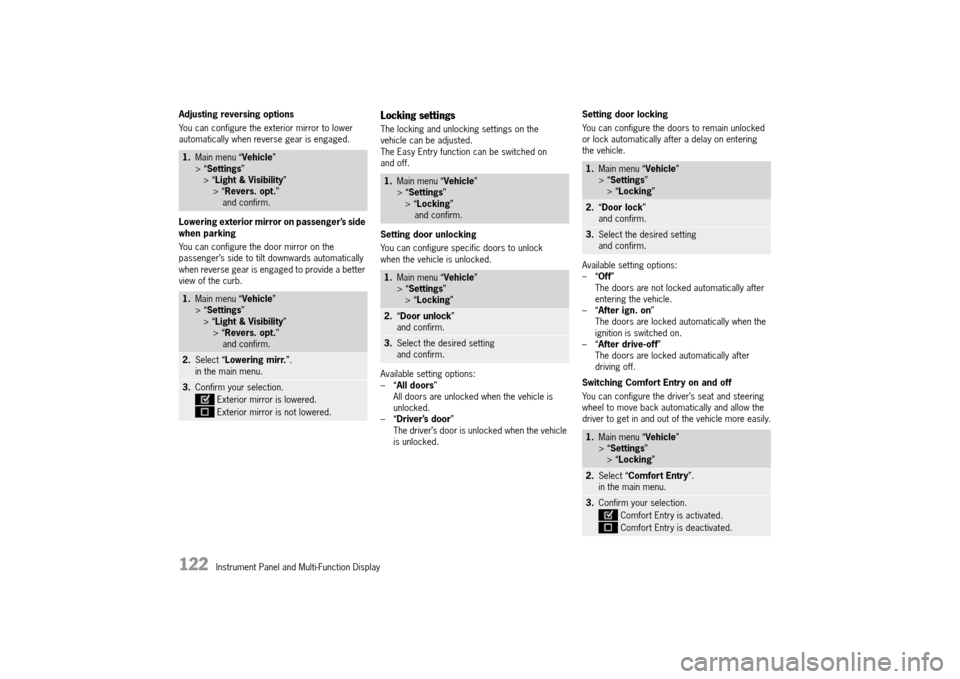
Adjusting reversing options
You can configure the exterior mirror to lower automatically when reverse gear is engaged.
Lowering exterior mirror on passenger’s side when parking
You can configure the door mirror on the passenger’s side to tilt downwards automatically when reverse gear is engaged to provide a better view of the curb.
Locking settings
The locking and unlocking settings on the vehicle can be adjusted.The Easy Entry function can be switched on and off.
Setting door unlocking
You can configure specific doors to unlock when the vehicle is unlocked.
Available setting options: –“ All doors” All doors are unlocked when the vehicle is unlocked.–“ Driver’s door” The driver’s door is unlocked when the vehicle is unlocked.
Setting door locking
You can configure the doors to remain unlocked or lock automatically after a delay on entering the vehicle.
Available setting options: –“ Off” The doors are not locked automatically after entering the vehicle.–“ After ign. on” The doors are locked automatically when the ignition is switched on.–“ After drive-off” The doors are locked automatically after driving off.
Switching Comfort Entry on and off
You can configure the driver’s seat and steering wheel to move back automatically and allow the driver to get in and out of the vehicle more easily.
1. Main menu “Vehicle” > “ Settings” > “ Light & Visibility” > “ Revers. opt.” and confirm.
1. Main menu “Vehicle” > “ Settings” > “ Light & Visibility” > “ Revers. opt.” and confirm.
2. Select “Lowering mirr.”. in the main menu.
3. Confirm your selection.
Exterior mirror is lowered.
Exterior mirror is not lowered.
1. Main menu “Vehicle” > “ Settings” > “ Locking” and confirm.
1. Main menu “Vehicle” > “ Settings” > “ Locking”
2.“Door unlock” and confirm.
3. Select the desired setting and confirm.
1. Main menu “Vehicle” > “ Settings” > “ Locking”
2.“Door lock” and confirm.
3. Select the desired setting and confirm.
1. Main menu “Vehicle” > “ Settings” > “ Locking”
2.Select “Comfort Entry”. in the main menu.
3. Confirm your selection.
Comfort Entry is activated.
Comfort Entry is deactivated.
14_991_Turbo_21.book Seite 122 Mittwoch, 9. April 2014 2:19 14
Page 127 of 300

Instrument Panel and Multi-Function Display 125
Setting the date
The date and date format can be changed in the “ Date” menu.
Setting the date format
The date format can be adjusted.
Available setting options: –“ DD.MM.YYYY” –“ MM/DD/YYYY” –“ YYYY/MM/DD”
Setting the current date
The day, month and year can be set individually on vehicles without the navigation module.
Setting Daylight Saving Time
The vehicle clock can be configured to change to Daylight Saving Time.
Displaying time in stopwatch on dashboard
You can configure the stopwatch on the dashboard to display the time.
Setting units
You can select the units of measurement for vehicle displays such as the speed on the digital speedometer in the instrument panel, the temperature gauge in the air-conditioning displays and the tire pressure display on the multi-function display.
1. Main menu “Vehicle” > “ Settings” > “ Date & Time” > “ Date” and confirm.
1. Main menu “Vehicle” > “ Settings” > “ Date & Time” > “ Date”
2.“Format” and confirm.
3. Select the desired setting and confirm.
1. Main menu “Vehicle” > “ Settings” > “ Date & Time” > “ Date” and confirm.
2. “Date”. in the main menu.
3. Set the desired date and confirm the setting.
1. Main menu “Vehicle” > “ Settings” > “ Date & Time”
2.Select “ DST (+01:00)”
3.Confirm your selection.
Daylight Saving Time is activated.
Daylight Saving Time is deactivated.
1. Main menu “Vehicle” > “ Settings” > “ Date & Time”
2.Select “Time – Chrono” in the main menu.
3. Confirm your selection.
Time is displayed.
Time is not displayed.
1. Main menu “Vehicle” > “ Settings” > “ Units” and confirm.
14_991_Turbo_21.book Seite 125 Mittwoch, 9. April 2014 2:19 14
Page 131 of 300
Instrument Panel and Multi-Function Display 129
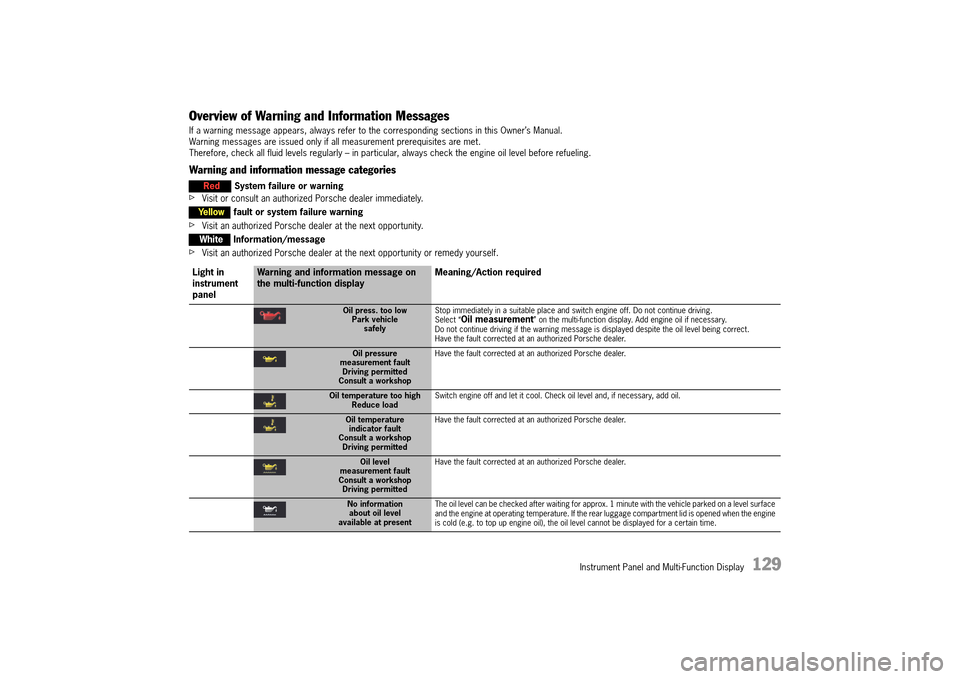
Overview of Warning and Information Messages
If a warning message appears, always refer to the corresponding sections in this Owner’s Manual. Warning messages are issued only if all measurement prerequisites are met. Therefore, check all fluid levels regularly – in particular, always check the engine oil level before refueling.
Warning and information message categories
fVisit or consult an authorized Porsche dealer immediately.
fVisit an authorized Porsche dealer at the next opportunity.
fVisit an authorized Porsche dealer at the next opportunity or remedy yourself.
Red System failure or warning
Yellowfault or system failure warning
WhiteInformation/message
Light in instrument panel
Warning and information message on the multi-function display Meaning/Action required
Oil press. too low Park vehiclesafely
Stop immediately in a suitable place and switch engine off. Do not continue driving. Select “Oil measurement” on the multi-function display. Add engine oil if necessary.Do not continue driving if the warning message is displayed despite the oil level being correct.Have the fault corrected at an authorized Porsche dealer.
Oil pressure measurement faultDriving permittedConsult a workshop
Have the fault corrected at an authorized Porsche dealer.
Oil temperature too high Reduce load Switch engine off and let it cool. Check oil level and, if necessary, add oil.
Oil temperature indicator faultConsult a workshopDriving permitted
Have the fault corrected at an authorized Porsche dealer.
Oil level measurement faultConsult a workshopDriving permitted
Have the fault corrected at an authorized Porsche dealer.
No information about oil levelavailable at present
The oil level can be checked after waiting for approx. 1 minute with the vehicle parked on a level surface and the engine at operating temperature. If the rear luggage compartment lid is opened when the engine is cold (e.g. to top up engine oil), the oil level cannot be displayed for a certain time.
14_991_Turbo_21.book Seite 129 Mittwoch, 9. April 2014 2:19 14
Page 132 of 300
130 Instrument Panel and Multi-Function Display
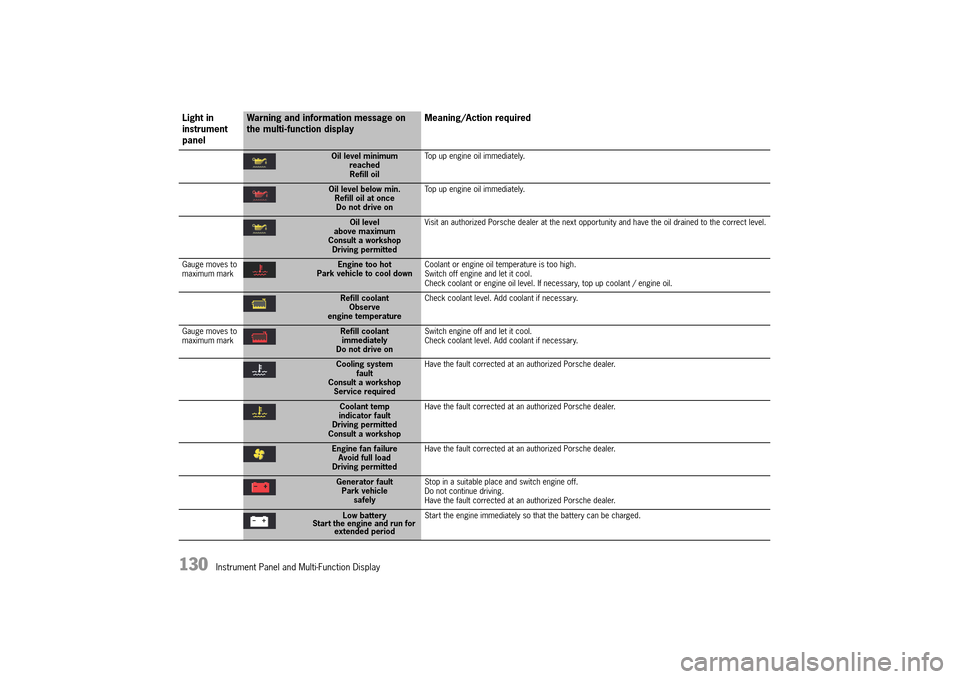
Oil level minimum reachedRefill oil
Top up engine oil immediately.
Oil level below min. Refill oil at once Do not drive on
Top up engine oil immediately.
Oil level above maximumConsult a workshopDriving permitted
Visit an authorized Porsche dealer at the next opportunity and have the oil drained to the correct level.
Gauge moves to maximum markEngine too hot Park vehicle to cool down Coolant or engine oil temperature is too high. Switch off engine and let it cool.Check coolant or engine oil level. If necessary, top up coolant / engine oil.
Refill coolant Observeengine temperature
Check coolant level. Add coolant if necessary.
Gauge moves to maximum markRefill coolant immediatelyDo not drive on
Switch engine off and let it cool. Check coolant level. Add coolant if necessary.
Cooling system faultConsult a workshopService required
Have the fault corrected at an authorized Porsche dealer.
Coolant temp indicator faultDriving permittedConsult a workshop
Have the fault corrected at an authorized Porsche dealer.
Engine fan failure Avoid full loadDriving permitted
Have the fault corrected at an authorized Porsche dealer.
Generator fault Park vehiclesafely
Stop in a suitable place and switch engine off. Do not continue driving.Have the fault corrected at an authorized Porsche dealer.
Low battery Start the engine and run for extended period
Start the engine immediately so that the battery can be charged.
Light in instrument panel
Warning and information message on the multi-function display Meaning/Action required
14_991_Turbo_21.book Seite 130 Mittwoch, 9. April 2014 2:19 14
Page 133 of 300
Instrument Panel and Multi-Function Display 131
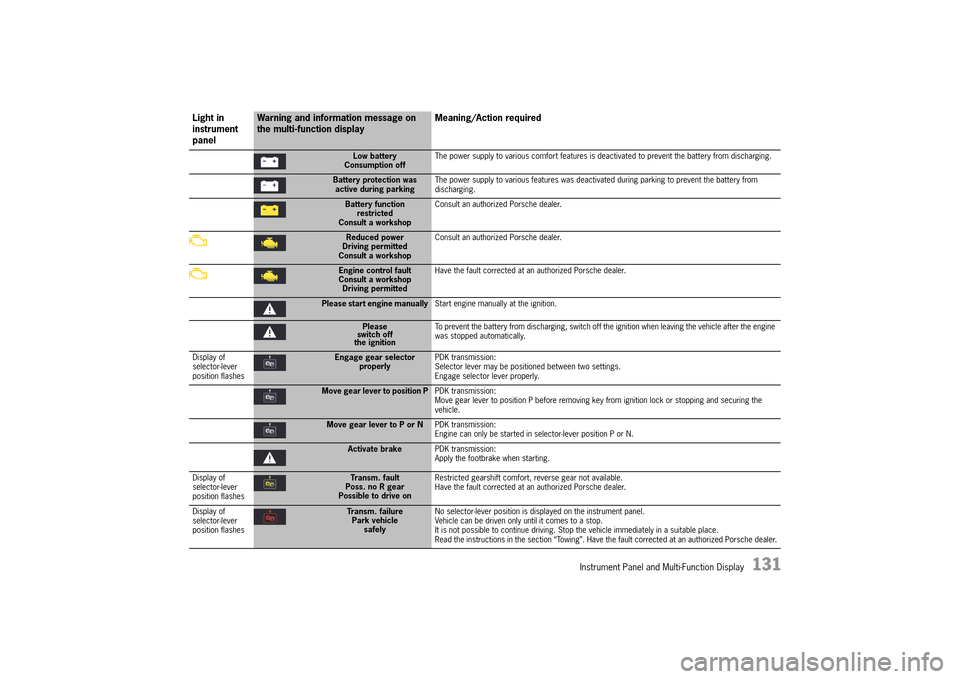
Low battery Consumption off The power supply to various comfort features is deactivated to prevent the battery from discharging.
Battery protection was active during parking The power supply to various features was deactivated during parking to prevent the battery from discharging.
Battery function restrictedConsult a workshop
Consult an authorized Porsche dealer.
Reduced power Driving permittedConsult a workshop
Consult an authorized Porsche dealer.
Engine control fault Consult a workshopDriving permitted
Have the fault corrected at an authorized Porsche dealer.
Please start engine manually Start engine manually at the ignition.
Please switch offthe ignition
To prevent the battery from discharging, switch off the ignition when leaving the vehicle after the engine was stopped automatically.
Display of selector-lever position flashes
Engage gear selector properly PDK transmission: Selector lever may be positioned between two settings. Engage selector lever properly.
Move gear lever to position P PDK transmission: Move gear lever to position P before removing key from ignition lock or stopping and securing the vehicle.
Move gear lever to P or N PDK transmission: Engine can only be started in selector-lever position P or N.
Activate brake PDK transmission: Apply the footbrake when starting.
Display of selector-lever position flashes
Transm. fault Poss. no R gearPossible to drive on
Restricted gearshift comfort, reverse gear not available. Have the fault corrected at an authorized Porsche dealer.
Display of selector-lever position flashes
Transm. failure Park vehiclesafely
No selector-lever position is displayed on the instrument panel. Vehicle can be driven only until it comes to a stop.It is not possible to continue driving. Stop the vehicle immediately in a suitable place. Read the instructions in the section “Towing”. Have the fault corrected at an authorized Porsche dealer.
Light in instrument panel
Warning and information message on the multi-function display Meaning/Action required
14_991_Turbo_21.book Seite 131 Mittwoch, 9. April 2014 2:19 14
Page 134 of 300
132 Instrument Panel and Multi-Function Display
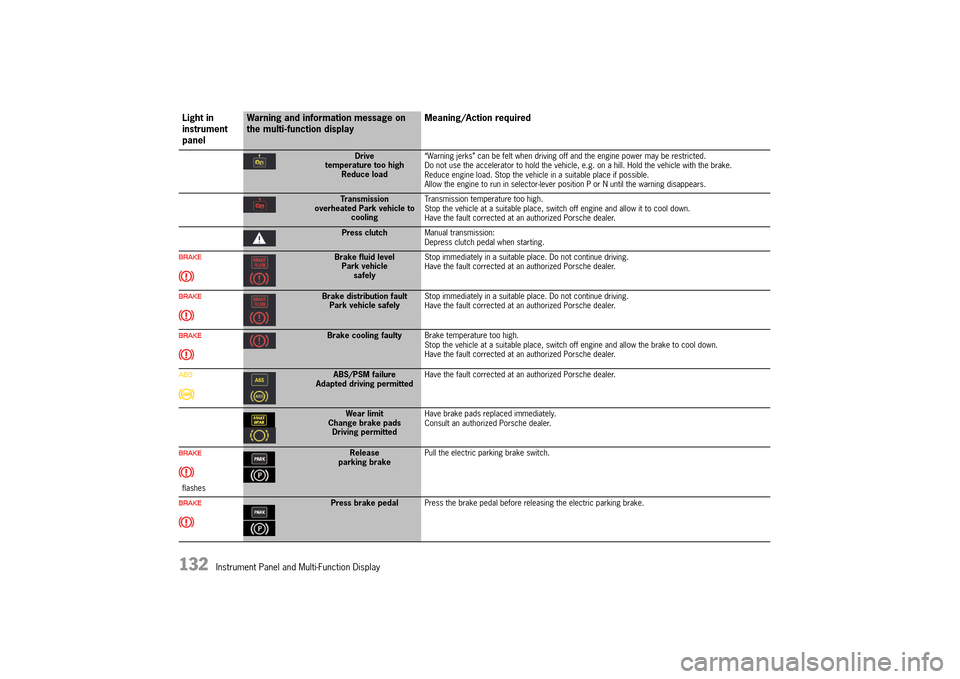
Drive temperature too highReduce load
“Warning jerks” can be felt when driving off and the engine power may be restricted. Do not use the accelerator to hold the vehicle, e.g. on a hill. Hold the vehicle with the brake.Reduce engine load. Stop the vehicle in a suitable place if possible.Allow the engine to run in selector-lever position P or N until the warning disappears.
Transmission overheated Park vehicle to cooling
Transmission temperature too high. Stop the vehicle at a suitable place, switch off engine and allow it to cool down.Have the fault corrected at an authorized Porsche dealer.
Press clutch Manual transmission: Depress clutch pedal when starting.
Brake fluid level Park vehiclesafely
Stop immediately in a suitable place. Do not continue driving. Have the fault corrected at an authorized Porsche dealer.
Brake distribution fault Park vehicle safely Stop immediately in a suitable place. Do not continue driving. Have the fault corrected at an authorized Porsche dealer.
Brake cooling faulty Brake temperature too high. Stop the vehicle at a suitable place, switch off engine and allow the brake to cool down.Have the fault corrected at an authorized Porsche dealer.
ABS/PSM failure Adapted driving permitted Have the fault corrected at an authorized Porsche dealer.
Wear limit Change brake padsDriving permitted
Have brake pads replaced immediately. Consult an authorized Porsche dealer.
flashes
Release parking brake Pull the electric parking brake switch.
Press brake pedal Press the brake pedal before releasing the electric parking brake.
Light in instrument panel
Warning and information message on the multi-function display Meaning/Action required
14_991_Turbo_21.book Seite 132 Mittwoch, 9. April 2014 2:19 14
Page 135 of 300
Instrument Panel and Multi-Function Display 133
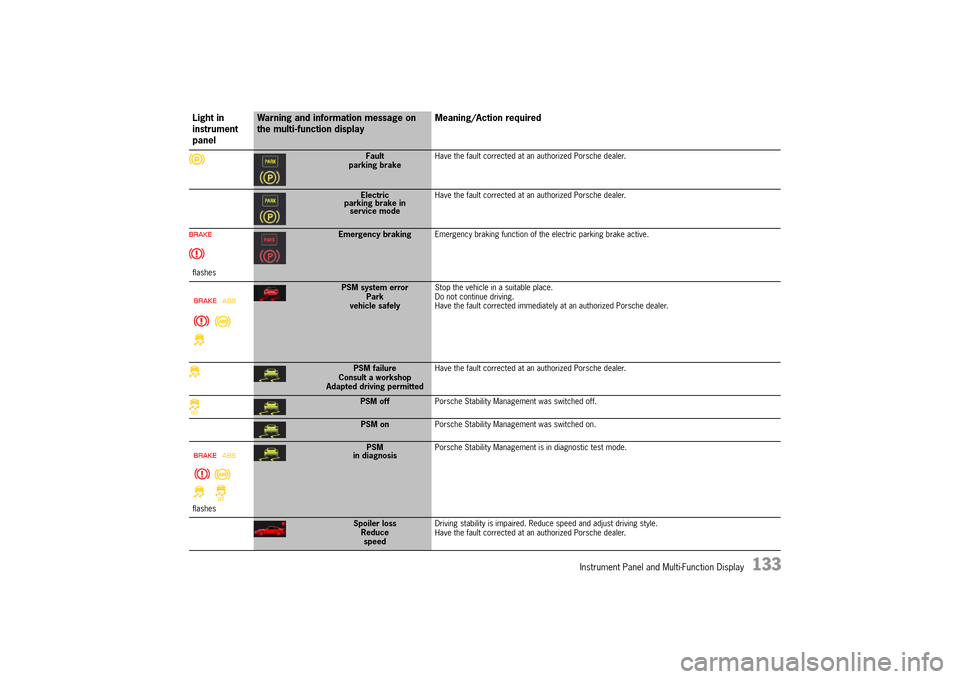
Fault parking brake Have the fault corrected at an authorized Porsche dealer.
Electric parking brake inservice mode
Have the fault corrected at an authorized Porsche dealer.
flashes
Emergency braking Emergency braking function of the electric parking brake active.
PSM system error Park vehicle safely
Stop the vehicle in a suitable place. Do not continue driving.Have the fault corrected immediately at an authorized Porsche dealer.
PSM failureConsult a workshopAdapted driving permitted
Have the fault corrected at an authorized Porsche dealer.
PSM off Porsche Stability Management was switched off.
PSM onPorsche Stability Management was switched on.
flashes
PSM in diagnosis Porsche Stability Management is in diagnostic test mode.
Spoiler loss Reducespeed
Driving stability is impaired. Reduce speed and adjust driving style. Have the fault corrected at an authorized Porsche dealer.
Light in instrument panel
Warning and information message on the multi-function display Meaning/Action required
14_991_Turbo_21.book Seite 133 Mittwoch, 9. April 2014 2:19 14
Page 136 of 300
134 Instrument Panel and Multi-Function Display
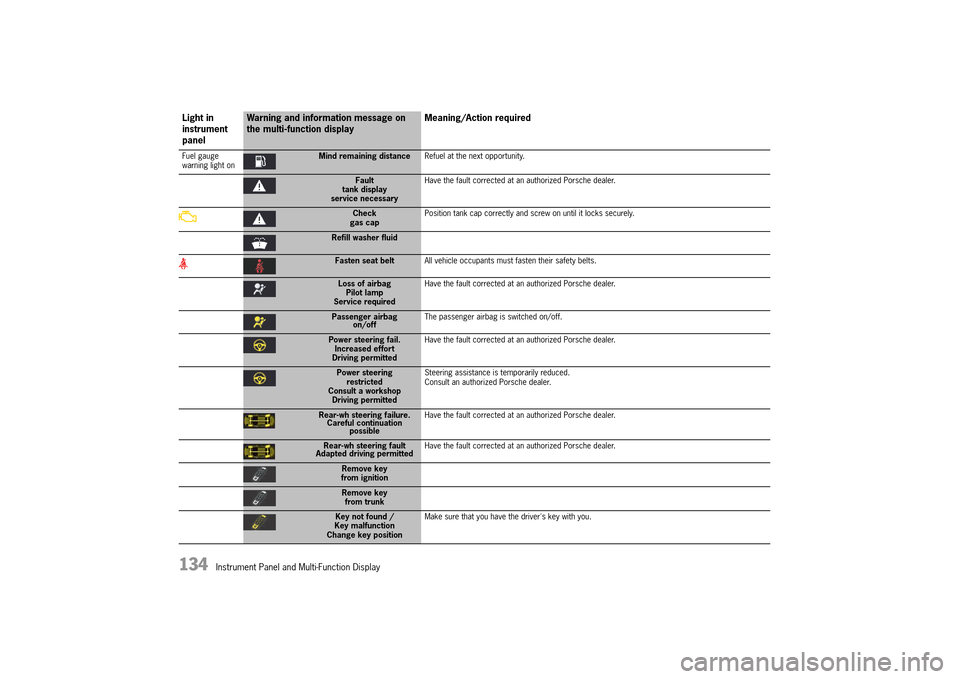
Fuel gauge warning light onMind remaining distance Refuel at the next opportunity.
Fault tank displayservice necessary
Have the fault corrected at an authorized Porsche dealer.
Check gas cap Position tank cap correctly and screw on until it locks securely.
Refill washer fluid
Fasten seat belt All vehicle occupants must fasten their safety belts.
Loss of airbag Pilot lampService required
Have the fault corrected at an authorized Porsche dealer.
Passenger airbag on/off The passenger airbag is switched on/off.
Power steering fail. Increased effortDriving permitted
Have the fault corrected at an authorized Porsche dealer.
Power steering restrictedConsult a workshopDriving permitted
Steering assistance is temporarily reduced. Consult an authorized Porsche dealer.
Rear-wh steering failure. Careful continuation possible
Have the fault corrected at an authorized Porsche dealer.
Rear-wh steering fault Adapted driving permitted Have the fault corrected at an authorized Porsche dealer.
Remove key from ignition
Remove keyfrom trunk
Key not found / Key malfunction Change key position
Make sure that you have the driver's key with you.
Light in instrument panel
Warning and information message on the multi-function display Meaning/Action required
14_991_Turbo_21.book Seite 134 Mittwoch, 9. April 2014 2:19 14
Page 137 of 300
Instrument Panel and Multi-Function Display 135
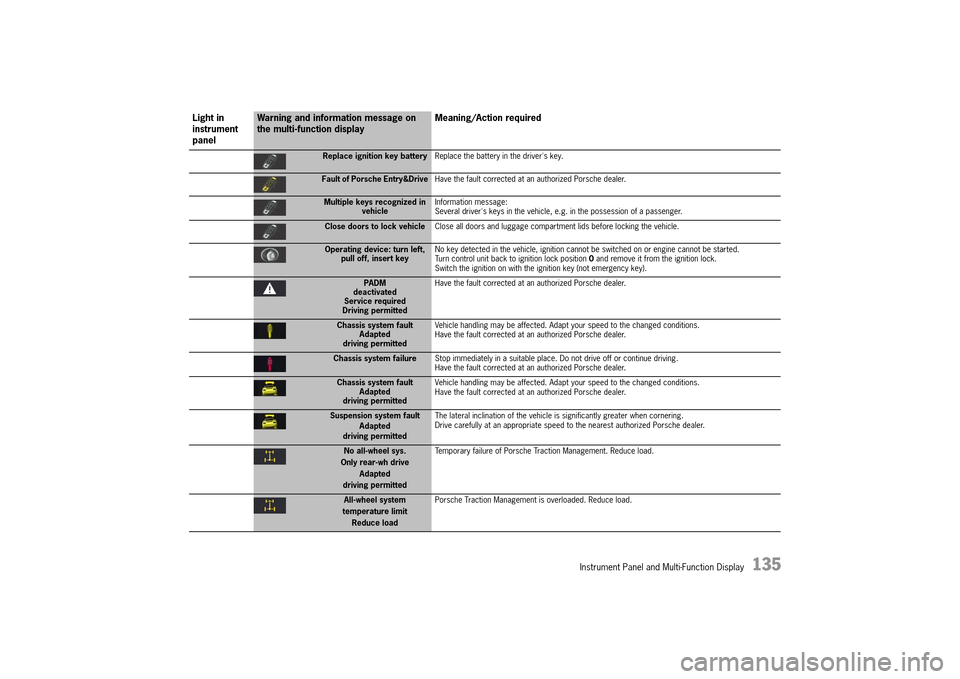
Replace ignition key batteryReplace the battery in the driver's key.
Fault of Porsche Entry&DriveHave the fault corrected at an authorized Porsche dealer.
Multiple keys recognized in vehicle Information message: Several driver's keys in the vehicle, e.g. in the possession of a passenger.
Close doors to lock vehicle Close all doors and luggage compartment lids before locking the vehicle.
Operating device: turn left, pull off, insert key No key detected in the vehicle, ignition cannot be switched on or engine cannot be started. Turn control unit back to ignition lock position 0 and remove it from the ignition lock. Switch the ignition on with the ignition key (not emergency key).
PADM deactivatedService requiredDriving permitted
Have the fault corrected at an authorized Porsche dealer.
Chassis system fault Adapteddriving permitted
Vehicle handling may be affected. Adapt your speed to the changed conditions. Have the fault corrected at an authorized Porsche dealer.
Chassis system failure Stop immediately in a suitable place. Do not drive off or continue driving. Have the fault corrected at an authorized Porsche dealer.
Chassis system fault Adapteddriving permitted
Vehicle handling may be affected. Adapt your speed to the changed conditions. Have the fault corrected at an authorized Porsche dealer.
Suspension system fault Adapteddriving permitted
The lateral inclination of the vehicle is significantly greater when cornering. Drive carefully at an appropriate speed to the nearest authorized Porsche dealer.
No all-wheel sys. Only rear-wh driveAdapted
driving permitted
Temporary failure of Porsche Traction Management. Reduce load.
All-wheel system temperature limitReduce load
Porsche Traction Management is overloaded. Reduce load.
Light in instrument panel
Warning and information message on the multi-function display Meaning/Action required
14_991_Turbo_21.book Seite 135 Mittwoch, 9. April 2014 2:19 14
Page 138 of 300
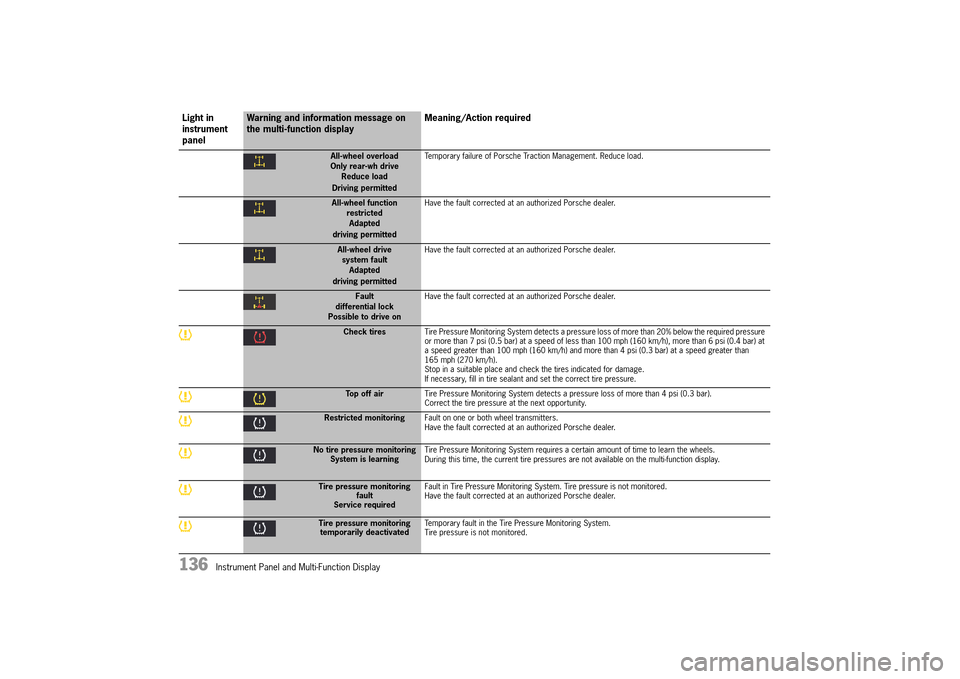
136 Instrument Panel and Multi-Function Display
All-wheel overload Only rear-wh driveReduce load Driving permitted
Temporary failure of Porsche Traction Management. Reduce load.
All-wheel function restrictedAdapted driving permitted
Have the fault corrected at an authorized Porsche dealer.
All-wheel drive system faultAdapted driving permitted
Have the fault corrected at an authorized Porsche dealer.
Fault differential lockPossible to drive on
Have the fault corrected at an authorized Porsche dealer.
Check tires Tire Pressure Monitoring System detects a pressure loss of more than 20% below the required pressure or more than 7 psi (0.5 bar) at a speed of less than 100 mph (160 km/h), more than 6 psi (0.4 bar) at a speed greater than 100 mph (160 km/h) and more than 4 psi (0.3 bar) at a speed greater than 165 mph (270 km/h).Stop in a suitable place and check the tires indicated for damage.If necessary, fill in tire sealant and set the correct tire pressure.
Top off air Tire Pressure Monitoring System detects a pressure loss of more than 4 psi (0.3 bar). Correct the tire pressure at the next opportunity.
Restricted monitoring Fault on one or both wheel transmitters. Have the fault corrected at an authorized Porsche dealer.
No tire pressure monitoring System is learning Tire Pressure Monitoring System requires a certain amount of time to learn the wheels. During this time, the current tire pressures are not available on the multi-function display.
Tire pressure monitoring faultService required
Fault in Tire Pressure Monitoring System. Tire pressure is not monitored. Have the fault corrected at an authorized Porsche dealer.
Tire pressure monitoring temporarily deactivated Temporary fault in the Tire Pressure Monitoring System. Tire pressure is not monitored.
Light in instrument panel
Warning and information message on the multi-function display Meaning/Action required
14_991_Turbo_21.book Seite 136 Mittwoch, 9. April 2014 2:19 14