Button PORSCHE 911 TURBO 2014 6.G Repair Manual
[x] Cancel search | Manufacturer: PORSCHE, Model Year: 2014, Model line: 911 TURBO, Model: PORSCHE 911 TURBO 2014 6.GPages: 300, PDF Size: 10.61 MB
Page 188 of 300
186 Driving and Driving Safety
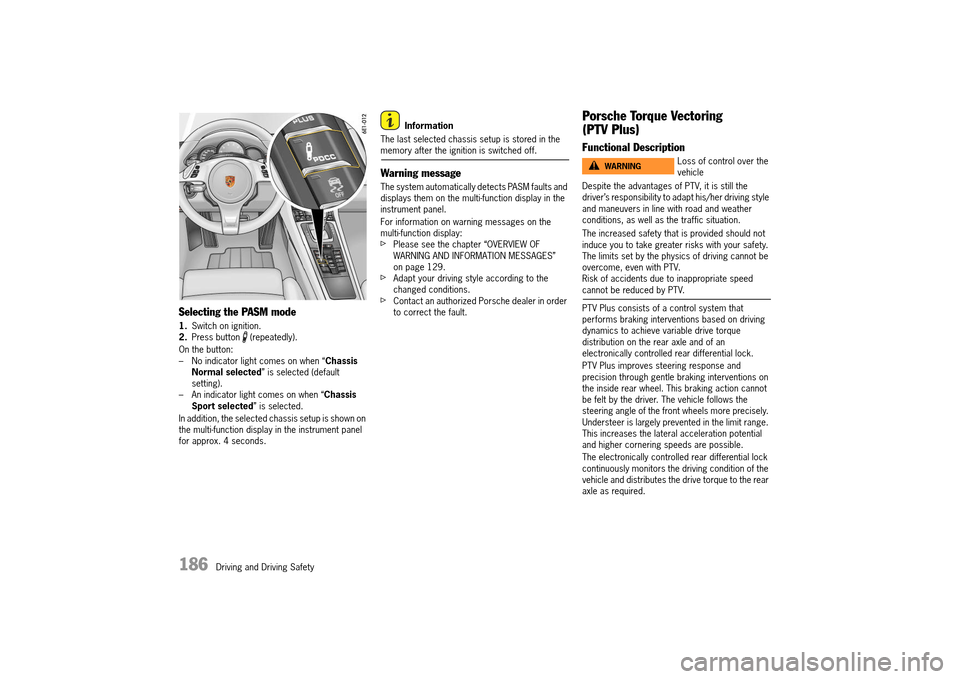
Selecting the PASM mode
1.Switch on ignition. 2. Press button (repeatedly).
On the button: – No indicator light comes on when “ Chassis Normal selected ” is selected (default setting).– An indicator light comes on when “ Chassis Sport selected ” is selected.
In addition, the selected chassis setup is shown on the multi-function display in the instrument panel for approx. 4 seconds.
Information
The last selected chassis setup is stored in the memory after the ignition is switched off.
Warning message
The system automatically detects PASM faults and displays them on the multi-function display in the instrument panel.
For information on warning messages on the multi-function display:fPlease see the chapter “OVERVIEW OF WARNING AND INFORMATION MESSAGES” on page 129.fAdapt your driving style according to the changed conditions.fContact an authorized Porsche dealer in order to correct the fault.
Porsche Torque Vectoring
(PTV Plus)
Functional Description
Despite the advantages of PTV, it is still the driver’s responsibility to adapt his/her driving style and maneuvers in line with road and weather conditions, as well as the traffic situation.
The increased safety that is provided should not induce you to take greater risks with your safety. The limits set by the physics of driving cannot be overcome, even with PTV.Risk of accidents due to inappropriate speed cannot be reduced by PTV.
PTV Plus consists of a control system that performs braking interventions based on driving dynamics to achieve variable drive torque distribution on the rear axle and of an electronically controlled rear differential lock.
PTV Plus improves steering response and precision through gentle braking interventions on the inside rear wheel. This braking action cannot be felt by the driver. The vehicle follows the steering angle of the front wheels more precisely. Understeer is largely prevented in the limit range. This increases the lateral acceleration potential and higher cornering speeds are possible.
The electronically controlled rear differential lock continuously monitors the driving condition of the vehicle and distributes the drive torque to the rear axle as required.
Loss of control over the vehicleWARNINGh
14_991_Turbo_21.book Seite 186 Mittwoch, 9. April 2014 2:19 14
Page 190 of 300
188 Driving and Driving Safety
Dynamic Engine Mounting (PADM)
On vehicles with Sport Chrono package
Dynamic Engine Mounting with variable damping is a system designed to enhance both driving dynamics and driving comfort. Depending on the driving situation, the ideal mounting rigidity and damping is automatically set in the range between an rigid engine-to-body connection (increase in driving dynamics) and decoupling of the engine from the body (increase in driving comfort).
“Sport” mode
When “ Sport” mode is switched on, a more rigid engine-to-body connection is achieved for a sporty driving style.
“Sport Plus” mode
When “ Sport Plus” mode is switched on, an optimal engine-to-body connection is achieved for driving on race circuits.
Warning message
Dynamic engine mounting faults are indicated by a warning message on the multi-function display.fPlease see the chapter “OVERVIEW OF WARNING AND INFORMATION MESSAGES” on page 129.
“Sport” and “Sport Plus” mode
The selectable chassis settings mean that the vehicle can offer various modes for a sportier overall setup.The “ Sport” mode pushes the control systems more in the direction of greater emotionality and performance during every day driving.
In “ Sport Plus” mode, maximum performance is set for race-circuit-like driving:– In “ Sport Plus” mode: PASM (Porsche Active Suspension Management) is automatically changed to “ Chassis Normal” or “Chassis Sport” mode. – In “ Sport Plus” mode: Like PASM, PDCC is switched to the corresponding “ Sport” mode, whereby the rolling movements of the vehicle are reduced further, depending on the selected mode.– The PDK transmission switches to a sporty gear-changing map and shortens the gear shifting times when Sport mode is activated. Gear changes take place faster.– The electronic accelerator pedal reacts sooner, and the engine is more responsive to throttle inputs. When Sport mode is switched on and the vehicle is traveling at a speed of less than 40 km/h (25 mph), this function is activated only after the driver has floored the accelerator pedal or released it briefly.– The rpm limiter characteristic is “harder”. In other words: the engine is immediately throttled when the performance limits are reached (only in manual selection mode on vehicles with PDK).
– PSM (Porsche Stability Management) control is more sporty in “ Sport Plus” mode. PSM interventions are later than in Normal mode. The driver can maneuver the vehicle with greater agility at its performance limits, without having to dispense with the assistance of PSM in emergency situations. This helps to achieve optimal lap times, particularly on race circuits with a dry road surface.– PADM changes to more sporty maps for the dynamic engine mountings to achieve a stiffer engine-to-body connection.In “ Sport” for a sporty driving style, in “ Sport Plus” mode for race-circuit-like driving. – PTV Plus changes to a more dynamic map when “ Sport Plus” is switched on. – The dynamic cornering light reacts more spontaneously to steering angle changes.– The sports exhaust system is be switched to a sound-optimized mode, but can be switched off separately via the button.The Auto Start Stop function and coasting mode are deactivated.fPlease read the relevant chapters.
Overboost function
On vehicles with Sport Chrono package
When “ Sport” or “Sport Plus” mode is switched on and the accelerator is fully pressed, the boost pressure is temporarily increased by approx. 2 psi (0.15 bar) in the medium engine-speed range and the maximum torque increases.
For information on the torque display:fPlease see the chapter “PERFORMANCE MENU” on page 116.
14_991_Turbo_21.book Seite 188 Mittwoch, 9. April 2014 2:19 14
Page 191 of 300
Driving and Driving Safety 189
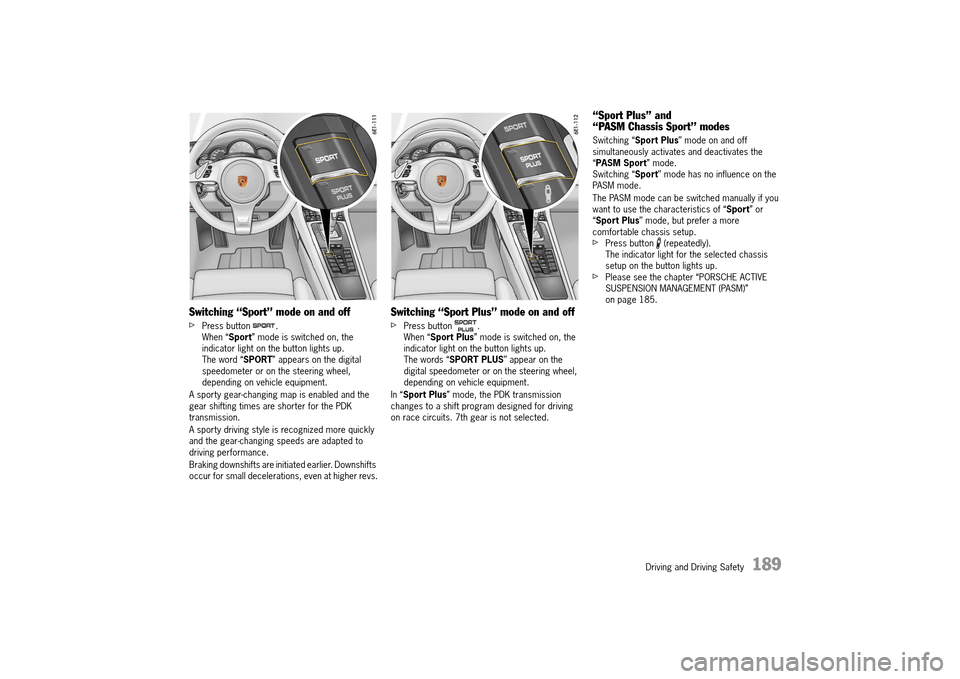
Switching “Sport” mode on and off
fPress button . When “ Sport” mode is switched on, the indicator light on the button lights up.The word “ SPORT” appears on the digital speedometer or on the steering wheel, depending on vehicle equipment.
A sporty gear-changing map is enabled and the gear shifting times are shorter for the PDK transmission.
A sporty driving style is recognized more quickly and the gear-changing speeds are adapted to driving performance.
Braking downshifts are initiated earlier. Downshifts occur for small decelerations, even at higher revs.
Switching “Sport Plus” mode on and off
fPress button .When “ Sport Plus” mode is switched on, the indicator light on the button lights up.The words “ SPORT PLUS” appear on the digital speedometer or on the steering wheel, depending on vehicle equipment.
In “ Sport Plus” mode, the PDK transmission changes to a shift program designed for driving on race circuits. 7th gear is not selected.
“Sport Plus” and “PASM Chassis Sport” modes
Switching “ Sport Plus” mode on and off simultaneously activates and deactivates the “ PASM Sport” mode. Switching “ Sport” mode has no influence on the PASM mode.
The PASM mode can be switched manually if you want to use the characteristics of “ Sport” or “ Sport Plus” mode, but prefer a more comfortable chassis setup.fPress button (repeatedly).The indicator light for the selected chassis setup on the button lights up.fPlease see the chapter “PORSCHE ACTIVE SUSPENSION MANAGEMENT (PASM)” on page 185.
14_991_Turbo_21.book Seite 189 Mittwoch, 9. April 2014 2:19 14
Page 193 of 300
Driving and Driving Safety 191
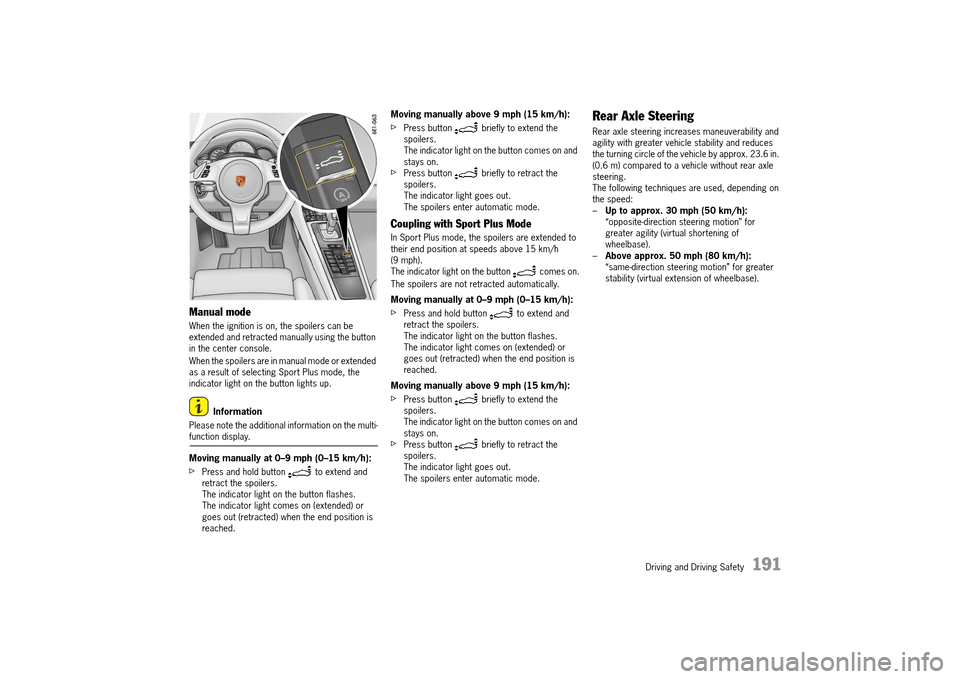
Manual mode
When the ignition is on, the spoilers can be extended and retracted manually using the button in the center console.
When the spoilers are in manual mode or extended as a result of selecting Sport Plus mode, the indicator light on the button lights up.
Information
Please note the additional information on the multi-function display.
Moving manually at 0–9 mph (0–15 km/h):
fPress and hold button to extend and retract the spoilers.The indicator light on the button flashes.The indicator light comes on (extended) or goes out (retracted) when the end position is reached.
Moving manually above 9 mph (15 km/h):
fPress button briefly to extend the spoilers.The indicator light on the button comes on and stays on.fPress button briefly to retract the spoilers.The indicator light goes out.The spoilers enter automatic mode.
Coupling with Sport Plus Mode
In Sport Plus mode, the spoilers are extended to their end position at speeds above 15 km/h (9 mph). The indicator light on the button comes on.
The spoilers are not retracted automatically.
Moving manually at 0–9 mph (0–15 km/h):
fPress and hold button to extend and retract the spoilers.The indicator light on the button flashes.The indicator light comes on (extended) or goes out (retracted) when the end position is reached.
Moving manually above 9 mph (15 km/h):
fPress button briefly to extend the spoilers.The indicator light on the button comes on and stays on.fPress button briefly to retract the spoilers.The indicator light goes out.The spoilers enter automatic mode.
Rear Axle Steering
Rear axle steering increases maneuverability and agility with greater vehicle stability and reduces the turning circle of the vehicle by approx. 23.6 in. (0.6 m) compared to a vehicle without rear axle steering. The following techniques are used, depending on the speed:– Up to approx. 30 mph (50 km/h): “opposite-direction steering motion” for greater agility (virtual shortening of wheelbase).– Above approx. 50 mph (80 km/h): “same-direction steering motion” for greater stability (virtual extension of wheelbase).
14_991_Turbo_21.book Seite 191 Mittwoch, 9. April 2014 2:19 14
Page 196 of 300
194 Storage, Luggage Compartment and Roof Transport System
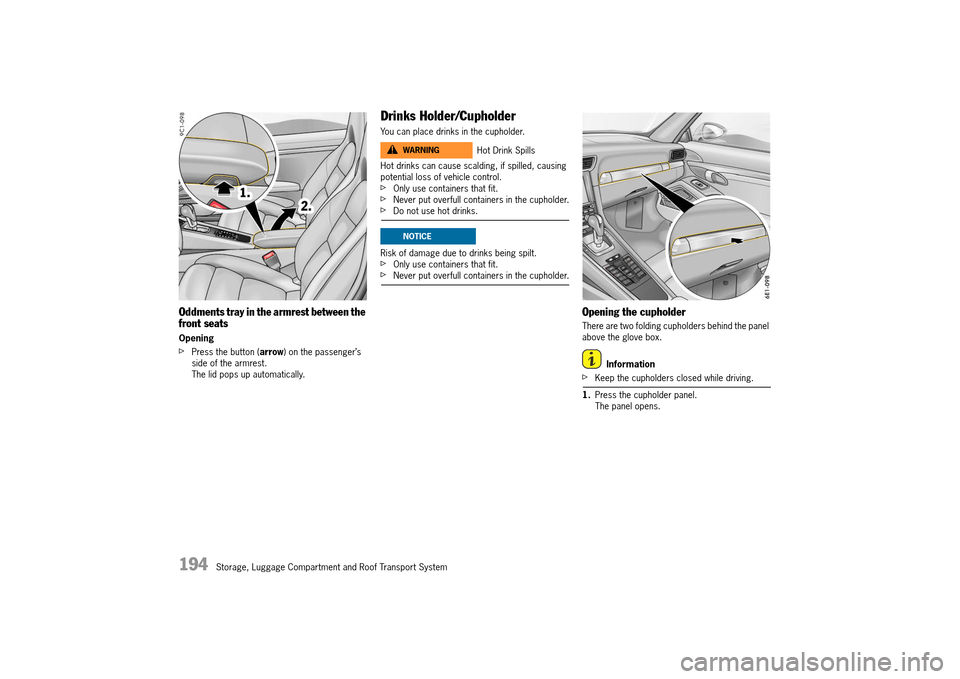
Oddments tray in the armrest between the front seats
Opening
fPress the button ( arrow) on the passenger’s side of the armrest.The lid pops up automatically.
Drinks Holder/Cupholder
You can place drinks in the cupholder.
Hot drinks can cause scalding, if spilled, causing potential loss of vehicle control.fOnly use containers that fit.fNever put overfull containers in the cupholder.fDo not use hot drinks.
Risk of damage due to drinks being spilt.fOnly use containers that fit.fNever put overfull containers in the cupholder.
Opening the cupholder
There are two folding cupholders behind the panel above the glove box.
Information
fKeep the cupholders closed while driving.
1. Press the cupholder panel. The panel opens.
Hot Drink SpillsWARNINGh
NOTICE
14_991_Turbo_21.book Seite 194 Mittwoch, 9. April 2014 2:19 14
Page 209 of 300
Parking 207
ParkAssist
When the driver is parking and maneuvering the vehicle, ParkAssist indicates the distance between the vehicle and a large obstacle by means of signal tones.fOn vehicles with front and rear sensors:For information on the ParkAssist visual display, please refer also to the section “PARKASSIST” in the operating instructions for the Porsche Communication Systems PCM/CDR.
ParkAssist is activated automatically when reverse gear is selected and the ignition is on.
If the vehicle has front ParkAssist, this also issues an automatic warning when the distance between the vehicle and an obstacle in front is less – than approx. 40 in./100 cm (acoustically) and approx. 32 in./80 cm (visually).
A warning signal sounds when – the distance between the vehicle and an obstacle at the rear is less than approx. 71 in./180 cm.The ParkAssist visual display appears on the central screen of the Porsche communication system.
Front and rear ParkAssist is not activated: – At a speed of more than approx. 9 mph (15 km/h).– When the electric parking brake is activated.– When the ParkAssist has been switched off with button A in the overhead console with the ignition switched on. The indicator light in button A lights up.
Responsibility for parking and for assessing the risk to persons, children, pets, and small objects around the vehicle lies completely with the driver. fMake sure that no persons (especially small children), animals or obstacles are within the maneuvering area. fIf the continuous tone sounds, stop and do not move your vehicle further in that direction.
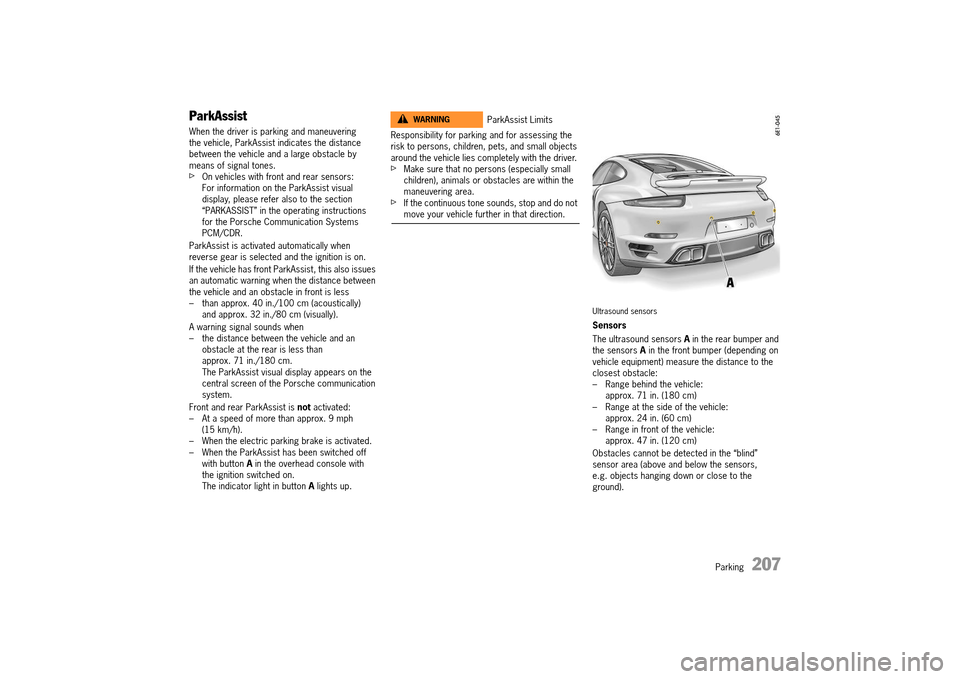
Ultrasound sensors
Sensors
The ultrasound sensors A in the rear bumper and the sensors A in the front bumper (depending on vehicle equipment) measure the distance to the closest obstacle:– Range behind the vehicle: approx. 71 in. (180 cm)– Range at the side of the vehicle: approx. 24 in. (60 cm)– Range in front of the vehicle: approx. 47 in. (120 cm)
Obstacles cannot be detected in the “blind” sensor area (above and below the sensors, e.g. objects hanging down or close to the ground).
ParkAssist LimitsWARNINGh
14_991_Turbo_21.book Seite 207 Mittwoch, 9. April 2014 2:19 14
Page 211 of 300
Parking 209
Deactivating ParkAssist
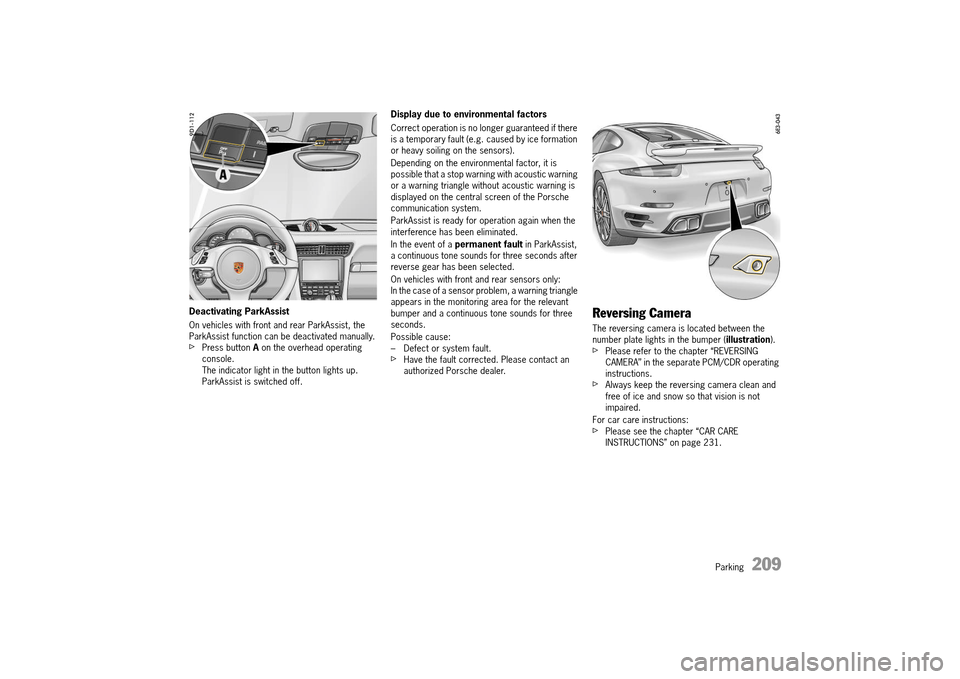
On vehicles with front and rear ParkAssist, the ParkAssist function can be deactivated manually.fPress button A on the overhead operating console.The indicator light in the button lights up.ParkAssist is switched off.
Display due to environmental factors
Correct operation is no longer guaranteed if there is a temporary fault (e.g. caused by ice formation or heavy soiling on the sensors).
Depending on the environmental factor, it is possible that a stop warning with acoustic warning or a warning triangle without acoustic warning is displayed on the central screen of the Porsche communication system.
ParkAssist is ready for operation again when the interference has been eliminated.
In the event of a permanent fault in ParkAssist, a continuous tone sounds for three seconds after reverse gear has been selected.
On vehicles with front and rear sensors only: In the case of a sensor problem, a warning triangle appears in the monitoring area for the relevant bumper and a continuous tone sounds for three seconds.
Possible cause: – Defect or system fault.fHave the fault corrected. Please contact an authorized Porsche dealer.
Reversing Camera
The reversing camera is located between the number plate lights in the bumper ( illustration).fPlease refer to the chapter “REVERSING CAMERA” in the separate PCM/CDR operating instructions.fAlways keep the reversing camera clean and free of ice and snow so that vision is not impaired.
For car care instructions:fPlease see the chapter “CAR CARE INSTRUCTIONS” on page 231.
14_991_Turbo_21.book Seite 209 Mittwoch, 9. April 2014 2:19 14
Page 212 of 300
210 Parking
Swivelling Down Mirror Glass as
Parking Aid
When reverse gear is engaged, the mirror on the passenger’s side swivels down slightly to show the curb area.
Preconditions
– The ignition must be switched on. – The function must be activated on the multi-function display.
For further information on setting the parking aid:fPlease see the chapter “ADJUSTING REVERSING OPTIONS” on page 122.
Swivelling down mirror glass manually
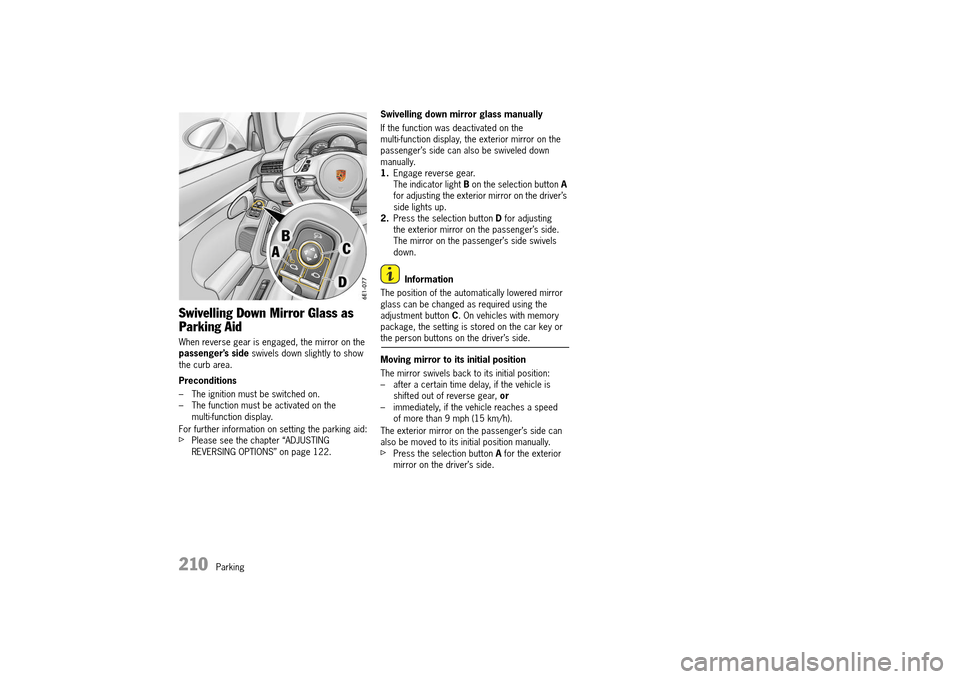
If the function was deactivated on the multi-function display, the exterior mirror on the passenger’s side can also be swiveled down manually.1. Engage reverse gear. The indicator light B on the selection button A for adjusting the exterior mirror on the driver’s side lights up.2. Press the selection button D for adjusting the exterior mirror on the passenger’s side.The mirror on the passenger’s side swivels down.
Information
The position of the automatically lowered mirror glass can be changed as required using the adjustment button C. On vehicles with memory package, the setting is stored on the car key or the person buttons on the driver’s side.
Moving mirror to its initial position
The mirror swivels back to its initial position: – after a certain time delay, if the vehicle is shifted out of reverse gear, or – immediately, if the vehicle reaches a speed of more than 9 mph (15 km/h).
The exterior mirror on the passenger’s side can also be moved to its initial position manually.fPress the selection button A for the exterior mirror on the driver’s side.
14_991_Turbo_21.book Seite 210 Mittwoch, 9. April 2014 2:19 14
Page 213 of 300
Parking 211
Garage Door Opener HomeLink®
(Universal Remote Control)
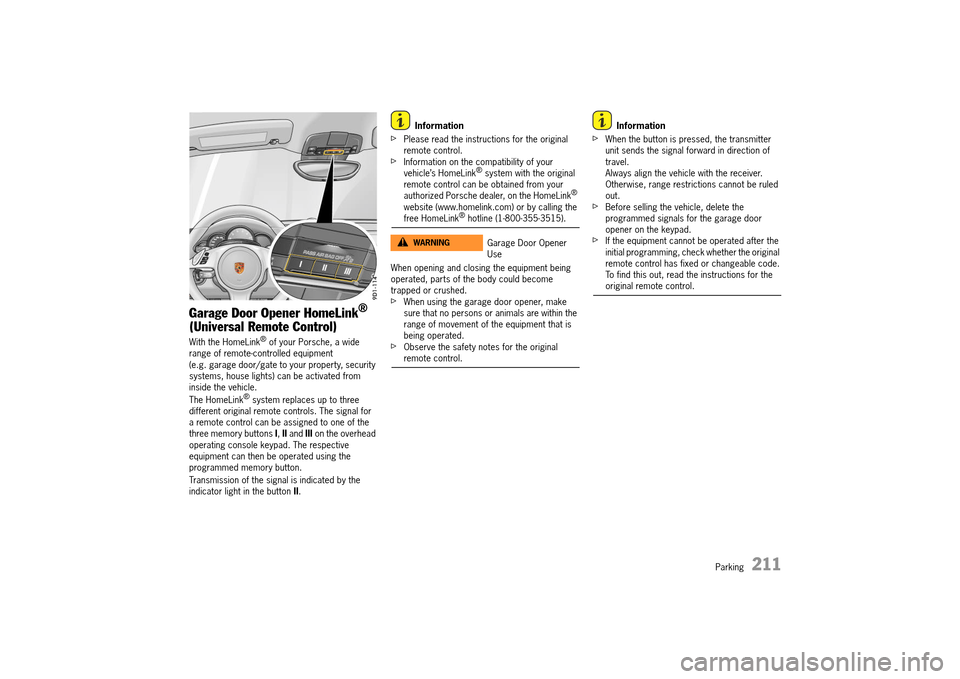
With the HomeLink® of your Porsche, a wide range of remote-controlled equipment (e.g. garage door/gate to your property, security systems, house lights) can be activated from inside the vehicle.
The HomeLink® system replaces up to three different original remote controls. The signal for a remote control can be assigned to one of the three memory buttons I, II and III on the overhead operating console keypad. The respective equipment can then be operated using the programmed memory button.
Transmission of the signal is indicated by the indicator light in the button II.
Information
fPlease read the instructions for the original remote control.fInformation on the compatibility of your vehicle’s HomeLink® system with the original remote control can be obtained from your authorized Porsche dealer, on the HomeLink® website (www.homelink.com) or by calling the free HomeLink® hotline (1-800-355-3515).
When opening and closing the equipment being operated, parts of the body could become trapped or crushed.fWhen using the garage door opener, make sure that no persons or animals are within the range of movement of the equipment that is being operated.fObserve the safety notes for the original remote control.
Information
fWhen the button is pressed, the transmitter unit sends the signal forward in direction of travel.Always align the vehicle with the receiver.Otherwise, range restrictions cannot be ruled out.fBefore selling the vehicle, delete the programmed signals for the garage door opener on the keypad. fIf the equipment cannot be operated after the initial programming, check whether the original remote control has fixed or changeable code.To find this out, read the instructions for the original remote control.
Garage Door Opener Use
WARNINGh
14_991_Turbo_21.book Seite 211 Mittwoch, 9. April 2014 2:19 14
Page 214 of 300
212 Parking
Operating the garage door opener
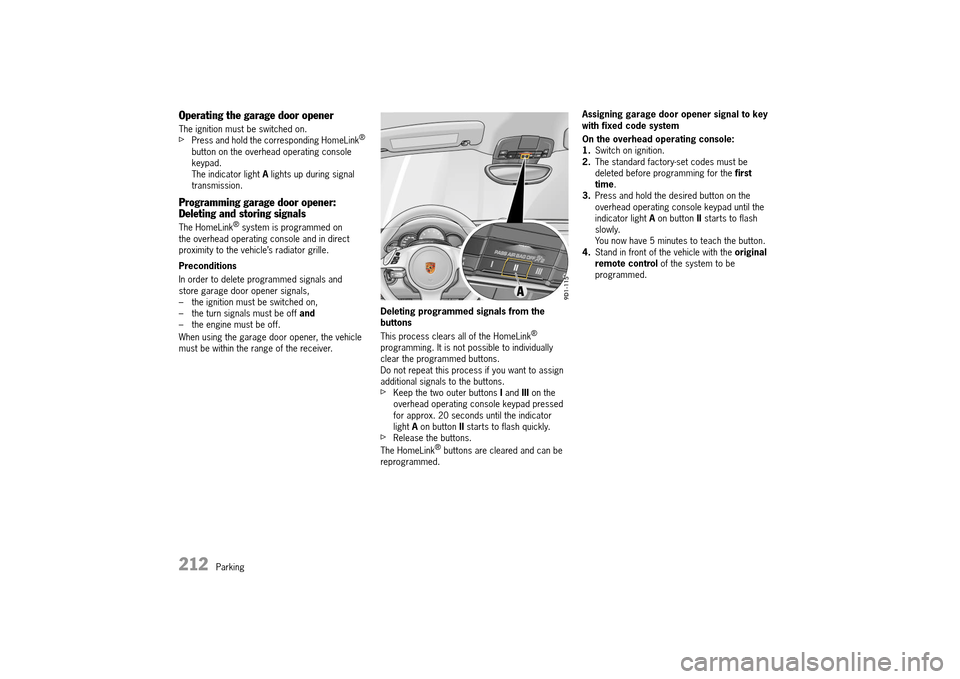
The ignition must be switched on.fPress and hold the corresponding HomeLink® button on the overhead operating console keypad.The indicator light A lights up during signal transmission.
Programming garage door opener: Deleting and storing signals
The HomeLink® system is programmed on the overhead operating console and in direct proximity to the vehicle’s radiator grille.
Preconditions
In order to delete programmed signals and store garage door opener signals,– the ignition must be switched on,– the turn signals must be off and – the engine must be off.
When using the garage door opener, the vehicle must be within the range of the receiver.
Deleting programmed signals from the buttons
This process clears all of the HomeLink® programming. It is not possible to individually clear the programmed buttons.Do not repeat this process if you want to assign additional signals to the buttons.fKeep the two outer buttons I and III on the overhead operating console keypad pressed for approx. 20 seconds until the indicator light A on button II starts to flash quickly.fRelease the buttons.
The HomeLink® buttons are cleared and can be reprogrammed.
Assigning garage door opener signal to key with fixed code system
On the overhead operating console: 1. Switch on ignition. 2. The standard factory-set codes must be deleted before programming for the first time . 3. Press and hold the desired button on the overhead operating console keypad until the indicator light A on button II starts to flash slowly.You now have 5 minutes to teach the button.4. Stand in front of the vehicle with the original remote control of the system to be programmed.
14_991_Turbo_21.book Seite 212 Mittwoch, 9. April 2014 2:19 14