ignition PORSCHE BOXSTER 2005 2.G Owner's Guide
[x] Cancel search | Manufacturer: PORSCHE, Model Year: 2005, Model line: BOXSTER, Model: PORSCHE BOXSTER 2005 2.GPages: 276, PDF Size: 4.05 MB
Page 69 of 276

Controls, Instruments
69
Switch position 2Start engine
fTurn ignition key to ignition lock position 2.
fPlease observe the chapter “STARTING PRO-
CEDURES” on Page 70.Switch position 3Ignition off
fTurn ignition key to ignition lock position 3.
Locking the steering columnAutomatic locking
The steering column is automatically locked when
the ignition key is withdrawn from the ignition lock.
Warning!
Risk of an accident.
The steering wheel will lock and will cause
loss of steering.
fNever remove key from the ignition lock or turn
the key off while the vehicle is moving.
fAlways withdraw the ignition key when leav-ing the vehicle.Automatic unlocking
The steering column is automatically unlocked
when the ignition key is inserted into the ignition
lock.
Note
To avoid battery run-down, always remove the igni-
tion key from the ignition lock.
Please observe the chapter “BULB CHART” on
Page 239.
Gong If you leave the key in the ignition/steering lock, a
gong will sound when the driver’s door is opened.
This is a reminder to remove the key.
Page 70 of 276

70
Controls, Instruments
Starting Procedures fPlease observe the chapter “IMMOBILIZER” on
Page 17.
fPlease observe the chapter “EMISSION CONT-
ROL SYSTEM” on Page 182.
Warning!
Serious injury may result if you are involved
in a collision without having fastened the
safety belts.
fFasten safety belts before driving away. Before starting the engine fApply the handbrake.
fManual transmission:
Move the gearshift lever into neutral.
The clutch pedal must be depressed fully
before the starter will engage.
fTiptronic:
Move the selector lever to P or N.
Temperature sensors on the engine automatically
provide the correct fuel/air mixture required for
starting.
Therefore, it is not necessary to depress the
accelerator pedal while starting a cold or a
warm engine.
Starting the enginefTurn ignition key to ignition lock position 2.
fAs soon as the engine starts, release the igni-
tion key.
The first operation of the starter is ended auto-
matically when the engine starts.
If the engine does not start, subsequent starter
operations will not be ended automatically.
If the engine fails to start after 10 or 15 seconds
of cranking:
fWait about 10 seconds before engaging the
starter again.
fWhen starting the engine, be ready to drive im-
mediately.
Drive vehicle at moderate speeds and avoid
engine speeds above 4,200 rpm during the
first 5 minutes.
fDo not let the engine idle to warm up.
Danger!
Engine exhaust fumes have many compon-
ents which you can smell. They also contain
carbon monoxide (CO), which is a colorless
and odorless gas.
Carbon monoxide can cause unconscious-
ness and even death if inhaled.
fNever start or let the engine run in an enc-
losed, unventilated area.
It is not recommended to sit in your car for pro-
longed periods with the engine on and the car
not moving.
An unattended vehicle with a running engine
is potentially hazardous.
If warning lights should come on to indicate
improper operation, they would go un-
noticed.
fNever leave the engine idling unattended.
Danger of fire.
fDo not park or operate the vehicle in areas
where the hot exhaust system may come in
contact with dry grass, brush, fuel spill or
other flammable material.
fIf your car catches on fire for any reason, call
the fire department.
Do not endanger your life by attempting to put out the fire.
Page 71 of 276

Controls, Instruments
71
Stopping engine fTurn key back to position 3.
fDo not stop engine immediately after hard or
extended driving.
Keep engine running at increased idle for
about two minutes to prevent excessive heat
build-up before turning off engine.
fTo avoid battery run-down, always remove the
ignition key from the ignition lock.
fMake sure that when you leave the car, even
briefly, you have withdrawn the ignition key.
fEngage the steering lock by moving the stee-
ring wheel to the left or right.
Turn the steering wheel to the locking position
before you switch off the engine so that you
don’t have to exert yourself when locking or un-
locking the steering.
Warning!
Danger of injury. Hot engine compartment
components can burn skin on contact.
fBefore working on any part in the engine com-
partment, turn the engine off and let it cool down sufficiently.
Engine-compartment blower,
radiator fan The radiator and radiator fans are in the front of
the car.
The engine-compartment blower is mounted in the
engine compartment.
Warning!
Risk of injury.
After the engine is switched off, the engine-
compartment temperatures is monitored for
approx. 30 minutes.
During this period, and depending on tempe-
rature, the engine-compartment blower may
continue to run or start to run.
fCarry out work in these areas only with the en-
gine off and exercise extreme caution.
Risk of injury. The radiator fans in the front
end of the car may be operating or
unexpectedly start operating when the
engine is switched on.
fCarry out work in these areas only with the en-gine switched off.
Automatic garage door The ignition system in your Porsche may interfere
with your electronically operated garage door.
fTo check this, drive your Porsche close to the
garage door. Make sure not to interfere with
the operating range of the door.
fRun the engine at different speeds.
If the garage door opens or closes without you
operating the garage door unit in your car, contact
the dealer who installed the automatic garage
door to have the frequency and/or coding of the
garage door signal changed or modified.
Page 73 of 276

Controls, Instruments
73
Instrument Panel USA Models Also refer to the corresponding chapter in
the Owner’s Manual.
1 Speedometer with analogue display
2 Turn signal indicator light, left
3 Tachometer
4 High beam indicator light
5 Turn signal indicator light, right
6 ABS warning light
7 Cooling system
Temperature gauge, warning light
8Fuel
Level gauge, warning light
9 Adjusting button for instrument illumination
and trip counter
10 Odometer and daily trip mileage display
11 Automatic speed control indicator light
12 Light sensor for instrument illumination13 Airbag warning light
14 Emission control warning light (Check Engine)
15 Central warning light
16 On-board computer display
17 Porsche Stability Management
Multifunctional PSM light
18 Brake warning light
19 Safety belt warning light
20 Tiptronic indicator
21 Clock and outside temperature display
22 Adjustment button for clockWhen the ignition is switched on, the warning
lights light up for a lamp check.
Note
Warnings that have been given are stored in the
appropriate control unit memory and can be read
out at an authorized Porsche dealer.
This information can help to warn you about situa-
tions which may be hazardous to you or your car.
Page 75 of 276

Controls, Instruments
75
Instrument Panel Canada Models Also refer to the corresponding chapter in
the Owner’s Manual.
1 Speedometer with analogue display
2 Turn signal indicator light, left
3 Tachometer
4 High beam indicator light
5 Turn signal indicator light, right
6 ABS warning light
7 Cooling system
Temperature gauge, warning light
8Fuel
Level gauge, warning light
9 Adjusting button for instrument illumination
and trip counter
10 Odometer and daily trip mileage display
11 Automatic speed control indicator light
12 Light sensor for instrument illumination13 Airbag warning light
14 Emission control warning light (Check Engine)
15 Central warning light
16 On-board computer display
17 Porsche Stability Management
Multifunctional PSM light
18 Brake warning light
19 Safety belt warning light
20 Tiptronic indicator
21 Clock and outside temperature display
22 Adjustment button for clockWhen the ignition is switched on, the warning
lights light up for a lamp check.
Note
Warnings that have been given are stored in the
appropriate control unit memory and can be read
out at an authorized Porsche dealer.
This information can help to warn you about situa-
tions which may be hazardous to you or your car.
Page 80 of 276
80
Controls, Instruments
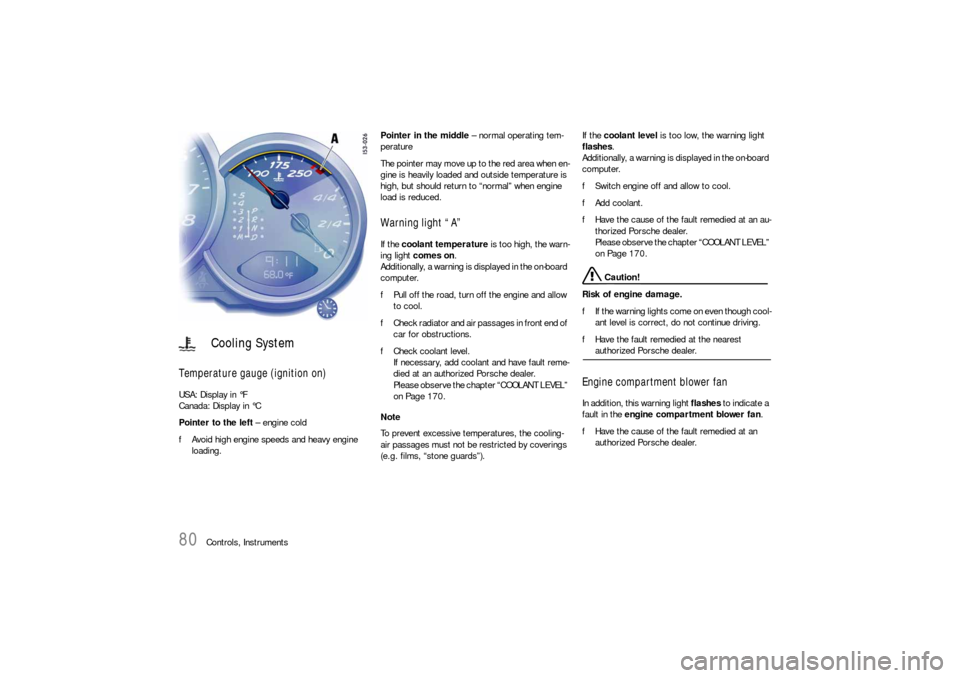
Temperature gauge (ignition on) USA: Display in °F
Canada: Display in °C
Pointer to the left – engine cold
fAvoid high engine speeds and heavy engine
loading. Pointer in the middle – normal operating tem-
perature
The pointer may move up to the red area when en-
gine is heavily loaded and outside temperature is
high, but should return to “normal” when engine
load is reduced.
Warning light “A” If the coolant temperature is too high, the warn-
ing light comes on.
Additionally, a warning is displayed in the on-board
computer.
fPull off the road, turn off the engine and allow
to cool.
fCheck radiator and air passages in front end of
car for obstructions.
fCheck coolant level.
If necessary, add coolant and have fault reme-
died at an authorized Porsche dealer.
Please observe the chapter “COOLANT LEVEL”
on Page 170.
Note
To prevent excessive temperatures, the cooling-
air passages must not be restricted by coverings
(e.g. films, “stone guards”). If the coolant level is too low, the warning light
flashes.
Additionally, a warning is displayed in the on-board
computer.
fSwitch engine off and allow to cool.
fAdd coolant.
fHave the cause of the fault remedied at an au-
thorized Porsche dealer.
Please observe the chapter “COOLANT LEVEL”
on Page 170.
Caution!
Risk of engine damage.
fIf the warning lights come on even though cool-
ant level is correct, do not continue driving.
fHave the fault remedied at the nearest authorized Porsche dealer.
Engine compartment blower fan In addition, this warning light flashes to indicate a
fault in the engine compartment blower fan.
fHave the cause of the fault remedied at an
authorized Porsche dealer.
Cooling System
Page 82 of 276
82
Controls, Instruments
Level gauge
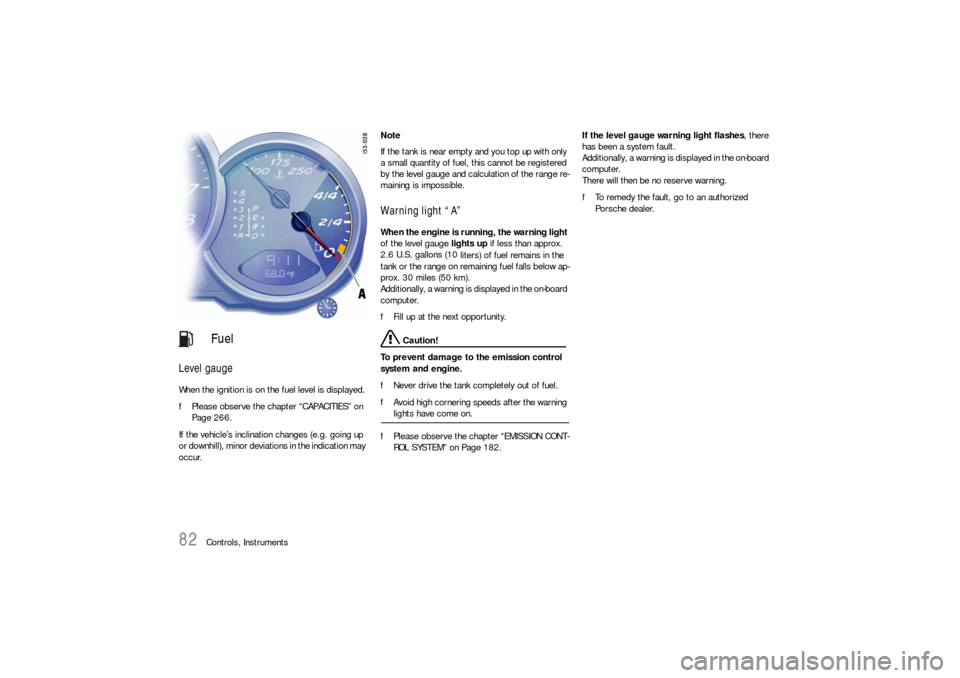
When the ignition is on the fuel level is displayed.
fPlease observe the chapter “CAPACITIES” on
Page 266.
If the vehicle’s inclination changes (e.g. going up
or downhill), minor deviations in the indication may
occur. Note
If the tank is near empty and you top up with only
a small quantity of fuel, this cannot be registered
by the level gauge and calculation of the range re-
maining is impossible.
Warning light “A” When the engine is running, the warning light
of the level gauge lights up if less than approx.
2.6 U.S. gallons (10
liters) of fuel remains in the
tank or the range on remaining fuel falls below ap-
prox. 30 miles (50 km).
Additionally, a warning is displayed in the on-board
computer.
fFill up at the next opportunity.
Caution!
To prevent damage to the emission control
system and engine.
fNever drive the tank completely out of fuel.
fAvoid high cornering speeds after the warning lights have come on.
fPlease observe the chapter “EMISSION CONT-
ROL SYSTEM” on Page 182.If the level gauge warning light flashes, there
has been a system fault.
Additionally, a warning is displayed in the on-board
computer.
There will then be no reserve warning.
fTo remedy the fault, go to an authorized
Porsche dealer.
Fuel
Page 83 of 276
Controls, Instruments
83
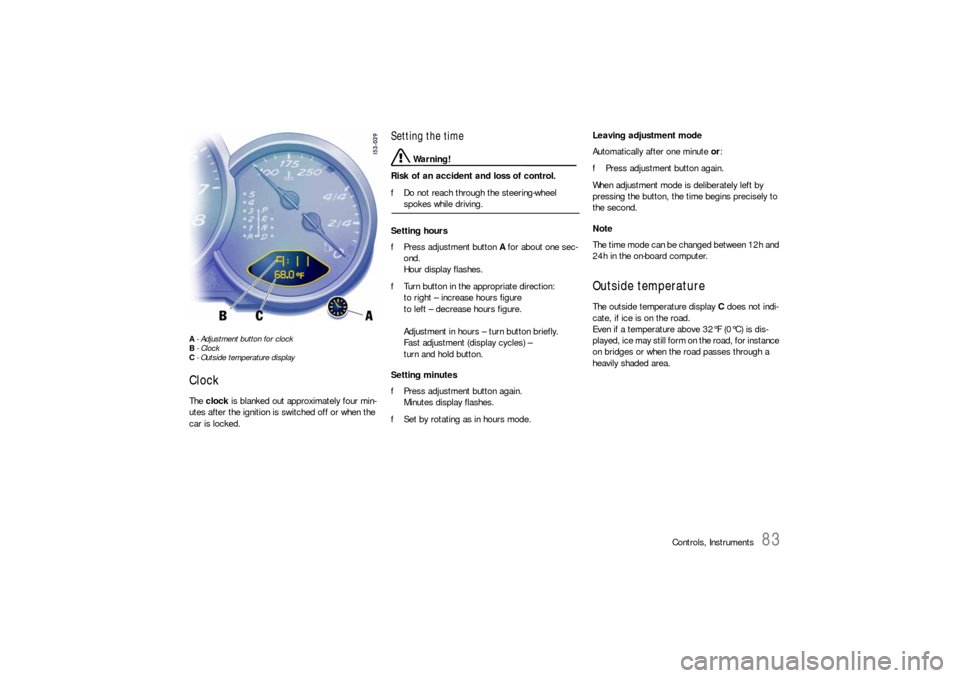
A- Adjustment button for clock
B- Clock
C- Outside temperature displayClock The clock is blanked out approximately four min-
utes after the ignition is switched off or when the
car is locked.
Setting the time
Warning!
Risk of an accident and loss of control.
fDo not reach through the steering-wheel spokes while driving.
Setting hours
fPress adjustment button A for about one sec-
ond.
Hour display flashes.
fTurn button in the appropriate direction:
to right – increase hours figure
to left – decrease hours figure.
Adjustment in hours – turn button briefly.
Fast adjustment (display cycles) –
turn and hold button.
Setting minutes
fPress adjustment button again.
Minutes display flashes.
fSet by rotating as in hours mode. Leaving adjustment mode
Automatically after one minute or:
fPress adjustment button again.
When adjustment mode is deliberately left by
pressing the button, the time begins precisely to
the second.
Note
The time mode can be changed between 12h and
24h in the on-board computer.
Outside temperature The outside temperature display C does not indi-
cate, if ice is on the road.
Even if a temperature above 32°F (0°C) is dis-
played, ice may still form on the road, for instance
on bridges or when the road passes through a
heavily shaded area.
Page 84 of 276
84
Controls, Instruments If the battery voltage drops abruptly, a warning
m e s s a g e w i l l b e d i s p l a y e d b y t h e o n - b o a rd c o m p u -
ter.
If the warning is displayed by the on-board
computer while the engine is running or while
driving:
fStop the car in a safe place and stop the
engine.
Possible causes
– Defect in the battery charging system.
– Broken drive belt. Warning!
Risk of an accident and risk of engine dam-
age.
A broken drive belt means there is no power
assistance to the steering (more effort is re-
quired to steer) and coolant pump function
will stop.
fDo not continue driving.
fHave the fault remedied at the nearest author-ized Porsche dealer. The warning light in the instrument panel comes
on when the ignition is first turned on and remains
on briefly as a bulb check. If the light does not
come on, have the bulb replaced promptly.
If the warning lights in the instrument panel and on-
board computer come on and remain on while
driving, it suggests:
– a potential engine control problem and the
need for system service or
– an improperly fastened tank cap or
– refuelling with engine running.
Although the vehicle is usually driveable and will
not require towing, see your dealer for service as
soon as possible.
Caution!
If the Check engine light in the instrument
panel is flashing, severe catalytic converter
damage and power loss will soon occur.
Prolonged driving with the Check engine light
on could cause damage to the emission con-
trol system. It also could affect fuel economy
and driveability.
fHave the fault remedied at the nearest author-ized Porsche dealer immediately.
Battery
Check Engine
Warning Light
Page 86 of 276
86
Controls, Instruments
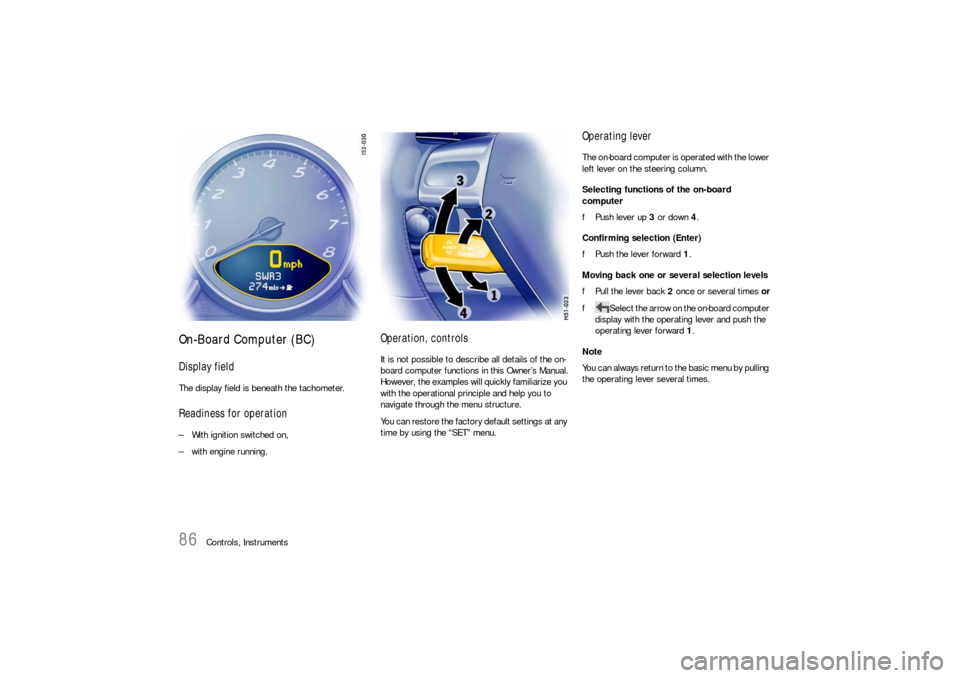
On-Board Computer (BC)Display fieldThe display field is beneath the tachometer.Readiness for operation– With ignition switched on,
– with engine running.
Operation, controlsIt is not possible to describe all details of the on-
board computer functions in this Owner’s Manual.
However, the examples will quickly familiarize you
with the operational principle and help you to
navigate through the menu structure.
You can restore the factory default settings at any
time by using the “SET” menu.
Operating leverThe on-board computer is operated with the lower
left lever on the steering column.
Selecting functions of the on-board
computer
fPush lever up 3 or down 4.
Confirming selection (Enter)
fPush the lever forward 1.
Moving back one or several selection levels
fPull the lever back 2 once or several times or
fSelect the arrow on the on-board computer
display with the operating lever and push the
operating lever forward 1.
Note
You can always return to the basic menu by pulling
the operating lever several times.