Speed PORSCHE CAYMAN 2010 1.G Owner's Guide
[x] Cancel search | Manufacturer: PORSCHE, Model Year: 2010, Model line: CAYMAN, Model: PORSCHE CAYMAN 2010 1.GPages: 284, PDF Size: 5.94 MB
Page 88 of 284
86
Operation, Safety
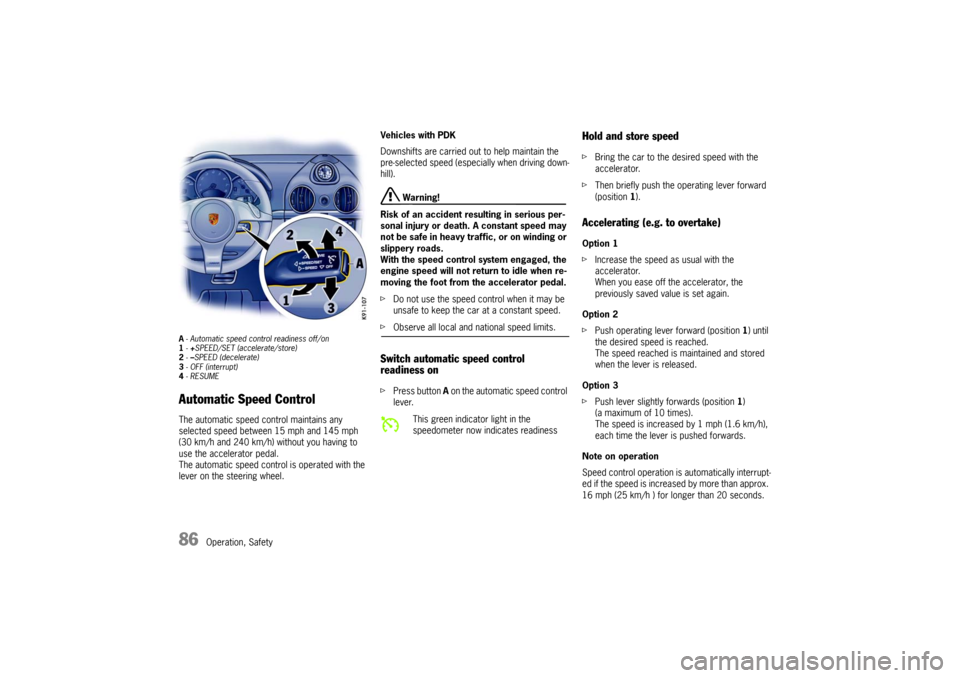
A- Automatic speed control readiness off/on
1 -+SPEED/SET (accelerate/store)
2 -–SPEED (decelerate)
3 - OFF (interrupt)
4 -RESUMEAutomatic Speed Control The automatic speed control maintains any
selected speed between 15 mph and 145 mph
(30 km/h and 240 km/h) without you having to
use the accelerator pedal.
The automatic speed control is operated with the
lever on the steering wheel. Vehicles with PDK
Downshifts are carried out to help maintain the
pre-selected speed (especially when driving down-
hill).
Warning!
Risk of an accident resulting in serious per-
sonal injury or death. A constant speed may
not be safe in heavy traf fic, or on winding or
slippery roads.
With the speed control system engaged, the
engine speed will not return to idle when re-
moving the foot from the accelerator pedal.
f Do not use the speed co ntrol when it may be
unsafe to keep the car at a constant speed.
f Observe all local and national speed limits. Switch automatic speed control
readiness onfPress button A on the automatic speed control
lever.
Hold and store speed f Bring the car to the desired speed with the
accelerator.
f Then briefly push the operating lever forward
(position 1).Accelerating (e.g. to overtake) Option 1
f Increase the speed as usual with the
accelerator.
When you ease off the accelerator, the
previously saved value is set again.
Option 2
f Push operating lever forward (position 1) until
the desired speed is reached.
The speed reached is maintained and stored
when the lever is released.
Option 3
f Push lever slightly forwards (position 1 )
(a maximum of 10 times).
The speed is increased by 1 mph (1.6 km/h),
each time the lever is pushed forwards.
Note on operation
Speed control operation is automatically interrupt-
ed if the speed is increased by more than approx.
16 mph (25 km/h ) for lo nger than 20 seconds.
This green indicator light in the
speedometer now indicates readiness
Page 89 of 284

Operation, Safety
87
Decelerating Option 1
fPull operating lever towards the steering wheel
(position 2) until the desired speed is reached.
The speed reached is maintained and stored
when the lever is released.
Option 2
f Briefly move lever towards the steering wheel
(position 2 ) (a maximum of 10 times).
The speed is reduced by 1 mph (1.6 km/h),
each time the lever is moved towards the
steering wheel.
Vehicles with PDK
Downshifts are carried o ut to improve decelera-
tion (especially when driving downhill).
Interrupting automatic speed control
operation f Pull operating lever downwards briefly
(position 3) or
f Operate brake or clutch pedal or
f Switch PDK to selector lever position N.
f Please see the chapter “PORSCHE DOPPEL-
KUPPLUNG (PDK)” on Page 178.
The speed driven before the interruption remains
stored in the memory.
Automatic speed control operation is
interrupted automatically:
– If the set vehicle speed is exceeded by more than approx. 16 mph (25 km/h) for longer than
20 seconds.
– If the actual vehicle sp eed falls to approx.
37 mph (60 km/h) below the set vehicle speed
for longer than 60 seconds (upward slopes).
– For PSM control operations.
Resuming the stored speed f Briefly push operating lever upwards
(position 4).
The speed control accelerates/decelerates
the vehicle to the stored speed.
The stored speed should only be recalled when
traffic conditions and the road surface so permit.Switching automatic speed control
readiness off f Press button A on the automatic speed control
lever.
The green readiness light in the speedometer
goes off.
Note
The stored speed value is cleared when the
vehicle is parked and the ignition is switched off.
Important note
On upward or downward slopes, the set speed
cannot always be maintained by the automatic
speed control.
f To obtain sufficient engine braking or a better
engine-speed range, a lo wer gear needs to be
selected.
Page 102 of 284
100
Operation, Safety
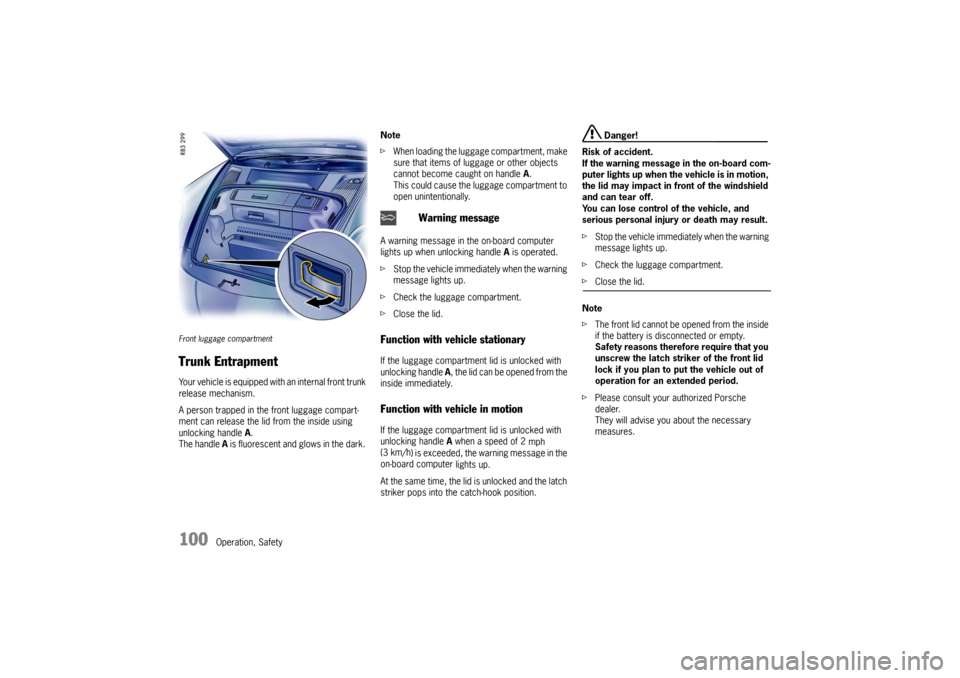
Front luggage compartment Trunk Entrapment Your vehicle is equipped with an internal front trunk
release mechanism.
A person trapped in the front luggage compart-
ment can release the lid from the inside using
unlocking handle A.
The handle A is fluorescent and glows in the dark. Note
f
When loading the luggage compartment, make
sure that items of luggage or other objects
cannot become caught on handle A.
This could cause the luggage compartment to
open unintentionally.
A warning message in the on-board computer
lights up when unlocking handle A is operated.
f Stop the vehicle immediately when the warning
message lights up.
f Check the luggage compartment.
f Close the lid.
Function with vehicle stationary If the luggage compartm ent lid is unlocked with
unlocking handle A, the lid can be opened from the
inside immediately. Function with vehicle in motion If the luggage compartm ent lid is unlocked with
unlocking handle A when a speed of 2
mph
(3 km/h ) is exceeded, the warning message in the
on-board computer lights up.
At the same time, the lid is unlocked and the latch
striker pops into the catch-hook position.
Danger!
Risk of accident.
If the warning message in the on-board com-
puter lights up when th e vehicle is in motion,
the lid may impact in front of the windshield
and can tear off.
You can lose control of the vehicle, and
serious personal injury or death may result.
f Stop the vehicle immediately when the warning
message lights up.
f Check the luggage compartment.
fClose the lid.
Note
f The front lid cannot be op ened from the inside
if the battery is disconnected or empty.
Safety reasons therefore require that you
unscrew the latch striker of the front lid
lock if you plan to put the vehicle out of
operation for an extended period.
f Please consult your authorized Porsche
dealer.
They will advise you about the necessary
measures.
Warning message
Page 107 of 284

Operation, Safety
105
Roof Transport SystemfPlease follow the separate instructions for fit-
ting the Roof Transport System.
f Only use Roof Transport Systems from the
Porsche Tequipment product range or Roof
Transport Systems which have been tested
and approved for your car by Porsche. Fitting
normal commercially available luggage racks
is not possible.
The Porsche Roof Transport System allows you
to carry various sports and hobby equipment.
Your Porsche partner will be pleased to tell you
about the various different uses of the Roof Trans-
port System.
Caution!
f Risk of damage to the paint on the rear lid.
Only open the rear lid if this cannot touch the
load.
f Completely remove the Roof Transport System
b e f o re u s i n g a n a u t o m a t i c c a r w a s h - r i s k o f d a -
mage to the vehicle!
f Do not exceed the maximum permitted pay-
load of 132 lbs. (60 kg), the maximum permit-
ted gross weight and the maximum permitted
axle loads.
f Please see the chapter “WEIGHTS” on
Page 272. f
Distribute load evenly, storing heavy items as
low as possible. Items of luggage must not
project beyond the side of the load area.
f Fix and secure every item to the basic carrier
with a rope or lashing strap (do not use elastic
rubber tensioners).
f Before every trip, and at regular intervals
during long trips, check that Roof Transport
System and load are secu re. Re-tighten if ne-
cessary and secure additionally by locking.
f When the Roof Transport System is loaded, the
maximum speed depends on the nature, size
and weight of the load being carried. But never
drive faster than 90 mph (140 km/h).
f With the basic carrier fitted and no load, do not
exceed a maximum speed of 110 mph
(180 km/h).
f Driving, braking and steering behavior change
due to the higher center of gravity and the gre-
ater wind-resistant area. You should adapt your
driving style appropriately.
f Since fuel consumption and noise are incre-
ased with the Roof Transport System fitted, it
should not remain on the vehicle if not in use.
Page 112 of 284
110
Automatic air conditioning system, Heated rear window/Door mirror heating
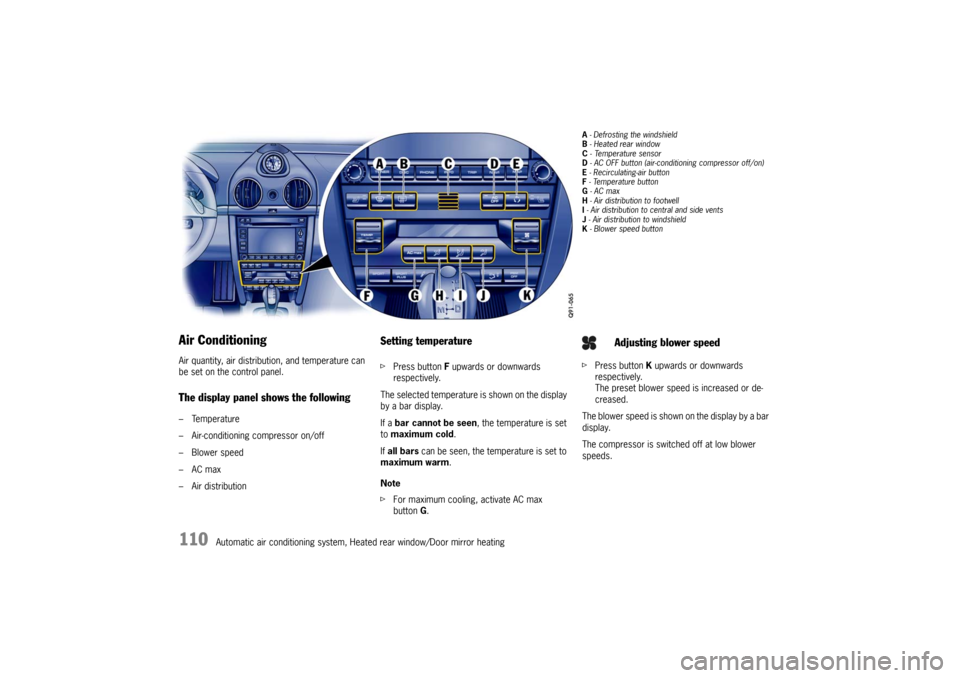
Air ConditioningAir quantity, air distribution, and temperature can
be set on the control panel.The display panel shows the following– Temperature
– Air-conditioning compressor on/off
–Blower speed
–AC max
– Air distribution
Setting temperaturefPress button F upwards or downwards
respectively.
The selected temperature is shown on the display
by a bar display.
If a bar cannot be seen , the temperature is set
to maximum cold .
If all bars can be seen, the temperature is set to
maximum warm.
Note
f For maximum cooling, activate AC max
button G.
A - Defrosting the windshield
B - Heated rear window
C - Te m p e r a t u r e s e n s o r
D - AC OFF button (air-conditioning compressor off/on)
E - Recirculating-air button
F - Temperature button
G - AC max
H - Air distribution to footwell
I - Air distribution to central and side vents
J - Air distribution to windshield
K - Blower speed buttonf Press button K upwards or downwards
respectively.
The preset blower speed is increased or de-
creased.
The blower speed is shown on the display by a bar
display.
The compressor is switched off at low blower
speeds.
Adjusting blower speed
Page 115 of 284
Automatic air conditioning system, Heated rear window/Door mirror heating
113
Automatic Air Conditioning SystemThe automatic air-conditioning system controls
the preselected interior temperature completely
automatically.
If necessary, the automatic system can be
manually adjusted.
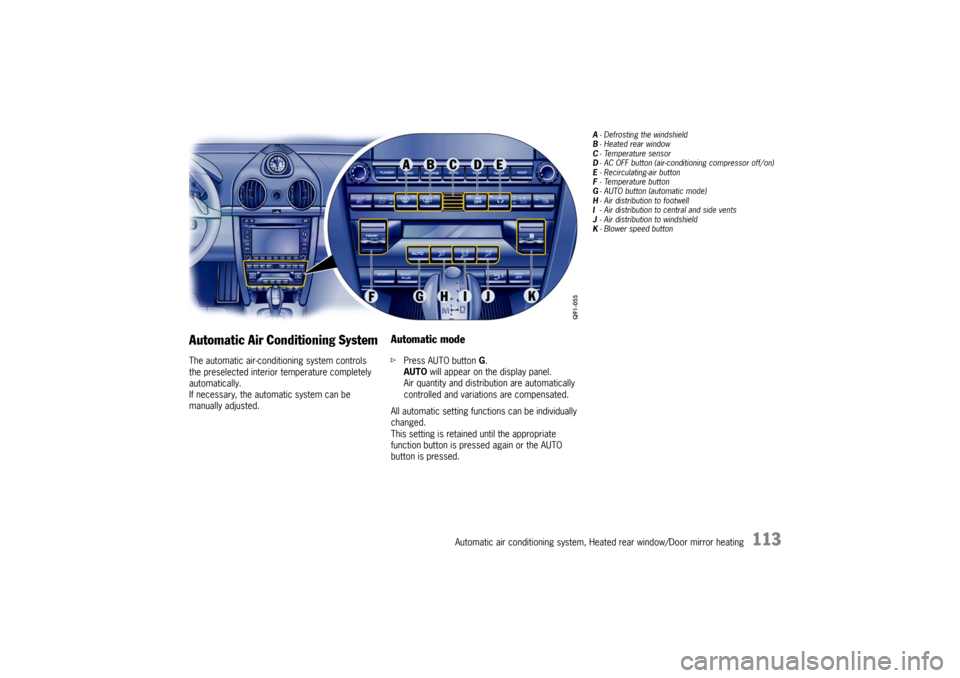
Automatic modef Press AUTO button G.
AUTO will appear on the display panel.
Air quantity and distribution are automatically
controlled and variations are compensated.
All automatic setting functions can be individually
changed.
This setting is retained until the appropriate
function button is pressed again or the AUTO
button is pressed.
A - Defrosting the windshield
B -Heated rear window
C -Temperature sensor
D - AC OFF button (air-conditi oning compressor off/on)
E - Recirculating-air button
F -Temperature button
G - AUTO button (automatic mode)
H - Air distribution to footwell
I - Air distribution to central and side vents
J - Air distribution to windshield
K -Blower speed button
Page 116 of 284
114
Automatic air conditioning system, Heated rear window/Door mirror heating
Setting temperaturefPress button F upwards or downwards
respectively.
To suit personal comfort, the interior temperature
can be adjusted between 61 °F and 85 °F/16 °C
and 29.5 °C.
Recommendation: 72 °F/22 °C.
If “LO” or “HI” appears on the display, the system
is operating at maximum cooling or heating pow-
er.
Automatic control is no longer active.
Note
If the preselected temperature is changed, the
blower speed can increase automatically in auto-
matic mode.
The desired temperature is reached more quickly
this way.
Sensors
To avoid affecting the performance of the air-con-
ditioning system:
f Do not cover the sun sensor on the instrument
panel or the temperature sensor C. f
Press button A (switch on or off).
The windshield is defogged or defrosted as
quickly as possible.
Air flows to the windshield only.
The light-emitting diode in the button lights up.
AC OFF – switching compressor for air-
conditioning system on and offThe air-conditioning compressor switches off
automatically at temperatures below approx.
37 °F/3 °C and cannot be switched on, even
manually.
Whenever outside temperatures exceed approx.
37 °F/3 °C, the air-conditioning compressor is
always switched on in automatic mode.
The compressor can be switched off to save fuel,
but control comfort is then limited:
f Press AC OFF button D.
The compressor is switched off.
The light-emitting diode in the button lights up.
f If the interior temperature is too high, switch
compressor back on or press AUTO button.
To dry incoming air in damp weather, do not
switch off the air-conditioning compressor.
This prevents fogging of windows. f
Press button K upwards or downwards respec-
tively.
The preset blower speed is increased or
decreased.
The speed stages are indicated by a bar display.
If the button is pressed downwards at the lowest
blower stage, the blower and automatic control
are switched off. “OFF” will appear on the display
field.
Pressing the button upwards or pressing the
AUTO button switches the blower and automatic
control back on again.
Warning!
Risk of accident due to impaired vision,
resulting in serious personal injury or death.
In recirculating-air setting, the windows may
fog up.
f Only select recirculatin g-air setting for short
periods.
f If the windows fog up, switch recirculating-air
setting off immediately by pressing the
circulating-air button again and select the “Defrost windshield” function.
Defrosting the windshield
Adjusting blower speed
Recirculating-air setting
Page 121 of 284

Instruments, On-Board Computer, Warnings
119
Instruments, On-Board Computer, Warnings
Instrument Panel USA Models ..................... 120
Instrument Panel Canada Models ................ 122
Automatic Speed Control Indicator light ...... 124
Instrument Illumination
............................... 124
Trip Odometer ....... ................................... 125
Speedometer .............. .............................. 126
Changing over between Miles / Kilometers .. 126
Tachometer ................ .............................. 127
Turn Signal Indicator Light ......................... 127
High Beam Indicator Light .......................... 127
Gear Shift Indicator
(in vehicles with manual transmission) ......... 127
Cooling System ...... ................................... 128
Porsche Doppelkupplung (PDK) .................. 129
Fuel ............... ......................... .................. 130
Clock ............ ......................... .................. 131
Outside Temperature ................................. 131
Check Engine (Emission Control) ................ 133
On-Board Computer (BC) ............................ 134
Warnings on the instrument panel and
the on-board computer .............................. 166
Page 122 of 284

120
Instruments, On-Board Computer, Warnings
Instrument Panel USA Models Also refer to the corresponding chapters in
the Owner’s Manual.1. Speedometer with analogue display
2. Automatic speed control indicator light
3. Tire pressure warning light
4. Turn signal indicator light, left/right
5. Tachometer
6. High beam indicator light
7. ABS warning light
8. Cooling system Temperature gage, warning light
9. Fuel Level gage, warning light
10.Adjustment button for instrument illumination and trip counter
11.Odometer and daily trip mileage display
12.Light sensor for instrument illumination
13.Airbag warning light 14.Check Engine warning light
(Emission control warning light)
15.Central warning light
16.On-board computer display
17.Porsche Stability Management PSM Multifunctional light
18.Brake warning light
19.Safety belt warning light
20.Gear display
21.PDK transmission, selector lever position
22.Clock and outside temperature display
23.Adjustment button for clock When the ignition is switched on, the warning
lights light up for a lamp check.
Note
Warnings that have been given are stored in the
appropriate control unit me
mory and can be read
out at an authorized Porsche dealer.
This information can help to warn you about situa-
tions which may be hazardous to you or your car.
Page 124 of 284

122
Instruments, On-Board Computer, Warnings
Instrument Panel Canada Models Also refer to the corresponding chapters in
the Owner’s Manual.1. Speedometer with analogue display
2. Automatic speed control indicator light
3. Tire pressure warning light
4. Turn signal indicator light, left/right
5. Tachometer
6. High beam indicator light
7. ABS warning light
8. Cooling system Temperature gage, warning light
9. Fuel Level gage, warning light
10.Adjustment button for instrument illumination and trip counter
11.Odometer and daily trip mileage display
12.Light sensor for instrument illumination
13.Airbag warning light 14.Check Engine warning light
(Emission control warning light)
15.Central warning light
16.On-board computer display
17.Porsche Stability Management PSM Multifunctional light
18.Brake warning light
19.Safety belt warning light
20.Gear display
21.PDK transmission, selector lever position
22.Clock and outside temperature display
23.Adjustment button for clock When the ignition is switched on, the warning
lights light up for a lamp check.
Note
Warnings that have been given are stored in the
appropriate control unit me
mory and can be read
out at an authorized Porsche dealer.
This information can help to warn you about situa-
tions which may be hazardous to you or your car.