Speed PORSCHE CAYMAN 2010 1.G Service Manual
[x] Cancel search | Manufacturer: PORSCHE, Model Year: 2010, Model line: CAYMAN, Model: PORSCHE CAYMAN 2010 1.GPages: 284, PDF Size: 5.94 MB
Page 126 of 284
124
Instruments, On-Board Computer, Warnings
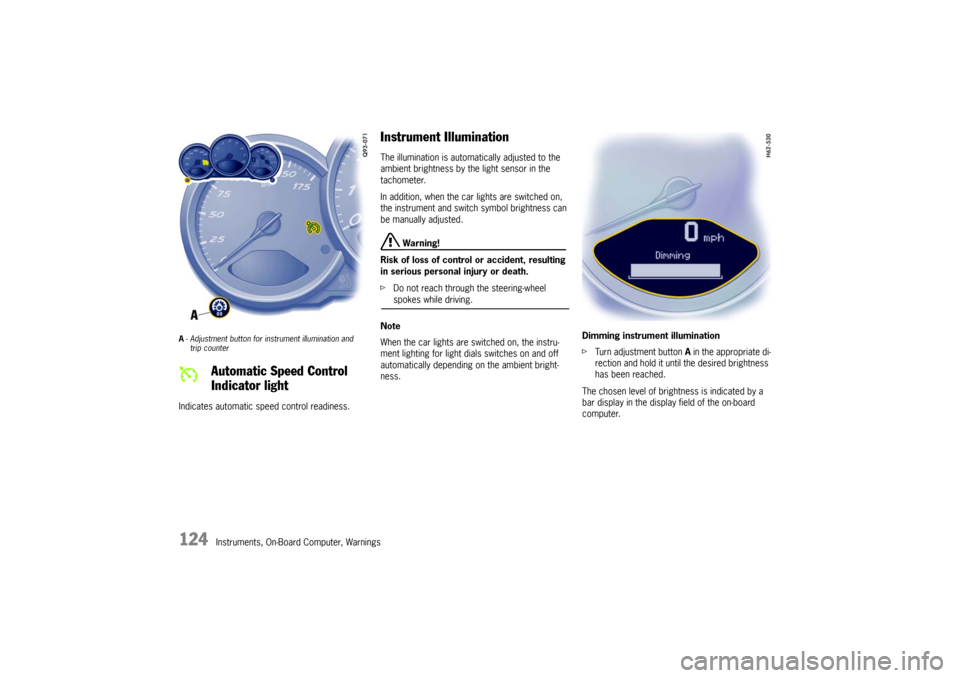
A- Adjustment button for in strument illumination and
trip counter Indicates automatic speed control readiness.
Instrument Illumination The illumination is automatically adjusted to the
ambient brightness by the light sensor in the
tachometer.
In addition, when the car lights are switched on,
the instrument and switch symbol brightness can
be manually adjusted.
Warning!
Risk of loss of control or accident, resulting
in serious personal injury or death.
f Do not reach through the steering-wheel spokes while driving.
Note
When the car lights are switched on, the instru-
ment lighting for light dials switches on and off
automatically depending on the ambient bright-
ness. Dimming instrument illumination
f
Turn adjustment button A in the appropriate di-
rection and hold it unti l the desired brightness
has been reached.
The chosen level of brightness is indicated by a
bar display in the display field of the on-board
computer.
Automatic Speed Control
Indicator light
Page 128 of 284

126
Instruments, On-Board Computer, Warnings
Speedometer The digital speedometer is integrated in the on-
board computer.
The indication changes from mph to km/h when
the units are changed from miles to kilometers.
Changing over between
Miles / Kilometers The units of the distance and speed displays can
be changed in the “SET” menu of the on-board
computer.
fPlease see the chapter “SET BASIC SETTING
ON ON-BOARD COMPUTER” on Page 163.
Page 129 of 284

Instruments, On-Board Computer, Warnings
127
Tachometer The tachometer shows the engine speed in revolu-
tions per minute (rpm).
The beginning of the red marks at the right end of
the scale indicates the maximum permissible en-
gine rpm.
A speed limiter prevents the engine from being
overrevved during acceleration. Before reaching
this area, the next higher gear should be select-
ed.
Shift to the next lower gear when the engine rpm
drops below 1,500 rpm.
Caution!
To avoid severe engine damage.
f Always observe the engine rpm before down-
shifting to a lower gear, so you do not exceed the maximum engine rpm.
Flashes in synchronism with the turn signals.
Left arrow – left turn signals
Right arrow – right turn signals
f If the frequency of the display becomes notice-
ably faster, check the operation of the turn sig-
nals.
Lights when high beam or headlight flasher is
switched on.
The indicator light goes out when the high beams
are switched off.
The indicator light flashes in the event of cornering
light failure.
Gear Shift Indicator(in vehicles with manual transmission)The consumption-orientated gear shift indicator A
on the display panel of the on-board computer
assists a fuel-saving driving style. The gear shift
indicator lights up as a recommendation to shift
up to the next-higher gear depending on the
selected gear, engine rpm and accelerator pedal
position.
f When the gear shift indicator A lights up,
change to the next higher gear to decrease
fuel consumption.
Turn Signal Indicator Light
High Beam Indicator Light
Page 130 of 284

128
Instruments, On-Board Computer, Warnings
Temperature gage (ignition on) USA: Display in °F
Canada: Display in °C
Pointer to the left – engine cold
f Avoid high engine speeds and heavy engine
loading. Pointer in the middle
– normal operating tem-
perature
The pointer may move up to the red area when en-
gine is heavily loaded and outside temperature is
high, but should return to “normal” when engine
load is reduced.
Warning light “A” If the coolant temperature is too high, the warn-
ing light comes on .
Additionally, a warning is displayed in the on-board
computer.
f Pull off the road, turn off the engine and allow
to cool.
f Check radiator and air passages in front end of
car for obstructions.
f Check coolant level.
If necessary, add coolant and have fault reme-
died at an authorized Porsche dealer.
Please see the chapter “COOLANT LEVEL” on
Page 187.
Note
To prevent excessive temperatures, the cooling-
air passages must not be restricted by coverings
(e.g. films, “stone guards”). If the
coolant level is too low, the warning light
flashes.
Additionally, a warning is displayed in the on-board
computer.
f Switch engine off and allow to cool.
f Add coolant after the engine has cooled to the
touch.
f Have the cause of the fault remedied at an au-
thorized Porsche dealer.
Please see the chapter “COOLANT LEVEL” on
Page 187.
Caution!
Risk of engine damage.
f If the warning lights come on even though cool-
ant level is correct, do not continue driving.
f Have the fault remedied at the nearest authorized Porsche dealer.
Engine compartment blower fan In addition, this warning light flashes to indicate a
fault in the engine compartment blower fan .
f Have the cause of the fault remedied at an
authorized Porsche dealer.
Cooling System
Page 132 of 284
130
Instruments, On-Board Computer, Warnings
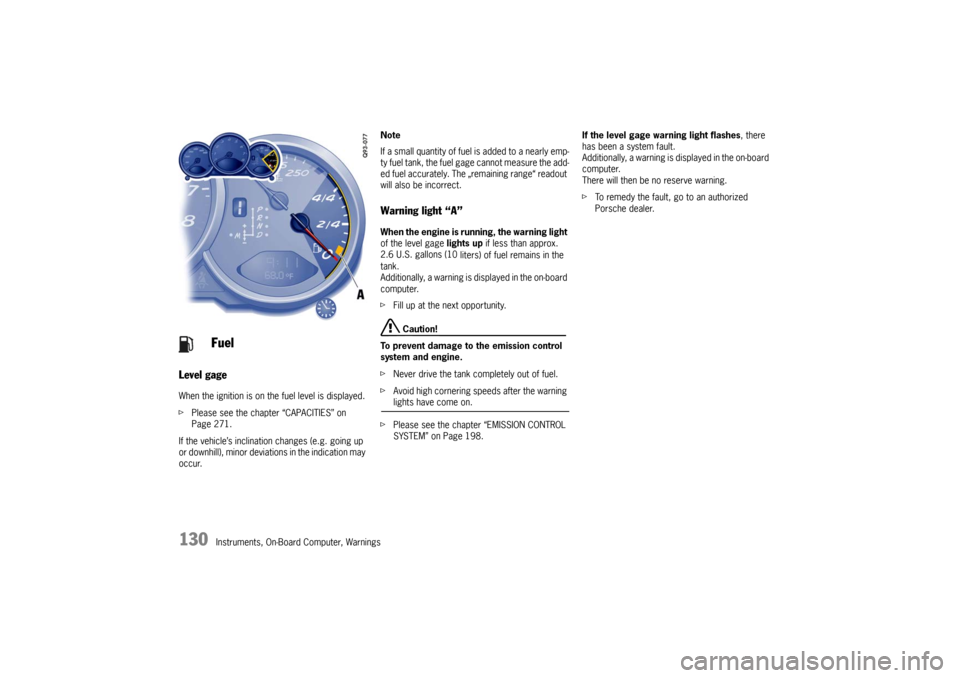
Level gage
When the ignition is on the fuel level is displayed.
f Please see the chapter “CAPACITIES” on
Page 271.
If the vehicle’s inclination changes (e.g. going up
or downhill), minor deviations in the indication may
occur. Note
If a small quantity of fuel
is added to a nearly emp-
ty fuel tank, the fuel ga ge cannot measure the add-
ed fuel accurately. The „remaining range“ readout
will also be incorrect.
Warning light “A” When the engine is running, the warning light
of the level gage lights up if less than approx.
2.6 U.S. gallons (10 liters) of fuel remains in the
tank.
Additionally, a warning is displayed in the on-board
computer.
f Fill up at the next opportunity.
Caution!
To prevent damage to the emission control
system and engine.
f Never drive the tank completely out of fuel.
f Avoid high cornering speeds after the warning lights have come on.
f Please see the chapter “EMISSION CONTROL
SYSTEM” on Page 198. If the level gage warning light flashes
, there
has been a system fault.
Additionally, a warning is displayed in the on-board
computer.
There will then be no reserve warning.
f To remedy the fault, go to an authorized
Porsche dealer.
Fuel
Page 137 of 284
Instruments, On-Board Computer, Warnings
135
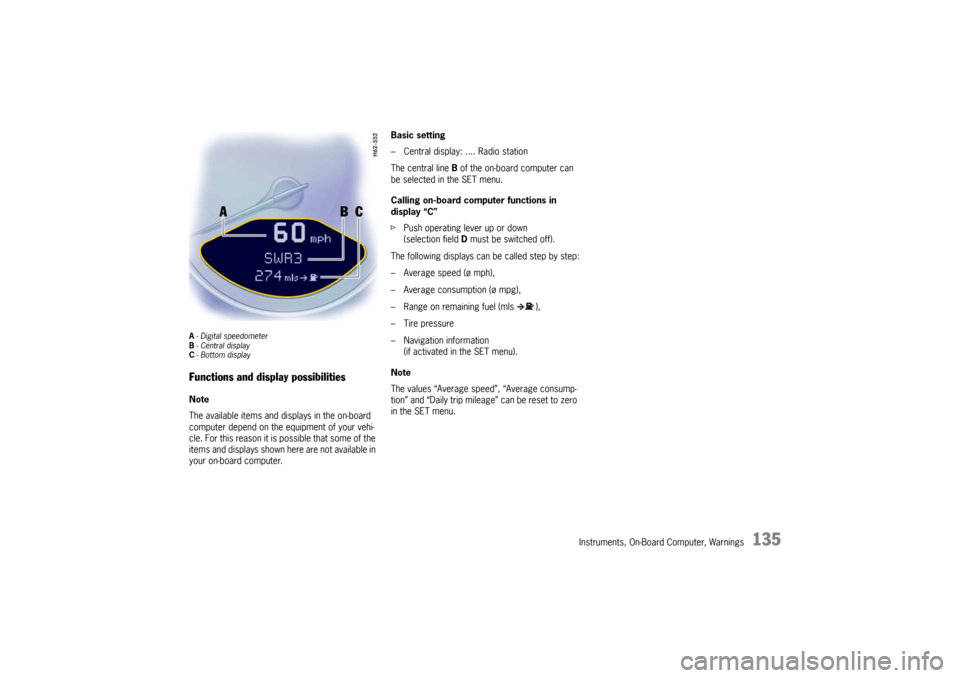
A- Digital speedometer
B -Central display
C - Bottom displayFunctions and display possibilitiesNote
The available items and displays in the on-board
computer depend on the equipment of your vehi-
cle. For this reason it is possible that some of the
items and displays shown here are not available in
your on-board computer. Basic setting
– Central display: .... Radio station
The central line
B of the on-board computer can
be selected in the SET menu.
Calling on-board computer functions in
display “C”
f Push operating lever up or down
(selection field D must be switched off).
The following displays can be called step by step:
– Average speed (ø mph),
– Average consumption (ø mpg),
– Range on remaining fuel (mls ),
– Tire pressure
– Navigation information (if activated in the SET menu).
Note
The values “Average speed”, “Average consump-
tion” and “Daily trip mileag e” can be reset to zero
in the SET menu.
Page 139 of 284
Instruments, On-Board Computer, Warnings
137
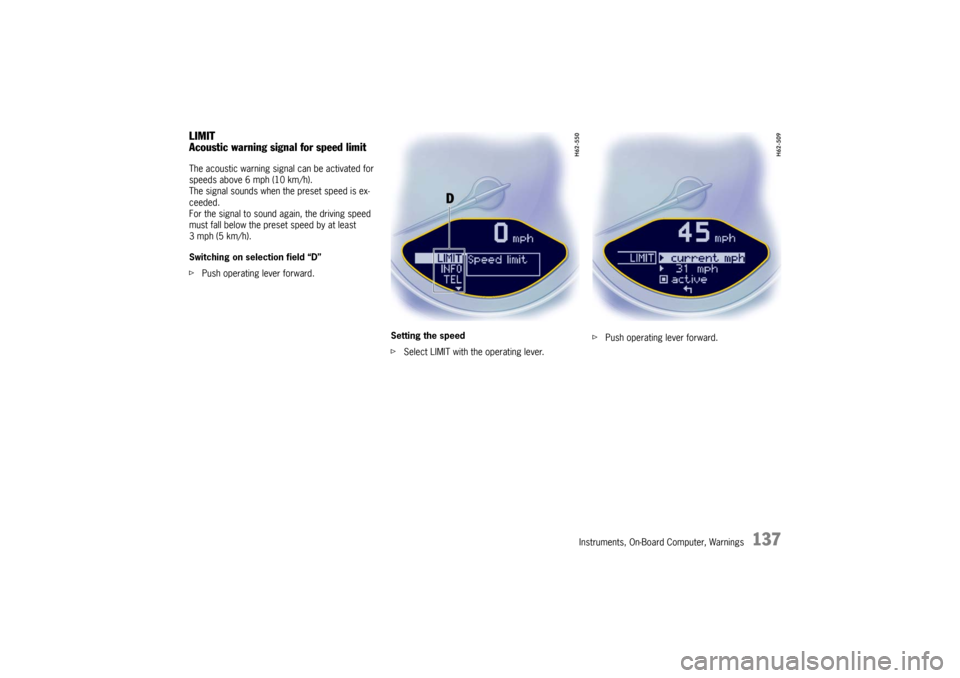
LIMIT
Acoustic warning signal for speed limitThe acoustic warning signal can be activated for
speeds above 6 mph (10 km/h).
The signal sounds when the preset speed is ex-
ceeded.
For the signal to sound again, the driving speed
must fall below the preset speed by at least
3 mph (5 km/h).
Switching on selection field “D”
f Push operating lever forward.
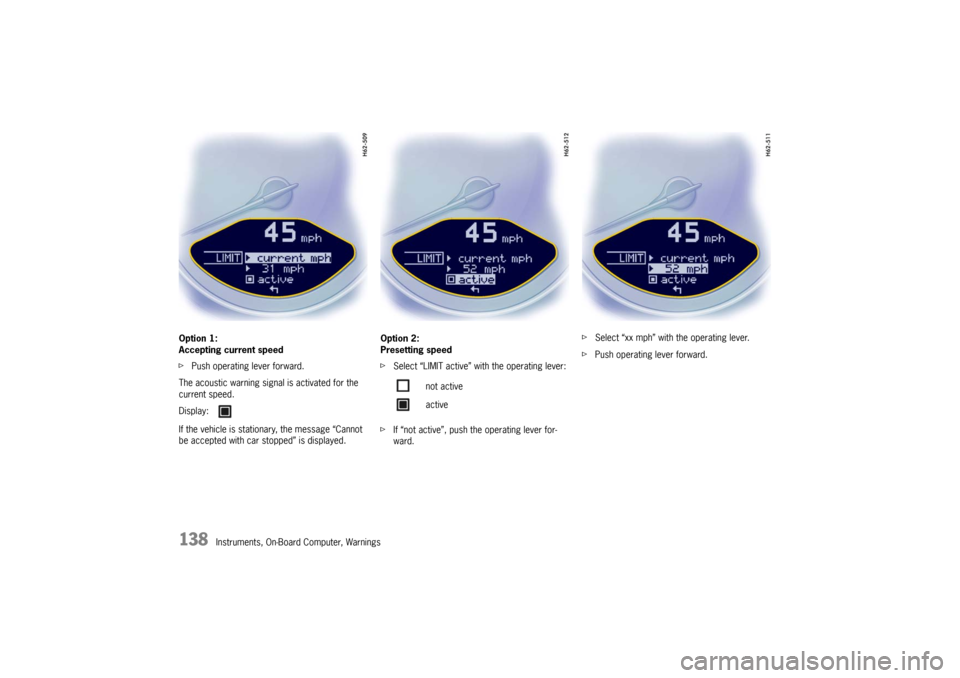
Setting the speed
fSelect LIMIT with the operating lever. f
Push operating lever forward.
Page 140 of 284
138
Instruments, On-Board Computer, Warnings
Option 1:
Accepting current speed
f
Push operating lever forward.
The acoustic warning signal is activated for the
current speed.
If the vehicle is stationary, the message “Cannot
be accepted with car stopped” is displayed. Option 2:
Presetting speed
f
Select “LIMIT active” with the operating lever:
f If “not active”, push the operating lever for-
ward. f
Select “xx mph” with the operating lever.
f Push operating lever forward.
Display:
not active
active
Page 141 of 284
Instruments, On-Board Computer, Warnings
139
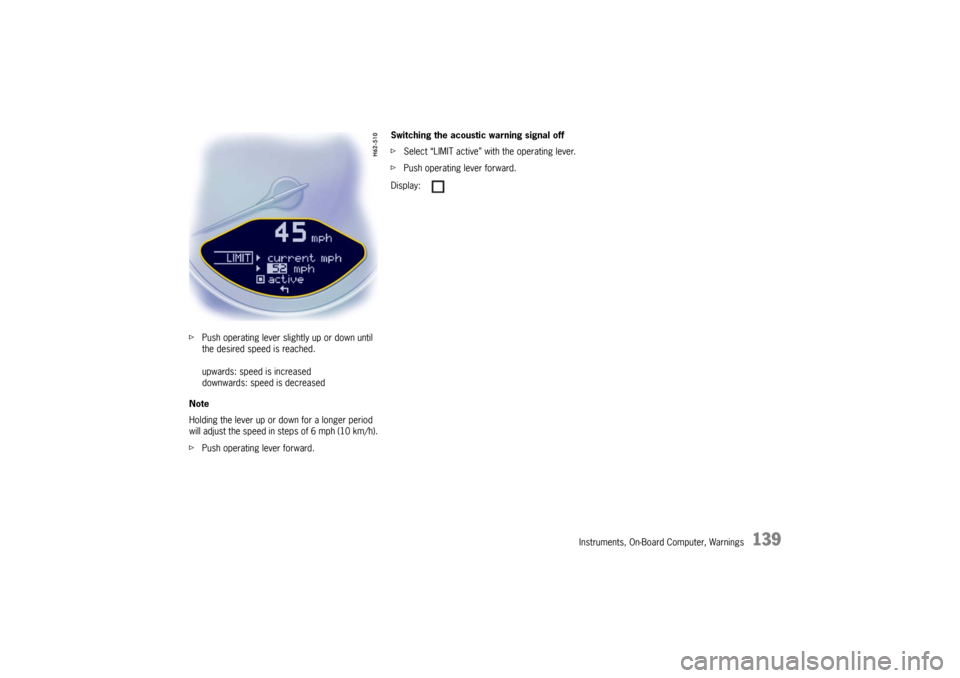
fPush operating lever slightly up or down until
the desired speed is reached.
upwards: speed is increased
downwards: speed is decreased
Note
Holding the lever up or do wn for a longer period
will adjust the speed in steps of 6 mph (10 km/h).
f Push operating lever forward. Switching the acoustic warning signal off
f
Select “LIMIT active” with the operating lever.
f Push operating lever forward.
Display:
Page 153 of 284

Instruments, On-Board Computer, Warnings
151
TPM
Tire Pressure MonitoringfPlease see the chapter “TIRE PRESSURE FOR
COLD TIRES (68 °F/ 20 °C)” on Page 267.
The Tire Pressure Monitoring continuously
monitors tire pressure and tire temperature on all
four wheels and warns the driver when the tire
pressure is too low.
The display as well as the settings for the Tire
Pressure Monitoring take place on the on-board
computer.
However, you must still adjust the tire pressure on
the wheel. f
The driver is responsible for filling the tires
correctly and making the correct settings on
the on-board computer.
The Tire Pressure Monitoring offers the following
functions:
– Display of the actual ti re pressure while the
vehicle is in motion.
– Display of the deviation from the required pressure (refilling pressure).
– Display of currently set tire size and type.
– Tire pressure warnings in two stages.
Warning!
f Despite the advantages offered by the Tire
Pressure Monitoring, it is still the driver’s re-
sponsibility to update the corresponding set-
tings in the on-board computer and maintain
the pressure in the tires.
Low tire pressure reduces the road safety of
the vehicle and destroys the tire and wheel.
f When a flat tire has been displayed, immedi-
ately stop in a suitable place and check the
tires for damage. If necessary, remedy the
damage with a tire sealant.
f Do not by any means continue to drive with
damaged tires.
f Sealing the tire with tire sealant is only an
emergency repair, so you can drive to the next
authorized Porsche dealer. The maximum per-
mitted speed is 50 mph (80 km/h). f
Do not drive with tires whose tire pressure
drops again in a short period of time. In cases
of doubt, have tires checked by an authorized
Porsche dealer.
f Damaged tires must be immediately replaced
by an authorized Porsche dealer.
Tire repairs are not permissible under any
circumstances.
f If a fault occurs in the Tire Pressure Monitoring
(e.g. defective wheel tr ansmitter), contact an
authorized Porsche dealer immediately and
have the damage repaired.
The tire pressure will not be monitored at all or
will be monitored only partially by defective
Tire Pressure Monitoring.
f Tires lose air over time without a tire defect
being present. A tire pressure warning will then
appear in the on-board computer display.
Correct the tire pressure at the next oppor-
tunity.
f The Tire Pressure Monitoring gives a warning
about tire damage due to natural pressure loss
as well as about a gradual loss of pressure due
to foreign objects.
The Tire Pressure Mnitoring cannot warn you
about tire damage that occurs suddenly (e.g.
flat tire due to abrupt external effects).