ESP PORSCHE CAYNNE 2010 1.G User Guide
[x] Cancel search | Manufacturer: PORSCHE, Model Year: 2010, Model line: CAYENNE, Model: PORSCHE CAYENNE 2010 1.GPages: 379, PDF Size: 13.91 MB
Page 46 of 379

46
Seats, Mirrors and Steering Wheel fAlways keep feet in the footwell while driving.
Do not put feet on the dashboard or the seat
area. Do not lean against the inside of the door
or outside the window while the vehicle is
moving.
fUsing accessories not approved by Porsche
can cause the weight sensing to be impaired.
fDo not squeeze objects, such as the fire
extinguisher, or first aid kit under the seat.
fOnly have seats removed and installed by an
authorized Porsche dealer so that weight
sensing components will not be damaged.
fGive your passenger all of the information in
this chapter.
Note
Airbag components (e.g. steering wheel, seats)
may be disassembled only by an authorized
Porsche dealer.
fWhen disposing of a used airbag unit, our
safety instructions must be followed. These
instructions can be obtained at any authorized
Porsche dealer.
Function of the airbag systemAirbags are a supplemental safety system. Your
primary protection comes from your safety belts.
The front airbags are triggered during a frontal
collision of sufficient force and direction.
In the event of a side impact of corresponding
force, the side airbag on the impact side is
triggered.
The inflation process generates the amount of gas
required to fill the airbags at the necessary
pressure in fractions of a second.
Airbags help to protect the head and upper body,
while simultaneously damping the motion of the
driver and passenger in the impact direction in the
event of a frontal impact or side impact.
In order to help provide protection in severe colli-
sions which can cause death and serious injury,
airbags must inflate extremely rapidly. Such high
speed inflation has a negative but unavoidable
side effect, which is that it can and does cause in-
juries, including facial and arm abrasions, bruising
and broken bones. You can help minimize such in-
juries by always wearing your safety belts.
There are many types of accidents in which
airbags are not expected to deploy. These include
accidents where the airbags would provide no be-
nefit, such as a rear impact against your vehicle.
Other accidents where the airbags are designed
not to deploy are those where the risk of injury
from the airbag deployment could exceed any pro-
tective benefits, such as in low speed accidents or higher speed accidents where the vehicle decele-
rates over a longer time. Since airbag deployment
does not occur in all accidents, this further em-
phasizes the need for you and your passengers to
always wear safety belts.
Your vehicle is equipped with a crash sensing and
diagnostic module. This module will record the
use of the seat belt restraint system by the driver
and front passenger when the airbags and/or belt
tentioner are triggered.
Precondition for activating the restraint systems:
fIgnition is switched on.
Advanced AirbagYour vehicle is equipped with weight sensing for
the passenger's seat in accordance with
U.S. Federal/Canadian Motor Vehicle Safety
Standard 208.
Depending on the weight acting on the
passenger's seat, the passenger's airbag will
automatically be switched on and off.
Depending on the angle and force of impact, the
passenger's airbag which is switched-on will be
triggered during a collision.
Precondition for switching the passenger's airbag
on and off, depending on weight:
fIgnition is switched on.
10_Cayenne_21_KW17.book Seite 46 Donnerstag, 9. April 2009 3:33 15
Page 65 of 379
Air Conditioning, Parking Heater and Heated Rear Window
65
Valid for Every Air-Conditioning
SystemNote on operation
The air conditioner settings are stored on the
respective remote control when switching off the
ignition and locking the vehic l e . T he “A i r fl o w O F F ”
setting is stored for approx. 60 minutes and the
“Recirculated air” setting is stored for approx.
20 minutes.REST modeUsing engine residual heat
The residual heat of the engine can be used to
heat the interior up to 20 minutes after the ignition
has been switched off.
fPress button (manual and 2-zone air-
conditioning) or (4-zone air-conditio-
ning) on the front control panel.
The air-conditioning settings cannot be chan-
ged in REST mode.
Ending the function
fPress button (manual and 2-zone air-
conditioning) or (4-zone air-conditio-
ning) on the front control panel.
Note on operation
If the battery voltage is too low, REST mode is
automatically ended.
ECON mode
Warning!
Risk of accident due to impaired vision,
resulting in serious personal injury or death.
The outside air that is flowing in is not dried
in ECON mode. The windows may mist up.
fDo not switch on ECON mode in damp weather.
In ECON mode, the air-conditioning compressor is
switched off and this deactivates the cooling
function (e.g. to save fuel).
The air-conditioning compressor is always swit-
ched off at temperatures below 37.4 °F (3 °C).
Switching on ECON mode
fPress button .
The ECON logo appears on the air-conditioning
display panel.
The air-conditioning compressor is switched
off.
Switching off ECON mode
fIf the interior temperature is too high,
press button or
press button (2-zone air-conditioning)
or button (4-zone air-conditioning).
The ECON logo disappears from the air-condi-
tioning display panel.
The air-conditioning compressor is switched
on.
Information on air-conditioning
compressorThe air-conditioning compressor:
– May switch off briefly to ensure sufficient
engine cooling if the engine is operating under
extreme load.
– Switches off automatically at temperatures
below approx. 37.4 °F (3 °C) and cannot be
switched on, even manually.
– Operates most effectively with windows
closed.
If the car has been in the sun for a long time,
however, it is a good idea to ventilate the
interior briefly with the windows open.
– Depending on the outside temperature and
humidity, condensation can drip from the eva-
porator and form a pool under the car.
This is normal and not a sign of leakage.
fIf uncooled air flows out when the lowest
temperature has been set (“LO”), switch off the
air-conditioning compressor and have the fault
remedied at an authorized Porsche dealer.
10_Cayenne_21_KW17.book Seite 65 Donnerstag, 9. April 2009 3:33 15
Page 77 of 379
Air Conditioning, Parking Heater and Heated Rear Window
77
Setting temperatureTo suit personal comfort, the interior temperature
for each of the four air-conditioned areas can be
adjusted between 61 °F and 85 °F (16 °C and
29.5 °C).
Recommendation: 72 °F (22 °C)
The selected temperature is shown on the display
above the button.
Increase temperature
fPush temperature button up.
Left air-conditioned area, front: Button H
Right air-conditioned area, front: Button Q
Left air-conditioned area, rear: Button H
Right air-conditioned area, rear: Button S
Decrease temperature
fPush temperature button down.
Left air-conditioned area, front: Button H
Right air-conditioned area, front: Button Q
Left air-conditioned area, rear: Button H
Right air-conditioned area, rear: Button S
If “LO” or “HI” appears on the display, the system
is operating at maximum cooling or heating
power.
If the preselected temperature is changed, the air
quantity blowing out can adjust automatically in
automatic mode.
The desired temperature is reached more quickly
this way.The air quantity can be selected individually for
each of the four air-conditioned areas.
The selected air quantity is shown in a bar display
on the display above the button. The more bars
that are displayed, the more air flows into the inte-
rior.
Increase air quantity
fPush air quantity button up.
Left air-conditioned area, front: Button G
Right air-conditioned area, front: Button R
Left air-conditioned area, rear: Button G
Right air-conditioned area, rear: Button T
Decrease air quantity
fPush air quantity button down.
Left air-conditioned area, front: Button G
Right air-conditioned area, front: Button R
Left air-conditioned area, rear: Button G
Right air-conditioned area, rear: Button TfPress AUTO button C to return to automatic
mode.
If the air quantity on the front control panel was re-
duced so much that “OFF” appears on the display,
the outside-air supply is interrupted.
Warning!
Risk of accident due to impaired vision,
resulting in serious personal injury or death.
If the air quantity is “OFF”, the windows may
mist up.
fOnly select air quantity setting “OFF” for short
periods.
fIf windows mist up, push air quantity buttons
G and O up to increase air quantity and select the function “Defrost windshield”.
Setting air distributionThe air quantity can be selected individually for
each of the four air-conditioned areas.
– Front control panel:
The air flows to the windshield.
– Rear control panel:
The air flows to the respective side window.
fPress button .
Setting air quantity
Air to windshield and side windows
10_Cayenne_21_KW17.book Seite 77 Donnerstag, 9. April 2009 3:33 15
Page 87 of 379
Windows and Sliding Roofs
87
Power windows
Warning!
Risk of injury when the door windows close.
This applies especially if the windows are
closed with the comfort function.
When this function is in operation the window
goes up automatically.
fMake sure that fingers, hands, arms or other
body parts are not in the way when the
windows close.
fRemove the ignition key or switch ignition off in
vehicles that have Porsche Entry & Drive to
shut off power to the window switches when
the vehicle is not attended by a responsible
person. Always take the ignition key with you
when leaving the vehicle. Uninformed persons
could injure themselves by operating the
power windows.
fIn case of danger, immediately release the but-
ton on the car key or the button in the door
handle in vehicles that have Porsche Entry &
Drive.
fDo not leave children in the car unattended.
Risk of an accident.
fDo not put anything on or near the windows that may interfere with the driver's vision.
Note on operation
fAlways keep the side windows closed while
driving off-road.
Readiness for operation of power windows– With ignition switched on or
– A maximum of 10 minutes with door closed
and ignition key withdrawn, but only until
driver’s or passenger door is first opened.
The one-touch operation for closing the door
windows is available only when the ignition is
switched on.Opening/closing windowsOpening window with the rocker switch
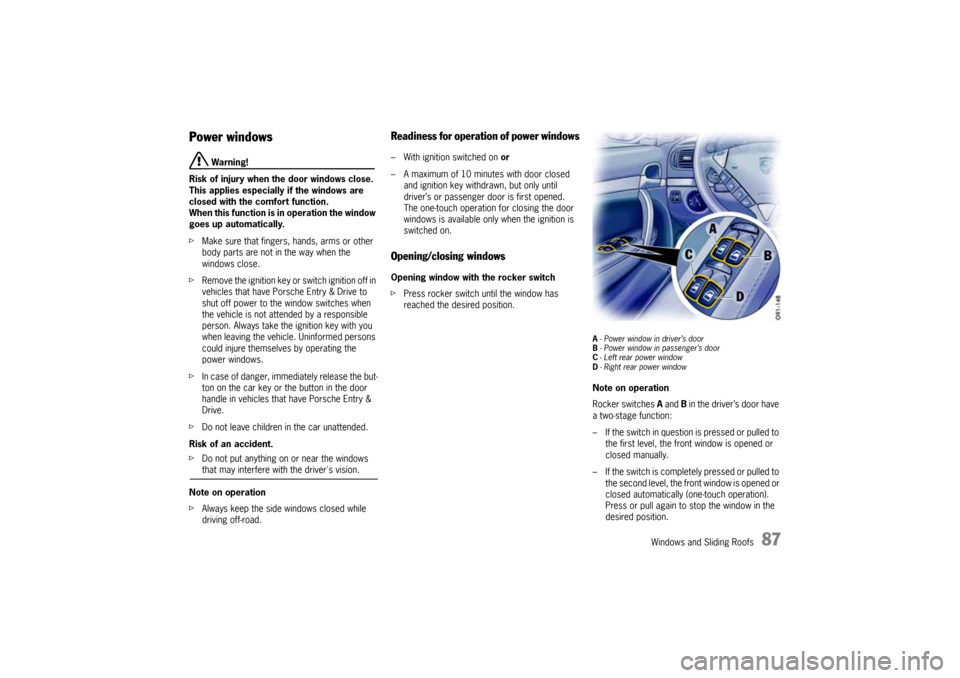
fPress rocker switch until the window has
reached the desired position.
A- Power window in driver’s door
B- Power window in passenger’s door
C- Left rear power window
D- Right rear power windowNote on operation
Rocker switches A and B in the driver’s door have
a two-stage function:
– If the switch in question is pressed or pulled to
the first level, the front window is opened or
closed manually.
– If the switch is completely pressed or pulled to
the second level, the front window is opened or
closed automatically (one-touch operation).
Press or pull again to stop the window in the
desired position.
10_Cayenne_21_KW17.book Seite 87 Donnerstag, 9. April 2009 3:33 15
Page 97 of 379
Windows and Sliding Roofs
97
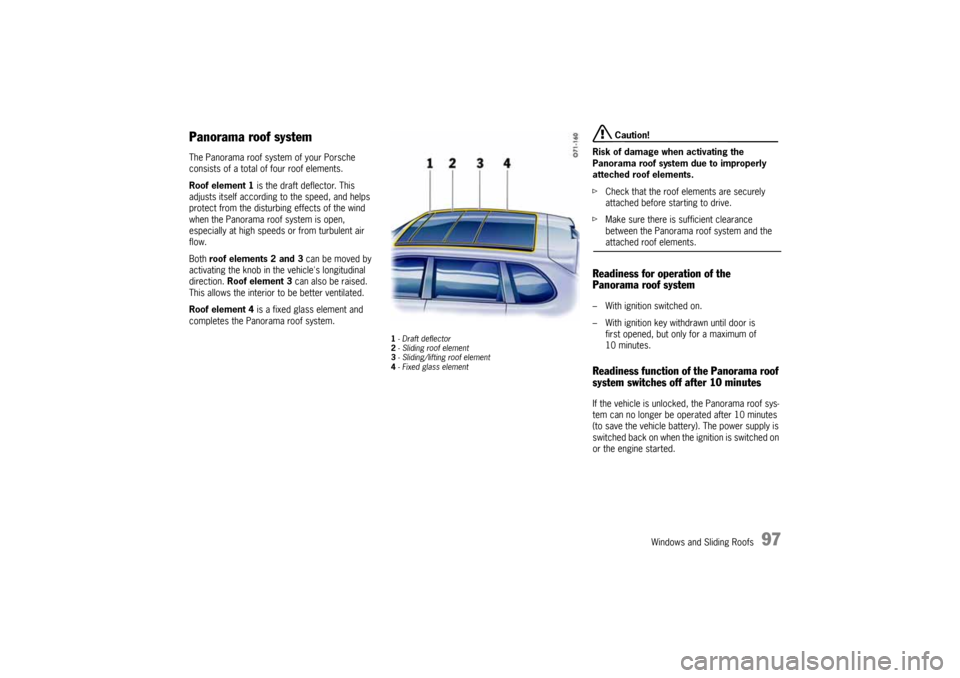
Panorama roof systemThe Panorama roof system of your Porsche
consists of a total of four roof elements.
Roof element 1 is the draft deflector. This
adjusts itself according to the speed, and helps
protect from the disturbing effects of the wind
when the Panorama roof system is open,
especially at high speeds or from turbulent air
flow.
Both roof elements 2 and 3 can be moved by
activating the knob in the vehicle's longitudinal
direction. Roof element 3 can also be raised.
This allows the interior to be better ventilated.
Roof element 4 is a fixed glass element and
completes the Panorama roof system.
1-Draft deflector
2- Sliding roof element
3- Sliding/lifting roof element
4- Fixed glass element
Caution!
Risk of damage when activating the
Panorama roof system due to improperly
atteched roof elements.
fCheck that the roof elements are securely
attached before starting to drive.
fMake sure there is sufficient clearance
between the Panorama roof system and the attached roof elements.
Readiness for operation of the
Panorama roof system– With ignition switched on.
– With ignition key withdrawn until door is
first opened, but only for a maximum of
10 minutes.Readiness function of the Panorama roof
system switches off after 10 minutesIf the vehicle is unlocked, the Panorama roof sys-
tem can no longer be operated after 10 minutes
(to save the vehicle battery). The power supply is
switched bac k o n whe n the ignition is switched on
or the engine started.
10_Cayenne_21_KW17.book Seite 97 Donnerstag, 9. April 2009 3:33 15
Page 99 of 379

Windows and Sliding Roofs
99
Comfort function on vehicles without
Porsche Entry & DriveOpening and closing the Panorama roof
system
fHold the car key in the door lock in the
unlocking or locking position until the windows
and the Panorama roof system have reached
the desired position.Comfort function on vehicles with
Porsche Entry & DriveOpening and closing the Panorama roof
system
fHold the car key in the door lock in the
unlocking or locking position until the windows
and the Panorama roof system have reached
the desired position.
Closing the Panorama roof system
fHold the button in the door handle when
locking the vehicle until the windows and the
Panorama roof system have reached the
desired position.
Force limiter for the Panorama roof
system All roof elements are equipped with a force limiter.
If the sliding roof or the sliding/lifting roof element
is obstructed during the closing or opening
process, the respective roof element opens or
closes again immediately.
Closing a roof element after triggering the
force limiter
1. Remove the obstruction.
2. Turn knob to position A again.Electric emergency closing function
Warning!
Risk of injury from the emergency closing
function for the Panorama roof system. The
force limiter is not available and the roof
elements will close with full force.
fEnsure that no one can be injured when the Panorama roof system is closing.
If the roof cannot be closed due to dirt, ice, or
similar substances:
1. Turn knob to position A.
2. Hold the knob in position A until all roof
elements are completely closed.
Save final position of the Panorama roof
systemAfter disconnecting/reconnecting the vehicle
battery or if the vehicle battery is discharged, or
after emergency starting with jumper cables, the
final positions of the Panorama roof system are
lost.
Warning!
Risk of injury when closing the Panorama
roof system. The force limiter is not available
and the roof elements will close with full
force.
fEnsure that no one can be injured when the Panorama roof system is closing.
1. Switch ignition off.
2. Turn knob to position A.
3. Switch ignition on.
4. Press knob up at its front edge in position A
and keep pressed.
The teaching process begins after around
5 seconds. Hold the knob pressed in position
until the roller blind and all roof elements have
completely stopped moving. The procedure
lasts a maximum of 20 seconds.
5. Release the knob.
The raised sliding/lifting roof element 3 clo-
ses automatically. The teaching process is
then completed.
10_Cayenne_21_KW17.book Seite 99 Donnerstag, 9. April 2009 3:33 15
Page 104 of 379
104
Lights, Turn Signals and Windshield Wipers
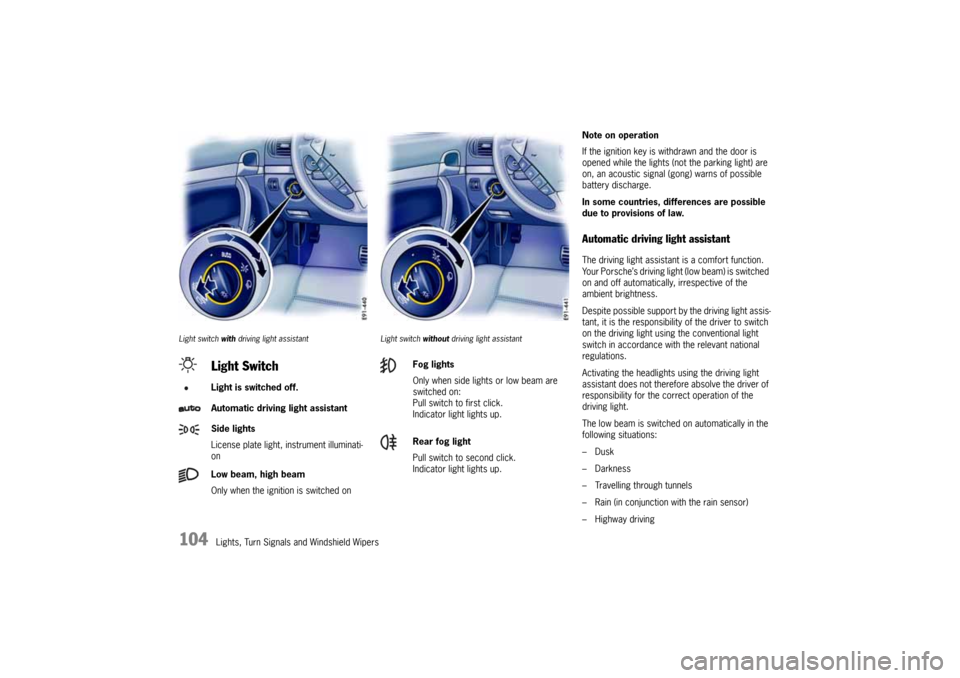
Light switch with driving light assistant Light switch without driving light assistant
Note on operation
If the ignition key is withdrawn and the door is
opened while the lights (not the parking light) are
on, an acoustic signal (gong) warns of possible
battery discharge.
In some countries, differences are possible
due to provisions of law.Automatic driving light assistantThe driving light assistant is a comfort function.
Your Porsche’s driving light (low beam) is switched
on and off automatically, irrespective of the
ambient brightness.
Despite possible support by the driving light assis-
tant, it is the responsibility of the driver to switch
on the driving light using the conventional light
switch in accordance with the relevant national
regulations.
Activating the headlights using the driving light
assistant does not therefore absolve the driver of
responsibility for the correct operation of the
driving light.
The low beam is switched on automatically in the
following situations:
–Dusk
– Darkness
– Travelling through tunnels
– Rain (in conjunction with the rain sensor)
– Highway driving
Light SwitchLight is switched off.
Automatic driving light assistant
Side lights
License plate light, instrument illuminati-
on
Low beam, high beam
Only when the ignition is switched on
Fog lights
Only when side lights or low beam are
switched on:
Pull switch to first click.
Indicator light lights up.
Rear fog light
Pull switch to second click.
Indicator light lights up.
10_Cayenne_21_KW17.book Seite 104 Donnerstag, 9. April 2009 3:33 15
Page 113 of 379

Lights, Turn Signals and Windshield Wipers
113
5 – Front windshield wipers and washer
system
fPull wiper stalk towards the steering wheel.
The washer system sprays and wipes while the
lever is pulled towards the steering wheel.
When the wiper lever is released, a few wipes
are executed.
Headlight washer (on vehicles with Bi-Xe-
non headlights):
The washer sprays only while low beam or high
beam is switched on.
To activate the headlight washer system, the
wiper lever must be pulled for a longer period
of time.
The headlight washer can be re-activated at
the earliest after five washing cycles.
The spray duration is limited.
Maintenance Note
fIf heavily soiled, repeat wash.
fPersistent dirt (e.g. insect remains) should be
regularly removed.
Please see the chapter “CAR CARE
INSTRUCTIONS” on Page 270.
The front windshield washer nozzles are
heated when the ignition is on, as a precaution
against freezing. However, this does not replace
the use of antifreeze.6 – Rear window wiper – intermittent
operation
fMove wiper stalk forwards to the first click.
The rear window wiper wipes at preset
intervals.
7 – Rear window wiper – one-touch
operation
fPush wiper stalk forward briefly. The washer
system sprays and the rear window wiper goes
through three wipe cycles.
Rear window wiper and washer system
fPush wiper stalk forwards as far as it will go.
The washer system sprays and wipes while the
lever is pulled away from the steering wheel.
When the wiper lever is released, a few drying
wipes are executed.Maintenance Note
fPeriodically clean the wiper blades with
window cleaner, especially after the vehicle
has been washed in a car wash.
We recommend the Porsche window cleaner.
In the event of heavy soiling (e.g. insect
residue), the blades can be cleaned with a
sponge or a cloth.
If the wiper blades rub or squeak, this may have
the following causes:
– If the vehicle is washed in an automatic car
wash, wax residues may adhere to the wind-
shield. These wax residues can be removed
only by using window cleaner concentrate.
fPlease see the chapter “WASHER FLUID” on
Page 258.
fPlease contact your authorized Porsche dealer
for further information.
– The wiper blades may be damaged or worn.
fReplace damaged or worn wiper blades as
soon as possible.
10_Cayenne_21_KW17.book Seite 113 Donnerstag, 9. April 2009 3:33 15
Page 128 of 379
128
Multi-Purpose Display and Instruments
Operating the telephone via the
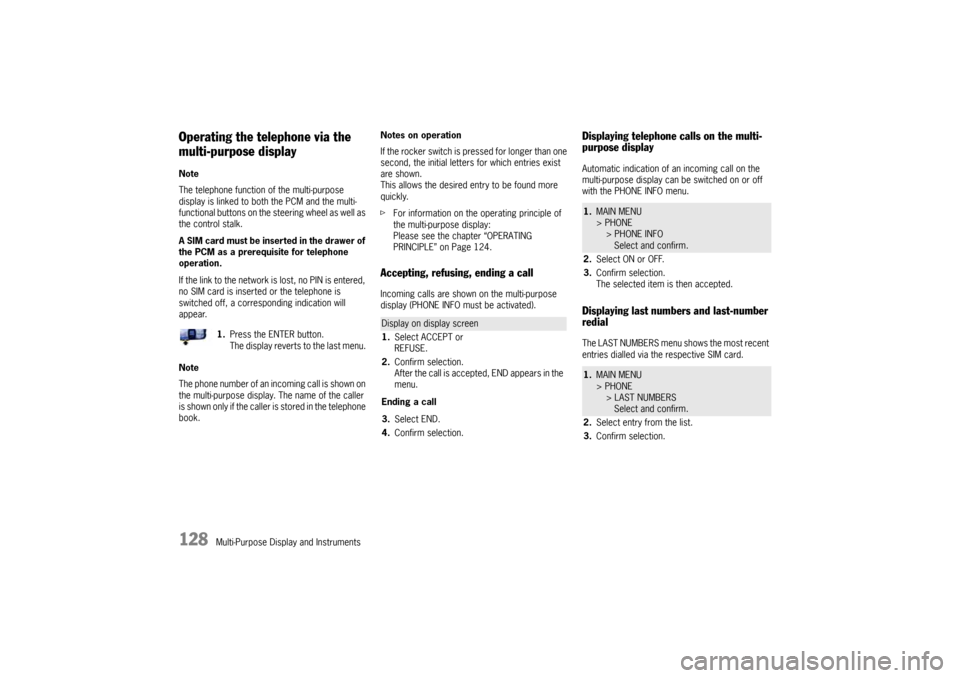
multi-purpose displayNote
The telephone function of the multi-purpose
display is linked to both the PCM and the multi-
functional buttons on the steering wheel as well as
the control stalk.
A SIM card must be inserted in the drawer of
the PCM as a prerequisite for telephone
operation.
If the link to the network is lost, no PIN is entered,
no SIM card is inserted or the telephone is
switched off, a corresponding indication will
appear.
Note
The phone number of an incoming call is shown on
the multi-purpose display. The name of the caller
is shown only if the caller is stored in the telephone
book.Notes on operation
If the rocker switch is pressed for longer than one
second, the initial letters for which entries exist
are shown.
This allows the desired entry to be found more
quickly.
fFor information on the operating principle of
the multi-purpose display:
Please see the chapter “OPERATING
PRINCIPLE” on Page 124.
Accepting, refusing, ending a callIncoming calls are shown on the multi-purpose
display (PHONE INFO must be activated).
Displaying telephone calls on the multi-
purpose displayAutomatic indication of an incoming call on the
multi-purpose display can be switched on or off
with the PHONE INFO menu.Displaying last numbers and last-number
redialThe LAST NUMBERS menu shows the most recent
entries dialled via the respective SIM card. 1.Press the ENTER button.
The display reverts to the last menu.
Display on display screen
1.Select ACCEPT or
REFUSE.
2.Confirm selection.
After the call is accepted, END appears in the
menu.
Ending a call
3.Select END.
4.Confirm selection.
1.MAIN MENU
> PHONE
> PHONE INFO
Select and confirm.
2.Select ON or OFF.
3.Confirm selection.
The selected item is then accepted.1.MAIN MENU
> PHONE
> LAST NUMBERS
Select and confirm.
2.Select entry from the list.
3.Confirm selection.
10_Cayenne_21_KW17.book Seite 128 Donnerstag, 9. April 2009 3:33 15
Page 132 of 379
132
Multi-Purpose Display and Instruments
Displaying average consumptionNote on operation
fFor information on the operating principle of
the multi-purpose display:
Please see the chapter “OPERATING
PRINCIPLE” on Page 124.
Setting Tire Pressure Monitoring
Danger!
Risk of serious personal injury or death.
Driving the vehicle with low tire pressure
increases risk of a tire failure and resulting
loss of control. Furthermore, low tire
pressure increases rate of wear of the
affected tires.
Despite the advantages offered by Tire
Pressure Monitoring, it is not a substitute for
proper tire maintenance, and it is still the
driver’s responsibility to update the settings
in the multi-purpose display and maintain the
correct tire pressure, even if under-inflation
has not reached the level to trigger illumina-
tion of Tire Pressure Monitoring low tire
pressure message. Low tire pressure
reduces the road safety of the vehicle and
destroys the tire and wheel.
fWhen a flat tire has been displayed, immedi-
ately stop in a suitable place and check the
tires for damage. If necessary, remedy the damage with tire sealant or fit the spare wheel.
fDo not by any means continue to drive with
leaking tires.
fSealing the tire with the tire sealant is only an
emergency repair so you can drive to the next
authorized Porsche dealer.
The maximum permitted speed is 50 mph
(80 km/h).
fDefective tires must be immediately replaced
by an authorized Porsche dealer.
Tire repairs are not permissible under any
circumstances.
fDo not drive with tires whose tire pressure
drops again in a short period of time. Have
tires checked by an authorized Porsche dealer.
fIf Tire Pressure Monitoring is defective (e.g.
defective wheel transmitters), contact an
authorized Porsche dealer immediately and
have the damage repaired.
The tire pressure will not be monitored by
defective Tire Pressure Monitoring.
For information on warning messages on the
multi-purpose display: Please see the chapter
“OVERVIEW OF WARNING MESSAGES” on
Page 149.
fTire Pressure Monitoring gives a warning about
tire damage due to insufficient tire pressure as
well as about a gradual loss of pressure due to
foreign objects. Tire Pressure Monitoring
cannot warn you about tire damage that
occurs suddenly (e.g. flat tire due to acute
external effects).
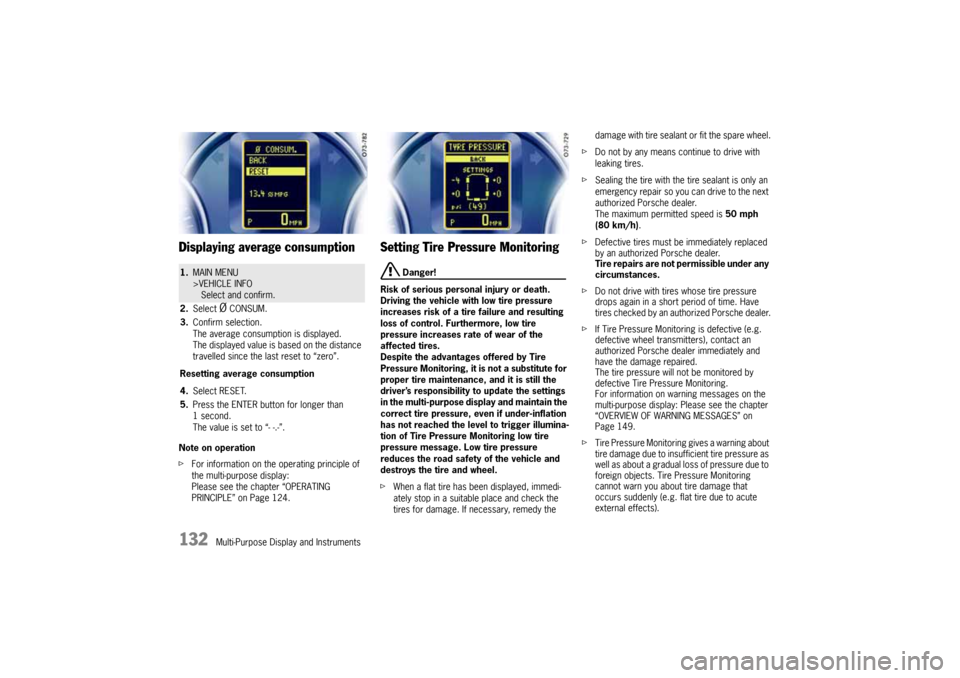
1.MAIN MENU
>VEHICLE INFO
Select and confirm.
2.Select
Ø CONSUM.
3.Confirm selection.
The average consumption is displayed.
The displayed value is based on the distance
travelled since the last reset to “zero”.
Resetting average consumption
4.Select RESET.
5.Press the ENTER button for longer than
1second.
The value is set to “- -.-”.
10_Cayenne_21_KW17.book Seite 132 Donnerstag, 9. April 2009 3:33 15