ESP PORSCHE CAYNNE 2010 1.G Owner's Manual
[x] Cancel search | Manufacturer: PORSCHE, Model Year: 2010, Model line: CAYENNE, Model: PORSCHE CAYENNE 2010 1.GPages: 379, PDF Size: 13.91 MB
Page 135 of 379
Multi-Purpose Display and Instruments
135
Warning!
Risk of accident due to excessive speed. This
could lead to serious personal injury or
death.
fAlways observe the permissible maximum
speed of the respective tire.
fExceeding maximum tire speed could result in
a tire burst, causing loss of control of the
vehicle. This could lead to serious personal
injury or death.
Moreover, Porsche recommends obeying all
traffic laws at all times to maintain the safety of yourself and all vehicle occupants.
The speed code letter indicates the maximum
permissible speed for the tire.
fThis letter appears on the tire sidewall:
Please see the chapter “INSCRIPTION ON
RADIAL TIRE” on Page 290.
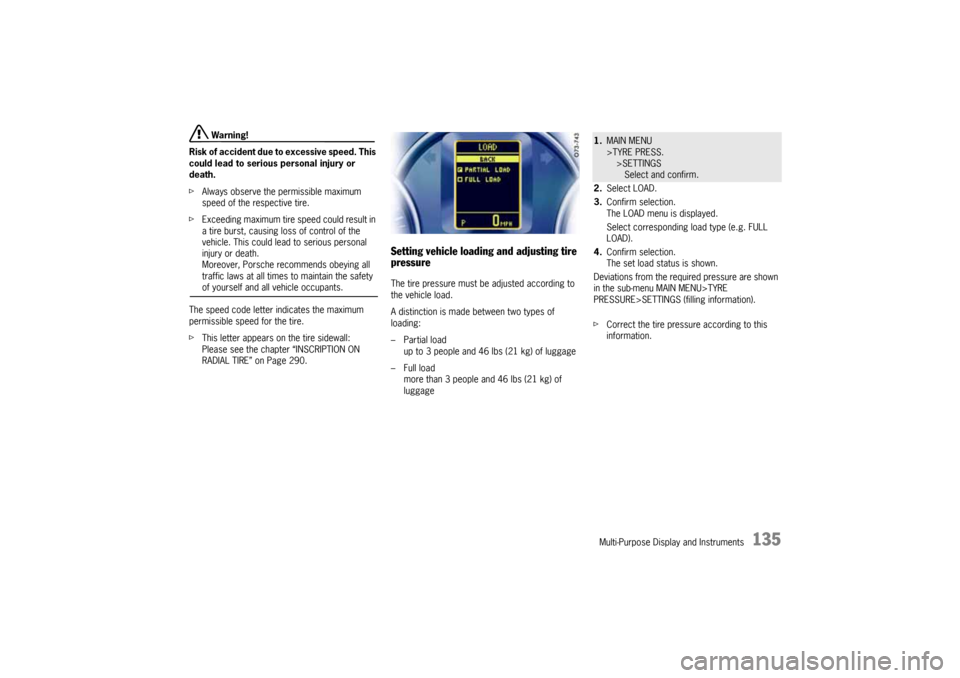
Setting vehicle loading and adjusting tire
pressureThe tire pressure must be adjusted according to
the vehicle load.
A distinction is made between two types of
loading:
– Partial load
up to 3 people and 46 lbs (21 kg) of luggage
–Full load
more than 3 people and 46 lbs (21 kg) of
luggage
1.MAIN MENU
>TYRE PRESS.
>SETTINGS
Select and confirm.
2.Select LOAD.
3.Confirm selection.
The LOAD menu is displayed.
Select corresponding load type (e.g. FULL
LOAD).
4.Confirm selection.
The set load status is shown.
Deviations from the required pressure are shown
in the sub-menu MAIN MENU>TYRE
PRESSURE>SETTINGS (filling information).
fCorrect the tire pressure according to this
information.
10_Cayenne_21_KW17.book Seite 135 Donnerstag, 9. April 2009 3:33 15
Page 136 of 379
136
Multi-Purpose Display and Instruments
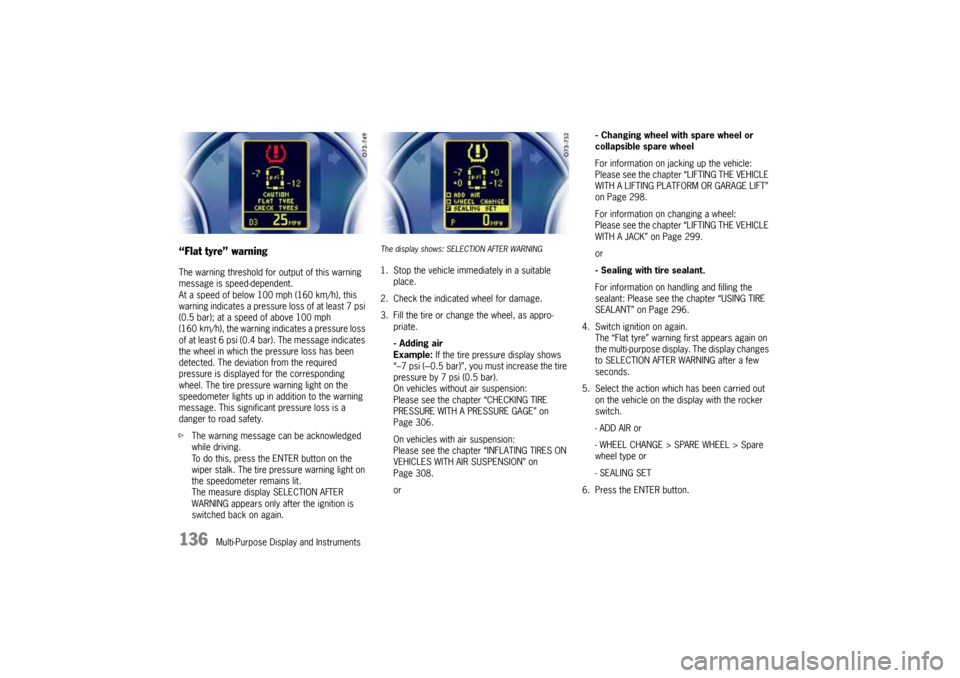
“Flat tyre” warningThe warning threshold for output of this warning
message is speed-dependent.
At a speed of below 100 mph (160 km/h), this
warning indicates a pressure loss of at least 7 psi
(0.5 bar); at a speed of above 100 mph
(160 km/h), the warning indicates a pressure loss
of at least 6 psi (0.4 bar). The message indicates
the wheel in which the pressure loss has been
detected. The deviation from the required
pressure is displayed for the corresponding
wheel. The tire pressure warning light on the
speedometer lights up in addition to the warning
message. This significant pressure loss is a
danger to road safety.
fThe warning message can be acknowledged
while driving.
To do this, press the ENTER button on the
wiper stalk. The tire pressure warning light on
the speedometer remains lit.
The measure display SELECTION AFTER
WARNING appears only after the ignition is
switched back on again.
The display shows: SELECTION AFTER WARNING1. Stop the vehicle immediately in a suitable
place.
2. Check the indicated wheel for damage.
3. Fill the tire or change the wheel, as appro-
priate.
- Adding air
Example: If the tire pressure display shows
“–7 psi (---0.5 bar)”, you must increase the tire
pressure by 7 psi (0.5 bar).
On vehicles without air suspension:
Please see the chapter “CHECKING TIRE
PRESSURE WITH A PRESSURE GAGE” on
Page 306.
On vehicles with air suspension:
Please see the chapter “INFLATING TIRES ON
VEHICLES WITH AIR SUSPENSION” on
Page 308.
or- Changing wheel with spare wheel or
collapsible spare wheel
For information on jacking up the vehicle:
Please see the chapter “LIFTING THE VEHICLE
WITH A LIFTING PLATFORM OR GARAGE LIFT”
on Page 298.
For information on changing a wheel:
Please see the chapter “LIFTING THE VEHICLE
WITH A JACK” on Page 299.
or
- Sealing with tire sealant.
For information on handling and filling the
sealant: Please see the chapter “USING TIRE
SEALANT” on Page 296.
4. Switch ignition on again.
The “Flat tyre” warning first appears again on
the multi-purpose display. The display changes
to SELECTION AFTER WARNING after a few
seconds.
5. Select the action which has been carried out
on the vehicle on the display with the rocker
switch.
- ADD AIR or
- WHEEL CHANGE > SPARE WHEEL > Spare
wheel type or
- SEALING SET
6. Press the ENTER button.
10_Cayenne_21_KW17.book Seite 136 Donnerstag, 9. April 2009 3:33 15
Page 137 of 379
Multi-Purpose Display and Instruments
137
Warning!
Risk of accident, resulting in serious
personal injury or death. The spare wheel
and collapsible spare wheel are not equipped
with wheel transmitters and are not
monitored by Tire Pressure Monitoring.
fThe spare wheel and collapsible spare wheel must be used only over short distances. Warning!
Risk of accident resulting in serious personal
injury or death if a collapsible spare wheel or
tire sealant is in use.
fAvoid hard acceleration and high cornering
speeds.
fDo not exceed maximum speed of 50 mph
(80 km/h).
fPlease observe the safety and operating
instructions on the tire compressor.
fHave the tire or wheel replaced by an
authorized Porsche dealer as soon as possible.Note
If a collapsible spare wheel or tire sealant is used,
a warning reminder appears on the multi-purpose
display if the speed limit of 50 mph (80 km/h) is
exceeded.
Note on operation
If you do not confirm a selection or confirm a
selection without carrying out the task described
for this selection, this will affect correct indication
of warnings and messages.
Depending on the selection made, a corre-
sponding message will appear when the ignition is
switched on, when driving off or while driving.
For further information on warning messages on
the multi-purpose display:
Please see the chapter “OVERVIEW OF WARNING
MESSAGES” on Page 149.
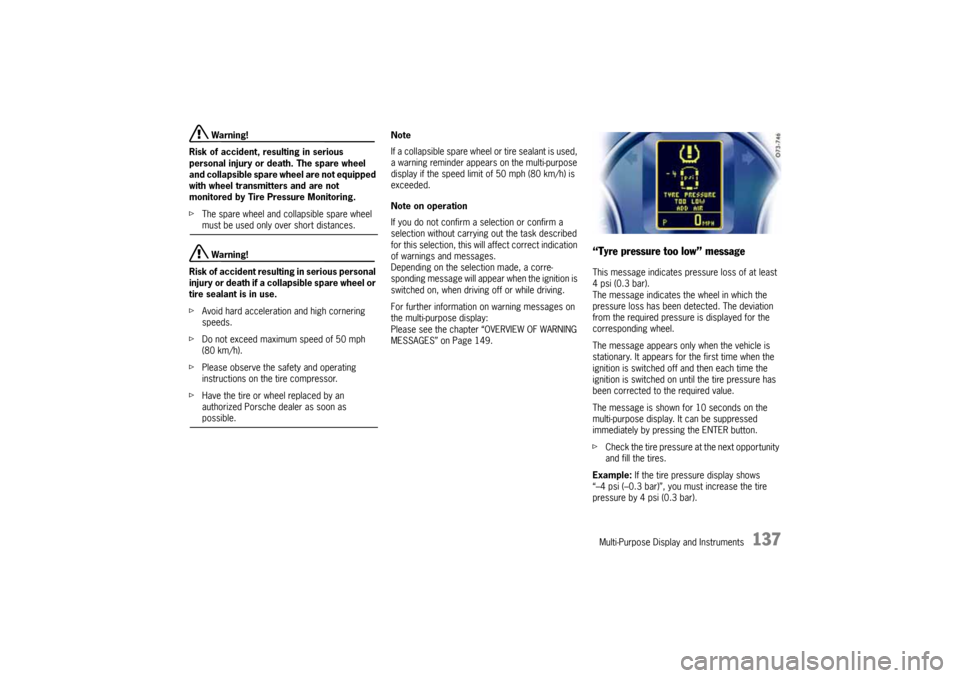
“Tyre pressure too low” messageThis message indicates pressure loss of at least
4 psi (0.3 bar).
The message indicates the wheel in which the
pressure loss has been detected. The deviation
from the required pressure is displayed for the
corresponding wheel.
The message appears only when the vehicle is
stationary. It appears for the first time when the
ignition is switched off and then each time the
ignition is switched on until the tire pressure has
been corrected to the required value.
The message is shown for 10 seconds on the
multi-purpose display. It can be suppressed
immediately by pressing the ENTER button.
fCheck the tire pressure at the next opportunity
and fill the tires.
Example: If the tire pressure display shows
“–4 psi (–0.3 bar)”, you must increase the tire
pressure by 4 psi (0.3 bar).
10_Cayenne_21_KW17.book Seite 137 Donnerstag, 9. April 2009 3:33 15
Page 141 of 379
Multi-Purpose Display and Instruments
141
fSet the fitted wheel set with tire type and tire
size.
Please see the chapter “SETTING THE TIRE
TYPE AND SIZE” on Page 134.
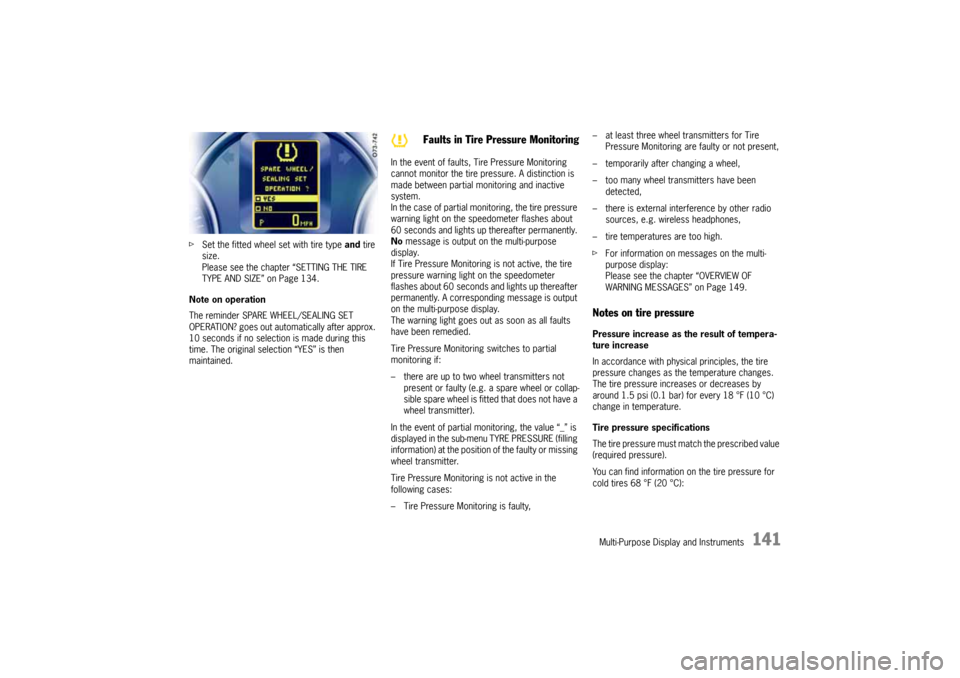
Note on operation
The reminder SPARE WHEEL/SEALING SET
OPERATION? goes out automatically after approx.
10 seconds if no selection is made during this
time. The original selection “YES” is then
maintained.In the event of faults, Tire Pressure Monitoring
cannot monitor the tire pressure. A distinction is
made between partial monitoring and inactive
system.
In the case of partial monitoring, the tire pressure
warning light on the speedometer flashes about
60 seconds and lights up thereafter permanently.
No message is output on the multi-purpose
display.
If Tire Pressure Monitoring is not active, the tire
pressure warning light on the speedometer
flashes about 60 seconds and lights up thereafter
permanently. A corresponding message is output
on the multi-purpose display.
The warning light goes out as soon as all faults
have been remedied.
Tire Pressure Monitoring switches to partial
monitoring if:
– there are up to two wheel transmitters not
present or faulty (e.g. a spare wheel or collap-
sible spare wheel is fitted that does not have a
wheel transmitter).
In the event of partial monitoring, the value “_” is
displayed in the sub-menu TYRE PRESSURE (filling
information) at the position of the faulty or missing
wheel transmitter.
Tire Pressure Monitoring is not active in the
following cases:
– Tire Pressure Monitoring is faulty,– at least three wheel transmitters for Tire
Pressure Monitoring are faulty or not present,
– temporarily after changing a wheel,
– too many wheel transmitters have been
detected,
– there is external interference by other radio
sources, e.g. wireless headphones,
– tire temperatures are too high.
fFor information on messages on the multi-
purpose display:
Please see the chapter “OVERVIEW OF
WARNING MESSAGES” on Page 149.
Notes on tire pressurePressure increase as the result of tempera-
ture increase
In accordance with physical principles, the tire
pressure changes as the temperature changes.
The tire pressure increases or decreases by
around 1.5 psi (0.1 bar) for every 18 °F (10 °C)
change in temperature.
Tire pressure specifications
The tire pressure must match the prescribed value
(required pressure).
You can find information on the tire pressure for
cold tires 68 °F (20 °C):
Faults in Tire Pressure Monitoring
10_Cayenne_21_KW17.book Seite 141 Donnerstag, 9. April 2009 3:33 15
Page 142 of 379

142
Multi-Purpose Display and Instruments – in the sub-menu TYRE PRESSURE (filling infor-
mation):
as a required pressure for each axle if Tire
Pressure Monitoring has not yet been taught
the corresponding values,
– in the front left door aperture for each wheel,
– in the Technical Data chapter in this Owner’s
Manual: Please see the chapter “TIRE
PRESSURES, COLD (68 °F/20 °C)” on
Page 354.
If Tire Pressure Monitoring has been taught the
corresponding values, the deviations from the
required pressure are shown in the sub-menu
TYRE PRESSURE (filling information) indepen-
dently of the tire temperature. The correct tire
pressure adjustment can be made for a wheel on
the basis of this display information even if the
tires are warm.
Insufficient tire filling pressure can cause tires to
overheat when driving and thus be damaged –
even invisibly.
Hidden tire damage is not eliminated by subse-
quently correcting the tire pressure.
fFor this reason, always make sure that the tire
pressure is correct.
fFor further information on maintenance and
care of tires and wheels:
Please see the chapter “TIRES/WHEELS” on
Page 281.
Switching off passenger compart-
ment monitoring on the multi-
purpose displayThe passenger compartment monitoring system
can be temporarily deactivated in the ALARM sub-
menu.
When the doors are locked again, the ultrasound
passenger compartment monitoring system is
activated once more.
Further important information concerning this
topic can be found in a separate chapter:
fPlease see the chapter “TEMPORARILY
DEACTIVATING PASSENGER COMPARTMENT
MONITORING SYSTEM” on Page 246.
Notes on operation
fComfort settings can be made only when the
vehicle is stationary.
fFor information on the operating principle of
the multi-purpose display:
Please see the chapter “OPERATING
PRINCIPLE” on Page 124.
Switching passenger compartment
monitoring on/offThe alarm is triggered if motion is detected in the
interior with the doors closed (e.g. if a window is
broken in a theft).1.MAIN MENU
>SETTINGS
> COMFORT
> ALARM
Select and confirm.
2.Select INTERIOR.
3.Confirm selection.
Monitoring is activated.
Monitoring is deactivated.
10_Cayenne_21_KW17.book Seite 142 Donnerstag, 9. April 2009 3:33 15
Page 143 of 379
Multi-Purpose Display and Instruments
143
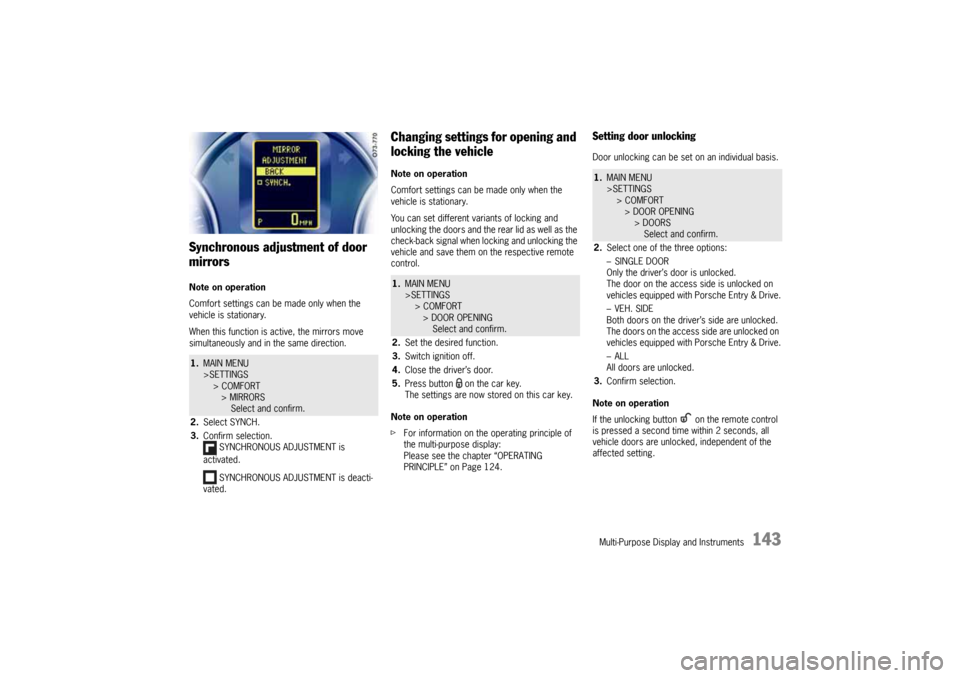
Synchronous adjustment of door
mirrorsNote on operation
Comfort settings can be made only when the
vehicle is stationary.
When this function is active, the mirrors move
simultaneously and in the same direction.
Changing settings for opening and
locking the vehicleNote on operation
Comfort settings can be made only when the
vehicle is stationary.
You can set different variants of locking and
unlocking the doors and the rear lid as well as the
check-back signal when locking and unlocking the
vehicle and save them on the respective remote
control.
Note on operation
fFor information on the operating principle of
the multi-purpose display:
Please see the chapter “OPERATING
PRINCIPLE” on Page 124.
Setting door unlockingDoor unlocking can be set on an individual basis.
Note on operation
If the unlocking button on the remote control
is pressed a second time within 2 seconds, all
vehicle doors are unlocked, independent of the
affected setting.
1.MAIN MENU
>SETTINGS
> COMFORT
> MIRRORS
Select and confirm.
2.Select SYNCH.
3.Confirm selection.
SYNCHRONOUS ADJUSTMENT is
activated.
SYNCHRONOUS ADJUSTMENT is deacti-
vated.
1.MAIN MENU
>SETTINGS
> COMFORT
> DOOR OPENING
Select and confirm.
2.Set the desired function.
3.Switch ignition off.
4.Close the driver’s door.
5.Press button on the car key.
The settings are now stored on this car key.
1.MAIN MENU
>SETTINGS
> COMFORT
> DOOR OPENING
> DOORS
Select and confirm.
2.Select one of the three options:
–SINGLE DOOR
Only the driver’s door is unlocked.
The door on the access side is unlocked on
vehicles equipped with Porsche Entry & Drive.
–VEH. SIDE
Both doors on the driver’s side are unlocked.
The doors on the access side are unlocked on
vehicles equipped with Porsche Entry & Drive.
–ALL
All doors are unlocked.
3.Confirm selection.
10_Cayenne_21_KW17.book Seite 143 Donnerstag, 9. April 2009 3:33 15
Page 149 of 379
Multi-Purpose Display and Instruments
149
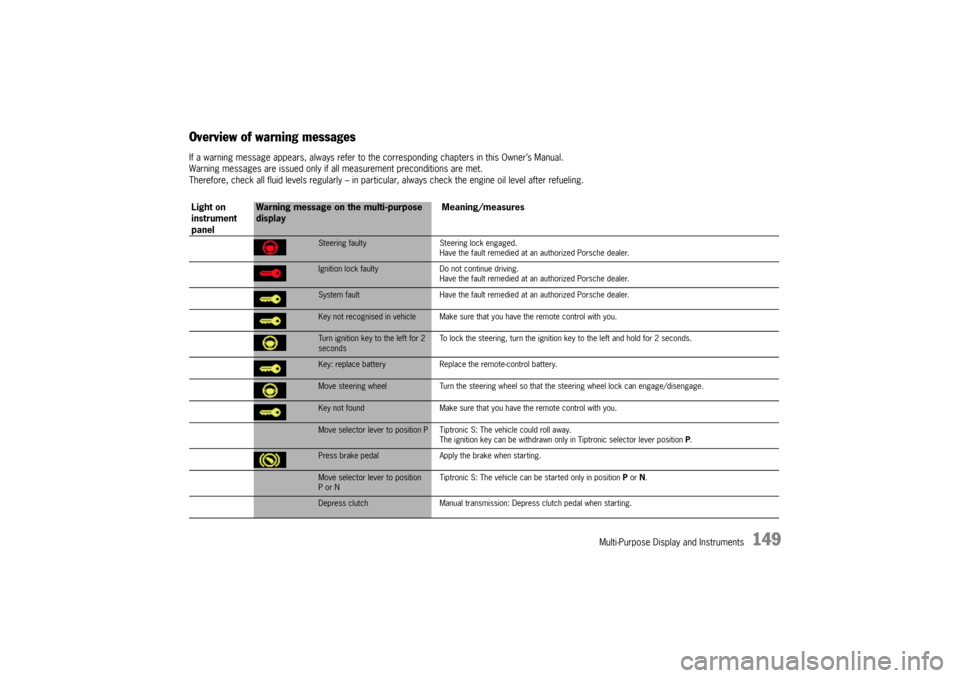
Overview of warning messagesIf a warning message appears, always refer to the corresponding chapters in this Owner’s Manual.
Warning messages are issued only if all measurement preconditions are met.
Therefore, check all fluid levels regularly – in particular, always check the engine oil level after refueling.
Light on
instrument
panel
Warning message on the multi-purpose
displayMeaning/measures
Steering faulty Steering lock engaged.
Have the fault remedied at an authorized Porsche dealer.Ignition lock faulty Do not continue driving.
Have the fault remedied at an authorized Porsche dealer.System fault Have the fault remedied at an authorized Porsche dealer.Key not recognised in vehicle Make sure that you have the remote control with you.Turn ignition key to the left for 2
secondsTo lock the steering, turn the ignition key to the left and hold for 2 seconds.Key: replace battery Replace the remote-control battery.Move steering wheel Turn the steering wheel so that the steering wheel lock can engage/disengage.Key not found Make sure that you have the remote control with you.Move selector lever to position P Tiptronic S: The vehicle could roll away.
The ignition key can be withdrawn only in Tiptronic selector lever position P.Press brake pedal Apply the brake when starting.Move selector lever to position
P or NTiptronic S: The vehicle can be started only in position P or N.Depress clutch Manual transmission: Depress clutch pedal when starting.
10_Cayenne_21_KW17.book Seite 149 Donnerstag, 9. April 2009 3:33 15
Page 152 of 379
152
Multi-Purpose Display and Instruments
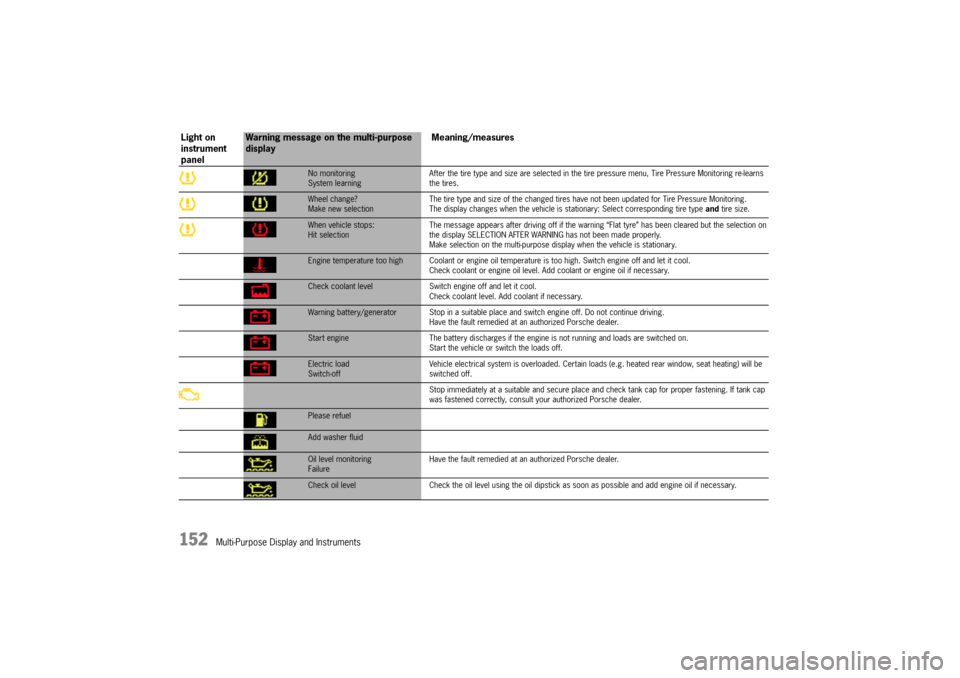
No monitoring
System learningAfter the tire type and size are selected in the tire pressure menu, Tire Pressure Monitoring re-learns
the tires.Wheel change?
Make new selectionThe tire type and size of the changed tires have not been updated for Tire Pressure Monitoring.
The display changes when the vehicle is stationary: Select corresponding tire type and tire size.When vehicle stops:
Hit selectionThe message appears after driving off if the warning “Flat tyre” has been cleared but the selection on
the display SELECTION AFTER WARNING has not been made properly.
Make selection on the multi-purpose display when the vehicle is stationary.Engine temperature too high Coolant or engine oil temperature is too high. Switch engine off and let it cool.
Check coolant or engine oil level. Add coolant or engine oil if necessary.Check coolant level Switch engine off and let it cool.
Check coolant level. Add coolant if necessary.Warning battery/generator Stop in a suitable place and switch engine off. Do not continue driving.
Have the fault remedied at an authorized Porsche dealer.Start engine The battery discharges if the engine is not running and loads are switched on.
Start the vehicle or switch the loads off.Electric load
Switch-offVehicle electrical system is overloaded. Certain loads (e.g. heated rear window, seat heating) will be
switched off.
Stop immediately at a suitable and secure place and check tank cap for proper fastening. If tank cap
was fastened correctly, consult your authorized Porsche dealer.
Please refuelAdd washer fluidOil level monitoring
FailureHave the fault remedied at an authorized Porsche dealer.Check oil level Check the oil level using the oil dipstick as soon as possible and add engine oil if necessary.
Light on
instrument
panel
Warning message on the multi-purpose
displayMeaning/measures
10_Cayenne_21_KW17.book Seite 152 Donnerstag, 9. April 2009 3:33 15
Page 172 of 379

172
Driving and Driving Safety The corner is taken in the right gear, and when you
accelerate out of the corner you do not have to
change down.
Shifting gear on the steering wheel
By shifting gear with the rocker switches on the
steering wheel, you can temporarily change from
automatic selection mode D to manual selection
mode M.
Advantages:
– Shifting down before corners and on entering
congested areas, on downward slopes (engine
braking) or for brief spurts of acceleration.
– Selecting 1st or 2nd gear for moving off.
The manual selection mode remains engaged:
– For cornering (depending on the lateral
acceleration) and passing,
– When the vehicle is stationary (e.g. at a
junction).
The system leaves manual selection mode:
– automatically after around 8 seconds
(unless car is cornering, passing or
stationary),
– if you depress the accelerator to kickdown.Temporary change-down
Precondition:
– Speed is higher than approx. 33 mph
(54 km/h).
fDepress accelerator quickly.
The Tiptronic changes temporarily to the
sportiest gear-changing map, i.e. to the
highest possible gear-changing points.
Correspondingly, the transmission shifts down
immediately by one, two or three gears.
Ending the function
fRelease the accelerator markedly (by approx.
25%).
Kickdown
The kickdown function is active in selector lever
position D.
fFor optimum acceleration, e.g. when over-
taking, depress the accelerator pedal beyond
the full-throttle point (kickdown).
The transmission shifts down depending on the
speed of travel and engine speed.
Upward shifts occur at the highest possible engine
speeds.
These gear-changing speeds remain active until
the accelerator is released to approx. 80% of the
full-throttle position.
D - Automatic selection mode (in the off-
road driving program)fUse selector lever position D for “normal”
driving.
The gears are shifted automatically according
to the accelerator position and speed.
The gear-changing points have been adjusted to
achieve the best possible vehicle control on diffi-
cult terrain.
Depending on the route profile, the gear-changing
points are shifted towards higher or lower engine-
speed ranges. On steep downhill stretches,
upward shifts are prevented until medium engine
speeds are reached (at least 2,500 rpm).
When the car is passing, an automatic upshift
does not occur when the engine speed limit is
reached.
Shifting gear on the steering wheel
By shifting gear with the rocker switches on the
steering wheel, you can temporarily change from
automatic selection mode D to manual selection
mode M.
Advantages:
– Shifting down on downward slopes (engine
braking) or for brief spurts of acceleration.
– Selecting 1st/2nd or 3rd gear for moving off.
10_Cayenne_21_KW17.book Seite 172 Donnerstag, 9. April 2009 3:33 15
Page 178 of 379
178
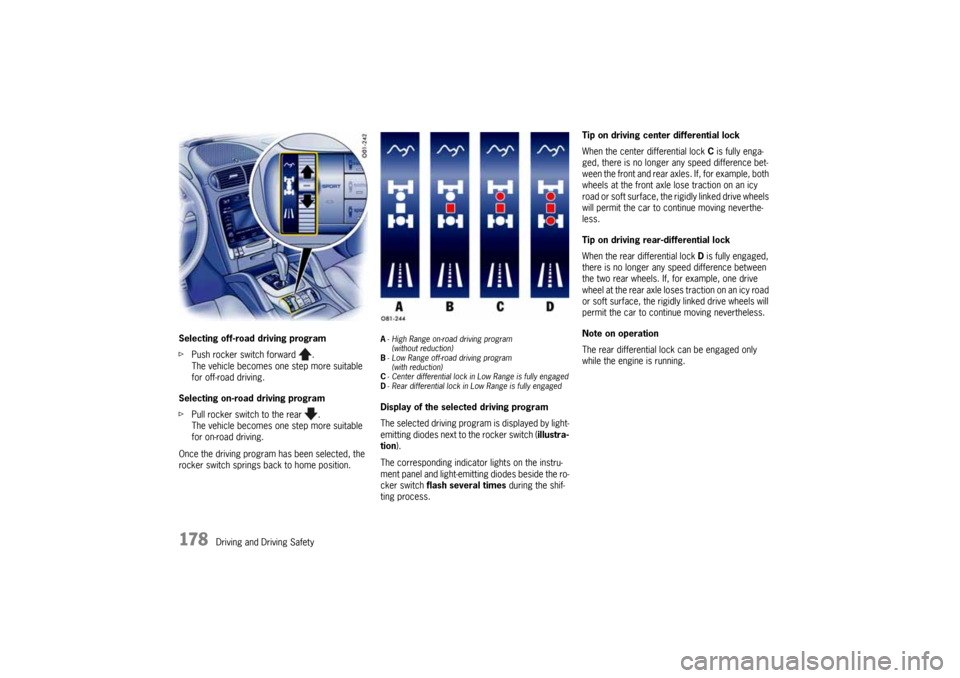
Driving and Driving Safety Selecting off-road driving program
fPush rocker switch forward .
The vehicle becomes one step more suitable
for off-road driving.
Selecting on-road driving program
fPull rocker switch to the rear .
The vehicle becomes one step more suitable
for on-road driving.
Once the driving program has been selected, the
rocker switch springs back to home position.
A-High Range on-road driving program
(without reduction)
B-Low Range off-road driving program
(with reduction)
C-Center differential lock in Low Range is fully engaged
D-Rear differential lock in Low Range is fully engagedDisplay of the selected driving program
The selected driving program is displayed by light-
emitting diodes next to the rocker switch (illustra-
tion).
The corresponding indicator lights on the instru-
ment panel and light-emitting diodes beside the ro-
cker switch flash several times during the shif-
ting process.Tip on driving center differential lock
When the center differential lock C is fully enga-
ged, there is no longer any speed difference bet-
ween the front and rear axles. If, for example, both
wheels at the front axle lose traction on an icy
road or soft surface, the rigidly linked drive wheels
will permit the car to continue moving neverthe-
less.
Tip on driving rear-differential lock
When the rear differential lock D is fully engaged,
there is no longer any speed difference between
the two rear wheels. If, for example, one drive
wheel at the rear axle loses traction on an icy road
or soft surface, the rigidly linked drive wheels will
permit the car to continue moving nevertheless.
Note on operation
The rear differential lock can be engaged only
while the engine is running.
10_Cayenne_21_KW17.book Seite 178 Donnerstag, 9. April 2009 3:33 15