warning PORSCHE CAYNNE S 2006 1.G Owners Manual
[x] Cancel search | Manufacturer: PORSCHE, Model Year: 2006, Model line: CAYENNE S, Model: PORSCHE CAYENNE S 2006 1.GPages: 420, PDF Size: 3.81 MB
Page 188 of 420
188
Controls, Safety, Instruments
Cigarette Lighter
Warning!
Danger of fire and burning. The cigarette
lighter is ready for use, regardless of the ig-
nition lock position.
fDo not leave children in the car unattended.
fNever touch the heating element or sides of
the lighter.
fHold the lighter by the knob only.
The cigarette lighter is ready for use regardless of
the ignition lock position.
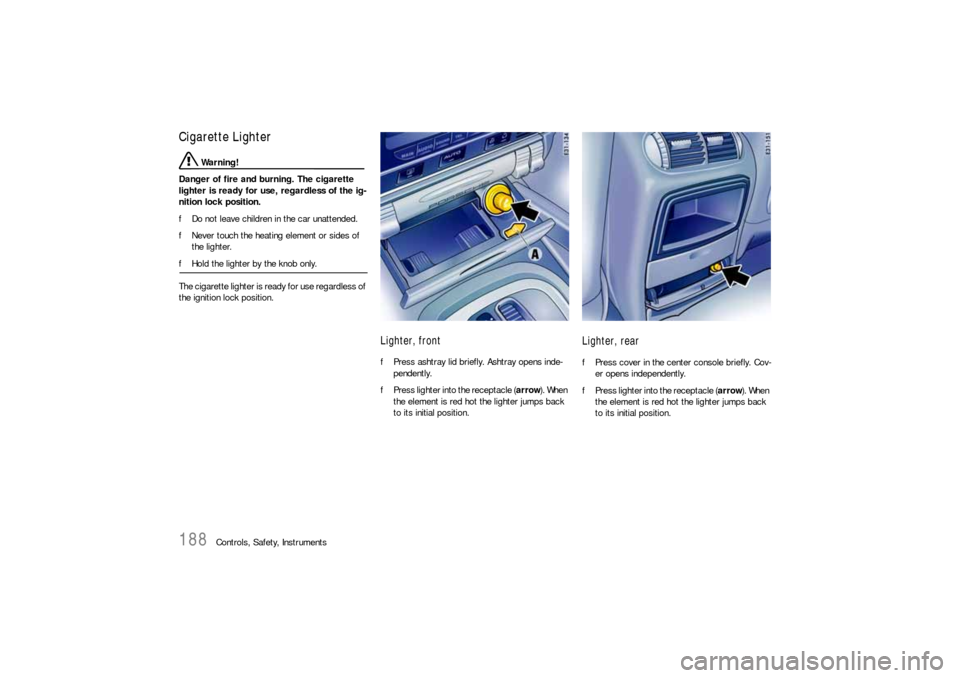
Lighter, frontfPress ashtray lid briefly. Ashtray opens inde-
pendently.
fPress lighter into the receptacle (arrow). When
the element is red hot the lighter jumps back
to its initial position.
Lighter, rearfPress cover in the center console briefly. Cov-
er opens independently.
fPress lighter into the receptacle (arrow). When
the element is red hot the lighter jumps back
to its initial position.
Page 190 of 420
190
Controls, Safety, Instruments
Compact disc player
Caution!
To avoid damage to compact disc player and
discs.
fUse only compact discs labeled as shown, hav-
ing no dirt, damage or warpage.
fNever attempt to disassemble or oil any part
of the player unit. Do not insert any object oth-
er than a disc into the slot.Remember there are
no user-serviceable parts inside the compact
disc player.
fDo not allow the disc to sustain any finger-
prints, scrapes or stickers on the surfaces.
This may cause poor sound quality.
Hold the disc only on the edge or center hole.
fWhen not in use, take the disc out of the player,
put the disc back into its case and store it
away from dust, heat, damp and direct sun-
light.
Leaving the disc on the dashboard in the sun
can damage the disc.fIf the disc gets dirty, clean the disc by wiping
the surfaces from the center to the outside in
a radial direction with a soft cloth.
Do not use a conventional record cleaner or
anti-static record preservative.
Disc cleaners are available in audio stores.
Car Telephone and Aftermarket Alarms Important legal and safety information re-
garding the use of cellular telephones
Some states may prohibit the use of cellular tele-
phones while driving a vehicle. Check the laws and
regulations on the use of cellular telephones in the
areas where you drive.
Danger!
Risk of an accident.
Severe personal injury or death can result in
the event of an accident.
Looking away from the road or turning your
attention away from your driving can cause
an accident and serious personal injury or
death.
When using your cellular telephone, you should al-
ways:
fGive full attention to your driving - pull off the
road and park before making or answering a
call if traffic conditions so require; andfKeep both hands on the steering wheel - use
hands-free operation (if available) - pull off the
road and park before using a hand-held tele-
phone.
It is essential to observe the instructions of
the telephone manufacturer before putting
the telephone into operation.
Any portable telephone or radio transmitter which
is used in a Porsche must be properly installed in
accordance with the technical requirements of
Porsche.
The transmission power must not exceed
10 W.
The devices must possess a type approval for
your vehicle and have an “e“ symbol.
If you should require equipment with transmission
power values greater than 10 W, please consult
your authorized Porsche dealer for this purpose.
He is familiar with the technical requirements for
installing devices of this kind.
The antennas for all radios and telephones with a
transmitting antenna must be externally mounted.
The improper installation of radios or telephones
or use of a radio or telephone with a transmitting
antenna inside the car may cause the warning
lights to come on.
Improper installation of such equipment can cre-
ate a discharged battery or excessive current
draw from added equipment.
Page 191 of 420

Controls, Safety, Instruments
191
If aftermarket systems are installed by non-dealer-
ship technicians or outside the selling dealer,
problems may result. Installation of aftermarket
equipment is not covered under the New Car War-
ranty.
fConsult your authorized Porsche dealer about
the installation of non Porsche approved equip-
ment.
Reception quality
The reception quality of your car telephone will
change constantly when you are driving. Interfer-
ence caused by buildings, landscape and weather
is unavoidable. It may become particularly difficult
to hear when using the hands-free function due to
external noise such as engine and wind noise.
Automatic car-wash
fUnscrew external antennas before using an au-
tomatic car-wash.
Porsche Communication
Management (PCM)
Warning!
There is a danger of accident if you set or
operate the on-board computer, radio, navi-
gation system, telephone or other equipment
when driving.
This could distract you from the traffic and
cause you to lose control of the vehicle re-
sulting in serious personal injury or death.
fOperate the components while driving only if
the traffic situation allows you to do so safely.
fCarry out any complicated operating or setting
procedures only with the vehicle stationary.
fIf it is necessary to operate these components
while the vehicle is in motion, use the function keys on the multi-functional steering wheel.
fRefer to the separate operating instructions
before putting the PCM into operation.
When put into operation for the first time, a dis-
tance of approx. 3 miles (5 km) must be driven in
order for the navigation system to complete the
process of fine calibration. The same applies
when the tires are changed (e.g. summer/winter
tires) or new tires fitted. Full location accuracy is
not yet achieved during the fine-calibration proc-
ess.If the vehicle has been transported (e.g. ferry, car
train), the system may take a few minutes after be-
ing switched on before it determines the current
location.
Serious tire slip (e.g. spinning wheels on snow)
may result in temporarily inaccurate navigation.
When the battery has been disconnected, it may
take up to 15 minutes before the navigation
system is operational once more.
Satellite radioYou must have the satellite radio activated before
you can put it into operation. You will need a con-
tract with a provider in order to use this radio.
fRefer to the separate radio operating instruc-
tions before putting into operation.
Page 193 of 420
Controls, Safety, Instruments
193
Storage
Warning!
Unsecured luggage and heavy objects may
come loose during braking, rapid directional
changes or in an accident and cause serious
personal injury or death.
fDo not carry items of luggage or objects in the
passenger compartment unsecured.
fDo not transport any heavy objects in open
storage trays.
fAlways keep the storage trays closed while
driving.
fAlways protect the passenger compartment
with a safety net and a luggage compartment cover.
Note on operation
An unsecured or incorrectly positioned load can
slip out of place or endanger the vehicle occu-
pants during braking, direction changes or in acci-
dents:
fPlease observe the chapter “LOADING INFOR-
MATION” on Page 213.
Storage options– In the glasses case in the roof console
– In the glove compartment, pen holder
– In the front and rear armrests
– In the drawer underneath the passenger’s seat
– In the storage compartments at the sides of
the luggage compartment
– In the door trim panel
– In the center console, front and rear
– On the back of the front seats
– Coat hook on the rear grab handles
– Under the load compartment floor
– In the front and rear cupholders
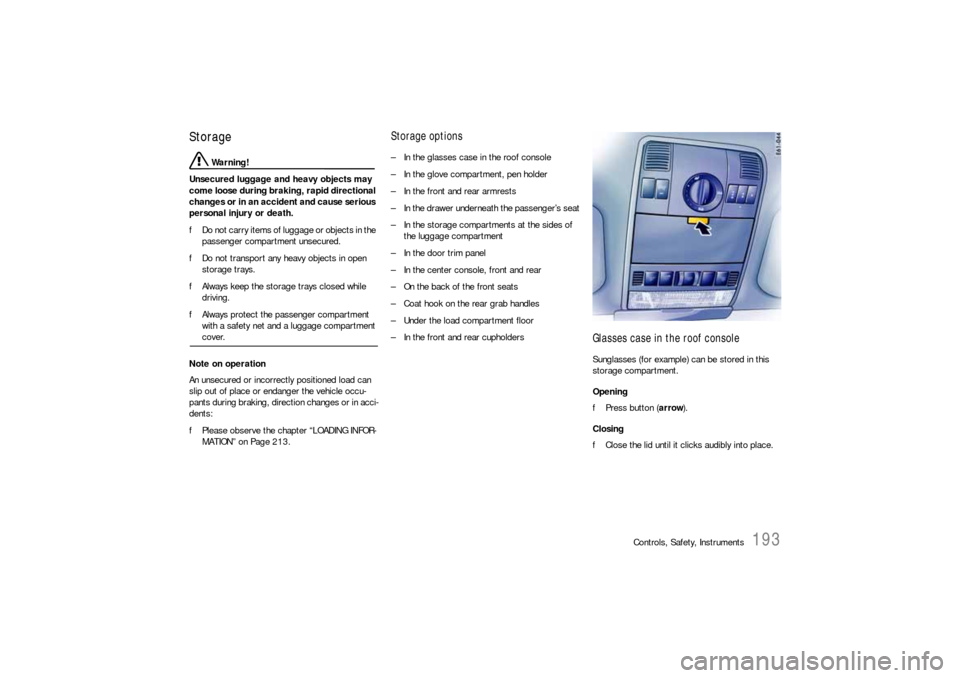
Glasses case in the roof consoleSunglasses (for example) can be stored in this
storage compartment.
Opening
fPress button (arrow).
Closing
fClose the lid until it clicks audibly into place.
Page 194 of 420
194
Controls, Safety, Instruments
Glove compartment
Warning!
Risk of injury by the glove compartment lid in
case of an accident.
fKeep the glove compartment closed while driv-ing.
A drawer, designed to hold the vehicle folder, is lo-
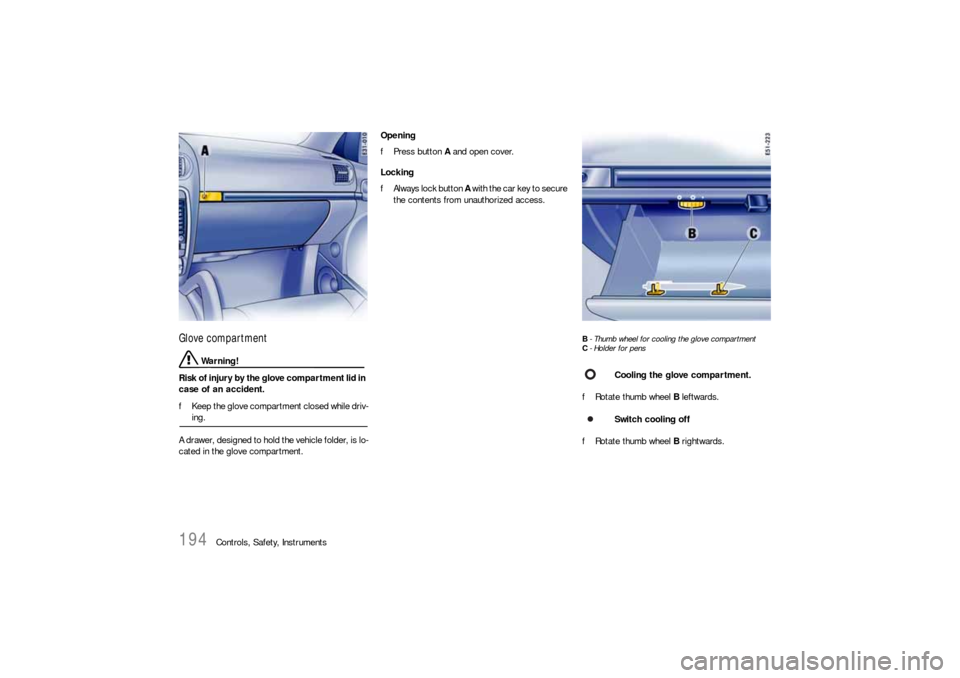
cated in the glove compartment.Opening
fPress button A and open cover.
Locking
fAlways lock button A with the car key to secure
the contents from unauthorized access.
B- Thumb wheel for cooling the glove compartment
C- Holder for pensfRotate thumb wheel B leftwards.
fRotate thumb wheel B rightwards.
Cooling the glove compartment.
Switch cooling off
Page 196 of 420
196
Controls, Safety, Instruments
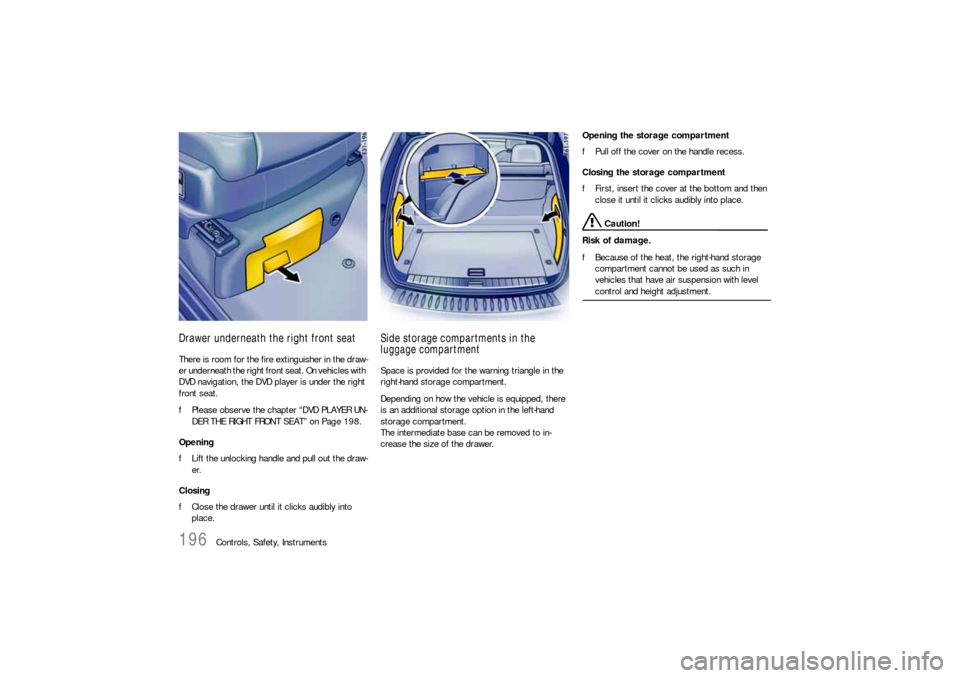
Drawer underneath the right front seatThere is room for the fire extinguisher in the draw-
er underneath the right front seat. On vehicles with
DVD navigation, the DVD player is under the right
front seat.
fPlease observe the chapter “DVD PLAYER UN-
DER THE RIGHT FRONT SEAT” on Page 198.
Opening
fLift the unlocking handle and pull out the draw-
er.
Closing
fClose the drawer until it clicks audibly into
place.
Side storage compartments in the
luggage compartmentSpace is provided for the warning triangle in the
right-hand storage compartment.
Depending on how the vehicle is equipped, there
is an additional storage option in the left-hand
storage compartment.
The intermediate base can be removed to in-
crease the size of the drawer.Opening the storage compartment
fPull off the cover on the handle recess.
Closing the storage compartment
fFirst, insert the cover at the bottom and then
close it until it clicks audibly into place.
Caution!
Risk of damage.
fBecause of the heat, the right-hand storage
compartment cannot be used as such in
vehicles that have air suspension with level control and height adjustment.
Page 197 of 420
Controls, Safety, Instruments
197
CupholderYou can place drinks cans and cups in the cup-
holder.
fKeep the cupholder closed while driving.
Warning!
Risk of accident, scalding or damage due to
spilling drinks.
fOnly use cupholder when safe to do so it is.
fOnly use containers which fit.
fNever put overfull containers in the cupholder.
fNever use hot drinks.
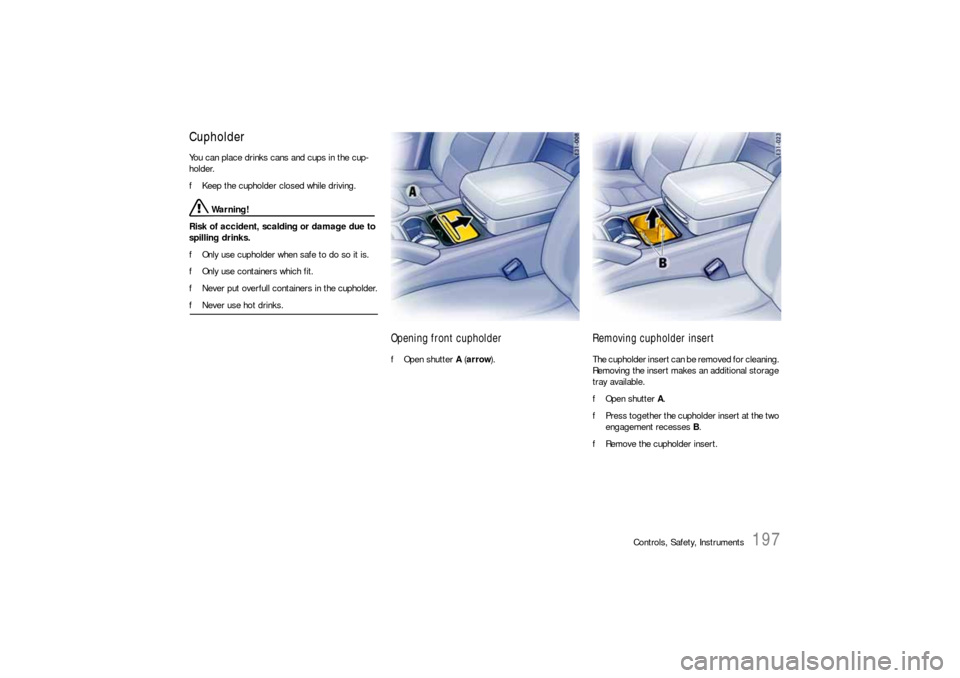
Opening front cupholderfOpen shutter A (arrow).
Removing cupholder insertThe cupholder insert can be removed for cleaning.
Removing the insert makes an additional storage
tray available.
fOpen shutter A.
fPress together the cupholder insert at the two
engagement recesses B.
fRemove the cupholder insert.
Page 200 of 420
200
Controls, Safety, Instruments
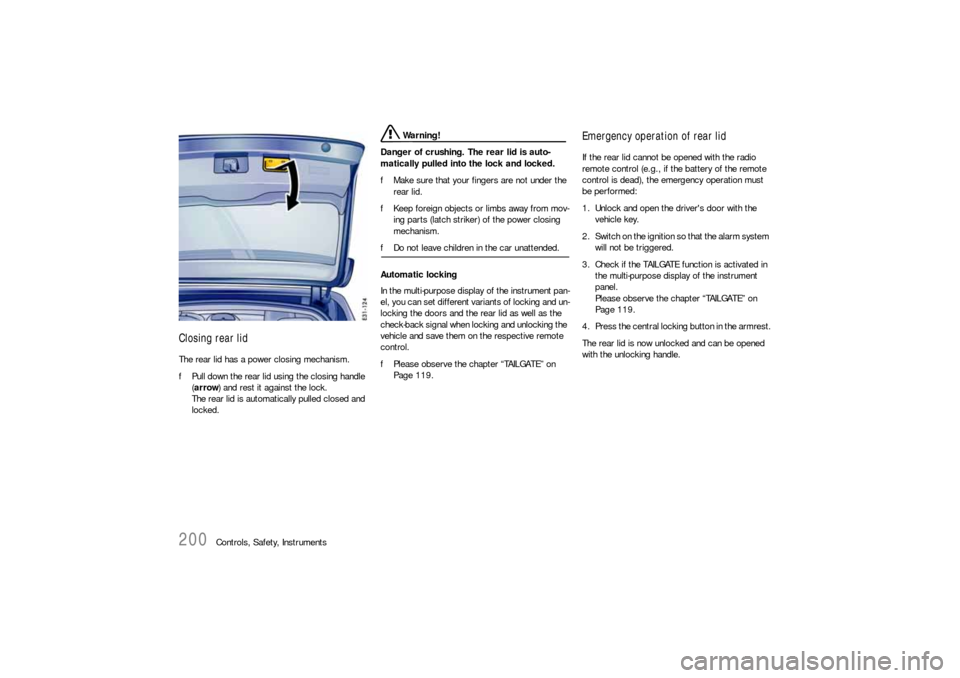
Closing rear lidThe rear lid has a power closing mechanism.
fPull down the rear lid using the closing handle
(arrow) and rest it against the lock.
The rear lid is automatically pulled closed and
locked.
Warning!
Danger of crushing. The rear lid is auto-
matically pulled into the lock and locked.
fMake sure that your fingers are not under the
rear lid.
fKeep foreign objects or limbs away from mov-
ing parts (latch striker) of the power closing
mechanism.
fDo not leave children in the car unattended.
Automatic locking
In the multi-purpose display of the instrument pan-
el, you can set different variants of locking and un-
locking the doors and the rear lid as well as the
check-back signal when locking and unlocking the
vehicle and save them on the respective remote
control.
fPlease observe the chapter “TAILGATE” on
Page 119.
Emergency operation of rear lidIf the rear lid cannot be opened with the radio
remote control (e.g., if the battery of the remote
control is dead), the emergency operation must
be performed:
1. Unlock and open the driver's door with the
vehicle key.
2. Switch on the ignition so that the alarm system
will not be triggered.
3. Check if the TAILGATE function is activated in
the multi-purpose display of the instrument
panel.
Please observe the chapter “TAILGATE” on
Page 119.
4. Press the central locking button in the armrest.
The rear lid is now unlocked and can be opened
with the unlocking handle.
Page 203 of 420
Controls, Safety, Instruments
203
Luggage Compartment CoverThe luggage can be protected against prying eyes
with the luggage compartment cover.
fAlways pull out the luggage compartment cov-
er when transporting objects in the luggage
compartment.
The luggage compartment cover is not de-
signed to carry objects.
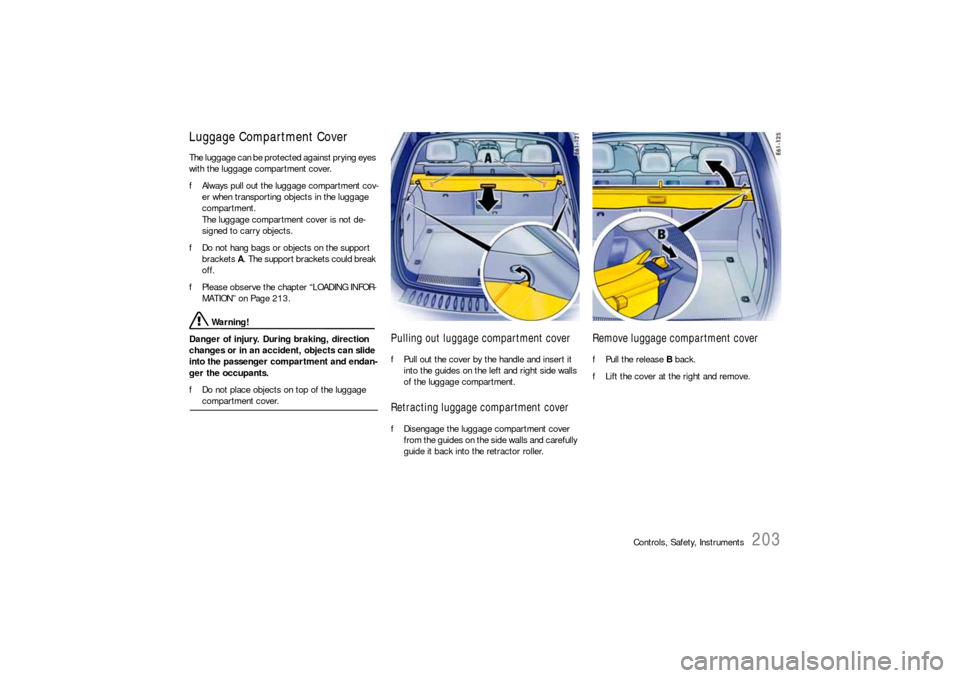
fDo not hang bags or objects on the support
brackets A. The support brackets could break
off.
fPlease observe the chapter “LOADING INFOR-
MATION” on Page 213.
Warning!
Danger of injury. During braking, direction
changes or in an accident, objects can slide
into the passenger compartment and endan-
ger the occupants.
fDo not place objects on top of the luggage compartment cover.
Pulling out luggage compartment coverfPull out the cover by the handle and insert it
into the guides on the left and right side walls
of the luggage compartment.Retracting luggage compartment coverfDisengage the luggage compartment cover
from the guides on the side walls and carefully
guide it back into the retractor roller.
Remove luggage compartment coverfPull the release B back.
fLift the cover at the right and remove.
Page 206 of 420
206
Controls, Safety, Instruments
Luggage Safety NetThe safety net can hold back only lightweight
items during braking, direction changes or in an
accident.
fPlease observe the chapter “LOADING INFOR-
MATION” on Page 213.
Warning!
Danger of injury. During braking, direction
changes or in an accident, an unsecured
load can slip and endanger the occupants.
fAlways secure the passenger compartment
with the luggage safety net.
fAlways fasten the load at the tie-down rings.
fThe load must never project over the top edge
of the seat backrest.
fIf the safety net was heavily stressed or dam-
aged during braking or an accident, etc., have
the luggage safety net and its bracket checked by an authorized Porsche dealer.
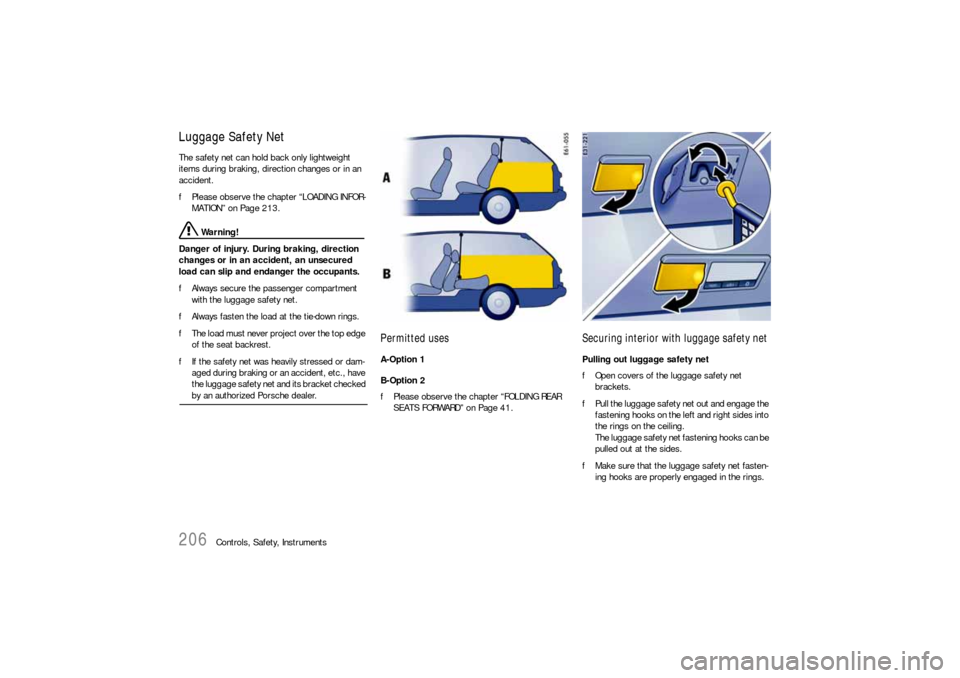
Permitted usesA-Option 1
B-Option 2
fPlease observe the chapter “FOLDING REAR
SEATS FORWARD” on Page 41.
Securing interior with luggage safety netPulling out luggage safety net
fOpen covers of the luggage safety net
brackets.
fPull the luggage safety net out and engage the
fastening hooks on the left and right sides into
the rings on the ceiling.
The luggage safety net fastening hooks can be
pulled out at the sides.
fMake sure that the luggage safety net fasten-
ing hooks are properly engaged in the rings.