ignition PORSCHE CAYNNE S 2006 1.G User Guide
[x] Cancel search | Manufacturer: PORSCHE, Model Year: 2006, Model line: CAYENNE S, Model: PORSCHE CAYENNE S 2006 1.GPages: 420, PDF Size: 3.81 MB
Page 28 of 420

28
Controls, Safety, Instruments
Alarm System,
Passenger Compartment
Monitoring, Inclination SensorThis device complies with:
Part 15 of the FCC Rules
RSS-210 of Industry Canada.
Operation of this device is subject to the following
two conditions:
– It may not cause harmful interference, and
– it must accept any interference received in-
cluding interference that may cause undesired
operation.
Note
fThe manufacturer is not responsible for any ra-
dio or TV interference caused by unauthorized
modifications to this equipment.
Such modification could void the user's author-
ity to operate the equipment.
Warning!
Any changes or modifications not expressly ap-
proved by Porsche could void the user’s authority
to operate this equipment.Avoiding false alarmsfAlways close the sliding/lifting roof or the
Panorama roof system, and all door windows.
fDo not leave a mobile phone switched on in the
glasses case of the roof console.
fAlways turn off the alarm system before you at-
tach a trailer. The inclination sensor could trig-
ger the alarm unintentionally.Switching off the alarm system if it is
triggeredfUnlock vehicle doors or
fSwitch ignition on.
The following alarm contacts are
monitored– Doors
– Engine compartment lid
–Rear lid
–Rear window
– Passenger compartment
– Vehicle inclination
fIf one of these alarm contacts is interrupted,
the alarm horn sounds for approx. 30 seconds
and the emergency flashers flash.
After 5 seconds of interruption the alarm is
triggered again. This cycle is repeated ten
times. USA: KR5KESSY
Canada: CAN 267 104 139
Page 29 of 420

Controls, Safety, Instruments
29
Switching onfLock the vehicle.
The alarm system, passenger compartment
monitoring system and inclination sensor are
switched on.
fPlease observe the chapter “CENTRAL LO-
CKING SYSTEM” on Page 24.Switching offfUnlock the vehicle.
The alarm system, passenger compartment
monitoring system and inclination sensor are
switched off automatically.
Note on operation
If you unlock the vehicle with the key at the door
lock, you must switch the ignition on (ignition lock
position 1) within 15 seconds of opening the door
in order to prevent the alarm system from being
triggered.
Temporarily deactivating passenger
compartment monitoring system and
inclination sensorIf people or animals are remaining in the locked ve-
hicle or the vehicle is being transported on a pas-
senger train or ship, for example, the passenger
compartment monitoring system and inclination
sensor must be deactivated.
When locked again, the passenger compartment
monitoring and inclination sensor are activated
again. The rocker switch to switch off the inclination sen-
sor and the passenger compartment monitoring
system is located next to the driver's seat under
the seat belt height adjustment.
Note on operation
You can also temporarily deactivate the passen-
ger compartment monitoring system and inclina-
tion sensor separately on the multi-purpose dis-
play in the instrument panel:
fPlease observe the chapter “ALARM” on
Page 118.
f f f
Page 30 of 420

30
Controls, Safety, Instruments
A, D - Switch for reading lights
B- Button for dimming the comfort lighting
C- Switch for interior light1. Apply the parking brake.
2. Switch on interior lighting by moving switch C
to the left.
3. Remove ignition key.
On vehicles with Porsche Entry & Drive:
Switch off the ignition.
4. Open the driver‘s door.
The symbol on the top half of the rocker switch
flashes.5. Press the flashing top half of rocker switch un-
til the upper symbol lights permanently.
6. Lock the vehicle.
Emergency flasher flashes twice and an acous-
tic signal will sound twice.
The vehicle doors, the rear lid and the rear window
are locked but the doors can be opened from the
inside by pulling the inner door handle twice.
fInform any persons remaining in the vehicle
that the alarm system will be triggered if the
door is opened.
Note on operation
If the ignition is switched on after pressing the
rocker switch, the passenger compartment moni-
toring system is activated again. The symbols on
the rocker switch will flash.1. Apply the parking brake.
2. Switch on interior lighting by moving switch C
to the left.
3. Remove ignition key.
On vehicles with Porsche Entry & Drive:
Switch off the ignition.
4. Open the driver‘s door.
The symbol on the top half of the rocker switch
flashes.
5. Press the bottom half of rocker switch until the
lower symbol lights permanently.
6. Lock the vehicle.
Emergency flasher flashes twice and an acous-
tic signal will sound twice.
The vehicle doors, the rear lid and the rear window
are locked but the doors can be opened from the
inside by pulling the inner door handle twice.
fInform any persons remaining in the vehicle
that the alarm system will be triggered if the
door is opened.
Note on operation
If the ignition is switched on after pressing the
rocker switch, the inclination sensor is activated
again. The symbols on the rocker switch will flash. Deactivating passenger compart-
ment monitoring
Deactivating inclination sensor
Page 31 of 420

Controls, Safety, Instruments
31
Deactivating passenger compartment
monitoring system and inclination sensor
1. Apply the parking brake.
2. Switch on interior lighting by moving switch C
to the left.
3. Remove ignition key.
On vehicles with Porsche Entry & Drive:
Switch off the ignition.
4. Open the driver‘s door.
The symbol on the top half of the rocker switch
flashes.
5. Press the bottom half of rocker switch until the
bottom symbol lights permanently.
6. Press the flashing top half of rocker switch un-
til the upper symbol lights permanently.
7. Lock the vehicle.
Emergency flasher flashes twice and an acous-
tic signal will sound twice.
The vehicle doors, the rear lid and the rear window
are locked but the doors can be opened from the
inside by pulling the inner door handle twice.
fInform any persons remaining in the vehicle
that the alarm system will be triggered if the
door is opened.Note on operation
If the ignition is switched on after pressing the
rocker switch, the passenger compartment moni-
toring system and the inclination sensor are acti-
vadet again. The symbols on the rocker switch will
flash.Activating the alarm system, the passenger
compartment monitoring system and
inclination sensor
fUnlock the vehicle and lock it again.
Fault indication
If the monitoring system and the inclination sensor
could not be deactivated the symbols on the rock-
er switch will flash (e.g. the rocker switch is
pressed with the ignition on).
For deactivating the passenger compartment
monitoring and inclination sensor:
fSwitch on interior lighting.
fSwitch off ignition.
fPress the rocker switch.
fLock the vehicle.
Page 33 of 420
Controls, Safety, Instruments
33
Power Windows
Warning!
Risk of injury when the door windows close.
This applies especially if the windows are
closed with the comfort function.
When this function is in operation the window
goes up automatically.
fMake sure nobody can be injured when the win-
dows close.
fRemove the ignition key or switch ignition off in
vehicles that have Porsche Entry & Drive to
shut off power to the window switches when
the vehicle is not attended by a responsible
person. Always take the ignition key with you
when leaving the vehicle. Uninformed persons
could injure themselves by operating the pow-
er windows.
fIn case of danger, immediately release the car
key or the button in the door handle in vehicles
that have Porsche Entry & Drive.
fDo not leave children in the car unattended.
Risk of an accident.
fDo not put anything on or near the windows that may interfere with the driver's vision.
Note on operation
fAlways keep the side windows closed while
driving off-road.
Readiness for operation of power windows– With ignition switched on or
– A maximum of 10 minutes with door closed
and ignition key withdrawn, but only until driv-
er’s or passenger door is first opened.
The one-touch operation for closing the door
windows is available only when the ignition is
switched on.
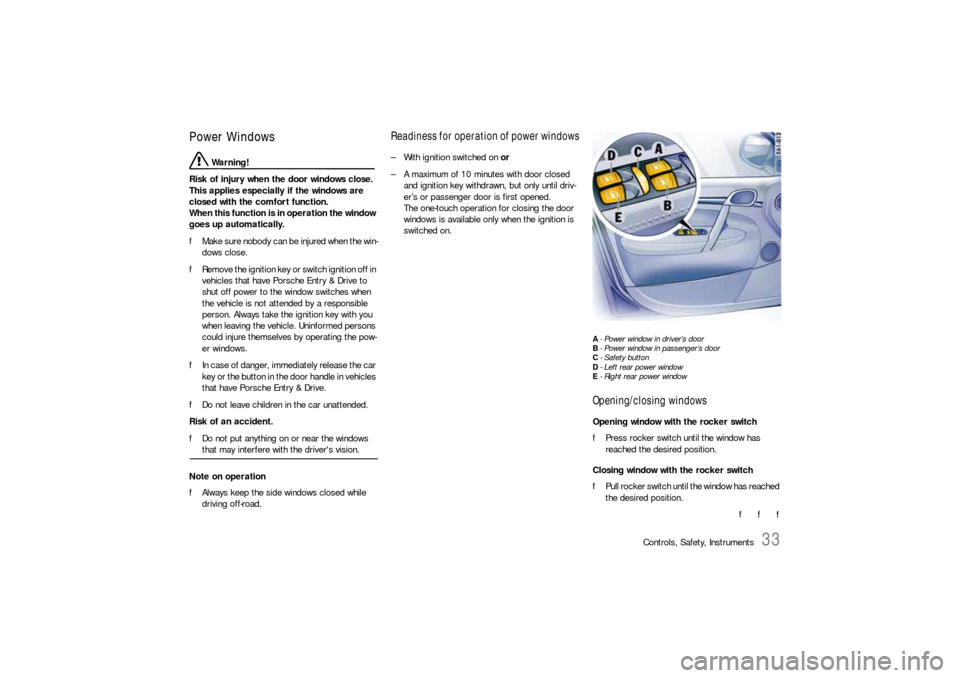
A- Power window in driver’s door
B- Power window in passenger’s door
C-Safety button
D- Left rear power window
E- Right rear power windowOpening/closing windowsOpening window with the rocker switch
fPress rocker switch until the window has
reached the desired position.
Closing window with the rocker switch
fPull rocker switch until the window has reached
the desired position.
f f f
Page 34 of 420

34
Controls, Safety, Instruments
Power windows in passenger’s door and rear doorsNote on operation
Rocker switches A and B in the driver’s door have
a two-stage function:
– If the switch in question is pressed or pulled to
the first level, the front window is opened or
closed manually.
– If the switch is completely pressed or pulled to
the second level, the front window is opened or
closed automatically (one-touch operation).One-touch operation for front windows
fPull or press rocker switch to its final position
in the driver’s door.
Window moves to its final position.
Press or pull again to stop the window in the
desired position.
Note on operation
If a door window is blocked during closing, it will
stop and open again by several inches.
However, this is not the case if:
– The rocker switch is pressed again within
10 seconds of the window being blocked and
– The windows are closed using the car key in
the door lock (comfort function).
The windows close with their full closing force.
Warning!
Danger of injury. If the rocker switch is
pressed again within 10 seconds of the
window being blocked, the window will close
with its full closing force.
fTa k e c a r e t o e n s u r e t h a t n o b o d y c a n b e i n j u re d when the windows close.
The one-touch operation is disabled for
10 seconds after blockage of the door window.
Comfort function for vehicles without
Porsche Entry & DriveOpening and closing windows
Warning!
Danger of injury. The window will close with
its full closing force.
fTake care to ensure that nobody can be injured when the windows close.
fHold the car key in the door lock in the unlock-
ing or locking position until the windows have
reached the desired position.
If you unlock the vehicle with the key at the door
lock, only the driver’s door is unlocked. In order to
prevent the alarm system from being triggered,
you must switch the ignition on within 15 seconds
of opening the door.
Page 35 of 420

Controls, Safety, Instruments
35
Comfort function for vehicles with
Porsche Entry & Drive
Warning!
Danger of injury. The window will close with
its full closing force.
fTake care to ensure that nobody can be injured when the windows close.
Opening and closing windows
fHold the car key in the door lock in the unlock-
ing or locking position until the windows have
reached the desired position.
If you unlock the vehicle with the key at the door
lock, only the driver’s door is unlocked. In order to
prevent the alarm system from being triggered,
you must switch the ignition on within 15 seconds
of opening the door.
Closing windows
fHold the button in the door handle when lock-
ing the vehicle until the windows and the Pano-
rama roof system have reached the desired
position.
Note on operation
The comfort function remains available for approx.
30 seconds after the vehicle has been locked.
Storing final position of the door windowsThe end positions of the door windows are lost
when the battery is disconnected and reconnect-
ed. The one-touch operation of the windows is dis-
abled.
Perform these procedures for all windows:
1. Close window completely once by pulling rock-
er switch.
2. Open window completely again by pressing
rocker switch.The power windows, the central locking buttons
on the rear doors and the rear control panel for
the air conditioning can be disabled using the safe-
ty button C in the armrest of the driver’s door.
Switching off
fPress safety button C.
The symbol in the safety button lights up.
Switching on
fPress safety button C again.
The symbol in the safety button goes out.
Safety button
Page 37 of 420
Controls, Safety, Instruments
37
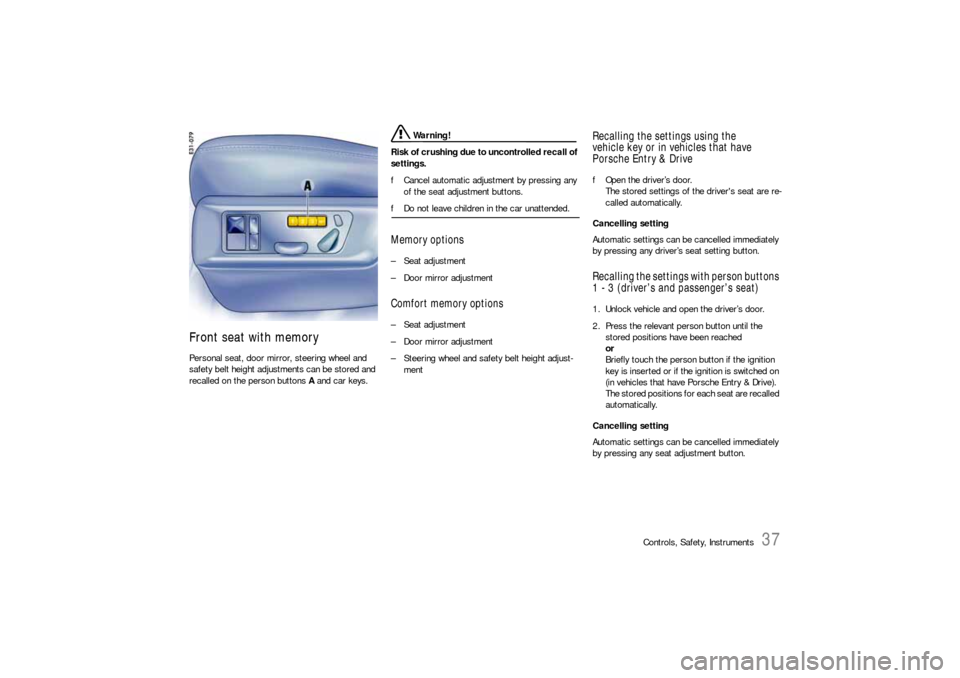
Front seat with memoryPersonal seat, door mirror, steering wheel and
safety belt height adjustments can be stored and
recalled on the person buttons A and car keys.
Warning!
Risk of crushing due to uncontrolled recall of
settings.
fCancel automatic adjustment by pressing any
of the seat adjustment buttons.
fDo not leave children in the car unattended.Memory options–Seat adjustment
– Door mirror adjustmentComfort memory options–Seat adjustment
– Door mirror adjustment
– Steering wheel and safety belt height adjust-
ment
Recalling the settings using the
vehicle key or in vehicles that have
Porsche Entry & DrivefOpen the driver’s door.
The stored settings of the driver's seat are re-
called automatically.
Cancelling setting
Automatic settings can be cancelled immediately
by pressing any driver’s seat setting button.Recalling the settings with person buttons
1 - 3 (driver’s and passenger’s seat)1. Unlock vehicle and open the driver’s door.
2. Press the relevant person button until the
stored positions have been reached
or
Briefly touch the person button if the ignition
key is inserted or if the ignition is switched on
(in vehicles that have Porsche Entry & Drive).
The stored positions for each seat are recalled
automatically.
Cancelling setting
Automatic settings can be cancelled immediately
by pressing any seat adjustment button.
Page 38 of 420
38
Controls, Safety, Instruments
Storing driver’s seat settingsStoring settings on a person button and a car
key
1. Apply the parking brake.
2. Switch ignition on.
3. Close doors.
4. Make the required adjustments to the seat,
mirror, steering wheel and safety belt.
5. Briefly press the SET memory button and,
within 10 seconds, hold down one of the per-
son buttons (1, 2 or 3) until an acknowledge
tone is obtained.
The settings are now stored on the desired
person button.
6. Withdraw car key or switch ignition off in vehi-
cles that have Porsche Entry & Drive.
7. Press the SET memory button within
10 seconds and keep the button depressed
until an acknowledge tone is obtained.
The settings are now assigned to the car key.
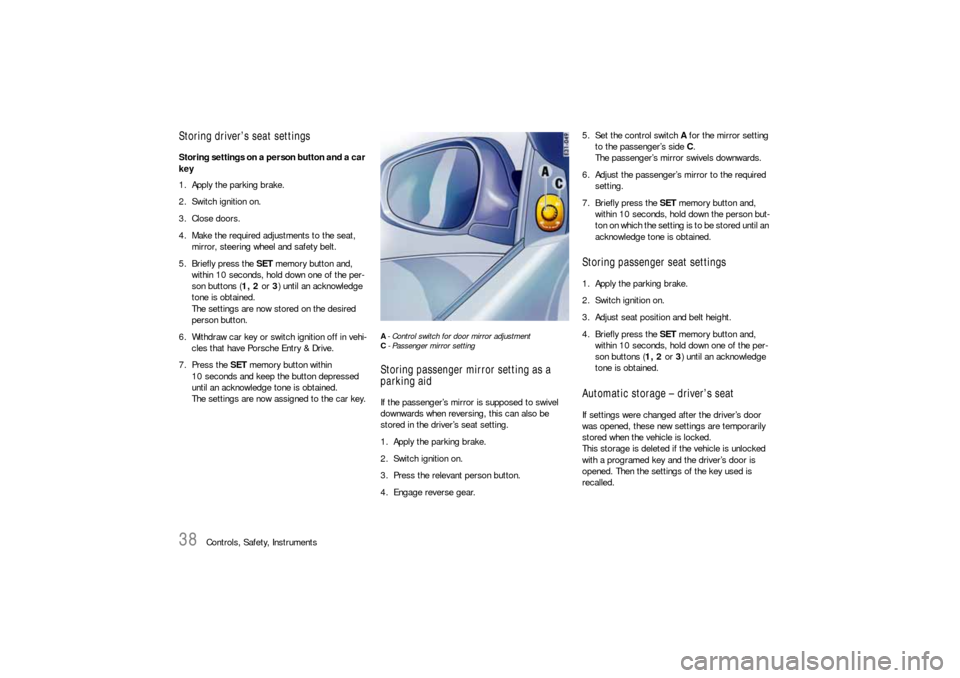
A-Control switch for door mirror adjustment
C- Passenger mirror settingStoring passenger mirror setting as a
parking aidIf the passenger’s mirror is supposed to swivel
downwards when reversing, this can also be
stored in the driver’s seat setting.
1. Apply the parking brake.
2. Switch ignition on.
3. Press the relevant person button.
4. Engage reverse gear.5. Set the control switch A for the mirror setting
to the passenger’s side C.
The passenger’s mirror swivels downwards.
6. Adjust the passenger’s mirror to the required
setting.
7. Briefly press the SET memory button and,
within 10 seconds, hold down the person but-
ton on which the setting is to be stored until an
acknowledge tone is obtained.
Storing passenger seat settings1. Apply the parking brake.
2. Switch ignition on.
3. Adjust seat position and belt height.
4. Briefly press the SET memory button and,
within 10 seconds, hold down one of the per-
son buttons (1, 2 or 3) until an acknowledge
tone is obtained.Automatic storage – driver’s seatIf settings were changed after the driver’s door
was opened, these new settings are temporarily
stored when the vehicle is locked.
This storage is deleted if the vehicle is unlocked
with a programed key and the driver’s door is
opened. Then the settings of the key used is
recalled.
Page 39 of 420
Controls, Safety, Instruments
39
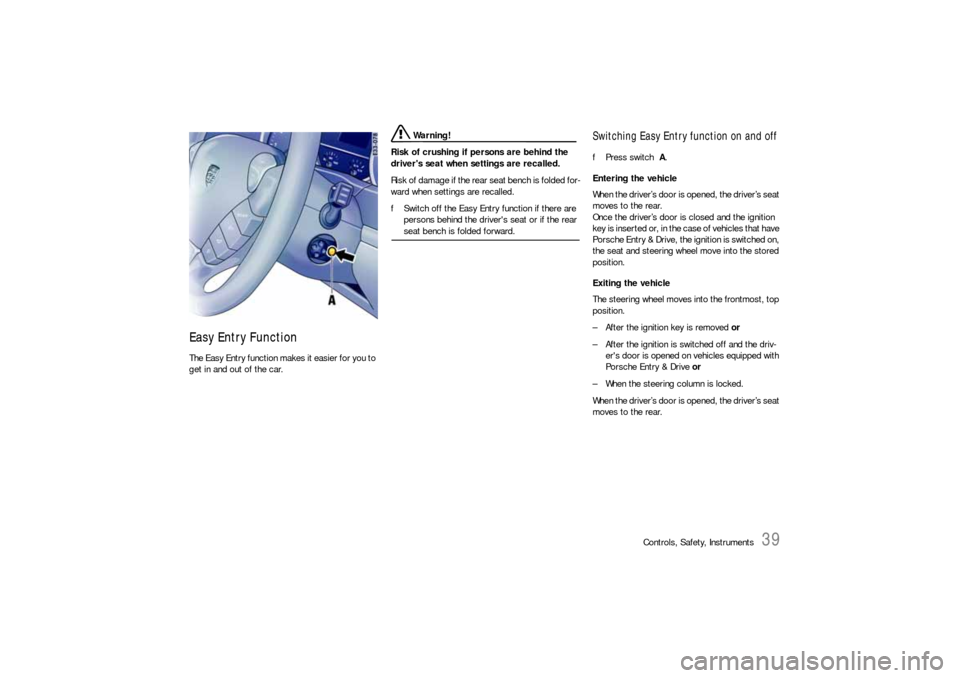
Easy Entry Function The Easy Entry function makes it easier for you to
get in and out of the car.
Warning!
Risk of crushing if persons are behind the
driver's seat when settings are recalled.
Risk of damage if the rear seat bench is folded for-
ward when settings are recalled.
fSwitch off the Easy Entry function if there are
persons behind the driver's seat or if the rear seat bench is folded forward.
Switching Easy Entry function on and offfPress switch A.
Entering the vehicle
When the driver’s door is opened, the driver’s seat
moves to the rear.
Once the driver’s door is closed and the ignition
key is inserted or, in the case of vehicles that have
Porsche Entry & Drive, the ignition is switched on,
the seat and steering wheel move into the stored
position.
Exiting the vehicle
The steering wheel moves into the frontmost, top
position.
– After the ignition key is removed or
– After the ignition is switched off and the driv-
er's door is opened on vehicles equipped with
Porsche Entry & Drive or
– When the steering column is locked.
When the driver’s door is opened, the driver’s seat
moves to the rear.