ignition PORSCHE CAYNNE S 2006 1.G Workshop Manual
[x] Cancel search | Manufacturer: PORSCHE, Model Year: 2006, Model line: CAYENNE S, Model: PORSCHE CAYENNE S 2006 1.GPages: 420, PDF Size: 3.81 MB
Page 135 of 420

Controls, Safety, Instruments
135
Turn signal/High Beam/Headlight
Flasher StalkTurn signals, low beam and high beam are ready
for operation when the ignition is on.
1 – Turn signal light, left
2 – Turn signal light, right
Move the stalk to the upper or lower pressure
point – turn signals flash three times
3 – High beam (push forward)
4 – Headlight flasher (pull backward)
Lever in center position – low beam
(when the light is switched on)Note on operation
When the high beam is switched on or the head-
light flasher is operated, the blue indicator light on
the speedometer is lit.
Parking lightThe parking light can only be switched on when
the ignition is switched off.
fMove the lever up or down to switch on the
right or left parking light.
Page 136 of 420
136
Controls, Safety, Instruments The emergency flasher is ready for use regardless
of the ignition lock position.
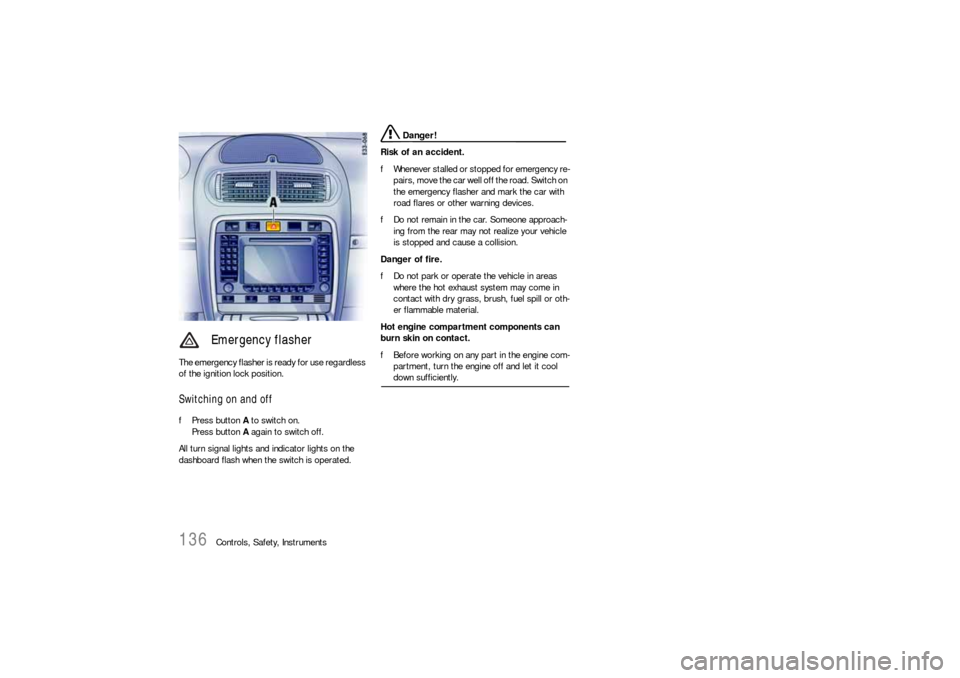
Switching on and offfPress button A to switch on.
Press button A again to switch off.
All turn signal lights and indicator lights on the
dashboard flash when the switch is operated.
Danger!
Risk of an accident.
fWhenever stalled or stopped for emergency re-
pairs, move the car well off the road. Switch on
the emergency flasher and mark the car with
road flares or other warning devices.
fDo not remain in the car. Someone approach-
ing from the rear may not realize your vehicle
is stopped and cause a collision.
Danger of fire.
fDo not park or operate the vehicle in areas
where the hot exhaust system may come in
contact with dry grass, brush, fuel spill or oth-
er flammable material.
Hot engine compartment components can
burn skin on contact.
fBefore working on any part in the engine com-
partment, turn the engine off and let it cool down sufficiently.
Emergency flasher
Page 137 of 420
Controls, Safety, Instruments
137
Windshield Wiper/Washer Stalk
Warning!
Danger of injury when the windshield wipers
operate unintentionally.
Risk of damage to the engine compartment
lid, windshield and wiper system.
fOnly wipe the windshield when sufficiently wet,
otherwise it could be scratched.
fLoosen frozen wiper blades before driving off.
fDo not operate headlight washer when it is
frozen.
fAlways switch off windshield wipers in car
wash to prevent them wiping unintentionally
(rain sensor operation).
fDo not operate headlight washer in car wash-
es.
fAlways switch off windshield wipers before
cleaning the windshield to avoid unintentional
operation (rain sensor operation).
fAlways hold the wiper arm securely when re-
placing the wiper blade.fAlways switch the windscreen wipers off (posi-
tion 0) before opening the engine compart-
ment lid. If the wiper arms are not in position
0, they will automatically move to this position
when the engine compartment lid is opened.
This will happen even if the ignition is off.
The wiper arms remain in this position until the
lid is closed and the wiper system is switched
off and then on again.
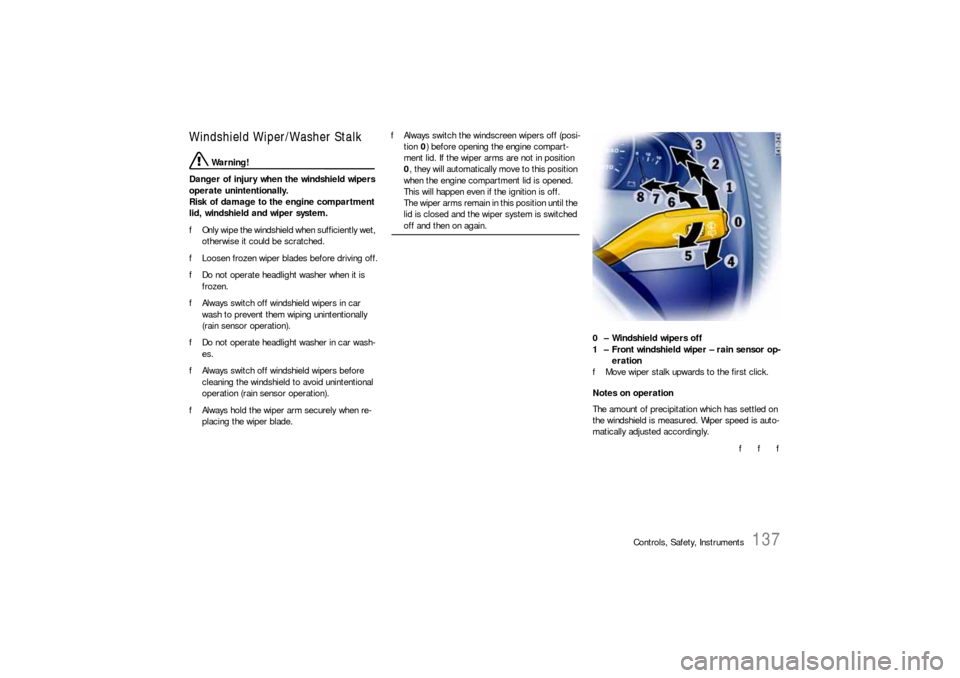
0 – Windshield wipers off
1 – Front windshield wiper – rain sensor op-
eration
fMove wiper stalk upwards to the first click.
Notes on operation
The amount of precipitation which has settled on
the windshield is measured. Wiper speed is auto-
matically adjusted accordingly.
f f f
Page 138 of 420
138
Controls, Safety, Instruments The rain sensor remains switched off if the wiper
lever is already in position 1 when the ignition is
switched on.
To switch the rain sensor on again:
fMove wiper stalk to position 0 and then to
position 1 – switching on is confirmed by one
wipe of the windscreen – or
fOperate windscreen washer system 5 –
switching on is confirmed by three wipes of the
windscreen – or
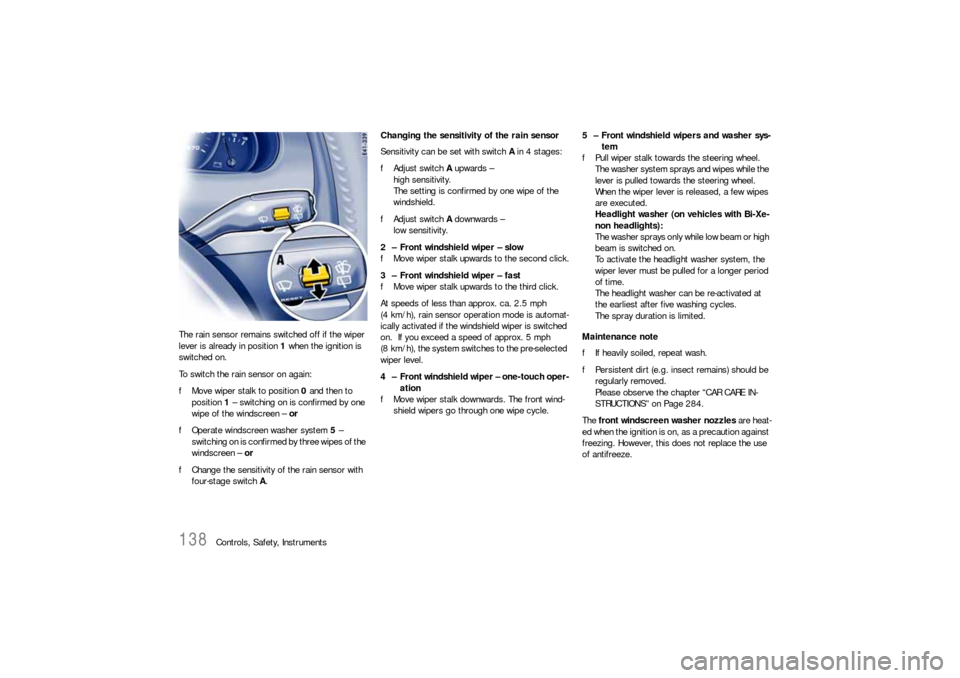
fChange the sensitivity of the rain sensor with
four-stage switch A.Changing the sensitivity of the rain sensor
Sensitivity can be set with switch A in 4 stages:
fAdjust switch A upwards –
high sensitivity.
The setting is confirmed by one wipe of the
windshield.
fAdjust switch A downwards –
low sensitivity.
2 – Front windshield wiper – slow
fMove wiper stalk upwards to the second click.
3 – Front windshield wiper – fast
fMove wiper stalk upwards to the third click.
At speeds of less than approx. ca. 2.5 mph
(4 km/h), rain sensor operation mode is automat-
ically activated if the windshield wiper is switched
on. If you exceed a speed of approx. 5 mph
(8 km/h), the system switches to the pre-selected
wiper level.
4 – Front windshield wiper – one-touch oper-
ation
fMove wiper stalk downwards. The front wind-
shield wipers go through one wipe cycle.5 – Front windshield wipers and washer sys-
tem
fPull wiper stalk towards the steering wheel.
The washer system sprays and wipes while the
lever is pulled towards the steering wheel.
When the wiper lever is released, a few wipes
are executed.
Headlight washer (on vehicles with Bi-Xe-
non headlights):
T h e w a s h e r s p r a ys o n l y w h i l e l o w b e a m o r h i g h
beam is switched on.
To activate the headlight washer system, the
wiper lever must be pulled for a longer period
of time.
The headlight washer can be re-activated at
the earliest after five washing cycles.
The spray duration is limited.
Maintenance note
fIf heavily soiled, repeat wash.
fPersistent dirt (e.g. insect remains) should be
regularly removed.
Please observe the chapter “CAR CARE IN-
STRUCTIONS” on Page 284.
The front windscreen washer nozzles are heat-
ed when the ignition is on, as a precaution against
freezing. However, this does not replace the use
of antifreeze.
Page 142 of 420

142
Controls, Safety, Instruments
Resuming the stored speedfPull back the operating lever to position 1.
Note on operation
The stored speed should only be recalled when
traffic conditions and the road surface so permit.Switching cruise control readiness offfPush forward the operating lever to position 2
until it clicks audibly into place.
The memory is cleared and the green
readiness light goes out.
When the vehicle is parked and the ignition
switched off, the memory is cleared.
Tip on driving
On upward or downward slopes, the set speed
cannot always be maintained by cruise control.
fTo obtain sufficient engine braking or a better
engine-speed range, therefore, you have to
change down to a lower gear.
Page 144 of 420
144
Controls, Safety, Instruments The heated rear window is ready for operation
when the ignition is on.
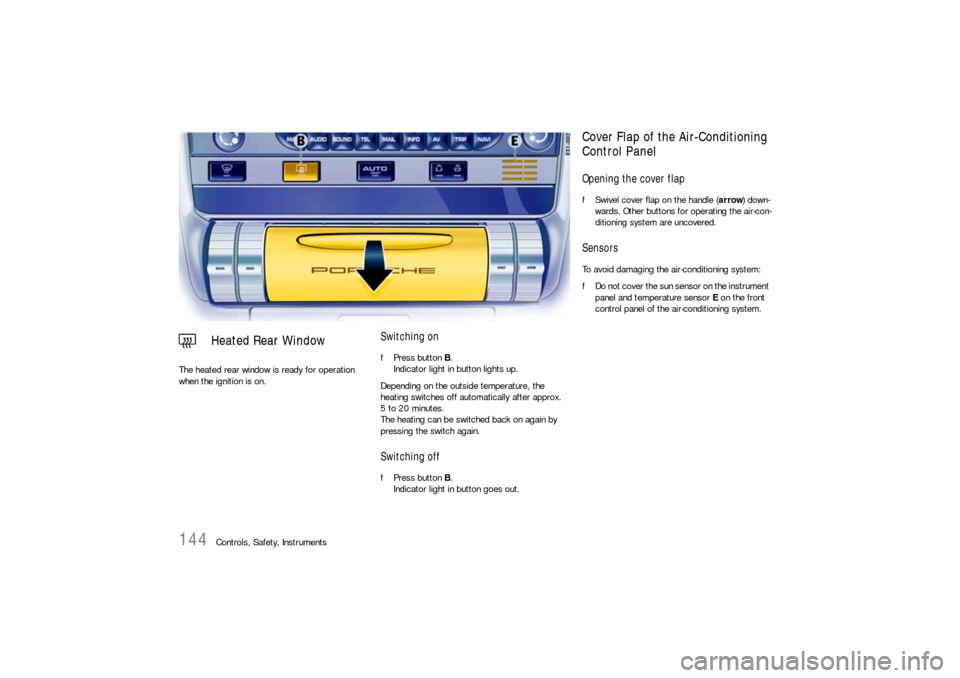
Switching onfPress button B.
Indicator light in button lights up.
Depending on the outside temperature, the
heating switches off automatically after approx.
5 to 20 minutes.
The heating can be switched back on again by
pressing the switch again.Switching offfPress button B.
Indicator light in button goes out.
Heated Rear Window
Cover Flap of the Air-Conditioning
Control PanelOpening the cover flapfSwivel cover flap on the handle (arrow) down-
wards. Other buttons for operating the air-con-
ditioning system are uncovered.SensorsTo avoid damaging the air-conditioning system:
fDo not cover the sun sensor on the instrument
panel and temperature sensor E on the front
control panel of the air-conditioning system.
Page 145 of 420
Controls, Safety, Instruments
145
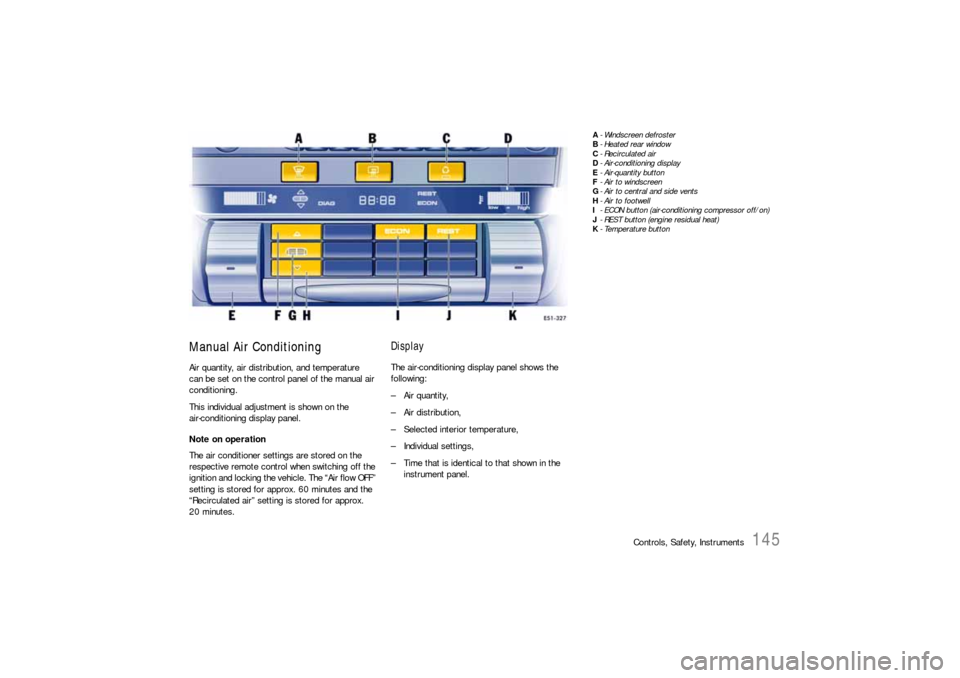
Manual Air ConditioningAir quantity, air distribution, and temperature
can be set on the control panel of the manual air
conditioning.
This individual adjustment is shown on the
air-conditioning display panel.
Note on operation
The air conditioner settings are stored on the
respective remote control when switching off the
ignition and locking the vehic l e . T he “A i r fl o w O F F ”
setting is stored for approx. 60 minutes and the
“Recirculated air” setting is stored for approx.
20 minutes.
DisplayThe air-conditioning display panel shows the
following:
– Air quantity,
–Air distribution,
– Selected interior temperature,
– Individual settings,
– Time that is identical to that shown in the
instrument panel.
A- Windscreen defroster
B-Heated rear window
C- Recirculated air
D- Air-conditioning display
E- Air-quantity button
F-Air to windscreen
G- Air to central and side vents
H- Air to footwell
I- ECON button (air-conditioning compressor off/on)
J- REST button (engine residual heat)
K-Temperature button
Page 151 of 420

Controls, Safety, Instruments
151
ECON modeThe outside air that is flowing in does not dry up if
the air-conditioning compressor is switched off.
Warning!
Risk of accident due to hampered vision.
If the air-conditioning compressor is
switched off, the windows may mist up.
fDo not switch off the air-conditioning compres-sor in damp weather.
Switching air-conditioning compressor off
Whenever outside temperatures exceed 37.4°F
(3°C), the air-conditioning compressor is always
switched on in automatic mode.
The compressor can be switched off to save fuel,
but control comfort is then limited:
fPress ECON button M.
The ECON logo appears on the air-conditioning
display panel.
The air-conditioning compressor is switched
off.
Switching air-conditioning compressor on
fIf the interior temperature is too high:
Press ECON button M or
Press AUTO button C.
Information on air-conditioning
compressorThe air-conditioning compressor:
– Can switch off briefly if engine is under an ex-
treme load to ensure sufficient engine cooling.
– Switches off automatically at temperatures be-
low approx. 37.4°F (3°C) and cannot be
switched on, even manually.
– Operates most effectively with windows
closed.
If the car has been in the sun for a long time,
however, it is a good idea to ventilate the
interior briefly with the windows open.
Notes on operation
Depending on the outside temperature and humid-
ity, condensation can drip from the evaporator
and form a pool under the car.
This is normal and not a sign of leakage.
If uncooled air flows out when the lowest temper-
ature has been set (“LO”), switch off the air-condi-
tioning compressor and have the fault remedied at
an authorized Porsche dealer.
REST modeUsing engine residual heat
The residual heat of the engine can be used to
heat the interior up to 20minutes after the ignition
has been switched off.
fPress REST button N.
The air-conditioning settings cannot be
changed in REST mode.
Ending the function
fPress REST button N.
Note on operation
If the battery positive voltage is too low, REST
mode is automatically ended.
fPlease observe the chapter “WARNING LIGHTS
AND WARNING MESSAGES” on Page 124.
Page 157 of 420

Controls, Safety, Instruments
157
Using engine residual heat
The residual heat of the engine can be used to
heat the interior up to 20 minutes after the ignition
has been switched off.
fPress AUTO/REST button C on the front
control panel.
The air-conditioning settings cannot be
changed in REST mode.
Ending the function
fPress AUTO/REST button C.
Note on operation
If the battery positive voltage is too low, REST
mode is automatically ended.
fPlease observe the chapter “WARNING LIGHTS
AND WARNING MESSAGES” on Page 124.fPress button M.
The Symbol appears on the display.
The rear air-conditioned areas can be control-
led from the front control panel.
Ending the function
fPress button M again.
Note on operation
The function is ended automatically 10 seconds
after the last settings are made.
REST mode
Controlling rear air-conditioned
areas with the front control panel
Page 158 of 420

158
Controls, Safety, Instruments
A-“
–” button
B-TIMER button
C-ON/OFF button
D-“+” button
Parking HeaterThe parking heater features two functions: parking
heating and parking ventilation.
The parking heater is ready for use regardless of
the ignition key position.
The parking heater is also used as an auxiliary
heater. Operation of the parking heater is clearly
audible when outside temperatures are low, even
if the parking heater has been manually switched
off.
Danger!
Risk of poisoning due to carbon monoxide
(CO). The parking heater consumes fuel and
emits exhaust fumes. Exposure to such
fumes can cause unconsciousness, serious
personal injury or death.
fSwitch off the parking heater before refuelling.
fDo not operate the parking heater in enclosed spaces (e.g. a garage).
The parking heater is operated using the following
buttons on the front air-conditioning control panel:
Switch parking heater on and off
Activate program
Start programming
Call memories
Set ON times
Activate heating function
Set ON times
Activate ventilating function