lock PORSCHE CAYNNE S 2006 1.G Workshop Manual
[x] Cancel search | Manufacturer: PORSCHE, Model Year: 2006, Model line: CAYENNE S, Model: PORSCHE CAYENNE S 2006 1.GPages: 420, PDF Size: 3.81 MB
Page 131 of 420
Controls, Safety, Instruments
131
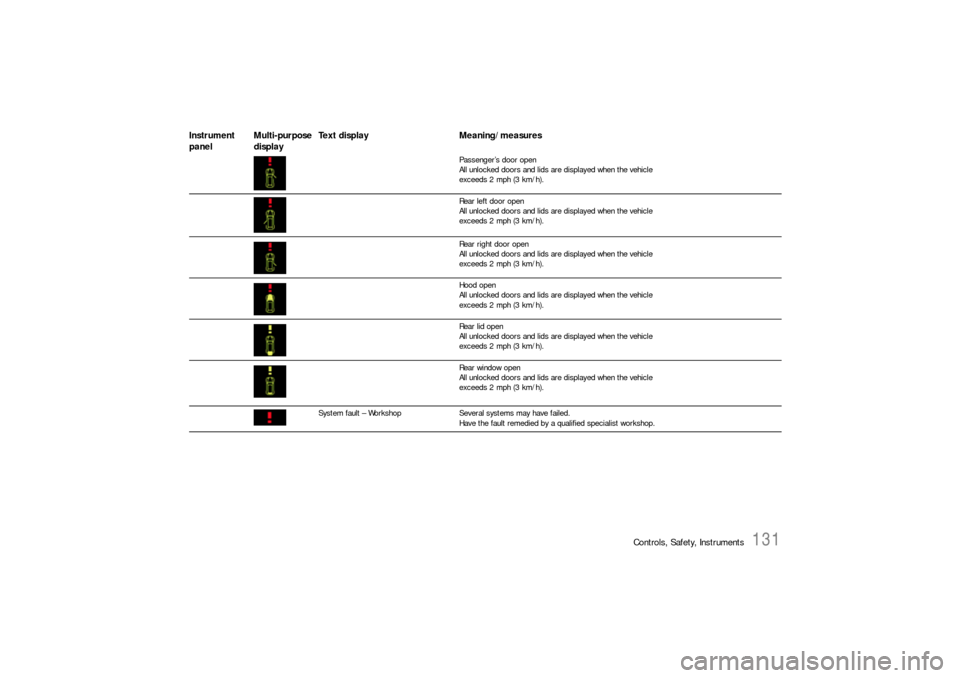
Passenger’s door open
All unlocked doors and lids are displayed when the vehicle
exceeds 2 mph (3 km/h).
Rear left door open
All unlocked doors and lids are displayed when the vehicle
exceeds 2 mph (3 km/h).
Rear right door open
All unlocked doors and lids are displayed when the vehicle
exceeds 2 mph (3 km/h).
Hood open
All unlocked doors and lids are displayed when the vehicle
exceeds 2 mph (3 km/h).
Rear lid open
All unlocked doors and lids are displayed when the vehicle
exceeds 2 mph (3 km/h).
Rear window open
All unlocked doors and lids are displayed when the vehicle
exceeds 2 mph (3 km/h).
System fault – WorkshopSeveral systems may have failed.
Have the fault remedied by a qualified specialist workshop.
Instrument
panelMulti-purpose
displayText display Meaning/measures
Page 136 of 420
136
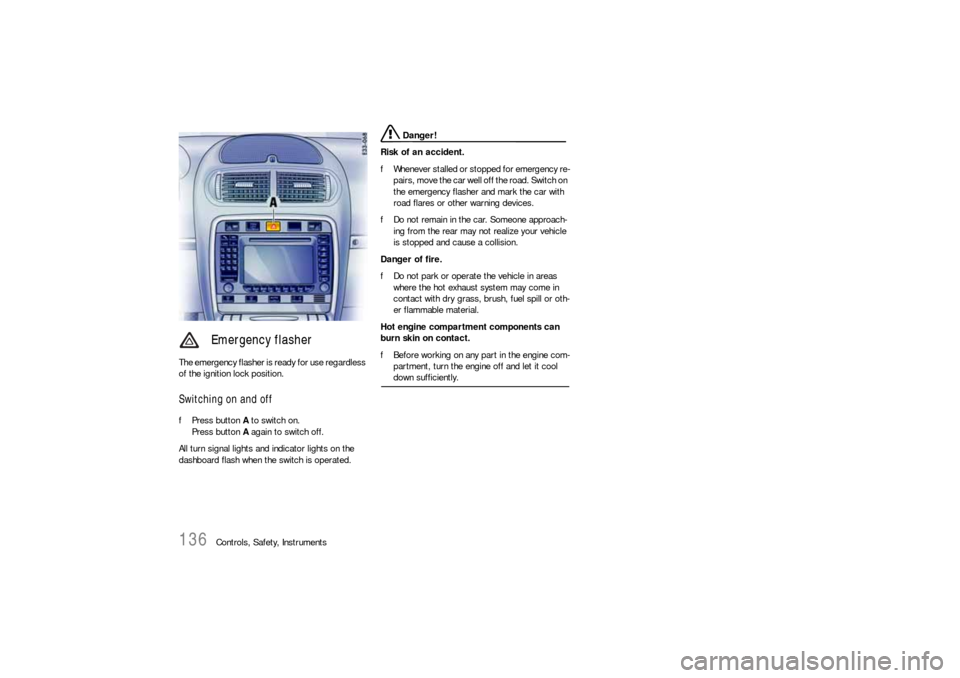
Controls, Safety, Instruments The emergency flasher is ready for use regardless
of the ignition lock position.
Switching on and offfPress button A to switch on.
Press button A again to switch off.
All turn signal lights and indicator lights on the
dashboard flash when the switch is operated.
Danger!
Risk of an accident.
fWhenever stalled or stopped for emergency re-
pairs, move the car well off the road. Switch on
the emergency flasher and mark the car with
road flares or other warning devices.
fDo not remain in the car. Someone approach-
ing from the rear may not realize your vehicle
is stopped and cause a collision.
Danger of fire.
fDo not park or operate the vehicle in areas
where the hot exhaust system may come in
contact with dry grass, brush, fuel spill or oth-
er flammable material.
Hot engine compartment components can
burn skin on contact.
fBefore working on any part in the engine com-
partment, turn the engine off and let it cool down sufficiently.
Emergency flasher
Page 140 of 420
140
Controls, Safety, Instruments
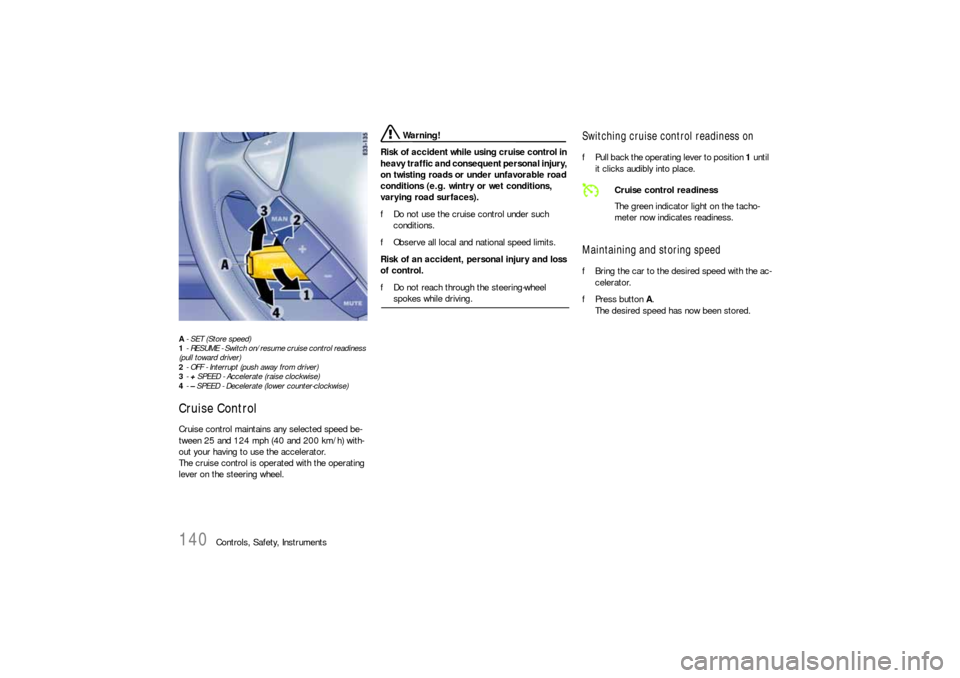
A- SET (Store speed)
1- RESUME - Switch on/resume cruise control readiness
(pull toward driver)
2- OFF - Interrupt (push away from driver)
3-+ SPEED - Accelerate (raise clockwise)
4-– SPEED - Decelerate (lower counter-clockwise)Cruise ControlCruise control maintains any selected speed be-
tween 25 and 124 mph (40 and 200 km/h) with-
out your having to use the accelerator.
The cruise control is operated with the operating
lever on the steering wheel.
Warning!
Risk of accident while using cruise control in
heavy traffic and consequent personal injury,
on twisting roads or under unfavorable road
conditions (e.g. wintry or wet conditions,
varying road surfaces).
fDo not use the cruise control under such
conditions.
fObserve all local and national speed limits.
Risk of an accident, personal injury and loss
of control.
fDo not reach through the steering-wheel spokes while driving.
Switching cruise control readiness onfPull back the operating lever to position 1 until
it clicks audibly into place.Maintaining and storing speedfBring the car to the desired speed with the ac-
celerator.
fPress button A.
The desired speed has now been stored.
Cruise control readiness
The green indicator light on the tacho-
meter now indicates readiness.
Page 145 of 420
Controls, Safety, Instruments
145
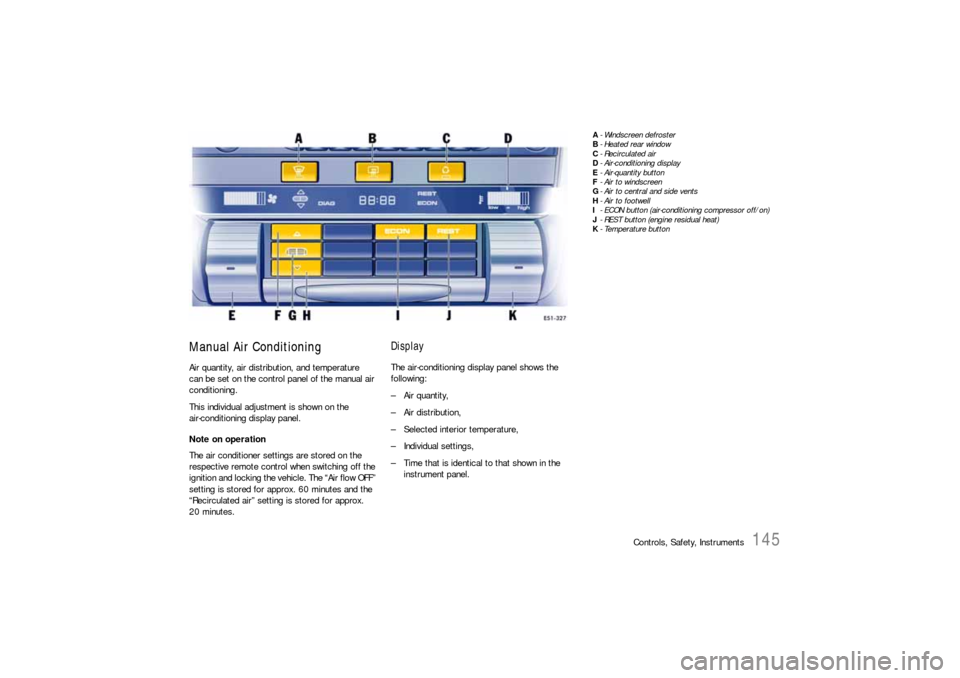
Manual Air ConditioningAir quantity, air distribution, and temperature
can be set on the control panel of the manual air
conditioning.
This individual adjustment is shown on the
air-conditioning display panel.
Note on operation
The air conditioner settings are stored on the
respective remote control when switching off the
ignition and locking the vehic l e . T he “A i r fl o w O F F ”
setting is stored for approx. 60 minutes and the
“Recirculated air” setting is stored for approx.
20 minutes.
DisplayThe air-conditioning display panel shows the
following:
– Air quantity,
–Air distribution,
– Selected interior temperature,
– Individual settings,
– Time that is identical to that shown in the
instrument panel.
A- Windscreen defroster
B-Heated rear window
C- Recirculated air
D- Air-conditioning display
E- Air-quantity button
F-Air to windscreen
G- Air to central and side vents
H- Air to footwell
I- ECON button (air-conditioning compressor off/on)
J- REST button (engine residual heat)
K-Temperature button
Page 148 of 420
148
Controls, Safety, Instruments
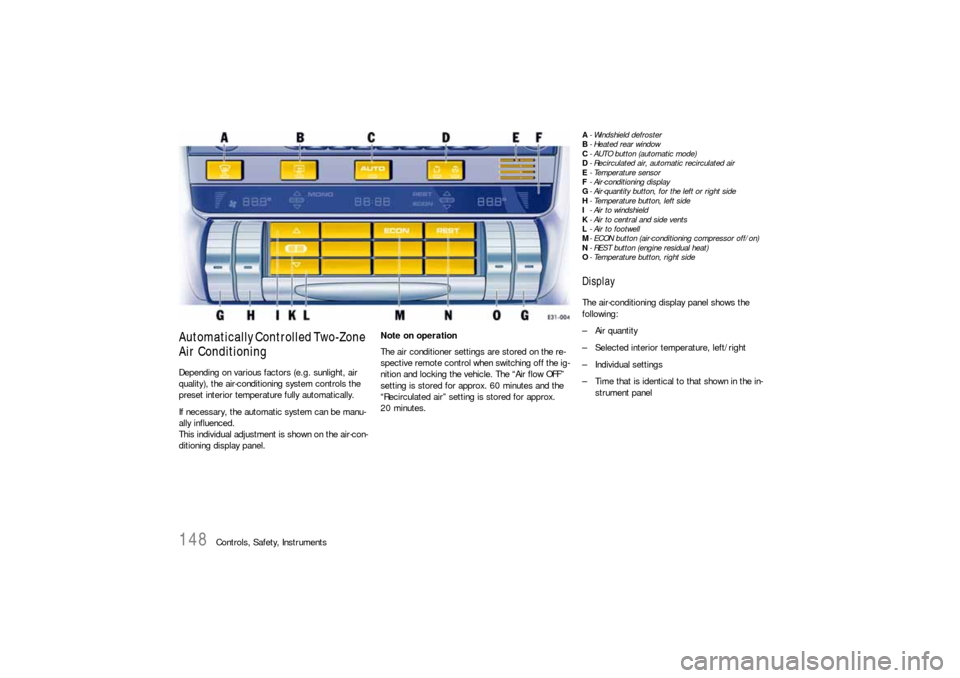
Automatically Controlled Two-Zone
Air ConditioningDepending on various factors (e.g. sunlight, air
quality), the air-conditioning system controls the
preset interior temperature fully automatically.
If necessary, the automatic system can be manu-
ally influenced.
This individual adjustment is shown on the air-con-
ditioning display panel.Note on operation
The air conditioner settings are stored on the re-
spective remote control when switching off the ig-
nition and locking the vehicle. The “Air flow OFF”
setting is stored for approx. 60 minutes and the
“Recirculated air” setting is stored for approx.
20 minutes.
A- Windshield defroster
B-Heated rear window
C- AUTO button (automatic mode)
D- Recirculated air, automatic recirculated air
E-Temperature sensor
F- Air-conditioning display
G- Air-quantity button, for the left or right side
H- Temperature button, left side
I- Air to windshield
K- Air to central and side vents
L- Air to footwell
M- ECON button (air-conditioning compressor off/on)
N- REST button (engine residual heat)
O- Temperature button, right sideDisplayThe air-conditioning display panel shows the
following:
– Air quantity
– Selected interior temperature, left/right
– Individual settings
– Time that is identical to that shown in the in-
strument panel
Page 152 of 420
152
Controls, Safety, Instruments
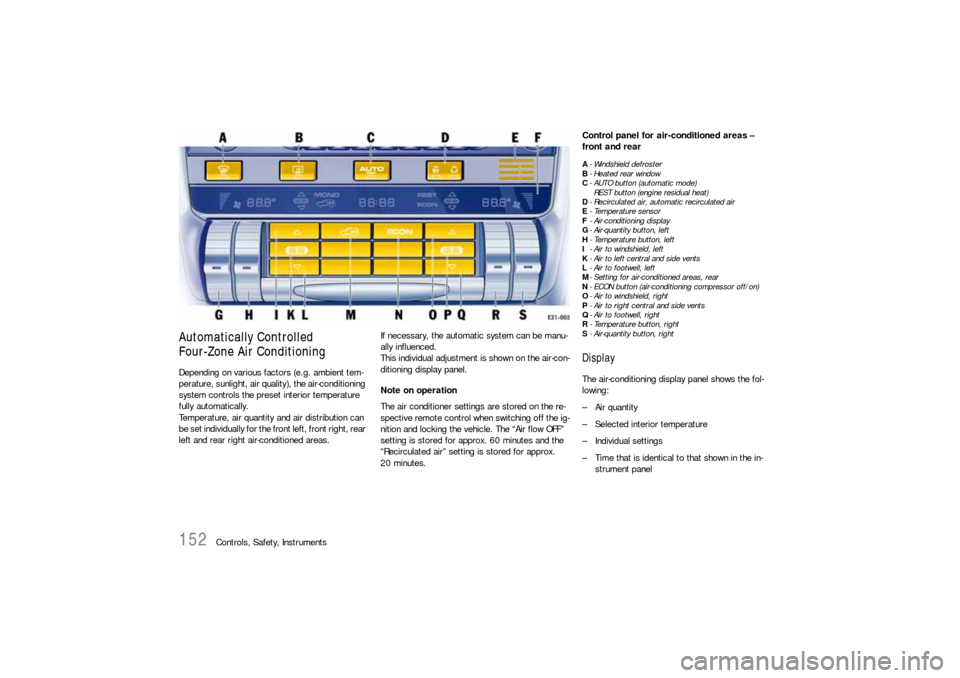
Automatically Controlled
Four-Zone Air ConditioningDepending on various factors (e.g. ambient tem-
perature, sunlight, air quality), the air-conditioning
system controls the preset interior temperature
fully automatically.
Temperature, air quantity and air distribution can
be set individually for the front left, front right, rear
left and rear right air-conditioned areas.If necessary, the automatic system can be manu-
ally influenced.
This individual adjustment is shown on the air-con-
ditioning display panel.
Note on operation
The air conditioner settings are stored on the re-
spective remote control when switching off the ig-
nition and locking the vehicle. The “Air flow OFF”
setting is stored for approx. 60 minutes and the
“Recirculated air” setting is stored for approx.
20 minutes.
Control panel for air-conditioned areas –
front and rearA- Windshield defroster
B-Heated rear window
C- AUTO button (automatic mode)
REST button (engine residual heat)
D- Recirculated air, automatic recirculated air
E-Temperature sensor
F- Air-conditioning display
G- Air-quantity button, left
H- Temperature button, left
I- Air to windshield, left
K- Air to left central and side vents
L- Air to footwell, left
M- Setting for air-conditioned areas, rear
N- ECON button (air-conditioning compressor off/on)
O- Air to windshield, right
P-Air to right central and side vents
Q- Air to footwell, right
R- Temperature button, right
S- Air-quantity button, rightDisplayThe air-conditioning display panel shows the fol-
lowing:
– Air quantity
– Selected interior temperature
– Individual settings
– Time that is identical to that shown in the in-
strument panel
Page 161 of 420

Controls, Safety, Instruments
161
Programming ON times
1. Switch ignition off.
2. Press TIMER button.
3. Select function (parking heating or parking
ventilation).
4. Select the memory using TIMER button B.
The desired memory can be selected by
pressing button B several times.
5. Set ON time using the “+” and “–” buttons A
und D.
Pressing the buttons adjusts the time on a
minute-by-minute basis. If the button is kept
depressed, the time is adjusted faster.
ON times are only valid for 24 hours.
6. Press ON/OFF button C.
Displays F and G flash for approx. 10 seconds.
The button C can be pressed again to switch
off the displays before this time has elapsed.
ON time I, clock symbol F and memory G are
displayed for 2 minutes after ON/OFF button C
has been pressed.
The display then goes out.
The parking heater has now been programed
and the selected memory is active (symbol G
is lit).
Note on operation
Only one memory can be active at any one time.Activating the memory
The parking heater runs for 30 minutes. It then
switches itself off automatically.
The program must be reactivated for every subse-
quent run.
To do this:
1. Switch ignition off.
2. Press TIMER button B.
3. Select function (parking heating or parking
ventilation).
4. Select the memory using TIMER button B. The
ON time that was last saved is displayed.
5. Press ON/OFF button C.
The program is reactivated.
Displays F and G flash for approx. 10 seconds.
The ON/OFF button can be pressed again to
switch off the displays before this time has
elapsed.
After the ON/OFF button has been pressed,
the ON time I, clock symbol F and memory G
are displayed for 2 minutes.
The display then goes out.
The parking heater has now been programed
and the selected memory is active (symbol G
is lit).
Note on operation
Only one memory can be active at any one time.Example:
The parking heater is to activate the parking
heating function at 9:48 a.m.
To do this:
1. Switch ignition off.
2. Press TIMER button B on the front air-condi-
tioning control panel.
The symbols for the parking heating or parking
ventilation function flash on the display.
3. Press “+” button D.
This selects the parking heating function.
4. Select the memory using TIMER button B
.
5. Set ON time to 9:48 a.m. using the “+” and
“–” buttons (A and D).
6. Press ON/OFF button C.
The parking heater has now been programed
and the selected memory is active.
Note on operation
If the parking heater is switched on manually prior
to program start of an active memory, this will
delete the programming.
The memory must be reactivated if it is needed.
If the memory is not reactivated, the parking
heater will not switch on.
Page 166 of 420
166
Controls, Safety, Instruments
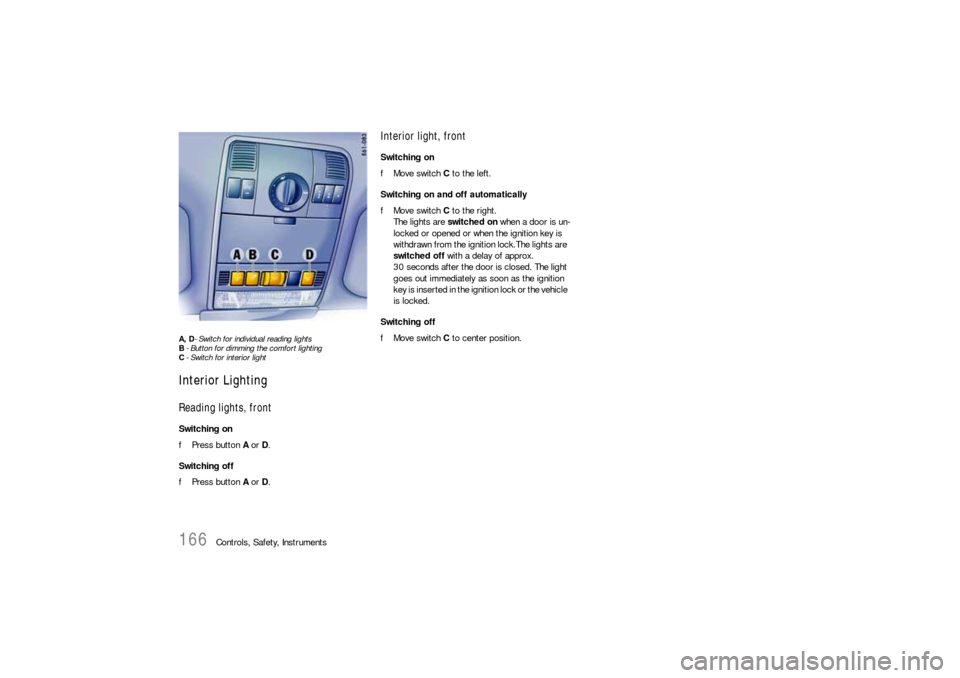
A, D- Switch for individual reading lights
B- Button for dimming the comfort lighting
C- Switch for interior lightInterior LightingReading lights, frontSwitching on
fPress button A or D.
Switching off
fPress button A or D.
Interior light, frontSwitching on
fMove switch C to the left.
Switching on and off automatically
fMove switch C to the right.
The lights are switched on when a door is un-
locked or opened or when the ignition key is
withdrawn from the ignition lock.The lights are
switched off with a delay of approx.
30 seconds after the door is closed. The light
goes out immediately as soon as the ignition
key is inserted in the ignition lock or the vehicle
is locked.
Switching off
fMove switch C to center position.
Page 167 of 420
Controls, Safety, Instruments
167
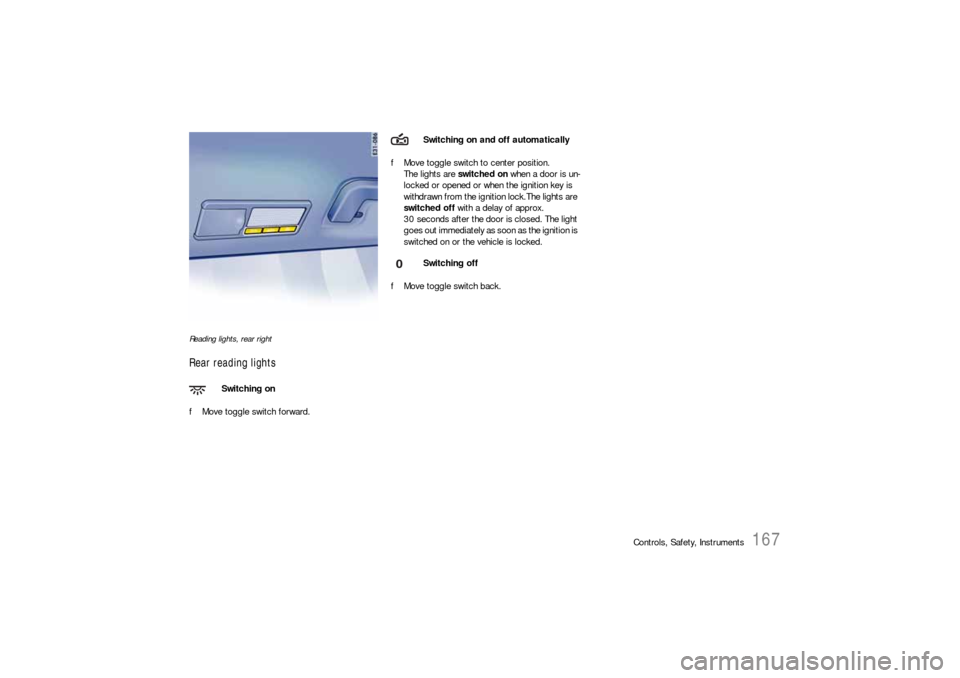
Reading lights, rear rightRear reading lightsfMove toggle switch forward.fMove toggle switch to center position.
The lights are switched on when a door is un-
locked or opened or when the ignition key is
withdrawn from the ignition lock.The lights are
switched off with a delay of approx.
30 seconds after the door is closed. The light
goes out immediately as soon as the ignition is
switched on or the vehicle is locked.
fMove toggle switch back.
Switching on
Switching on and off automatically
Switching off
Page 168 of 420
168
Controls, Safety, Instruments
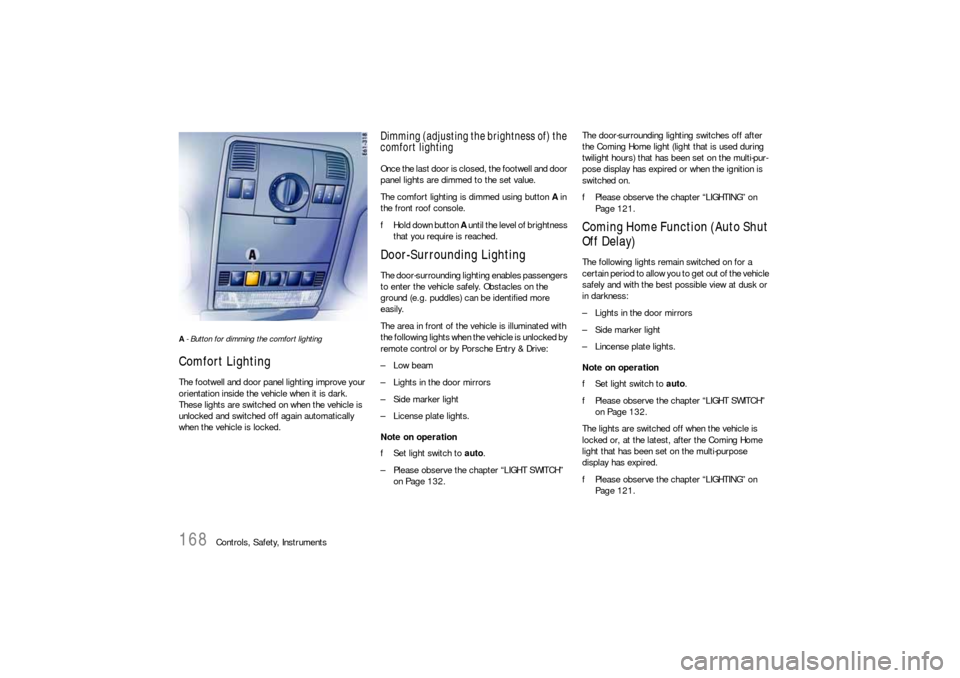
A- Button for dimming the comfort lighting Comfort LightingThe footwell and door panel lighting improve your
orientation inside the vehicle when it is dark.
These lights are switched on when the vehicle is
unlocked and switched off again automatically
when the vehicle is locked.
Dimming (adjusting the brightness of) the
comfort lightingOnce the last door is closed, the footwell and door
panel lights are dimmed to the set value.
The comfort lighting is dimmed using button A in
the front roof console.
fHold down button A until the level of brightness
that you require is reached.Door-Surrounding LightingThe door-surrounding lighting enables passengers
to enter the vehicle safely. Obstacles on the
ground (e.g. puddles) can be identified more
easily.
The area in front of the vehicle is illuminated with
the following lights when the vehicle is unlocked by
remote control or by Porsche Entry & Drive:
–Low beam
– Lights in the door mirrors
– Side marker light
– License plate lights.
Note on operation
fSet light switch to auto.
– Please observe the chapter “LIGHT SWITCH”
on Page 132.The door-surrounding lighting switches off after
the Coming Home light (light that is used during
twilight hours) that has been set on the multi-pur-
pose display has expired or when the ignition is
switched on.
fPlease observe the chapter “LIGHTING” on
Page 121.
Coming Home Function (Auto Shut
Off Delay)The following lights remain switched on for a
certain period to allow you to get out of the vehicle
safely and with the best possible view at dusk or
in darkness:
– Lights in the door mirrors
– Side marker light
– Lincense plate lights.
Note on operation
fSet light switch to auto.
fPlease observe the chapter “LIGHT SWITCH”
on Page 132.
The lights are switched off when the vehicle is
locked or, at the latest, after the Coming Home
light that has been set on the multi-purpose
display has expired.
fPlease observe the chapter “LIGHTING” on
Page 121.