ignition PORSCHE CAYNNE S 2006 1.G Repair Manual
[x] Cancel search | Manufacturer: PORSCHE, Model Year: 2006, Model line: CAYENNE S, Model: PORSCHE CAYENNE S 2006 1.GPages: 420, PDF Size: 3.81 MB
Page 159 of 420

Controls, Safety, Instruments
159
Notes on operation
The parking heater runs on fuel, and it therefore
cannot be switched on after the reserve warning
lights up.
fPlease observe the chapter “FUEL RESERVE
WARNING” on Page 88.
The parking heater must be operated at least
once per month, with the engine cold and the
blower at its lowest setting.
Ignition off: When the parking heater is running,
the remaining running time is shown on the display
panel.
Operation of the parking heater is clearly audible
when outside temperatures are low and the engine
is cold.Switching on
fPress ON/OFF button C.
The programed parking heating or parking ven-
tilation function is switched on.
Switching off
fPress ON/OFF button C again.
Note on operation
fAfter switching off the parking heater using
ON/OFF button C wait for at least 2 minutes
before you press the button again.
The combusion chamber is cleaned.
Switching parking heater on and
off
Page 160 of 420
160
Controls, Safety, Instruments
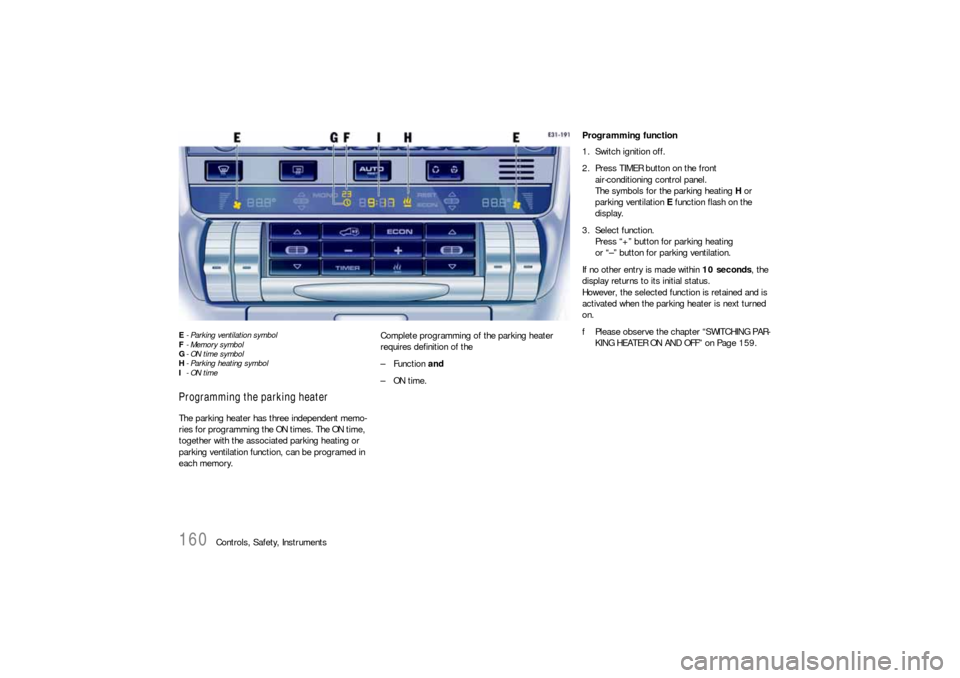
E- Parking ventilation symbol
F-Memory symbol
G-ON time symbol
H- Parking heating symbol
I-ON timeProgramming the parking heaterThe parking heater has three independent memo-
ries for programming the ON times. The ON time,
together with the associated parking heating or
parking ventilation function, can be programed in
each memory.Complete programming of the parking heater
requires definition of the
–Function and
–ON time.
Programming function
1. Switch ignition off.
2. Press TIMER button on the front
air-conditioning control panel.
The symbols for the parking heating H or
parking ventilation E function flash on the
display.
3. Select function.
Press “+” button for parking heating
or “–” button for parking ventilation.
If no other entry is made within 10 seconds, the
display returns to its initial status.
However, the selected function is retained and is
activated when the parking heater is next turned
on.
fPlease observe the chapter “SWITCHING PAR-
KING HEATER ON AND OFF” on Page 159.
Page 161 of 420

Controls, Safety, Instruments
161
Programming ON times
1. Switch ignition off.
2. Press TIMER button.
3. Select function (parking heating or parking
ventilation).
4. Select the memory using TIMER button B.
The desired memory can be selected by
pressing button B several times.
5. Set ON time using the “+” and “–” buttons A
und D.
Pressing the buttons adjusts the time on a
minute-by-minute basis. If the button is kept
depressed, the time is adjusted faster.
ON times are only valid for 24 hours.
6. Press ON/OFF button C.
Displays F and G flash for approx. 10 seconds.
The button C can be pressed again to switch
off the displays before this time has elapsed.
ON time I, clock symbol F and memory G are
displayed for 2 minutes after ON/OFF button C
has been pressed.
The display then goes out.
The parking heater has now been programed
and the selected memory is active (symbol G
is lit).
Note on operation
Only one memory can be active at any one time.Activating the memory
The parking heater runs for 30 minutes. It then
switches itself off automatically.
The program must be reactivated for every subse-
quent run.
To do this:
1. Switch ignition off.
2. Press TIMER button B.
3. Select function (parking heating or parking
ventilation).
4. Select the memory using TIMER button B. The
ON time that was last saved is displayed.
5. Press ON/OFF button C.
The program is reactivated.
Displays F and G flash for approx. 10 seconds.
The ON/OFF button can be pressed again to
switch off the displays before this time has
elapsed.
After the ON/OFF button has been pressed,
the ON time I, clock symbol F and memory G
are displayed for 2 minutes.
The display then goes out.
The parking heater has now been programed
and the selected memory is active (symbol G
is lit).
Note on operation
Only one memory can be active at any one time.Example:
The parking heater is to activate the parking
heating function at 9:48 a.m.
To do this:
1. Switch ignition off.
2. Press TIMER button B on the front air-condi-
tioning control panel.
The symbols for the parking heating or parking
ventilation function flash on the display.
3. Press “+” button D.
This selects the parking heating function.
4. Select the memory using TIMER button B
.
5. Set ON time to 9:48 a.m. using the “+” and
“–” buttons (A and D).
6. Press ON/OFF button C.
The parking heater has now been programed
and the selected memory is active.
Note on operation
If the parking heater is switched on manually prior
to program start of an active memory, this will
delete the programming.
The memory must be reactivated if it is needed.
If the memory is not reactivated, the parking
heater will not switch on.
Page 166 of 420
166
Controls, Safety, Instruments
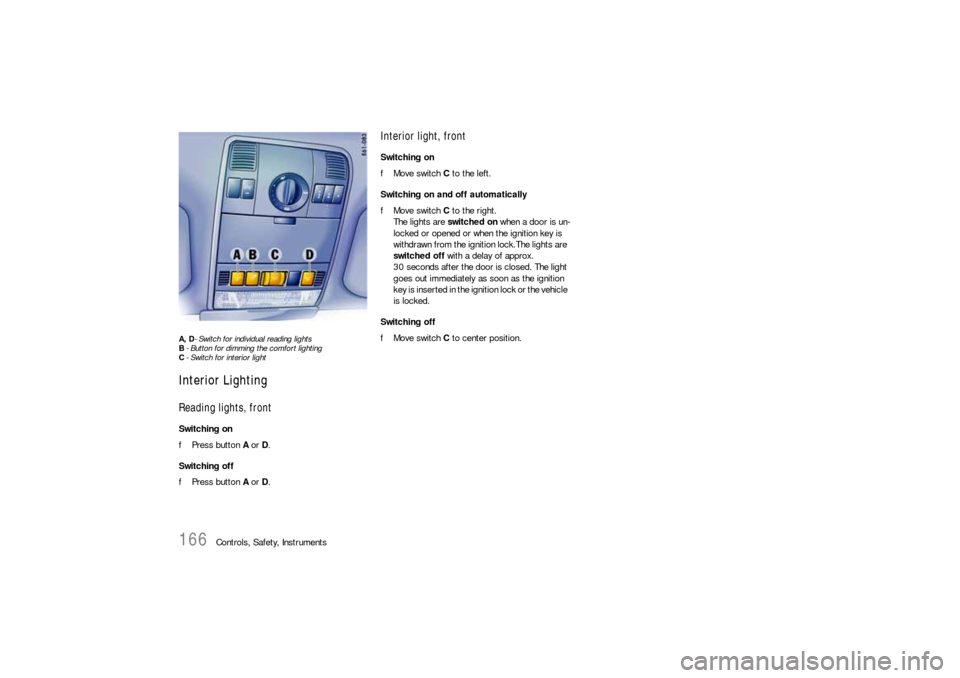
A, D- Switch for individual reading lights
B- Button for dimming the comfort lighting
C- Switch for interior lightInterior LightingReading lights, frontSwitching on
fPress button A or D.
Switching off
fPress button A or D.
Interior light, frontSwitching on
fMove switch C to the left.
Switching on and off automatically
fMove switch C to the right.
The lights are switched on when a door is un-
locked or opened or when the ignition key is
withdrawn from the ignition lock.The lights are
switched off with a delay of approx.
30 seconds after the door is closed. The light
goes out immediately as soon as the ignition
key is inserted in the ignition lock or the vehicle
is locked.
Switching off
fMove switch C to center position.
Page 167 of 420
Controls, Safety, Instruments
167
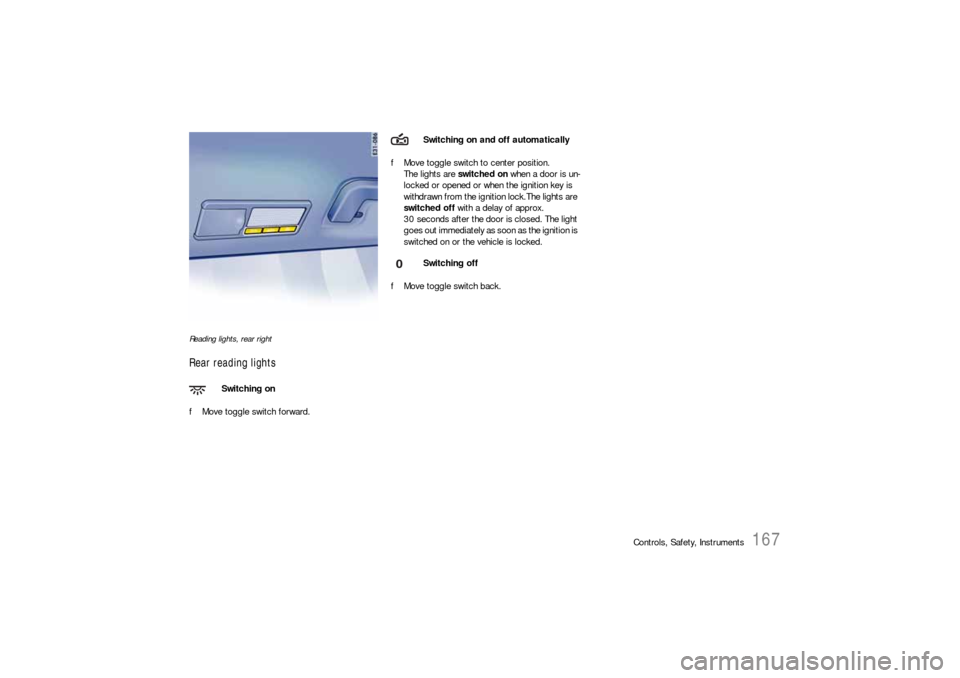
Reading lights, rear rightRear reading lightsfMove toggle switch forward.fMove toggle switch to center position.
The lights are switched on when a door is un-
locked or opened or when the ignition key is
withdrawn from the ignition lock.The lights are
switched off with a delay of approx.
30 seconds after the door is closed. The light
goes out immediately as soon as the ignition is
switched on or the vehicle is locked.
fMove toggle switch back.
Switching on
Switching on and off automatically
Switching off
Page 168 of 420
168
Controls, Safety, Instruments
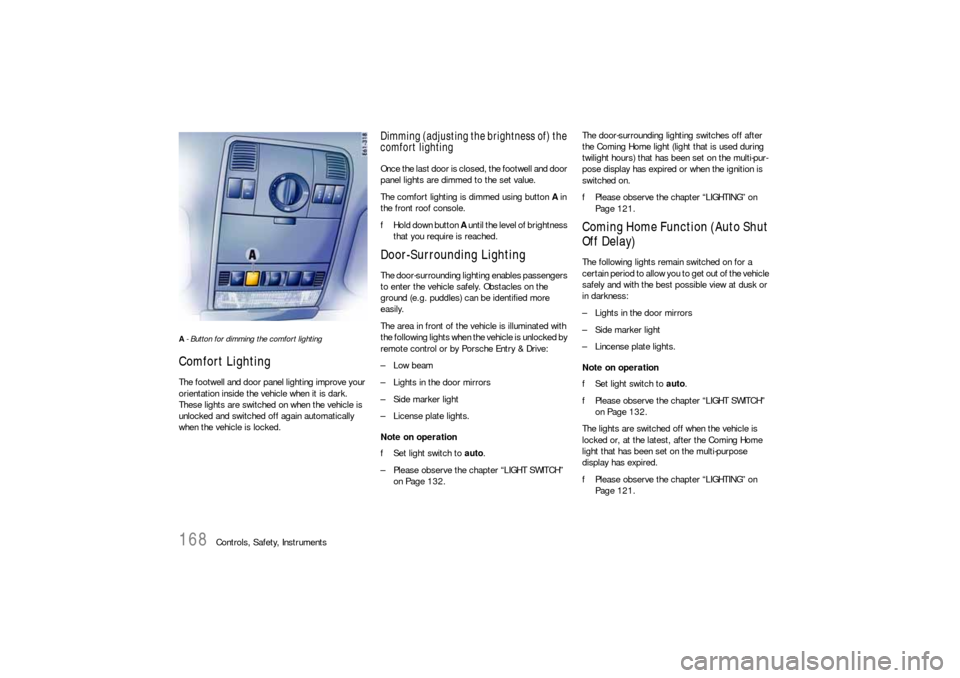
A- Button for dimming the comfort lighting Comfort LightingThe footwell and door panel lighting improve your
orientation inside the vehicle when it is dark.
These lights are switched on when the vehicle is
unlocked and switched off again automatically
when the vehicle is locked.
Dimming (adjusting the brightness of) the
comfort lightingOnce the last door is closed, the footwell and door
panel lights are dimmed to the set value.
The comfort lighting is dimmed using button A in
the front roof console.
fHold down button A until the level of brightness
that you require is reached.Door-Surrounding LightingThe door-surrounding lighting enables passengers
to enter the vehicle safely. Obstacles on the
ground (e.g. puddles) can be identified more
easily.
The area in front of the vehicle is illuminated with
the following lights when the vehicle is unlocked by
remote control or by Porsche Entry & Drive:
–Low beam
– Lights in the door mirrors
– Side marker light
– License plate lights.
Note on operation
fSet light switch to auto.
– Please observe the chapter “LIGHT SWITCH”
on Page 132.The door-surrounding lighting switches off after
the Coming Home light (light that is used during
twilight hours) that has been set on the multi-pur-
pose display has expired or when the ignition is
switched on.
fPlease observe the chapter “LIGHTING” on
Page 121.
Coming Home Function (Auto Shut
Off Delay)The following lights remain switched on for a
certain period to allow you to get out of the vehicle
safely and with the best possible view at dusk or
in darkness:
– Lights in the door mirrors
– Side marker light
– Lincense plate lights.
Note on operation
fSet light switch to auto.
fPlease observe the chapter “LIGHT SWITCH”
on Page 132.
The lights are switched off when the vehicle is
locked or, at the latest, after the Coming Home
light that has been set on the multi-purpose
display has expired.
fPlease observe the chapter “LIGHTING” on
Page 121.
Page 169 of 420
Controls, Safety, Instruments
169
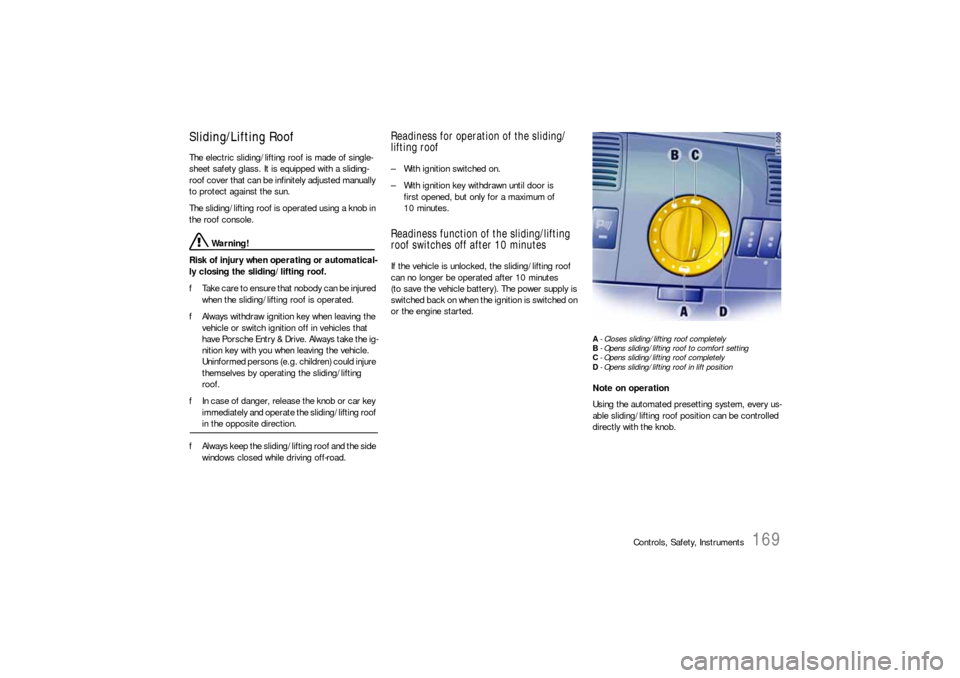
Sliding/Lifting RoofThe electric sliding/lifting roof is made of single-
sheet safety glass. It is equipped with a sliding-
roof cover that can be infinitely adjusted manually
to protect against the sun.
The sliding/lifting roof is operated using a knob in
the roof console.
Warning!
Risk of injury when operating or automatical-
ly closing the sliding/lifting roof.
fTake care to ensure that nobody can be injured
when the sliding/lifting roof is operated.
fAlways withdraw ignition key when leaving the
vehicle or switch ignition off in vehicles that
have Porsche Entry & Drive. Always take the ig-
nition key with you when leaving the vehicle.
Uninformed persons (e.g. children) could injure
themselves by operating the sliding/lifting
roof.
fIn case of danger, release the knob or car key
immediately and operate the sliding/lifting roof in the opposite direction.
fAlways keep the sliding/lifting roof and the side
windows closed while driving off-road.
Readiness for operation of the sliding/
lifting roof– With ignition switched on.
– With ignition key withdrawn until door is
first opened, but only for a maximum of
10 minutes.Readiness function of the sliding/lifting
roof switches off after 10 minutesIf the vehicle is unlocked, the sliding/lifting roof
can no longer be operated after 10 minutes
(to save the vehicle battery). The power supply is
switched back on when the ignition is switched on
or the engine started.
A- Closes sliding/lifting roof completely
B- Opens sliding/lifting roof to comfort setting
C- Opens sliding/lifting roof completely
D- Opens sliding/lifting roof in lift positionNote on operation
Using the automated presetting system, every us-
able sliding/lifting roof position can be controlled
directly with the knob.
Page 173 of 420
Controls, Safety, Instruments
173
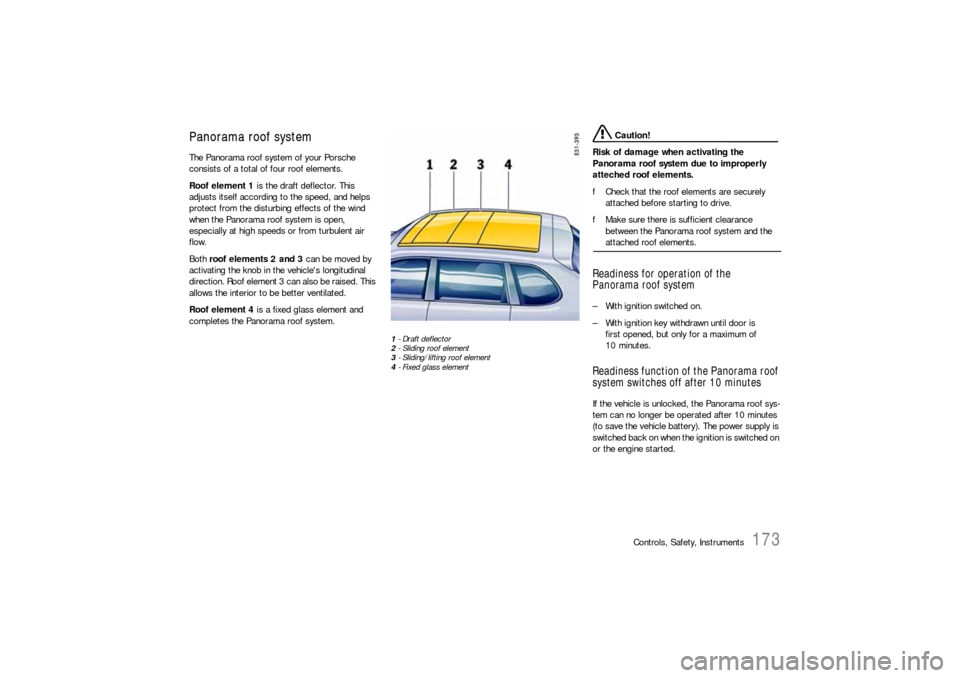
Panorama roof systemThe Panorama roof system of your Porsche
consists of a total of four roof elements.
Roof element 1 is the draft deflector. This
adjusts itself according to the speed, and helps
protect from the disturbing effects of the wind
when the Panorama roof system is open,
especially at high speeds or from turbulent air
flow.
Both roof elements 2 and 3 can be moved by
activating the knob in the vehicle's longitudinal
direction. Roof element 3 can also be raised. This
allows the interior to be better ventilated.
Roof element 4 is a fixed glass element and
completes the Panorama roof system.
1-Draft deflector
2- Sliding roof element
3- Sliding/lifting roof element
4- Fixed glass element
Caution!
Risk of damage when activating the
Panorama roof system due to improperly
atteched roof elements.
fCheck that the roof elements are securely
attached before starting to drive.
fMake sure there is sufficient clearance
between the Panorama roof system and the attached roof elements.
Readiness for operation of the
Panorama roof system– With ignition switched on.
– With ignition key withdrawn until door is
first opened, but only for a maximum of
10 minutes.Readiness function of the Panorama roof
system switches off after 10 minutesIf the vehicle is unlocked, the Panorama roof sys-
tem can no longer be operated after 10 minutes
(to save the vehicle battery). The power supply is
switched bac k o n whe n the ignition is switched on
or the engine started.
Page 174 of 420
174
Controls, Safety, Instruments
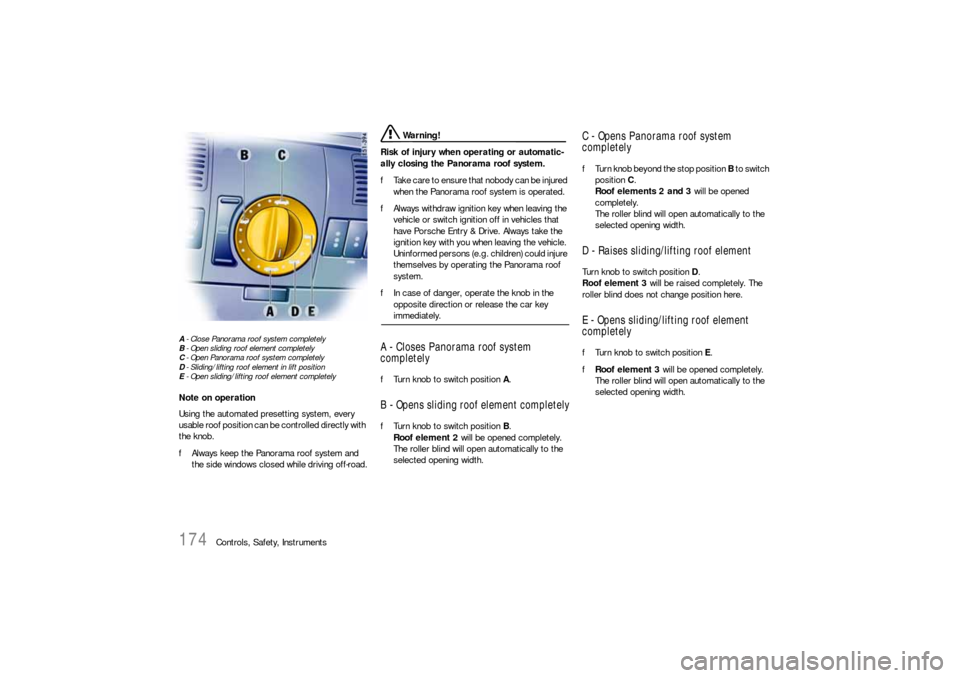
A- Close Panorama roof system completely
B- Open sliding roof element completely
C- Open Panorama roof system completely
D- Sliding/lifting roof element in lift position
E- Open sliding/lifting roof element completelyNote on operation
Using the automated presetting system, every
usable roof position can be controlled directly with
the knob.
fAlways keep the Panorama roof system and
the side windows closed while driving off-road.
Warning!
Risk of injury when operating or automatic-
ally closing the Panorama roof system.
fTa k e c a r e t o e n s u r e t h a t n o b o d y c a n b e i n j u re d
when the Panorama roof system is operated.
fAlways withdraw ignition key when leaving the
vehicle or switch ignition off in vehicles that
have Porsche Entry & Drive. Always take the
ignition key with you when leaving the vehicle.
Uninformed persons (e.g. children) could injure
themselves by operating the Panorama roof
system.
fIn case of danger, operate the knob in the
opposite direction or release the car key immediately.
A - Closes Panorama roof system
completelyfTurn knob to switch position A.B - Opens sliding roof element completelyfTurn knob to switch position B.
Roof element 2 will be opened completely.
The roller blind will open automatically to the
selected opening width.
C - Opens Panorama roof system
completelyfTurn knob beyond the stop position B to switch
position C.
Roof elements 2 and 3 will be opened
completely.
The roller blind will open automatically to the
selected opening width.D - Raises sliding/lifting roof elementTurn knob to switch position D.
Roof element 3 will be raised completely. The
roller blind does not change position here.E - Opens sliding/lifting roof element
completelyfTurn knob to switch position E.
fRoof element 3 will be opened completely.
The roller blind will open automatically to the
selected opening width.
Page 175 of 420

Controls, Safety, Instruments
175
Comfort function on vehicles without
Porsche Entry & DriveOpening and closing the Panorama roof
system
fHold the vehicle key in the door lock in the
unlocking or locking position until the windows
and the Panorama roof system have reached
the desired position.Comfort function on vehicles with
Porsche Entry & DriveOpening and closing the Panorama roof
system
fHold the vehicle key in the door lock in the
unlocking or locking position until the windows
and the Panorama roof system have reached
the desired position.
Closing the Panorama roof system
fHold the button in the door handle when
locking the vehicle until the windows and the
Panorama roof system have reached the
desired position.
Force limiter for the Panorama roof
system All roof elements are equipped with a force limiter.
If the sliding roof or the sliding/lifting roof element
is obstructed during the closing or opening
process, the respective roof element opens or
closes again immediately.
Closing a roof element after triggering the
force limiter
1. Remove the obstruction.
2. Turn knob to position A again.Electric emergency closing function
Warning!
Risk of injury from the emergency closing
function for the Panorama roof system. The
force limiter is not available and the roof
elements will close with full force.
fTake care to ensure that nobody can be injured when the Panorama roof system is closing.
If the roof cannot be closed due to dirt, ice, or
similar substances:
1. Turn knob to position A.
2. Hold the knob in position A until all roof
elements are completely closed.
Save final position of the Panorama roof
systemAfter disconnecting/reconnecting the vehicle
battery or if the vehicle battery is discharged, or
after emergency starting with jumper cables, the
final positions of the Panorama roof system are
lost.
Warning!
Risk of injury when closing the Panorama
roof system. The force limiter is not available
and the roof elements will close with full
force.
fTake care to ensure that nobody can be injured when the Panorama roof system is closing.
1. Switch ignition off.
2. Turn knob to position A.
3. Switch ignition on.
4. Hold knob in position A. The closing process
begins after around 5 seconds. Hold the knob
in position until the roller blind and all roof
elements are completely closed. The proce-
dure lasts approximately 20 seconds.
Note on operation
If the procedure is interrupted, saving the final po-
sitions must be started from the beginning.