no power Ram 1500 2013 Owner's Guide
[x] Cancel search | Manufacturer: RAM, Model Year: 2013, Model line: 1500, Model: Ram 1500 2013Pages: 734, PDF Size: 5.47 MB
Page 143 of 734
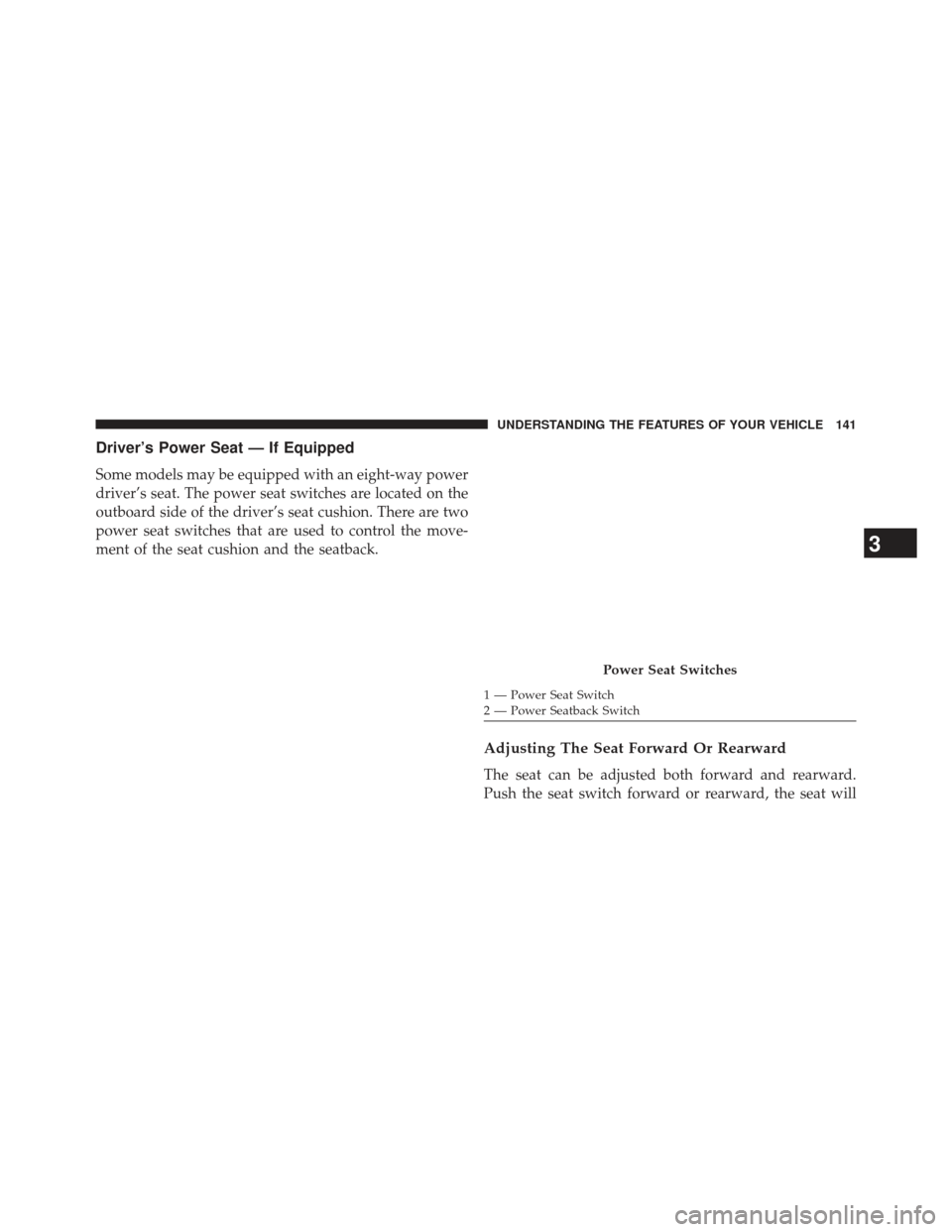
Driver’s Power Seat — If Equipped
Some models may be equipped with an eight-way power
driver’s seat. The power seat switches are located on the
outboard side of the driver’s seat cushion. There are two
power seat switches that are used to control the move-
ment of the seat cushion and the seatback.
Adjusting The Seat Forward Or Rearward
The seat can be adjusted both forward and rearward.
Push the seat switch forward or rearward, the seat will
Power Seat Switches
1 — Power Seat Switch
2 — Power Seatback Switch
3
UNDERSTANDING THE FEATURES OF YOUR VEHICLE 141
Page 145 of 734
CAUTION!
Do not place any article under a power seat or
impede its ability to move as it may cause damage to
the seat controls. Seat travel may become limited if
movement is stopped by an obstruction in the seat’s
path.
Passenger’s Power Seat — If Equipped
Some models are equipped with a six-way power pas-
senger seat. The power seat switch is located on the
outboard side of the seat. The switch is used to control
the movement of the seat and seat cushion.
Adjusting The Seat Forward Or Rearward
The seat can be adjusted both forward and rearward.
Push the seat switch forward or rearward, the seat will
move in the direction of the switch. Release the switch
when the desired position has been reached.
Adjusting The Seat Up Or Down
The height of the seats can be adjusted up or down. Pull
upward or push downward on the seat switch, the seat
will move in the direction of the switch. Release the
switch when the desired position is reached.
3
UNDERSTANDING THE FEATURES OF YOUR VEHICLE 143
Page 146 of 734
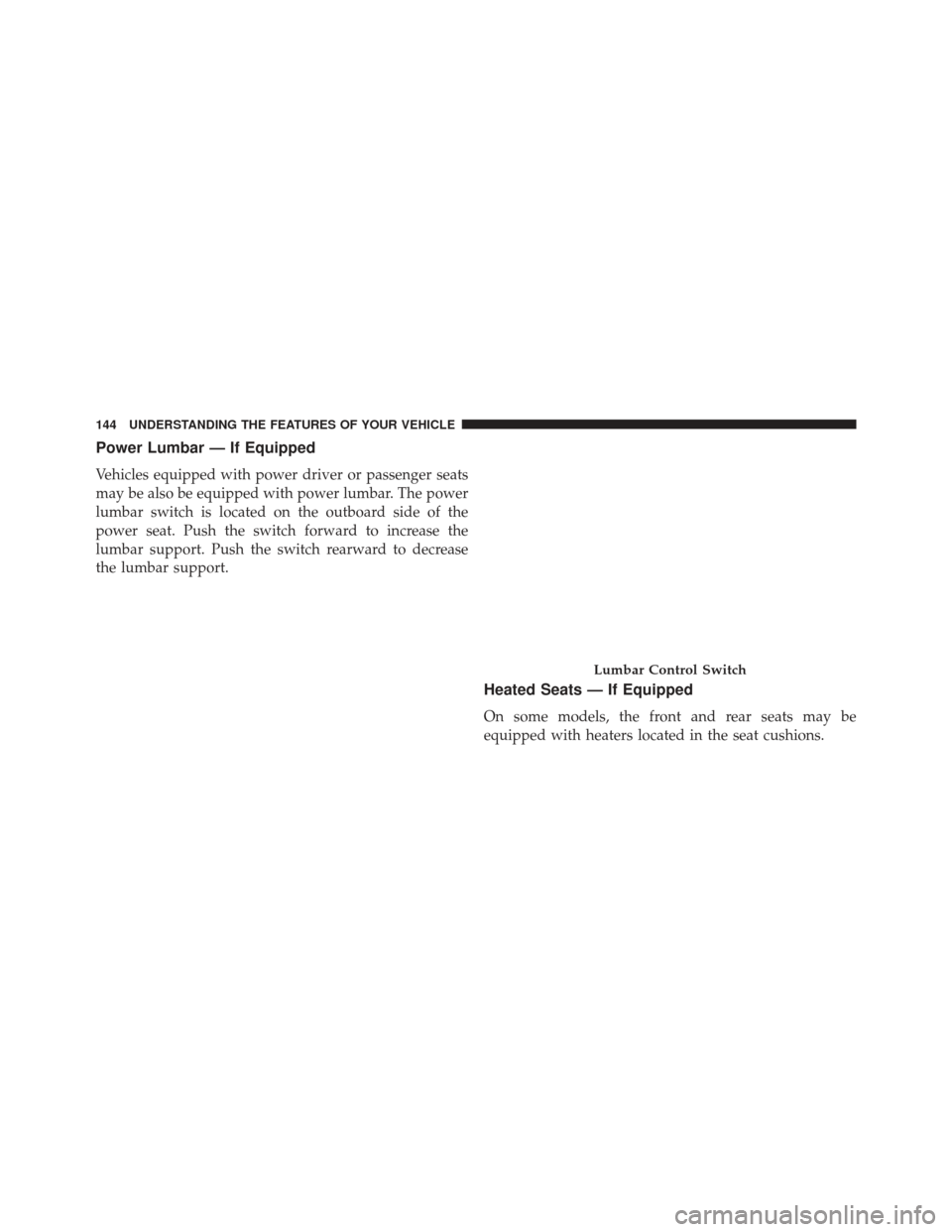
Power Lumbar — If Equipped
Vehicles equipped with power driver or passenger seats
may be also be equipped with power lumbar. The power
lumbar switch is located on the outboard side of the
power seat. Push the switch forward to increase the
lumbar support. Push the switch rearward to decrease
the lumbar support.
Heated Seats — If Equipped
On some models, the front and rear seats may be
equipped with heaters located in the seat cushions.
Lumbar Control Switch
144 UNDERSTANDING THE FEATURES OF YOUR VEHICLE
Page 159 of 734
Vehicles Equipped With Keyless Enter-N-Go
1. Without pressing the brake pedal, push the ENGINESTART/STOP button and cycle the ignition to the
ON/RUN position (Do not start the engine).
2. Adjust all memory profile settings to desired prefer- ences (seat, side mirrors, adjustable pedals and radio
station presets).
3. Press and release the S (Set) button on the memory switch.
4. Within five seconds, press and release either of the memory buttons (1) or (2). The Electronic Vehicle
Information Center (EVIC) will display which
memory position has been set.
Vehicles Not Equipped With Keyless Enter-N-Go
1. Insert the ignition key fob, and turn the ignition switch to the ON/RUN position. 2. Adjust all memory profile settings to desired prefer-
ences (seat, side mirrors, adjustable pedals [if
equipped], power tilt and telescopic steering column
[if equipped], and radio station presets).
3. Press and release the S (Set) button on the memory switch.
4. Within five seconds, press and release either of the memory buttons (1) or (2). The Electronic Vehicle
Information Center (EVIC) will display which
memory position has been set.
NOTE:
• Memory profiles can be set without the vehicle in
PARK, but the vehicle must be in PARK to recall a
memory profile.
• The Recall Memory with Remote Linked to Memory
feature can be enabled through the Electronic Vehicle
Information Center (EVIC), refer to “Electronic Vehicle
3
UNDERSTANDING THE FEATURES OF YOUR VEHICLE 157
Page 196 of 734
CAUTION!
•To avoid vehicle damage, ParkView® should only
be used as a parking aid. The ParkView® camera is
unable to view every obstacle or object in your
drive path.
• To avoid vehicle damage, the vehicle must be
driven slowly when using ParkView® to be able to
stop in time when an obstacle is seen. It is recom-
mended that the driver look frequently over his/her
shoulder when using ParkView®.
NOTE: If snow, ice, mud, or any foreign substance builds
up on the camera lens, clean the lens, rinse with water,
and dry with a soft cloth. Do not cover the lens.
Turning ParkView® On Or Off — With Uconnect® 5.0
1. Press the “Settings” button.
2. Press the “Safety & Assistance” soft-key. 3. Press the check box soft key next to “Parkview®
Backup Camera” to enable/disable.
Turning ParkView® On Or Off — With Uconnect®
8.4A/8.4AN
1. Press the “Settings” soft-key.
2. Press the “Safety & Driving Assistance” soft-key.
3. Press the check box soft key next to “Parkview®Backup Camera” to enable/disable.
OVERHEAD CONSOLE — IF EQUIPPED
The overhead console is located on the headliner above
the review mirror. The overhead console contains the
following features:
•Courtesy/Reading Lights
• Power Sunroof Switch — If Equipped
• Power Sliding Rear Window Switch — If Equipped
• Universal Garage Door Opener — If Equipped
194 UNDERSTANDING THE FEATURES OF YOUR VEHICLE
Page 198 of 734
NOTE:The courtesy/reading lights will remain on until
the switch is pressed a second time, so be sure they have
been turned off before leaving the vehicle. If the interior
lights are left on after the ignition is turned OFF, they will
automatically turn off after 15 minutes.
GARAGE DOOR OPENER — IF EQUIPPED
HomeLink® replaces up to three hand-held transmitters
that operate devices such as garage door openers, motor-
ized gates, lighting or home security systems. The
HomeLink® unit is powered by your vehicles 12 Volt
battery.
The HomeLink® buttons that are located in the overhead
console designate the three different HomeLink® chan-
nels.
Rear Passenger Courtesy/Reading Light
196 UNDERSTANDING THE FEATURES OF YOUR VEHICLE
Page 207 of 734
NOTE:
•The transmitter has been tested and it complies with
FCC and IC rules. Changes or modifications not ex-
pressly approved by the party responsible for compli-
ance could void the user ’s authority to operate the
device.
• The term IC before the certification/registration num-
ber only signifies that Industry Canada technical speci-
fications were met.
POWER SUNROOF — IF EQUIPPED
The power sunroof switch is located on the overhead
console between the courtesy/reading lights.Power Sunroof Switch
3
UNDERSTANDING THE FEATURES OF YOUR VEHICLE 205
Page 208 of 734
WARNING!
•Never leave children unattended in a vehicle, and
do not leave the key in the ignition switch (or leave
the ignition of a vehicle equipped with Keyless
Enter-N-Go™ in the ACC or ON/Run position).
Occupants, particularly unattended children, can
become entrapped by the power sunroof while
operating the power sunroof switch. Such entrap-
ment may result in serious injury or death.
• In a collision, there is a greater risk of being thrown
from a vehicle with an open sunroof. You could
also be seriously injured or killed. Always fasten
your seat belt properly and make sure all passen-
gers are also properly secured.
• Do not allow small children to operate the sunroof.
Never allow your fingers, other body parts, or any
object, to project through the sunroof opening.
Injury may result.
Opening Sunroof — Express
Press the switch rearward and release it within one-half
second and the sunroof will open automatically from any
position. The sunroof will open fully and stop automati-
cally. This is called “Express Open”. During Express
Open operation, any movement of the sunroof switch
will stop the sunroof.
Closing Sunroof — Express
Press the switch forward and release it within one-half
second and the sunroof will close automatically from any
position. The sunroof will close fully and stop automati-
cally. This is called “Express Close”. During Express
Close operation, any movement of the switch will stop
the sunroof.
206 UNDERSTANDING THE FEATURES OF YOUR VEHICLE
Page 210 of 734
Sunroof Maintenance
Use only a nonabrasive cleaner and a soft cloth to clean
the glass panel.
Ignition Off Operation
For Vehicles Not Equipped With The Electronic Vehicle
Information Center (EVIC)
The power sunroof switch will remain active for 45
seconds after the ignition switch is turned to the LOCK
position. Opening either front door will cancel this
feature.
For Vehicles Equipped With The EVIC
The power sunroof switch will remain active for up to
approximately ten minutes after the ignition switch is
turned to the LOCK position. Opening either front door
will cancel this feature.
ELECTRICAL POWER OUTLETS
The auxiliary 12 Volt (13 Amp) power outlets can provide
power for in-cab accessories designed for use with the
standard “cigar lighter” plug. The 12 Volt power outlets
have a cap attached to the outlet indicating “12V DC”,
together with either a key symbol or a battery symbol.
A key symbol indicates that the key must be in the
ON/RUN or ACC positions for the outlet to provide
power. The battery symbol indicates that the outlet is
connected to the battery, and can provide power at all
times.
NOTE:To ensure proper operation a MOPAR® knob
and element must be used.
208 UNDERSTANDING THE FEATURES OF YOUR VEHICLE
Page 211 of 734
CAUTION!
•Do not exceed the maximum power of 160 Watts (13
Amps) at 12 Volts. If the 160 Watt (13 Amp) power
rating is exceeded the fuse protecting the system
will need to be replaced.
• Power outlets are designed for accessory plugs
only. Do not insert any other object in the power
outlets as this will damage the outlet and blow the
fuse. Improper use of the power outlet can cause
damage not covered by your New Vehicle Limited
Warranty. The auxiliary power outlets can be found in the following
locations:
•
Lower left and lower right of the center stack when
equipped with a bench seat
Power Outlets — Center Stack
3
UNDERSTANDING THE FEATURES OF YOUR VEHICLE 209