four wheel drive RAM 1500 2021 User Guide
[x] Cancel search | Manufacturer: RAM, Model Year: 2021, Model line: 1500, Model: RAM 1500 2021Pages: 496, PDF Size: 20.89 MB
Page 165 of 496

STARTING AND OPERATING163
Shifting Procedure
If any of the requirements to select a new
transfer case position have not been met,
then the transfer case will not shift. The posi -
tion indicator light for the previous position
will remain on and the newly selected posi -
tion indicator light will continue to flash until
all the requirements for the selected position
have been met.
If all the requirements to select a new
transfer case position have been met, then
the current position indicator light will turn off
and the selected position indicator light will
flash until the transfer case completes the
shift. When the shift is complete, the position
indicator light for the selected position will
stop flashing and remain on.
FIVE-POSITION ELECTRONICALLY
S
HIFTED TRANSFER CASE — IF
E
QUIPPED
This is an electronic shift transfer case and is
operated by the 4WD Control Switch (Transfer
Case Switch), which is located on the
instrument panel.
Five-Position/On-Demand Transfer Case
This electronically shifted transfer case
provides five mode positions:
Two-Wheel Drive High Range (2WD) — This
range is for normal street and highway
driving on dry hard surfaced roads. Driving
the vehicle in 2WD will have greater fuel
economy benefits as the front axle is not
engaged in 2WD.
Four-Wheel Drive Automatic High Range
(4WD AUTO) — This range sends power to the
front wheels automatically when the vehicle
senses a loss of traction. This range may be
used during varying road conditions.
Four-Wheel Drive High Range (4WD HIGH) —
This range provides torque to the front drive -
shaft (engages four-wheel drive) which allows
front and rear wheels to spin at the same
speed. This provides additional traction for
loose or slippery road surfaces only.
Four-Wheel Drive Low Range (4WD LOW) —
This range provides low speed four-wheel
drive. It maximizes torque (increased torque
over 4WD HIGH) to the front driveshaft;
allowing front and rear wheels to rotate at the
same speed. This range provides additional
traction and maximum pulling power for
loose or slippery road surfaces only. Do not
exceed 25 mph (40 km/h) in this range.
N (Neutral) — This range disengages both the
front and rear driveshafts from the power -
train. To be used for flat towing behind
another vehicle Ú page 231.
4
21_DT_OM_EN_USC_t.book Page 163
Page 166 of 496

164STARTING AND OPERATING
NOTE:
The 4WD High and 4WD Low positions are
designed for loose, slippery road surfaces
only. Driving in the 4WD High and 4WD Low positions on dry hard surfaced roads may
cause increased tire wear and damage to the
driveline components.
The transfer case N (Neutral) button is
located in the center of the 4WD Control
Switch and is pushed by using a ballpoint pen
or similar object. The transfer case N
(Neutral) position is to be used for recre
-
ational towing only Ú page 231.
Transfer Case Position Indicator Lights
The Transfer Case Position Indicator Lights
(4WD High, 4WD Low, and 4WD Auto) are
located in the instrument cluster and indicate
the current and desired transfer case selection.
When you select a different transfer case
position, the indicator lights will do the
following:
1. The current position indicator light will turn off.
2. The selected position indicator light will flash until the transfer case completes the
shift.
3. When the shift is complete, the indicator light for the selected position will stop
flashing and remain on. If the transfer case does not shift into the
desired position, one or more of the following
events may occur:
1. The indicator light for the current position
will remain on.
2. The newly selected position indicator light will continue to flash.
3. If the transfer case will not shift, there will
be a cluster message stating the 4WD shift
has canceled.
NOTE:
Before retrying a selection, make certain that all
the necessary requirements for selecting a new
transfer case position have been met. To retry
the selection, push the current position, wait
five seconds, and retry selection.
The “SVC 4WD Warning Light” monitors the
electronic shift four-wheel drive system. If this
light remains on after engine start up or
illuminates during driving, it means that the
four-wheel drive system is not functioning
properly and that service is required.
WARNING!
You or others could be injured or killed if
you leave the vehicle unattended with the
transfer case in the N (Neutral) position
without first fully engaging the parking
brake. The transfer case N (Neutral) posi -
tion disengages both the front and rear
drive shaft from the powertrain, and will
allow the vehicle to roll, even if the trans -
mission is in PARK. The parking brake
should always be applied when the driver is
not in the vehicle.
The transmission may not engage PARK if
the vehicle is moving. Always bring the
vehicle to a complete stop before shifting to
PARK, and verify that the transmission gear
position indicator solidly indicates PARK (P)
without blinking. Ensure that the vehicle is
completely stopped, and the PARK position
is properly indicated, before exiting the
vehicle.
21_DT_OM_EN_USC_t.book Page 164
Page 167 of 496
STARTING AND OPERATING165
NOTE:
Do not attempt to make a shift while only the
front or rear wheels are spinning. This could
cause damage to driveline components.
When operating your vehicle in 4WD Low, the
engine speed is approximately three times that
of the 2WD, 4WD Auto or 4WD High positions
at a given road speed. Take care not to
overspeed the engine and do not exceed
25 mph (40 km/h).
Proper operation of four-wheel drive vehicles
depends on tires of equal size, type and
circumference on each wheel. Any difference in
tire size can cause damage to the drivetrain.
Because four-wheel drive provides improved
traction, there is a tendency to exceed safe
turning and stopping speeds. Do not go faster
than road conditions permit.
Shifting Procedure
If any of the requirements to select a new
transfer case position have not been met,
then the transfer case will not shift. The posi -
tion indicator light for the previous position
will remain on and the newly selected posi -
tion indicator light will continue to flash until
all the requirements for the selected position
have been met.
If all the requirements to select a new
transfer case position have been met, then
the current position indicator light will turn off
and the selected position indicator light will
flash until the transfer case completes the
shift. When the shift is complete, the position
indicator light for the selected position will
stop flashing and remain on.
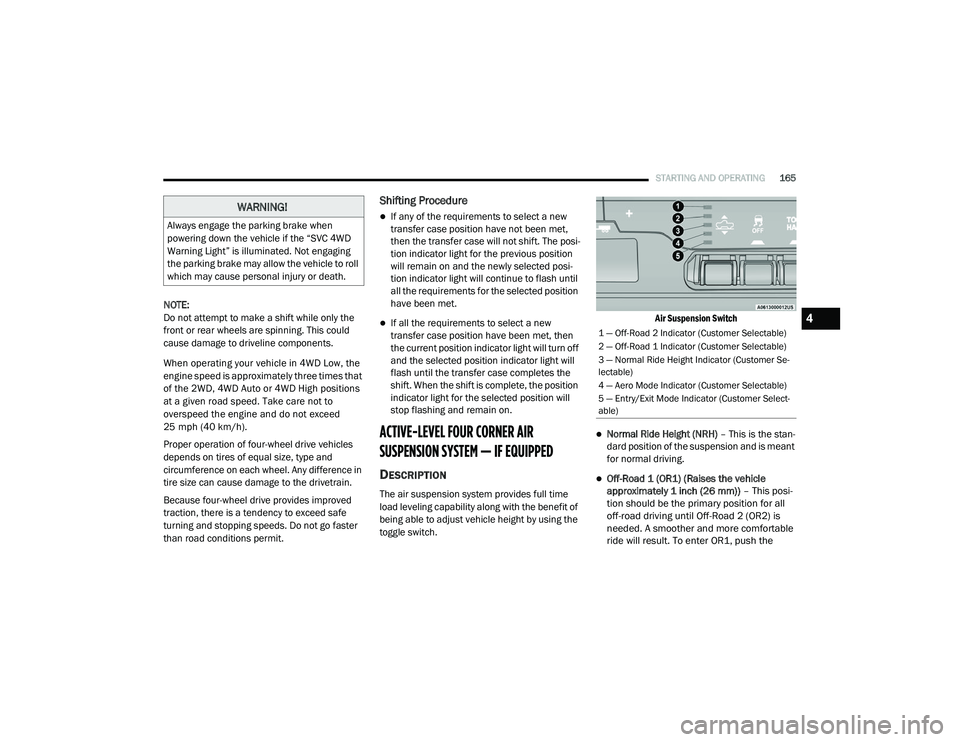
ACTIVE-LEVEL FOUR CORNER AIR
SUSPENSION SYSTEM — IF EQUIPPED
DESCRIPTION
The air suspension system provides full time
load leveling capability along with the benefit of
being able to adjust vehicle height by using the
toggle switch.
Air Suspension Switch
Normal Ride Height (NRH)
– This is the stan-
dard position of the suspension and is meant
for normal driving.
Off-Road 1 (OR1) (Raises the vehicle
approximately 1 inch (26 mm)) – This posi-
tion should be the primary position for all
off-road driving until Off-Road 2 (OR2) is
needed. A smoother and more comfortable
ride will result. To enter OR1, push the
WARNING!
Always engage the parking brake when
powering down the vehicle if the “SVC 4WD
Warning Light” is illuminated. Not engaging
the parking brake may allow the vehicle to roll
which may cause personal injury or death.
1 — Off-Road 2 Indicator (Customer Selectable)
2 — Off-Road 1 Indicator (Customer Selectable)
3 — Normal Ride Height Indicator (Customer Se -
lectable)
4 — Aero Mode Indicator (Customer Selectable)
5 — Entry/Exit Mode Indicator (Customer Select -
able)
4
21_DT_OM_EN_USC_t.book Page 165
Page 169 of 496

STARTING AND OPERATING167
to Normal Height Mode, push the height
selector switch up once while in Entry/Exit or
drive the vehicle over 15 mph (24 km/h).
Entry/Exit mode may not be available due to
vehicle payload, an instrument cluster
message will be displayed when this occurs
Úpage 114.
NOTE:
Entry/Exit mode may be achieved using your
key fob for easier entry/loading Ú page 17.
The system requires that the ignition be in the
ON/RUN position or the engine running for all
user requested changes. When lowering the
vehicle, all of the doors must be closed. If a door
is opened at any time while the vehicle is
lowering, the change will not be completed until
the open door(s) is closed. This system uses a lifting and lowering pattern
which keeps the headlights from incorrectly
shining into oncoming traffic. When raising the
vehicle, the rear of the vehicle will move up first
and then the front. When lowering the vehicle,
the front will move down first and then the rear.
After the engine is turned off, it may be noticed
that the air suspension system operates briefly;
this is normal. The system is correcting the
position of the vehicle to ensure a proper
appearance.
To assist with changing a spare tire, the air
suspension system has a feature which allows
the automatic leveling to be disabled
Ú
page 114.
NOTE:
If equipped with a touchscreen radio, all
enabling/disabling of air suspension features
must be done through the radio Ú page 237.AIR SUSPENSION MODES
The air suspension system has multiple modes
to protect the system in unique situations. The
engine should be running to change between
Air Suspension Modes.
Automatic AERO Mode
To improve aerodynamics, the air suspension
system has a feature which will put the vehicle
into AERO height automatically Úpage 114.
Automatic Aero Mode may be disabled through
vehicle settings in the Uconnect Radio (if
equipped) Ú page 237.
Tire Jack Mode
To assist with changing a tire, the air
suspension system has a feature which allows
the automatic leveling to be disabled
Ú page 237.
Transport Mode
For towing your vehicle with four wheels off the
road, the air suspension system has a feature
which will put the vehicle into Entry/Exit height
and disable the automatic load leveling system
Ú page 237.
CAUTION!
When in ENTRY/EXIT setting, be aware of your
surroundings, you may not have the
clearance required for certain areas and
vehicle damage may occur.
WARNING!
The air suspension system uses a high
pressure volume of air to operate the system.
To avoid personal injury or damage to the
system, see an authorized dealer for service.
4
21_DT_OM_EN_USC_t.book Page 167
Page 224 of 496

222STARTING AND OPERATING
Towing Requirements — Tires
Do not attempt to tow a trailer while using a
compact spare tire.
Do not drive more than 50 mph (80 km/h)
when towing while using a full size spare tire.
Proper tire inflation pressures are essential
to the safe and satisfactory operation of your
vehicle.
Check the trailer tires for proper tire inflation
pressures before trailer usage.
Check for signs of tire wear or visible tire
damage before towing a trailer.
Replacing tires with a higher load carrying
capacity will not increase the vehicle's GVWR
and GAWR limits.
For further information Ú page 443.
Towing Requirements — Trailer Brakes
Do not interconnect the hydraulic brake
system or vacuum system of your vehicle
with that of the trailer.
An electronically actuated trailer brake
controller is required when towing a trailer
with electronically actuated brakes. When
towing a trailer equipped with a hydraulic
surge actuated brake system, an electronic
brake controller is not required.
Trailer brakes are recommended for trailers
over 1,000 lbs (453 kg) and required for
trailers in excess of 2,000 lbs (907 kg).
Vehicles with trailers should not be parked
on a grade. When parking, apply the
parking brake on the tow vehicle. Put the
tow vehicle transmission in PARK. For
four-wheel drive vehicles, make sure the
transfer case is not in NEUTRAL. Always,
block or "chock" the trailer wheels.
GCWR must not be exceeded.
Total weight must be distributed between
the tow vehicle and the trailer such that the
following four ratings are not exceeded :
GVWR
GTW
GAWR
Tongue weight rating for the trailer
hitch utilized.
WARNING! (Continued)WARNING!
Do not connect trailer brakes to your
vehicle's hydraulic brake lines. It can over -
load your brake system and cause it to fail.
You might not have brakes when you need
them and could have an accident.
Towing any trailer will increase your stop -
ping distance. When towing, you should
allow for additional space between your
vehicle and the vehicle in front of you.
Failure to do so could result in an accident.
CAUTION!
If the trailer weighs more than 1,000 lbs
(453 kg) loaded, it should have its own
brakes and they should be of adequate
capacity. Failure to do this could lead to
accelerated brake lining wear, higher brake
pedal effort, and longer stopping distances.
21_DT_OM_EN_USC_t.book Page 222
Page 232 of 496
230STARTING AND OPERATING
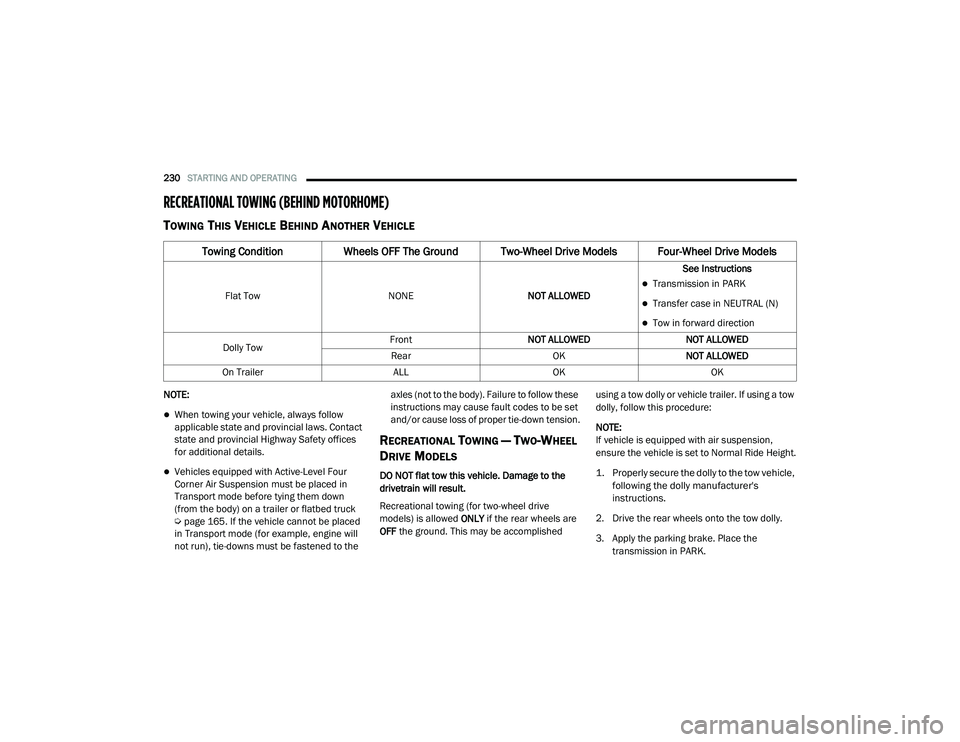
RECREATIONAL TOWING (BEHIND MOTORHOME)
TOWING THIS VEHICLE BEHIND ANOTHER VEHICLE
NOTE:
When towing your vehicle, always follow
applicable state and provincial laws. Contact
state and provincial Highway Safety offices
for additional details.
Vehicles equipped with Active-Level Four
Corner Air Suspension must be placed in
Transport mode before tying them down
(from the body) on a trailer or flatbed truck
Úpage 165. If the vehicle cannot be placed
in Transport mode (for example, engine will
not run), tie-downs must be fastened to the axles (not to the body). Failure to follow these
instructions may cause fault codes to be set
and/or cause loss of proper tie-down tension.
RECREATIONAL TOWING — TWO-WHEEL
D
RIVE MODELS
DO NOT flat tow this vehicle. Damage to the
drivetrain will result.
Recreational towing (for two-wheel drive
models) is allowed ONLY if the rear wheels are
OFF the ground. This may be accomplished using a tow dolly or vehicle trailer. If using a tow
dolly, follow this procedure:
NOTE:
If vehicle is equipped with air suspension,
ensure the vehicle is set to Normal Ride Height.
1. Properly secure the dolly to the tow vehicle,
following the dolly manufacturer's
instructions.
2. Drive the rear wheels onto the tow dolly.
3. Apply the parking brake. Place the transmission in PARK.
Towing Condition Wheels OFF The Ground Two-Wheel Drive Models Four-Wheel Drive Models
Flat Tow NONENOT ALLOWED See InstructionsTransmission in PARK
Transfer case in NEUTRAL (N)
Tow in forward direction
Dolly Tow Front
NOT ALLOWED NOT ALLOWED
Rear OKNOT ALLOWED
On Trailer ALLOKOK
21_DT_OM_EN_USC_t.book Page 230
Page 233 of 496
STARTING AND OPERATING231
(Continued)
4. Properly secure the rear wheels to the dolly, following the dolly manufacturer's
instructions.
5. Turn the ignition OFF.
6. Install a suitable clamping device, designed for towing, to secure the front wheels in the
straight position.
RECREATIONAL TOWING —
F
OUR-WHEEL DRIVE MODELS
NOTE:
The transfer case must be shifted into N
(Neutral) for recreational towing. The transmis -
sion must be shifted into PARK for recreational
towing. Refer to the following for the proper
transfer case N (Neutral) shifting procedure for
your vehicle.
CAUTION!
Towing with the rear wheels on the ground will
cause severe transmission damage. Damage
from improper towing is not covered under
the New Vehicle Limited Warranty.
CAUTION!
DO NOT dolly tow any 4WD vehicle. Towing
with only one set of wheels on the ground
(front or rear) will cause severe transmis -
sion and/or transfer case damage. Tow
with all four wheels either ON the ground, or
OFF the ground (using a vehicle trailer).
Tow only in the forward direction. Towing
this vehicle backwards can cause severe
damage to the transfer case.
Before recreational towing, the transfer
case must be in N (Neutral). To be certain
the transfer case is fully in N (Neutral),
perform the procedure outlined under
“Shifting Into N (Neutral)”. Internal trans -
mission damage will result, if the transfer
case is not in N (Neutral) during towing.
The transmission must be in PARK for
recreational towing.
Ensure that the Electric Park Brake is
released, and remains released, while
being towed.
Towing this vehicle in violation of the above
requirements can cause severe transmis -
sion and/or transfer case damage.
Damage from improper towing is not
covered under the New Vehicle Limited
Warranty.
Do not disconnect the rear driveshaft
because fluid will leak from the transfer
case, causing damage to internal parts.
Do not use a bumper-mounted clamp-on
tow bar on your vehicle. The bumper face
bar will be damaged.
CAUTION! (Continued)
4
21_DT_OM_EN_USC_t.book Page 231
Page 256 of 496
254MULTIMEDIA
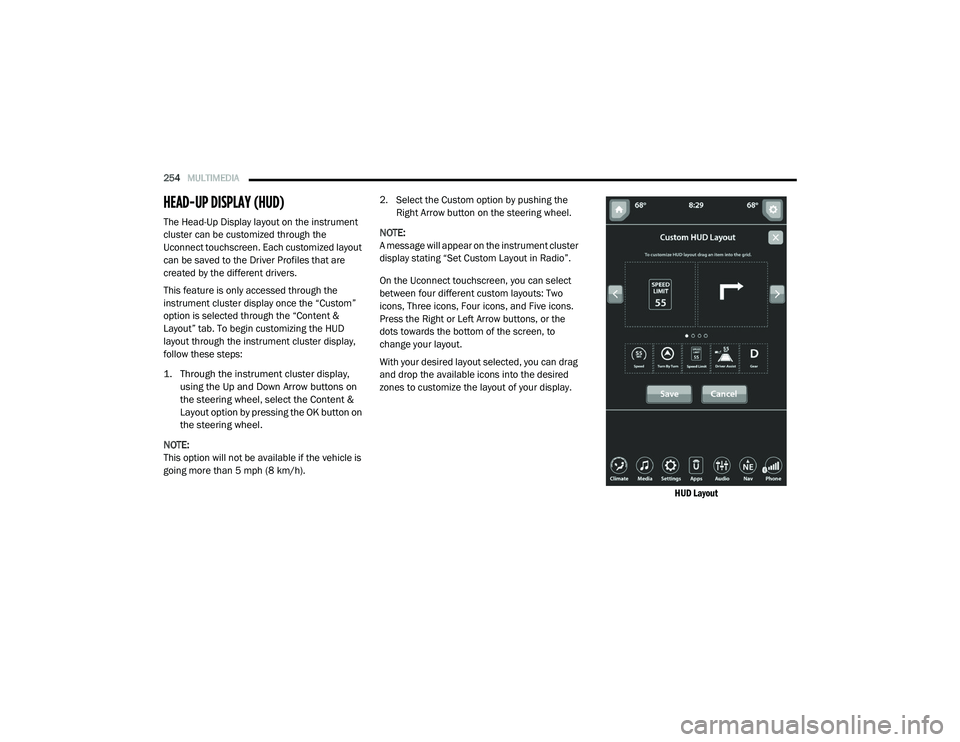
HEAD-UP DISPLAY (HUD)
The Head-Up Display layout on the instrument
cluster can be customized through the
Uconnect touchscreen. Each customized layout
can be saved to the Driver Profiles that are
created by the different drivers.
This feature is only accessed through the
instrument cluster display once the “Custom”
option is selected through the “Content &
Layout” tab. To begin customizing the HUD
layout through the instrument cluster display,
follow these steps:
1. Through the instrument cluster display,
using the Up and Down Arrow buttons on
the steering wheel, select the Content &
Layout option by pressing the OK button on
the steering wheel.
NOTE:
This option will not be available if the vehicle is
going more than 5 mph (8 km/h). 2. Select the Custom option by pushing the
Right Arrow button on the steering wheel.
NOTE:
A message will appear on the instrument cluster
display stating “Set Custom Layout in Radio”.
On the Uconnect touchscreen, you can select
between four different custom layouts: Two
icons, Three icons, Four icons, and Five icons.
Press the Right or Left Arrow buttons, or the
dots towards the bottom of the screen, to
change your layout.
With your desired layout selected, you can drag
and drop the available icons into the desired
zones to customize the layout of your display.
HUD Layout
21_DT_OM_EN_USC_t.book Page 254
Page 331 of 496
SAFETY329
NOTE:
The TPMS is not intended to replace normal
tire care and maintenance or to provide
warning of a tire failure or condition.
The TPMS should not be used as a tire pres -
sure gauge while adjusting your tire pressure,
unless your vehicle is equipped with a Tire Fill
Alert (TFA) system.
Driving on a significantly underinflated tire
causes the tire to overheat and can lead to
tire failure. Underinflation also reduces fuel
efficiency and tire tread life, and may affect
the vehicle’s handling and stopping ability.
The TPMS is not a substitute for proper tire
maintenance, and it is the driver’s responsi -
bility to maintain correct tire pressure using
an accurate tire pressure gauge, even if
underinflation has not reached the level to
trigger illumination of the TPMS Warning
Light.
Seasonal temperature changes will affect
tire pressure, and the TPMS will monitor the
actual tire pressure in the tire.
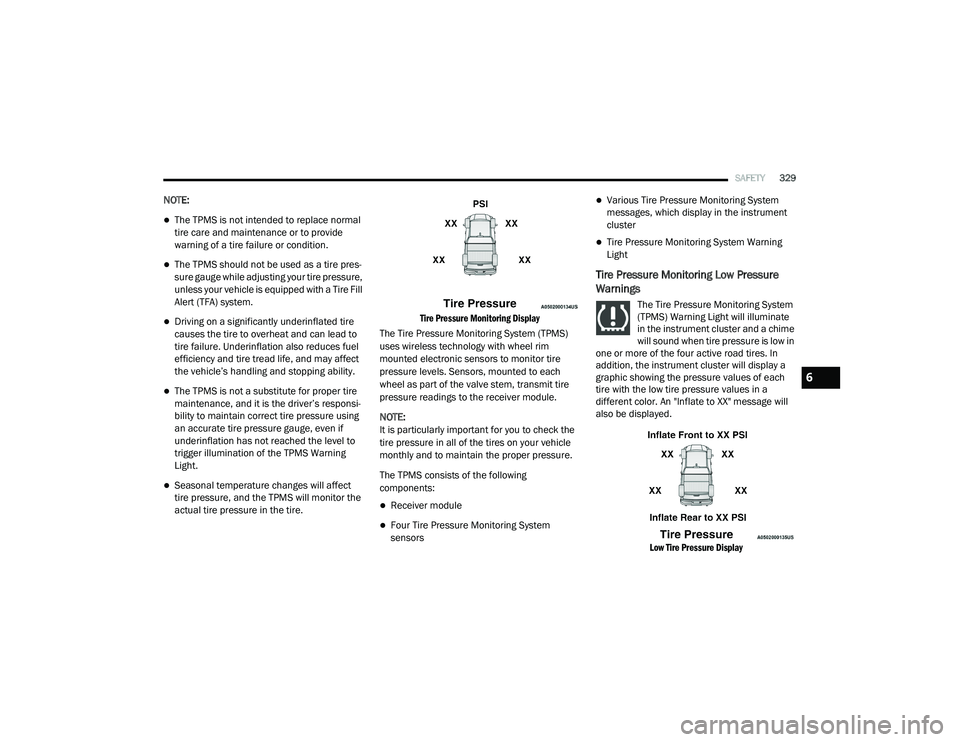
Tire Pressure Monitoring Display
The Tire Pressure Monitoring System (TPMS)
uses wireless technology with wheel rim
mounted electronic sensors to monitor tire
pressure levels. Sensors, mounted to each
wheel as part of the valve stem, transmit tire
pressure readings to the receiver module.
NOTE:
It is particularly important for you to check the
tire pressure in all of the tires on your vehicle
monthly and to maintain the proper pressure.
The TPMS consists of the following
components:
Receiver module
Four Tire Pressure Monitoring System
sensors
Various Tire Pressure Monitoring System
messages, which display in the instrument
cluster
Tire Pressure Monitoring System Warning
Light
Tire Pressure Monitoring Low Pressure
Warnings
The Tire Pressure Monitoring System
(TPMS) Warning Light will illuminate
in the instrument cluster and a chime
will sound when tire pressure is low in
one or more of the four active road tires. In
addition, the instrument cluster will display a
graphic showing the pressure values of each
tire with the low tire pressure values in a
different color. An "Inflate to XX" message will
also be displayed.
Low Tire Pressure Display
6
21_DT_OM_EN_USC_t.book Page 329
Page 344 of 496
342SAFETY
SUPPLEMENTAL RESTRAINT SYSTEMS
(SRS)
Some of the safety features described in this
section may be standard equipment on some
models, or may be optional equipment on
others. If you are not sure, ask an authorized
dealer.
The air bag system must be ready to protect you
in a collision. The Occupant Restraint Controller
(ORC) monitors the internal circuits and
interconnecting wiring associated with the
electrical Air Bag System Components. Your
vehicle may be equipped with the following Air
Bag System Components:
Air Bag System Components
Occupant Restraint Controller (ORC)
Air Bag Warning Light
Steering Wheel and Column
Instrument Panel
Knee Impact Bolsters
Driver and Front Passenger Air Bags
Seat Belt Buckle Switch
Supplemental Side Air Bags
Front and Side Impact Sensors
Seat Belt Pretensioners
Seat Track Position Sensors
Occupant Classification System
Air Bag Warning Light
The Occupant Restraint Controller
(ORC) monitors the readiness of the
electronic parts of the air bag system
whenever the ignition switch is in the
START or ON/RUN position. If the ignition switch
is in the OFF position or in the ACC position, the
air bag system is not on and the air bags will not
inflate. The ORC contains a backup power supply
system that may deploy the air bag system even
if the battery loses power or it becomes
disconnected prior to deployment.
The ORC turns on the Air Bag Warning Light in
the instrument panel for approximately four to
eight seconds for a self-check when the ignition
switch is first in the ON/RUN position. After the
self-check, the Air Bag Warning Light will turn
off. If the ORC detects a malfunction in any part
of the system, it turns on the Air Bag Warning
Light, either momentarily or continuously. A
single chime will sound to alert you if the light
comes on again after initial startup.
The ORC also includes diagnostics that will
illuminate the instrument panel Air Bag Warning
Light if a malfunction is detected that could
affect the air bag system. The diagnostics also
record the nature of the malfunction. While the
air bag system is designed to be maintenance
free, if any of the following occurs, have an
authorized dealer service the air bag system
immediately.
Failure to replace the seat belt assembly
could increase the risk of injury in colli
-
sions.
Do not use the Automatic Locking Mode to
restrain occupants who are wearing the
seat belt or children who are using booster
seats. The locked mode is only used to
install rear-facing or forward-facing child
restraints that have a harness for
restraining the child.
WARNING! (Continued)
21_DT_OM_EN_USC_t.book Page 342