trailer RAM 1500 2021 Owners Manual
[x] Cancel search | Manufacturer: RAM, Model Year: 2021, Model line: 1500, Model: RAM 1500 2021Pages: 496, PDF Size: 20.89 MB
Page 4 of 496
2
INTRODUCTION
Symbols Key ..........................................................11
WARNINGS AND CAUTIONS ...............................11
VAN CONVERSIONS/CAMPERS ..........................11
VEHICLE MODIFICATIONS/ALTERATIONS .........11
Symbol Glossary ...................................................12
GETTING TO KNOW YOUR VEHICLE
KEYS ......................................................................17
Key Fob......................................................... 17
SENTRY KEY ..........................................................20
IGNITION SWITCH .................................................21
Keyless Enter-N-Go — Ignition ..................... 21
REMOTE START — IF EQUIPPED (GASOLINE) ...22
How To Use Remote Start ........................... 22
To Exit Remote Start Mode ......................... 23
Remote Start Front Defrost Activation — If
Equipped ...................................................... 24 Remote Start Comfort Systems —
If Equipped ................................................... 24 Remote Start Windshield Wiper De-Icer
Activation — If Equipped .............................. 25 Remote Start Abort Message ...................... 25
REMOTE START — IF EQUIPPED (DIESEL) ........25
How To Use Remote Start ........................... 25 VEHICLE SECURITY SYSTEM — IF EQUIPPED .. 26
To Arm The System ...................................... 26
To Disarm The System ................................ 26
Rearming Of The System............................. 27
Security System Manual Override .............. 27
DOORS .................................................................. 27
Manual Door Locks...................................... 27
Power Door Locks — If Equipped ............... 28
Power Side Steps — If Equipped ................. 28
Keyless Enter-N-Go — Passive Entry .......... 28
Automatic Unlock Doors On Exit —
If Equipped ................................................... 30 Automatic Door Locks — If Equipped ......... 30
Child-Protection Door Lock System —
Rear Doors ................................................... 31
STEERING WHEEL ................................................ 31
Tilt/Telescoping Steering Column .............. 31
Heated Steering Wheel — If Equipped ...... 32
DRIVER MEMORY SETTINGS — IF EQUIPPED ... 32
Programming The Memory Feature............ 33
Linking And Unlinking The Key Fob To
Memory ........................................................ 33 Memory Position Recall............................... 34
SEATS ................................................................... 34
Manual Adjustment (Front Seats) — If
Equipped ...................................................... 34 Manual Adjustment (Rear Seats) ............... 36 Power Adjustment (Front Seats) —
If Equipped ................................................... 36 Heated Seats — If Equipped ...................... 38
Ventilated Seats — If Equipped................... 39
Plastic Grocery Bag Retainers ................... 39
Head Restraints ........................................... 40
UCONNECT VOICE RECOGNITION ......................41
Introducing Voice Recognition .................... 41
Basic Voice Commands .............................. 42
Get Started................................................... 43
Additional Information................................. 43
DRIVER ADJUSTABLE PEDALS —
IF EQUIPPED ..........................................................43
MIRRORS ..............................................................44
Inside Rearview Mirror ................................ 44
Outside Mirrors ........................................... 46
Outside Automatic Dimming Mirrors — If
Equipped ...................................................... 47 Power Mirrors............................................... 47
Power Folding Outside Mirrors For
Standard And Trailer Tow — If Equipped .... 47 Trailer Towing Mirrors — If Equipped ......... 48
Heated Mirrors — If Equipped ..................... 48
Tilt Side Mirrors In Reverse —
If Equipped ................................................... 48
21_DT_OM_EN_USC_t.book Page 2
Page 5 of 496
3
UNIVERSAL GARAGE DOOR OPENER
(HOMELINK®) — IF EQUIPPED ...........................49 Before You Begin Programming
HomeLink® .................................................. 49 Erasing All The HomeLink® Channels........ 49
Identifying Whether You Have A Rolling
Code Or Non-Rolling Code Device .............. 49 Programming HomeLink® To A Garage
Door Opener ................................................. 50 Programming HomeLink® To A
Miscellaneous Device.................................. 51 Reprogramming A Single HomeLink®
Button ........................................................... 51 Canadian/Gate Operator Programming ..... 51
EXTERIOR LIGHTS.................................................52
Headlight Switch .......................................... 52
Multifunction Lever ..................................... 53
Daytime Running Lights (DRLs) ................. 53
High/Low Beam Switch ............................... 53
Automatic High Beam Headlamp
Control — If Equipped ................................. 53 Flash-To-Pass ............................................... 54
Automatic Headlights — If Equipped ......... 54
Parking Lights And Panel Lights ................. 54
Automatic Headlights With Wipers ............. 54
Headlight Delay ............................................ 55
Lights-On Reminder ..................................... 55
Fog Lights — If Equipped ............................ 55
Turn Signals ................................................ 55
Lane Change Assist — If Equipped ............. 55 Cargo Lights/Trailer Spotter Lights With
Bed Lights — If Equipped............................. 56 Battery Saver ............................................... 57
INTERIOR LIGHTS ................................................ 57
Courtesy Lights ............................................ 57
Illuminated Entry ......................................... 58
WINDSHIELD WIPERS AND WASHERS............. 58
Windshield Wiper Operation ...................... 58
Rain Sensing Wipers — If Equipped............ 59
CLIMATE CONTROLS ........................................... 60
Automatic Climate Control Descriptions
And Functions .............................................. 60 Manual Climate Control Descriptions And
Functions...................................................... 63 Automatic Temperature Control (ATC) —
If Equipped ................................................... 65 Climate Voice Recognition .......................... 66
Operating Tips ............................................. 66
INTERIOR STORAGE AND EQUIPMENT ............. 68
Storage ......................................................... 68
USB/AUX Control ......................................... 72
Electrical Power Outlets .............................. 74
Power Inverter — If Equipped ..................... 75
Wireless Charging Pad — If Equipped ........ 77
WINDOWS ............................................................ 77
Power Windows............................................ 77
Automatic Window Features ....................... 78
Reset Auto-Up ............................................. 78
Window Lockout Switch .............................. 79 Power Sliding Rear Window —
If Equipped .................................................. 79 Manual Sliding Rear Window —
If Equipped ................................................... 79 Wind Buffeting ............................................ 80
POWER SUNROOF — IF EQUIPPED ....................80
Single Pane Power Sunroof —
If Equipped ................................................... 80 Dual Pane Power Sunroof —
If Equipped ................................................... 82
HOOD .....................................................................84
To Open The Hood ....................................... 84
To Close The Hood....................................... 85
TAILGATE ...............................................................85
Opening ........................................................ 85
Closing.......................................................... 85
Locking Tailgate ........................................... 85
Multifunction Tailgate — If Equipped.......... 85
Tailgate Removal ........................................ 86
Bed Step — If Equipped ............................... 89
PICKUP BOX .........................................................90
Bed Rail Tie-Down System —
If Equipped .................................................. 91
RAMBOX — IF EQUIPPED ....................................92
Locking And Unlocking RamBox ................. 93
RamBox Cargo Storage Bins ....................... 93
RamBox Safety Warning ............................. 94
Bed Divider — If Equipped ........................... 95
21_DT_OM_EN_USC_t.book Page 3
Page 8 of 496
6
VEHICLE LOADING ............................................. 213 Gross Vehicle Weight Rating (GVWR) ......213Payload .......................................................213Gross Axle Weight Rating (GAWR) ............213
Tire Size ......................................................213
Rim Size......................................................214
Inflation Pressure ......................................214
Curb Weight................................................214
Loading .......................................................214
TRAILER TOWING .............................................. 214
Common Towing Definitions .....................214Trailer Hitch Type and Maximum Trailer
Weight.........................................................218 Trailer Towing Weights (Maximum Trailer
Weight Ratings) ..........................................218 Trailer And Tongue Weight ........................ 219Trailer Reverse Steering Control ...............219
Towing Requirements ...............................221
Towing Tips ................................................227
SNOWPLOW ...................................................... 227
Before Plowing ........................................... 228
Snowplow Prep Package Model
Availability .................................................. 228 Over The Road Operation With Snowplow
Attached .....................................................229 Operating Tips ............................................229
General Maintenance ................................229 RECREATIONAL TOWING (BEHIND
MOTORHOME) ...................................................230
Towing This Vehicle Behind Another
Vehicle ........................................................ 230 Recreational Towing — Two-Wheel Drive
Models ........................................................ 230 Recreational Towing — Four-Wheel Drive
Models ........................................................ 231
DRIVING TIPS ...................................................... 234
Driving On Slippery Surfaces ................... 234
Driving Through Water .............................. 234
Off-Road Driving Tips ................................. 235
MULTIMEDIA
UCONNECT SYSTEMS .......................................236
CYBERSECURITY ............................................... 236
UCONNECT SETTINGS ........................................ 237Customer Programmable Features .......... 237
HEAD-UP DISPLAY (HUD) .................................. 254
UCONNECT INTRODUCTION ..............................256
System Overview ....................................... 256Safety And General Information ............... 258
UCONNECT MODES ............................................259
Steering Wheel Audio Controls ................ 259
Radio Mode ............................................... 259Media Mode .............................................. 268
Phone Mode .............................................. 271 CONNECTED VEHICLE SERVICES —
IF EQUIPPED ...................................................... 282
Is My Vehicle Connected? ......................... 282
Introduction To Connected Vehicle
Services ..................................................... 282 Getting Started With Connected Vehicle
Services ..................................................... 284 Using SiriusXM Guardian™ ...................... 286
Manage My SiriusXM Guardian™
Account ...................................................... 301
CONNECTED SERVICES FAQs ......................... 301
Connected Services SOS FAQs ................ 301
Connected Services Remote Door Lock/
Unlock FAQs .............................................. 302 Connected Services Roadside
Assistance FAQs ....................................... 302 Connected Services Send & Go FAQs ..... 302Connected Services Vehicle Finder
FAQs .......................................................... 303 Connected Services Stolen Vehicle
Assistance FAQs ....................................... 303 Connected Services Remote Vehicle
Start FAQs ................................................. 303 Connected Services Remote Horn &
Lights FAQs ................................................ 304 Connected Services Account FAQs........... 304
Data Collection & Privacy .......................... 306
21_DT_OM_EN_USC_t.book Page 6
Page 14 of 496
12
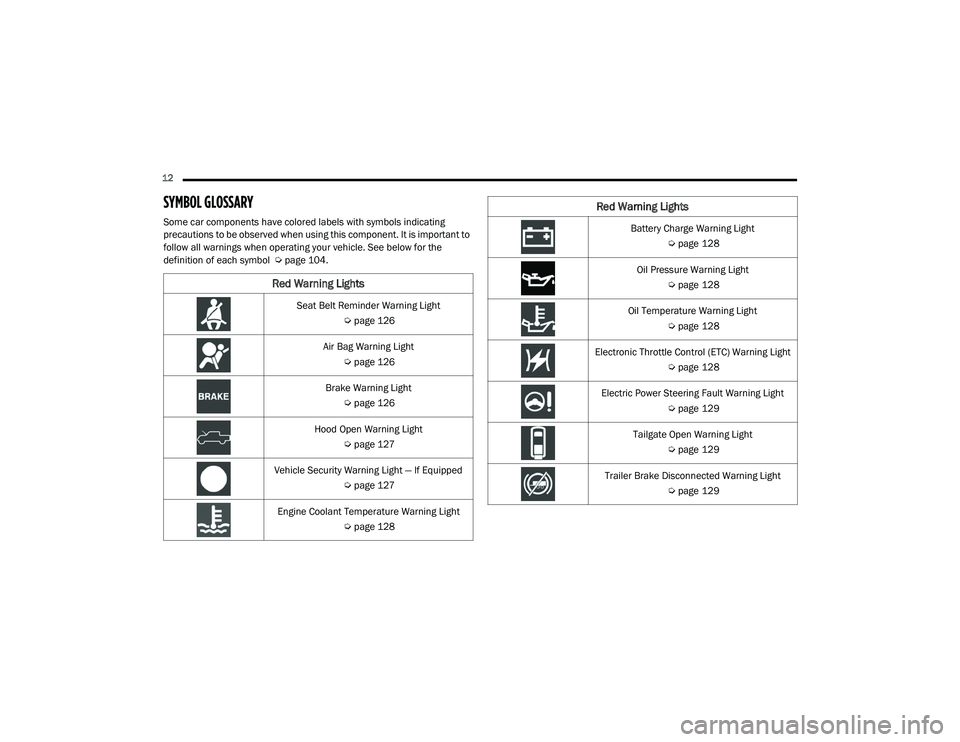
SYMBOL GLOSSARY
Some car components have colored labels with symbols indicating
precautions to be observed when using this component. It is important to
follow all warnings when operating your vehicle. See below for the
definition of each symbol Úpage 104.
Red Warning Lights
Seat Belt Reminder Warning Light
Úpage 126
Air Bag Warning Light Úpage 126
Brake Warning Light Úpage 126
Hood Open Warning Light Úpage 127
Vehicle Security Warning Light — If Equipped Úpage 127
Engine Coolant Temperature Warning Light Úpage 128
Battery Charge Warning Light
Úpage 128
Oil Pressure Warning Light Úpage 128
Oil Temperature Warning Light Úpage 128
Electronic Throttle Control (ETC) Warning Light Úpage 128
Electric Power Steering Fault Warning Light Úpage 129
Tailgate Open Warning Light Úpage 129
Trailer Brake Disconnected Warning Light Úpage 129
Red Warning Lights
21_DT_OM_EN_USC_t.book Page 12
Page 16 of 496

14
Service Stop/Start System Warning Light Úpage 133
Service 4WD Warning Light — If Equipped Úpage 133
Cruise Control Fault Warning Light Úpage 133
Yellow Indicator Lights
Forward Collision Warning Off Indicator Light —
If Equipped
Ú page 133
Air Suspension Payload Protection Indicator Light — If Equipped
Úpage 133
Trailer Merge Assist Indicator Light — If Equipped
Ú page 133
TOW/HAUL Indicator Light Úpage 133
Yellow Warning Lights
Cargo Light On Indicator Light
Úpage 133
Air Suspension Off-Road 1 Indicator Light — If Equipped
Ú page 133
Air Suspension Off-Road 2 Indicator Light — If Equipped
Ú page 133
Air Suspension Normal Height Indicator Light — If Equipped
Ú page 134
Air Suspension Aerodynamic Height Indicator Light — If Equipped
Úpage 134
Entry/Exit Indicator Light — If Equipped Úpage 134
Air Suspension Ride Height Raising Indicator Light — If Equipped
Úpage 134
Yellow Indicator Lights
21_DT_OM_EN_USC_t.book Page 14
Page 49 of 496
GETTING TO KNOW YOUR VEHICLE47
OUTSIDE AUTOMATIC DIMMING
M
IRRORS — IF EQUIPPED
The driver’s outside mirror and if equipped, the
passenger’s outside mirror, will automatically
dim for glare from vehicles behind you. This
feature is controlled by the inside automatic
dimming mirror. The mirrors will automatically
adjust for headlight glare when the inside mirror
adjusts.
POWER MIRRORS
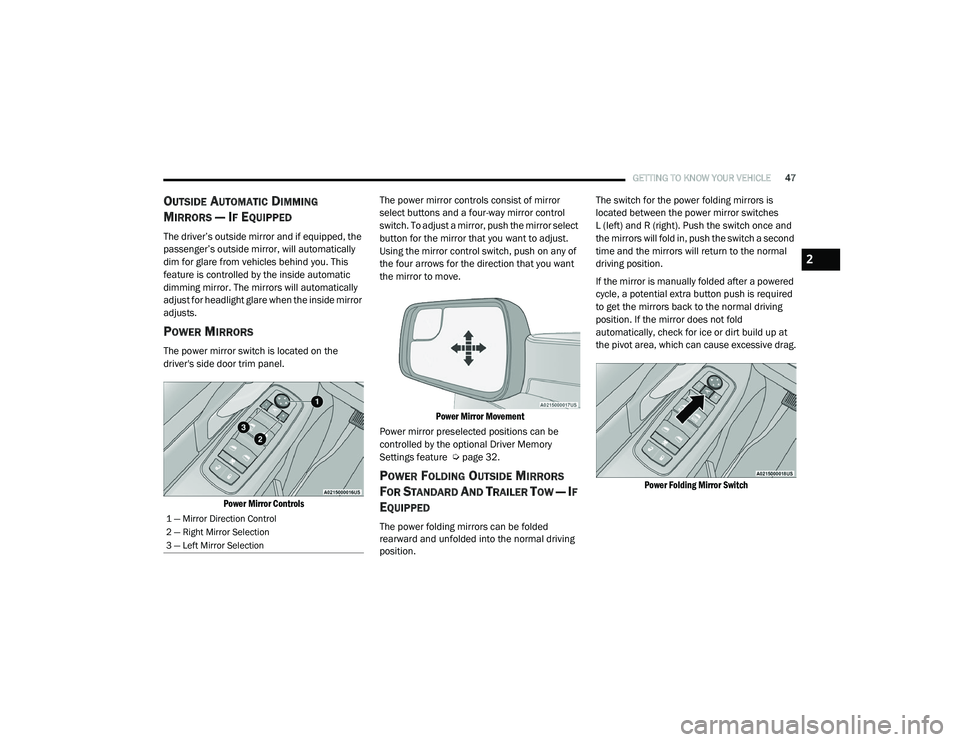
The power mirror switch is located on the
driver's side door trim panel.
Power Mirror Controls
The power mirror controls consist of mirror
select buttons and a four-way mirror control
switch. To adjust a mirror, push the mirror select
button for the mirror that you want to adjust.
Using the mirror control switch, push on any of
the four arrows for the direction that you want
the mirror to move.
Power Mirror Movement
Power mirror preselected positions can be
controlled by the optional Driver Memory
Settings feature Ú page 32.
POWER FOLDING OUTSIDE MIRRORS
F
OR STANDARD AND TRAILER TOW — IF
E
QUIPPED
The power folding mirrors can be folded
rearward and unfolded into the normal driving
position. The switch for the power folding mirrors is
located between the power mirror switches
L (left) and R (right). Push the switch once and
the mirrors will fold in, push the switch a second
time and the mirrors will return to the normal
driving position.
If the mirror is manually folded after a powered
cycle, a potential extra button push is required
to get the mirrors back to the normal driving
position. If the mirror does not fold
automatically, check for ice or dirt build up at
the pivot area, which can cause excessive drag.
Power Folding Mirror Switch
1 — Mirror Direction Control
2 — Right Mirror Selection
3 — Left Mirror Selection
2
21_DT_OM_EN_USC_t.book Page 47
Page 50 of 496

48GETTING TO KNOW YOUR VEHICLE
Resetting The Power Folding Outside Mirrors
You may need to reset the power folding mirrors
if the following occurs:
The mirrors are accidentally blocked while
folding.
The mirrors are accidentally manually
folded/unfolded (by hand or by pushing the
power folding mirror switch).
The mirrors come out of the unfolded posi -
tion.
The mirrors shake and vibrate at normal
driving speeds.
To reset the power folding mirrors: Fold and
unfold them by pushing the button (this may
require multiple attempts). This resets them to
their normal driving position.
TRAILER TOWING MIRRORS — IF
E
QUIPPED
These mirrors are designed with an adjustable
mirror head to provide a greater vision range
when towing extra-wide loads. To change
position inboard or outboard, the mirror head
should be rotated (flipped in or out).
Trailer Towing Position
NOTE:
Fold the trailer towing mirrors prior to entering
an automated car wash.
A small blindspot mirror is located next to the
main mirror and can be adjusted manually.
Blindspot Mirror
HEATED MIRRORS — IF EQUIPPED
These mirrors are heated to melt frost
or ice. This feature will be activated
whenever you turn on the rear window
defroster (if equipped) Ú page 60.
TILT SIDE MIRRORS IN REVERSE — IF
E
QUIPPED
This feature provides automatic outside mirror
positioning which will assist with the driver’s
ground visibility. The outside mirrors will move
slightly downward from the present position
when the vehicle is shifted into REVERSE. The
outside mirrors will then return to the original
position when the vehicle is shifted out of
REVERSE. If the vehicle is equipped with Driver
Memory Settings, this feature will be linked to
the programmable settings.
NOTE:
The Tilt Side Mirrors In Reverse feature can be
turned on and off using the Uconnect system
Ú page 237.
21_DT_OM_EN_USC_t.book Page 48
Page 54 of 496
52GETTING TO KNOW YOUR VEHICLE
It may be helpful to unplug the device during the
cycling process to prevent possible overheating
of the garage door or gate motor.
1. Cycle the ignition to the ON/RUN position.
2. Place the hand-held transmitter 1 to
3 inches (3 to 8 cm) away from the
HomeLink button you wish to program while
keeping the HomeLink indicator light in
view.
3. Continue to press and hold the HomeLink button, while you press and release
(“cycle”) your hand-held transmitter every
two seconds until HomeLink has
successfully accepted the frequency signal.
The indicator light will flash slowly and then
rapidly when fully trained.
4. Watch for the HomeLink indicator to change flash rates. When it changes, it is
programmed. It may take up to 30 seconds
or longer in rare cases. The garage door
may open and close while you are
programming.
5. Press and hold the programmed HomeLink button and observe the indicator light. NOTE:
If the indicator light stays on constantly,
programming is complete and the garage
door/device should activate when the Home
-
Link button is pressed.
To program the two remaining HomeLink
buttons, repeat each step for each remaining
button. DO NOT erase the channels.
If you unplugged the garage door opener/
device for programming, plug it back in at this
time.
Reprogramming A Single HomeLink Button
(Canadian/Gate Operator)
To reprogram a channel that has been
previously trained, follow these steps:
1. Cycle the ignition to the ON/RUN position.
2. Press and hold the desired HomeLink button until the indicator light begins to
flash after 20 seconds. Do not release the
button.
3. Without releasing the button, proceed with “Canadian/Gate Operator Programming”
step 2 and follow all remaining steps
Úpage 482.
EXTERIOR LIGHTS
HEADLIGHT SWITCH
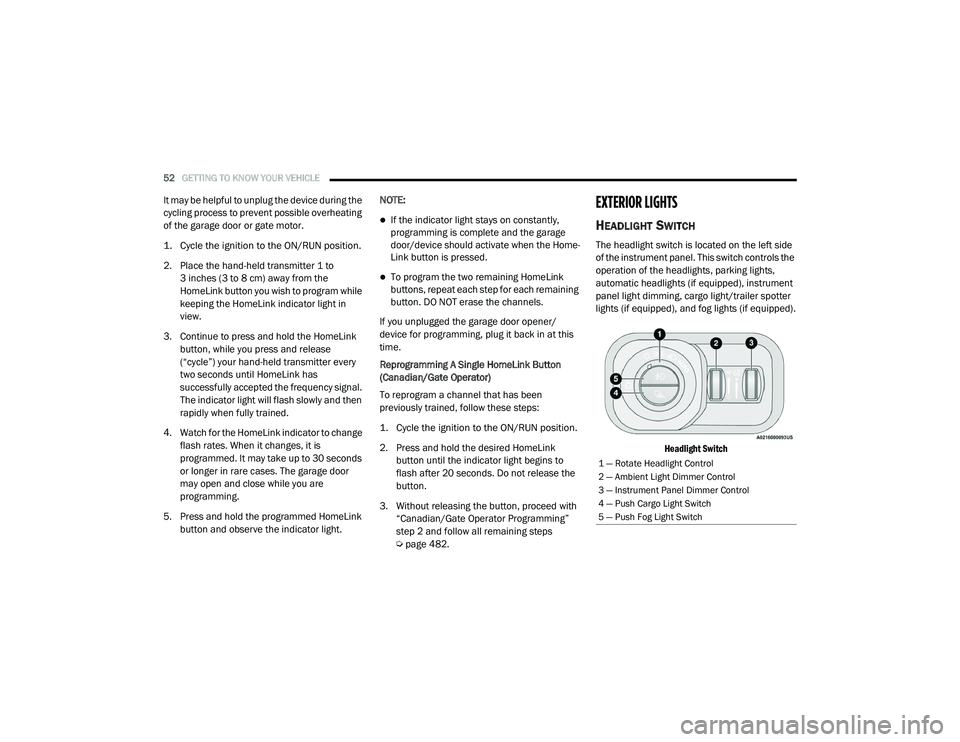
The headlight switch is located on the left side
of the instrument panel. This switch controls the
operation of the headlights, parking lights,
automatic headlights (if equipped), instrument
panel light dimming, cargo light/trailer spotter
lights (if equipped), and fog lights (if equipped).
Headlight Switch
1 — Rotate Headlight Control
2 — Ambient Light Dimmer Control
3 — Instrument Panel Dimmer Control
4 — Push Cargo Light Switch
5 — Push Fog Light Switch
21_DT_OM_EN_USC_t.book Page 52
Page 58 of 496

56GETTING TO KNOW YOUR VEHICLE
CARGO LIGHTS/TRAILER SPOTTER
L
IGHTS WITH BED LIGHTS — IF
E
QUIPPED
The cargo light, bed lights, and trailer spotter
lights are turned on by pushing the cargo light
button located on the lower half of the headlight
switch.
Cargo/Bed Lights Button On Headlight Switch Cargo Lights
When the vehicle is stationary, these lights can
also be turned on using the switch located just
inside the pickup box, on the lower part of the
bed light lens. A telltale will illuminate in the
instrument cluster display when these lights are
on. Pushing the switch a second time will turn
the lights off.
Bed Light Switch (Without RamBox)
The cargo light and bed lights (if equipped) will
turn on for approximately 30 seconds when a
key fob unlock button is pushed, as part of the
Illuminated Entry feature.
When these lights are activated using the
button on the headlight switch, the trailer
spotter lights will remain illuminated when the
vehicle transmission is in PARK, NEUTRAL, or
REVERSE. The trailer spotter lights will turn off
when the vehicle transmission is placed in
DRIVE.
NOTE:
The cargo light will automatically turn off if the
vehicle is shifted into NEUTRAL or DRIVE, and
will turn back on when the vehicle is shifted into
PARK or REVERSE. The bed lights are not
affected by gear selection.
NOTE:
For vehicles shipped to or sold in the states of
California or Mississippi, the cargo, bed, and
mirror spotter lights will not work while the
vehicle is in motion. In every other state, the
cargo and mirror spotter lights will turn off when
the vehicle is in motion, but the bed light will
remain on. In all states, including California and
Mississippi, if a bed camera is deactivated, the
bed lights will turn back on.
21_DT_OM_EN_USC_t.book Page 56
Page 107 of 496

GETTING TO KNOW YOUR INSTRUMENT PANEL105
BASE / MIDLINE INSTRUMENT CLUSTER
D
ESCRIPTIONS — GASOLINE
1. Tachometer
Indicates the engine speed in revolutions
per minute (RPM x 1000).
2. Voltmeter
When the vehicle is in the RUN state, the
gauge indicates the electrical system
voltage. The pointer should stay within
the normal range if the battery is
charged. If the pointer moves to either
extreme left or right and remains there
during normal driving, the electrical
system should be serviced.
NOTE:
In vehicles equipped with Stop/Start, a reduced
voltage may be present during an Autostop.
3. Instrument Cluster Display
When the appropriate conditions exist,
this display shows the instrument cluster
display messages Ú page 114.
Instrument Cluster Display/Controls Location
The display always show one of the main
menu item after ignition on.
4. Oil Pressure Gauge
The pointer should always indicate the oil
pressure when the engine is running. A
continuous high or low reading under
normal driving conditions may indicate a
lubrication system malfunction. Imme -
diate service should be obtained from an
authorized dealer.
NOTE:
In vehicles equipped with Stop/Start, an oil
pressure indication of zero is normal during an
Autostop. 5. Speedometer
Indicates vehicle speed.
6. Fuel Gauge
The pointer shows the level of fuel in the
fuel tank when the ignition is in the ON/
RUN position.
The fuel pump symbol points to the
side of the vehicle where the fuel door
is located.
7. Temperature Gauge
The pointer shows engine coolant
temperature. The pointer positioned
within the normal range indicates that
the engine cooling system is operating
satisfactorily.
The pointer will likely indicate a higher
temperature when driving in hot weather,
up mountain grades, or when towing a
trailer. It should not be allowed to exceed
the upper limits of the normal operating
range.
1 – Instrument Cluster Display Controls
2 – Instrument Cluster Display Screen
3
21_DT_OM_EN_USC_t.book Page 105