tailgate RAM 1500 2021 User Guide
[x] Cancel search | Manufacturer: RAM, Model Year: 2021, Model line: 1500, Model: RAM 1500 2021Pages: 496, PDF Size: 20.89 MB
Page 91 of 496
GETTING TO KNOW YOUR VEHICLE89
10. Raise the tailgate slightly, and remove the
support cables by releasing the lock tang
from the pivot.
NOTE:
Make sure tailgate is supported by you and/or a
second person when removing support cables.
Locking Tang
11. Remove the tailgate from the vehicle.
NOTE:
Do not carry the tailgate loose in the truck
pickup box.
If the tailgate is closed with the wire harness
disconnected, the tailgate can only be
opened by removing the inside panel and
unlatching the locking mechanism manually.
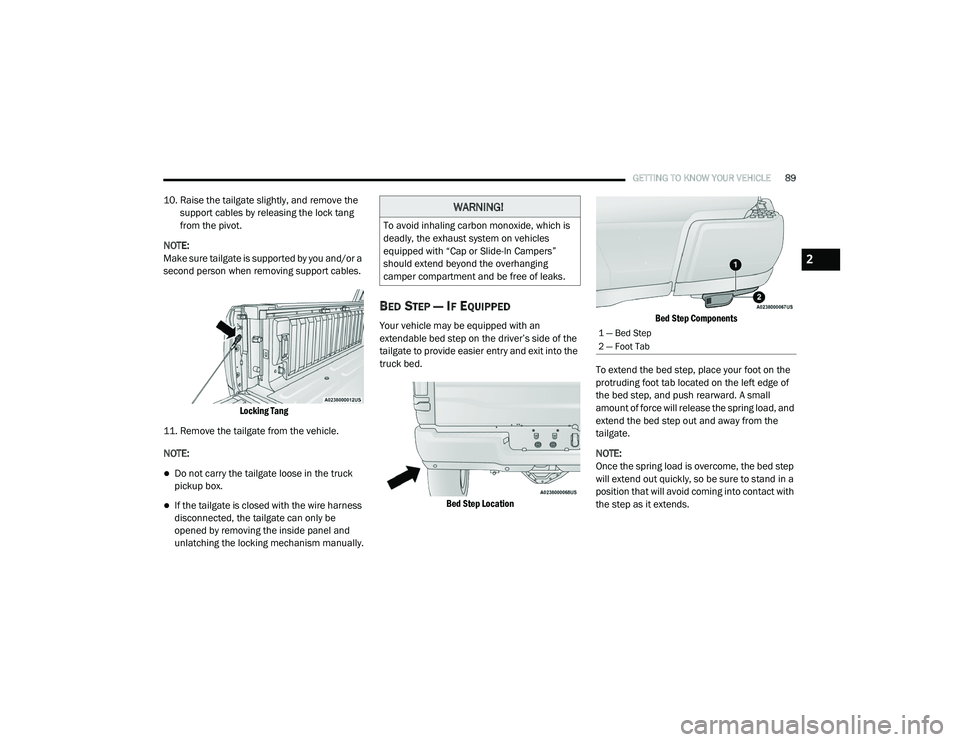
BED STEP — IF EQUIPPED
Your vehicle may be equipped with an
extendable bed step on the driver’s side of the
tailgate to provide easier entry and exit into the
truck bed.
Bed Step Location Bed Step Components
To extend the bed step, place your foot on the
protruding foot tab located on the left edge of
the bed step, and push rearward. A small
amount of force will release the spring load, and
extend the bed step out and away from the
tailgate.
NOTE:
Once the spring load is overcome, the bed step
will extend out quickly, so be sure to stand in a
position that will avoid coming into contact with
the step as it extends.
WARNING!
To avoid inhaling carbon monoxide, which is
deadly, the exhaust system on vehicles
equipped with “Cap or Slide-In Campers”
should extend beyond the overhanging
camper compartment and be free of leaks.
1 — Bed Step
2 — Foot Tab
2
21_DT_OM_EN_USC_t.book Page 89
Page 92 of 496
90GETTING TO KNOW YOUR VEHICLE
(Continued)
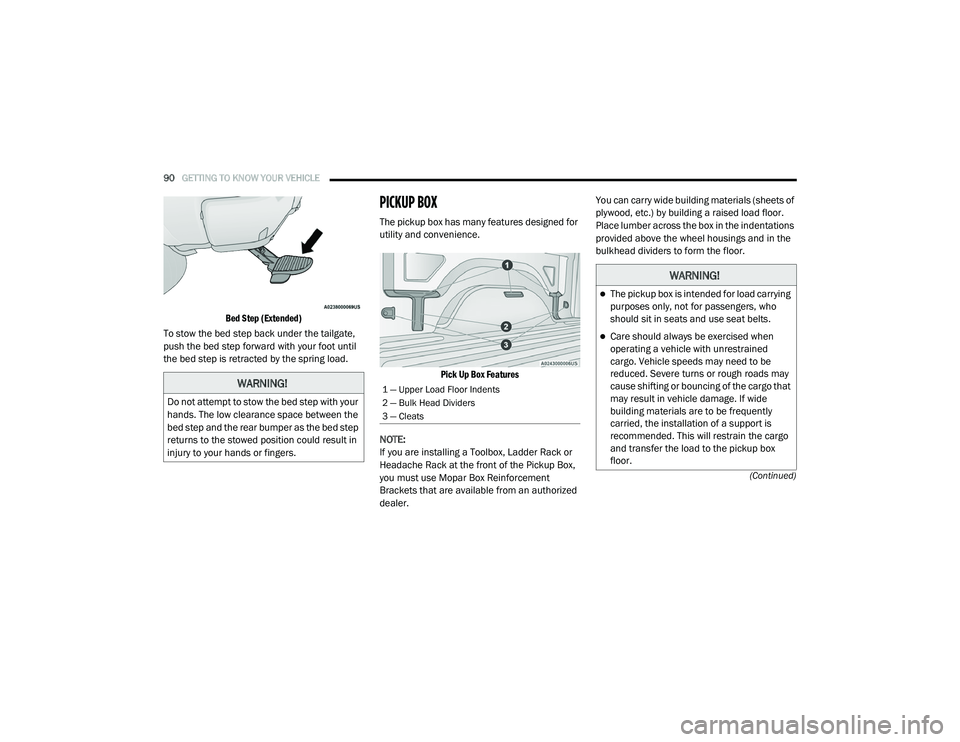
Bed Step (Extended)
To stow the bed step back under the tailgate,
push the bed step forward with your foot until
the bed step is retracted by the spring load.
PICKUP BOX
The pickup box has many features designed for
utility and convenience.
Pick Up Box Features
NOTE:
If you are installing a Toolbox, Ladder Rack or
Headache Rack at the front of the Pickup Box,
you must use Mopar Box Reinforcement
Brackets that are available from an authorized
dealer. You can carry wide building materials (sheets of
plywood, etc.) by building a raised load floor.
Place lumber across the box in the indentations
provided above the wheel housings and in the
bulkhead dividers to form the floor.
WARNING!
Do not attempt to stow the bed step with your
hands. The low clearance space between the
bed step and the rear bumper as the bed step
returns to the stowed position could result in
injury to your hands or fingers.
1 — Upper Load Floor Indents
2 — Bulk Head Dividers
3 — Cleats
WARNING!
The pickup box is intended for load carrying
purposes only, not for passengers, who
should sit in seats and use seat belts.
Care should always be exercised when
operating a vehicle with unrestrained
cargo. Vehicle speeds may need to be
reduced. Severe turns or rough roads may
cause shifting or bouncing of the cargo that
may result in vehicle damage. If wide
building materials are to be frequently
carried, the installation of a support is
recommended. This will restrain the cargo
and transfer the load to the pickup box
floor.
21_DT_OM_EN_USC_t.book Page 90
Page 95 of 496
GETTING TO KNOW YOUR VEHICLE93
LOCKING AND UNLOCKING RAMBOX
Push and release the lock or unlock button on
the key fob to lock and unlock all doors, the
tailgate and the RamBox Úpage 17. To unlatch
the storage bin manually, insert the emergency
key into the keyhole and turn clockwise. Always
return the key to the upright (vertical) position
before removing it from the keyhole.
RAMBOX CARGO STORAGE BINS
Cargo storage bins are located on both sides of
the pickup box. The cargo storage bins provide
watertight, lockable, illuminated storage for up
to 150 lbs (68 kg) of evenly distributed cargo.
RamBox Cargo Storage Bins
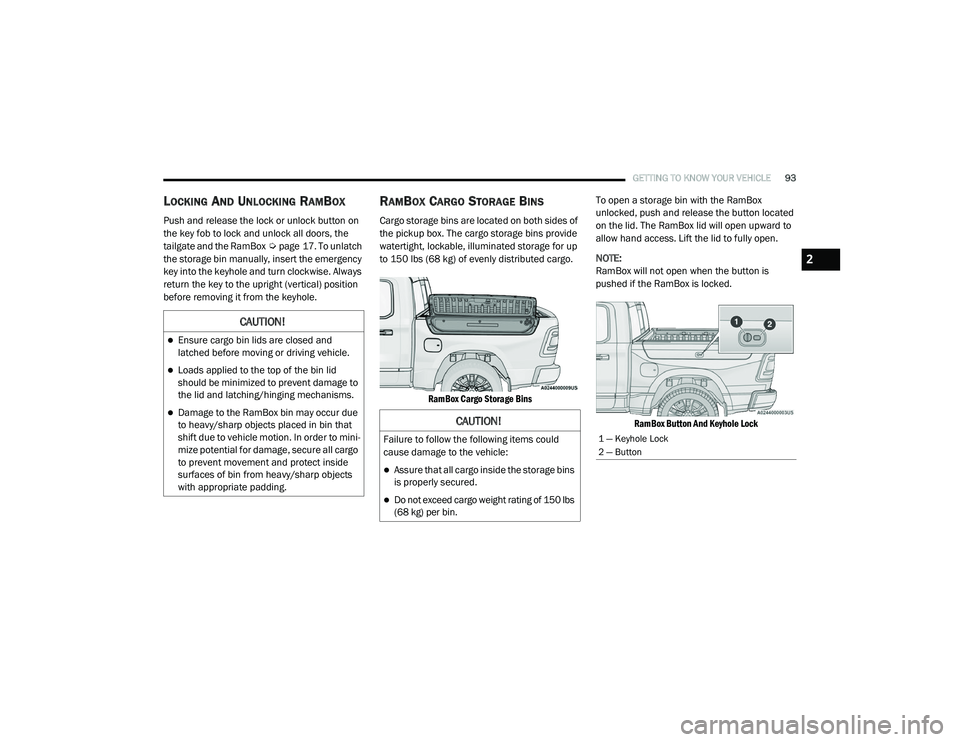
To open a storage bin with the RamBox
unlocked, push and release the button located
on the lid. The RamBox lid will open upward to
allow hand access. Lift the lid to fully open.
NOTE:
RamBox will not open when the button is
pushed if the RamBox is locked.
RamBox Button And Keyhole Lock
CAUTION!
Ensure cargo bin lids are closed and
latched before moving or driving vehicle.
Loads applied to the top of the bin lid
should be minimized to prevent damage to
the lid and latching/hinging mechanisms.
Damage to the RamBox bin may occur due
to heavy/sharp objects placed in bin that
shift due to vehicle motion. In order to mini -
mize potential for damage, secure all cargo
to prevent movement and protect inside
surfaces of bin from heavy/sharp objects
with appropriate padding.CAUTION!
Failure to follow the following items could
cause damage to the vehicle:
Assure that all cargo inside the storage bins
is properly secured.
Do not exceed cargo weight rating of 150 lbs
(68 kg) per bin.
1 — Keyhole Lock
2 — Button
2
21_DT_OM_EN_USC_t.book Page 93
Page 100 of 496
98GETTING TO KNOW YOUR VEHICLE
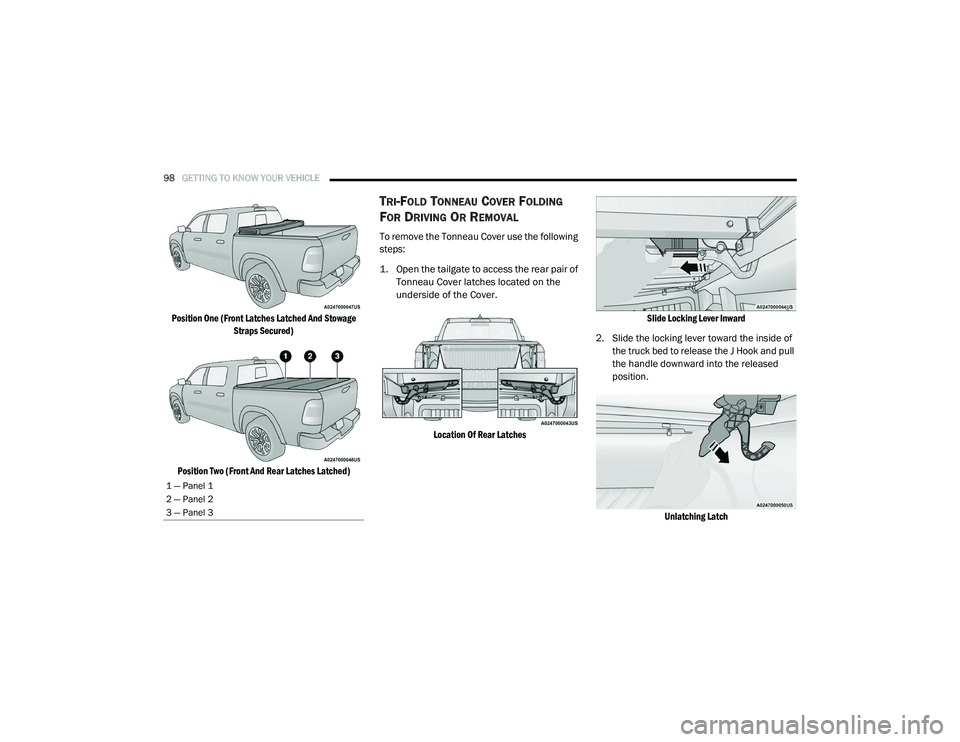
Position One (Front Latches Latched And Stowage
Straps Secured)
Position Two (Front And Rear Latches Latched)
TRI-FOLD TONNEAU COVER FOLDING
F
OR DRIVING OR REMOVAL
To remove the Tonneau Cover use the following
steps:
1. Open the tailgate to access the rear pair of
Tonneau Cover latches located on the
underside of the Cover.
Location Of Rear Latches Slide Locking Lever Inward
2. Slide the locking lever toward the inside of the truck bed to release the J Hook and pull
the handle downward into the released
position.
Unlatching Latch
1 — Panel 1
2 — Panel 2
3 — Panel 3
21_DT_OM_EN_USC_t.book Page 98
Page 131 of 496
GETTING TO KNOW YOUR INSTRUMENT PANEL129
Electric Power Steering (EPS) Fault
Warning Light
This warning light will turn on when
there's a fault with the EPS system
Úpage 174.
Tailgate Open Warning Light
This warning light will illuminate when
the tailgate is open.
NOTE:
If the vehicle is moving, there will also be a
single chime.
Trailer Brake Disconnected Warning Light
This warning light will illuminate when
the Trailer Brake has been
disconnected.
Transmission Temperature Warning Light
— If Equipped
This warning light will illuminate to
warn of a high transmission fluid
temperature. This may occur with
strenuous usage such as trailer
towing. If this light turns on, stop the vehicle and
run the engine at idle or slightly faster, with the
transmission in PARK or NEUTRAL, until the
light turns off. Once the light turns off, you may
continue to drive normally.
Door Open Warning Light
This indicator will illuminate when a
door is ajar/open and not fully closed.
NOTE:
If the vehicle is moving there will also be a single
chime.
YELLOW WARNING LIGHTS
Adaptive Cruise Control (ACC) Fault
Warning Light — If Equipped
This warning light will illuminate to
indicate a fault in the ACC system.
Contact an authorized dealer for
service Ú page 179.
Air Suspension Fault Warning Light — If
Equipped
This light will illuminate when a fault is
detected with the air suspension
system.
WARNING!
Continued operation with reduced assist
could pose a safety risk to yourself and
others. Service should be obtained as soon
as possible.
WARNING!
If you continue operating the vehicle when
the Transmission Temperature Warning Light
is illuminated you could cause the fluid to boil
over, come in contact with hot engine or
exhaust components and cause a fire.
CAUTION!
Continuous driving with the Transmission
Temperature Warning Light illuminated will
eventually cause severe transmission
damage or transmission failure.
3
21_DT_OM_EN_USC_t.book Page 129
Page 196 of 496

194STARTING AND OPERATING
NOTE:
Water from a car wash or road slush in freezing
weather may also cause sensors to become
blocked.
If the "PARKSENSE UNAVAILABLE SERVICE
REQUIRED" message appears in the instrument
cluster display, see your authorized dealer.
CLEANING THE PARKSENSE SYSTEM
Clean the ParkSense sensors with water, car
wash soap and a soft cloth. Do not use rough or
hard cloths. Do not scratch or poke the sensors.
PARKSENSE SYSTEM USAGE
P
RECAUTIONS
NOTE:
Ensure that the front and rear fascias/
bumpers are free of snow, ice, mud, dirt and
debris to keep the ParkSense system oper -
ating properly.
Jackhammers, large trucks, and other vibra -
tions could affect the performance of Park -
Sense.
When you turn Front or Rear ParkSense off,
the instrument cluster display will show a
vehicle graphic of the Front or Rear Park -
Sense on/off state for two seconds. Further -
more, once you turn Front or Rear ParkSense
off, it remains off until you turn it on again,
even if you cycle the ignition.
When you move the gear selector to the
REVERSE position and Front or Rear Park -
Sense is turned off, the instrument cluster
display will show a vehicle graphic with "OFF"
in the corresponding side. This vehicle
graphic will be displayed for as long as the
vehicle is in REVERSE.
ParkSense, when on, will reduce the volume
of the radio when it is sounding a tone.
Clean the ParkSense sensors regularly,
taking care not to scratch or damage them.
The sensors must not be covered with ice,
snow, slush, mud, dirt or debris. Failure to do
so can result in the system not working prop -
erly. The ParkSense system might not detect
an obstacle behind or in front of the fascia/
bumper, or it could provide a false indication
that an obstacle is behind or in front of the
fascia/bumper.
Use the ParkSense switch to turn the Park -
Sense system off if obstacles such as bicycle
carriers, trailer hitches, etc. are placed near
the rear fascia/bumper. Failure to do so can
result in the system misinterpreting a close
obstacle as a sensor problem, causing the
“PARKSENSE UNAVAILABLE SERVICE
REQUIRED” message to be appear in the
instrument cluster display.
ParkSense should be disabled when the tail -
gate is in the lowered or open position. A
lowered tailgate could provide a false indica -
tion that an obstacle is behind the vehicle
and could also cause a false braking event.
The Rear ParkSense system will automati -
cally disable when the system detects that a
trailer with trailer brakes has been connected
to the Integrated Trailer Brake Module.
The Front ParkSense system will automati -
cally disable if a snow plow has been
connected to the vehicle.
21_DT_OM_EN_USC_t.book Page 194
Page 198 of 496

196STARTING AND OPERATING
New vehicles from the dealership must have
at least 30 miles (48 km) accumulated
before the ParkSense Active Park Assist
system is fully calibrated and performs accu -
rately. This is due to the system’s dynamic
vehicle calibration to improve the perfor -
mance of the feature.
The driver must control the vehicle’s brakes.
The automatic emergency braking feature is
NOT intended to substitute for the driver
during REVERSE maneuvers.
ENABLING AND DISABLING THE
P
ARKSENSE ACTIVE PARK ASSIST
S
YSTEM
The ParkSense Active Park Assist
system can be enabled and disabled
with the ParkSense Active Park Assist
switch, located on the switch panel
below the Uconnect display.
NOTE:
If your vehicle is equipped with a 12-inch
Uconnect display, the ParkSense Active Park
Assist switch is located above the display. To enable or disable the ParkSense Active Park
Assist system, push the ParkSense Active Park
Assist switch once (LED turns on). Pushing the
switch a second time will disable the system
(LED turns off).
The ParkSense Active Park Assist system will
turn off automatically for any of the following
conditions:
Parking maneuver is completed.
Vehicle speed is greater than 18 mph
(30 km/h) when searching for a parking
space.
Vehicle speed is greater than 5 mph (7 km/h)
during active steering guidance into the
parking space.
Steering wheel is touched during active
steering guidance into the parking space.
ParkSense Front/Rear Park Assist switch is
pushed.
Driver's door is opened.
Tailgate is opened.
Electronic Stability Control/Anti-Lock Braking
System intervention.NOTE:
The ParkSense Active Park Assist system will
allow a maximum of eight shifts between DRIVE
and REVERSE. If the maneuver cannot be
completed within eight shifts, the system will
cancel and the instrument cluster display will
instruct the driver to complete the maneuver
manually.
The ParkSense Active Park Assist system will
only operate and search for a parking space
when the following conditions are present:
Gear selector is in DRIVE.
The ignition is in the ON/RUN position.
The ParkSense Active Park Assist switch is
activated.
Driver's door is closed.
Tailgate is closed.
Vehicle speed is less than 15 mph (25 km/h).
The outer surface and the underside of the
front and rear fascias/bumpers are clean
and clear of snow, ice, mud, dirt or other
obstruction.
21_DT_OM_EN_USC_t.book Page 196
Page 199 of 496
STARTING AND OPERATING197
NOTE:
If the vehicle is driven above approximately
15 mph (25 km/h), the instrument cluster
display will instruct the driver to slow down. If
the vehicle is driven above approximately
18 mph (30 km/h), the system will cancel. The
driver must then reactivate the system by
pushing the ParkSense Active Park Assist
switch.
When pushed, the LED on the ParkSense Active
Park Assist switch will blink momentarily, and
then the LED will turn off if any of the above
conditions are not present.
PARALLEL/PERPENDICULAR PARKING
S
PACE ASSISTANCE OPERATION
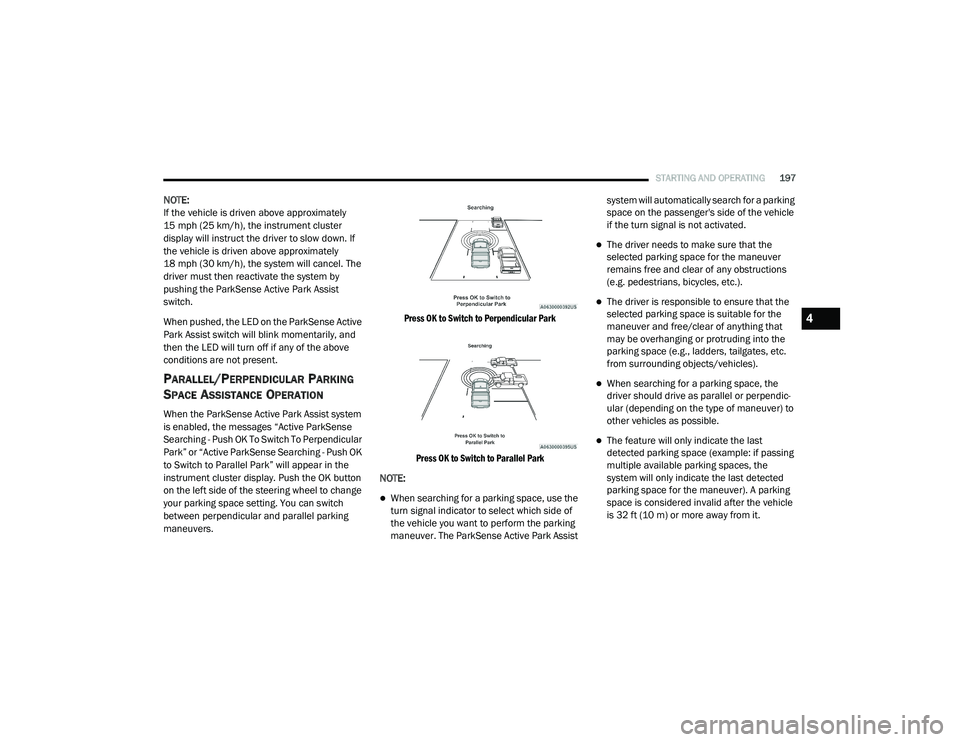
When the ParkSense Active Park Assist system
is enabled, the messages “Active ParkSense
Searching - Push OK To Switch To Perpendicular
Park” or “Active ParkSense Searching - Push OK
to Switch to Parallel Park” will appear in the
instrument cluster display. Push the OK button
on the left side of the steering wheel to change
your parking space setting. You can switch
between perpendicular and parallel parking
maneuvers.
Press OK to Switch to Perpendicular Park
Press OK to Switch to Parallel Park
NOTE:
When searching for a parking space, use the
turn signal indicator to select which side of
the vehicle you want to perform the parking
maneuver. The ParkSense Active Park Assist system will automatically search for a parking
space on the passenger's side of the vehicle
if the turn signal is not activated.
The driver needs to make sure that the
selected parking space for the maneuver
remains free and clear of any obstructions
(e.g. pedestrians, bicycles, etc.).
The driver is responsible to ensure that the
selected parking space is suitable for the
maneuver and free/clear of anything that
may be overhanging or protruding into the
parking space (e.g., ladders, tailgates, etc.
from surrounding objects/vehicles).
When searching for a parking space, the
driver should drive as parallel or perpendic
-
ular (depending on the type of maneuver) to
other vehicles as possible.
The feature will only indicate the last
detected parking space (example: if passing
multiple available parking spaces, the
system will only indicate the last detected
parking space for the maneuver). A parking
space is considered invalid after the vehicle
is 32 ft (10 m) or more away from it.
4
21_DT_OM_EN_USC_t.book Page 197
Page 204 of 496
202STARTING AND OPERATING
CHANGING LANESENSE STATUS
The LaneSense system has settings to adjust
the intensity of the torque warning and the
warning zone sensitivity (Early/Medium/Late)
that you can configure through the Uconnect
system Úpage 237.
NOTE:
When enabled the system operates above
37 mph (60 km/h) and below 112 mph (180 km/h).
The warnings are disabled with use of the
turn signal.
The system will not apply torque to the
steering wheel whenever a safety system
engages (Anti-Lock Brakes, Traction Control
System, Electronic Stability Control, Forward
Collision Warning, etc.).
PARKVIEW REAR BACK UP CAMERA
The ParkView Rear Back Up Camera allows you
to see an on-screen image of the rear
surroundings of your vehicle whenever the gear
selector is put into REVERSE. The image will be
displayed on the Navigation/Multimedia radio
display screen along with a caution note to “Check Entire Surroundings” across the top of
the screen. After five seconds this note will
disappear. The ParkView Camera is located in
the center of the tailgate handle.
Manual Activation Of The Rear View
Camera:
1. Press the "Controls" button located on the bottom of the Uconnect display.
2. Press the "Back Up Camera" icon to turn the Rear View Camera system on.
NOTE:
The ParkView Rear Back Up Camera has
programmable modes of operation that may be
selected through the Uconnect system
Ú page 237.
When the vehicle is shifted out of REVERSE
(with camera delay turned off), the rear camera
mode is exited and the previous screen
appears. When the vehicle is shifted out of
REVERSE (with camera delay turned on), the
camera image will continue to be displayed for
up to 10 seconds after shifting out of REVERSE
unless the following conditions occur: The
vehicle speed exceeds 8 mph (13 km/h), the vehicle is shifted into PARK, the vehicle’s
ignition is placed in the OFF position, or the user
presses image defeat “X” to exit out of the
camera video display.
Whenever the Rear View Camera image is
activated through the "Back Up Camera" button
in the Controls menu, and the vehicle speed is
greater than, or equal to, 8 mph (13 km/h), a
display timer for the image is initiated. The
image will continue to be displayed until the
display timer exceeds 10 seconds.
NOTE:
If the vehicle speed remains below 8 mph
(13 km/h), the Rear View Camera image will
be displayed continuously until deactivated
via the touchscreen button "X", the transmis -
sion is shifted into PARK, or the ignition is
placed in the OFF position.
The touchscreen button "X" to disable display
of the camera image is made available ONLY
when the vehicle is not in REVERSE.
When enabled, active guidelines are overlaid on
the image to illustrate the width of the vehicle
and its projected back up path based on the
steering wheel position. A dashed center line
overlay indicates the center of the vehicle to
21_DT_OM_EN_USC_t.book Page 202
Page 206 of 496

204STARTING AND OPERATING
AUX CAMERA — IF EQUIPPED
Your vehicle may be equipped with one or two
AUX Cameras, which display rearview and side
view images from the trailer on the
touchscreen.
Activation
The AUX Camera is activated by first pressing
the Backup Camera or Surround View Camera
(if equipped) button on the touchscreen,
followed by the AUX button located in the upper
left corner of the rearview display. The AUX
camera can also be activated when the vehicle
is in REVERSE by pressing the AUX button.
If equipped with two AUX Cameras, you can
switch between each camera by pressing the
AUX1 or AUX2 buttons on the Trailer Camera
display.
AUX1 Camera Button
AUX2 Camera Button Deactivation
The AUX Camera is deactivated by pressing the
“X” in the upper right corner of the touchscreen.
This will return the display back to the
previously displayed screen.
NOTE:
If the AUX button is pressed and no AUX
Camera is connected, the touchscreen will
display a blue screen along with the message
“Camera System Unavailable.” The screen
can be exited out by pressing the “X” in the
upper right hand corner. This will return the
display back to the previously displayed
screen.
Zoom View is not available with the AUX
Camera feature.
The display will always default to the Trailer
Camera display (AUX 1).
SURROUND VIEW CAMERA SYSTEM — IF
EQUIPPED
The Surround View Camera system allows you
to see an on-screen image of the surroundings
and the Top View of your vehicle. This occurs
whenever the gear selector is in REVERSE or when enabled through the Uconnect system.
The Top View of the vehicle will also show if any
doors are open. The image will be displayed on
the touchscreen along with a caution note
“Check Entire Surroundings”. After five
seconds, this note will disappear. The Surround
View Camera system is comprised of four
cameras located in the front grille, rear tailgate
and side mirrors.
NOTE:
The Surround View Camera system has
programmable settings that may be selected
through the Uconnect system Ú
page 237.
Press this button on the touchscreen
to enter the Surround View Camera
menu in the Uconnect system.
When the vehicle is shifted into REVERSE, the
Rear View and Top View is the default view of
the system.
If the camera delay is turned on, the camera
image will display for up to 10 seconds after
shifting out of REVERSE. The camera image will
not display for 10 seconds if the vehicle speed
exceeds 8 mph (13 km/h), the vehicle is shifted
into PARK, or the ignition is placed in the OFF
position. The “X” button on the touchscreen
disables the display of the camera image.
21_DT_OM_EN_USC_t.book Page 204