MPH setting RAM 1500 2021 Owner's Manual
[x] Cancel search | Manufacturer: RAM, Model Year: 2021, Model line: 1500, Model: RAM 1500 2021Pages: 496, PDF Size: 20.89 MB
Page 248 of 496
246MULTIMEDIA
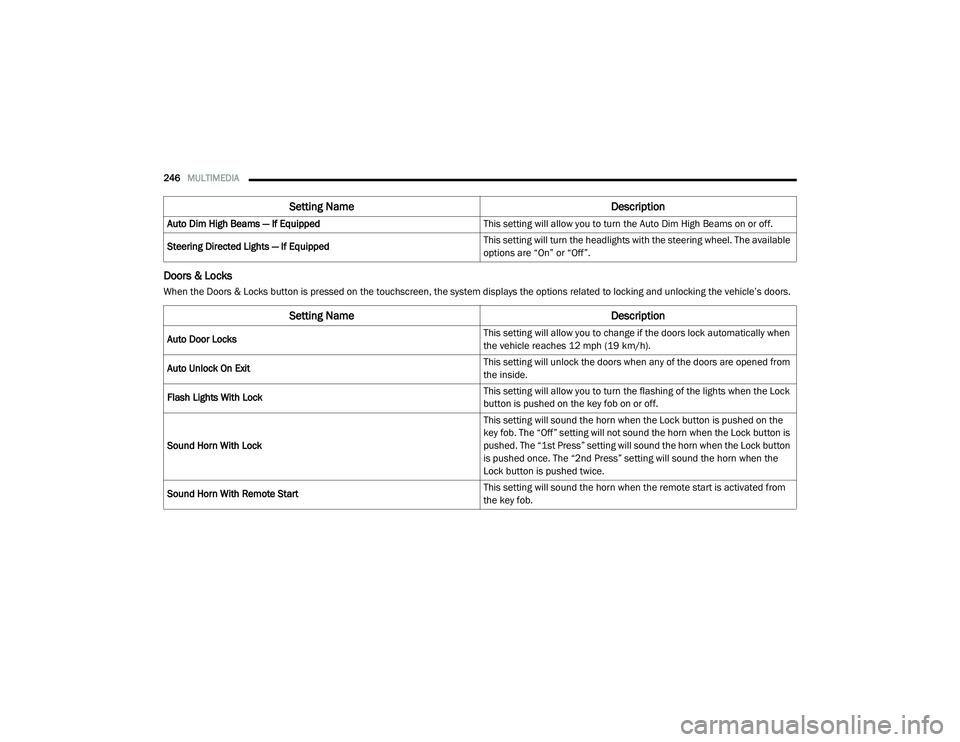
Doors & Locks
When the Doors & Locks button is pressed on the touchscreen, the system displays the options related to locking and unlocking the vehicle’s doors.Auto Dim High Beams — If Equipped
This setting will allow you to turn the Auto Dim High Beams on or off.
Steering Directed Lights — If Equipped This setting will turn the headlights with the steering wheel. The available
options are “On” or “Off”.
Setting Name
Description
Setting NameDescription
Auto Door Locks This setting will allow you to change if the doors lock automatically when
the vehicle reaches 12 mph (19 km/h).
Auto Unlock On Exit This setting will unlock the doors when any of the doors are opened from
the inside.
Flash Lights With Lock This setting will allow you to turn the flashing of the lights when the Lock
button is pushed on the key fob on or off.
Sound Horn With Lock This setting will sound the horn when the Lock button is pushed on the
key fob. The “Off” setting will not sound the horn when the Lock button is
pushed. The “1st Press” setting will sound the horn when the Lock button
is pushed once. The “2nd Press” setting will sound the horn when the
Lock button is pushed twice.
Sound Horn With Remote Start This setting will sound the horn when the remote start is activated from
the key fob.
21_DT_OM_EN_USC_t.book Page 246
Page 325 of 496

SAFETY323
a trailer will be detected using the blind spot
radar within 90 seconds of forward move -
ment of the vehicle. The vehicle must be
moving above 6 mph (10 km/h) to activate the feature. Once the trailer has been
detected, the system will default to the
maximum blind spot zone until the length has
been verified. You will see “Auto” in the
instrument panel cluster .
Maximum Mode — When “Max Mode” is
selected, the system will default to the
maximum blind spot zone regardless of what
size trailer is attached .
NOTE:
Selected setting is stored when the ignition is
placed in the OFF position. To change this
setting, it must be selected through the
Uconnect settings Ú page 237.
Trailer Length Detection
Once the trailer presence has been established,
the trailer length will be established (by making
a 90 degree turn) and then the trailer length
category (example 10-20 ft (3 m to 6 m)) will be
displayed. This can take up to 30 seconds after
completing the turn. NOTE:
During the same ignition cycle, if the vehicle is
at a standstill for a minimum of 90 seconds, a
new “trailer detection request” is enabled by
the system once the vehicle resumes motion.
Maximum length supported by the Trailer Merge
Assist feature is 39.5 ft (12 m). Trailer length is
considered the forward most portion of the
trailer hitch to the rearward most portion of the
body, fascia/bumper, or ramp of the trailer.
Maximum width supported by the Trailer Merge
Assist feature is 8.5 ft (2.59 m). Trailer width is
measured at the widest portion of the trailer
and may include wheels, tires, finders, or rails.
NOTE:
Fifth wheel or gooseneck trailers are not
supported by Trailer Merge Assist.
NOTE:
The ability to detect a trailer may be degraded in
crowded or busy environments. Busy parking
lots, narrow areas surrounded with trees, or any
other crowded area may prevent the radar
sensors from being able to adequately detect
the trailer. The system will try to detect a trailer
at every ignition cycle or 90 seconds of stand
-
still.
Trailer Length Detection
Trailer length will be identified and placed into
one of the following categories:
Trailer length up to 10 ft (3 m) — Blind spot
zone will be adjusted to 10 ft (3 m) .
Trailer length between 10 ft to 20 ft (3 m to
6 m) — Blind spot zone will be adjusted to
20 ft (6 m) .
Trailer length between 20 ft to 30 ft (6 m to
9 m) — Blind spot zone will be adjusted to
30 ft (9 m) .
1 — Trailer Length
2 — Trailer Width
3 — Trailer Hitch
6
21_DT_OM_EN_USC_t.book Page 323
Page 327 of 496
SAFETY325
Forward Collision Warning with Mitigation event
stops the vehicle completely, the system will
hold the vehicle at standstill for two seconds
and then release the brakes.
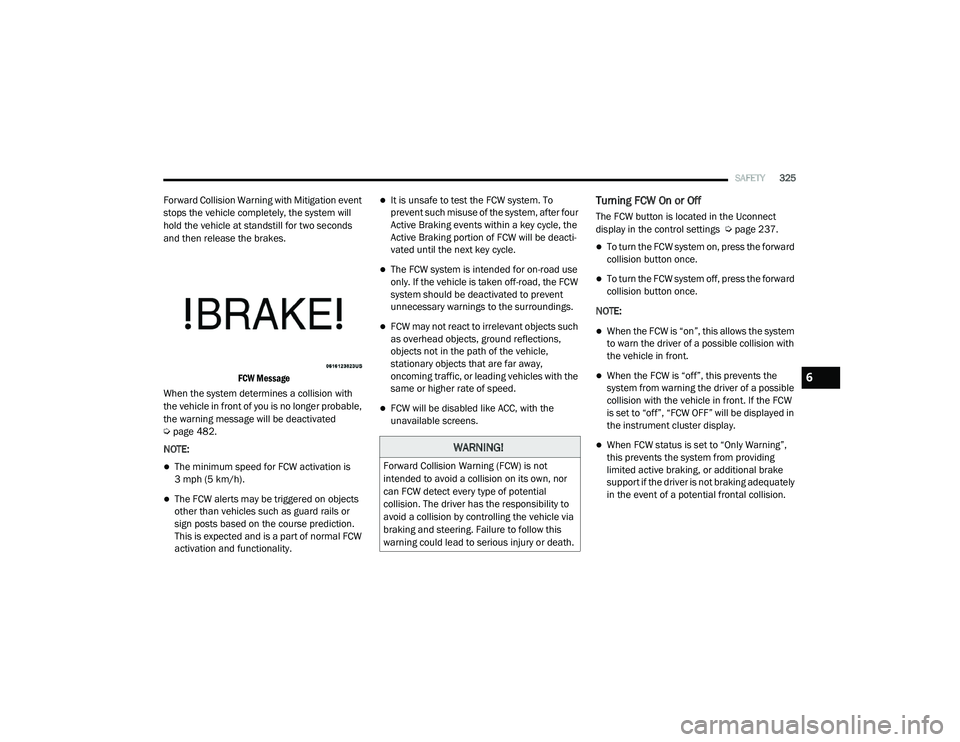
FCW Message
When the system determines a collision with
the vehicle in front of you is no longer probable,
the warning message will be deactivated
Ú page 482.
NOTE:
The minimum speed for FCW activation is
3 mph (5 km/h).
The FCW alerts may be triggered on objects
other than vehicles such as guard rails or
sign posts based on the course prediction.
This is expected and is a part of normal FCW
activation and functionality.
It is unsafe to test the FCW system. To
prevent such misuse of the system, after four
Active Braking events within a key cycle, the
Active Braking portion of FCW will be deacti -
vated until the next key cycle.
The FCW system is intended for on-road use
only. If the vehicle is taken off-road, the FCW
system should be deactivated to prevent
unnecessary warnings to the surroundings.
FCW may not react to irrelevant objects such
as overhead objects, ground reflections,
objects not in the path of the vehicle,
stationary objects that are far away,
oncoming traffic, or leading vehicles with the
same or higher rate of speed.
FCW will be disabled like ACC, with the
unavailable screens.
Turning FCW On or Off
The FCW button is located in the Uconnect
display in the control settings Ú page 237.
To turn the FCW system on, press the forward
collision button once.
To turn the FCW system off, press the forward
collision button once.
NOTE:
When the FCW is “on”, this allows the system
to warn the driver of a possible collision with
the vehicle in front.
When the FCW is “off”, this prevents the
system from warning the driver of a possible
collision with the vehicle in front. If the FCW
is set to “off”, “FCW OFF” will be displayed in
the instrument cluster display.
When FCW status is set to “Only Warning”,
this prevents the system from providing
limited active braking, or additional brake
support if the driver is not braking adequately
in the event of a potential frontal collision.WARNING!
Forward Collision Warning (FCW) is not
intended to avoid a collision on its own, nor
can FCW detect every type of potential
collision. The driver has the responsibility to
avoid a collision by controlling the vehicle via
braking and steering. Failure to follow this
warning could lead to serious injury or death.
6
21_DT_OM_EN_USC_t.book Page 325
Page 329 of 496

SAFETY327
Pedestrian Emergency Braking (PEB) — If
Equipped
PEB is a subsystem of the FCW system that
provides the driver with audible and visual
warnings in the instrument cluster display, and
may apply automatic braking when it detects a
potential frontal collision with a pedestrian.
If a PEB event begins at a speed below 37 mph
(60 km/h), the system may provide braking to
mitigate the potential collision with a
pedestrian. If the PEB event stops the vehicle
completely, the system will hold the vehicle at a
standstill for two seconds and then release the
brakes. When the system determines a collision
with the pedestrian in front of you is no longer
probable, the warning message will be
deactivated.
The minimum speed for PEB activation is 3 mph
(5 km/h). Turning PEB On Or Off
NOTE:
The default status of PEB is “On.” This allows
the system to warn you of a possible frontal
collision with the pedestrian.
The PEB button is located in the Uconnect
display in the controls settings Ú
page 237.
To turn the PEB system off, push the Pedestrian
Emergency Braking button once.
To turn the PEB system back on, push the
Pedestrian Emergency Braking button again.
Changing the PEB status to “Off” deactivates
the system, so no warning or active braking will
be available in case of a possible frontal
collision with the pedestrian. NOTE:
The PEB system will NOT retain the last setting
selected by the driver after ignition shut down.
The system will reset to the default setting when
the vehicle is restarted.
TIRE PRESSURE MONITORING SYSTEM
(TPMS)
TPMS will warn the driver of a low tire pressure
based on the vehicle recommended cold
placard pressure.
NOTE:
The TPMS Warning Light will illuminate in the
instrument cluster and a chime will sound when
tire pressure is low in one or more of the four
active road tires. In addition, the instrument
cluster will display a graphic showing the pres -
sure values of each tire with the low tire pres -
sure values in a different color, or the Uconnect
radio will display a TPMS message; when this
occurs you must increase the tire pressure to
the recommended cold placard pressure in
order for the TPMS Warning Light to turn off.
The tire pressure will vary with temperature by
about 1 psi (7 kPa) for every 12°F (6.5°C). This
means that when the outside temperature
decreases, the tire pressure will decrease. Tire
WARNING!
Pedestrian Emergency Braking (PEB) is not
intended to avoid a collision on its own, nor
can PEB detect every type of potential colli -
sion with a pedestrian. The driver has the
responsibility to avoid a collision by con -
trolling the vehicle via braking and steering.
Failure to follow this warning could lead to
serious injury or death.
6
21_DT_OM_EN_USC_t.book Page 327
Page 333 of 496
SAFETY331
warning limit, upon the next ignition switch
cycle, the Tire Pressure Monitoring System
(TPMS) Warning Light and a “LOW TIRE”
message will remain on and a chime will
sound. In addition, the graphic in the instru -
ment cluster will still display a pressure value
in a different color and an “Inflate to XX”
message.
After driving the vehicle for up to 20 minutes
above 15 mph (24 km/h), the Tire Pressure
Monitoring System (TPMS) Warning Light will
flash on and off for 75 seconds and then
remain on solid. In addition, the instrument
cluster will display a "SERVICE TPMS
SYSTEM" message for a minimum of five
seconds and then display dashes (--) in place
of the pressure value.
For each subsequent ignition switch cycle, a
chime will sound, the Tire Pressure Moni -
toring System (TPMS) Warning Light will flash
on and off for 75 seconds and then remain
on solid, and the instrument cluster will
display a "SERVICE TPMS SYSTEM" message
for a minimum of five seconds and then
display dashes (--) in place of the pressure
value.
Once you repair or replace the original road
tire and reinstall it on the vehicle in place of
the non-matching full size spare or compact
spare, the TPMS will update automatically. In
addition, the Tire Pressure Monitoring
System (TPMS) Warning Light will turn off and
the graphic in the instrument cluster will
display a new pressure value instead of
dashes (--), as long as no tire pressure is
below the low-pressure warning limit in any of
the four active road tires. The vehicle may
need to be driven for up to 20 minutes above
15 mph (24 km/h) in order for the TPMS to
receive this information.
Tire Fill Alert
This feature notifies the user when the placard
tire pressure is attained while inflating or
deflating the tire.
You may choose to disable or enable the Tire Fill
Alert feature through use of the Uconnect
Settings in the radio.
NOTE:
Only one tire can be filled at a time when
using the Tire Fill Alert system.
The Tire Fill Alert feature cannot be entered if
an existing TPMS fault is set to “active” or if
the system is in deactivation mode (if
equipped).
The system will be activated when a positive
increase in tire pressure is detected by the
TPMS while inflating the tire. The ignition must
be in the RUN mode, with the transmission in
PARK.
NOTE:
It is not required to have the engine running to
enter Tire Fill Alert mode.
The hazard lamps will come on to confirm the
vehicle is in Tire Fill Alert mode.
When Tire Fill Alert mode is entered, the tire
pressure display screen will be displayed in the
instrument cluster.
If the hazard lamps do not come on while
inflating the tire, the TPMS sensor may be out of
range preventing the TPMS sensor signal from
being received. In this case, the vehicle may
need to be moved either forward or backward
slightly to exit the null spot.
6
21_DT_OM_EN_USC_t.book Page 331