key RAM 1500 2021 Owner's Manual
[x] Cancel search | Manufacturer: RAM, Model Year: 2021, Model line: 1500, Model: RAM 1500 2021Pages: 496, PDF Size: 20.89 MB
Page 36 of 496

34GETTING TO KNOW YOUR VEHICLE
(Continued)
MEMORY POSITION RECALL
NOTE:
If a recall is attempted when the vehicle is not in
PARK, a message will display in the instrument
cluster display.
To recall the memory settings for driver one or
two, push the desired memory button number
(1 or 2) or the unlock button on the key fob
linked to the desired memory position.
A recall can be canceled by pushing any of the
memory buttons (S, 1, or 2) during a recall.
When a recall is canceled, the driver seat will
stop moving. A delay of one second will occur
before another recall can be selected.
SEATS
Seats are a part of the Occupant Restraint
System of the vehicle.
MANUAL ADJUSTMENT (FRONT SEATS)
— I
F EQUIPPED
Manual Front Seat Forward/Rearward
Adjustment
Both front seats are adjustable forward or
rearward. The manual seat adjustment handle
is located under the seat cushion at the front
edge of each seat.
Manual Seat Adjustment Bar
While sitting in the seat, pull up on the handle
and slide the seat forward or rearward. Release
the bar once you have reached the desired
position. Then, using body pressure, move
forward and rearward on the seat to be sure
that the seat adjusters have latched.
WARNING!
It is dangerous to ride in a cargo area,
inside or outside of a vehicle. In a collision,
people riding in these areas are more likely
to be seriously injured or killed.
Do not allow people to ride in any area of
your vehicle that is not equipped with seats
and seat belts. In a collision, people riding
in these areas are more likely to be seri -
ously injured or killed.
Be sure everyone in your vehicle is in a seat
and using a seat belt properly.
WARNING!
Adjusting a seat while the vehicle is moving
is dangerous. The sudden movement of the
seat could cause you to lose control. The
seat belt might not be adjusted properly
and you could be injured. Adjust the seat
only while the vehicle is parked.
Do not ride with the seatback reclined so
that the shoulder belt is no longer resting
against your chest. In a collision you could
slide under the seat belt and be seriously or
even fatally injured. Use the recliner only
when the vehicle is parked.
WARNING! (Continued)
21_DT_OM_EN_USC_t.book Page 34
Page 40 of 496

38GETTING TO KNOW YOUR VEHICLE
When you remove the key fob from the igni -
tion, the driver’s seat will move to a position
0.3 inches (7.7 mm) forward of the rear stop if the driver’s seat position is between
0.9 inches and 2.7 inches (22.7 mm and
67.7 mm) forward of the rear stop. The seat
will return to its previously set position when
you place the ignition to the ACC or ON/RUN
position.
The Easy Entry/Easy Exit feature is disabled
when the driver’s seat position is less than
0.9 inches (22.7 mm) forward of the rear stop. At this position, there is no benefit to
the driver by moving the seat for Easy Exit or
Easy Entry.
When enabled in Uconnect Settings, Easy Entry
and Easy Exit positions are stored in each
memory setting profile Ú page 32.
NOTE:
The Easy Entry/Exit feature is enabled or
disabled through the programmable features in
the Uconnect system Ú page 237.
HEATED SEATS — IF EQUIPPED
For information on use with the Remote Start
system, see Úpage 24.
Front Heated Seats — If Equipped
The front heated seats control buttons are
located within the Uconnect system. You can
gain access to the control buttons through the
climate screen and the controls screen.
Push the heated seat button once to turn
the HI setting on.
Push the heated seat button a second
time to turn the MED setting on.
Push the heated seat button a third time
to turn the LO setting on.
Push the heated seat button a fourth time
to turn the heating elements off.
NOTE:
Once a heat setting is selected, heat will be
felt within two to five minutes.
The engine must be running for the heated
seats to operate.
The level of heat selected will stay on until
the operator changes it.
WARNING!
Persons who are unable to feel pain to the
skin because of advanced age, chronic
illness, diabetes, spinal cord injury, medica -
tion, alcohol use, exhaustion or other phys -
ical condition must exercise care when
using the seat heater. It may cause burns
even at low temperatures, especially if
used for long periods of time.
Do not place anything on the seat or seat -
back that insulates against heat, such as a
blanket or cushion. This may cause the seat
heater to overheat. Sitting in a seat that has
been overheated could cause serious
burns due to the increased surface
temperature of the seat.
21_DT_OM_EN_USC_t.book Page 38
Page 43 of 496

GETTING TO KNOW YOUR VEHICLE41
Rear Head Restraints
The outboard head restraints are
non-adjustable, but can be folded down for
improved rearward visibility. Push the button on
the outboard side of the head restraint to
release. To return the head restraint to its
upright position, push up on the head restraint
until it locks back into place.
Release Button
The center head restraint is not adjustable or
removable.
NOTE:
The head restraints should only be removed by
qualified technicians, for service purposes only.
If any of the head restraints require removal,
see an authorized dealer.
For child restraint tethering Ú page 334.
UCONNECT VOICE RECOGNITION
INTRODUCING VOICE RECOGNITION
Start using Uconnect Voice Recognition with
these helpful quick tips. It provides the key
Voice Commands and tips you need to know to
control your vehicle’s Voice Recognition (VR)
system.
Uconnect 3 With 5-inch Display
WARNING!
All occupants, including the driver, should
not operate a vehicle or sit in a vehicle’s
seat until the head restraints are placed in
their proper positions in order to minimize
the risk of neck injury in the event of a
crash.
Head restraints should never be adjusted
while the vehicle is in motion. Driving a
vehicle with the head restraints improperly
adjusted or removed could cause serious
injury or death in the event of a collision.
WARNING!
Sitting in a seat with the head restraint in its
lowered position could result in serious injury
or death in a collision. Always make sure the
outboard head restraints are in their upright
positions when the seat is to be occupied.
2
21_DT_OM_EN_USC_t.book Page 41
Page 46 of 496

44GETTING TO KNOW YOUR VEHICLE
Adjustable Pedals Switch
The pedals can be adjusted with the ignition
placed in the OFF position.
The pedals cannot be adjusted when the
vehicle is in REVERSE or when the Cruise
Control system or Adaptive Cruise Control
system is on. The following messages will
appear in the instrument cluster display if the
pedals are attempted to be adjusted when
the system is locked out: “Adjustable Pedal
Disabled — Cruise Control Engaged” or
“Adjustable Pedal Disabled — Vehicle In
Reverse”.
NOTE:
Always adjust the pedals to a position that
allows full movement of the pedal.
Further small adjustments may be necessary
to find the best possible seat/pedal position.
For vehicles equipped with Driver Memory
Settings Úpage 32, you can use your key fob
or the memory switch on the driver’s door
trim panel to return the adjustable pedals to
pre-programmed positions.
MIRRORS
INSIDE REARVIEW MIRROR
Manual Mirror — If Equipped
The mirror head can be adjusted up, down, left,
and right. The mirror should be adjusted to
center on the view through the rear window.
Headlight glare from vehicles behind you can be
reduced by moving the small control under the
mirror to the night position (toward the rear of
the vehicle). The mirror should be adjusted
while set in the day position (toward the
windshield).
Adjusting Rearview Mirror
WARNING!
Do not adjust the pedals while the vehicle is
moving. You could lose control and have an
accident. Always adjust the pedals while the
vehicle is parked.
CAUTION!
Do not place any article under the adjustable
pedals or impede its ability to move, as it may
cause damage to the pedal controls. Pedal
travel may become limited if movement is
stopped by an obstruction in the adjustable
pedal's path.
21_DT_OM_EN_USC_t.book Page 44
Page 58 of 496

56GETTING TO KNOW YOUR VEHICLE
CARGO LIGHTS/TRAILER SPOTTER
L
IGHTS WITH BED LIGHTS — IF
E
QUIPPED
The cargo light, bed lights, and trailer spotter
lights are turned on by pushing the cargo light
button located on the lower half of the headlight
switch.
Cargo/Bed Lights Button On Headlight Switch Cargo Lights
When the vehicle is stationary, these lights can
also be turned on using the switch located just
inside the pickup box, on the lower part of the
bed light lens. A telltale will illuminate in the
instrument cluster display when these lights are
on. Pushing the switch a second time will turn
the lights off.
Bed Light Switch (Without RamBox)
The cargo light and bed lights (if equipped) will
turn on for approximately 30 seconds when a
key fob unlock button is pushed, as part of the
Illuminated Entry feature.
When these lights are activated using the
button on the headlight switch, the trailer
spotter lights will remain illuminated when the
vehicle transmission is in PARK, NEUTRAL, or
REVERSE. The trailer spotter lights will turn off
when the vehicle transmission is placed in
DRIVE.
NOTE:
The cargo light will automatically turn off if the
vehicle is shifted into NEUTRAL or DRIVE, and
will turn back on when the vehicle is shifted into
PARK or REVERSE. The bed lights are not
affected by gear selection.
NOTE:
For vehicles shipped to or sold in the states of
California or Mississippi, the cargo, bed, and
mirror spotter lights will not work while the
vehicle is in motion. In every other state, the
cargo and mirror spotter lights will turn off when
the vehicle is in motion, but the bed light will
remain on. In all states, including California and
Mississippi, if a bed camera is deactivated, the
bed lights will turn back on.
21_DT_OM_EN_USC_t.book Page 56
Page 59 of 496
GETTING TO KNOW YOUR VEHICLE57
BATTERY SAVER
Timers are set to both the interior and exterior
lights to protect the life of your vehicle’s battery.
After 10 minutes, if the ignition is OFF and any
door is left open or the dimmer control is
rotated all the way up to the dome light on
position, the interior lights will automatically
turn off.
NOTE:
Battery saver mode is canceled if the ignition is
ON.
If the headlights remain on while the ignition is
placed in the OFF position, the exterior lights will
automatically turn off after eight minutes. If the
headlights are turned on and left on for eight
minutes while the ignition is OFF, the exterior
lights will automatically turn off.
INTERIOR LIGHTS
COURTESY LIGHTS
Courtesy and dome lights are turned on when the
doors are opened or the Dome ON button is
pushed on the overhead console. If your vehicle
is equipped with Remote Keyless Entry and the
unlock button is pushed on the key fob, the courtesy and dome lights will turn on. When a
door is open and the interior lights are on, and
the Dome Defeat button on the overhead
console is pressed, the interior lights will turn off.
Front Map/Reading Lights
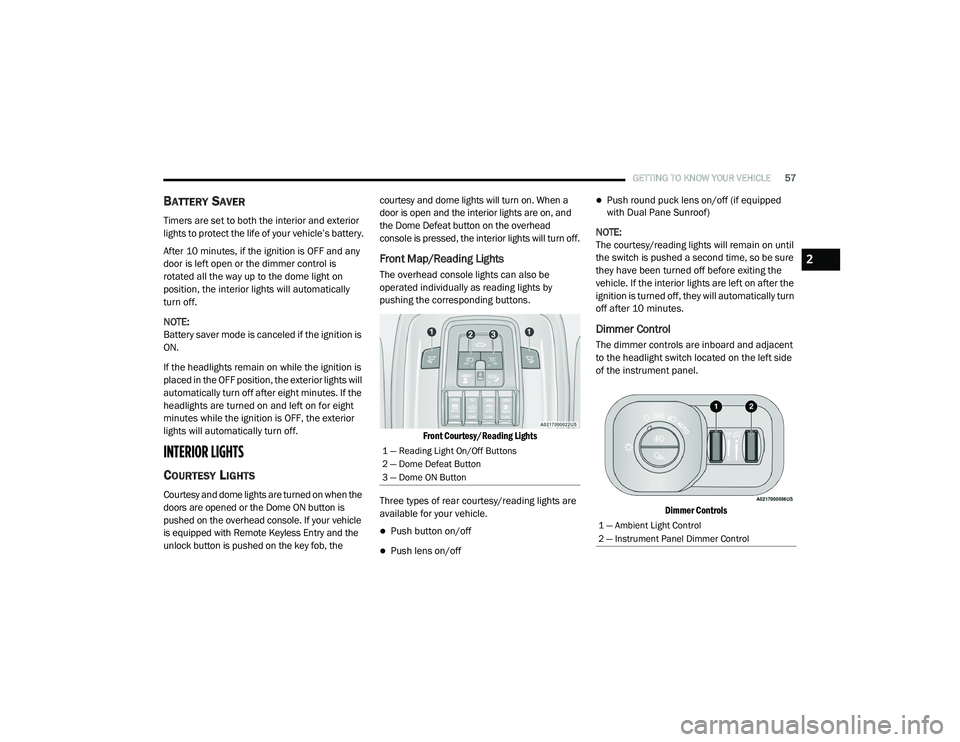
The overhead console lights can also be
operated individually as reading lights by
pushing the corresponding buttons.
Front Courtesy/Reading Lights
Three types of rear courtesy/reading lights are
available for your vehicle.
Push button on/off
Push lens on/off
Push round puck lens on/off (if equipped
with Dual Pane Sunroof)
NOTE:
The courtesy/reading lights will remain on until
the switch is pushed a second time, so be sure
they have been turned off before exiting the
vehicle. If the interior lights are left on after the
ignition is turned off, they will automatically turn
off after 10 minutes.
Dimmer Control
The dimmer controls are inboard and adjacent
to the headlight switch located on the left side
of the instrument panel.
Dimmer Controls
1 — Reading Light On/Off Buttons
2 — Dome Defeat Button
3 — Dome ON Button
1 — Ambient Light Control
2 — Instrument Panel Dimmer Control
2
21_DT_OM_EN_USC_t.book Page 57
Page 60 of 496

58GETTING TO KNOW YOUR VEHICLE
With the parking lights or headlights on, rotating
the right dimmer control upward will increase
the brightness of the instrument panel lights.
Rotating the left dimmer control will adjust the
interior and ambient light levels when the
headlights are on.
NOTE:
The dimming of the touchscreen is program -
mable through the Uconnect system
Ú page 237.
ILLUMINATED ENTRY
The courtesy lights will turn on when you use the
key fob to unlock the doors or open any door.
This feature also turns on the approach lamps
located beneath the outside mirrors (if
equipped).
The lights will fade to off after approximately
30 seconds, or they will immediately fade to off
once the ignition switch is placed in the ON/
RUN position from the OFF position.
The front courtesy overhead console and door
courtesy lights will not turn off if the Dome ON
button on the overhead console is pushed. The
overhead and door courtesy lights will turn off
after 10 minutes to protect the battery. The illuminated entry system will not operate if
the Dome Defeat button on the overhead
console is pushed.
NOTE:
If your vehicle is equipped with Illuminated
Approach lights under the outside mirrors, they
will also be turned off by pushing the Dome
Defeat button.
WINDSHIELD WIPERS AND WASHERS
The windshield wiper/washer controls are
located on the multifunction lever on the left
side of the steering column. The front wipers are
operated by rotating a switch, located on the
end of the lever.
Windshield Wiper/Washer Lever
WINDSHIELD WIPER OPERATION
Intermittent Wipers
The intermittent feature of this system was
designed for use when weather conditions
make a single wiping cycle, with a variable
pause between cycles, desirable. For maximum
delay between cycles, rotate the control knob
upward to the first detent.
The delay interval decreases as you rotate the
knob until it enters the low continual speed
position. The delay can be regulated from a
maximum of about 18 seconds between cycles,
to a cycle every one second. The delay intervals
will double in duration when the vehicle speed
is 10 mph (16 km/h) or less.Windshield Washers
To use the windshield washer, push the washer
knob, located on the end of the multifunction
lever, inward and hold. Washer fluid will be
sprayed and the wiper will operate for two to
three cycles after the washer knob is released.
If the washer knob pushed while in the delay
range, the wiper will operate for several
seconds after the washer knob is released. It
will then resume the intermittent interval
previously selected. If the washer knob is
21_DT_OM_EN_USC_t.book Page 58
Page 76 of 496

74GETTING TO KNOW YOUR VEHICLE
(Continued)
Center Console USB/AUX Media Hub
Some USB ports support media and charging.
You can use features, such as Apple CarPlay®,
Android Auto™, Pandora®, and others while
charging your phone.
NOTE:
Plugging in a phone or another USB device may
cause the connection to a previous device to be
lost.
For further information, refer to the Uconnect
Owner’s Manual Supplement or visit
UconnectPhone.com.
ELECTRICAL POWER OUTLETS
The auxiliary 12 Volt (13 Amp) power outlet can
provide power for in-cab accessories designed
for use with the standard “cigarette lighter”
style plug. The 12 Volt power outlets and 5 Volt
(2.5 Amp) USB Port (Charge Only) have a cap
attached to the outlet indicating “12V DC”,
together with either a key symbol, battery
symbol, or USB symbol.
A key symbol indicates that the ignition must be
in the ON/RUN or ACC positions for the outlet to
provide power. The battery symbol indicates
that the outlet is connected to the battery, and
can provide power at all times. An auxiliary power outlet can be found in the
tray on top of the center stack. This power outlet
only works when the ignition is in the ON/RUN
or ACC position.
Power Outlet — Top Of Center Stack
1 — Standard USB Type A Ports
2 — Mini-USB Type C Ports
3 — AUX Port
CAUTION!
Do not exceed the maximum power of 160
Watts (13 Amps) at 12 Volts. If the 160
Watts (13 Amps) power rating is exceeded,
the fuse protecting the system will need to
be replaced.
Power outlets are designed for accessory
plugs only. Do not insert any other object in
the power outlets as this will damage the
outlet and blow the fuse. Improper use of
the power outlet can cause damage not
covered by your New Vehicle Limited
Warranty.
CAUTION! (Continued)
21_DT_OM_EN_USC_t.book Page 74
Page 79 of 496
GETTING TO KNOW YOUR VEHICLE77
WIRELESS CHARGING PAD — IF
E
QUIPPED
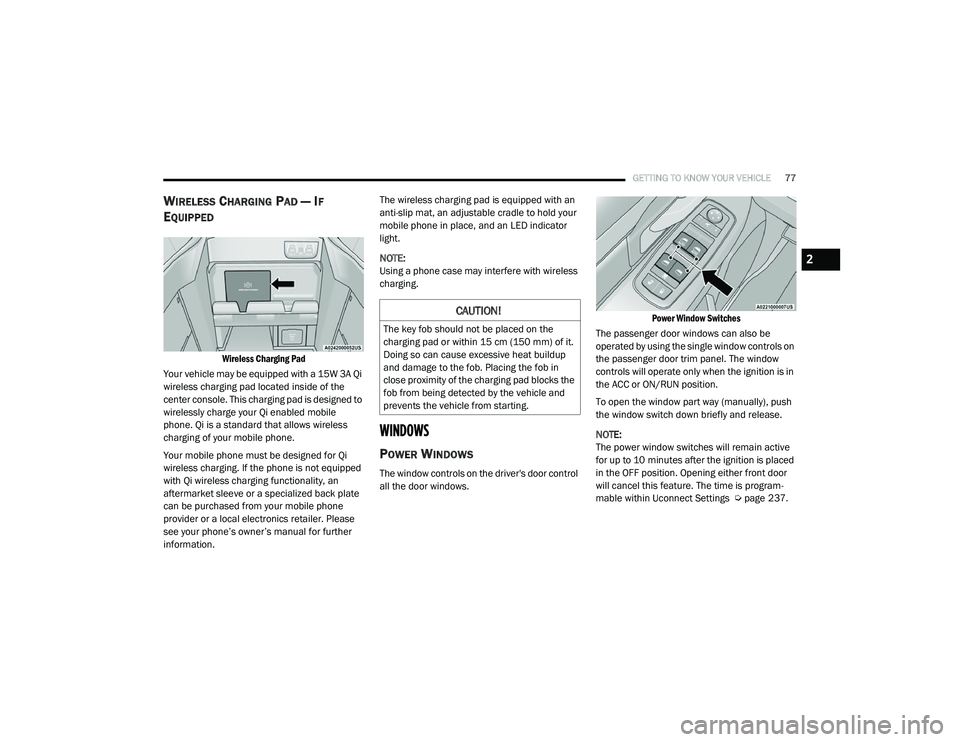
Wireless Charging Pad
Your vehicle may be equipped with a 15W 3A Qi
wireless charging pad located inside of the
center console. This charging pad is designed to
wirelessly charge your Qi enabled mobile
phone. Qi is a standard that allows wireless
charging of your mobile phone.
Your mobile phone must be designed for Qi
wireless charging. If the phone is not equipped
with Qi wireless charging functionality, an
aftermarket sleeve or a specialized back plate
can be purchased from your mobile phone
provider or a local electronics retailer. Please
see your phone’s owner’s manual for further
information. The wireless charging pad is equipped with an
anti-slip mat, an adjustable cradle to hold your
mobile phone in place, and an LED indicator
light.
NOTE:
Using a phone case may interfere with wireless
charging.
WINDOWS
POWER WINDOWS
The window controls on the driver's door control
all the door windows.
Power Window Switches
The passenger door windows can also be
operated by using the single window controls on
the passenger door trim panel. The window
controls will operate only when the ignition is in
the ACC or ON/RUN position.
To open the window part way (manually), push
the window switch down briefly and release.
NOTE:
The power window switches will remain active
for up to 10 minutes after the ignition is placed
in the OFF position. Opening either front door
will cancel this feature. The time is program -
mable within Uconnect Settings Ú page 237.
CAUTION!
The key fob should not be placed on the
charging pad or within 15 cm (150 mm) of it.
Doing so can cause excessive heat buildup
and damage to the fob. Placing the fob in
close proximity of the charging pad blocks the
fob from being detected by the vehicle and
prevents the vehicle from starting.
2
21_DT_OM_EN_USC_t.book Page 77
Page 80 of 496

78GETTING TO KNOW YOUR VEHICLE
AUTOMATIC WINDOW FEATURES
Auto-Down Feature
The driver and front passenger door power
window switches have an Auto-Down feature.
Push the window switch down for a short period
of time, then release, and the window will go
down automatically.
To stop the window from going all the way down
during the Auto-Down operation, pull up or push
down on the switch briefly. Auto-Up Feature With Anti-Pinch Protection
Lift the window switch up for a short period of
time and release; the window will go up
automatically.
To stop the window from going all the way up
during the Auto-Up operation, push down on the
switch briefly.
To close the window part way, lift the window
switch briefly and release it when you want the
window to stop.
If the window runs into any obstacle during
auto-closure, it will reverse direction and then
go back down. Remove the obstacle and use
the window switch again to close the window.
NOTE:
Any impact due to rough road conditions may
trigger the auto-reverse function unexpectedly
during auto-closure. If this happens, pull the
switch lightly and hold to close the window
manually.
RESET AUTO-UP
Should the Auto-Up feature stop working, the
window probably needs to be reset. To reset
Auto-Up:
1. Pull the window switch up to close the
window completely and continue to hold
the switch up for an additional two seconds
after the window is closed.
2. Push the window switch down firmly to open the window completely and continue to hold
the switch down for an additional two
seconds after the window is fully open.
WARNING!
Never leave children unattended in a vehicle.
Do not leave the key fob in or near the vehicle
or in a location accessible to children, and do
not leave the ignition of a vehicle equipped
with Keyless Enter-N-Go in the ACC or ON/
RUN mode. Occupants, particularly unat-
tended children, can become entrapped by
the windows while operating the power win -
dow switches. Such entrapment may result in
serious injury or death.
WARNING!
There is no anti-pinch protection when the
window is almost closed. To avoid personal
injury be sure to clear your arms, hands,
fingers and all objects from the window path
before closing.
21_DT_OM_EN_USC_t.book Page 78