lights RAM 1500 2021 Owner's Manual
[x] Cancel search | Manufacturer: RAM, Model Year: 2021, Model line: 1500, Model: RAM 1500 2021Pages: 496, PDF Size: 20.89 MB
Page 82 of 496
80GETTING TO KNOW YOUR VEHICLE
WIND BUFFETING
Wind buffeting can be described as the
perception of pressure on the ears or a
helicopter-type sound in the ears. Your vehicle
may exhibit wind buffeting with the windows
down, or the sunroof (if equipped) in certain
open or partially open positions. This is a normal
occurrence and can be minimized. If the
buffeting occurs with the rear windows open,
open the front and rear windows together to
minimize the buffeting. If the buffeting occurs
with the sunroof open, adjust the sunroof
opening to minimize the buffeting or open any
window.
POWER SUNROOF — IF EQUIPPED
SINGLE PANE POWER SUNROOF — IF
E
QUIPPED
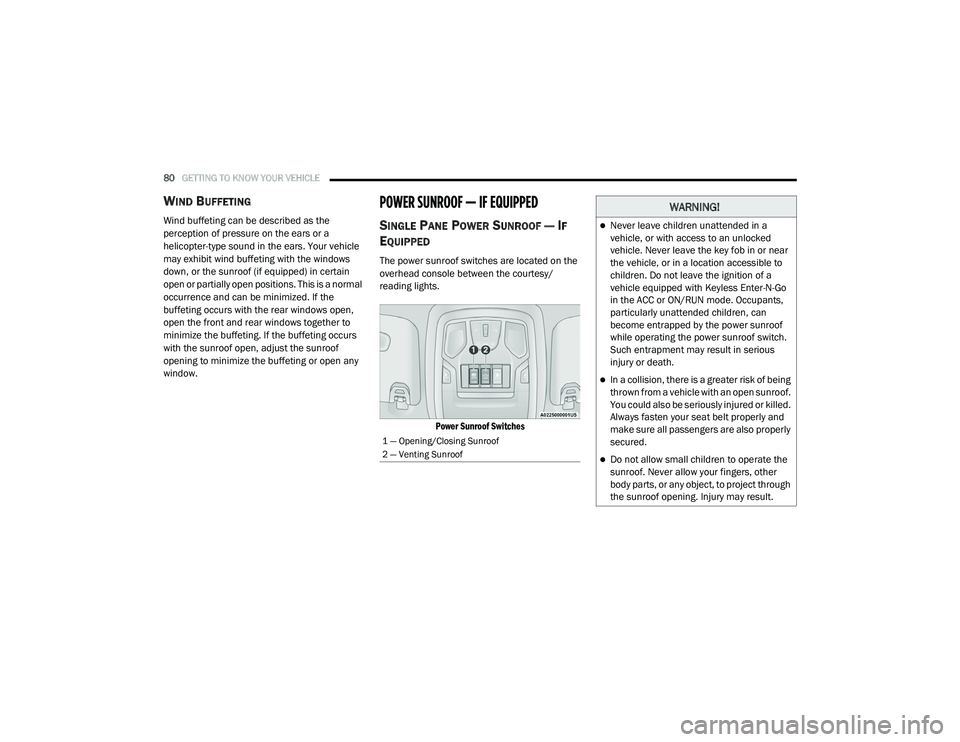
The power sunroof switches are located on the
overhead console between the courtesy/
reading lights.
Power Sunroof Switches
1 — Opening/Closing Sunroof
2 — Venting Sunroof
WARNING!
Never leave children unattended in a
vehicle, or with access to an unlocked
vehicle. Never leave the key fob in or near
the vehicle, or in a location accessible to
children. Do not leave the ignition of a
vehicle equipped with Keyless Enter-N-Go
in the ACC or ON/RUN mode. Occupants,
particularly unattended children, can
become entrapped by the power sunroof
while operating the power sunroof switch.
Such entrapment may result in serious
injury or death.
In a collision, there is a greater risk of being
thrown from a vehicle with an open sunroof.
You could also be seriously injured or killed.
Always fasten your seat belt properly and
make sure all passengers are also properly
secured.
Do not allow small children to operate the
sunroof. Never allow your fingers, other
body parts, or any object, to project through
the sunroof opening. Injury may result.
21_DT_OM_EN_USC_t.book Page 80
Page 84 of 496
82GETTING TO KNOW YOUR VEHICLE
DUAL PANE POWER SUNROOF — IF
E
QUIPPED
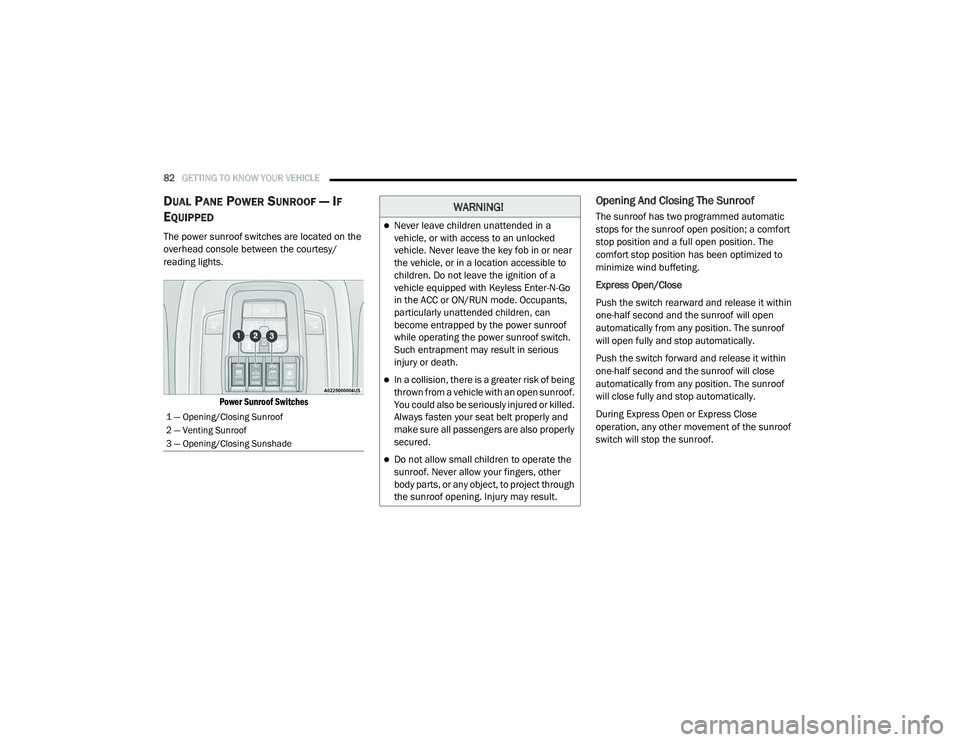
The power sunroof switches are located on the
overhead console between the courtesy/
reading lights.
Power Sunroof Switches
Opening And Closing The Sunroof
The sunroof has two programmed automatic
stops for the sunroof open position; a comfort
stop position and a full open position. The
comfort stop position has been optimized to
minimize wind buffeting.
Express Open/Close
Push the switch rearward and release it within
one-half second and the sunroof will open
automatically from any position. The sunroof
will open fully and stop automatically.
Push the switch forward and release it within
one-half second and the sunroof will close
automatically from any position. The sunroof
will close fully and stop automatically.
During Express Open or Express Close
operation, any other movement of the sunroof
switch will stop the sunroof.
1 — Opening/Closing Sunroof
2 — Venting Sunroof
3 — Opening/Closing Sunshade
WARNING!
Never leave children unattended in a
vehicle, or with access to an unlocked
vehicle. Never leave the key fob in or near
the vehicle, or in a location accessible to
children. Do not leave the ignition of a
vehicle equipped with Keyless Enter-N-Go
in the ACC or ON/RUN mode. Occupants,
particularly unattended children, can
become entrapped by the power sunroof
while operating the power sunroof switch.
Such entrapment may result in serious
injury or death.
In a collision, there is a greater risk of being
thrown from a vehicle with an open sunroof.
You could also be seriously injured or killed.
Always fasten your seat belt properly and
make sure all passengers are also properly
secured.
Do not allow small children to operate the
sunroof. Never allow your fingers, other
body parts, or any object, to project through
the sunroof opening. Injury may result.
21_DT_OM_EN_USC_t.book Page 82
Page 96 of 496
94GETTING TO KNOW YOUR VEHICLE
(Continued)
The interior of the RamBox will automatically
illuminate when the lid is opened. The timing
can be adjusted within Uconnect Settings
Úpage 237.
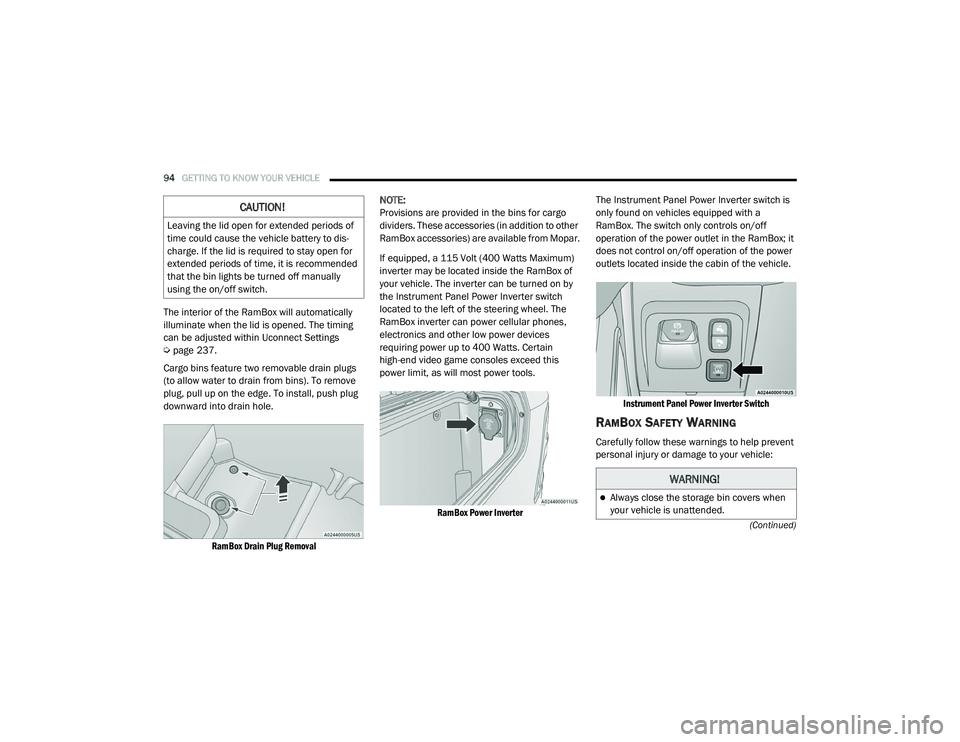
Cargo bins feature two removable drain plugs
(to allow water to drain from bins). To remove
plug, pull up on the edge. To install, push plug
downward into drain hole.
RamBox Drain Plug Removal
NOTE:
Provisions are provided in the bins for cargo
dividers. These accessories (in addition to other
RamBox accessories) are available from Mopar.
If equipped, a 115 Volt (400 Watts Maximum)
inverter may be located inside the RamBox of
your vehicle. The inverter can be turned on by
the Instrument Panel Power Inverter switch
located to the left of the steering wheel. The
RamBox inverter can power cellular phones,
electronics and other low power devices
requiring power up to 400 Watts. Certain
high-end video game consoles exceed this
power limit, as will most power tools.
RamBox Power Inverter
The Instrument Panel Power Inverter switch is
only found on vehicles equipped with a
RamBox. The switch only controls on/off
operation of the power outlet in the RamBox; it
does not control on/off operation of the power
outlets located inside the cabin of the vehicle.
Instrument Panel Power Inverter Switch
RAMBOX SAFETY WARNING
Carefully follow these warnings to help prevent
personal injury or damage to your vehicle:
CAUTION!
Leaving the lid open for extended periods of
time could cause the vehicle battery to dis -
charge. If the lid is required to stay open for
extended periods of time, it is recommended
that the bin lights be turned off manually
using the on/off switch.
WARNING!
Always close the storage bin covers when
your vehicle is unattended.
21_DT_OM_EN_USC_t.book Page 94
Page 127 of 496

GETTING TO KNOW YOUR INSTRUMENT PANEL125
BATTERY SAVER ON/BATTERY SAVER
M
ODE MESSAGE — ELECTRICAL LOAD
R
EDUCTION ACTIONS — IF EQUIPPED
This vehicle is equipped with an Intelligent
Battery Sensor (IBS) to perform additional
monitoring of the electrical system and status
of the vehicle battery.
In cases when the IBS detects charging system
failure, or the vehicle battery conditions are
deteriorating, electrical load reduction actions
will take place to extend the driving time and
distance of the vehicle. This is done by reducing
power to or turning off non-essential electrical
loads.
Load reduction is only active when the engine is
running. It will display a message if there is a
risk of battery depletion to the point where the
vehicle may stall due to lack of electrical supply,
or will not restart after the current drive cycle.
When load reduction is activated, the message
“Battery Saver On Some Systems May Have
Reduced Power” will appear in the instrument
cluster.
These messages indicate the vehicle battery
has a low state of charge and continues to lose electrical charge at a rate that the charging
system cannot sustain.
NOTE:The charging system is independent from
load reduction. The charging system
performs a diagnostic on the charging
system continuously.
If the Battery Charge Warning Light is on it
may indicate a problem with the charging
system Ú
page 128.
The electrical loads that may be switched off (if
equipped), and vehicle functions which can be
affected by load reduction:
Heated Seats / Vented Seats / Heated Wheel
Rear Defroster And Heated Mirrors
HVAC System
115 Volts AC Power Inverter System
Audio and Telematics System
Loss of the battery charge may indicate one or
more of the following conditions:
The charging system cannot deliver enough
electrical power to the vehicle system
because the electrical loads are larger than the capability of charging system. The
charging system is still functioning properly.
Turning on all possible vehicle electrical
loads (e.g. HVAC to max settings, exterior and
interior lights, overloaded power outlets
+12 Volts, 115 Volts AC, USB ports) during
certain driving conditions (city driving,
towing, frequent stopping).
Installing options like additional lights,
upfitter electrical accessories, audio
systems, alarms and similar devices.
Unusual driving cycles (short trips separated
by long parking periods).
The vehicle was parked for an extended
period of time (weeks, months).
The battery was recently replaced and was
not charged completely.
The battery was discharged by an electrical
load left on when the vehicle was parked.
The battery was used for an extended period
with the engine not running to supply radio,
lights, chargers, +12 Volt portable appli
-
ances like vacuum cleaners, game consoles
and similar devices.
3
21_DT_OM_EN_USC_t.book Page 125
Page 128 of 496

126GETTING TO KNOW YOUR INSTRUMENT PANEL
What to do when an electrical load reduction
action message is present (“Battery Saver On”
or “Battery Saver Mode”)
During a trip:
Reduce power to unnecessary loads if
possible:
Turn off redundant lights (interior or exte-
rior).
Check what may be plugged in to power
outlets +12 Volts, 115 Volts AC, USB
ports.
Check HVAC settings (blower, tempera -
ture).
Check the audio settings (volume).
After a trip:
Check if any aftermarket equipment was
installed (additional lights, upfitter electrical
accessories, audio systems, alarms) and
review specifications if any (load and Ignition
Off Draw currents).
Evaluate the latest driving cycles (distance,
driving time and parking time).
The vehicle should have service performed if
the message is still present during consecu -tive trips and the evaluation of the vehicle
and driving pattern did not help to identify the
cause.
WARNING LIGHTS AND MESSAGES
The warning/indicator lights will illuminate in
the instrument panel together with a dedicated
message and/or acoustic signal when
applicable. These indications are indicative and
precautionary and as such must not be
considered as exhaustive and/or alternative to
the information contained in the Owner’s
Manual, which you are advised to read carefully
in all cases. Always refer to the information in
this chapter in the event of a failure indication.
All active telltales will display first if applicable.
The system check menu may appear different
based upon equipment options and current
vehicle status. Some telltales are optional and
may not appear.
RED WARNING LIGHTS
Seat Belt Reminder Warning Light
This warning light indicates when the
driver or passenger seat belt is
unbuckled. When the ignition is first
placed in the ON/RUN or ACC/ON/
RUN position and if the driver’s seat belt is
unbuckled, a chime will sound and the light will
turn on. When driving, if the driver or front
passenger seat belt remains unbuckled, the
Seat Belt Reminder Light will flash or remain on
continuously and a chime will sound
Ú
page 334.
Air Bag Warning Light
This warning light will illuminate to
indicate a fault with the air bag, and
will turn on for four to eight seconds
as a bulb check when the ignition is
placed in the ON/RUN or ACC/ON/RUN
position. This light will illuminate with a single
chime when a fault with the air bag has been
detected, it will stay on until the fault is cleared.
If the light is either not on during startup, stays
on, or turns on while driving, have the system
inspected at an authorized dealer as soon as
possible.
Brake Warning Light
This warning light monitors various
brake functions, including brake fluid
level and parking brake application. If
the brake light turns on it may
indicate that the parking brake is applied, that
21_DT_OM_EN_USC_t.book Page 126
Page 131 of 496
GETTING TO KNOW YOUR INSTRUMENT PANEL129
Electric Power Steering (EPS) Fault
Warning Light
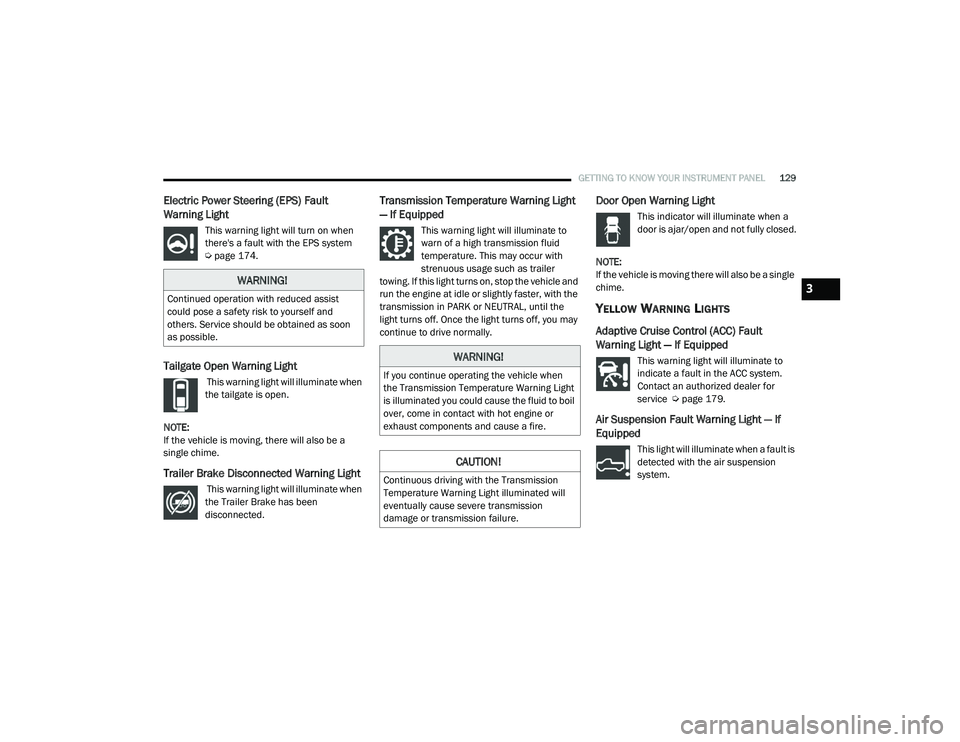
This warning light will turn on when
there's a fault with the EPS system
Úpage 174.
Tailgate Open Warning Light
This warning light will illuminate when
the tailgate is open.
NOTE:
If the vehicle is moving, there will also be a
single chime.
Trailer Brake Disconnected Warning Light
This warning light will illuminate when
the Trailer Brake has been
disconnected.
Transmission Temperature Warning Light
— If Equipped
This warning light will illuminate to
warn of a high transmission fluid
temperature. This may occur with
strenuous usage such as trailer
towing. If this light turns on, stop the vehicle and
run the engine at idle or slightly faster, with the
transmission in PARK or NEUTRAL, until the
light turns off. Once the light turns off, you may
continue to drive normally.
Door Open Warning Light
This indicator will illuminate when a
door is ajar/open and not fully closed.
NOTE:
If the vehicle is moving there will also be a single
chime.
YELLOW WARNING LIGHTS
Adaptive Cruise Control (ACC) Fault
Warning Light — If Equipped
This warning light will illuminate to
indicate a fault in the ACC system.
Contact an authorized dealer for
service Ú page 179.
Air Suspension Fault Warning Light — If
Equipped
This light will illuminate when a fault is
detected with the air suspension
system.
WARNING!
Continued operation with reduced assist
could pose a safety risk to yourself and
others. Service should be obtained as soon
as possible.
WARNING!
If you continue operating the vehicle when
the Transmission Temperature Warning Light
is illuminated you could cause the fluid to boil
over, come in contact with hot engine or
exhaust components and cause a fire.
CAUTION!
Continuous driving with the Transmission
Temperature Warning Light illuminated will
eventually cause severe transmission
damage or transmission failure.
3
21_DT_OM_EN_USC_t.book Page 129
Page 135 of 496

GETTING TO KNOW YOUR INSTRUMENT PANEL133
Service Stop/Start System Warning Light —
If Equipped
This warning light will illuminate when
the Stop/Start system is not
functioning properly and service is
required. Contact an authorized
dealer for service.
Service 4WD Warning Light — If Equipped
This warning light will illuminate to
signal a fault with the 4WD system. If
the light stays on or comes on during
driving, it means that the 4WD system
is not functioning properly and that service is
required. We recommend you drive to the
nearest service center and have the vehicle
serviced immediately.
Cruise Control Fault Warning Light
This warning light will illuminate to
indicate the Cruise Control System is
not functioning properly and service is
required. Contact an authorized
dealer.
YELLOW INDICATOR LIGHTS
Forward Collision Warning Off Indicator
Light — If Equipped
This indicator light illuminates to
indicate that Forward Collision
Warning is off.
Air Suspension Payload Protection
Indicator Light — If Equipped
This indicator light will illuminate to
indicate that the maximum payload
may have been exceeded or load
leveling cannot be achieved at its
current ride height. Protection Mode will
automatically be selected to “protect” the air
suspension system, air suspension adjustment
is limited due to payload.
Trailer Merge Assist Indicator Light — If
Equipped
This indicator light will illuminate to
indicate when Trailer Merge Assist
has been activated Ú page 318.
TOW/HAUL Indicator Light
This indicator light will illuminate
when TOW/HAUL mode is selected.
Cargo Light — If Equipped
This indicator light will illuminate
when the cargo light is activated by
pushing the cargo light button on the
headlight switch.
Air Suspension Off-Road 1 Indicator Light
— If Equipped
This light will illuminate when the air
suspension system is set to the
Off-Road 1 setting Úpage 165.
Air Suspension Off-Road 2 Indicator Light
— If Equipped
This light will illuminate when the air
suspension system is set to the
Off-Road 2 setting Úpage 165.
3
21_DT_OM_EN_USC_t.book Page 133
Page 137 of 496

GETTING TO KNOW YOUR INSTRUMENT PANEL135
Wait To Start Light — If Equipped
This indicator light will illuminate for
approximately two seconds when the
ignition is turned to the RUN position.
Its duration may be longer based on
colder operating conditions. Vehicle will not
initiate start until telltale is no longer displayed
Ú page 146.
NOTE:
The “Wait To Start” telltale may not illuminate if
the intake manifold temperature is warm
enough.
Water In Fuel Indicator Light — If Equipped
The “Water In Fuel Indicator Light” will
illuminate when there is water
detected in the fuel filter. If this light
remains on, DO NOT start the vehicle
before you drain the water from the fuel filter to
prevent engine damage, and please see an
authorized dealer.GREEN INDICATOR LIGHTS
Adaptive Cruise Control (ACC) Set With
Target Light — If Equipped
This will display when the ACC is set
and a target vehicle is detected
Ú page 179.
Adaptive Cruise Control (ACC) Set With No
Target Detected Indicator Light — If
Equipped
This light will turn on when the ACC is
SET and there is no target vehicle
detected Ú page 179.
ECO Mode Indicator Light
This light will turn on when ECO Mode
is active.
Park/Headlight On Indicator Light
This indicator light will illuminate
when the park lights or headlights are
turned on.
LaneSense Indicator Light — If Equipped
The LaneSense indicator light
illuminates solid green when both
lane markings have been detected
and the system is “armed” and ready
to provide visual and torque warnings if an
unintentional lane departure occurs
Ú page 199.
CAUTION!
The presence of water in the fuel system
circuit may cause severe damage to the
injection system and irregular engine
operation. If the indicator light is illuminated,
contact an authorized dealer as soon as
possible to bleed the system. If the above
indications come on immediately after
refuelling, water has probably been poured
into the tank: switch the engine off
immediately and contact an authorized
dealer.
3
21_DT_OM_EN_USC_t.book Page 135
Page 138 of 496
136GETTING TO KNOW YOUR INSTRUMENT PANEL
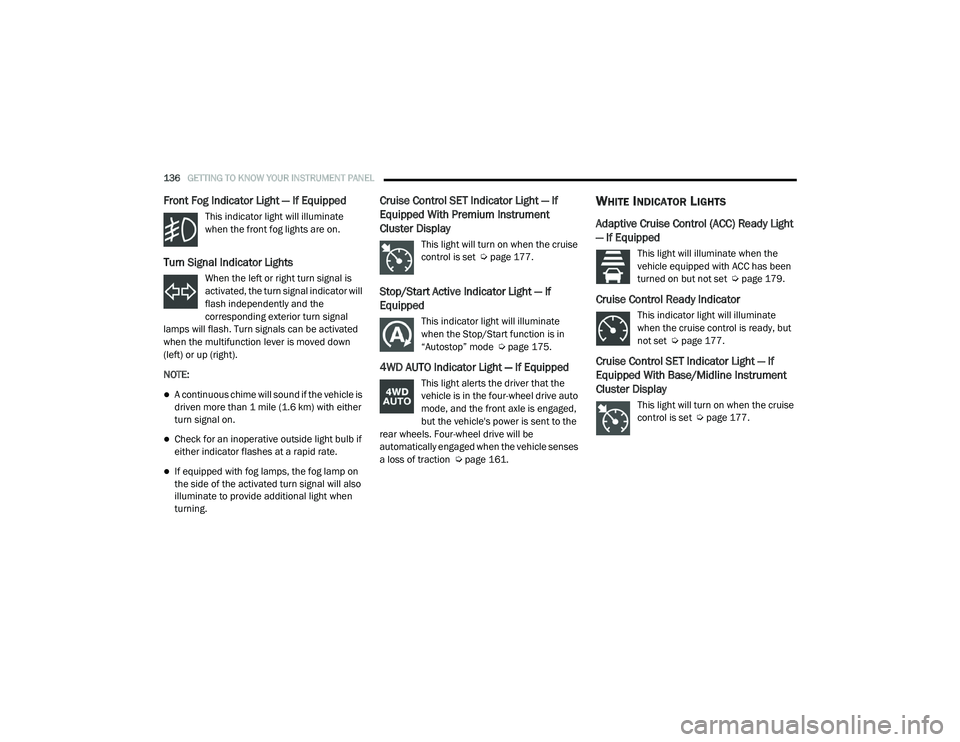
Front Fog Indicator Light — If Equipped
This indicator light will illuminate
when the front fog lights are on.
Turn Signal Indicator Lights
When the left or right turn signal is
activated, the turn signal indicator will
flash independently and the
corresponding exterior turn signal
lamps will flash. Turn signals can be activated
when the multifunction lever is moved down
(left) or up (right).
NOTE:
A continuous chime will sound if the vehicle is
driven more than 1 mile (1.6 km) with either
turn signal on.
Check for an inoperative outside light bulb if
either indicator flashes at a rapid rate.
If equipped with fog lamps, the fog lamp on
the side of the activated turn signal will also
illuminate to provide additional light when
turning.
Cruise Control SET Indicator Light — If
Equipped With Premium Instrument
Cluster Display
This light will turn on when the cruise
control is set Ú page 177.
Stop/Start Active Indicator Light — If
Equipped
This indicator light will illuminate
when the Stop/Start function is in
“Autostop” mode Ú page 175.
4WD AUTO Indicator Light — If Equipped
This light alerts the driver that the
vehicle is in the four-wheel drive auto
mode, and the front axle is engaged,
but the vehicle's power is sent to the
rear wheels. Four-wheel drive will be
automatically engaged when the vehicle senses
a loss of traction Ú page 161.
WHITE INDICATOR LIGHTS
Adaptive Cruise Control (ACC) Ready Light
— If Equipped
This light will illuminate when the
vehicle equipped with ACC has been
turned on but not set Ú page 179.
Cruise Control Ready Indicator
This indicator light will illuminate
when the cruise control is ready, but
not set Úpage 177.
Cruise Control SET Indicator Light — If
Equipped With Base/Midline Instrument
Cluster Display
This light will turn on when the cruise
control is set Ú page 177.
21_DT_OM_EN_USC_t.book Page 136
Page 139 of 496
GETTING TO KNOW YOUR INSTRUMENT PANEL137
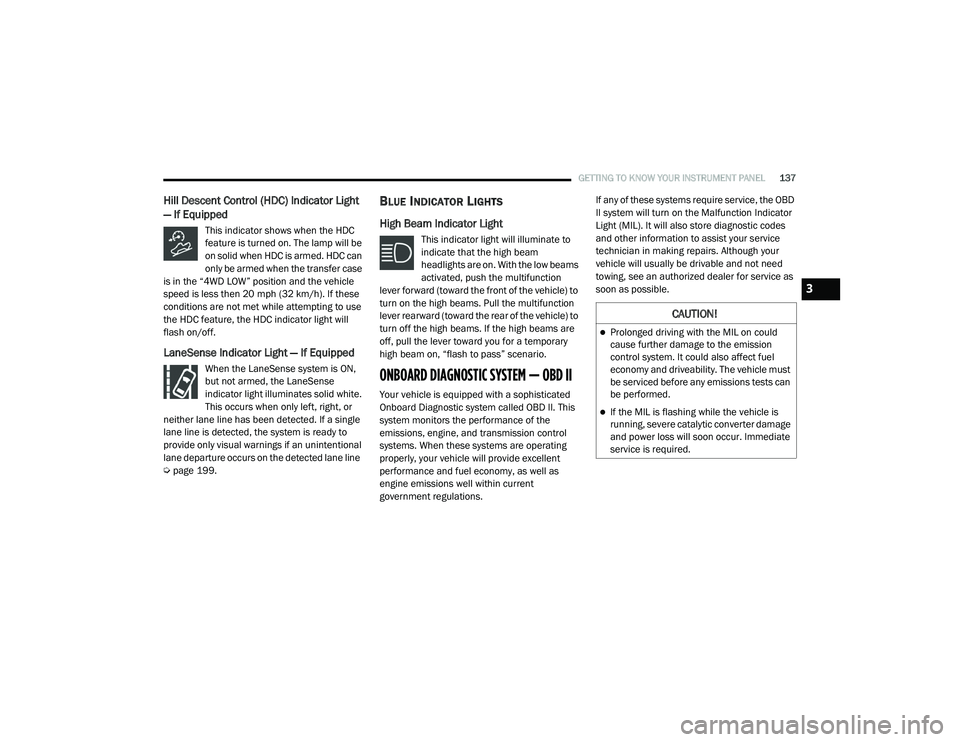
Hill Descent Control (HDC) Indicator Light
— If Equipped
This indicator shows when the HDC
feature is turned on. The lamp will be
on solid when HDC is armed. HDC can
only be armed when the transfer case
is in the “4WD LOW” position and the vehicle
speed is less then 20 mph (32 km/h). If these
conditions are not met while attempting to use
the HDC feature, the HDC indicator light will
flash on/off.
LaneSense Indicator Light — If Equipped
When the LaneSense system is ON,
but not armed, the LaneSense
indicator light illuminates solid white.
This occurs when only left, right, or
neither lane line has been detected. If a single
lane line is detected, the system is ready to
provide only visual warnings if an unintentional
lane departure occurs on the detected lane line
Ú page 199.
BLUE INDICATOR LIGHTS
High Beam Indicator Light
This indicator light will illuminate to
indicate that the high beam
headlights are on. With the low beams
activated, push the multifunction
lever forward (toward the front of the vehicle) to
turn on the high beams. Pull the multifunction
lever rearward (toward the rear of the vehicle) to
turn off the high beams. If the high beams are
off, pull the lever toward you for a temporary
high beam on, “flash to pass” scenario.
ONBOARD DIAGNOSTIC SYSTEM — OBD II
Your vehicle is equipped with a sophisticated
Onboard Diagnostic system called OBD II. This
system monitors the performance of the
emissions, engine, and transmission control
systems. When these systems are operating
properly, your vehicle will provide excellent
performance and fuel economy, as well as
engine emissions well within current
government regulations. If any of these systems require service, the OBD
II system will turn on the Malfunction Indicator
Light (MIL). It will also store diagnostic codes
and other information to assist your service
technician in making repairs. Although your
vehicle will usually be drivable and not need
towing, see an authorized dealer for service as
soon as possible.
CAUTION!
Prolonged driving with the MIL on could
cause further damage to the emission
control system. It could also affect fuel
economy and driveability. The vehicle must
be serviced before any emissions tests can
be performed.
If the MIL is flashing while the vehicle is
running, severe catalytic converter damage
and power loss will soon occur. Immediate
service is required.
3
21_DT_OM_EN_USC_t.book Page 137