park assist RAM 1500 2021 Owner's Manual
[x] Cancel search | Manufacturer: RAM, Model Year: 2021, Model line: 1500, Model: RAM 1500 2021Pages: 496, PDF Size: 20.89 MB
Page 275 of 496

MULTIMEDIA273
The system handles multiple inputs in the same
phrase or sentence such as “make a phone
call” and “to Kelly Smith”. For multiple inputs in
the same phrase or sentence, the system
identifies the topic or context and provides the
associated follow-up prompt such as “Who do
you want to call?” in the case where a phone
call was requested but the specific name was
not recognized.
The system utilizes continuous dialog. When the
system requires more information from the
user, it will ask a question to which the user can
respond without pushing the Voice Command
button on the steering wheel.
Help Command
If you need assistance at any prompt, or if you
want to know your options at any prompt, say
“Help” following the beep.
To activate the Uconnect Phone from idle,
simply push the Phone button (if active) on your
steering wheel and say a command or say
“Help”. All Phone sessions begin with a push of
the VR button or Phone button on the radio
faceplate. Cancel Command
At any prompt, after the beep, you can say
“Cancel” and you will be returned to the main
menu.
You can also push the VR button or Phone
button on your steering wheel when the system
is listening for a command and be returned to
the main or previous menu.
Pair (Link) Uconnect Phone To A Mobile Phone
To begin using your Uconnect Phone, you must
pair your compatible Bluetooth®-enabled
mobile phone. Mobile phone pairing is the
process of establishing a wireless connection
between a cellular phone and the Uconnect
system.
To complete the pairing process, you will need
to reference your mobile phone’s manual.
Please visit UconnectPhone.com for complete
mobile phone compatibility information.
Uconnect 3 With 5-inch Display
NOTE:
You must have Bluetooth® enabled on your
phone to complete this procedure.
The vehicle must be in PARK or at a standstill.
Follow the steps below to pair your phone:
1. Place the ignition in the ACC or ON/RUN position.
2. Press the Phone button.
5
21_DT_OM_EN_USC_t.book Page 273
Page 285 of 496
MULTIMEDIA283
NOTE:
Certain SiriusXM Guardian™ services are
dependent upon an operative telematics
device, a cellular connection, navigation map
data, and GPS satellite signal reception, which
can limit the ability to reach the response
center or reach emergency support.
Not all features of SiriusXM Guardian™ are
available everywhere at all times, particularly
in remote or enclosed areas.
Other factors outside the control of SiriusXM
Guardian™ that may limit or prevent service
delivery are hills, structures, buildings,
tunnels, weather, damage to the electrical
system or other important parts of your
vehicle, network congestion, civil distur-
bances, actions of third parties or the govern -
ment, Internet failure, and/or the physical
location of your vehicle, such as in an under -
ground parking structure or under a bridge.
Not all SiriusXM Guardian™ features are
available for all models.
SiriusXM Guardian™ provides:
The ability to remotely lock/unlock and remote
start your vehicle from virtually anywhere by
using the Uconnect App or your computer.
Send & Go capability with the Uconnect App.
Use the Uconnect App to easily search, map
and send your locations directly to your
Uconnect Navigation.
The ability to locate your vehicle, when you
forget where you parked, using the Vehicle
Finder function of the Uconnect App.
Before you drive, familiarize yourself with the
easy-to-use Uconnect system and SiriusXM
Guardian™ services.
The ASSIST and SOS Call Buttons On Your
Rearview Mirror Or Overhead Console
The ASSIST Button is used for contacting
Roadside Assistance, Vehicle Care, Uconnect
Care, and SiriusXM Guardian™ Customer Care.
The SOS Call button connects you directly to
SiriusXM Guardian™ Customer Care for
assistance in an emergency.
Activation
To unlock the full potential of SiriusXM
Guardian™ in your vehicle, you must activate
your SiriusXM Guardian™ services.
1. Press the Apps icon on the bottom of your in-vehicle touchscreen.
2. Select the Activate Services icon from your
list of apps.
3. For customers in the United States , select
“Customer Care” to speak with a SiriusXM
Guardian™ Customer Care agent who will
activate services in your vehicle, or select
“Enter Email” to activate on the web.
For customers in Canada , enter your email
address to activate services in your vehicle.
Included Trial Period For New Vehicles
Your new vehicle may come with an included
trial period for use of the SiriusXM Guardian™
services starting on the date of vehicle
purchase. To get started with your trial,
enrollment in SiriusXM Guardian™ is required.
The Uconnect 4C/4C NAV includes a trial* of
SiriusXM Guardian™ services from your date of
purchase.
* Included trial applies to new vehicles only.
Features And Packages
After the trial period, you must purchase a
subscription to continue your services by calling
a SiriusXM Guardian™ Customer Care agent.
5
21_DT_OM_EN_USC_t.book Page 283
Page 293 of 496
MULTIMEDIA291
An ignition cycle is required for some remote
commands, such as Remote Vehicle Start
and Remote Door Lock/Unlock if following a
Remote Horn & Lights activation.
Your Remote Door Lock/Unlock request will
not be processed if the vehicle is in motion,
the ignition key is on or during an emergency
call.
NOTE:
All other remote services should be performed
via your Owner’s Site or through the Uconnect
App on your compatible device.
Remote Vehicle Start
Description
The Remote Vehicle Start feature provides you
with the ability to start the engine on your
vehicle without the keys and from virtually any
distance. Once started, the preset climate
controls in your vehicle can warm up or cool
down the interior.
You can also send a command to turn off an
engine that has been started using Remote
Vehicle Start. After 15 minutes, if you have not
entered your vehicle with the key, the engine
will shut off automatically. This remote function requires your vehicle to be
equipped with a factory-installed Remote Start
system.
You can set up push notifications every time a
command is sent to activate or cancel Remote
Start.
Working Vehicle Conditions
The vehicle must be off or in ACC mode.
The vehicle has been started with the key fob
within the last 14 days.
The vehicle must be in PARK or at a standstill.
The vehicle’s security system has been
armed and not triggered since the last
vehicle start.
The doors, hood, and trunk/liftgate are
closed.
The vehicle’s check engine light must be off.
The vehicle must have at least a quarter tank
of fuel, along with oil and battery power.
The vehicle’s hazard lights must be off.
If equipped, the vehicle must have an auto
-
matic transmission.
The vehicle must be in an open area with cell
tower reception.
Your mobile device must have a cellular or
Wi-Fi connection.
If the Panic button has been pressed, the
vehicle must be started at least once after
alarming the system.
NOTE:
The SiriusXM Guardian™ Customer Care agents
are not authorized for Remote Vehicle Start
services. Contact the Uconnect Care Team for
assistance
Remote Horn & Lights
Description
It is easy to locate a vehicle in a dark, crowded
or noisy parking area by activating the horn and
lights. It may also help if you need to draw
attention to your vehicle for any reason.
If you want, you can set up push notifications
every time a command is sent to turn on the
horn and lights.
5
21_DT_OM_EN_USC_t.book Page 291
Page 294 of 496
292MULTIMEDIA
Working Vehicle Conditions
The vehicle must in PARK or at a standstill.
The vehicle must be in an open area with cell
tower reception.
Your mobile device must have a cellular or
Wi-Fi connection.
NOTE:
The Remote Horn & Lights feature is designed
to be loud and get noticed. Please keep in mind
the surroundings when using this feature. You
are responsible for compliance with local laws,
rules and ordinances in the location of your
vehicle when using Remote Horn & Lights.
Roadside Assistance Call
Description
Vehicles equipped with the SiriusXM Guardian™
system feature will contain an ASSIST button in
the vehicle. Once your SiriusXM Guardian™
services have been activated, the ASSIST
button can connect you directly to customer
care call centers. You will be directed to one of
the four services below.
Roadside Assist — If you get a flat tire or need
a tow, you’ll be connected to someone who
can help anytime.
Connected Services — Contact the SiriusXM
Guardian™ Customer Care call center to acti -
vate your services, renew after your trial has
expired, and for in-vehicle support for your
SiriusXM Guardian™ system or help
answering any general questions
surrounding your connected services.
Uconnect Care — In-vehicle support for all
non-connected Uconnect system features,
such as radio and Bluetooth® connections.
Vehicle Care — Total support for your vehicle.
SiriusXM Guardian™ In-Vehicle Assistance
Features
With SiriusXM Guardian™, your vehicle has
onboard assistance features located on the
rearview mirror or overhead console designed
to enhance your driving experience if you should
ever need assistance or support. How It Works
Simply press the ASSIST button in the vehicle
and you will be presented with your ASSIST
options on the touchscreen. Make your
selection by pressing the touchscreen.
Requirements
This feature is available only on vehicles sold
in the US and Canada.
Vehicle must be properly equipped with the
SiriusXM Guardian™ system.
Vehicle must have an operable LTE (voice/
data) or 3G or 4G (data) network connection.
Vehicle must be registered with SiriusXM
Guardian™ and have an active subscription
that includes the applicable feature.
Vehicle must be powered in the ON/RUN or
ACC (Accessory) position with a properly func -
tioning electrical system.
21_DT_OM_EN_USC_t.book Page 292
Page 318 of 496
316SAFETY
NOTE:
During HDC the +/- shifter input is used for HDC
target speed selection, but will not affect the
gear chosen by the transmission. When actively
controlling HDC the transmission will shift
appropriately for the driver-selected set speed
and corresponding driving conditions.
Driver Override
The driver may override HDC activation with
throttle or brake application at any time.
Deactivating HDC
HDC will be deactivated but remain available if
any of the following conditions occur:
The driver overrides HDC set speed with
throttle or brake application.
The vehicle speed exceeds 20 mph (32 km/h)
but remains below 40 mph (64 km/h).
The vehicle is on a downhill grade of insuffi -
cient magnitude, is on level ground, or is on
an uphill grade.
The vehicle is shifted to PARK. Disabling HDC
HDC will be deactivated and disabled if any of
the following conditions occur:
The driver pushes the HDC switch.
The driveline is shifted out of the 4WD Low.
The parking brake is applied.
The driver door opens.
The vehicle is driven greater than 20 mph
(32 km/h) for greater than 70 seconds.
The vehicle is driven greater than 40 mph
(64 km/h) (HDC exits immediately).
HDC detects excessive brake temperature.
Feedback To The Driver
The instrument cluster has an HDC icon and the
HDC switch has an LED icon, which offers
feedback to the driver about the state HDC is in.
The cluster icon and switch lamp will illumi -
nate and remain on solid when HDC is
enabled or activated. This is the normal oper -
ating condition for HDC.
The cluster icon and switch lamp will flash for
several seconds, then extinguish when the
driver pushes the HDC switch but enable
conditions are not met.
The cluster icon and switch lamp will flash for
several seconds, then extinguish when HDC
disables due to excess speed.
The cluster icon and switch lamp will flash
when HDC deactivates due to overheated
brakes. The flashing will stop and HDC will
activate again once the brakes have cooled
sufficiently.
WARNING!
HDC is only intended to assist the driver in
controlling vehicle speed when descending
hills. The driver must remain attentive to the
driving conditions and is responsible for
maintaining a safe vehicle speed.
21_DT_OM_EN_USC_t.book Page 316
Page 319 of 496
SAFETY317
Hill Start Assist (HSA)
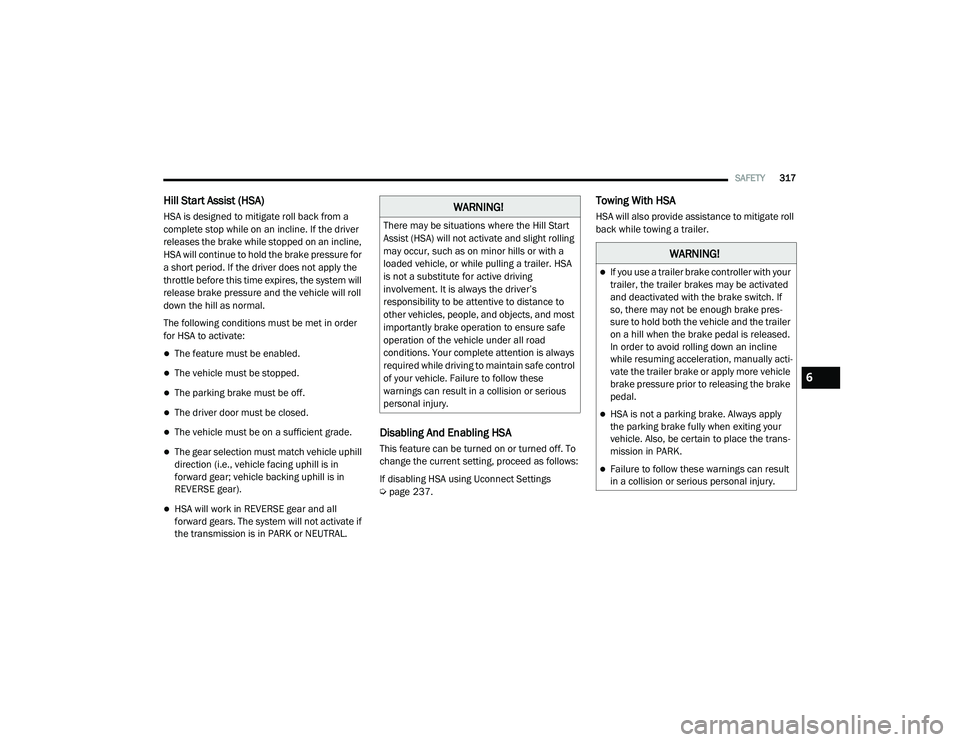
HSA is designed to mitigate roll back from a
complete stop while on an incline. If the driver
releases the brake while stopped on an incline,
HSA will continue to hold the brake pressure for
a short period. If the driver does not apply the
throttle before this time expires, the system will
release brake pressure and the vehicle will roll
down the hill as normal.
The following conditions must be met in order
for HSA to activate:
The feature must be enabled.
The vehicle must be stopped.
The parking brake must be off.
The driver door must be closed.
The vehicle must be on a sufficient grade.
The gear selection must match vehicle uphill
direction (i.e., vehicle facing uphill is in
forward gear; vehicle backing uphill is in
REVERSE gear).
HSA will work in REVERSE gear and all
forward gears. The system will not activate if
the transmission is in PARK or NEUTRAL.
Disabling And Enabling HSA
This feature can be turned on or turned off. To
change the current setting, proceed as follows:
If disabling HSA using Uconnect Settings
Úpage 237.
Towing With HSA
HSA will also provide assistance to mitigate roll
back while towing a trailer.WARNING!
There may be situations where the Hill Start
Assist (HSA) will not activate and slight rolling
may occur, such as on minor hills or with a
loaded vehicle, or while pulling a trailer. HSA
is not a substitute for active driving
involvement. It is always the driver’s
responsibility to be attentive to distance to
other vehicles, people, and objects, and most
importantly brake operation to ensure safe
operation of the vehicle under all road
conditions. Your complete attention is always
required while driving to maintain safe control
of your vehicle. Failure to follow these
warnings can result in a collision or serious
personal injury.
WARNING!
If you use a trailer brake controller with your
trailer, the trailer brakes may be activated
and deactivated with the brake switch. If
so, there may not be enough brake pres -
sure to hold both the vehicle and the trailer
on a hill when the brake pedal is released.
In order to avoid rolling down an incline
while resuming acceleration, manually acti -
vate the trailer brake or apply more vehicle
brake pressure prior to releasing the brake
pedal.
HSA is not a parking brake. Always apply
the parking brake fully when exiting your
vehicle. Also, be certain to place the trans -
mission in PARK.
Failure to follow these warnings can result
in a collision or serious personal injury.
6
21_DT_OM_EN_USC_t.book Page 317
Page 325 of 496

SAFETY323
a trailer will be detected using the blind spot
radar within 90 seconds of forward move -
ment of the vehicle. The vehicle must be
moving above 6 mph (10 km/h) to activate the feature. Once the trailer has been
detected, the system will default to the
maximum blind spot zone until the length has
been verified. You will see “Auto” in the
instrument panel cluster .
Maximum Mode — When “Max Mode” is
selected, the system will default to the
maximum blind spot zone regardless of what
size trailer is attached .
NOTE:
Selected setting is stored when the ignition is
placed in the OFF position. To change this
setting, it must be selected through the
Uconnect settings Ú page 237.
Trailer Length Detection
Once the trailer presence has been established,
the trailer length will be established (by making
a 90 degree turn) and then the trailer length
category (example 10-20 ft (3 m to 6 m)) will be
displayed. This can take up to 30 seconds after
completing the turn. NOTE:
During the same ignition cycle, if the vehicle is
at a standstill for a minimum of 90 seconds, a
new “trailer detection request” is enabled by
the system once the vehicle resumes motion.
Maximum length supported by the Trailer Merge
Assist feature is 39.5 ft (12 m). Trailer length is
considered the forward most portion of the
trailer hitch to the rearward most portion of the
body, fascia/bumper, or ramp of the trailer.
Maximum width supported by the Trailer Merge
Assist feature is 8.5 ft (2.59 m). Trailer width is
measured at the widest portion of the trailer
and may include wheels, tires, finders, or rails.
NOTE:
Fifth wheel or gooseneck trailers are not
supported by Trailer Merge Assist.
NOTE:
The ability to detect a trailer may be degraded in
crowded or busy environments. Busy parking
lots, narrow areas surrounded with trees, or any
other crowded area may prevent the radar
sensors from being able to adequately detect
the trailer. The system will try to detect a trailer
at every ignition cycle or 90 seconds of stand
-
still.
Trailer Length Detection
Trailer length will be identified and placed into
one of the following categories:
Trailer length up to 10 ft (3 m) — Blind spot
zone will be adjusted to 10 ft (3 m) .
Trailer length between 10 ft to 20 ft (3 m to
6 m) — Blind spot zone will be adjusted to
20 ft (6 m) .
Trailer length between 20 ft to 30 ft (6 m to
9 m) — Blind spot zone will be adjusted to
30 ft (9 m) .
1 — Trailer Length
2 — Trailer Width
3 — Trailer Hitch
6
21_DT_OM_EN_USC_t.book Page 323
Page 379 of 496

IN CASE OF EMERGENCY377
(Continued)
NOTE:
Your vehicle may be transmitting data as
authorized by the subscriber.
Never place anything on or near the vehicle’s
LTE (voice/data) or 4G (data) and GPS
antennas. You could prevent LTE (voice/
data) or 4G (data) and GPS signal reception,
which can prevent your vehicle from placing
an emergency call. An operable LTE (voice/
data) or 4G (data) network connection and a
GPS signal is required for the SOS Call
system to function properly.
NOTE:
Changes or modifications not expressly
approved by the party responsible for compli -
ance could void the user's authority to operate
the equipment.
JACKING AND TIRE CHANGING
NOTE:
If your vehicle is equipped with an air suspen -
sion system, there is a feature which allows the
automatic leveling to be disabled to assist with
changing a tire. This feature can be activated
through the Uconnect system Ú page 249.
PREPARATIONS FOR JACKING
NOTE:
If your vehicle is equipped with Air Suspension,
you will need to enable Tire Jack Mode in the
Uconnect system Úpage 165 before changing
the tire.
1. Park on a firm, level surface. Avoid ice or slippery areas.
2. Turn on the Hazard Warning Flashers.
3. Apply the parking brake.
4. Shift the transmission into Park (P).
5. Turn the ignition OFF.
WARNING!
Do not attempt to change a tire on the side
of the vehicle close to moving traffic. Pull
far enough off the road to avoid the danger
of being hit when operating the jack or
changing the wheel.
Being under a jacked-up vehicle is
dangerous. The vehicle could slip off the
jack and fall on you. You could be crushed.
Never put any part of your body under a
vehicle that is on a jack. If you need to get
under a raised vehicle, take it to a service
center where it can be raised on a lift.
Never start or run the engine while the
vehicle is on a jack.
The jack is designed to be used as a tool for
changing tires only. The jack should not be
used to lift the vehicle for service purposes.
The vehicle should be jacked on a firm level
surface only. Avoid ice or slippery areas.
WARNING! (Continued)
WARNING!
Do not attempt to change a tire on the side of
the vehicle close to moving traffic. Pull far
enough off the road to avoid being hit when
operating the jack or changing the wheel.
7
21_DT_OM_EN_USC_t.book Page 377
Page 416 of 496
414SERVICING AND MAINTENANCE
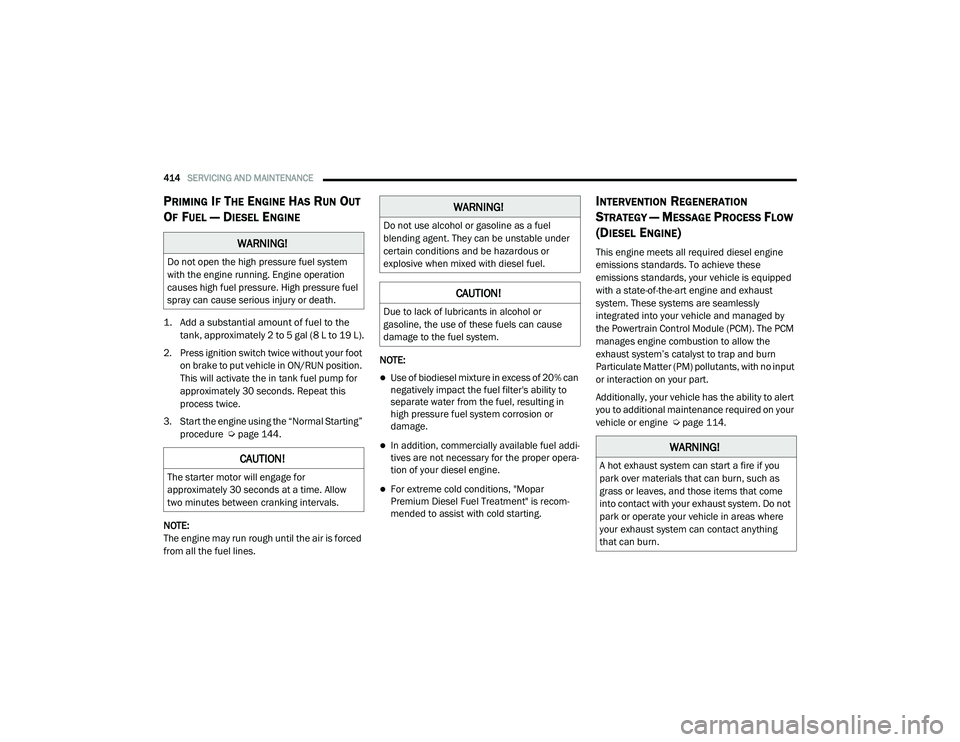
PRIMING IF THE ENGINE HAS RUN OUT
O
F FUEL — DIESEL ENGINE
1. Add a substantial amount of fuel to the
tank, approximately 2 to 5 gal (8 L to 19 L).
2. Press ignition switch twice without your foot on brake to put vehicle in ON/RUN position.
This will activate the in tank fuel pump for
approximately 30 seconds. Repeat this
process twice.
3. Start the engine using the “Normal Starting” procedure Ú page 144.
NOTE:
The engine may run rough until the air is forced
from all the fuel lines. NOTE:
Use of biodiesel mixture in excess of 20% can
negatively impact the fuel filter's ability to
separate water from the fuel, resulting in
high pressure fuel system corrosion or
damage.
In addition, commercially available fuel addi
-
tives are not necessary for the proper opera -
tion of your diesel engine.
For extreme cold conditions, "Mopar
Premium Diesel Fuel Treatment" is recom -
mended to assist with cold starting.
INTERVENTION REGENERATION
S
TRATEGY — MESSAGE PROCESS FLOW
(D
IESEL ENGINE)
This engine meets all required diesel engine
emissions standards. To achieve these
emissions standards, your vehicle is equipped
with a state-of-the-art engine and exhaust
system. These systems are seamlessly
integrated into your vehicle and managed by
the Powertrain Control Module (PCM). The PCM
manages engine combustion to allow the
exhaust system’s catalyst to trap and burn
Particulate Matter (PM) pollutants, with no input
or interaction on your part.
Additionally, your vehicle has the ability to alert
you to additional maintenance required on your
vehicle or engine Ú page 114.WARNING!
Do not open the high pressure fuel system
with the engine running. Engine operation
causes high fuel pressure. High pressure fuel
spray can cause serious injury or death.
CAUTION!
The starter motor will engage for
approximately 30 seconds at a time. Allow
two minutes between cranking intervals.
WARNING!
Do not use alcohol or gasoline as a fuel
blending agent. They can be unstable under
certain conditions and be hazardous or
explosive when mixed with diesel fuel.
CAUTION!
Due to lack of lubricants in alcohol or
gasoline, the use of these fuels can cause
damage to the fuel system.
WARNING!
A hot exhaust system can start a fire if you
park over materials that can burn, such as
grass or leaves, and those items that come
into contact with your exhaust system. Do not
park or operate your vehicle in areas where
your exhaust system can contact anything
that can burn.
21_DT_OM_EN_USC_t.book Page 414
Page 436 of 496
434SERVICING AND MAINTENANCE
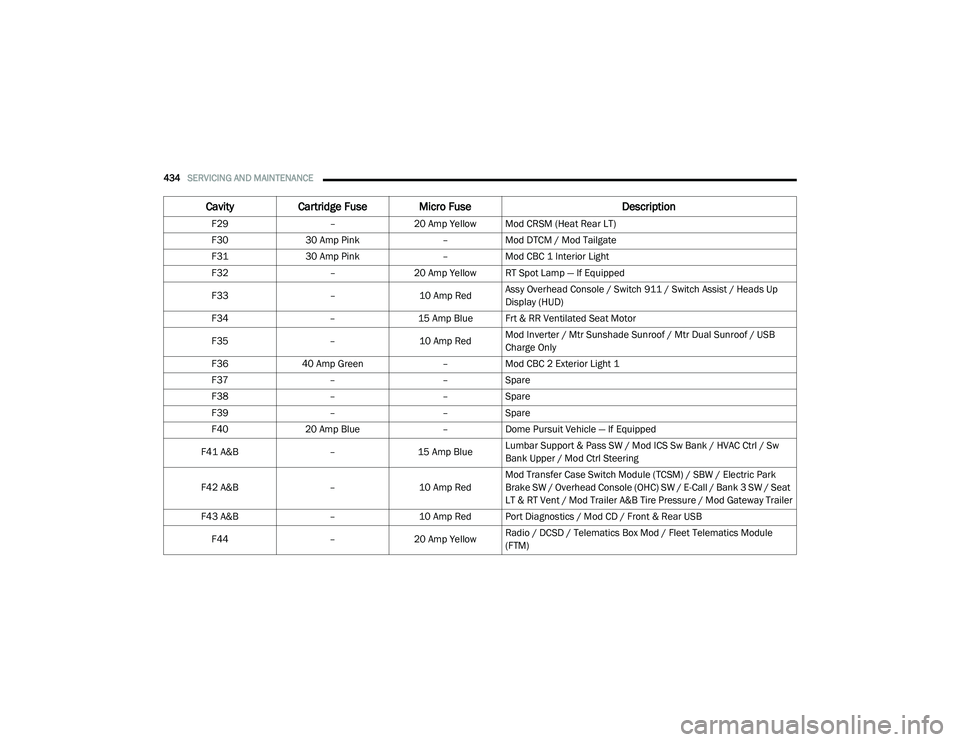
F29–20 Amp Yellow Mod CRSM (Heat Rear LT)
F30 30 Amp Pink –Mod DTCM / Mod Tailgate
F31 30 Amp Pink –Mod CBC 1 Interior Light
F32 –20 Amp Yellow RT Spot Lamp — If Equipped
F33 –10 Amp RedAssy Overhead Console / Switch 911 / Switch Assist / Heads Up
Display (HUD)
F34 –15 Amp Blue Frt & RR Ventilated Seat Motor
F35 –10 Amp RedMod Inverter / Mtr Sunshade Sunroof / Mtr Dual Sunroof / USB
Charge Only
F36 40 Amp Green –Mod CBC 2 Exterior Light 1
F37 ––Spare
F38 ––Spare
F39 ––Spare
F40 20 Amp Blue –Dome Pursuit Vehicle — If Equipped
F41 A&B –15 Amp BlueLumbar Support & Pass SW / Mod ICS Sw Bank / HVAC Ctrl / Sw
Bank Upper / Mod Ctrl Steering
F42 A&B –10 Amp RedMod Transfer Case Switch Module (TCSM) / SBW / Electric Park
Brake SW / Overhead Console (OHC) SW / E-Call / Bank 3 SW / Seat
LT & RT Vent / Mod Trailer A&B Tire Pressure / Mod Gateway Trailer
F43 A&B –10 Amp Red Port Diagnostics / Mod CD / Front & Rear USB
F44 –20 Amp Yellow Radio / DCSD / Telematics Box Mod / Fleet Telematics Module
(FTM)
Cavity
Cartridge Fuse Micro Fuse Description
21_DT_OM_EN_USC_t.book Page 434