transmission RAM 1500 2021 Workshop Manual
[x] Cancel search | Manufacturer: RAM, Model Year: 2021, Model line: 1500, Model: RAM 1500 2021Pages: 496, PDF Size: 20.89 MB
Page 246 of 496
244MULTIMEDIA
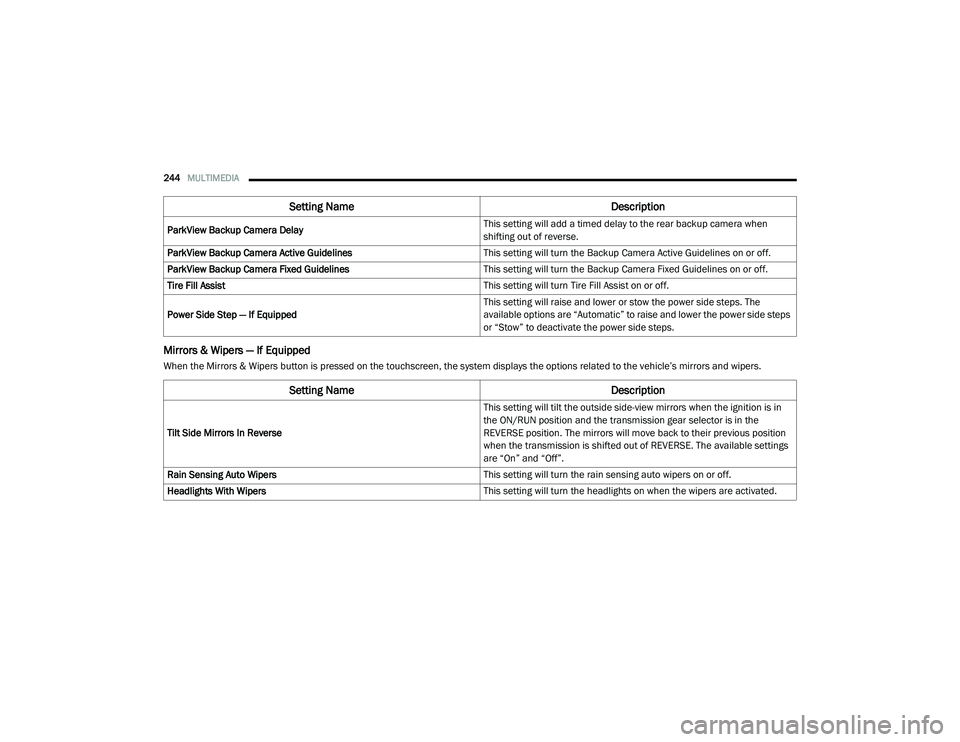
Mirrors & Wipers — If Equipped
When the Mirrors & Wipers button is pressed on the touchscreen, the system displays the options related to the vehicle’s mirrors and wipers.ParkView Backup Camera Delay
This setting will add a timed delay to the rear backup camera when
shifting out of reverse.
ParkView Backup Camera Active Guidelines This setting will turn the Backup Camera Active Guidelines on or off.
ParkView Backup Camera Fixed Guidelines This setting will turn the Backup Camera Fixed Guidelines on or off.
Tire Fill Assist This setting will turn Tire Fill Assist on or off.
Power Side Step — If Equipped This setting will raise and lower or stow the power side steps. The
available options are “Automatic” to raise and lower the power side steps
or “Stow” to deactivate the power side steps.
Setting Name
Description
Setting NameDescription
Tilt Side Mirrors In Reverse This setting will tilt the outside side-view mirrors when the ignition is in
the ON/RUN position and the transmission gear selector is in the
REVERSE position. The mirrors will move back to their previous position
when the transmission is shifted out of REVERSE. The available settings
are “On” and “Off”.
Rain Sensing Auto Wipers This setting will turn the rain sensing auto wipers on or off.
Headlights With Wipers This setting will turn the headlights on when the wipers are activated.
21_DT_OM_EN_USC_t.book Page 244
Page 284 of 496
282MULTIMEDIA
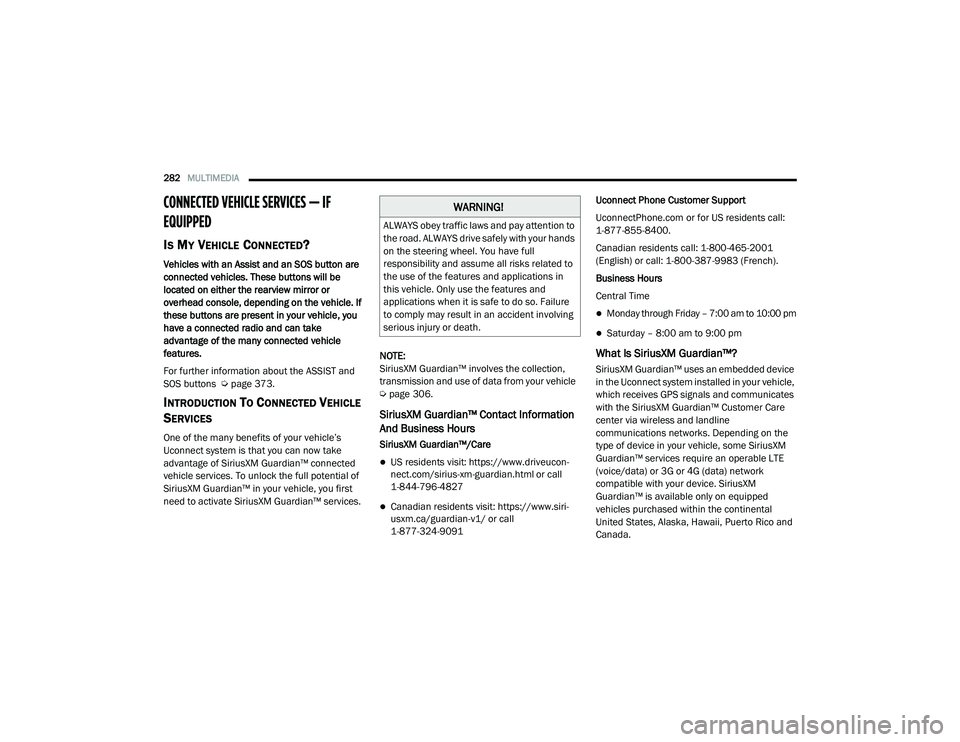
CONNECTED VEHICLE SERVICES — IF
EQUIPPED
IS MY VEHICLE CONNECTED?
Vehicles with an Assist and an SOS button are
connected vehicles. These buttons will be
located on either the rearview mirror or
overhead console, depending on the vehicle. If
these buttons are present in your vehicle, you
have a connected radio and can take
advantage of the many connected vehicle
features.
For further information about the ASSIST and
SOS buttons Ú page 373.
INTRODUCTION TO CONNECTED VEHICLE
S
ERVICES
One of the many benefits of your vehicle’s
Uconnect system is that you can now take
advantage of SiriusXM Guardian™ connected
vehicle services. To unlock the full potential of
SiriusXM Guardian™ in your vehicle, you first
need to activate SiriusXM Guardian™ services. NOTE:
SiriusXM Guardian™ involves the collection,
transmission and use of data from your vehicle
Ú
page 306.
SiriusXM Guardian™ Contact Information
And Business Hours
SiriusXM Guardian™/Care
US residents visit: https://www.driveucon -
nect.com/sirius-xm-guardian.html or call
1-844-796-4827
Canadian residents visit: https://www.siri -
usxm.ca/guardian-v1/ or call
1-877-324-9091 Uconnect Phone Customer Support
UconnectPhone.com or for US residents call:
1-877-855-8400.
Canadian residents call: 1-800-465-2001
(English) or call: 1-800-387-9983 (French).
Business Hours
Central Time
Monday through Friday – 7:00 am to 10:00 pm
Saturday – 8:00 am to 9:00 pm
What Is SiriusXM Guardian™?
SiriusXM Guardian™ uses an embedded device
in the Uconnect system installed in your vehicle,
which receives GPS signals and communicates
with the SiriusXM Guardian™ Customer Care
center via wireless and landline
communications networks. Depending on the
type of device in your vehicle, some SiriusXM
Guardian™ services require an operable LTE
(voice/data) or 3G or 4G (data) network
compatible with your device. SiriusXM
Guardian™ is available only on equipped
vehicles purchased within the continental
United States, Alaska, Hawaii, Puerto Rico and
Canada.
WARNING!
ALWAYS obey traffic laws and pay attention to
the road. ALWAYS drive safely with your hands
on the steering wheel. You have full
responsibility and assume all risks related to
the use of the features and applications in
this vehicle. Only use the features and
applications when it is safe to do so. Failure
to comply may result in an accident involving
serious injury or death.
21_DT_OM_EN_USC_t.book Page 282
Page 293 of 496
MULTIMEDIA291
An ignition cycle is required for some remote
commands, such as Remote Vehicle Start
and Remote Door Lock/Unlock if following a
Remote Horn & Lights activation.
Your Remote Door Lock/Unlock request will
not be processed if the vehicle is in motion,
the ignition key is on or during an emergency
call.
NOTE:
All other remote services should be performed
via your Owner’s Site or through the Uconnect
App on your compatible device.
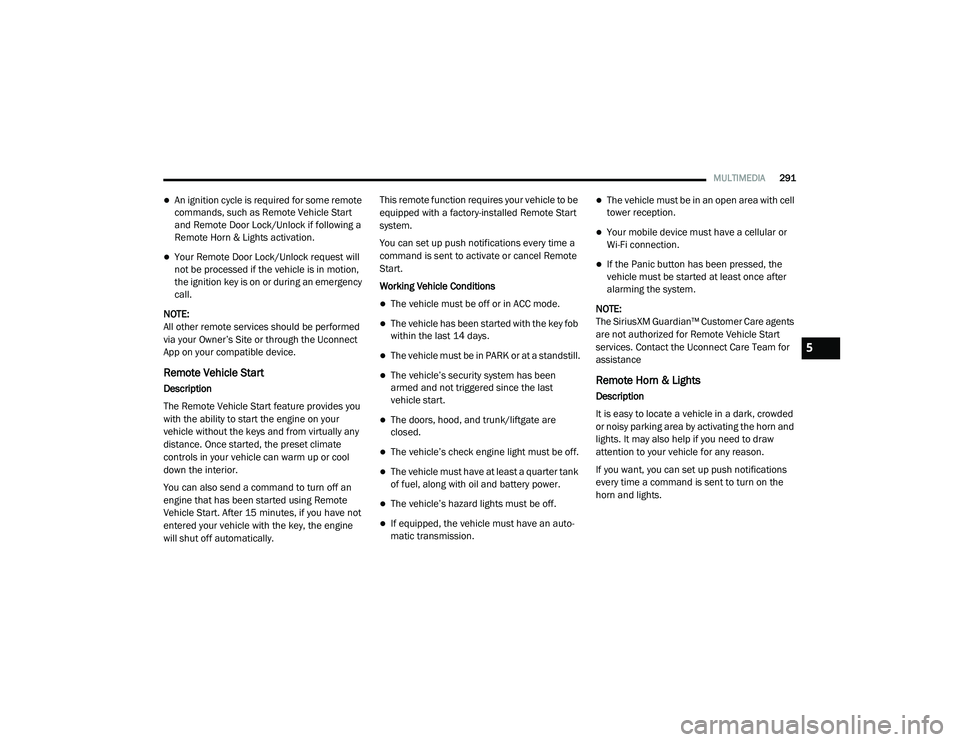
Remote Vehicle Start
Description
The Remote Vehicle Start feature provides you
with the ability to start the engine on your
vehicle without the keys and from virtually any
distance. Once started, the preset climate
controls in your vehicle can warm up or cool
down the interior.
You can also send a command to turn off an
engine that has been started using Remote
Vehicle Start. After 15 minutes, if you have not
entered your vehicle with the key, the engine
will shut off automatically. This remote function requires your vehicle to be
equipped with a factory-installed Remote Start
system.
You can set up push notifications every time a
command is sent to activate or cancel Remote
Start.
Working Vehicle Conditions
The vehicle must be off or in ACC mode.
The vehicle has been started with the key fob
within the last 14 days.
The vehicle must be in PARK or at a standstill.
The vehicle’s security system has been
armed and not triggered since the last
vehicle start.
The doors, hood, and trunk/liftgate are
closed.
The vehicle’s check engine light must be off.
The vehicle must have at least a quarter tank
of fuel, along with oil and battery power.
The vehicle’s hazard lights must be off.
If equipped, the vehicle must have an auto
-
matic transmission.
The vehicle must be in an open area with cell
tower reception.
Your mobile device must have a cellular or
Wi-Fi connection.
If the Panic button has been pressed, the
vehicle must be started at least once after
alarming the system.
NOTE:
The SiriusXM Guardian™ Customer Care agents
are not authorized for Remote Vehicle Start
services. Contact the Uconnect Care Team for
assistance
Remote Horn & Lights
Description
It is easy to locate a vehicle in a dark, crowded
or noisy parking area by activating the horn and
lights. It may also help if you need to draw
attention to your vehicle for any reason.
If you want, you can set up push notifications
every time a command is sent to turn on the
horn and lights.
5
21_DT_OM_EN_USC_t.book Page 291
Page 300 of 496
298MULTIMEDIA
In order to provide the Monthly Vehicle Health
Report, the Uconnect system in your vehicle
may collect and transmit vehicle data to
SiriusXM Guardian™ and to FCA, such as your
vehicle’s health and performance, your
vehicle’s location, your utilization of the
features in your vehicle, and other data.
This data collection and transmission begins
when you enroll in SiriusXM Guardian™ and will
continue even if you cancel your SiriusXM
Guardian™ subscription unless you call
SiriusXM Guardian™ Customer Care and tell
them to deactivate your Uconnect Services.
Please see the Uconnect Privacy Policy for more
information, located at
www.driveuconnect.com/connectedservices/
privacy (US Residents) or
www.driveuconnect.ca (Canadian Residents).
For more information on SiriusXM Guardian™
private policy, see https://siriusxmcvs.com/
privacy-policy.Vehicle Health Alert
Description
Your vehicle will send you an email alert if it
senses a problem with one of your vehicle’s key
systems. For further information, go to your
Owner’s website.
NOTE:
Vehicle Health Alert emails require you to
register and activate services. During this
process you will be asked to provide an email
address to which the reports will be sent.
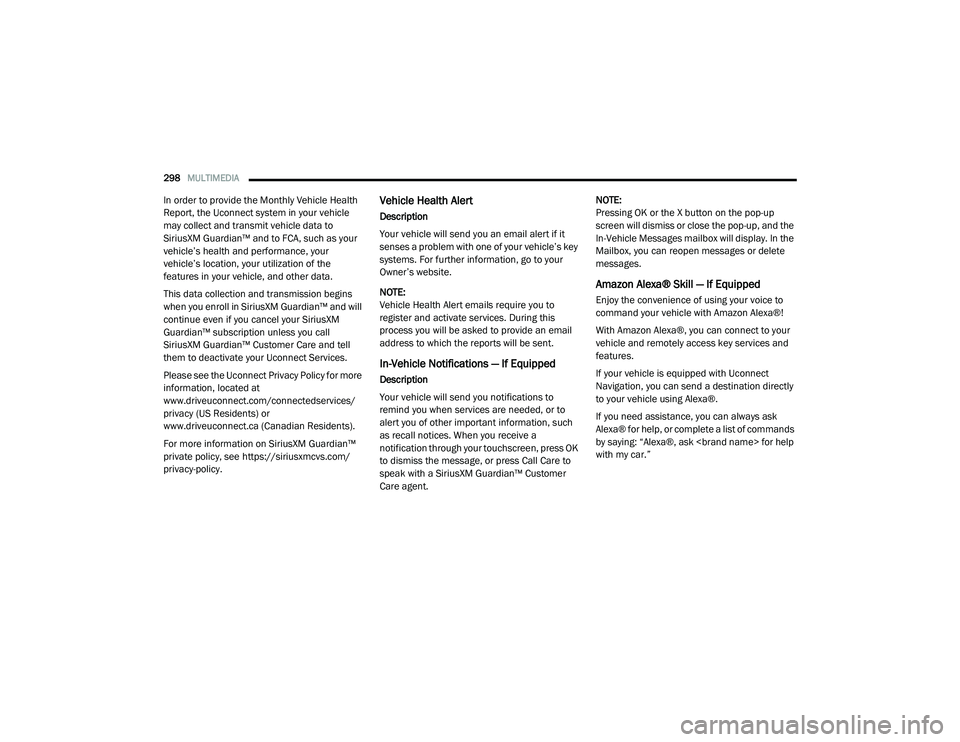
In-Vehicle Notifications — If Equipped
Description
Your vehicle will send you notifications to
remind you when services are needed, or to
alert you of other important information, such
as recall notices. When you receive a
notification through your touchscreen, press OK
to dismiss the message, or press Call Care to
speak with a SiriusXM Guardian™ Customer
Care agent. NOTE:
Pressing OK or the X button on the pop-up
screen will dismiss or close the pop-up, and the
In-Vehicle Messages mailbox will display. In the
Mailbox, you can reopen messages or delete
messages.
Amazon Alexa® Skill — If Equipped
Enjoy the convenience of using your voice to
command your vehicle with Amazon Alexa®!
With Amazon Alexa®, you can connect to your
vehicle and remotely access key services and
features.
If your vehicle is equipped with Uconnect
Navigation, you can send a destination directly
to your vehicle using Alexa®.
If you need assistance, you can always ask
Alexa® for help, or complete a list of commands
by saying: “Alexa®, ask
with my car.”
21_DT_OM_EN_USC_t.book Page 298
Page 310 of 496
308MULTIMEDIA
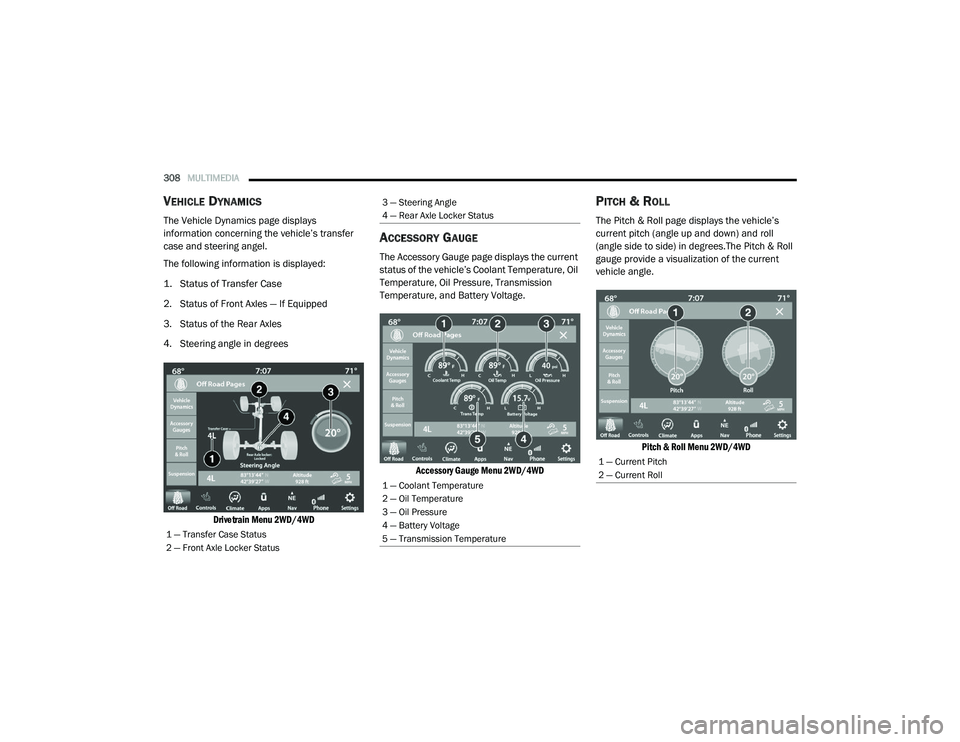
VEHICLE DYNAMICS
The Vehicle Dynamics page displays
information concerning the vehicle’s transfer
case and steering angel.
The following information is displayed:
1. Status of Transfer Case
2. Status of Front Axles — If Equipped
3. Status of the Rear Axles
4. Steering angle in degrees
Drivetrain Menu 2WD/4WD
ACCESSORY GAUGE
The Accessory Gauge page displays the current
status of the vehicle’s Coolant Temperature, Oil
Temperature, Oil Pressure, Transmission
Temperature, and Battery Voltage.
Accessory Gauge Menu 2WD/4WD
PITCH & ROLL
The Pitch & Roll page displays the vehicle’s
current pitch (angle up and down) and roll
(angle side to side) in degrees.The Pitch & Roll
gauge provide a visualization of the current
vehicle angle.
Pitch & Roll Menu 2WD/4WD
1 — Transfer Case Status
2 — Front Axle Locker Status
3 — Steering Angle
4 — Rear Axle Locker Status
1 — Coolant Temperature
2 — Oil Temperature
3 — Oil Pressure
4 — Battery Voltage
5 — Transmission Temperature
1 — Current Pitch
2 — Current Roll
21_DT_OM_EN_USC_t.book Page 308
Page 318 of 496
316SAFETY
NOTE:
During HDC the +/- shifter input is used for HDC
target speed selection, but will not affect the
gear chosen by the transmission. When actively
controlling HDC the transmission will shift
appropriately for the driver-selected set speed
and corresponding driving conditions.
Driver Override
The driver may override HDC activation with
throttle or brake application at any time.
Deactivating HDC
HDC will be deactivated but remain available if
any of the following conditions occur:
The driver overrides HDC set speed with
throttle or brake application.
The vehicle speed exceeds 20 mph (32 km/h)
but remains below 40 mph (64 km/h).
The vehicle is on a downhill grade of insuffi -
cient magnitude, is on level ground, or is on
an uphill grade.
The vehicle is shifted to PARK. Disabling HDC
HDC will be deactivated and disabled if any of
the following conditions occur:
The driver pushes the HDC switch.
The driveline is shifted out of the 4WD Low.
The parking brake is applied.
The driver door opens.
The vehicle is driven greater than 20 mph
(32 km/h) for greater than 70 seconds.
The vehicle is driven greater than 40 mph
(64 km/h) (HDC exits immediately).
HDC detects excessive brake temperature.
Feedback To The Driver
The instrument cluster has an HDC icon and the
HDC switch has an LED icon, which offers
feedback to the driver about the state HDC is in.
The cluster icon and switch lamp will illumi -
nate and remain on solid when HDC is
enabled or activated. This is the normal oper -
ating condition for HDC.
The cluster icon and switch lamp will flash for
several seconds, then extinguish when the
driver pushes the HDC switch but enable
conditions are not met.
The cluster icon and switch lamp will flash for
several seconds, then extinguish when HDC
disables due to excess speed.
The cluster icon and switch lamp will flash
when HDC deactivates due to overheated
brakes. The flashing will stop and HDC will
activate again once the brakes have cooled
sufficiently.
WARNING!
HDC is only intended to assist the driver in
controlling vehicle speed when descending
hills. The driver must remain attentive to the
driving conditions and is responsible for
maintaining a safe vehicle speed.
21_DT_OM_EN_USC_t.book Page 316
Page 319 of 496
SAFETY317
Hill Start Assist (HSA)
HSA is designed to mitigate roll back from a
complete stop while on an incline. If the driver
releases the brake while stopped on an incline,
HSA will continue to hold the brake pressure for
a short period. If the driver does not apply the
throttle before this time expires, the system will
release brake pressure and the vehicle will roll
down the hill as normal.
The following conditions must be met in order
for HSA to activate:
The feature must be enabled.
The vehicle must be stopped.
The parking brake must be off.
The driver door must be closed.
The vehicle must be on a sufficient grade.
The gear selection must match vehicle uphill
direction (i.e., vehicle facing uphill is in
forward gear; vehicle backing uphill is in
REVERSE gear).
HSA will work in REVERSE gear and all
forward gears. The system will not activate if
the transmission is in PARK or NEUTRAL.
Disabling And Enabling HSA
This feature can be turned on or turned off. To
change the current setting, proceed as follows:
If disabling HSA using Uconnect Settings
Úpage 237.
Towing With HSA
HSA will also provide assistance to mitigate roll
back while towing a trailer.WARNING!
There may be situations where the Hill Start
Assist (HSA) will not activate and slight rolling
may occur, such as on minor hills or with a
loaded vehicle, or while pulling a trailer. HSA
is not a substitute for active driving
involvement. It is always the driver’s
responsibility to be attentive to distance to
other vehicles, people, and objects, and most
importantly brake operation to ensure safe
operation of the vehicle under all road
conditions. Your complete attention is always
required while driving to maintain safe control
of your vehicle. Failure to follow these
warnings can result in a collision or serious
personal injury.
WARNING!
If you use a trailer brake controller with your
trailer, the trailer brakes may be activated
and deactivated with the brake switch. If
so, there may not be enough brake pres -
sure to hold both the vehicle and the trailer
on a hill when the brake pedal is released.
In order to avoid rolling down an incline
while resuming acceleration, manually acti -
vate the trailer brake or apply more vehicle
brake pressure prior to releasing the brake
pedal.
HSA is not a parking brake. Always apply
the parking brake fully when exiting your
vehicle. Also, be certain to place the trans -
mission in PARK.
Failure to follow these warnings can result
in a collision or serious personal injury.
6
21_DT_OM_EN_USC_t.book Page 317
Page 333 of 496
SAFETY331
warning limit, upon the next ignition switch
cycle, the Tire Pressure Monitoring System
(TPMS) Warning Light and a “LOW TIRE”
message will remain on and a chime will
sound. In addition, the graphic in the instru -
ment cluster will still display a pressure value
in a different color and an “Inflate to XX”
message.
After driving the vehicle for up to 20 minutes
above 15 mph (24 km/h), the Tire Pressure
Monitoring System (TPMS) Warning Light will
flash on and off for 75 seconds and then
remain on solid. In addition, the instrument
cluster will display a "SERVICE TPMS
SYSTEM" message for a minimum of five
seconds and then display dashes (--) in place
of the pressure value.
For each subsequent ignition switch cycle, a
chime will sound, the Tire Pressure Moni -
toring System (TPMS) Warning Light will flash
on and off for 75 seconds and then remain
on solid, and the instrument cluster will
display a "SERVICE TPMS SYSTEM" message
for a minimum of five seconds and then
display dashes (--) in place of the pressure
value.
Once you repair or replace the original road
tire and reinstall it on the vehicle in place of
the non-matching full size spare or compact
spare, the TPMS will update automatically. In
addition, the Tire Pressure Monitoring
System (TPMS) Warning Light will turn off and
the graphic in the instrument cluster will
display a new pressure value instead of
dashes (--), as long as no tire pressure is
below the low-pressure warning limit in any of
the four active road tires. The vehicle may
need to be driven for up to 20 minutes above
15 mph (24 km/h) in order for the TPMS to
receive this information.
Tire Fill Alert
This feature notifies the user when the placard
tire pressure is attained while inflating or
deflating the tire.
You may choose to disable or enable the Tire Fill
Alert feature through use of the Uconnect
Settings in the radio.
NOTE:
Only one tire can be filled at a time when
using the Tire Fill Alert system.
The Tire Fill Alert feature cannot be entered if
an existing TPMS fault is set to “active” or if
the system is in deactivation mode (if
equipped).
The system will be activated when a positive
increase in tire pressure is detected by the
TPMS while inflating the tire. The ignition must
be in the RUN mode, with the transmission in
PARK.
NOTE:
It is not required to have the engine running to
enter Tire Fill Alert mode.
The hazard lamps will come on to confirm the
vehicle is in Tire Fill Alert mode.
When Tire Fill Alert mode is entered, the tire
pressure display screen will be displayed in the
instrument cluster.
If the hazard lamps do not come on while
inflating the tire, the TPMS sensor may be out of
range preventing the TPMS sensor signal from
being received. In this case, the vehicle may
need to be moved either forward or backward
slightly to exit the null spot.
6
21_DT_OM_EN_USC_t.book Page 331
Page 355 of 496

SAFETY353
eye irritation, rinse the area with cool water.
For nose or throat irritation, move to fresh air.
If the irritation continues, see your doctor. If
these particles settle on your clothing, follow
the garment manufacturer’s instructions for
cleaning.
Do not drive your vehicle after the air bags have
deployed. If you are involved in another
collision, the air bags will not be in place to
protect you.
NOTE:
Air bag covers may not be obvious in the inte -
rior trim, but they will open during air bag
deployment.
After any collision, the vehicle should be
taken to an authorized dealer immediately.
Enhanced Accident Response System
In the event of an impact, if the communication
network remains intact, and the power remains
intact, depending on the nature of the event,
the Occupant Restraint Controller (ORC) will
determine whether to have the Enhanced
Accident Response System perform the
following functions:
Cut off fuel to the engine (if equipped)
Cut off battery power to the electric motor (if
equipped)
Flash hazard lights as long as the battery has
power
Turn on the interior lights, which remain on
as long as the battery has power or for
15 minutes from the intervention of the
Enhanced Accident Response System
Unlock the power door locks
Your vehicle may also be designed to perform
any of these other functions in response to the
Enhanced Accident Response System:
Turn off the Fuel Filter Heater, Turn off the
HVAC Blower Motor, Close the HVAC Circula -
tion Door
Cut off battery power to the:
Engine
Electric Motor (if equipped)
Electric power steering
Brake booster
Electric park brake
Automatic transmission gear selector
Horn
Front wiper
Headlamp washer pump
NOTE:
After an accident, remember to cycle the igni -
tion to the STOP (OFF/LOCK) position and
remove the key from the ignition switch to avoid
draining the battery. Carefully check the vehicle
for fuel leaks in the engine compartment and on
the ground near the engine compartment and
fuel tank before resetting the system and
starting the engine. If there are no fuel leaks or
damage to the vehicle electrical devices (e.g.
headlights) after an accident, reset the system
by following the procedure described below. If
you have any doubt, contact an authorized
dealer.
WARNING!
Deployed air bags and seat belt
pretensioners cannot protect you in another
collision. Have the air bags, seat belt
pretensioners, and the seat belt retractor
assemblies replaced by an authorized dealer
immediately. Also, have the Occupant
Restraint Controller System serviced as well.
6
21_DT_OM_EN_USC_t.book Page 353
Page 379 of 496

IN CASE OF EMERGENCY377
(Continued)
NOTE:
Your vehicle may be transmitting data as
authorized by the subscriber.
Never place anything on or near the vehicle’s
LTE (voice/data) or 4G (data) and GPS
antennas. You could prevent LTE (voice/
data) or 4G (data) and GPS signal reception,
which can prevent your vehicle from placing
an emergency call. An operable LTE (voice/
data) or 4G (data) network connection and a
GPS signal is required for the SOS Call
system to function properly.
NOTE:
Changes or modifications not expressly
approved by the party responsible for compli -
ance could void the user's authority to operate
the equipment.
JACKING AND TIRE CHANGING
NOTE:
If your vehicle is equipped with an air suspen -
sion system, there is a feature which allows the
automatic leveling to be disabled to assist with
changing a tire. This feature can be activated
through the Uconnect system Ú page 249.
PREPARATIONS FOR JACKING
NOTE:
If your vehicle is equipped with Air Suspension,
you will need to enable Tire Jack Mode in the
Uconnect system Úpage 165 before changing
the tire.
1. Park on a firm, level surface. Avoid ice or slippery areas.
2. Turn on the Hazard Warning Flashers.
3. Apply the parking brake.
4. Shift the transmission into Park (P).
5. Turn the ignition OFF.
WARNING!
Do not attempt to change a tire on the side
of the vehicle close to moving traffic. Pull
far enough off the road to avoid the danger
of being hit when operating the jack or
changing the wheel.
Being under a jacked-up vehicle is
dangerous. The vehicle could slip off the
jack and fall on you. You could be crushed.
Never put any part of your body under a
vehicle that is on a jack. If you need to get
under a raised vehicle, take it to a service
center where it can be raised on a lift.
Never start or run the engine while the
vehicle is on a jack.
The jack is designed to be used as a tool for
changing tires only. The jack should not be
used to lift the vehicle for service purposes.
The vehicle should be jacked on a firm level
surface only. Avoid ice or slippery areas.
WARNING! (Continued)
WARNING!
Do not attempt to change a tire on the side of
the vehicle close to moving traffic. Pull far
enough off the road to avoid being hit when
operating the jack or changing the wheel.
7
21_DT_OM_EN_USC_t.book Page 377