seats RAM 1500 2022 User Guide
[x] Cancel search | Manufacturer: RAM, Model Year: 2022, Model line: 1500, Model: RAM 1500 2022Pages: 496, PDF Size: 18.03 MB
Page 43 of 496

GETTING TO KNOW YOUR VEHICLE41
Rear Ventilated Seats — If Equipped
If equipped, the two outboard rear seats
will have ventilated seats. The rear
ventilated seat control switches are
located on the rear of the center console.
The fans operate at three speeds: HI, MED, and LO.
Push the ventilated seat buttons to toggle through
the speeds, or to turn the feature off.
NOTE:The engine must be running for the ventilated
seats to operate.
PLASTIC GROCERY BAG RETAINERS
Retainer hooks which will hold plastic grocery bag
handles are attached to the underside of the rear
seat cushion. To access these hooks, lift the rear
seat cushion upward.
HEAD RESTRAINTS
Head restraints are designed to reduce the risk of
injury by restricting head movement in the event of
a rear impact. Head restraints should be adjusted
so that the top of the head restraint is located
above the top of your ear.
NOTE:Do not reverse the head restraints (making the
rear of the head restraint face forward) in an
attempt to gain additional clearance to the back of
your head.
Front Head Restraints
Your vehicle is equipped with front four-way driver
and passenger head restraints.
To raise the head restraint, pull upward on the
head restraint. To lower the head restraint, push
the adjustment button, located at the base of the
head restraint, and push downward on the head
restraint.
NOTE:The head restraints should only be removed by
qualified technicians, for service purposes only. If
either of the head restraints require removal, see
an authorized dealer.
Head Restraint Adjustment Button Location
WARNING!
All occupants, including the driver, should not
operate a vehicle or sit in a vehicle’s seat until
the head restraints are placed in their proper
positions in order to minimize the risk of neck
injury in the event of a crash.
Head restraints should never be adjusted
while the vehicle is in motion. Driving a vehicle
with the head restraints improperly adjusted
or removed could cause serious injury or
death in the event of a collision.
2
22_DT_OM_EN_USC_t.book Page 41
Page 70 of 496

68GETTING TO KNOW YOUR VEHICLE
To provide you with maximum comfort in the
Automatic mode during cold start-ups, the blower
fan will remain on low until the engine warms up.
The blower will increase in speed and transition
into Auto mode.
Manual Operation Override
This system offers a full complement of manual
override features. The AUTO symbol in the front
ATC display will be turned off when the system is
being used in the manual mode.
CLIMATE VOICE RECOGNITION —
I
F EQUIPPED
Adjust vehicle temperatures hands-free and keep
everyone comfortable while you keep moving
ahead.
Push the VR button on the steering wheel. After the
beep, say one of the following commands:
“ Set driver temperature to 70 degrees ”
“Set passenger temperature to 70 degrees ”
Did you know: Voice Command for Climate may
only be used to adjust the interior temperature of
your vehicle. Voice Command will not work to
adjust the heated seats or steering wheel if
equipped.
OPERATING TIPS
Refer to the chart at the end of this section for
suggested control settings for various weather
conditions.
Summer Operation
The engine cooling system must be protected with
a high-quality antifreeze coolant to provide proper
corrosion protection and to protect against engine
overheating. OAT coolant (conforming to
MS.90032) is recommended.
Winter Operation
To ensure the best possible heater and defroster
performance, make sure the engine cooling
system is functioning properly and the proper
amount, type, and concentration of coolant is
used. Use of the Air Recirculation mode during
Winter months is not recommended, because it
may cause window fogging.
Vacation/Storage
For information on maintaining the Climate Control
system when the vehicle is being stored for an
extended period of time, see Ú page 461.
Window Fogging
Vehicle windows tend to fog on the inside in mild,
rainy, and/or humid weather. To clear the
windows, select Defrost or Mix mode and increase
the front blower speed. Do not use the
Recirculation mode without A/C for long periods,
as fogging may occur.
Outside Air Intake
Make sure the air intake, located directly in front of
the windshield, is free of obstructions, such as
leaves. Leaves collected in the air intake may
reduce airflow, and if they enter the air distribution
box, they could plug the water drains. In Winter
months, make sure the air intake is clear of ice,
slush, and snow.
Cabin Air Filter
The Climate Control system filters out dust and
pollen from the air. Contact an authorized dealer to
service your cabin air filter, and to have it replaced
when needed.
Stop/Start System — If Equipped
While in an Autostop, the Climate Control system
may automatically adjust airflow to maintain cabin
comfort. Customer settings will be maintained
upon return to an engine running condition.
22_DT_OM_EN_USC_t.book Page 68
Page 72 of 496
70GETTING TO KNOW YOUR VEHICLE
(Continued)
Center Storage Compartment —
If Equipped
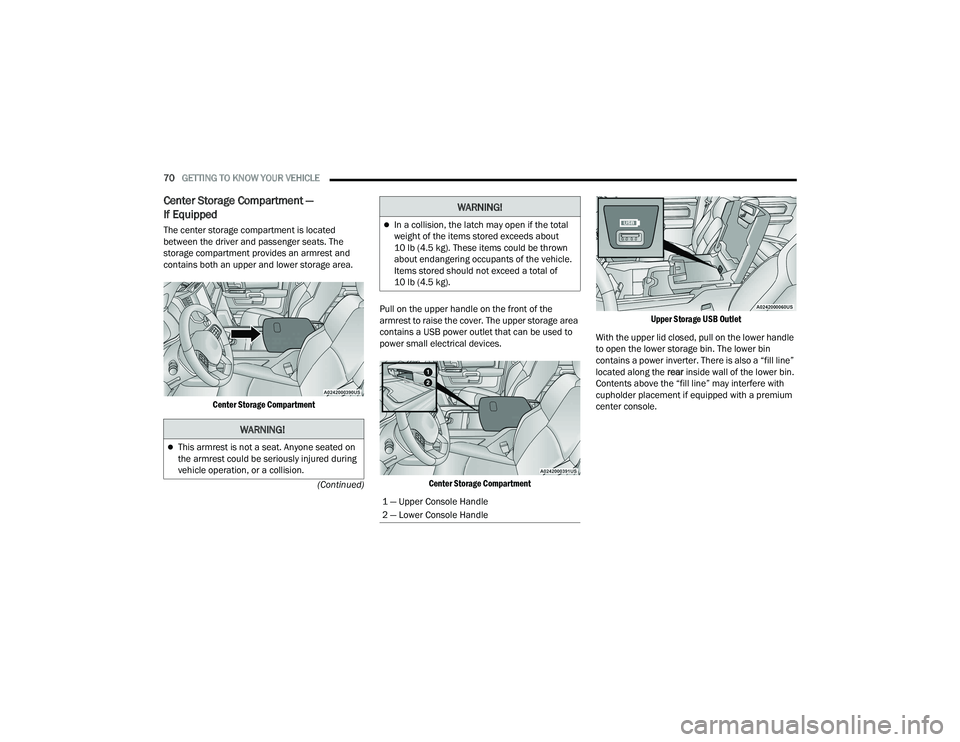
The center storage compartment is located
between the driver and passenger seats. The
storage compartment provides an armrest and
contains both an upper and lower storage area.
Center Storage Compartment
Pull on the upper handle on the front of the
armrest to raise the cover. The upper storage area
contains a USB power outlet that can be used to
power small electrical devices.
Center Storage Compartment Upper Storage USB Outlet
With the upper lid closed, pull on the lower handle
to open the lower storage bin. The lower bin
contains a power inverter. There is also a “fill line”
located along the rear inside wall of the lower bin.
Contents above the “fill line” may interfere with
cupholder placement if equipped with a premium
center console.
WARNING!
This armrest is not a seat. Anyone seated on
the armrest could be seriously injured during
vehicle operation, or a collision.
In a collision, the latch may open if the total
weight of the items stored exceeds about
10 lb (4.5 kg). These items could be thrown
about endangering occupants of the vehicle.
Items stored should not exceed a total of
10 lb (4.5 kg).
1 — Upper Console Handle
2 — Lower Console Handle
WARNING!
22_DT_OM_EN_USC_t.book Page 70
Page 75 of 496
GETTING TO KNOW YOUR VEHICLE73
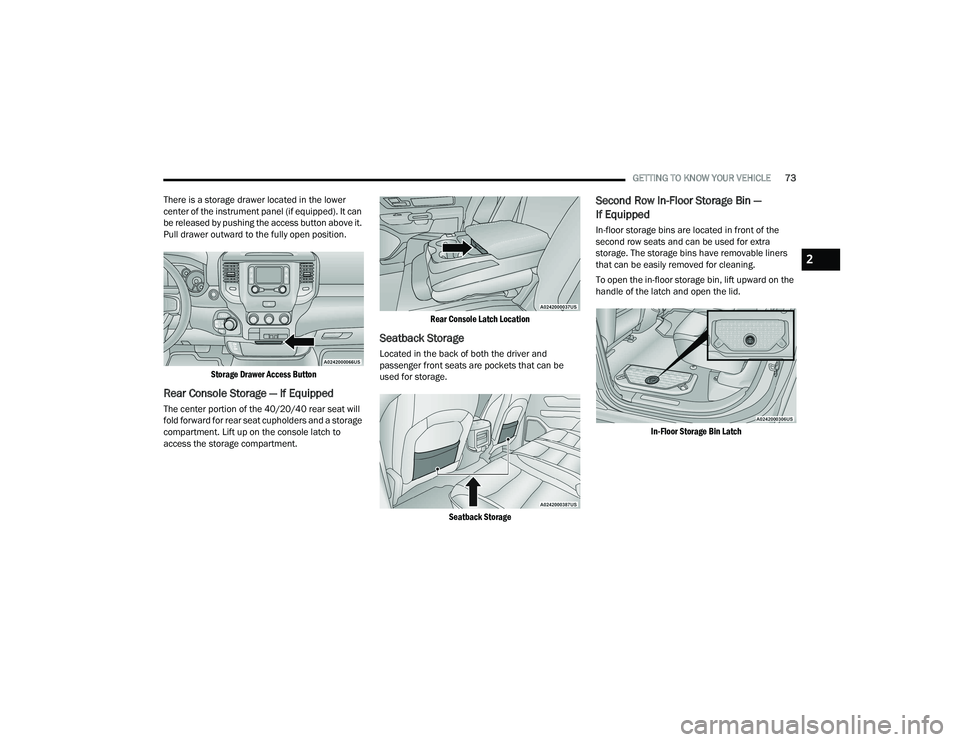
There is a storage drawer located in the lower
center of the instrument panel (if equipped). It can
be released by pushing the access button above it.
Pull drawer outward to the fully open position.
Storage Drawer Access Button
Rear Console Storage — If Equipped
The center portion of the 40/20/40 rear seat will
fold forward for rear seat cupholders and a storage
compartment. Lift up on the console latch to
access the storage compartment.
Rear Console Latch Location
Seatback Storage
Located in the back of both the driver and
passenger front seats are pockets that can be
used for storage.
Seatback Storage
Second Row In-Floor Storage Bin —
If Equipped
In-floor storage bins are located in front of the
second row seats and can be used for extra
storage. The storage bins have removable liners
that can be easily removed for cleaning.
To open the in-floor storage bin, lift upward on the
handle of the latch and open the lid.
In-Floor Storage Bin Latch
2
22_DT_OM_EN_USC_t.book Page 73
Page 76 of 496
74GETTING TO KNOW YOUR VEHICLE
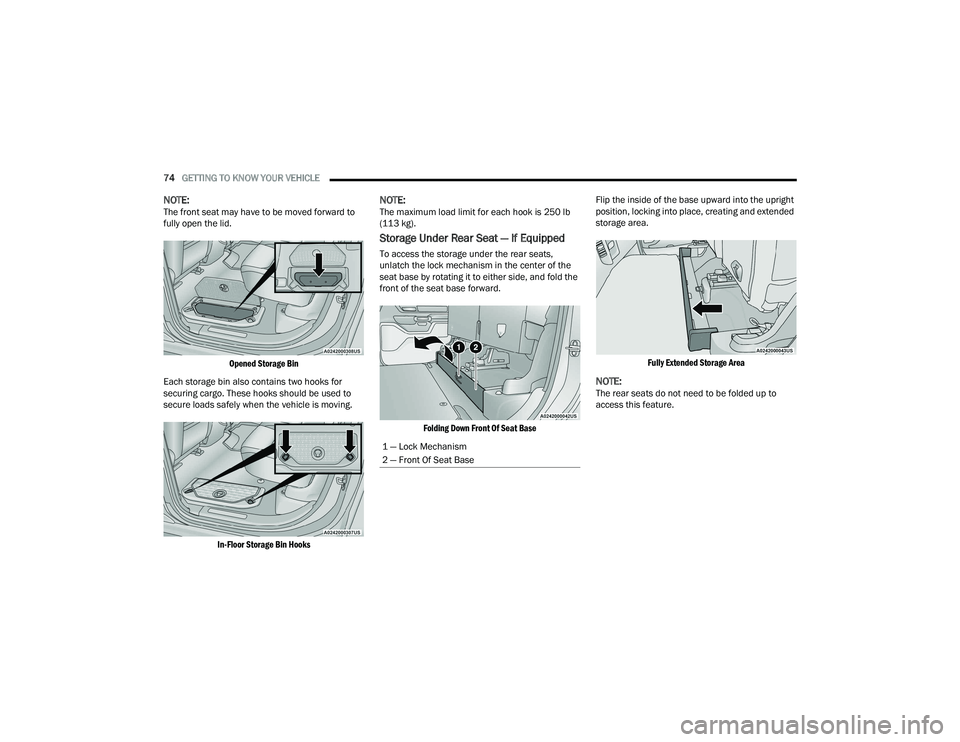
NOTE:The front seat may have to be moved forward to
fully open the lid.
Opened Storage Bin
Each storage bin also contains two hooks for
securing cargo. These hooks should be used to
secure loads safely when the vehicle is moving.
In-Floor Storage Bin Hooks
NOTE:The maximum load limit for each hook is 250 lb
(113 kg).
Storage Under Rear Seat — If Equipped
To access the storage under the rear seats,
unlatch the lock mechanism in the center of the
seat base by rotating it to either side, and fold the
front of the seat base forward.
Folding Down Front Of Seat Base
Flip the inside of the base upward into the upright
position, locking into place, creating and extended
storage area.
Fully Extended Storage Area
NOTE:The rear seats do not need to be folded up to
access this feature.
1 — Lock Mechanism
2 — Front Of Seat Base
22_DT_OM_EN_USC_t.book Page 74
Page 94 of 496
92GETTING TO KNOW YOUR VEHICLE
(Continued)
PICKUP BOX
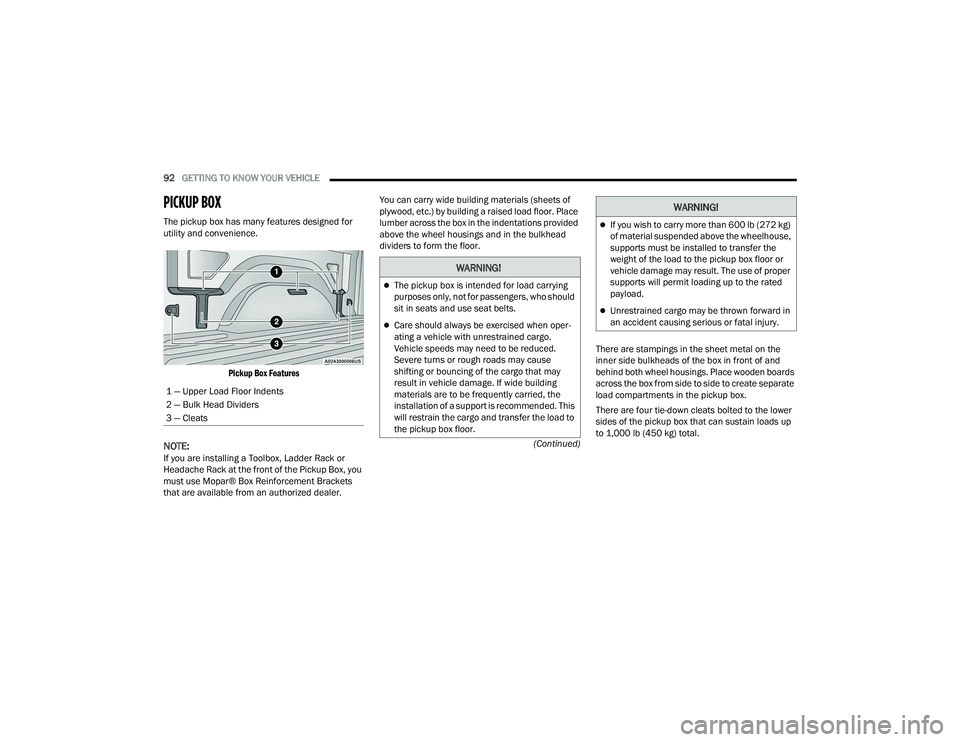
The pickup box has many features designed for
utility and convenience.
Pickup Box Features
NOTE:If you are installing a Toolbox, Ladder Rack or
Headache Rack at the front of the Pickup Box, you
must use Mopar® Box Reinforcement Brackets
that are available from an authorized dealer. You can carry wide building materials (sheets of
plywood, etc.) by building a raised load floor. Place
lumber across the box in the indentations provided
above the wheel housings and in the bulkhead
dividers to form the floor.
There are stampings in the sheet metal on the
inner side bulkheads of the box in front of and
behind both wheel housings. Place wooden boards
across the box from side to side to create separate
load compartments in the pickup box.
There are four tie-down cleats bolted to the lower
sides of the pickup box that can sustain loads up
to 1,000 lb (450 kg) total.
1 — Upper Load Floor Indents
2 — Bulk Head Dividers
3 — Cleats
WARNING!
The pickup box is intended for load carrying
purposes only, not for passengers, who should
sit in seats and use seat belts.
Care should always be exercised when oper
-
ating a vehicle with unrestrained cargo.
Vehicle speeds may need to be reduced.
Severe turns or rough roads may cause
shifting or bouncing of the cargo that may
result in vehicle damage. If wide building
materials are to be frequently carried, the
installation of a support is recommended. This
will restrain the cargo and transfer the load to
the pickup box floor.
If you wish to carry more than 600 lb (272 kg)
of material suspended above the wheelhouse,
supports must be installed to transfer the
weight of the load to the pickup box floor or
vehicle damage may result. The use of proper
supports will permit loading up to the rated
payload.
Unrestrained cargo may be thrown forward in
an accident causing serious or fatal injury.
WARNING!
22_DT_OM_EN_USC_t.book Page 92
Page 129 of 496

GETTING TO KNOW YOUR INSTRUMENT PANEL127
BATTERY SAVER ON/BATTERY SAVER
M
ODE MESSAGE — ELECTRICAL LOAD
R
EDUCTION ACTIONS — IF EQUIPPED
This vehicle is equipped with an Intelligent Battery
Sensor (IBS) to perform additional monitoring of
the electrical system and status of the vehicle
battery.
In cases when the IBS detects charging system
failure, or the vehicle battery conditions are
deteriorating, electrical load reduction actions will
take place to extend the driving time and distance
of the vehicle. This is done by reducing power to or
turning off non-essential electrical loads.
Load reduction is only active when the engine is
running. It will display a message if there is a risk
of battery depletion to the point where the vehicle
may stall due to lack of electrical supply, or will not
restart after the current drive cycle.
When load reduction is activated, the message
“Battery Saver On Some Systems May Have
Reduced Power” will appear in the instrument
cluster. These messages indicate the vehicle battery has a
low state of charge and continues to lose electrical
charge at a rate that the charging system cannot
sustain.NOTE:
The charging system is independent from load
reduction. The charging system performs a diag
-
nostic on the charging system continuously.
If the Battery Charge Warning Light is on it may
indicate a problem with the charging system
Ú page 129.
The electrical loads that may be switched off
(if equipped), and vehicle functions which can be
affected by load reduction:
Heated Seats / Vented Seats / Heated Wheel
Rear Defroster And Heated Mirrors
HVAC System
115 Volts AC Power Inverter System
Audio and Telematics System
Loss of the battery charge may indicate one or
more of the following conditions:
The charging system cannot deliver enough
electrical power to the vehicle system because
the electrical loads are larger than the capability
of charging system. The charging system is still
functioning properly.
Turning on all possible vehicle electrical loads
(e.g. HVAC to max settings, exterior and interior
lights, overloaded power outlets +12 Volts,
115 Volts AC, USB ports) during certain driving
conditions (city driving, towing, frequent stop -
ping).
Installing options like additional lights, upfitter
electrical accessories, audio systems, alarms
and similar devices.
Unusual driving cycles (short trips separated by
long parking periods).
The vehicle was parked for an extended period
of time (weeks, months).
The battery was recently replaced and was not
charged completely.
The battery was discharged by an electrical load
left on when the vehicle was parked.
The battery was used for an extended period
with the engine not running to supply radio,
lights, chargers, +12 Volt portable appliances
like vacuum cleaners, game consoles and
similar devices.
3
22_DT_OM_EN_USC_t.book Page 127
Page 239 of 496
MULTIMEDIA237
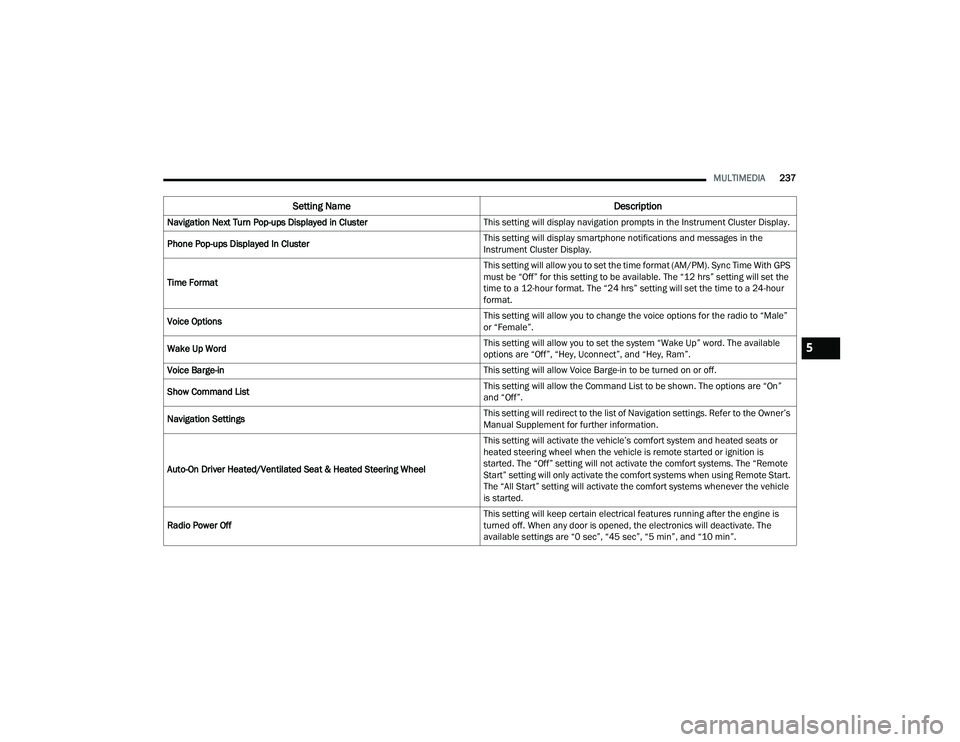
Navigation Next Turn Pop-ups Displayed in Cluster This setting will display navigation prompts in the Instrument Cluster Display.
Phone Pop-ups Displayed In Cluster This setting will display smartphone notifications and messages in the
Instrument Cluster Display.
Time Format This setting will allow you to set the time format (AM/PM). Sync Time With GPS
must be “Off” for this setting to be available. The “12 hrs” setting will set the
time to a 12-hour format. The “24 hrs” setting will set the time to a 24-hour
format.
Voice Options This setting will allow you to change the voice options for the radio to “Male”
or “Female”.
Wake Up Word This setting will allow you to set the system “Wake Up” word. The available
options are “Off”, “Hey, Uconnect”, and “Hey, Ram”.
Voice Barge-in This setting will allow Voice Barge-in to be turned on or off.
Show Command List This setting will allow the Command List to be shown. The options are “On”
and “Off”.
Navigation Settings This setting will redirect to the list of Navigation settings. Refer to the Owner’s
Manual Supplement for further information.
Auto-On Driver Heated/Ventilated Seat & Heated Steering Wheel This setting will activate the vehicle’s comfort system and heated seats or
heated steering wheel when the vehicle is remote started or ignition is
started. The “Off” setting will not activate the comfort systems. The “Remote
Start” setting will only activate the comfort systems when using Remote Start.
The “All Start” setting will activate the comfort systems whenever the vehicle
is started.
Radio Power Off This setting will keep certain electrical features running after the engine is
turned off. When any door is opened, the electronics will deactivate. The
available settings are “0 sec”, “45 sec”, “5 min”, and “10 min”.
Setting Name
Description
5
22_DT_OM_EN_USC_t.book Page 237
Page 253 of 496
MULTIMEDIA251
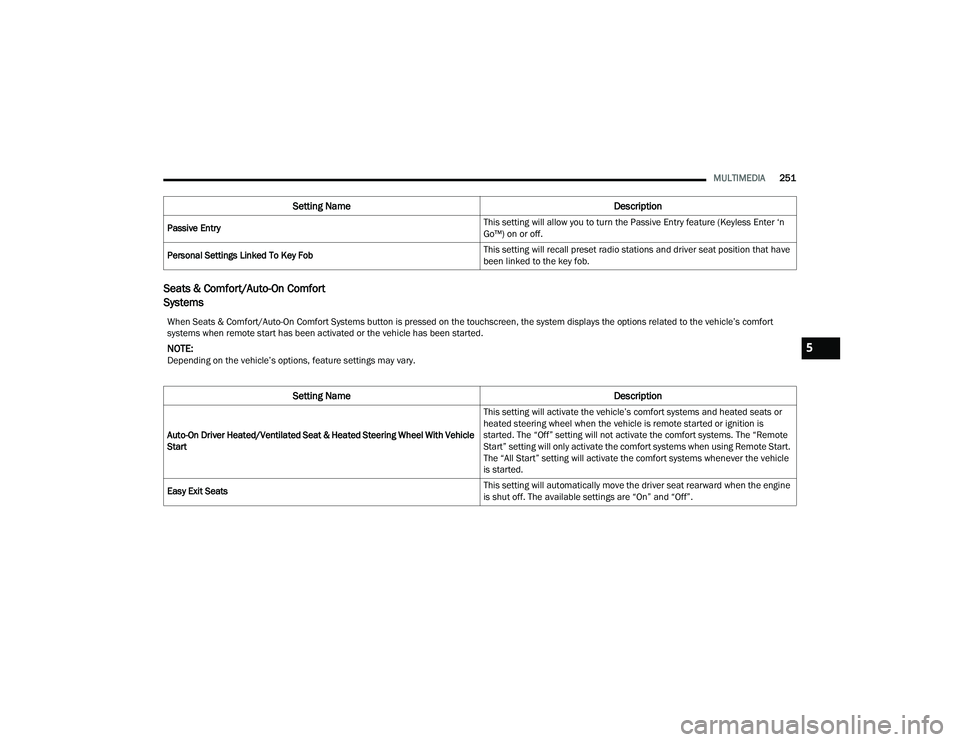
Seats & Comfort/Auto-On Comfort
Systems
Passive Entry This setting will allow you to turn the Passive Entry feature (Keyless Enter ‘n
Go™) on or off.
Personal Settings Linked To Key Fob This setting will recall preset radio stations and driver seat position that have
been linked to the key fob.
Setting Name
Description
When Seats & Comfort/Auto-On Comfort Systems button is pressed on the touchscreen, the system displays the options related to the vehicle’s comfort
systems when remote start has been activated or the vehicle has been started.
NOTE:Depending on the vehicle’s options, feature settings may vary.
Setting NameDescription
Auto-On Driver Heated/Ventilated Seat & Heated Steering Wheel With Vehicle
Start This setting will activate the vehicle’s comfort systems and heated seats or
heated steering wheel when the vehicle is remote started or ignition is
started. The “Off” setting will not activate the comfort systems. The “Remote
Start” setting will only activate the comfort systems when using Remote Start.
The “All Start” setting will activate the comfort systems whenever the vehicle
is started.
Easy Exit Seats This setting will automatically move the driver seat rearward when the engine
is shut off. The available settings are “On” and “Off”.
5
22_DT_OM_EN_USC_t.book Page 251
Page 254 of 496
252MULTIMEDIA
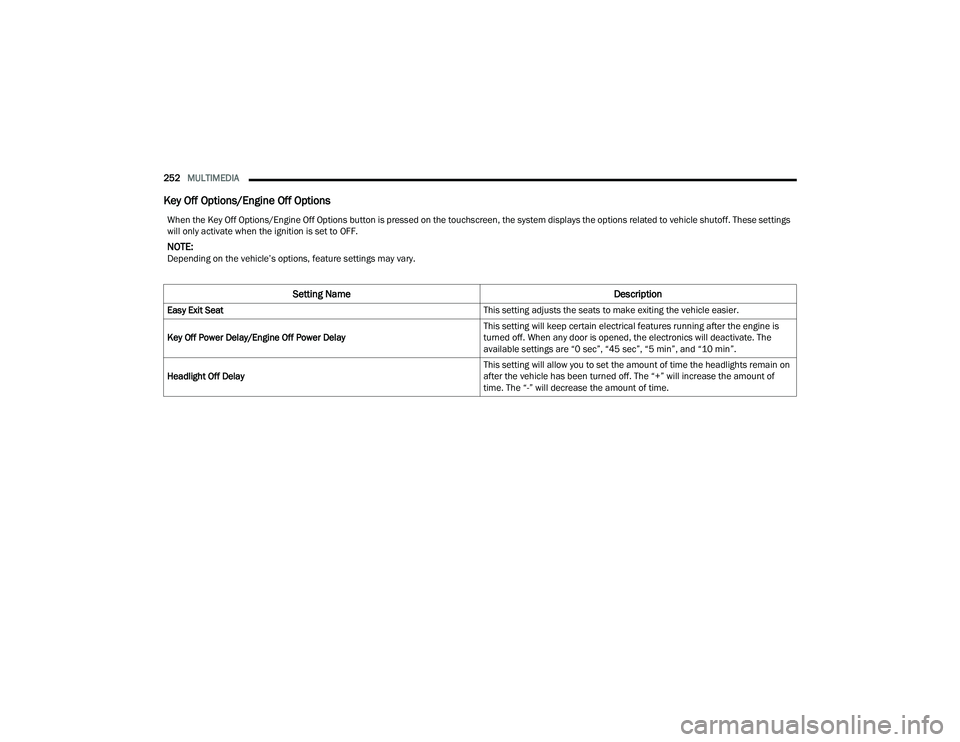
Key Off Options/Engine Off Options
When the Key Off Options/Engine Off Options button is pressed on the touchscreen, the system displays the options related to vehicle shutoff. These settings
will only activate when the ignition is set to OFF.
NOTE:Depending on the vehicle’s options, feature settings may vary.
Setting Name Description
Easy Exit Seat This setting adjusts the seats to make exiting the vehicle easier.
Key Off Power Delay/Engine Off Power Delay This setting will keep certain electrical features running after the engine is
turned off. When any door is opened, the electronics will deactivate. The
available settings are “0 sec”, “45 sec”, “5 min”, and “10 min”.
Headlight Off Delay This setting will allow you to set the amount of time the headlights remain on
after the vehicle has been turned off. The “+” will increase the amount of
time. The “-” will decrease the amount of time.
22_DT_OM_EN_USC_t.book Page 252