Speed sensor RAM 1500 2022 Owners Manual
[x] Cancel search | Manufacturer: RAM, Model Year: 2022, Model line: 1500, Model: RAM 1500 2022Pages: 496, PDF Size: 18.03 MB
Page 7 of 496
5
NORMAL OPERATION — DIESEL ENGINE ......... 146 Cold Weather Precautions ............................ 146
Engine Idling .................................................. 147
Stopping The Engine ..................................... 148
ENGINE BLOCK HEATER — IF EQUIPPED .......... 149
ENGINE BREAK-IN RECOMMENDATIONS —
GASOLINE ENGINE .............................................. 150
ENGINE BREAK-IN RECOMMENDATIONS —
DIESEL ENGINE .................................................... 150
PARKING BRAKE ................................................. 150
Electric Park Brake (EPB) ............................. 150
AUTOMATIC TRANSMISSION.............................. 153
Ignition Park Interlock ................................... 154Brake/Transmission Shift Interlock
(BTSI) System ................................................ 154
8-Speed Automatic Transmission ................ 154
FOUR-WHEEL DRIVE OPERATION —
IF EQUIPPED ........................................................ 160
Four-Position Electronically Shifted
Transfer Case — If Equipped ........................ 160
Five-Position Electronically Shifted
Transfer Case — If Equipped ........................ 162
ACTIVE-LEVEL FOUR CORNER AIR
SUSPENSION SYSTEM — IF EQUIPPED ............. 165
Description..................................................... 165
Air Suspension Modes .................................. 167
Instrument Cluster Display Messages ......... 167Operation ....................................................... 168 ACTIVE-LEVEL FOUR CORNER AIR
SUSPENSION SYSTEM
(OFF-ROAD GROUP) — IF EQUIPPED................. 169
Description .................................................... 169
Air Suspension Modes .................................. 171
Instrument Cluster Display Messages ......... 171Operation ....................................................... 171
AXLE LOCK SYSTEM — IF EQUIPPED ................ 172
LIMITED-SLIP DIFFERENTIAL —
IF EQUIPPED ........................................................ 173
POWER STEERING ............................................. 173
Electric Power Steering ................................ 173
FUEL SAVER TECHNOLOGY 5.7L ENGINES
ONLY — IF EQUIPPED.......................................... 174
STOP/START SYSTEM — IF EQUIPPED ............. 174 Autostop Mode .............................................. 174
Possible Reasons The Engine Does Not
Autostop......................................................... 174
To Start The Engine While In
Autostop Mode .............................................. 175
To Manually Turn Off The Stop/Start
System ........................................................... 175
To Manually Turn On The Stop/Start
System ........................................................... 175
System Malfunction ...................................... 176
CRUISE CONTROL SYSTEMS —
IF EQUIPPED ........................................................ 176
Cruise Control ................................................ 176Adaptive Cruise Control (ACC) ..................... 178 PARKSENSE FRONT/REAR PARK
ASSIST SYSTEM — IF EQUIPPED........................ 186
ParkSense Sensors ....................................... 187
ParkSense Warning Display ......................... 187
ParkSense Display ........................................ 187
Enabling And Disabling Front And/Or
Rear ParkSense ............................................ 190
Service The ParkSense Park Assist
System ........................................................... 190
Cleaning The ParkSense System ................. 190
ParkSense System Usage Precautions........ 191
PARKSENSE ACTIVE PARK ASSIST
SYSTEM — IF EQUIPPED ..................................... 192
Enabling And Disabling The ParkSense
Active Park Assist System............................. 192Parallel/Perpendicular Parking Space
Assistance Operation .................................... 193
LANESENSE — IF EQUIPPED .............................. 196
LaneSense Operation ................................... 196
Turning LaneSense On Or Off....................... 196
LaneSense Warning Message...................... 197
Changing LaneSense Status ........................ 198
PARKVIEW REAR BACK UP CAMERA ............... 199
SURROUND VIEW CAMERA SYSTEM —
IF EQUIPPED ........................................................ 200 Forward Facing Camera With Tire
Lines — If Equipped....................................... 203
22_DT_OM_EN_USC_t.book Page 5
Page 116 of 496

114GETTING TO KNOW YOUR INSTRUMENT PANEL
PREMIUM INSTRUMENT CLUSTER
D
ESCRIPTIONS — DIESEL
1. Tachometer
Indicates the engine speed in revolutions
per minute (RPM x 1000).
2. Instrument Cluster Display
When the appropriate conditions exist, this
display shows the instrument cluster
display messages Ú page 114.
The display always shows one of the main
menu items after ignition on.
3. Speedometer
Indicates vehicle speed.
4. Diesel Exhaust Fluid (DEF) Gauge
The DEF Gauge displays the actual level of
Diesel Exhaust Fluid in the DEF tank. DEF is
required to maintain normal vehicle opera -
tion and emissions compliance. If some -
thing is wrong with the gauge, a DEF
Warning Message or Malfunction Indicator
Light (MIL) will be displayed Ú page 125.
NOTE:
• The DEF tank on these vehicles is
designed with a large amount of full
reserve. So the level sensor will indicate
a full reading even before the tank is completely full. To put it another way,
there’s additional storage capacity in the
tank above the Full mark that’s not repre
-
sented in the gauge. You may not see any
movement in the reading – even after
driving up to 2,000 miles (3,219 km) in
some cases.
• The gauge may take up to five seconds to update after adding a gallon or more of
DEF to the DEF tank. If you have a fault
related to the DEF system, the gauge may
not update to the new level. See an
authorized dealer for service.
• The DEF gauge may also not immediately update after a refill if the temperature of
the DEF fluid is below 12°F (-11°C). The
DEF line heater will possibly warm up the
DEF fluid and allow the gauge to update
after a period of run time. Under very cold
conditions, it is possible that the gauge
may not reflect the new fill level for
several drives.
• Outside temperature can affect DEF consumption. In cold conditions, 12°F
(-11°C) and below, the DEF gauge needle
can stay on a fixed position and may not
move for extended periods of time. This is
a normal function of the system.
5. Fuel Gauge
The pointer shows the level of fuel in the
fuel tank when the ignition switch is in the
ON/RUN position.
The fuel pump symbol points to
the side of the vehicle where the
fuel filler door is located.
INSTRUMENT CLUSTER DISPLAY
Your vehicle will be equipped with an instrument
cluster display, which offers useful information to
the driver. With the ignition in the OFF mode,
opening/closing of a door will activate the display
for viewing, and display the total miles, or
kilometers, in the odometer. Your instrument
cluster display is designed to display important
information about your vehicle’s systems and
features. Using a driver interactive display located
on the instrument panel, your instrument cluster
display can show you how systems are working and
give you warnings when they are not. The steering
wheel mounted controls allow you to scroll through
the main menus and submenus. You can access
the specific information you want and make
selections and adjustments.
22_DT_OM_EN_USC_t.book Page 114
Page 123 of 496

GETTING TO KNOW YOUR INSTRUMENT PANEL121
Trailer Tow — If Equipped
Push and release the up or down arrow
button until the Trailer Tow menu item is
highlighted in the instrument cluster display. Push
and release the right or left arrow button to
cycle through the following trailer tow information:
Trip (trailer specific) Distance: Push and hold
the OK button to reset the distance.
Integrated Trailer Brake Module (ITBM):
Braking Output
Trailer Type
ITBM Gain
Trailer Light Check: Push and hold the OK
button to begin the Trailer Light Test sequence
Ú page 223.
Trailer Tire Pressure Monitoring: The Instrument
Cluster Display will display the Trailer Tire Pres -
sure for a connected trailer with sensors that
match the active trailer profile. When a low tire
is present, the low tire value will be displayed in
red, and the affected low tire will have a red
glow. “Trailer Tire Low“ will be displayed on the
center bottom of the Instrument Cluster Display
screen.
Audio
Push and release the up or down arrow
button until the Audio Menu icon/title is
highlighted in the instrument cluster display. This
menu will display the audio source information,
including the Song name, Artist name, and audio
source with an accompanying graphic.
Phone Call Status
When a call is incoming, a Phone Call Status
pop-up will display on the screen. The pop-up will
remain until the phone is answered or ignored.
NOTE:The call status will temporarily replace the
previous media source information displayed on
the screen. When the pop-up is no longer
displayed, the display will return to the last used
screen.
Stored Messages
Push and release the up or down arrow
button until the Messages Menu item is
highlighted. This feature shows the number of
stored warning messages. Push and release the
right or left arrow button to cycle through
stored messages.
Settings
Head-Up Display (HUD) – If Equipped
NOTE:The HUD feature Settings are available at any
vehicle speed Úpage 122.
Screen Setup Driver Selectable Items
Push and release the up or down arrow
button until the Settings Menu Icon/Title is
highlighted in the instrument cluster display. Push
and release the OK button to enter the submenus
and follow the prompts on the screen as needed.
The Settings feature allows you to change what
information is displayed in the instrument cluster
as well as the location that information is
displayed.
NOTE:The Settings feature is only available when the
vehicle speed is less than 5 mph.
3
22_DT_OM_EN_USC_t.book Page 121
Page 180 of 496
178STARTING AND OPERATING
(Continued)
Pushing the on/off button or placing the ignition in
the OFF position, erases the set speed from
memory.
ADAPTIVE CRUISE CONTROL (ACC)
Adaptive Cruise Control (ACC) increases the driving
convenience provided by Cruise Control while
traveling on highways and major roadways.
However, it is not a safety system and not designed
to prevent collisions. The Cruise Control function
performs differently
Ú page 176.
ACC will allow you to keep Cruise Control engaged
in light to moderate traffic conditions without the
constant need to reset your speed. ACC utilizes a
radar sensor and a forward facing camera
designed to detect a vehicle directly ahead of you
to maintain a set speed.
NOTE:
If the ACC sensor detects a vehicle ahead, ACC
will apply limited braking or acceleration (not to
exceed the original set speed) automatically to
maintain a preset following distance, while
matching the speed of the vehicle ahead.
Any chassis/suspension or tire size modifica -
tions to the vehicle will affect the performance
of the Adaptive Cruise Control and Forward Colli -
sion Warning system.
Fixed Speed Cruise Control (ACC not enabled)
will not detect vehicles directly ahead of you.
Always be aware of the feature selected
Ú page 480.
WARNING!
Adaptive Cruise Control (ACC) is a conve -
nience system. It is not a substitute for active
driver involvement. It is always the driver’s
responsibility to be attentive of road, traffic,
and weather conditions, vehicle speed,
distance to the vehicle ahead; and, most
importantly, brake operation to ensure safe
operation of the vehicle under all road condi -
tions. Your complete attention is always
required while driving to maintain safe control
of your vehicle. Failure to follow these warn -
ings can result in a collision and death or
serious personal injury.
The ACC system:
Does not react to pedestrians, oncoming
vehicles, and stationary objects (e.g., a
stopped vehicle in a traffic jam or a
disabled vehicle).
Cannot take street, traffic, and weather
conditions into account, and may be
limited upon adverse sight distance condi -
tions.
Does not always fully recognize complex
driving conditions, which can result in
wrong or missing distance warnings.
Will bring your vehicle to a complete stop
while following a vehicle ahead and hold
your vehicle for approximately three
minutes in the stop position. If the vehicle
ahead does not start moving within three
minutes the parking brake will be acti -
vated, and the ACC system will be
cancelled.
You should switch off the ACC system:
When driving in fog, heavy rain, heavy snow,
sleet, heavy traffic, and complex driving situa -
tions (i.e., in highway construction zones).
When entering a turn lane or highway off
ramp; when driving on roads that are winding,
icy, snow-covered, slippery, or have steep
uphill or downhill slopes.
When towing a trailer up or down steep slopes.
When circumstances do not allow safe driving
at a constant speed.
WARNING!
22_DT_OM_EN_USC_t.book Page 178
Page 184 of 496
182STARTING AND OPERATING
When ACC Is Active
When you use the SET (-) button to decelerate, if
the engine’s braking power does not slow the
vehicle sufficiently to reach the set speed, the
brake system will automatically slow the
vehicle.
The ACC system decelerates the vehicle to a full
stop when following the vehicle in front. If your
vehicle follows the vehicle in front to a standstill,
after two seconds the driver will either have to
push the RES (resume) button, or apply the
accelerator pedal to reengage the ACC to the
existing set speed.
The ACC system maintains set speed when
driving uphill and downhill. However, a slight
speed change on moderate hills is normal. In
addition, downshifting may occur while climbing
uphill or descending downhill. This is normal
operation and necessary to maintain set speed.
When driving uphill and downhill, the ACC
system will cancel if the braking temperature
exceeds normal range (overheated).
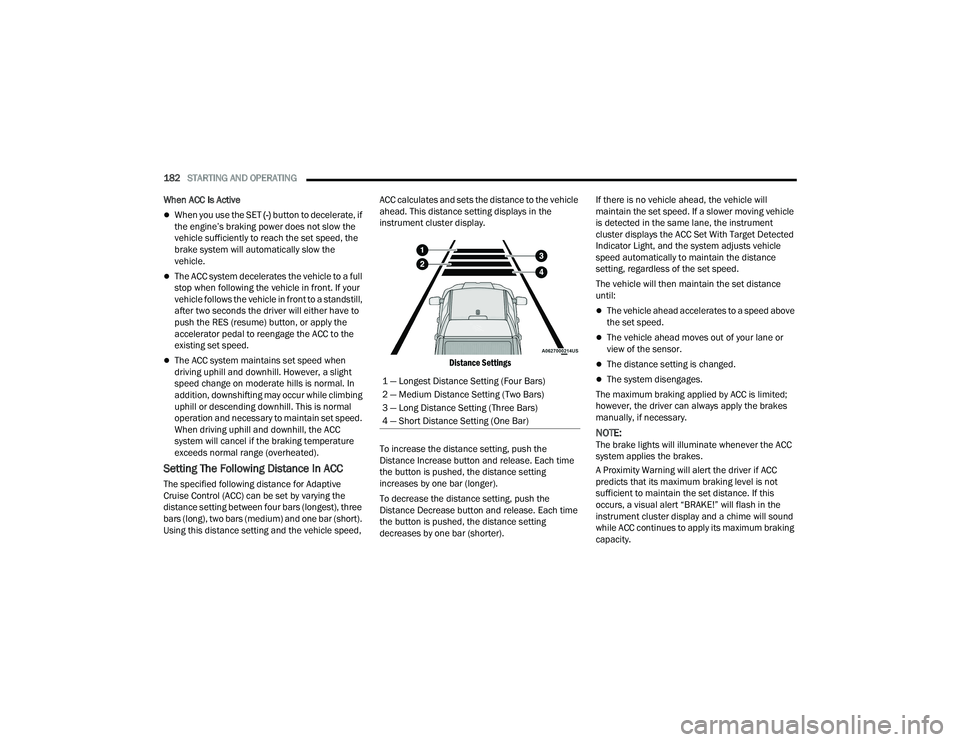
Setting The Following Distance In ACC
The specified following distance for Adaptive
Cruise Control (ACC) can be set by varying the
distance setting between four bars (longest), three
bars (long), two bars (medium) and one bar (short).
Using this distance setting and the vehicle speed, ACC calculates and sets the distance to the vehicle
ahead. This distance setting displays in the
instrument cluster display.
Distance Settings
To increase the distance setting, push the
Distance Increase button and release. Each time
the button is pushed, the distance setting
increases by one bar (longer).
To decrease the distance setting, push the
Distance Decrease button and release. Each time
the button is pushed, the distance setting
decreases by one bar (shorter). If there is no vehicle ahead, the vehicle will
maintain the set speed. If a slower moving vehicle
is detected in the same lane, the instrument
cluster displays the ACC Set With Target Detected
Indicator Light, and the system adjusts vehicle
speed automatically to maintain the distance
setting, regardless of the set speed.
The vehicle will then maintain the set distance
until:
The vehicle ahead accelerates to a speed above
the set speed.
The vehicle ahead moves out of your lane or
view of the sensor.
The distance setting is changed.
The system disengages.
The maximum braking applied by ACC is limited;
however, the driver can always apply the brakes
manually, if necessary.
NOTE:The brake lights will illuminate whenever the ACC
system applies the brakes.
A Proximity Warning will alert the driver if ACC
predicts that its maximum braking level is not
sufficient to maintain the set distance. If this
occurs, a visual alert “BRAKE!” will flash in the
instrument cluster display and a chime will sound
while ACC continues to apply its maximum braking
capacity.
1 — Longest Distance Setting (Four Bars)
2 — Medium Distance Setting (Two Bars)
3 — Long Distance Setting (Three Bars)
4 — Short Distance Setting (One Bar)
22_DT_OM_EN_USC_t.book Page 182
Page 185 of 496
STARTING AND OPERATING183
NOTE:
The “BRAKE!” screen in the instrument cluster
display is a warning for the driver to take action and
does not mean that the Forward Collision Warning
system is applying the brakes autonomously.
Overtake Aid
When driving with Adaptive Cruise Control (ACC)
engaged, and following a vehicle, the system will
provide an additional acceleration up to the ACC
set speed to assist in passing the vehicle. This
additional acceleration is triggered when the driver
utilizes the left turn signal and will only be active
when passing on the left hand side.
ACC Operation At Stop
In the event that the ACC system brings your
vehicle to a standstill while following the vehicle in
front, if the vehicle in front starts moving within two
seconds of your vehicle coming to a standstill, your
vehicle will resume motion without the need for
any driver action.
If the vehicle in front does not start moving within
two seconds of your vehicle coming to a standstill,
the driver will either have to push the RES (resume)
button, or apply the accelerator pedal to reengage
the ACC to the existing set speed.
NOTE:After the ACC system holds your vehicle at a stand -
still for approximately three consecutive minutes, the parking brake will be activated, and the ACC
system will be canceled.
While ACC is holding your vehicle at a standstill, if
the driver seat belt is unbuckled or the driver door
is opened, the parking brake will be activated, and
the ACC system will be canceled.
Display Warnings And Maintenance
“WIPE FRONT RADAR SENSOR IN FRONT OF
VEHICLE” WARNING
The “ACC/FCW Unavailable Wipe Front Radar
Sensor” warning will display and a chime will
sound when conditions temporarily limit system
performance.
This most often occurs at times of poor visibility,
such as in snow or heavy rain. The ACC system may
also become temporarily blinded due to
obstructions, such as mud, dirt or ice. In these
cases, the instrument cluster display will display
“ACC/FCW Unavailable Wipe Front Radar Sensor”
and the system will deactivate.The “ACC/FCW Unavailable Wipe Front Radar
Sensor” message can sometimes be displayed
while driving in highly reflective areas (i.e. ice and
snow, or tunnels with reflective tiles). The ACC
system will recover after the vehicle has left these
areas. Under rare conditions, when the radar is not
tracking any vehicles or objects in its path this
warning may temporarily occur.
NOTE:If the “ACC/FCW Unavailable Wipe Front Radar
Sensor” warning is active, Fixed Speed Cruise
Control is still available.
If weather conditions are not a factor, the driver
should examine the sensor. It may require cleaning
or removal of an obstruction. The sensor is located
in the camera in the center of the windshield, on
the forward side of the rearview mirror.
To keep the ACC system operating properly, it is
important to note the following maintenance
items:
Always keep the sensor clean. Carefully clear
the windshield.
Do not remove any screws from the sensor.
Doing so could cause an ACC system malfunc
-
tion or failure and require a sensor realignment.
Do not attach or install any accessories near the
sensor, including transparent material. Doing so
could cause an ACC system failure or malfunc -
tion.
WARNING!
When the ACC system is resumed, the driver
must ensure that there are no pedestrians,
vehicles or objects in the path of the vehicle.
Failure to follow these warnings can result in a
collision and death or serious personal injury.
4
22_DT_OM_EN_USC_t.book Page 183
Page 189 of 496

STARTING AND OPERATING187
ParkSense will retain its last known configura -
tion state for the automatic braking function
through ignition cycles.
Trailer hitch ball assembly may cause false
braking events if left attached after towing.
The automatic braking function is intended to
assist the driver in avoiding possible collisions with
detected obstacles when backing up in REVERSE
gear.
NOTE:
The system is provided to assist the driver and
not to substitute the driver.
The driver must stay in full control of the
vehicle's acceleration and braking and is
responsible for the vehicle's movements.
For limitations of this system and usage
precautions, see Ú page 191.
ParkSense will retain the last system state
(enabled or disabled) from the last ignition cycle
when the ignition is placed in the ON/RUN position.
ParkSense can be active only when the gear
selector is in REVERSE or DRIVE. If ParkSense is
enabled while in one of these gears, the system will
remain active until the vehicle speed is increased
to approximately 7 mph (11 km/h) or above. A
warning will appear in the instrument cluster
display indicating the vehicle speed is above ParkSense operating speed while in REVERSE. The
system will become active again if the vehicle
speed is decreased to speeds less than
approximately 6 mph (9 km/h).
PARKSENSE SENSORS
The four ParkSense sensors (six if equipped with
Active Parksense), located in the front fascia/
bumper, monitor the area in front of the vehicle
that is within the sensors’ field of view, and the four
ParkSense sensors, located in the rear fascia/
bumper, monitor the area behind the vehicle that
is within the sensors’ field of view. The front
sensors can detect obstacles from approximately
12 inches (30 cm) up to 47 inches (120 cm) from
the front fascia/bumper. The rear sensors can
detect obstacles from approximately 12 inches
(30 cm) up to 79 inches (200 cm). These distances
depend on the location, type and orientation of the
obstacle in the horizontal direction.
PARKSENSE WARNING DISPLAY
The ParkSense Warning screen is located within
the instrument cluster display Ú
page 114. It
provides visual warnings to indicate the distance
between the rear fascia/bumper and/or front
fascia/bumper and the detected obstacle.
PARKSENSE DISPLAY
The warning display will turn on indicating the
system status when the vehicle is in REVERSE or
when the vehicle is in DRIVE and an obstacle has
been detected.
The system will indicate a detected obstacle by
showing a single arc in the left, right, or center
regions based on the obstacle’s distance and
location relative to the vehicle.
If an obstacle is detected in the center front region,
the display will show a single solid arc in the center
front region with no chime. As the vehicle moves
closer to the obstacle, the display will show the
single arc moving closer to the vehicle and a fast
chime will be heard and will change from fast to
continuous.
If an obstacle is detected in the left and/or right
front region, the display will show a single flashing
arc in the left and/or right front region and will
produce a fast chime. As the vehicle moves closer
to the obstacle, the display will show the single arc
moving closer to the vehicle and the tone will
change from fast to continuous.
4
22_DT_OM_EN_USC_t.book Page 187
Page 198 of 496
196STARTING AND OPERATING
LANESENSE — IF EQUIPPED
LANESENSE OPERATION
The LaneSense system is operational at speeds
above 37 mph (60 km/h) and below 112 mph
(180 km/h). The LaneSense system uses a
forward looking camera to detect lane markings
and measure vehicle position within the lane
boundaries.
When both lane markings are detected and the
driver drifts out of the lane (no turn signal applied),
the LaneSense system provides a haptic warning
in the form of torque applied to the steering wheel,
as well as a visual warning in the instrument
cluster display, to prompt the driver to remain
within the lane boundaries.
The driver may manually override the haptic
warning by applying force into the steering wheel at
any time.
When only a single lane marking is detected and
the driver drifts across the lane marking (no turn
signal applied), the LaneSense system provides a
visual warning through the instrument cluster
display to prompt the driver to remain within the
lane.
When only a single lane marking is detected, a
haptic or a torque warning will not be provided.
NOTE:
When operating conditions have been met, the
LaneSense system will monitor if the driver’s
hands are on the steering wheel and provide an
audible and visual warning to the driver if
removed. The system will cancel if the driver
does not return their hands to the wheel.
LaneSense will disable when a snow plow is
connected to the vehicle.
TURNING LANESENSE ON OR OFF
The LaneSense button is located on the
switch panel below the Uconnect display.
NOTE:If your vehicle is equipped with a 12-inch Uconnect
Display screen, the LaneSense button is located
above the display.
To turn the LaneSense system on, push the
LaneSense button (LED turns off). A “LaneSense
On” message is shown in the instrument cluster
display.
To turn the LaneSense system off, push the
LaneSense button again (LED turns on).
NOTE:The LaneSense system will retain the last system
state on or off from the last ignition cycle when the
ignition is placed in the ON/RUN position.
WARNING!
Drivers must be careful when performing
parallel or perpendicular parking maneuvers
even when using the ParkSense Active Park
Assist system. Always check carefully behind
and in front of your vehicle, look behind and in
front of you, and be sure to check for
pedestrians, animals, other vehicles,
obstructions, and blind spots before backing up
and moving forward. You are responsible for
safety and must continue to pay attention to
your surroundings. Failure to do so can result in
serious injury or death.
CAUTION!
The ParkSense Active Park Assist system is
only a parking aid and it is unable to recognize
every obstacle, including small obstacles.
Parking curbs might be temporarily detected
or not detected at all. Obstacles located above
or below the sensors’ field of view will not be
detected when they are in close proximity.
The vehicle must be driven slowly when using
the ParkSense Active Park Assist system in
order to be able to stop in time when an
obstacle is detected. It is recommended that
the driver looks over his/her shoulders when
using the ParkSense Active Park Assist system.
22_DT_OM_EN_USC_t.book Page 196
Page 308 of 496

306MULTIMEDIA
Engine
Press the Left and Right Arrow buttons on the
bottom of the touchscreen to cycle between the
Dyno and Engine pages.
When selected, this screen displays the following
values:
Vehicle Speed: Shows the actual vehicle speed.
Engine Power: Shows the instantaneous power.
Engine Torque : Shows the instantaneous
torque.
Boost Pressure : Shows the actual engine boost
pressure.
Gear : Shows the current (or pending) operating
gear of the vehicle.
VEHICLE DYNAMICS
The Vehicle Dynamics page displays information
concerning the vehicle’s drivetrain.
Steering Angle — If Equipped
Steering Angle utilizes the steering angle sensor to
calculate the degree of the steering relative to zero
(straight ahead) reference angle. The zero degree
reference angle measurement indicates the actual
front tire steering angle. Transfer Case
This feature will be active when the vehicle is in
4WD HIGH, 4WD AUTO, Neutral, or 4WD LOW.
NOTE:A lock symbol will only be present on the Transfer
Case button when the vehicle is in 4WD LOW.
Rear Axle Locker
This feature will allow you to lock and unlock the
rear axle. To change the status, push the AXLE
LOCK button.
OFF-ROAD PAGES — IF EQUIPPED
Your vehicle may be equipped with Off-Road Pages
which display vehicle information related to the
drivetrain, transfer case, and coolant/oil gauges.
To access Off-Road Pages, press the Vehicle
button on the touchscreen, select the Off-Road
Pages tab, and then select the Off-Road button on
the main screen. Off-Road Pages can also be
accessed through the app drawer.
Off-Road Button
22_DT_OM_EN_USC_t.book Page 306
Page 316 of 496

314SAFETY
(Continued)
Electronic Roll Mitigation (ERM)
The ERM system anticipates the potential for
wheel lift by monitoring the driver’s steering wheel
input and the speed of the vehicle. When ERM
determines that the rate of change of the steering
wheel angle and vehicle’s speed are sufficient to
potentially cause wheel lift, it then applies the
appropriate brake and may also reduce engine
power to lessen the chance that wheel lift will
occur. ERM can only reduce the chance of wheel
lift occurring during severe or evasive driving
maneuvers; it cannot prevent wheel lift due to
other factors, such as road conditions, leaving the
roadway, striking objects or other vehicles.
Electronic Stability Control (ESC)
ESC enhances directional control and stability of
the vehicle under various driving conditions. ESC
corrects for oversteering or understeering of the
vehicle by applying the brake of the appropriate
wheel(s) to counteract the above conditions.
Engine power may also be reduced to help the
vehicle maintain the desired path.
Oversteer — when the vehicle is turning more
than appropriate for the steering wheel position.
Understeer — when the vehicle is turning less
than appropriate for the steering wheel position.
ESC uses sensors in the vehicle to determine the
vehicle path intended by the driver and compares
it to the actual path of the vehicle. When the actual
path does not match the intended path, ESC
applies the brake of the appropriate wheel to
assist in counteracting the oversteer or understeer
condition. The ESC Activation/Malfunction Indicator Light
located in the instrument cluster will start to flash
as soon as the ESC system becomes active. The
ESC Activation/Malfunction Indicator Light also
flashes when the TCS is active. If the ESC
Activation/Malfunction Indicator Light begins to
flash during acceleration, ease up on the
accelerator and apply as little throttle as possible.
Be sure to adapt your speed and driving to the
prevailing road conditions.
WARNING!
Many factors, such as vehicle loading, road
conditions and driving conditions, influence the
chance that wheel lift or rollover may occur. ERM
cannot prevent all wheel lift or rollovers,
especially those that involve leaving the roadway
or striking objects or other vehicles. The
capabilities of an ERM-equipped vehicle must
never be exploited in a reckless or dangerous
manner which could jeopardize the user's safety
or the safety of others.
WARNING!
Electronic Stability Control (ESC) cannot
prevent the natural laws of physics from
acting on the vehicle, nor can it increase the
traction afforded by prevailing road condi
-
tions. ESC cannot prevent accidents, including
those resulting from excessive speed in turns,
driving on very slippery surfaces, or hydro -
planing. ESC also cannot prevent accidents
resulting from loss of vehicle control due to
inappropriate driver input for the conditions.
Only a safe, attentive, and skillful driver can
prevent accidents. The capabilities of an ESC
equipped vehicle must never be exploited in a
reckless or dangerous manner which could
jeopardize the user’s safety or the safety of
others.
22_DT_OM_EN_USC_t.book Page 314