warning RAM 1500 2023 Owners Manual
[x] Cancel search | Manufacturer: RAM, Model Year: 2023, Model line: 1500, Model: RAM 1500 2023Pages: 416, PDF Size: 20.59 MB
Page 273 of 416
SAFETY271
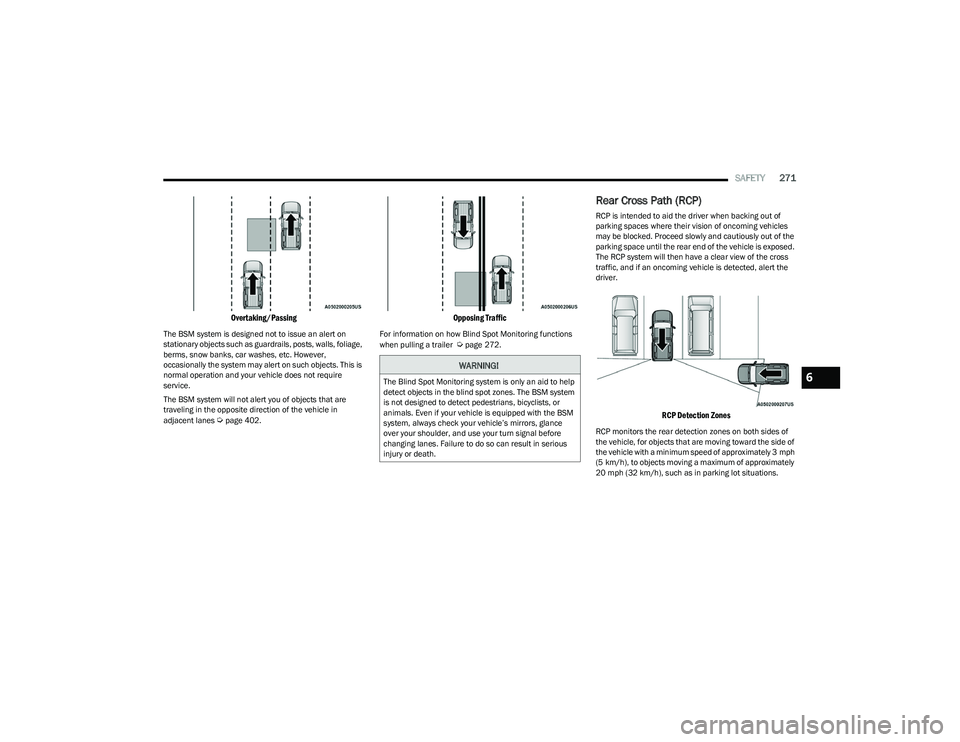
Overtaking/Passing
The BSM system is designed not to issue an alert on
stationary objects such as guardrails, posts, walls, foliage,
berms, snow banks, car washes, etc. However,
occasionally the system may alert on such objects. This is
normal operation and your vehicle does not require
service.
The BSM system will not alert you of objects that are
traveling in the opposite direction of the vehicle in
adjacent lanes
Úpage 402.
Opposing Traffic
For information on how Blind Spot Monitoring functions
when pulling a trailer Úpage 272.
Rear Cross Path (RCP)
RCP is intended to aid the driver when backing out of
parking spaces where their vision of oncoming vehicles
may be blocked. Proceed slowly and cautiously out of the
parking space until the rear end of the vehicle is exposed.
The RCP system will then have a clear view of the cross
traffic, and if an oncoming vehicle is detected, alert the
driver.
RCP Detection Zones
RCP monitors the rear detection zones on both sides of
the vehicle, for objects that are moving toward the side of
the vehicle with a minimum speed of approximately 3 mph
(5 km/h), to objects moving a maximum of approximately
20 mph (32 km/h), such as in parking lot situations.
WARNING!
The Blind Spot Monitoring system is only an aid to help
detect objects in the blind spot zones. The BSM system
is not designed to detect pedestrians, bicyclists, or
animals. Even if your vehicle is equipped with the BSM
system, always check your vehicle’s mirrors, glance
over your shoulder, and use your turn signal before
changing lanes. Failure to do so can result in serious
injury or death.6
23_DT_OM_EN_USC_t.book Page 271
Page 274 of 416

272SAFETY
When RCP is on and the vehicle is in REVERSE (R), the
driver is alerted using both the visual and audible alarms,
including reducing the radio volume.
NOTE:In a parking lot situation, oncoming vehicles can be
blocked by vehicles parked on either side. If the sensors
are blocked by other structures or vehicles, the system will
not be able to alert the driver.
Blind Spot Modes
Blind Spot has three selectable modes of operation that
are available in the Uconnect system.
Blind Spot Alert Lights Only
When operating in Blind Spot Alert mode, the BSM system
will provide a visual alert in the appropriate side view
mirror based on a detected object. However, when the
system is operating in Rear Cross Path (RCP) mode, the
system will respond with both visual and audible alerts
when a detected object is present. Whenever an audible
alert is requested, the radio is muted. Blind Spot Alert Lights/Chime
When operating in Blind Spot Alert Lights/Chime mode,
the BSM system will provide a visual alert in the
appropriate side view mirror based on a detected object.
If the turn signal is then activated, and it corresponds to
an alert present on that side of the vehicle, an audible
chime will also be sounded. Whenever a turn signal and
detected object are present on the same side at the same
time, both the visual and audible alerts will be issued. In
addition to the audible alert the radio (if on) will also be
muted.
NOTE:Whenever an audible alert is requested by the BSM
system, the radio is also muted.
When the system is in RCP, the system shall respond with
both visual and audible alerts when a detected object is
present. Whenever an audible alert is requested, the radio
is also muted. Turn/hazard signal status is ignored; the
RCP state always requests the chime.
Blind Spot Alert Off
When the BSM system is turned off there will be no visual
or audible alerts from either the BSM, RCP, or Trailer
Merge Assist systems.
NOTE:The BSM system will store the current operating mode
when the vehicle is shut off. Each time the vehicle is
started the previously stored mode will be recalled and
used.
Trailer Merge Assist — If Equipped
Trailer Merge Assist is a function of the Blind Spot
Monitoring (BSM) system that extends the blind spot zone
to work while pulling a trailer.
NOTE:When Trailer Merge Assist is activated, Rear Cross Path is
disabled.
Trailer Merge Assist consists of three sub functions:
Automatic Trailer Detection
Trailer Length Detection
Trailer Merge Warning
Blind Spot Zones With Trailer Merge Assist
WARNING!
Rear Cross Path Detection (RCP) is not a backup aid
system. It is intended to be used to help a driver detect
an oncoming vehicle in a parking lot situation. Drivers
must be careful when backing up, even when using
RCP. Always check carefully behind your vehicle, look
behind you, and be sure to check for pedestrians,
animals, other vehicles, obstructions, and blind spots
before backing up. Failure to do so can result in serious
injury or death.
1 — Vehicle
2 — Trailer
23_DT_OM_EN_USC_t.book Page 272
Page 276 of 416

274SAFETY
NOTE:Trailer length is determined within +/- 3 ft (1 m) of actual
length. Trailers that are the same size as the category
limit, 10/20/30 ft (3/6/9 m), could be subject to being
placed in the category above or below the correct one.
Trailer Merge Warning
Trailer Merge Warning is the extension of the blind spot
function to cover the length of the trailer, plus a safety
margin, to warn the driver when there is a vehicle in the
adjacent lane. The driver is alerted by the illumination of
the BSM Warning Light located in the outside mirror on the
side the other vehicle is detected on. In addition, an
audible (chime) alert will be heard and radio volume will
be reduced
Úpage 272.
NOTE:
The Trailer Merge Alert system DOES NOT alert the
driver about rapidly approaching vehicles that are
outside the detection zones.
The Blind Spot Monitoring (BSM) system may experi -
ence drop outs (blinking on and off) of the side mirror
warning indicator lights when a motorcycle or any small
object remains at the side of the vehicle for extended
periods of time (more than a couple of seconds).
Crowded areas such as parking lots, neighborhoods,
etc. may lead to an increased amount of false alerts.
This is normal operation.
FORWARD COLLISION WARNING (FCW)
W
ITH MITIGATION — IF EQUIPPED
FCW with Mitigation provides the driver with audible
warnings, visual warnings (within the instrument cluster
display), and may apply a brake jerk to warn the driver
when it detects a potential frontal collision. The warnings
and limited braking are intended to provide the driver with
enough time to react, avoid or mitigate the potential
collision.
NOTE:FCW monitors the information from the forward looking
sensors as well as the Electronic Brake Controller (EBC), to
calculate the probability of a forward collision. When the
system determines that a forward collision is probable, the
driver will be provided with audible and visual warnings as
well as a possible brake jerk warning. If the driver does not take action based upon these
progressive warnings, then the system will provide a
limited level of active braking to help slow the vehicle and
mitigate the potential forward collision. If the driver reacts
to the warnings by braking and the system determines
that the driver intends to avoid the collision by braking but
has not applied sufficient brake force, the system will
compensate and provide additional brake force as
required.
If a FCW with Mitigation event begins at a speed below
32 mph (52 km/h), the system may provide the maximum
braking possible to mitigate the potential forward
collision. If the Forward Collision Warning with Mitigation
event stops the vehicle completely, the system will hold
the vehicle at standstill for two seconds and then release
the brakes.
FCW Message
WARNING!
The Blind Spot Monitoring system is only an aid to help
detect objects in the blind spot zones. The BSM system
is not designed to detect pedestrians, bicyclists, or
animals. Even if your vehicle is equipped with the BSM
system, always check your vehicle’s mirrors, glance
over your shoulder, and use your turn signal before
changing lanes. Failure to do so can result in serious
injury or death.
23_DT_OM_EN_USC_t.book Page 274
Page 277 of 416
SAFETY275
When the system determines a collision with the vehicle in
front of you is no longer probable, the warning message
will be deactivated
Úpage 402.
NOTE:
The minimum speed for FCW activation is 3 mph
(5 km/h).
The FCW alerts may be triggered on objects other than
vehicles such as guardrails or sign posts based on the
course prediction. This is expected and is a part of
normal FCW activation and functionality.
It is unsafe to test the FCW system. To prevent such
misuse of the system, after four Active Braking events
within a key cycle, the Active Braking portion of FCW will
be deactivated until the next key cycle.
The FCW system is intended for on-road use only. If the
vehicle is taken off-road, the FCW system should be
deactivated to prevent unnecessary warnings to the
surroundings.
FCW may not react to irrelevant objects such as over -
head objects, ground reflections, objects not in the
path of the vehicle, stationary objects that are far away,
oncoming traffic, or leading vehicles with the same or
higher rate of speed.
FCW will be disabled like ACC, with the unavailable
screens.
Turning FCW On Or Off
The FCW button is located in the Uconnect display in the
control settings Úpage 191.
To turn the FCW system on, press the forward collision
button once.
To turn the FCW system off, press the forward collision
button once.
NOTE:
When the FCW is “on”, this allows the system to warn
the driver of a possible collision with the vehicle in
front.
When the FCW is “off”, this prevents the system from
warning the driver of a possible collision with the
vehicle in front. If the FCW is set to “off”, “FCW OFF” will
be displayed in the instrument cluster display.
When FCW status is set to “Only Warning”, this
prevents the system from providing limited active
braking, or additional brake support if the driver is not
braking adequately in the event of a potential frontal
collision.
When FCW status is set to “Warning and Braking”, this
allows the system to warn the driver of a possible colli -
sion with the vehicle in front using audible/visual warn -
ings and it applies autonomous braking.
The FCW system state is defaulted to “Full On” from
one ignition cycle to the next. If the system is turned off,
it will reset to “Full On” when the vehicle is restarted.
FCW Braking Status And Sensitivity
The FCW Sensitivity and Active Braking status are
programmable through the Uconnect system
Úpage 191.
Far
When the sensitivity of FCW is set to the “Far”
setting and the system status is “Only Warning”,
this allows the system to warn the driver of a
possible more distant collision with the vehicle in
front using audible/visual warnings.
More cautious drivers that do not mind frequent
warnings may prefer this setting.
NOTE:The “Far” setting may result in a greater number of FCW
possible collision warnings experienced.
WARNING!
Forward Collision Warning (FCW) is not intended to
avoid a collision on its own, nor can FCW detect every
type of potential collision. The driver has the
responsibility to avoid a collision by controlling the
vehicle via braking and steering. Failure to follow this
warning could lead to serious injury or death.
6
23_DT_OM_EN_USC_t.book Page 275
Page 278 of 416
276SAFETY
Medium
When the sensitivity of FCW is set to the “Medium”
setting and the system status is “Only Warning”,
this allows the system to warn the driver of a
possible collision with the vehicle in front using
audible/visual warnings.
Near
When the sensitivity of FCW is set to the “Near”
setting and the system status is “Only Warning”,
this allows the system to warn the driver of a
possible closer collision with the vehicle in front
using audible/visual warnings.
This setting provides less reaction time than the
“Far” and “Medium” settings, which allows for a
more dynamic driving experience.
More dynamic or aggressive drivers that want to
avoid frequent warnings may prefer this setting.
NOTE:The “Near” setting may result in a lesser number of FCW
possible collision warnings experienced.
FCW Limited Warning
If the instrument cluster displays “ACC/FCW Limited
Functionality” or “ACC/FCW Limited Functionality Clean
Front Windshield” momentarily, there may be a condition
that limits FCW functionality. Although the vehicle is still
driveable under normal conditions, the active braking may
not be fully available. Once the condition that limited the
system performance is no longer present, the system will
return to its full performance state. If the problem persists,
see an authorized dealer.
Service FCW Warning
If the system turns off, and the instrument cluster
displays:
ACC/FCW Unavailable Service Required
Cruise/FCW Unavailable Service Required
This indicates there is an internal system fault. Although
the vehicle is still drivable under normal conditions, have
the system checked by an authorized dealer.
Pedestrian Emergency Braking (PEB) —
If Equipped
PEB is a subsystem of the FCW system that provides the
driver with audible and visual warnings in the instrument
cluster display, and may apply automatic braking when it
detects a potential frontal collision with a pedestrian/
cyclist.
If a PEB event begins at a speed below 37 mph (60 km/h),
the system may provide braking to mitigate the potential
collision with a pedestrian/cyclist. If the PEB event stops
the vehicle completely, the system will hold the vehicle at
a standstill for two seconds and then release the brakes.
When the system determines a collision with the
pedestrian/cyclist in front of you is no longer probable, the
warning message will be deactivated.
The minimum speed for PEB activation is 3 mph (5 km/h). Turning PEB On Or Off
NOTE:The default status of PEB is “On.” This allows the system
to warn you of a possible frontal collision with the
pedestrian.
The PEB button is located in the Uconnect display in the
controls settings
Úpage 191.
To turn the PEB system off, push the Pedestrian
Emergency Braking button once.
To turn the PEB system back on, push the Pedestrian
Emergency Braking button again.
Changing the PEB status to “Off” deactivates the system,
so no warning or active braking will be available in case of
a possible frontal collision with the pedestrian.
NOTE:The PEB system will retain the last setting selected by the
driver after ignition shut down.
WARNING!
Pedestrian Emergency Braking (PEB) is not intended to
avoid a collision on its own, nor can PEB detect every
type of potential collision with a pedestrian. The driver
has the responsibility to avoid a collision by controlling
the vehicle via braking and steering. Failure to follow
this warning could lead to serious injury or death.
23_DT_OM_EN_USC_t.book Page 276
Page 279 of 416

SAFETY277
TIRE PRESSURE MONITORING SYSTEM
(TPMS)
TPMS will warn the driver of a low tire pressure based on
the vehicle recommended cold placard pressure.
NOTE:The TPMS Warning Light will illuminate in the instrument
cluster and a chime will sound when tire pressure is low in
one or more of the four active road tires. In addition, the
instrument cluster will display a graphic showing the
pressure values of each tire with the low tire pressure
values in a different color, or the Uconnect radio will
display a TPMS message; when this occurs you must
increase the tire pressure to the recommended cold
placard pressure in order for the TPMS Warning Light to
turn off.
The tire pressure will vary with temperature by about 1 psi
(7 kPa) for every 12°F (6.5°C). This means that when the
outside temperature decreases, the tire pressure will
decrease. Tire pressure should always be set based on
cold inflation tire pressure. This is defined as the tire
pressure after the vehicle has not been driven for at least
three hours, or driven less than 1 mile (1.6 km) after a
three hour period. The cold tire inflation pressure must not
exceed the maximum inflation pressure molded into the
tire sidewall. The tire pressure will also increase as the
vehicle is driven — this is normal and there should be no
adjustment for this increased pressure.
See
Úpage 370 on how to properly inflate the vehicle’s
tires. The TPMS will warn the driver of a low tire pressure if the
tire pressure falls below the low-pressure warning limit for
any reason, including low temperature effects and natural
pressure loss through the tire
Úpage 402.
The TPMS will continue to warn the driver of low tire
pressure as long as the condition exists, and will not turn
off until the tire pressure is at or above the recommended
cold placard pressure. Once the low TPMS Warning Light
illuminates, increase the tire pressure to the
recommended cold placard pressure in order for the
TPMS Warning Light to turn off. The system will
automatically update and the TPMS Warning Light will turn
off once the system receives the updated tire pressures.
The vehicle may need to be driven for up to 20 minutes
above 15 mph (24 km/h) in order for the TPMS to receive
this information.
NOTE:When filling warm tires, the tire pressure may need to be
increased up to an additional 4 psi (28 kPa) above the
recommended cold placard pressure in order to turn the
TPMS Warning Light off.
For example, your vehicle may have a recommended cold
(parked for more than three hours) placard pressure of
30 psi (207 kPa). If the ambient temperature is 68°F
(20°C) and the measured tire pressure is 27 psi
(186 kPa), a temperature drop to 20°F (-7°C) will
decrease the tire pressure to approximately 23 psi
(158 kPa). This tire pressure is sufficiently low enough
to turn on the TPMS Warning Light. Driving the vehicle may cause the tire pressure to rise to
approximately 27 psi (186 kPa), but the TPMS Warning
Light will still be on. In this situation, the TPMS Warning
Light will turn off only after the tires are inflated to the
vehicle’s recommended cold placard pressure value.
CAUTION!
The TPMS has been optimized for the original equip -
ment tires and wheels. TPMS pressures and warning
have been established for the tire size equipped on
your vehicle. Undesirable system operation or sensor
damage may result when using replacement equip -
ment that is not of the same size, type, and/or style.
Aftermarket wheels can cause sensor damage.
Using aftermarket tire sealants may cause the Tire
Pressure Monitoring System (TPMS) sensor to
become inoperable. After using an aftermarket tire
sealant it is recommended that you take your vehicle
to an authorized dealership to have your sensor func -
tion checked.
After inspecting or adjusting the tire pressure always
reinstall the valve stem cap. This will prevent mois -
ture and dirt from entering the valve stem, which
could damage the TPMS sensor.
6
23_DT_OM_EN_USC_t.book Page 277
Page 280 of 416

278SAFETY
NOTE:
The TPMS is not intended to replace normal tire care
and maintenance or to provide warning of a tire failure
or condition.
The TPMS should not be used as a tire pressure gauge
while adjusting your tire pressure, unless your vehicle
is equipped with a Tire Fill Alert (TFA) system.
Driving on a significantly underinflated tire causes the
tire to overheat and can lead to tire failure. Underinfla -
tion also reduces fuel efficiency and tire tread life, and
may affect the vehicle’s handling and stopping ability.
The TPMS is not a substitute for proper tire mainte -
nance, and it is the driver’s responsibility to maintain
correct tire pressure using an accurate tire pressure
gauge, even if underinflation has not reached the level
to trigger illumination of the TPMS Warning Light.
Seasonal temperature changes will affect tire pres -
sure, and the TPMS will monitor the actual tire pres -
sure in the tire.
Tire Pressure Monitoring System Display
The Tire Pressure Monitoring System (TPMS) uses wireless
technology with wheel rim mounted electronic sensors to
monitor tire pressure levels. Sensors, mounted to each
wheel as part of the valve stem, transmit tire pressure
readings to the receiver module.
NOTE:It is particularly important for you to check the tire
pressure in all of the tires on your vehicle monthly and to
maintain the proper pressure.
The TPMS consists of the following components:
Receiver module
Four Tire Pressure Monitoring System sensors
Various Tire Pressure Monitoring System messages,
which display in the instrument cluster
Tire Pressure Monitoring System Warning Light
Tire Pressure Monitoring System Low
Pressure Warnings
The Tire Pressure Monitoring System (TPMS)
Warning Light will illuminate in the instrument
cluster and a chime will sound when tire
pressure is low in one or more of the four active
road tires. In addition, the instrument cluster will display a
graphic showing the pressure values of each tire with the
low tire pressure values in a different color. An "Inflate to
XX" message will also be displayed.
Low Tire Pressure Display
Should this occur, you should stop as soon as possible
and inflate the tires with a low pressure condition
(those in a different color in the instrument cluster
graphic) to the vehicle’s recommended cold placard
pressure inflation value as shown in the "Inflate to XX"
message. Once the system receives the updated tire
pressures, the system will automatically update, the
graphic display in the instrument cluster will return to its
original color, and the Tire Pressure Monitoring System
Warning Light will turn off. The vehicle may need to be
driven for up to 20 minutes above 15 mph (24 km/h) in
order for the TPMS to receive this information.
NOTE:When filling warm tires, the tire pressure may need to be
increased up to an additional 4 psi (28 kPa) above the
recommended cold placard pressure in order to turn the
Tire Pressure Monitoring System Warning Light off.
23_DT_OM_EN_USC_t.book Page 278
Page 281 of 416

SAFETY279
Service TPMS Warning
If a system fault is detected, the Tire Pressure Monitoring
System (TPMS) Warning Light will flash on and off for 75
seconds and then remain on solid. The system fault will
also sound a chime. In addition, the instrument cluster will
display a "SERVICE TPM SYSTEM" message for a minimum
of five seconds and then display dashes (--) in place of the
pressure value to indicate which sensor is not being
received.
If the ignition switch is cycled, this sequence will repeat,
providing the system fault still exists. If the system fault no
longer exists, the Tire Pressure Monitoring System
Warning Light will no longer flash, and the "SERVICE TPM
SYSTEM" message will no longer display, and a pressure
value will display in place of the dashes. A system fault can
occur due to any of the following:
Signal interference due to electronic devices or driving
next to facilities emitting the same radio frequencies
as the Tire Pressure Monitoring System sensors
Installing aftermarket window tinting that contains
materials that may block radio wave signals
Accumulation of snow or ice around the wheels or
wheel housings
Using tire chains on the vehicle
Using wheels/tires not equipped with TPMS sensors
A system fault may occur due to an incorrect TPMS sensor
location condition. When a system fault occurs due to an
incorrect TPMS sensor location, the Tire Pressure
Monitoring System (TPMS) Warning Light will flash on and
off for 75 seconds and then remain on solid. The system fault will also sound a chime. In addition, the
instrument cluster will display a Tire Pressure Temporarily
Unavailable message in place of the tire pressure display
screen. If the ignition switch is cycled, this sequence will
repeat, providing the system fault still exists. If the system
fault no longer exists, the “Tire Pressure Monitoring
System Warning Light” will no longer flash and the tire
pressure display screen will be displayed showing the tire
pressure values the correct locations.
Vehicles With Non-Matching Full Size Spare Or Compact
Spare
The non-matching full size spare or compact spare tire
does not have a TPMS sensor. Therefore, the TPMS will
not monitor the pressure in the non-matching full size
spare or compact spare tire.
If you install the non-matching full size spare or
compact spare tire in place of a road tire that has a
pressure below the low-pressure warning limit, upon
the next ignition switch cycle, the Tire Pressure
Monitoring System (TPMS) Warning Light and a
“LOW TIRE” message will remain on and a chime will
sound. In addition, the graphic in the instrument
cluster will still display a pressure value in a different
color and an “Inflate to XX” message.
After driving the vehicle for up to 20 minutes above
15 mph (24 km/h), the Tire Pressure Monitoring
System (TPMS) Warning Light will flash on and off for
75 seconds and then remain on solid. In addition, the
instrument cluster will display a "SERVICE TPM
SYSTEM" message for a minimum of five seconds and
then display dashes (--) in place of the pressure value.
For each subsequent ignition switch cycle, a chime will
sound, the Tire Pressure Monitoring System (TPMS)
Warning Light will flash on and off for 75 seconds and
then remain on solid, and the instrument cluster will
display a "SERVICE TPM SYSTEM" message for a
minimum of five seconds and then display dashes (--)
in place of the pressure value.
Once you repair or replace the original road tire and
reinstall it on the vehicle in place of the non-matching
full size spare or compact spare, the TPMS will update
automatically. In addition, the Tire Pressure Monitoring
System (TPMS) Warning Light will turn off and the
graphic in the instrument cluster will display a new
pressure value instead of dashes (--), as long as no tire
pressure is below the low-pressure warning limit in any
of the four active road tires. The vehicle may need to be
driven for up to 20 minutes above 15 mph (24 km/h)
in order for the TPMS to receive this information.
Tire Fill Alert
This feature notifies the user when the placard tire
pressure is attained while inflating or deflating the tire.
You may choose to disable or enable the Tire Fill Alert
feature through use of the Uconnect Settings in the radio.
NOTE:
Only one tire can be filled at a time when using the Tire
Fill Alert system.
The Tire Fill Alert feature cannot be entered if an
existing TPMS fault is set to “active” or if the system is
in deactivation mode (if equipped).
6
23_DT_OM_EN_USC_t.book Page 279
Page 283 of 416

SAFETY281
Trailer Tire Pressure Pairing
Follow the on screen prompts to select the number of
axles (1-3), the number of trailer tires (2, 4, 6, 8, or 12),
and the set trailer tire pressure. The range is selectable
anywhere between 25-125 psi (172-862 kPa).
Once psi (kPa) is programmed, the pairing screen
appears. Tire sensors must be paired in order shown.
Starting with Tire 1, deflate tire by 5 psi (34 kPa) and wait
for a horn chirp. It may take up to three minutes for the
chirp to occur, indicating that the sensor has paired.
Repeat process on each tire, in order, until complete.
Do not exit the pairing screen until process is complete.
If pairing was unsuccessful, a double horn chirp will
sound, and a prompt on the touchscreen will allow you to
retry the procedure; “Retry” will only appear when setup
fails. Each tire must be successfully paired during a single
pairing process to receive the success screen.
NOTE:If the pairing process times out after three minutes of no
communication with a sensor, a double horn chip will
occur indicating the pairing has failed and a message will
display on the radio indicating the process was unsuc -
cessful. Under certain circumstances, the double horn
chirp may continue to happen every three minutes indi -
cating the failed pairing. If this happens, the horn chirping
may be canceled by cycling the ignition button OFF and
then back to RUN position.
Tire Pressure Monitoring System Low Pressure Warnings
When a tire pressure low in one or more of the active road
tires is detected, the instrument cluster will display a
message stating “Trailer Tire Pressure Low”.
The instrument cluster will then display the TTPMS graphic
showing the pressure values of each tire with the low tire
pressure values in a different color.
Should this occur, you should stop as soon as possible
and inflate the tires with a low pressure condition (those in
a different color in the instrument cluster graphic) to the
customer programmed target tire pressure value as
shown at the top of the TTPMS instrument cluster graphic.
Once the tire(s) are inflated, the system will automatically
update the graphic display in the instrument cluster,
returning to its original color. The vehicle may need to be
driven for up to 10 minutes above 15 mph (24 km/h) in
order for the TTPMS to receive the updated information. Service TTPMS Warning
If a system fault is detected, the instrument cluster will
display a “Trailer Tire Pressure System Service Required”
message for a minimum of five seconds.
Once the system fault is corrected the "Trailer Tire
Pressure System Service Required" message will no
longer be displayed. The vehicle may need to be driven for
up to 10 minutes above 15 mph (24 km/h) in order for the
TTPMS to receive the trailer tire pressure information.
Trailer Tire Pressure System Not Configured
A “Trailer Tire Pressure System Not Configured” message
will be displayed in the instrument cluster on the TTPMS
instrument cluster graphic when a trailer number is
selected that has not had trailer tire pressure sensors
paired. To correct this condition, see
Úpage 191.
Trailer Sensors Detected Do Not Match Active Trailer
The “Trailer Sensors Detected Do Not Match Active
Trailer” message will be displayed in the instrument
cluster when the trailer sensors being received by the
TTPMS module do not match the trailer sensors paired to
the current trailer number selected. This message will be
displayed when the sensors being received completely
match the sensors paired to another trailer number
configured in the TTPMS module.
To correct this condition, the correct trailer number must
be selected in the radio
Úpage 191.
6
23_DT_OM_EN_USC_t.book Page 281
Page 284 of 416
282SAFETY
OCCUPANT RESTRAINT SYSTEMS
Some of the most important safety features in your vehicle
are the restraint systems:
OCCUPANT RESTRAINT SYSTEMS
F
EATURES
Seat Belt Systems
Supplemental Restraint Systems (SRS) Air Bags
Child Restraints
Some of the safety features described in this section may
be standard equipment on some models, or may be
optional equipment on others. If you are not sure, ask an
authorized dealer.
IMPORTANT SAFETY PRECAUTIONS
Please pay close attention to the information in this
section. It tells you how to use your restraint system
properly, to keep you and your passengers as safe as
possible.
Here are some simple steps you can take to minimize the
risk of harm from a deploying air bag:
1. Children 12 years old and under should always ride buckled up in the rear seat of a vehicle with
a rear seat.
2. A child who is not big enough to wear the vehicle seat belt properly must be secured in the appropriate child
restraint or belt-positioning booster seat in a rear
seating position
Úpage 298. 3. If a child from 2 to 12 years old (not in a rear-facing
child restraint) must ride in the front passenger seat,
move the seat as far back as possible and use the
proper child restraint
Úpage 298.
4. Never allow children to slide the shoulder belt behind them or under their arm.
5. You should read the instructions provided with your child restraint to make sure that you are using it
properly.
6. All occupants should always wear their lap and shoulder belts properly.
7. The driver and front passenger seats should be moved back as far as practical to allow the front air
bags room to inflate.
8. Do not lean against the door or window. If your vehicle has side air bags, and deployment occurs, the side air
bags will inflate forcefully into the space between
occupants and the door and occupants could be
injured.
9. If the air bag system in this vehicle needs to be modified to accommodate a disabled person, see
Úpage 398 for customer service contact
information.
SEAT BELT SYSTEMS
Buckle up even though you are an excellent driver, even
on short trips. Someone on the road may be a poor driver
and could cause a collision that includes you. This can
happen far away from home or on your own street.
Research has shown that seat belts save lives, and they
can reduce the seriousness of injuries in a collision. Some
of the worst injuries happen when people are thrown from
the vehicle. Seat belts reduce the possibility of ejection
and the risk of injury caused by striking the inside of the
vehicle. Everyone in a motor vehicle should be belted at all
times.
WARNING!
Never place a rear-facing child restraint in front of an
air bag. A deploying passenger front air bag can
cause death or serious injury to a child 12 years or
younger, including a child in a rear-facing child
restraint.
Never install a rear-facing child restraint in the front
seat of a vehicle. Only use a rear-facing child
restraint in the rear seat. If the vehicle does not have
a rear seat, do not transport a rear-facing child
restraint in that vehicle.
23_DT_OM_EN_USC_t.book Page 282