phone RAM 1500 2023 User Guide
[x] Cancel search | Manufacturer: RAM, Model Year: 2023, Model line: 1500, Model: RAM 1500 2023Pages: 416, PDF Size: 20.59 MB
Page 71 of 416
GETTING TO KNOW YOUR VEHICLE69
iPhone® 12 (including iPod®) is equipped with
software to protect the device from overheating. When
the software is active, the rate of charge is slowed
down to protect the device.
Phones must always be placed on the wireless
charging pad within the outline shown on the pad so
that its charging parts connect with the charging coils
of the system. Movement of the phone during charging
may prevent or slow the rate of charge.
Having multiple applications open on the phone while
charging will reduce the charging efficiency, and may
even shut down an application that is actively running
(i.e. Apple CarPlay®). This may also cause the phone to
overheat.
Wireless chargers may implement certain methods to
prevent the phone from overheating during charging
such as slowing down the rate of charge. In certain
instances, the device may shut down for a brief period
of time (when the device reaches a certain tempera -
ture). If this happens, it does not mean there is a fault
with the wireless charging pad. This may just be a
protective measure to prevent damage to the phone.UV-C LIGHT — IF EQUIPPED
Your vehicle may be equipped with a UV-C light located
inside the glove compartment used to hygienize surface
areas of items placed inside. The UV-C light hygienizes
using a very specialized, and high powered, UV-C light
source.
NOTE:No chemicals are used in the hygienizing process.
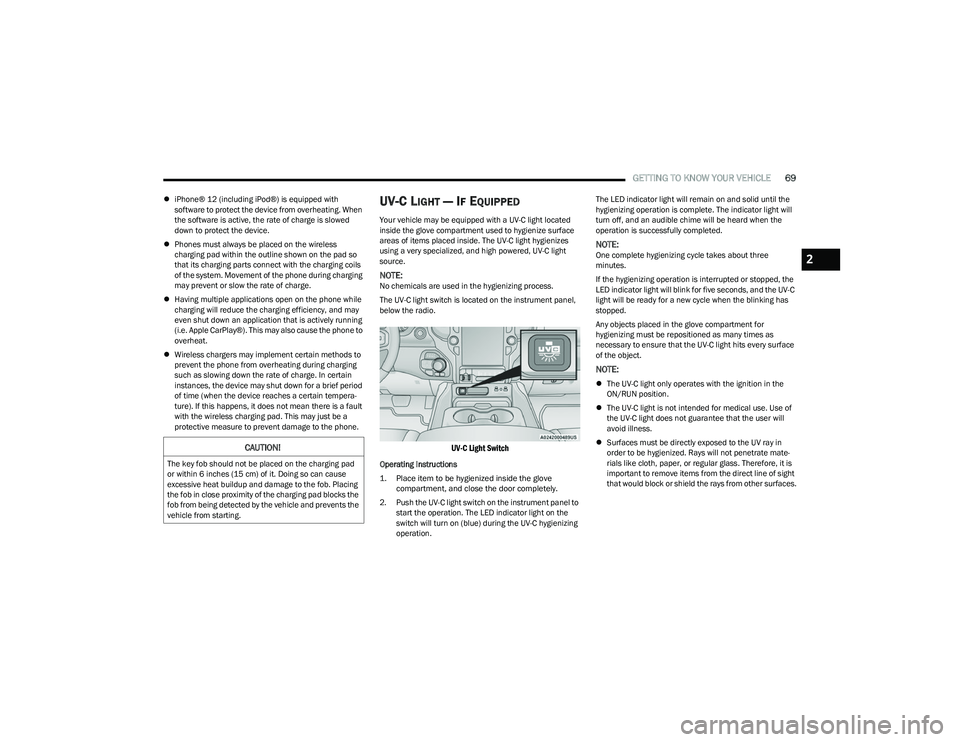
The UV-C light switch is located on the instrument panel,
below the radio.
UV-C Light Switch
Operating Instructions
1. Place item to be hygienized inside the glove compartment, and close the door completely.
2. Push the UV-C light switch on the instrument panel to start the operation. The LED indicator light on the
switch will turn on (blue) during the UV-C hygienizing
operation. The LED indicator light will remain on and solid until the
hygienizing operation is complete. The indicator light will
turn off, and an audible chime will be heard when the
operation is successfully completed.
NOTE:One complete hygienizing cycle takes about three
minutes.
If the hygienizing operation is interrupted or stopped, the
LED indicator light will blink for five seconds, and the UV-C
light will be ready for a new cycle when the blinking has
stopped.
Any objects placed in the glove compartment for
hygienizing must be repositioned as many times as
necessary to ensure that the UV-C light hits every surface
of the object.
NOTE:
The UV-C light only operates with the ignition in the
ON/RUN position.
The UV-C light is not intended for medical use. Use of
the UV-C light does not guarantee that the user will
avoid illness.
Surfaces must be directly exposed to the UV ray in
order to be hygienized. Rays will not penetrate mate -
rials like cloth, paper, or regular glass. Therefore, it is
important to remove items from the direct line of sight
that would block or shield the rays from other surfaces.
CAUTION!
The key fob should not be placed on the charging pad
or within 6 inches (15 cm) of it. Doing so can cause
excessive heat buildup and damage to the fob. Placing
the fob in close proximity of the charging pad blocks the
fob from being detected by the vehicle and prevents the
vehicle from starting.
2
23_DT_OM_EN_USC_t.book Page 69
Page 85 of 416
GETTING TO KNOW YOUR VEHICLE83
Cargo bins feature two removable drain plugs (to allow
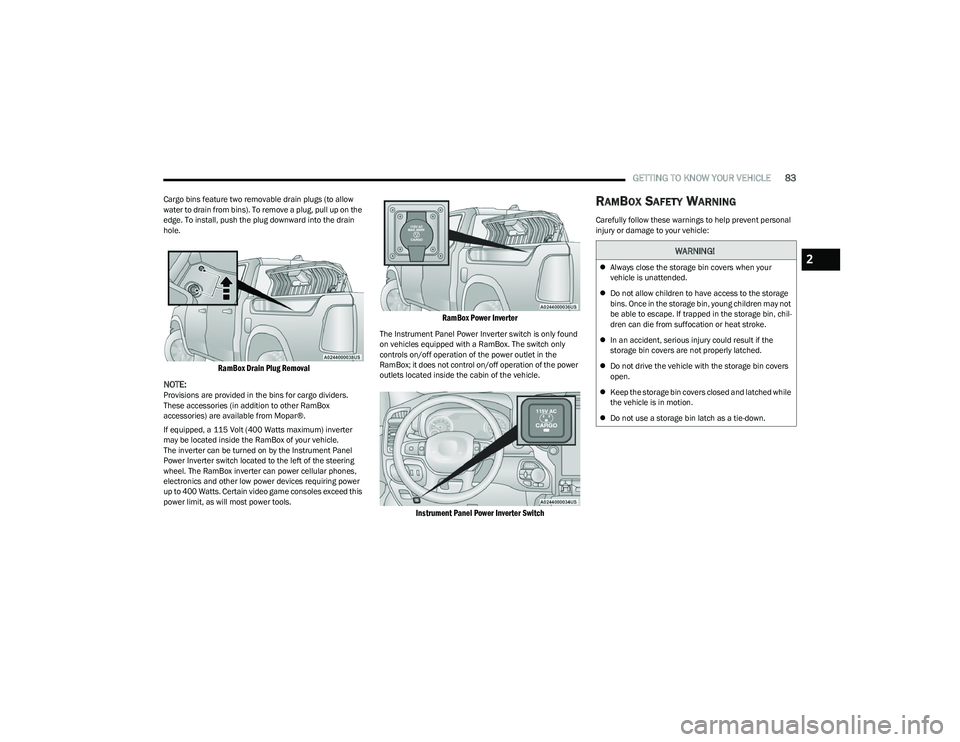
water to drain from bins). To remove a plug, pull up on the
edge. To install, push the plug downward into the drain
hole.
RamBox Drain Plug Removal
NOTE:
Provisions are provided in the bins for cargo dividers.
These accessories (in addition to other RamBox
accessories) are available from Mopar®.
If equipped, a 115 Volt (400 Watts maximum) inverter
may be located inside the RamBox of your vehicle.
The inverter can be turned on by the Instrument Panel
Power Inverter switch located to the left of the steering
wheel. The RamBox inverter can power cellular phones,
electronics and other low power devices requiring power
up to 400 Watts. Certain video game consoles exceed this
power limit, as will most power tools.
RamBox Power Inverter
The Instrument Panel Power Inverter switch is only found
on vehicles equipped with a RamBox. The switch only
controls on/off operation of the power outlet in the
RamBox; it does not control on/off operation of the power
outlets located inside the cabin of the vehicle.
Instrument Panel Power Inverter Switch
RAMBOX SAFETY WARNING
Carefully follow these warnings to help prevent personal
injury or damage to your vehicle:
WARNING!
Always close the storage bin covers when your
vehicle is unattended.
Do not allow children to have access to the storage
bins. Once in the storage bin, young children may not
be able to escape. If trapped in the storage bin, chil -
dren can die from suffocation or heat stroke.
In an accident, serious injury could result if the
storage bin covers are not properly latched.
Do not drive the vehicle with the storage bin covers
open.
Keep the storage bin covers closed and latched while
the vehicle is in motion.
Do not use a storage bin latch as a tie-down.2
23_DT_OM_EN_USC_t.book Page 83
Page 105 of 416
GETTING TO KNOW YOUR INSTRUMENT PANEL103
Trip Info
Push and release the up or down arrow button until
the Trip menu item is highlighted in the instrument cluster
display. Push and release the right or left arrow
button to enter the submenus of Trip A and Trip B. The Trip
A or Trip B information will display the following:
Distance
Average Fuel Economy
Elapsed Time
Push and hold OK button to reset all information.
Navigation — If Equipped
Push and release the up or down arrow button until
the Navigation display title is highlighted in the instrument
cluster display, “Hold OK to Start Route” will display when
no active route is set. “Hold OK to Cancel Route” will
display when active route is set. Use the left or right
arrow button to zoom in or out on the display
Úpage 191.
Stop/Start — If Equipped
Push and release the up or down arrow button until
the Stop/Start icon/title is highlighted in the instrument
cluster display. The screen will display the Stop/Start
status.
Trailer Tow — If Equipped
Push and release the up or down arrow button until
the Trailer Tow menu item is highlighted in the instrument
cluster display. Push and release the right or left
arrow button to cycle through the following trailer tow
information:
Trip (trailer specific) Distance: Push and hold the OK
button to reset the distance.
Integrated Trailer Brake Module (ITBM):
Braking Output
Trailer Type
ITBM Gain
Trailer Tire Pressure Monitoring: The Instrument
Cluster Display will display the Trailer Tire Pressure for
a connected trailer with sensors that match the active
trailer profile. When a low tire is present, the low tire
value will be displayed in red, and the affected low tire
will have a red glow. “Trailer Tire Low“ will be displayed
on the center bottom of the Instrument Cluster Display
screen.
Trailer Light Check — If Equipped: Push and hold the OK
button to begin the Trailer Light Test sequence
Úpage 182.
Audio
Push and release the up or down arrow button until
the Audio Menu icon/title is highlighted in the instrument
cluster display. This menu will display the audio source
information, including the Song name, Artist name, and
audio source with an accompanying graphic.
Phone Call Status
When a call is incoming, a Phone Call Status pop-up will
display on the screen. The pop-up will remain until the
phone is answered or ignored.
NOTE:The call status will temporarily replace the previous media
source information displayed on the screen. When the
pop-up is no longer displayed, the display will return to the
last used screen.
Stored Messages
Push and release the up or down arrow button until
the Messages Menu item is highlighted. This feature
shows the number of stored warning messages Example:
“Oil Change Required”. Push and release the right or
left arrow button to cycle through stored messages.
3
23_DT_OM_EN_USC_t.book Page 103
Page 196 of 416
194MULTIMEDIA
Phone Pop-ups Displayed In Cluster This setting will display smartphone notifications and messages in the Instrument
Cluster Display.
Time Format This setting will allow you to set the time format (AM/PM). Sync Time With GPS must be
“Off” for this setting to be available. The “12 hrs” setting will set the time to a 12-hour
format. The “24 hrs” setting will set the time to a 24-hour format.
Voice Options This setting will allow you to change the voice options for the radio to “Male” or “Female”.
Wake Up Word This setting will allow you to set the system “Wake Up” word. The available options are
“Off”, “Hey, Uconnect”, and “Hey, Ram”.
Voice Barge-in This setting will allow Voice Barge-in to be turned on or off.
Show Command List This setting will allow the Command List to be shown. The options are “On” and “Off”.
Navigation Settings This setting will redirect to the list of Navigation settings. Refer to your Uconnect Radio
Instruction Manual for further information.
Auto-On Driver Heated/Ventilated Seat & Heated Steering Wheel This setting will activate the vehicle’s comfort system and heated seats or heated
steering wheel when the vehicle is remote started or ignition is started. The “Off” setting
will not activate the comfort systems. The “Remote Start” setting will only activate the
comfort systems when using Remote Start. The “All Start” setting will activate the comfort
systems whenever the vehicle is started.
Radio Power Off This setting will keep certain electrical features running after the engine is turned off.
When any door is opened, the electronics will deactivate. The available settings are
“0 sec”, “45 sec”, “5 min”, and “10 min”.
Radio Off With Door This setting will allow you to determine if the radio shuts off when any of the doors
are opened.
Audio Settings This setting will open the submenu, containing the audio settings
Úpage 211.
App Drawer Favoriting Pop-ups This setting will allow you to favorite app drawer pop-ups with “On” and “Off” options.
App Drawer Unfavoritings Pop-ups This setting will allow you to unfavorite app drawer pop-ups with “On” and “Off” options.
New Text Message Pop-ups This setting will allow you to have pop-up notifications for new text messages. Setting
options are “On” and “Off”.
Setting Name
Description
23_DT_OM_EN_USC_t.book Page 194
Page 199 of 416
MULTIMEDIA197
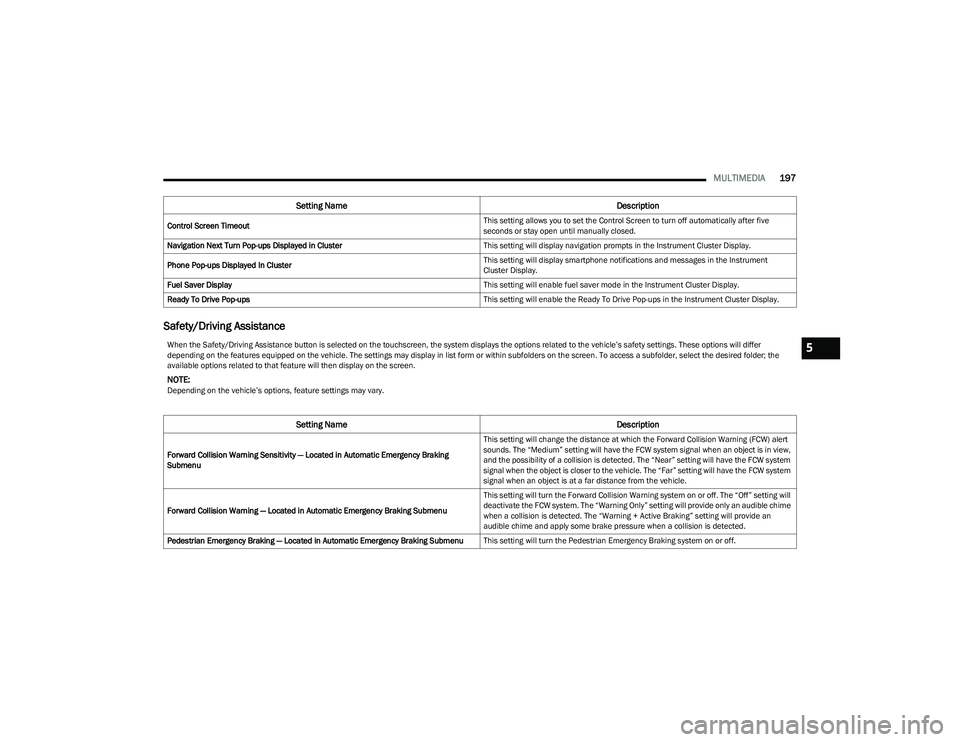
Safety/Driving Assistance
Control Screen Timeout This setting allows you to set the Control Screen to turn off automatically after five
seconds or stay open until manually closed.
Navigation Next Turn Pop-ups Displayed in Cluster This setting will display navigation prompts in the Instrument Cluster Display.
Phone Pop-ups Displayed In Cluster This setting will display smartphone notifications and messages in the Instrument
Cluster Display.
Fuel Saver Display This setting will enable fuel saver mode in the Instrument Cluster Display.
Ready To Drive Pop-ups This setting will enable the Ready To Drive Pop-ups in the Instrument Cluster Display.
Setting NameDescription
When the Safety/Driving Assistance button is selected on the touchscreen, the system displays the options related to the vehicle’s safety settings. These options will differ
depending on the features equipped on the vehicle. The settings may display in list form or within subfolders on the screen. To access a subfolder, select the desired folder; the
available options related to that feature will then display on the screen.
NOTE:Depending on the vehicle’s options, feature settings may vary.
Setting NameDescription
Forward Collision Warning Sensitivity — Located in Automatic Emergency Braking
Submenu This setting will change the distance at which the Forward Collision Warning (FCW) alert
sounds. The “Medium” setting will have the FCW system signal when an object is in view,
and the possibility of a collision is detected. The “Near” setting will have the FCW system
signal when the object is closer to the vehicle. The “Far” setting will have the FCW system
signal when an object is at a far distance from the vehicle.
Forward Collision Warning — Located in Automatic Emergency Braking Submenu This setting will turn the Forward Collision Warning system on or off. The “Off” setting will
deactivate the FCW system. The “Warning Only” setting will provide only an audible chime
when a collision is detected. The “Warning + Active Braking” setting will provide an
audible chime and apply some brake pressure when a collision is detected.
Pedestrian Emergency Braking — Located in Automatic Emergency Braking Submenu This setting will turn the Pedestrian Emergency Braking system on or off.
5
23_DT_OM_EN_USC_t.book Page 197
Page 202 of 416
200MULTIMEDIA
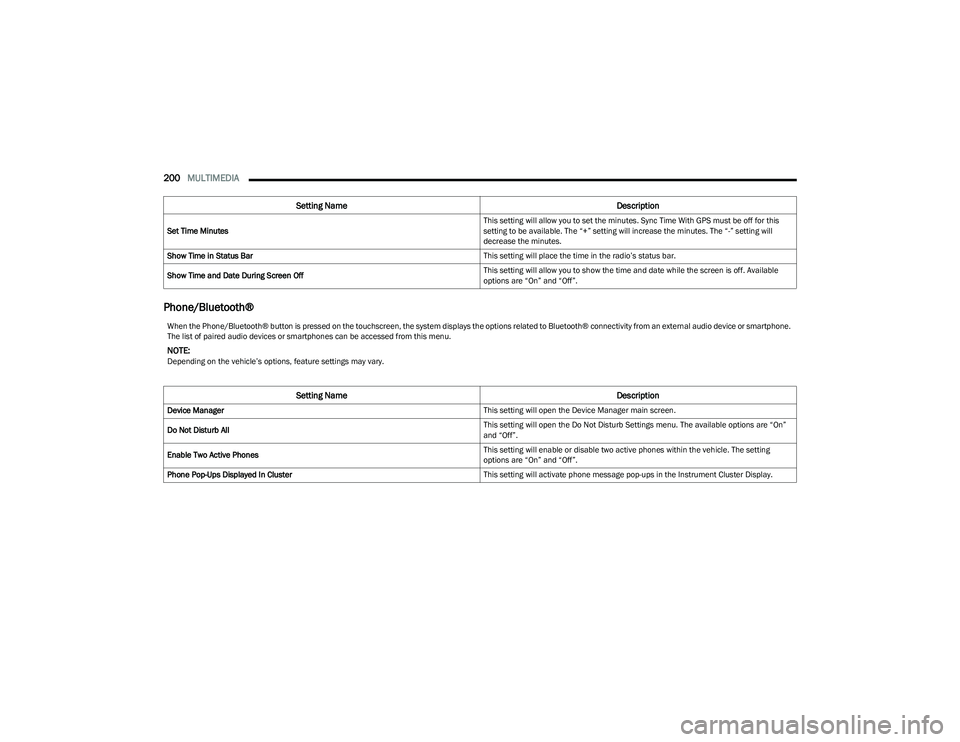
Phone/Bluetooth®
Set Time Minutes This setting will allow you to set the minutes. Sync Time With GPS must be off for this
setting to be available. The “+” setting will increase the minutes. The “-” setting will
decrease the minutes.
Show Time in Status Bar This setting will place the time in the radio’s status bar.
Show Time and Date During Screen Off This setting will allow you to show the time and date while the screen is off. Available
options are “On” and “Off”.
Setting Name
Description
When the Phone/Bluetooth® button is pressed on the touchscreen, the system displays the options related to Bluetooth® connectivity from an external audio device or smartphone.
The list of paired audio devices or smartphones can be accessed from this menu.
NOTE:Depending on the vehicle’s options, feature settings may vary.
Setting NameDescription
Device Manager This setting will open the Device Manager main screen.
Do Not Disturb All This setting will open the Do Not Disturb Settings menu. The available options are “On”
and “Off”.
Enable Two Active Phones This setting will enable or disable two active phones within the vehicle. The setting
options are “On” and “Off”.
Phone Pop-Ups Displayed In Cluster This setting will activate phone message pop-ups in the Instrument Cluster Display.
23_DT_OM_EN_USC_t.book Page 200
Page 213 of 416
MULTIMEDIA211
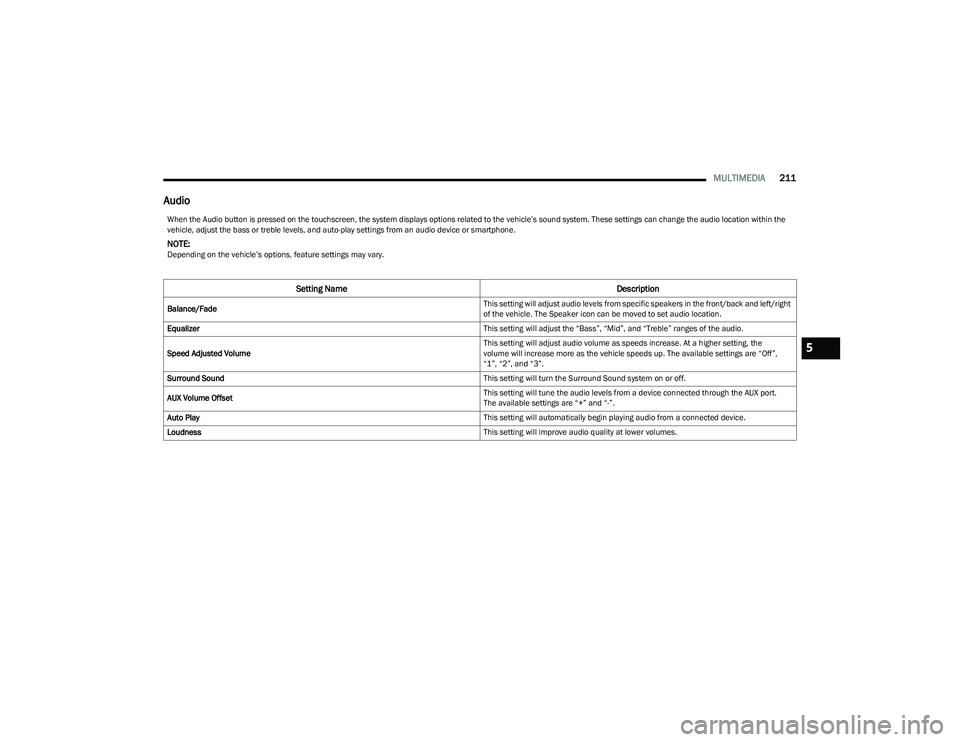
Audio
When the Audio button is pressed on the touchscreen, the system displays options related to the vehicle’s sound system. These settings can change the audio location within the
vehicle, adjust the bass or treble levels, and auto-play settings from an audio device or smartphone.
NOTE:Depending on the vehicle’s options, feature settings may vary.
Setting Name Description
Balance/Fade This setting will adjust audio levels from specific speakers in the front/back and left/right
of the vehicle. The Speaker icon can be moved to set audio location.
Equalizer This setting will adjust the “Bass”, “Mid”, and “Treble” ranges of the audio.
Speed Adjusted Volume This setting will adjust audio volume as speeds increase. At a higher setting, the
volume will increase more as the vehicle speeds up. The available settings are “Off”,
“1”, “2”, and “3”.
Surround Sound This setting will turn the Surround Sound system on or off.
AUX Volume Offset This setting will tune the audio levels from a device connected through the AUX port.
The available settings are “+” and “-”.
Auto Play This setting will automatically begin playing audio from a connected device.
Loudness This setting will improve audio quality at lower volumes.
5
23_DT_OM_EN_USC_t.book Page 211
Page 214 of 416
212MULTIMEDIA
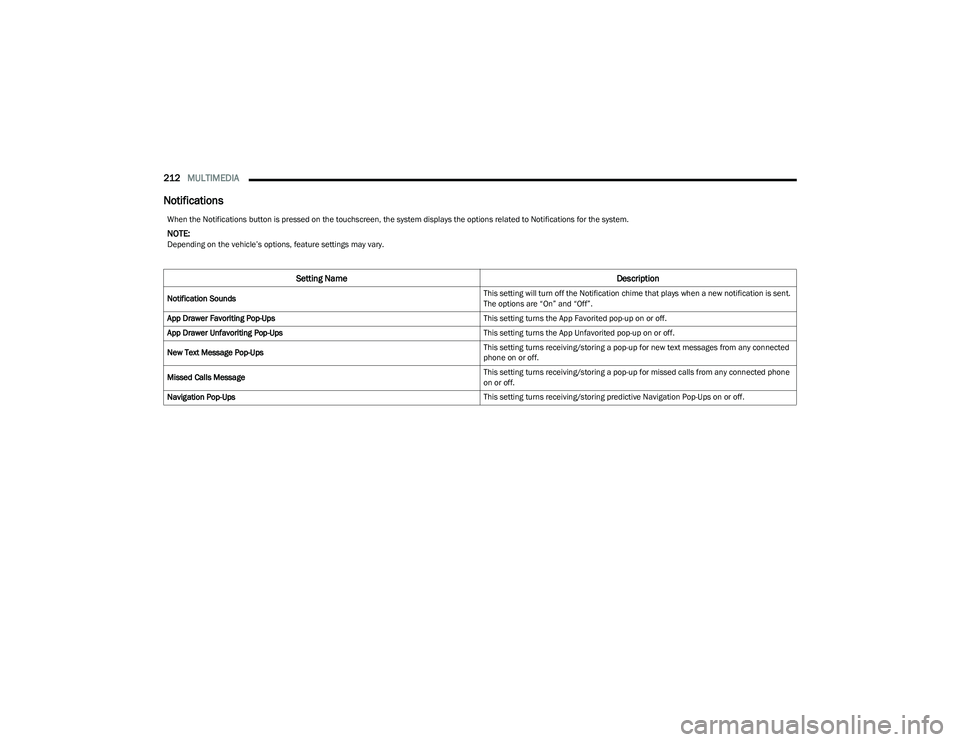
Notifications
When the Notifications button is pressed on the touchscreen, the system displays the options related to Notifications for the system.
NOTE:Depending on the vehicle’s options, feature settings may vary.
Setting Name Description
Notification Sounds This setting will turn off the Notification chime that plays when a new notification is sent.
The options are “On” and “Off”.
App Drawer Favoriting Pop-Ups This setting turns the App Favorited pop-up on or off.
App Drawer Unfavoriting Pop-Ups This setting turns the App Unfavorited pop-up on or off.
New Text Message Pop-Ups This setting turns receiving/storing a pop-up for new text messages from any connected
phone on or off.
Missed Calls Message This setting turns receiving/storing a pop-up for missed calls from any connected phone
on or off.
Navigation Pop-Ups This setting turns receiving/storing predictive Navigation Pop-Ups on or off.
23_DT_OM_EN_USC_t.book Page 212
Page 216 of 416
214MULTIMEDIA
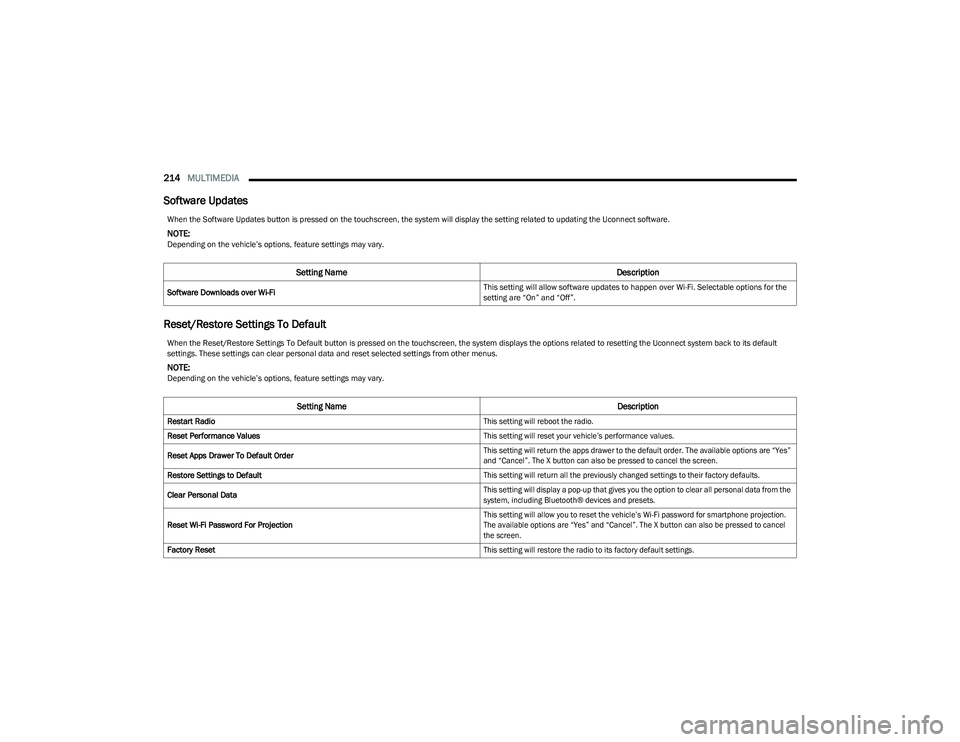
Software Updates
Reset/Restore Settings To Default
When the Software Updates button is pressed on the touchscreen, the system will display the setting related to updating the Uconnect software.
NOTE:Depending on the vehicle’s options, feature settings may vary.
Setting Name Description
Software Downloads over Wi-Fi This setting will allow software updates to happen over Wi-Fi. Selectable options for the
setting are “On” and “Off”.
When the Reset/Restore Settings To Default button is pressed on the touchscreen, the system displays the options related to resetting the Uconnect system back to its default
settings. These settings can clear personal data and reset selected settings from other menus.
NOTE:Depending on the vehicle’s options, feature settings may vary.
Setting Name
Description
Restart Radio
This setting will reboot the radio.
Reset Performance Values
This setting will reset your vehicle’s performance values.
Reset Apps Drawer To Default Order
This setting will return the apps drawer to the default order. The available options are “Yes”
and “Cancel”. The X button can also be pressed to cancel the screen.
Restore Settings to Default
This setting will return all the previously changed settings to their factory defaults.
Clear Personal Data
This setting will display a pop-up that gives you the option to clear all personal data from the
system, including Bluetooth® devices and presets.
Reset Wi-Fi Password For Projection
This setting will allow you to reset the vehicle’s Wi-Fi password for smartphone projection.
The available options are “Yes” and “Cancel”. The X button can also be pressed to cancel
the screen.
Factory Reset
This setting will restore the radio to its factory default settings.
23_DT_OM_EN_USC_t.book Page 214
Page 217 of 416
MULTIMEDIA215
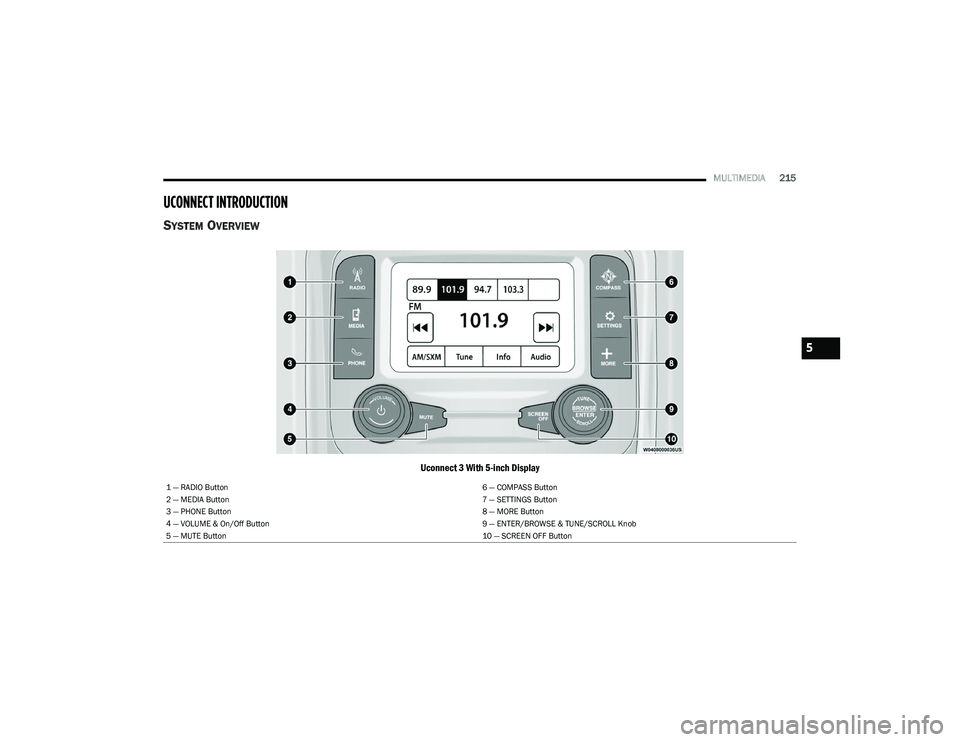
UCONNECT INTRODUCTION
SYSTEM OVERVIEW
Uconnect 3 With 5-inch Display
1 — RADIO Button 6 — COMPASS Button
2 — MEDIA Button 7 — SETTINGS Button
3 — PHONE Button 8 — MORE Button
4 — VOLUME & On/Off Button 9 — ENTER/BROWSE & TUNE/SCROLL Knob
5 — MUTE Button 10 — SCREEN OFF Button
5
23_DT_OM_EN_USC_t.book Page 215