light RAM 1500 2023 Owner's Guide
[x] Cancel search | Manufacturer: RAM, Model Year: 2023, Model line: 1500, Model: RAM 1500 2023Pages: 416, PDF Size: 20.59 MB
Page 53 of 416
GETTING TO KNOW YOUR VEHICLE51
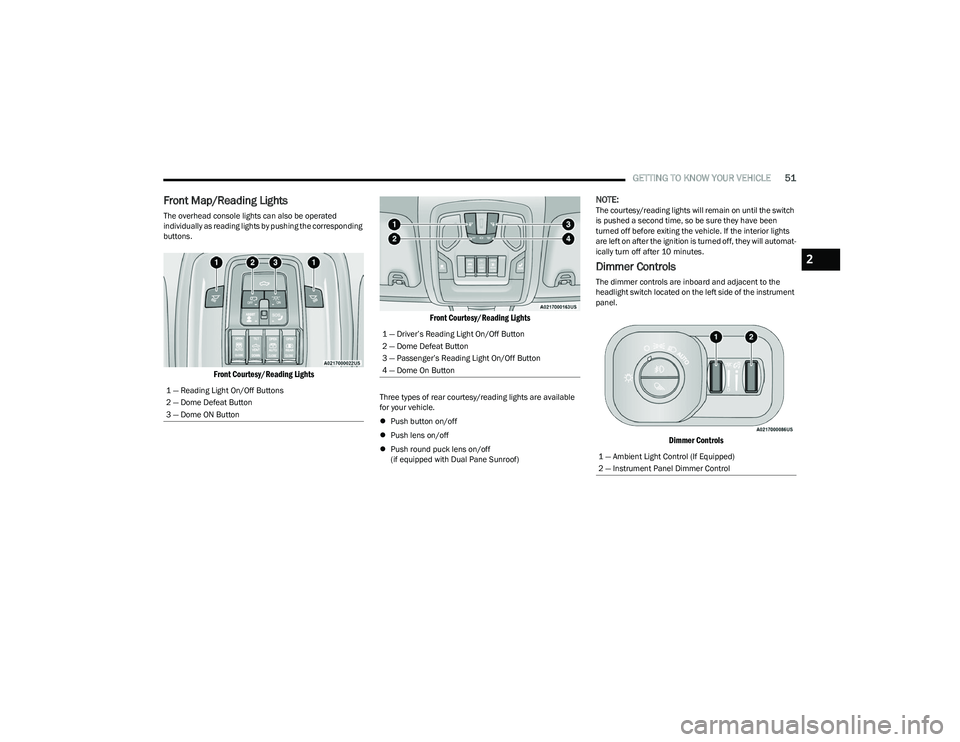
Front Map/Reading Lights
The overhead console lights can also be operated
individually as reading lights by pushing the corresponding
buttons.
Front Courtesy/Reading Lights Front Courtesy/Reading Lights
Three types of rear courtesy/reading lights are available
for your vehicle.
Push button on/off
Push lens on/off
Push round puck lens on/off
(if equipped with Dual Pane Sunroof)
NOTE:The courtesy/reading lights will remain on until the switch
is pushed a second time, so be sure they have been
turned off before exiting the vehicle. If the interior lights
are left on after the ignition is turned off, they will automat -
ically turn off after 10 minutes.
Dimmer Controls
The dimmer controls are inboard and adjacent to the
headlight switch located on the left side of the instrument
panel.
Dimmer Controls
1 — Reading Light On/Off Buttons
2 — Dome Defeat Button
3 — Dome ON Button
1 — Driver’s Reading Light On/Off Button
2 — Dome Defeat Button
3 — Passenger’s Reading Light On/Off Button
4 — Dome On Button
1 — Ambient Light Control (If Equipped)
2 — Instrument Panel Dimmer Control
2
23_DT_OM_EN_USC_t.book Page 51
Page 54 of 416
52GETTING TO KNOW YOUR VEHICLE
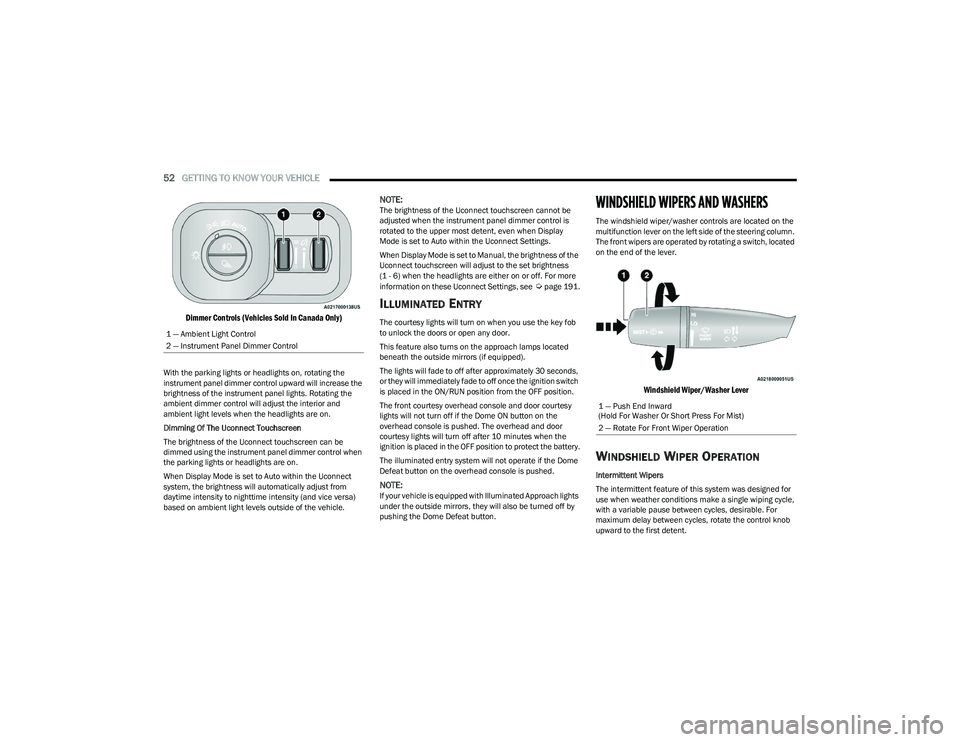
Dimmer Controls (Vehicles Sold In Canada Only)
With the parking lights or headlights on, rotating the
instrument panel dimmer control upward will increase the
brightness of the instrument panel lights. Rotating the
ambient dimmer control will adjust the interior and
ambient light levels when the headlights are on.
Dimming Of The Uconnect Touchscreen
The brightness of the Uconnect touchscreen can be
dimmed using the instrument panel dimmer control when
the parking lights or headlights are on.
When Display Mode is set to Auto within the Uconnect
system, the brightness will automatically adjust from
daytime intensity to nighttime intensity (and vice versa)
based on ambient light levels outside of the vehicle.
NOTE:The brightness of the Uconnect touchscreen cannot be
adjusted when the instrument panel dimmer control is
rotated to the upper most detent, even when Display
Mode is set to Auto within the Uconnect Settings.
When Display Mode is set to Manual, the brightness of the
Uconnect touchscreen will adjust to the set brightness
(1 - 6) when the headlights are either on or off. For more
information on these Uconnect Settings, see
Úpage 191.
ILLUMINATED ENTRY
The courtesy lights will turn on when you use the key fob
to unlock the doors or open any door.
This feature also turns on the approach lamps located
beneath the outside mirrors (if equipped).
The lights will fade to off after approximately 30 seconds,
or they will immediately fade to off once the ignition switch
is placed in the ON/RUN position from the OFF position.
The front courtesy overhead console and door courtesy
lights will not turn off if the Dome ON button on the
overhead console is pushed. The overhead and door
courtesy lights will turn off after 10 minutes when the
ignition is placed in the OFF position to protect the battery.
The illuminated entry system will not operate if the Dome
Defeat button on the overhead console is pushed.
NOTE:If your vehicle is equipped with Illuminated Approach lights
under the outside mirrors, they will also be turned off by
pushing the Dome Defeat button.
WINDSHIELD WIPERS AND WASHERS
The windshield wiper/washer controls are located on the
multifunction lever on the left side of the steering column.
The front wipers are operated by rotating a switch, located
on the end of the lever.
Windshield Wiper/Washer Lever
WINDSHIELD WIPER OPERATION
Intermittent Wipers
The intermittent feature of this system was designed for
use when weather conditions make a single wiping cycle,
with a variable pause between cycles, desirable. For
maximum delay between cycles, rotate the control knob
upward to the first detent.
1 — Ambient Light Control
2 — Instrument Panel Dimmer Control
1 — Push End Inward
(Hold For Washer Or Short Press For Mist)
2 — Rotate For Front Wiper Operation
23_DT_OM_EN_USC_t.book Page 52
Page 58 of 416
56GETTING TO KNOW YOUR VEHICLE
Blower Control
Blower Control regulates the amount of air
forced through the climate control system.
There are seven blower speeds available.
Adjusting the blower will cause automatic
mode to switch to manual operation. The speeds can be
selected using either the blower control knob on the
faceplate or the buttons on the touchscreen.
Faceplate
The blower speed increases as you turn the blower control
knob clockwise from the lowest blower setting. The blower
speed decreases as you turn the blower control knob
counterclockwise.
Touchscreen
Use the small blower icon to reduce the blower setting and
the large blower icon to increase the blower setting.
Blower can also be selected by pressing the blower bar
area between the icons.
Mode Control
Select Mode by pressing one of the Mode
buttons on the touchscreen, or pushing the
Mode button on the faceplate, to change the
airflow distribution mode. The airflow
distribution mode can be adjusted so air comes from the
instrument panel outlets, floor outlets, defrost outlets, and
demist outlets.
Panel Mode
Air comes from the outlets in the instrument
panel. Each of these outlets can be individually
adjusted to direct the flow of air. The air vanes
of the center outlets and outboard outlets can
be moved up and down or side to side to regulate airflow
direction. There is a shut-off wheel located below the air
vanes to shut off or adjust the amount of airflow from
these outlets.
Bi-Level Mode
Air comes from the instrument panel outlets
and floor outlets. A slight amount of air is
directed through the defrost and side window
demister outlets.
NOTE:Bi-Level mode is designed under comfort conditions to
provide cooler air out of the panel outlets and warmer air
from the floor outlets.
Floor Mode
Air comes from the floor outlets. A slight
amount of air is directed through the defrost
and side window demister outlets.
Mix Mode
Air is directed through the floor, defrost, and
side window demister outlets. This setting
works best in cold or snowy conditions that
require extra heat to the windshield. This
setting is good for maintaining comfort while reducing
moisture on the windshield.
Climate Control OFF Button
Press and release the OFF button on the
touchscreen, or push the OFF button on the
faceplate (if equipped) to turn the Climate
Control on/off.
MANUAL CLIMATE CONTROL
D
ESCRIPTIONS AND FUNCTIONS
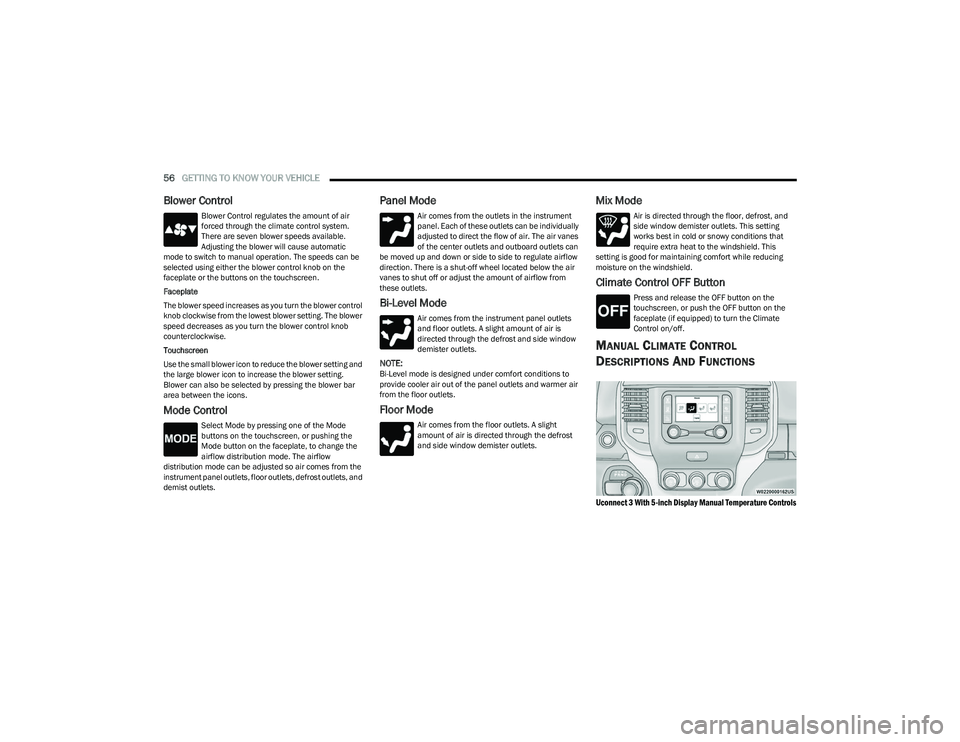
Uconnect 3 With 5-inch Display Manual Temperature Controls
23_DT_OM_EN_USC_t.book Page 56
Page 60 of 416
58GETTING TO KNOW YOUR VEHICLE
Rear Defrost Button
Push and release the Rear Defrost Control
button to turn on the rear window defroster and
the heated outside mirrors (if equipped). The
Rear Defrost indicator illuminates when the
rear window defroster is on. The rear window defroster
automatically turns off after 10 minutes.
Temperature Control
Temperature Control regulates the temperature of the air
forced through the climate system. The temperature increases as you turn the
temperature control knob clockwise.
The temperature decreases as you turn the
temperature control knob counterclockwise.
Blower Control
Blower Control regulates the amount of air
forced through the climate control system.
There are seven blower speeds available. The
blower speed increases as you turn the blower
control knob clockwise from the lowest blower setting. The
blower speed decreases as you turn the blower control
knob counterclockwise.
Mode Control
Turn the mode control knob or press the mode
control button (if equipped) to adjust airflow
distribution. The airflow distribution mode can
be adjusted so air comes from the instrument
panel outlets, floor outlets, defrost outlets and demist
outlets.
Panel Mode
Air comes from the outlets in the instrument
panel. Each of these outlets can be individually
adjusted to direct the flow of air. The air vanes
of the center outlets and outboard outlets can
be moved up and down or side to side to regulate airflow
direction. There is a shut-off wheel located below the air vanes to
shut off or adjust the amount of airflow from these outlets.
Bi-Level Mode
Air comes from the instrument panel outlets
and floor outlets. A slight amount of air is
directed through the defrost and side window
demister outlets.
NOTE:Bi-Level mode is designed under comfort conditions to
provide cooler air out of the panel outlets and warmer air
from the floor outlets.
Floor Mode
Air comes from the floor outlets. A slight
amount of air is directed through the defrost
and side window demister outlets.
Mix Mode
Air is directed through the floor, defrost, and
side window demister outlets. This setting
works best in cold or snowy conditions that
require extra heat to the windshield. This
setting is good for maintaining comfort while reducing
moisture on the windshield.
CAUTION!
Failure to follow these cautions can cause damage to
the heating elements:
Use care when washing the inside of the rear
window. Do not use abrasive window cleaners on the
interior surface of the window. Use a soft cloth and a
mild washing solution, wiping parallel to the heating
elements. Labels can be peeled off after soaking
with warm water.
Do not use scrapers, sharp instruments, or abrasive
window cleaners on the interior surface of the
window.
Keep all objects a safe distance from the window.
23_DT_OM_EN_USC_t.book Page 58
Page 68 of 416

66GETTING TO KNOW YOUR VEHICLE
NOTE:Charge unsupported devices with the Charge Only USB
ports. If an unsupported device is plugged into a Media
USB port, a message will display on the touchscreen that
the device is not supported by the system.
Plugging in a phone or another USB device may cause the
connection to a previous device to be lost.
If equipped, your vehicle may also contain a USB port
located on the top tray of the vehicle’s center console.
If equipped, two Mini-USB ports (Type C), two Standard
USB ports (Type A), and one AUX port may be located to the
left of the center stack, just below the climate controls.
Center Console USB/AUX Media Hub
Some USB ports support media and charging. You can use
features, such as Apple CarPlay®, Android Auto™,
Pandora®, and others while charging your phone.
NOTE:Plugging in a phone or another USB device may cause the
connection to a previous device to be lost.
For further information, refer to the Uconnect Radio
Instruction Manual or visit UconnectPhone.com.
ELECTRICAL POWER OUTLETS
The auxiliary 12 Volt (13 Amp) power outlet can provide
power for in-cab accessories designed for use with the
standard “cigarette lighter” style plug. The 12 Volt power
outlets and 5 Volt (2.5 Amp) USB Port (Charge Only) have
a cap attached to the outlet indicating “12V DC”, together
with either a key symbol, battery symbol, or USB symbol.
An auxiliary power outlet can be found in the tray on top of
the center stack. This power outlet works when the ignition
is in the ON/RUN, ACC, or OFF position.
Power Outlet — Top Of Center Stack
Power Outlet Fuse Locations
1 — Standard USB Type A Ports
2 — Mini-USB Type C Ports
3 — AUX Port
CAUTION!
Do not exceed the maximum power of 160 Watts
(13 Amps) at 12 Volts. If the 160 Watts (13 Amps)
power rating is exceeded, the fuse protecting the
system will need to be replaced.
Power outlets are designed for accessory plugs only.
Do not insert any other object in the power outlets as
this will damage the outlet and blow the fuse.
Improper use of the power outlet can cause damage
not covered by your New Vehicle Limited Warranty.
1 — F54 Fuse 20 A Yellow Power Outlet Battery Fed
Position
2 — F54 Fuse 20 A Yellow Power Outlet Ignition Fed
Position
3 — F48 Fuse 10 A Red Port Power or Rear USB
(Charge Only)
23_DT_OM_EN_USC_t.book Page 66
Page 69 of 416

GETTING TO KNOW YOUR VEHICLE67
(Continued)
When the vehicle is turned off, be sure to unplug any
equipment as to not drain the battery of the vehicle. All
accessories connected to the outlet(s) should be removed
or turned off when the vehicle is not in use to protect the
battery against discharge.
POWER INVERTER — IF EQUIPPED
A 115 Volt (400 Watts maximum) inverter may be located
inside the center console towards the right hand side. This
inverter can power cellular phones, electronics and other
low power devices requiring power up to 400 Watts.
Certain video game consoles exceed this power limit, as
will most power tools.
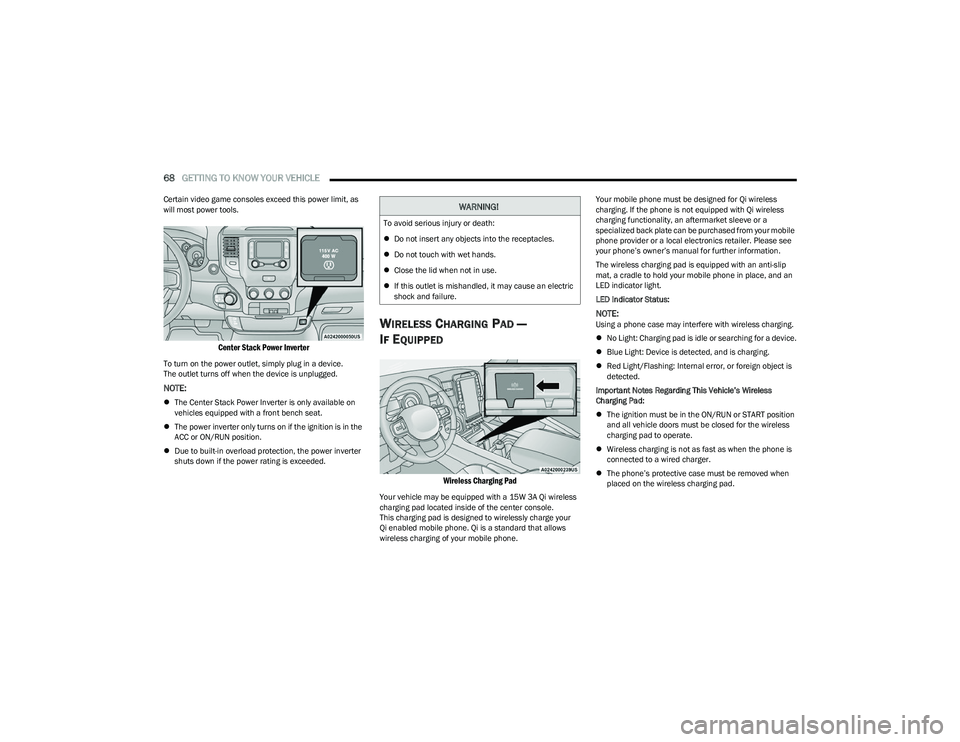
Center Console Power Inverter Outlet
There is also a second 115 Volt (400 Watts maximum)
power inverter located on the rear of the center console.
This inverter can power cellular phones, electronics and
other low power devices requiring power up to 400 Watts. Certain video game consoles exceed this power limit, as
will most power tools.
All power inverters are designed with built-in overload
protection. If the power rating of 400 Watts is exceeded,
the power inverter shuts down. Once the electrical device
has been removed from the outlet the inverter should
reset.
Rear Center Console Power Inverter Outlet
NOTE:
400 Watts is the maximum for the inverter, not each
outlet. If three outlets are in use, 400 Watts is shared
amongst the devices plugged in.
If equipped with a front bench seat, there may be a
115 Volt (400 Watts maximum) inverter located to the
right of the center stack, just below the climate controls.
This inverter can power cellular phones, electronics and
other low power devices requiring power up to 400 Watts.
WARNING!
To avoid serious injury or death:
Only devices designed for use in this type of outlet
should be inserted into any 12 Volt outlet.
Do not touch with wet hands.
Close the lid when not in use and while driving the
vehicle.
If this outlet is mishandled, it may cause an electric
shock and failure.
CAUTION!
Many accessories that can be plugged in draw power
from the vehicle's battery, even when not in use
(i.e., cellular phones, etc.). Eventually, if plugged in
long enough, the vehicle's battery will discharge suffi -
ciently to degrade battery life and/or prevent the
engine from starting.
Accessories that draw higher power (i.e., coolers,
vacuum cleaners, lights, etc.), will discharge the
battery even more quickly. Only use these intermit -
tently and with greater caution.
After the use of high power draw accessories, or long
periods of the vehicle not being started (with acces -
sories still plugged in), the vehicle must be driven a
sufficient length of time to allow the generator to
recharge the vehicle's battery.
CAUTION!
2
23_DT_OM_EN_USC_t.book Page 67
Page 70 of 416
68GETTING TO KNOW YOUR VEHICLE
Certain video game consoles exceed this power limit, as
will most power tools.
Center Stack Power Inverter
To turn on the power outlet, simply plug in a device.
The outlet turns off when the device is unplugged.
NOTE:
The Center Stack Power Inverter is only available on
vehicles equipped with a front bench seat.
The power inverter only turns on if the ignition is in the
ACC or ON/RUN position.
Due to built-in overload protection, the power inverter
shuts down if the power rating is exceeded.
WIRELESS CHARGING PAD —
I
F EQUIPPED
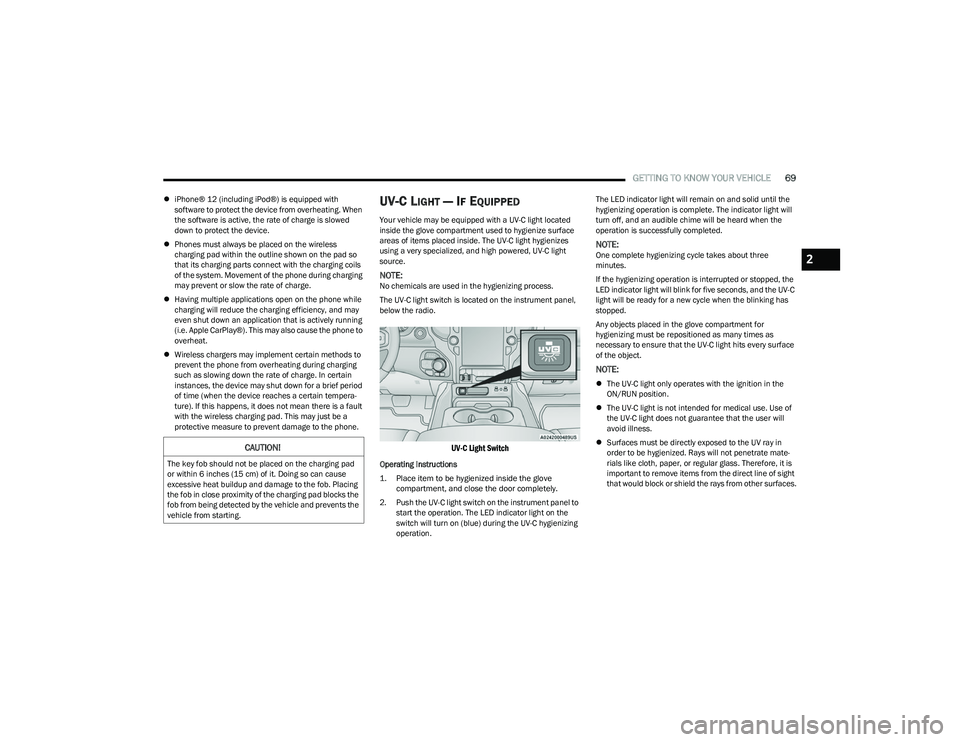
Wireless Charging Pad
Your vehicle may be equipped with a 15W 3A Qi wireless
charging pad located inside of the center console.
This charging pad is designed to wirelessly charge your
Qi enabled mobile phone. Qi is a standard that allows
wireless charging of your mobile phone. Your mobile phone must be designed for Qi wireless
charging. If the phone is not equipped with Qi wireless
charging functionality, an aftermarket sleeve or a
specialized back plate can be purchased from your mobile
phone provider or a local electronics retailer. Please see
your phone’s owner’s manual for further information.
The wireless charging pad is equipped with an anti-slip
mat, a cradle to hold your mobile phone in place, and an
LED indicator light.
LED Indicator Status:
NOTE:Using a phone case may interfere with wireless charging.
No Light: Charging pad is idle or searching for a device.
Blue Light: Device is detected, and is charging.
Red Light/Flashing: Internal error, or foreign object is
detected.
Important Notes Regarding This Vehicle’s Wireless
Charging Pad:
The ignition must be in the ON/RUN or START position
and all vehicle doors must be closed for the wireless
charging pad to operate.
Wireless charging is not as fast as when the phone is
connected to a wired charger.
The phone’s protective case must be removed when
placed on the wireless charging pad.
WARNING!
To avoid serious injury or death:
Do not insert any objects into the receptacles.
Do not touch with wet hands.
Close the lid when not in use.
If this outlet is mishandled, it may cause an electric
shock and failure.
23_DT_OM_EN_USC_t.book Page 68
Page 71 of 416
GETTING TO KNOW YOUR VEHICLE69
iPhone® 12 (including iPod®) is equipped with
software to protect the device from overheating. When
the software is active, the rate of charge is slowed
down to protect the device.
Phones must always be placed on the wireless
charging pad within the outline shown on the pad so
that its charging parts connect with the charging coils
of the system. Movement of the phone during charging
may prevent or slow the rate of charge.
Having multiple applications open on the phone while
charging will reduce the charging efficiency, and may
even shut down an application that is actively running
(i.e. Apple CarPlay®). This may also cause the phone to
overheat.
Wireless chargers may implement certain methods to
prevent the phone from overheating during charging
such as slowing down the rate of charge. In certain
instances, the device may shut down for a brief period
of time (when the device reaches a certain tempera -
ture). If this happens, it does not mean there is a fault
with the wireless charging pad. This may just be a
protective measure to prevent damage to the phone.UV-C LIGHT — IF EQUIPPED
Your vehicle may be equipped with a UV-C light located
inside the glove compartment used to hygienize surface
areas of items placed inside. The UV-C light hygienizes
using a very specialized, and high powered, UV-C light
source.
NOTE:No chemicals are used in the hygienizing process.
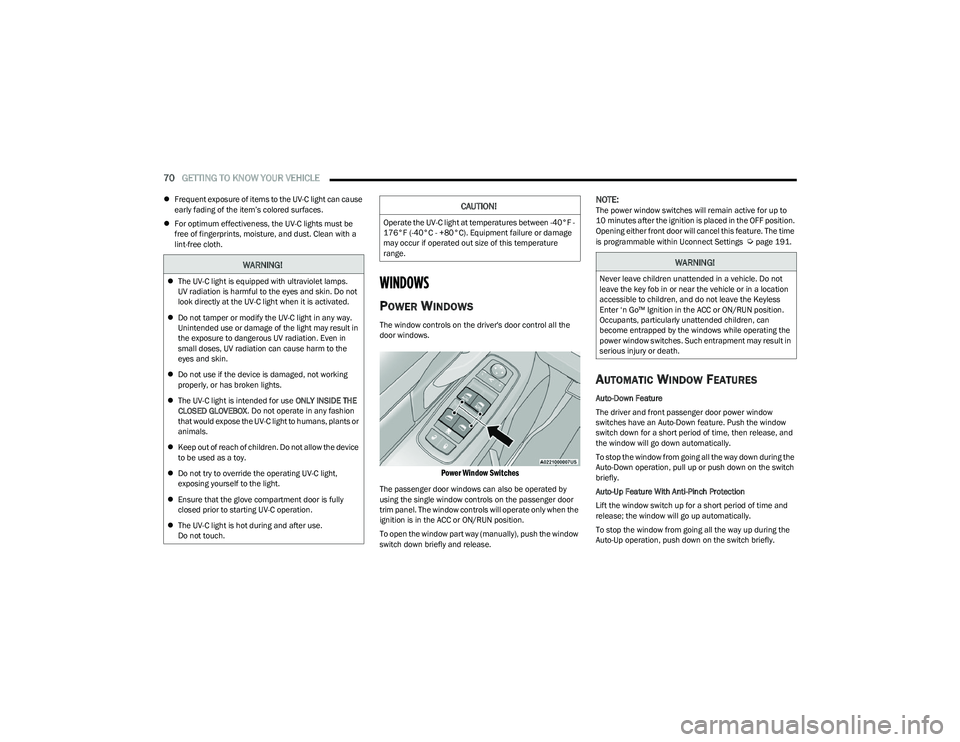
The UV-C light switch is located on the instrument panel,
below the radio.
UV-C Light Switch
Operating Instructions
1. Place item to be hygienized inside the glove compartment, and close the door completely.
2. Push the UV-C light switch on the instrument panel to start the operation. The LED indicator light on the
switch will turn on (blue) during the UV-C hygienizing
operation. The LED indicator light will remain on and solid until the
hygienizing operation is complete. The indicator light will
turn off, and an audible chime will be heard when the
operation is successfully completed.
NOTE:One complete hygienizing cycle takes about three
minutes.
If the hygienizing operation is interrupted or stopped, the
LED indicator light will blink for five seconds, and the UV-C
light will be ready for a new cycle when the blinking has
stopped.
Any objects placed in the glove compartment for
hygienizing must be repositioned as many times as
necessary to ensure that the UV-C light hits every surface
of the object.
NOTE:
The UV-C light only operates with the ignition in the
ON/RUN position.
The UV-C light is not intended for medical use. Use of
the UV-C light does not guarantee that the user will
avoid illness.
Surfaces must be directly exposed to the UV ray in
order to be hygienized. Rays will not penetrate mate -
rials like cloth, paper, or regular glass. Therefore, it is
important to remove items from the direct line of sight
that would block or shield the rays from other surfaces.
CAUTION!
The key fob should not be placed on the charging pad
or within 6 inches (15 cm) of it. Doing so can cause
excessive heat buildup and damage to the fob. Placing
the fob in close proximity of the charging pad blocks the
fob from being detected by the vehicle and prevents the
vehicle from starting.
2
23_DT_OM_EN_USC_t.book Page 69
Page 72 of 416
70GETTING TO KNOW YOUR VEHICLE
Frequent exposure of items to the UV-C light can cause
early fading of the item’s colored surfaces.
For optimum effectiveness, the UV-C lights must be
free of fingerprints, moisture, and dust. Clean with a
lint-free cloth.
WINDOWS
POWER WINDOWS
The window controls on the driver's door control all the
door windows.
Power Window Switches
The passenger door windows can also be operated by
using the single window controls on the passenger door
trim panel. The window controls will operate only when the
ignition is in the ACC or ON/RUN position.
To open the window part way (manually), push the window
switch down briefly and release.
NOTE:The power window switches will remain active for up to
10 minutes after the ignition is placed in the OFF position.
Opening either front door will cancel this feature. The time
is programmable within Uconnect Settings
Úpage 191.
AUTOMATIC WINDOW FEATURES
Auto-Down Feature
The driver and front passenger door power window
switches have an Auto-Down feature. Push the window
switch down for a short period of time, then release, and
the window will go down automatically.
To stop the window from going all the way down during the
Auto-Down operation, pull up or push down on the switch
briefly.
Auto-Up Feature With Anti-Pinch Protection
Lift the window switch up for a short period of time and
release; the window will go up automatically.
To stop the window from going all the way up during the
Auto-Up operation, push down on the switch briefly.
WARNING!
The UV-C light is equipped with ultraviolet lamps.
UV radiation is harmful to the eyes and skin. Do not
look directly at the UV-C light when it is activated.
Do not tamper or modify the UV-C light in any way.
Unintended use or damage of the light may result in
the exposure to dangerous UV radiation. Even in
small doses, UV radiation can cause harm to the
eyes and skin.
Do not use if the device is damaged, not working
properly, or has broken lights.
The UV-C light is intended for use ONLY INSIDE THE
CLOSED GLOVEBOX . Do not operate in any fashion
that would expose the UV-C light to humans, plants or
animals.
Keep out of reach of children. Do not allow the device
to be used as a toy.
Do not try to override the operating UV-C light,
exposing yourself to the light.
Ensure that the glove compartment door is fully
closed prior to starting UV-C operation.
The UV-C light is hot during and after use.
Do not touch.
CAUTION!
Operate the UV-C light at temperatures between -40°F -
176°F (-40°C - +80°C). Equipment failure or damage
may occur if operated out size of this temperature
range.
WARNING!
Never leave children unattended in a vehicle. Do not
leave the key fob in or near the vehicle or in a location
accessible to children, and do not leave the Keyless
Enter ‘n Go™ Ignition in the ACC or ON/RUN position.
Occupants, particularly unattended children, can
become entrapped by the windows while operating the
power window switches. Such entrapment may result in
serious injury or death.
23_DT_OM_EN_USC_t.book Page 70
Page 73 of 416

GETTING TO KNOW YOUR VEHICLE71
To close the window part way, lift the window switch briefly
and release it when you want the window to stop.
If the window runs into any obstacle during auto-closure, it
will reverse direction and then go back down. Remove the
obstacle and use the window switch again to close the
window.
NOTE:Any impact due to rough road conditions may trigger the
auto-reverse function unexpectedly during auto-closure.
If this happens, pull the switch lightly and hold to close the
window manually.
RESET AUTO-UP
Should the Auto-Up feature stop working, the window
probably needs to be reset. To reset Auto-Up:
1. Pull the window switch up to close the window
completely and continue to hold the switch up for an
additional two seconds after the window is closed.
2. Push the window switch down firmly to open the window completely and continue to hold the switch
down for an additional two seconds after the window
is fully open.
WINDOW LOCKOUT SWITCH
The window lockout switch on the driver's door trim panel
allows you to disable the window controls on the rear
passenger doors. To disable the window controls, push
and release the window lockout button (the indicator light
on the button will turn on). To enable the window controls,
push and release the window lockout button again
(the indicator light on the button will turn off).
Window Lockout Switch
POWER SLIDING REAR WINDOW —
I
F EQUIPPED
The switch for the power sliding rear window is located on
the overhead console. Push the switch rearward to open
the glass. Pull the switch forward to close the glass.
Rear Window Switch
MANUAL SLIDING REAR WINDOW —
I
F EQUIPPED
A locking device in the center of the window helps to
prevent entry from the rear of the vehicle. Squeeze the
lock to release the window.
Manual Rear Window Lock
WARNING!
There is no anti-pinch protection when the window is
almost closed. To avoid personal injury be sure to clear
your arms, hands, fingers and all objects from the
window path before closing.
2
23_DT_OM_EN_USC_t.book Page 71