brake Ram 2500 2020 Owner's Manual
[x] Cancel search | Manufacturer: RAM, Model Year: 2020, Model line: 2500, Model: Ram 2500 2020Pages: 553, PDF Size: 21.99 MB
Page 419 of 553

SERVICING AND MAINTENANCE417
checked. Operating the vehicle with an
improper fluid level can cause severe transmis -
sion damage.
Fluid Level Check — Six-Speed Transmission
It is best to check the fluid level when the trans -
mission is at normal operating temperature
(158-176°F / 70-80°C). This normally occurs
after at least 15 miles (25 km) of driving. At normal operating temperature the fluid cannot
be held comfortably between the fingertips. You
can read the transmission sump temperature in
the instrument cluster screen refer to “Instru -
ment Cluster Display” in “Getting To Know Your
Instrument Panel” for further information.
Use the following procedure to check the trans -
mission fluid level properly:
1. Monitor the transmission temperature using the instrument cluster display, and
operate the vehicle as required to reach the normal operating temperature. If the
transmission is not functioning properly, or
the vehicle cannot be driven, see the NOTE
and CAUTION below about checking the
fluid level at colder temperatures.
2. Park the vehicle on level ground.
3. Run the engine at normal idle speed for at least 60 seconds, and leave the engine
running for the rest of this procedure.
4. Fully apply the parking brake, and press the brake pedal.
5. Place the gear selector momentarily into each gear position (allowing time for the
transmission to fully engage in each posi -
tion), ending with the transmission in PARK.
6. Remove the dipstick, wipe it clean and rein -
sert it until seated.
7. Remove the dipstick again and note the fluid level on both sides. The fluid level
reading is only valid if there is a solid
coating of oil on both sides of the dipstick.
Note that the holes in the dipstick will be full
of fluid if the actual level is at or above the
hole. The fluid level should be between the
“HOT” (upper) reference holes on the dipstick at normal operating temperature. If
the fluid level is low, add fluid through the
dipstick tube to bring it to the proper level.
Do not overfill.
Use ONLY the specified fluid
refer to "Fluids And Lubricants" in “Tech -
nical Specifications” for fluid specifications.
After adding any quantity of oil through the
dipstick tube, wait a minimum of two
minutes for the oil to fully drain into the
transmission before rechecking the fluid
level.
NOTE:
If it is necessary to check the transmission
below the operating temperature, the fluid level
should be between the two “COLD” (lower)
holes on the dipstick with the fluid at 60-70°F /
16-21°C. Only use the COLD region of the
dipstick as a rough reference when setting the
fluid level after a transmission service or fluid
change. Re-check the fluid level, and adjust as
required, once the transmission reaches
normal operating temperature.
CAUTION!
If a transmission fluid leak occurs, visit an
authorized dealer immediately. Severe
transmission damage may occur. An
authorized dealer has the proper tools to
adjust the fluid level accurately.
7
20_DJD2_OM_EN_USC_t.book Page 417
Page 420 of 553

418SERVICING AND MAINTENANCE
8. Reinsert the dipstick. Check for leaks.
Release the parking brake.
NOTE:
If it is necessary to check the transmission
below the operating temperature, the fluid level
should be between the two COLD (lower) holes
on the dipstick with the fluid at 68-86°F /
20-30°C. Only use the COLD region of the
dipstick as a rough reference when setting the
fluid level after a transmission service or fluid
change. Re-check the fluid level, and adjust as
required, once the transmission reaches
normal operating temperature.Fluid And Filter Changes — Eight-Speed
Transmission
Under normal operating conditions, the fluid
installed at the factory will provide satisfactory
lubrication for the life of the vehicle.
Routine fluid and filter changes are not
required. However, change the fluid and filter if
the fluid becomes contaminated (with water,
etc.), or if the transmission is disassembled for
any reason.
Fluid And Filter Changes — Six Speed
Transmission
Refer to the “Maintenance Plan” for the proper
maintenance intervals.
In addition, change the fluid and filters if the
fluid becomes contaminated (with water, etc.),
or if the transmission is disassembled for any
reason.
Rear Axle And 4x4 Front Driving Axle Fluid
Level
For normal service, periodic fluid level checks
are not required. When the vehicle is serviced
for other reasons the exterior surfaces of the
axle assembly should be inspected. If gear oil
leakage is suspected inspect the fluid level.
Refer to “Fluids And Lubricants” in “Technical
Specifications” for further information. This
inspection should be made with the vehicle in a
level position.
For all 2500/3500 Model axles, the fluid level
should be 1/4 in ± 1/4 in (6.4 mm ± 6.4 mm)
below the fill hole on the 9.25 in front, 11.5 in
rear axle, and 12.0 in rear axle.
Drain And Refill
Refer to the “Maintenance Plan” for the proper
maintenance intervals.
Lubricant Selection
Refer to “Fluids And Lubricants” in “Technical
Specifications” for further information.
NOTE:
The presence of water in the gear lubricant will
result in corrosion and possible failure of differ -
ential components. Operation of the vehicle in
CAUTION!
If the fluid temperature is below 50°F (10°C)
it may not register on the dipstick. Do not add
fluid until the temperature is elevated enough
to produce an accurate reading. Run the
engine at idle, in PARK, to warm the fluid.
CAUTION!
If the fluid temperature is below 50°F (10°C)
it may not register on the dipstick. Do not add
fluid until the temperature is elevated enough
to produce an accurate reading. Run the
engine at idle, in PARK, to warm the fluid.
20_DJD2_OM_EN_USC_t.book Page 418
Page 437 of 553

SERVICING AND MAINTENANCE435
Your wheels are susceptible to deterioration
caused by salt, sodium chloride, magnesium
chloride, calcium chloride, etc., and other road
chemicals used to melt ice or control dust on
dirt roads. Use a soft cloth or sponge and mild
soap to wipe away promptly. Do not use harsh
chemicals or a stiff brush. They can damage the
wheel’s protective coating that helps keep them
from corroding and tarnishing.
When cleaning extremely dirty wheels including
excessive brake dust, care must be taken in the
selection of tire and wheel cleaning chemicals
and equipment to prevent damage to the
wheels. Mopar Wheel Treatment or Mopar
Chrome Cleaner or their equivalent is recom -mended or select a non-abrasive, non-acidic
cleaner for aluminum or chrome wheels.
NOTE:
If you intend parking or storing your vehicle for
an extended period after cleaning the wheels
with wheel cleaner, drive your vehicle and apply
the brakes to remove the water droplets from
the brake components. This activity will remove
the red rust on the brake rotors and prevent
vehicle vibration when braking.
Dark Vapor Chrome, Black Satin Chrome, or
Low Gloss Clear Coat Wheels
Tire Chains And Traction Devices
Use of traction devices require sufficient
tire-to-body clearance. Due to limited clearance,
the following traction devices are recom
-
mended. Follow these recommendations to
guard against damage.
Traction device must be of proper size for the
tire, as recommended by the traction device
manufacturer.
No other tire sizes are recommended for use
with a tire chain or traction device.
CAUTION!
Avoid products or automatic car washes that
use acidic solutions or strong alkaline
additives or harsh brushes. Many aftermarket
wheel cleaners and automatic car washes
may damage the wheel's protective finish.
Such damage is not covered by the New
Vehicle Limited Warranty. Only car wash soap,
Mopar Wheel Cleaner or equivalent is
recommended.
CAUTION!
Do not use scouring pads, steel wool, a bristle
brush, metal polishes or oven cleaner. These
products may damage the wheel's protective
finish. Such damage is not covered by the
New Vehicle Limited Warranty. Only car wash
soap, Mopar Wheel Cleaner or equivalent is
recommended.
CAUTION!
If your vehicle is equipped with these
specialty wheels, DO NOT USE wheel
cleaners, abrasives, or polishing compounds.
They will permanently damage this finish and
such damage is not covered by the New
Vehicle Limited Warranty. HAND WASH ONLY
USING MILD SOAP AND WATER WITH A SOFT
CLOTH. Used on a regular basis; this is all that
is required to maintain this finish.
7
20_DJD2_OM_EN_USC_t.book Page 435
Page 446 of 553
444
TECHNICAL SPECIFICATIONS
IDENTIFICATION DATA
Vehicle Identification Number
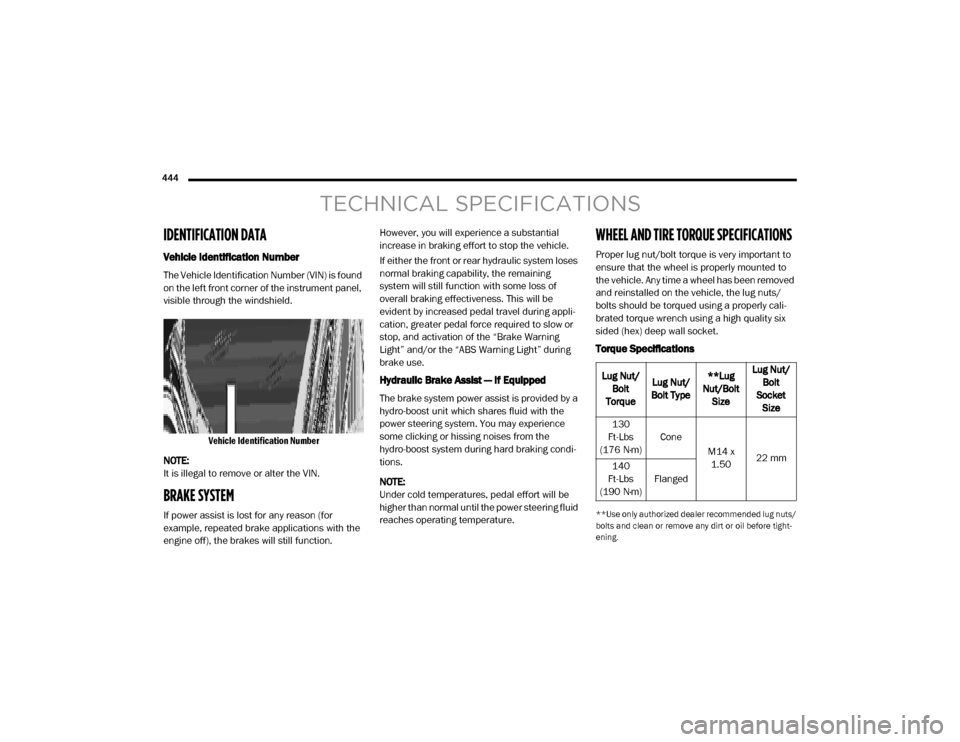
The Vehicle Identification Number (VIN) is found
on the left front corner of the instrument panel,
visible through the windshield.
Vehicle Identification Number
NOTE:
It is illegal to remove or alter the VIN.
BRAKE SYSTEM
If power assist is lost for any reason (for
example, repeated brake applications with the
engine off), the brakes will still function. However, you will experience a substantial
increase in braking effort to stop the vehicle.
If either the front or rear hydraulic system loses
normal braking capability, the remaining
system will still function with some loss of
overall braking effectiveness. This will be
evident by increased pedal travel during appli
-
cation, greater pedal force required to slow or
stop, and activation of the “Brake Warning
Light” and/or the “ABS Warning Light” during
brake use.
Hydraulic Brake Assist — If Equipped
The brake system power assist is provided by a
hydro-boost unit which shares fluid with the
power steering system. You may experience
some clicking or hissing noises from the
hydro-boost system during hard braking condi -
tions.
NOTE:
Under cold temperatures, pedal effort will be
higher than normal until the power steering fluid
reaches operating temperature.
WHEEL AND TIRE TORQUE SPECIFICATIONS
Proper lug nut/bolt torque is very important to
ensure that the wheel is properly mounted to
the vehicle. Any time a wheel has been removed
and reinstalled on the vehicle, the lug nuts/
bolts should be torqued using a properly cali -
brated torque wrench using a high quality six
sided (hex) deep wall socket.
Torque Specifications
**Use only authorized dealer recommended lug nuts/
bolts and clean or remove any dirt or oil before tight -
ening.
Lug Nut/ Bolt
Torque Lug Nut/
Bolt Type **Lug
Nut/Bolt Size Lug Nut/
Bolt
Socket Size
130
Ft-Lbs
(176 N·m) Cone
M14 x 1.50 22 mm
140
Ft-Lbs
(190 N·m) Flanged
20_DJD2_OM_EN_USC_t.book Page 444
Page 456 of 553
454TECHNICAL SPECIFICATIONS
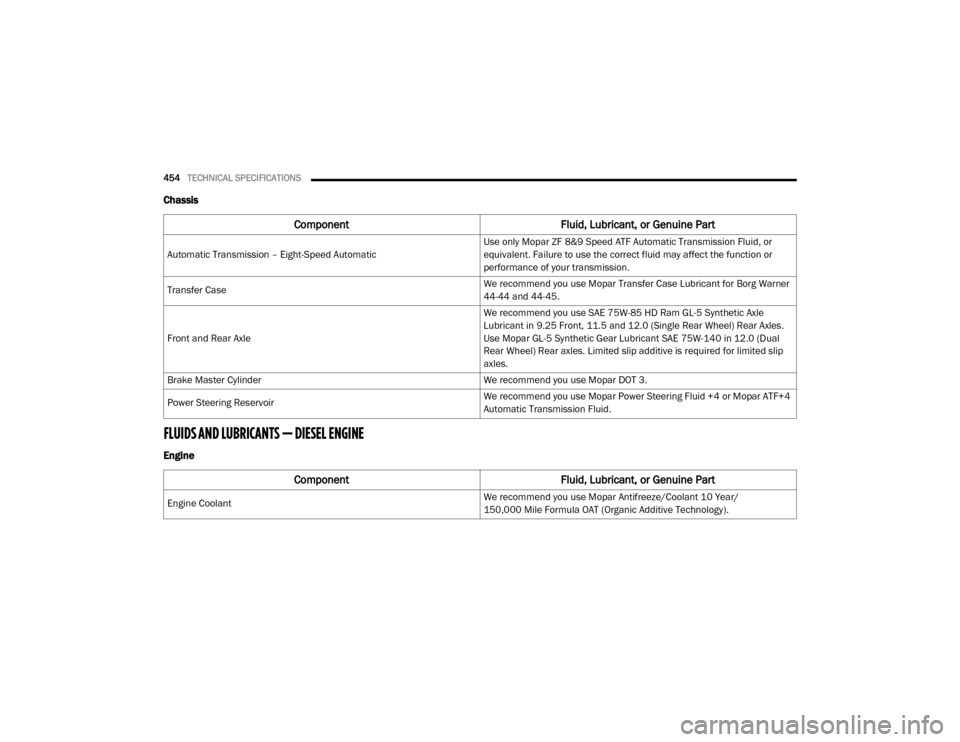
Chassis
FLUIDS AND LUBRICANTS — DIESEL ENGINE
Engine
Component Fluid, Lubricant, or Genuine Part
Automatic Transmission – Eight-Speed Automatic Use only Mopar ZF 8&9 Speed ATF Automatic Transmission Fluid, or
equivalent. Failure to use the correct fluid may affect the function or
performance of your transmission.
Transfer Case We recommend you use Mopar Transfer Case Lubricant for Borg Warner
44-44 and 44-45.
Front and Rear Axle We recommend you use SAE 75W-85 HD Ram GL-5 Synthetic Axle
Lubricant in 9.25 Front, 11.5 and 12.0 (Single Rear Wheel) Rear Axles.
Use Mopar GL-5 Synthetic Gear Lubricant SAE 75W-140 in 12.0 (Dual
Rear Wheel) Rear axles. Limited slip additive is required for limited slip
axles.
Brake Master Cylinder We recommend you use Mopar DOT 3.
Power Steering Reservoir We recommend you use Mopar Power Steering Fluid +4 or Mopar ATF+4
Automatic Transmission Fluid.
Component
Fluid, Lubricant, or Genuine Part
Engine Coolant We recommend you use Mopar Antifreeze/Coolant 10 Year/
150,000 Mile Formula OAT (Organic Additive Technology).
20_DJD2_OM_EN_USC_t.book Page 454
Page 459 of 553

TECHNICAL SPECIFICATIONS457
Chassis
Component Fluid, Lubricant, or Genuine Part
Automatic Transmission – 6.7L Diesel with 68RFE Only use ATF+4 Automatic Transmission Fluid. Failure to use ATF+4 fluid
may affect the function or performance of your transmission. We
recommend Mopar ATF+4 fluid.
Automatic Transmission – 6.7L Diesel with AS69RC Only use Mopar ASRC Automatic Transmission Fluid or equivalent.Failure
to use the proper fluid may affect the function orperformance of your
transmission
Transfer Case We recommend you use Mopar BW44–44 Transfer Case Fluid.
Front and Rear Axle Fluid (2500/3500) We recommend you use SAE 75W-85 HD Ram GL-5 Synthetic Axle
Lubricant in 9.25 Front, 11.5 and 12.0 (Single Rear Wheel) Rear Axles.
Use Mopar GL-5 Synthetic Gear Lubricant SAE 75W-140 in 12.0 (Dual
Rear Wheel) Rear axles. Limited slip additive is required for limited slip
axles.
Brake Master Cylinder We recommend you use Mopar DOT 3.
8
20_DJD2_OM_EN_USC_t.book Page 457
Page 461 of 553
MULTIMEDIA459
NOTE:
FCA US LLC or your dealer may contact you
directly regarding software updates.
To help further improve vehicle security and
minimize the potential risk of a security
breach, vehicle owners should:
Routinely check www.driveuconnect.com
(US Residents) or www.driveuconnect.ca
(Canadian Residents) to learn about
available Uconnect software updates.
Only connect and use trusted media devices (e.g. personal mobile phones,
USBs, CDs).
Privacy of any wireless and wired communica -
tions cannot be assured. Third parties may
unlawfully intercept information and private
communications without your consent. For
further information, refer to “Data Collection &
Privacy” in your Uconnect Owner’s Manual
Supplement or “Onboard Diagnostic System
(OBD II) Cybersecurity” in “Getting To Know Your
Instrument Panel”.
UCONNECT SETTINGS
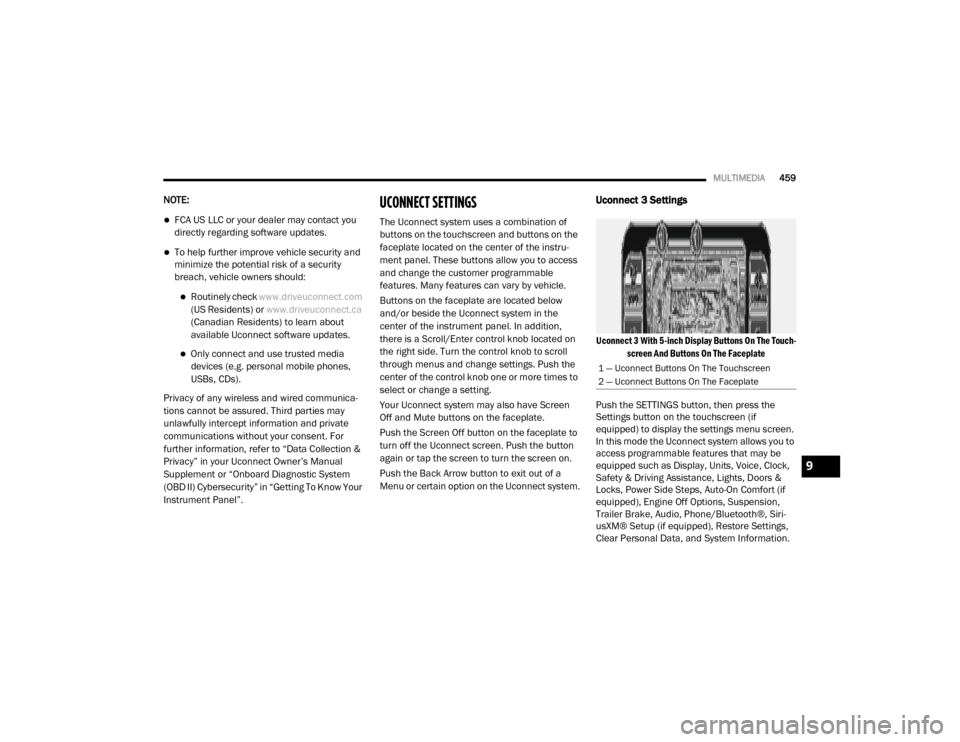
The Uconnect system uses a combination of
buttons on the touchscreen and buttons on the
faceplate located on the center of the instru -
ment panel. These buttons allow you to access
and change the customer programmable
features. Many features can vary by vehicle.
Buttons on the faceplate are located below
and/or beside the Uconnect system in the
center of the instrument panel. In addition,
there is a Scroll/Enter control knob located on
the right side. Turn the control knob to scroll
through menus and change settings. Push the
center of the control knob one or more times to
select or change a setting.
Your Uconnect system may also have Screen
Off and Mute buttons on the faceplate.
Push the Screen Off button on the faceplate to
turn off the Uconnect screen. Push the button
again or tap the screen to turn the screen on.
Push the Back Arrow button to exit out of a
Menu or certain option on the Uconnect system.
Uconnect 3 Settings
Uconnect 3 With 5-inch Display Buttons On The Touch -
screen And Buttons On The Faceplate
Push the SETTINGS button, then press the
Settings button on the touchscreen (if
equipped) to display the settings menu screen.
In this mode the Uconnect system allows you to
access programmable features that may be
equipped such as Display, Units, Voice, Clock,
Safety & Driving Assistance, Lights, Doors &
Locks, Power Side Steps, Auto-On Comfort (if
equipped), Engine Off Options, Suspension,
Trailer Brake, Audio, Phone/Bluetooth®, Siri -
usXM® Setup (if equipped), Restore Settings,
Clear Personal Data, and System Information.
1 — Uconnect Buttons On The Touchscreen
2 — Uconnect Buttons On The Faceplate
9
20_DJD2_OM_EN_USC_t.book Page 459
Page 471 of 553

MULTIMEDIA469
Trailer Brake
After pressing the Trailer Brake button on the touchscreen, the following settings will be available:NOTE:
When this feature is selected, the air suspension system is disabled to prevent auto leveling of the suspension, while the vehicle is on a jack changing
a tire.
Transport Mode OnOff
NOTE:
When the “Transport Mode” feature is selected, the air suspension system is disabled to assist with flat bed towing. Wheel Alignment Mode OnOff
NOTE:
The “Wheel Alignment Mode” feature prevents auto leveling of the air suspension while performing a wheel alignment service. Before performing a
wheel alignment, this mode must be enabled. Refer to an authorized dealer for further information.
Setting Name Selectable Options
Setting NameSelectable Options
Trailer SelectTrailer 1Trailer 2Trailer 3Trailer 4
Trailer Brake Type Light ElectricHeavy Electric Light EOHHeavy EOH
Trailer Name List of Trailer Names Available
NOTE:
You can select and personalize your trailer name depending on the type of trailer you are hauling. Select the trailer name from the following list: trailer,
boat, car, cargo, dump, equipment, flatbed, gooseneck, horse, livestock, motorcycle, snowmobile, travel, utility, and 5th wheel.
9
20_DJD2_OM_EN_USC_t.book Page 469
Page 482 of 553
480MULTIMEDIA
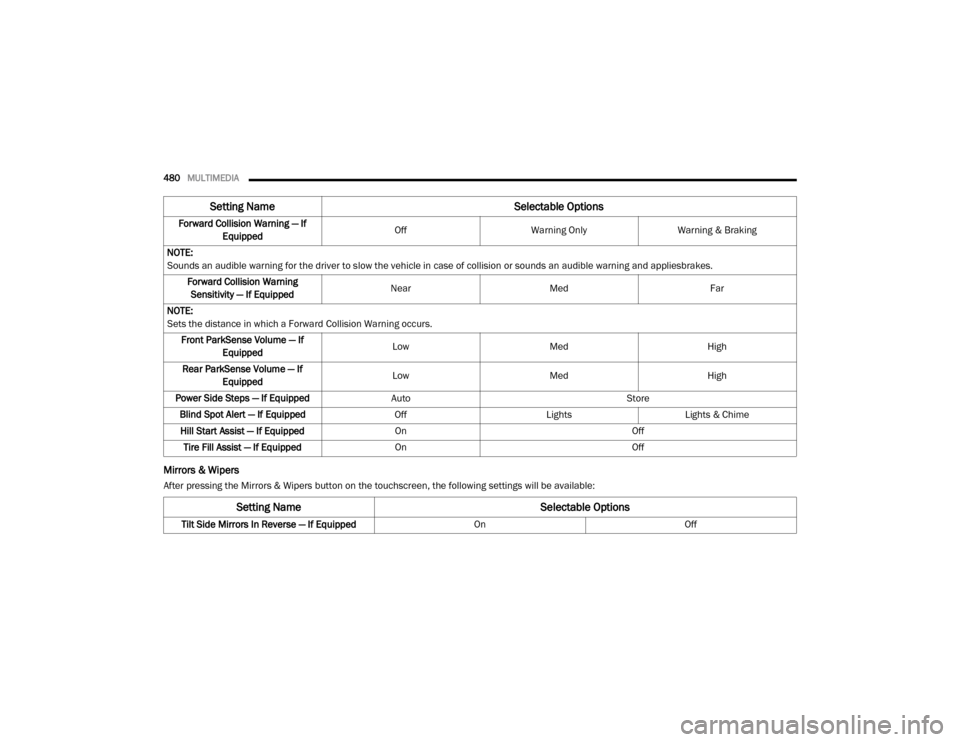
Mirrors & Wipers
After pressing the Mirrors & Wipers button on the touchscreen, the following settings will be available:Forward Collision Warning — If
Equipped Off
Warning Only Warning & Braking
NOTE:
Sounds an audible warning for the driver to slow the vehicle in case of collision or sounds an audible warning and appliesbrakes. Forward Collision Warning Sensitivity — If Equipped Near
Med Far
NOTE:
Sets the distance in which a Forward Collision Warning occurs. Front ParkSense Volume — If Equipped Low
Med High
Rear ParkSense Volume — If Equipped Low
Med High
Power Side Steps — If Equipped Auto Store
Blind Spot Alert — If Equipped OffLightsLights & Chime
Hill Start Assist — If Equipped On Off
Tire Fill Assist — If Equipped On Off
Setting Name Selectable Options
Setting NameSelectable Options
Tilt Side Mirrors In Reverse — If Equipped OnOff
20_DJD2_OM_EN_USC_t.book Page 480
Page 495 of 553
MULTIMEDIA493
Uconnect 4C NAV With 12-inch Display
Settings
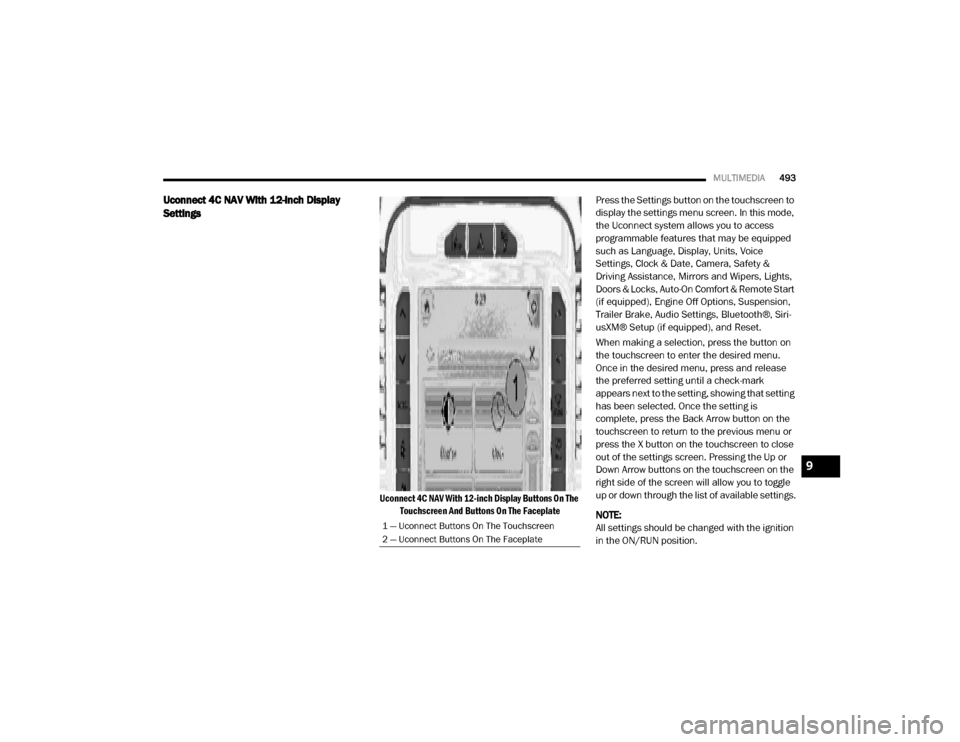
Uconnect 4C NAV With 12-inch Display Buttons On The
Touchscreen And Buttons On The Faceplate
Press the Settings button on the touchscreen to
display the settings menu screen. In this mode,
the Uconnect system allows you to access
programmable features that may be equipped
such as Language, Display, Units, Voice
Settings, Clock & Date, Camera, Safety &
Driving Assistance, Mirrors and Wipers, Lights,
Doors & Locks, Auto-On Comfort & Remote Start
(if equipped), Engine Off Options, Suspension,
Trailer Brake, Audio Settings, Bluetooth®, Siri-
usXM® Setup (if equipped), and Reset.
When making a selection, press the button on
the touchscreen to enter the desired menu.
Once in the desired menu, press and release
the preferred setting until a check-mark
appears next to the setting, showing that setting
has been selected. Once the setting is
complete, press the Back Arrow button on the
touchscreen to return to the previous menu or
press the X button on the touchscreen to close
out of the settings screen. Pressing the Up or
Down Arrow buttons on the touchscreen on the
right side of the screen will allow you to toggle
up or down through the list of available settings.
NOTE:
All settings should be changed with the ignition
in the ON/RUN position.
1 — Uconnect Buttons On The Touchscreen
2 — Uconnect Buttons On The Faceplate
9
20_DJD2_OM_EN_USC_t.book Page 493