Amp Ram 3500 2019 Owner's Manual
[x] Cancel search | Manufacturer: RAM, Model Year: 2019, Model line: 3500, Model: Ram 3500 2019Pages: 696, PDF Size: 13.89 MB
Page 567 of 696

TECHNICAL SPECIFICATIONS 565
BRAKE SYSTEM
If power assist is lost for any reason (for example, repeated
brake applications with the engine off), the brakes will still
function. However, you will experience a substantial
increase in braking effort to stop the vehicle.
If either the front or rear hydraulic system loses normal
braking capability, the remaining system will still function
with some loss of overall braking effectiveness. This will be
evident by increased pedal travel during application, greater
pedal force required to slow or stop, and activation of the
“Brake Warning Light” and the “ABS Warning Light” (if
equipped) during brake use.
Hydraulic Brake Assist — 2500/3500 Models Only
(Except Power Wagon)
The brake system power assist is provided by a hydro-boost
unit which shares fluid with the power steering system. You
may experience some clicking or hissing noises from the
hydro-boost system during hard braking conditions.
NOTE:
Under cold temperatures, pedal effort will be higher than
normal until the power steering fluid reaches operating
temperature.
WHEEL AND TIRE TORQUE SPECIFICATIONS
Proper lug nut/bolt torque is very important to ensure that
the wheel is properly mounted to the vehicle. Any time a
wheel has been removed and reinstalled on the vehicle, the
lug nuts/bolts should be torqued using a properly calibrated
torque wrench using a high quality six sided (hex) deep wall
socket.
Torque Specifications
**Use only your authorized dealer recommended lug nuts/
bolts and clean or remove any dirt or oil before tightening.Lug Nut/Bolt
Torque
Lug Nut/Bolt
Type**Lug Nut/
Bolt SizeLug Nut/Bolt
Socket Size
130 Ft-Lbs
(176 N·m) Cone
M14 x 1.50 22 mm
140 Ft-Lbs
(190 N·m) Flanged8
Page 572 of 696

570 TECHNICAL SPECIFICATIONS
Fuel System Cautions
NOTE:
Intentional tampering with the emissions control system can
result in civil penalties being assessed against you.
Carbon Monoxide Warnings
CAUTION!
Follow these guidelines to maintain your vehicle’s
performance:
• The use of leaded gasoline is prohibited by Federal law. Using leaded gasoline can impair engine perfor -
mance and damage the emissions control system.
• An out-of-tune engine or certain fuel or ignition malfunctions can cause the catalytic converter to over -
heat. If you notice a pungent burning odor or some
light smoke, your engine may be out of tune or
malfunctioning and may require immediate service.
Contact an authorized dealer for service assistance.
• The use of fuel additives, which are now being sold as octane enhancers, is not recommended. Most of these
products contain high concentrations of methanol. Fuel
system damage or vehicle performance problems
resulting from the use of such fuels or additives is not the
responsibility of the manufacturer and may void or not
be covered under the New Vehicle Limited Warranty.
WARNING!
Carbon monoxide (CO) in exhaust gases is deadly.
Follow the precautions below to prevent carbon
monoxide poisoning:
• Do not inhale exhaust gases. They contain carbon monoxide, a colorless and odorless gas, which can kill.
Never run the engine in a closed area, such as a garage,
and never sit in a parked vehicle with the engine
running for an extended period. If the vehicle is
stopped in an open area with the engine running for
more than a short period, adjust the ventilation system
to force fresh, outside air into the vehicle.
• Guard against carbon monoxide with proper mainte -
nance. Have the exhaust system inspected every time
the vehicle is raised. Have any abnormal conditions
repaired promptly. Until repaired, drive with all side
windows fully open.
Page 585 of 696

MULTIMEDIA 583
NOTE:
When the vehicle is shifted out of REVERSE (with camera delay turned OFF), the rear camera mode is exited and the navi-
gation or audio screen appears again. When the vehicle is shifted out of REVERSE (with camera delay turned ON), the rear
view image with dynamic grid lines will be displayed for up to ten seconds after shifting out of REVERSE unless the forward
vehicle speed exceeds 8 mph (12 km/h), the transmission is shifted into PARK or the ignition is switched to the OFF position.
Forward Facing Camera
Guidelines — If Equipped On
Off
NOTE:
The “Forward Facing Camera Guidelines” feature is an off-road type of feature that shows the path of the tires based on the
steering wheel input.
CHMSL (Center High
Mounted Stop Lamp)
Camera Dynamic Centerline
— If Equipped On
Off
NOTE:
When the “CHMSL Camera Dynamic Centerline” feature is selected, it will assist in backing up for trailer alignment and
hook up.
Rain Sensing Auto Wipers
— If Equipped On
Off
NOTE:
When the “Rain Sensing Auto Wipers” feature is selected, the system automatically activates the windshield wipers if it
senses moisture on the windshield. Setting Name
Selectable Options
9
Page 606 of 696

604 MULTIMEDIA
Safety & Driving Assistance
After pressing the “Safety & Driving Assistance” button on the touchscreen, the following settings will be available:NOTE:
The “Forward Facing Camera Guidelines” feature is an off-road type of feature that shows the path of the tires based on the
steering wheel input.
CHMSL (Center High Mounted Stop
Lamp) Camera Dynamic Centerline — If Equipped On
Off
NOTE:
When the “CHMSL Camera Dynamic Centerline” feature is selected, it will assist in backing up for trailer alignment and
hook up. Setting Name
Selectable Options
Setting NameSelectable Options
Surround View Camera — If
Equipped On
Off
NOTE:
The “Surround View Camera” feature displays a complete 360 degree view of the vehicle's exterior environment while
backing up.
Surround View Camera
Delay — If Equipped On
Off
Page 608 of 696

606 MULTIMEDIA
NOTE:
The “ParkView Backup Camera Active Guide Lines” feature overlays the Rear Backup Camera image with active, or
dynamic, grid lines to help illustrate the width of the vehicle and its project back up path, based on the steering wheel posi-
tion when the option is checked. A dashed center line overlay indicates the center of the vehicle to assist with parking or
aligning to a hitch/receiver.
Fixed Parkview Backup
Camera Guidelines On
Off
Forward Facing Camera
Guidelines — If Equipped On
Off
NOTE:
The “Forward Facing Camera Guidelines” feature is an off-road type of feature that shows the path of the tires based on the
steering wheel input.
CHMSL (Center High
Mounted Stop Lamp)
Camera Dynamic Centerline
— If Equipped On
Off
NOTE:
When the “CHMSL Camera Dynamic Centerline” feature is selected, it will assist in backing up for trailer alignment and
hook up.
Forward Collision Warning
— If Equipped Off
Warning Only Warning & Braking
Setting Name
Selectable Options
Page 612 of 696

610 MULTIMEDIA
Doors & Locks
After pressing the “Doors & Locks” button on the touchscreen, the following settings will be available:Daytime Running Lights — If
Equipped On
Off
Flash Lights With Lock OnOff
NOTE:
When the “Flash Lights With Lock” feature is selected, the exterior lamps flash when the doors are locked or unlocked with
the key fob. This feature may be selected with or without the sound horn on lock feature selected. Rear Cargo Guidance Lights — If Equipped On
Off
NOTE:
When the “Rear Cargo Guidance Lights” feature is selected, the lights in the cargo and bed of the truck will come on either
when the headlight switch is pressed, or the button on the back bed of the truck is pressed. Setting Name
Selectable Options
Setting NameSelectable Options
Auto Door Locks — If
Equipped On
Off
NOTE:
When the “Auto Door Locks” feature is selected, all doors lock automatically when the vehicle reaches a speed of 15 mph
(24 km/h).
Auto Unlock On Exit On Off
Page 629 of 696

MULTIMEDIA 627
NOTE:
The “Active Backup Camera Guidelines” feature overlays the Rear Backup Camera image with active, or dynamic, grid lines
to help illustrate the width of the vehicle and its project back up path, based on the steering wheel position when the option
is checked. A dashed center line overlay indicates the center of the vehicle to assist with parking or aligning to a hitch/
receiver.Fixed Backup Camera Guidelines OnOff
Forward Facing Camera Guidelines — If Equipped On
Off
NOTE:
The “Forward Facing Camera Guidelines” feature is an off-road type of feature that shows the path of the tires based on the
steering wheel input. CHMSL (Center High Mounted Stop
Lamp) Camera Dynamic Centerline — If Equipped On
Off
NOTE:
When the “CHMSL Camera Dynamic Centerline” feature is selected, it will assist in backing up for trailer alignment and
hook up. Setting Name
Selectable Options
9
Page 633 of 696

MULTIMEDIA 631
Doors & Locks
After pressing the “Doors & Locks” button on the touchscreen, the following settings will be available:Flash Lights with Lock
OnOff
NOTE:
When the “Flash Lights With Lock” feature is selected, the exterior lamps flash when the doors are locked or unlocked with
the key fob. This feature may be selected with or without the sound horn on lock feature selected. Steering Directed Lights OnOff
NOTE:
When the “Steering Directed Lights” feature is selected, the headlights turn with the direction of the steering wheel. Rear Cargo Guidance Lights — If Equipped On
Off
NOTE:
When the “Rear Cargo Guidance Lights” feature is selected, the lights in the cargo and bed of the truck will come on either
when the headlight switch is pressed, or the button on the back bed of the truck is pressed. Setting Name
Selectable Options
Setting NameSelectable Options
Auto Door Locks OnOff
Auto Unlock On Exit OnOff
NOTE:
When the “Auto Unlock On Exit” feature is selected, all doors unlock when the vehicle is stopped and the transmission is in
the PARK or NEUTRAL position and the driver's door is opened.9
Page 645 of 696
MULTIMEDIA 643
IPOD/USB/MP3 CONTROL — IF EQUIPPED
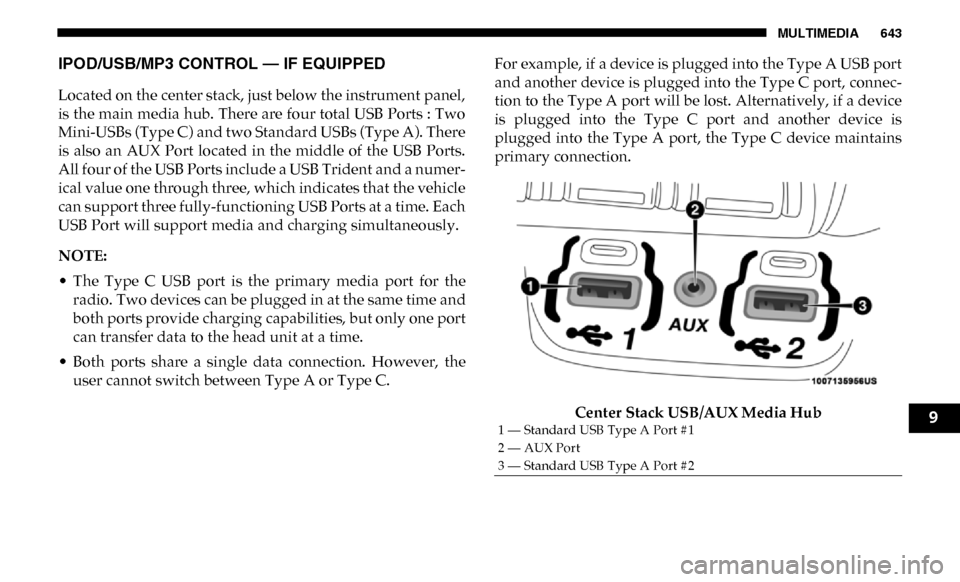
Located on the center stack, just below the instrument panel,
is the main media hub. There are four total USB Ports : Two
Mini-USBs (Type C) and two Standard USBs (Type A). There
is also an AUX Port located in the middle of the USB Ports.
All four of the USB Ports include a USB Trident and a numer-
ical value one through three, which indicates that the vehicle
can support three fully-functioning USB Ports at a time. Each
USB Port will support media and charging simultaneously.
NOTE:
• The Type C USB port is the primary media port for the radio. Two devices can be plugged in at the same time and
both ports provide charging capabilities, but only one port
can transfer data to the head unit at a time.
• Both ports share a single data connection. However, the user cannot switch between Type A or Type C. For example, if a device is plugged into the Type A USB port
and another device is plugged into the Type C port, connec
-
tion to the Type A port will be lost. Alternatively, if a device
is plugged into the Type C port and another device is
plugged into the Type A port, the Type C device maintains
primary connection.
Center Stack USB/AUX Media Hub
1 — Standard USB Type A Port #1
2 — AUX Port
3 — Standard USB Type A Port #29
Page 651 of 696

MULTIMEDIA 649
• If this equipment does cause harmful interference to radioor television reception, which can be determined by
turning the equipment off and on, the user is encouraged
to try to correct the interference by one or more of the
following measures:
1. Increase the separation between the equipment and receiver.
2. Consult an authorized dealer or an experienced radio technician for help.
VOICE COMMANDS
Introducing Uconnect
Start using Uconnect Voice Recognition with these helpful
quick tips. It provides the key Voice Commands and tips you
need to know to control your Uconnect system.
If you see the NAV icon on the bottom bar, or in the Apps
menus, of your touchscreen, you have the Uconnect 4C NAV
With 8.4–inch Display or the Uconnect 4C NAV With
12–inch Display system. If not, you have a Uconnect 4C With
8.4–inch Display system.
Get Started
All you need to control your Uconnect system with your
voice are the buttons on your steering wheel.
1. Visit UconnectPhone.com to check mobile device and
feature compatibility and to find phone pairing instruc -
tions.
2. Reduce background noise. Wind noise and passenger conversations are examples of noise that may impact
recognition.
3. Speak clearly at a normal pace and volume while facing straight ahead. The microphone is located in the head -
liner and aimed at the driver.
4. Each time you give a Voice Command, you must first push either the VR or Phone button, wait until after the
beep, then say your Voice Command.
9