charging Ram 3500 2019 User Guide
[x] Cancel search | Manufacturer: RAM, Model Year: 2019, Model line: 3500, Model: Ram 3500 2019Pages: 696, PDF Size: 13.89 MB
Page 492 of 696

490 IN CASE OF EMERGENCY
3. If using another vehicle to jump start the battery, park thevehicle within the jumper cables’ reach, apply the
parking brake and make sure the ignition is OFF.
Jump Starting Procedure
Connecting The Jumper Cables
1. Connect the positive (+) end of the jumper cable to the
positive (+) post of the discharged vehicle.
NOTE:
Do not jump off fuses. Only jump directly off positive
post.
2. Connect the opposite end of the positive (+) jumper cable
to the positive (+) post of the booster battery.
3. Connect the negative (-) end of the jumper cable to the
negative (-) post of the booster battery.
4. Connect the opposite end of the negative (-) jumper cable
to a good engine ground (exposed metal part of the
discharged vehicle’s engine) away from the battery and
the fuel injection system.
WARNING!
Do not allow vehicles to touch each other as this could
establish a ground connection and personal injury could
result.
WARNING!
Failure to follow this jump starting procedure could
result in personal injury or property damage due to
battery explosion.
CAUTION!
Failure to follow these procedures could result in
damage to the charging system of the booster vehicle or
the discharged vehicle.
WARNING!
Do not connect the jumper cable to the negative (-) post
of the discharged battery. The resulting electrical spark
could cause the battery to explode and could result in
personal injury. Only use the specific ground point, do
not use any other exposed metal parts.
Page 493 of 696

491
5. Start the engine in the vehicle that has the booster battery,let the engine idle a few minutes, and then start the
engine in the vehicle with the discharged battery.
6. Once the engine is started, remove the jumper cables in the reverse sequence:
Disconnecting The Jumper Cables
1. Disconnect the negative (-) end of the jumper cable from
the engine ground of the vehicle with the discharged
battery.
2. Disconnect the opposite end of the negative (-) jumper
cable from the negative (-) post of the booster battery. 3. Disconnect the positive
(+) end of the jumper cable from
the positive (+) post of the booster battery.
4. Disconnect the opposite end of the positive (+) jumper
cable from the positive (+) post of the vehicle with the
discharged battery.
If frequent jump starting is required to start your vehicle you
should have the battery and charging system inspected at an
authorized dealer.
CAUTION!
Do not connect jumper cable to any of the fuses on the
positive battery terminal. The resulting electrical current
will blow the fuse.
CAUTION!
Accessories plugged into the vehicle power outlets draw
power from the vehicle’s battery, even when not in use
(i.e., cellular devices, etc.). Eventually, if plugged in long
enough without engine operation, the vehicle’s battery
will discharge sufficiently to degrade battery life and/or
prevent the engine from starting.
6
Page 645 of 696
MULTIMEDIA 643
IPOD/USB/MP3 CONTROL — IF EQUIPPED
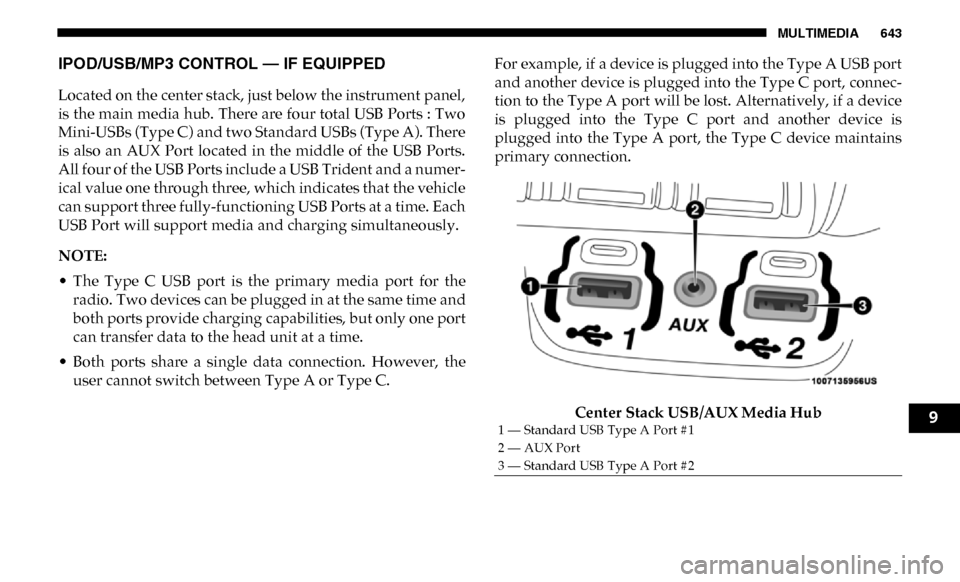
Located on the center stack, just below the instrument panel,
is the main media hub. There are four total USB Ports : Two
Mini-USBs (Type C) and two Standard USBs (Type A). There
is also an AUX Port located in the middle of the USB Ports.
All four of the USB Ports include a USB Trident and a numer-
ical value one through three, which indicates that the vehicle
can support three fully-functioning USB Ports at a time. Each
USB Port will support media and charging simultaneously.
NOTE:
• The Type C USB port is the primary media port for the radio. Two devices can be plugged in at the same time and
both ports provide charging capabilities, but only one port
can transfer data to the head unit at a time.
• Both ports share a single data connection. However, the user cannot switch between Type A or Type C. For example, if a device is plugged into the Type A USB port
and another device is plugged into the Type C port, connec
-
tion to the Type A port will be lost. Alternatively, if a device
is plugged into the Type C port and another device is
plugged into the Type A port, the Type C device maintains
primary connection.
Center Stack USB/AUX Media Hub
1 — Standard USB Type A Port #1
2 — AUX Port
3 — Standard USB Type A Port #29
Page 649 of 696
MULTIMEDIA 647
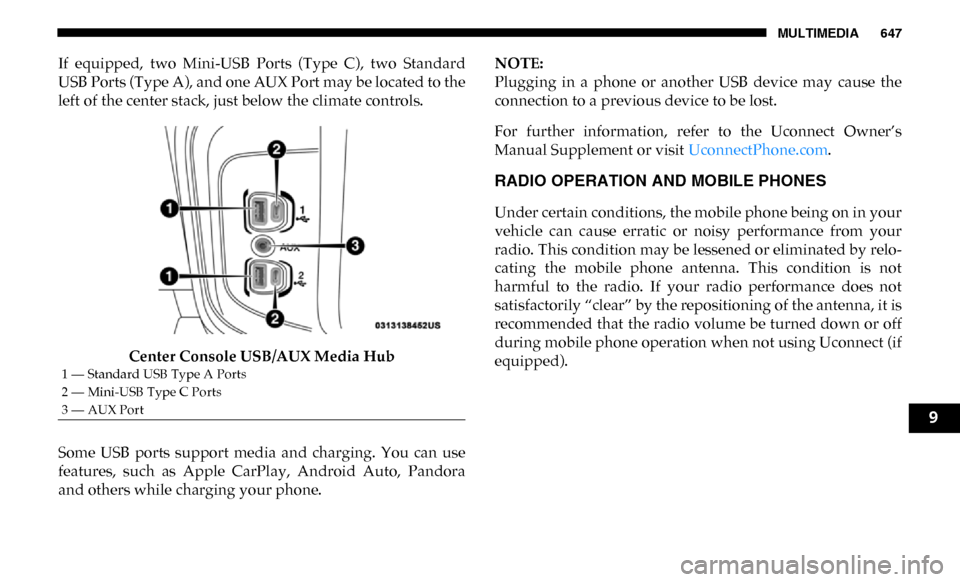
If equipped, two Mini-USB Ports (Type C), two Standard
USB Ports (Type A), and one AUX Port may be located to the
left of the center stack, just below the climate controls.Center Console USB/AUX Media Hub
Some USB ports support media and charging. You can use
features, such as Apple CarPlay, Android Auto, Pandora
and others while charging your phone. NOTE:
Plugging in a phone or another USB device may cause the
connection to a previous device to be lost.
For further information, refer to the Uconnect Owner’s
Manual Supplement or visit
UconnectPhone.com.
RADIO OPERATION AND MOBILE PHONES
Under certain conditions, the mobile phone being on in your
vehicle can cause erratic or noisy performance from your
radio. This condition may be lessened or eliminated by relo -
cating the mobile phone antenna. This condition is not
harmful to the radio. If your radio performance does not
satisfactorily “clear” by the repositioning of the antenna, it is
recommended that the radio volume be turned down or off
during mobile phone operation when not using Uconnect (if
equipped).
1 — Standard USB Type A Ports
2 — Mini-USB Type C Ports
3 — AUX Port
9
Page 681 of 696

679
Automatic Door Locks ............................................................. 39
Automatic Headlights .............................................................. 69
Automatic Tailgate Release ................................................... 102
Automatic Temperature Control (ATC) ................................ 91
Automatic Transmission ................................................ 301, 529 Adding Fluid ....................................................................... 529Fluid And Filter Change .................................................... 529
Fluid Change........................................................................ 529
Fluid Level Check ....................................................... 528, 529
Fluid Type .................................................................... 528, 574
Special Additives................................................................. 528
Automatic Transmission Limp Home Mode ...................... 306
Auxiliary Driving Systems .................................................... 208
Axle Fluid......................................................................... 529, 574
Axle Lubrication...................................................................... 529 B
Back-Up .................................................................................... 397
Back-Up Camera ..................................................................... 397
Bar, Stabilizer/Sway System ................................................. 322
Battery............................................................................... 182, 506 Charging System Light....................................................... 182
Keyless Key Fob Replacement ............................................ 21
Battery Saver Feature ............................................................... 73 Belts, Seat ................................................................................. 287
Blind Spot Monitoring............................................................ 208
Body Builders Guide ................................................................ 15 Body Mechanism Lubrication ...............................................517
B-Pillar Location ......................................................................537
Brake Assist System ................................................................197
Brake Control System .............................................................196
Brake Fluid .......................................................................527, 574
Brake System....................................................................527, 565 Fluid Check ..........................................................................527
Master Cylinder ...................................................................527Parking ..................................................................................298
Warning Light......................................................................180
Brake/Transmission Interlock ..............................................301
Bulb Replacement ...................................................................446
Bulbs, Light ......................................................................289, 446 C
Cab Top Clearance Lights ......................................................455
Camera...................................................................................... 397
Camera, Rear....................................................................397, 401
Camper .....................................................................................144
Capacities, Fluid ......................................................................571
Caps, Filler Oil (Engine) ..................................................................504, 508
Radiator (Coolant Pressure)...............................................525
Car Washes ..............................................................................558
Carbon Monoxide Warning ...........................................286, 570
Cargo Light ................................................................................72 Cellular Phone .........................................................................647
11
Page 694 of 696

692
W
Warning Lights (Instrument Cluster Descriptions) ........... 185
Warnings And Cautions .......................................................... 15
Warranty Information ............................................................ 676
Washers, Windshield ....................................................... 77, 505
Washing Vehicle ..................................................................... 558
Water Driving Through ................................................................. 437
Wheel And Wheel Tire Care ................................................. 551
Wheel And Wheel Tire Trim ................................................. 551
Wheel Covers........................................................................... 487
Winch ........................................................................................ 337 Accessories ........................................................................... 341Operation.............................................................................. 341
Rigging Techniques ............................................................ 352
Usage..................................................................................... 337
Wind Buffeting .................................................................... 97, 99
Window Fogging ...................................................................... 92 Windows ....................................................................................94
Power ......................................................................................94
Rear Sliding ............................................................................97
Reset Auto-Up .......................................................................95
Windshield Defroster .............................................................287
Windshield Washers ................................................... 76, 77, 505 Fluid ................................................................................76, 505
Windshield Wiper Blades ......................................................517
Windshield Wipers ...................................................................76
Wipers Blade Replacement ....................................................517
Wipers, Intermittent .................................................................77
Wipers, Rain Sensitive ..............................................................78
Wireless Charging Pad ........................................................... 129