service Ram 3500 2019 Owner's Guide
[x] Cancel search | Manufacturer: RAM, Model Year: 2019, Model line: 3500, Model: Ram 3500 2019Pages: 696, PDF Size: 13.89 MB
Page 198 of 696

196 SAFETY
ABS is designed to function with the OEM tires. Modification
may result in degraded ABS performance.
Anti-Lock Brake Warning Light
The yellow “Anti-Lock Brake Warning Light” will turn on
when the ignition is turned to the ON/RUN mode and may
stay on for as long as four seconds.
If the “Anti-Lock Brake Warning Light” remains on or comes on
while driving, it indicates that the anti-lock portion of the brake
system is not functioning and that service is required. However,
the conventional brake system will continue to operate normally
if the “Anti-Lock Brake Warning Light” is on.
If the “Anti-Lock Brake Warning Light” is on, the brake
system should be serviced as soon as possible to restore the
benefits of anti-lock brakes. If the “Anti-Lock Brake Warning
Light” does not come on when the ignition is turned to the
ON/RUN mode, have the light repaired as soon as possible.
Electronic Brake Control System
Your vehicle is equipped with an advanced Electronic Brake
Control system (EBC). This system includes Electronic Brake
Force Distribution (EBD), Anti-Lock Brake System (ABS),
Brake Assist System (BAS), Hill Start Assist (HSA), Traction
Control System (TCS), Electronic Stability Control (ESC),
and Electronic Roll Mitigation (ERM). These systems work
together to enhance both vehicle stability and control in
various driving conditions.
Your vehicle may also be equipped with Trailer Sway
Control (TSC) and Hill Descent Control (HDC).
• The ABS cannot prevent the natural laws of physics
from acting on the vehicle, nor can it increase braking
or steering efficiency beyond that afforded by the
condition of the vehicle brakes and tires or the traction
afforded.
• The ABS cannot prevent collisions, including those resulting from excessive speed in turns, following
another vehicle too closely, or hydroplaning.
• The capabilities of an ABS equipped vehicle must never be exploited in a reckless or dangerous manner
that could jeopardize the user’s safety or the safety of
others.
WARNING! (Continued)
Page 199 of 696

SAFETY 197
Electronic Brake Force Distribution (EBD)
This function manages the distribution of the braking torque
between the front and rear axles by limiting braking pressure
to the rear axle. This is done to prevent overslip of the rear
wheels to avoid vehicle instability, and to prevent the rear
axle from entering ABS before the front axle.
Brake System Warning Light
The red “Brake System Warning Light” will turn on when
the ignition is turned to the ON/RUN mode and may stay on
for as long as four seconds.
If the “Brake System Warning Light” remains on or comes on
while driving, it indicates that the brake system is not func-
tioning properly and that immediate service is required. If
the “Brake System Warning Light” does not come on when
the ignition is turned to the ON/RUN mode, have the light
repaired as soon as possible. Brake Assist System (BAS)
The BAS is designed to optimize the vehicle’s braking capa
-
bility during emergency braking maneuvers. The system
detects an emergency braking situation by sensing the rate
and amount of brake application and then applies optimum
pressure to the brakes. This can help reduce braking
distances. The BAS complements the anti-lock brake system
(ABS). Applying the brakes very quickly results in the best
BAS assistance. To receive the benefit of the system, you
must apply continuous braking pressure during the stop -
ping sequence, (do not “pump” the brakes). Do not reduce
brake pedal pressure unless braking is no longer desired.
Once the brake pedal is released, the BAS is deactivated.
WARNING!
The Brake Assist System (BAS) cannot prevent the
natural laws of physics from acting on the vehicle, nor
can it increase the traction afforded by prevailing road
conditions. BAS cannot prevent collisions, including
those resulting from excessive speed in turns, driving on
very slippery surfaces, or hydroplaning. The capabilities
of a BAS-equipped vehicle must never be exploited in a
reckless or dangerous manner, which could jeopardize
the user's safety or the safety of others.
4
Page 214 of 696

212 SAFETY
Overtaking/PassingThe BSM system is designed not to issue an alert on
stationary objects such as guardrails, posts, walls, foliage,
berms, snow banks, car washes etc. However, occasionally
the system may alert on such objects. This is normal opera
-
tion and your vehicle does not require service.
Stationary Objects
Page 221 of 696

SAFETY 219
FCW Limited Warning
If the instrument cluster displays “ACC/FCW Limited Func-
tionality” or “ACC/FCW Limited Functionality Clean Front
Windshield” momentarily, there may be a condition that
limits FCW functionality. Although the vehicle is still driv -
able under normal conditions, the active braking may not be
fully available. Once the condition that limited the system
performance is no longer present, the system will return to
its full performance state. If the problem persists, see an
authorized dealer.
Service FCW Warning
If the system turns off, and the instrument cluster displays:
• ACC/FCW Unavailable Service Required
• Cruise/FCW Unavailable Service Required
This indicates there is an internal system fault. Although the
vehicle is still drivable under normal conditions, have the
system checked by an authorized dealer. General Information
The following regulatory statement applies to all Radio
Frequency (RF) devices equipped in this vehicle:
This device complies with Part 15 of the FCC Rules and with
Industry Canada license-exempt RSS standard(s). Operation
is subject to the following two conditions:
1. This device may not cause harmful interference.
2. This device must accept any interference received,
including interference that may cause undesired opera -
tion.
NOTE:
Changes or modifications not expressly approved by the
party responsible for compliance could void the user’s
authority to operate the equipment.
4
Page 225 of 696
SAFETY 223
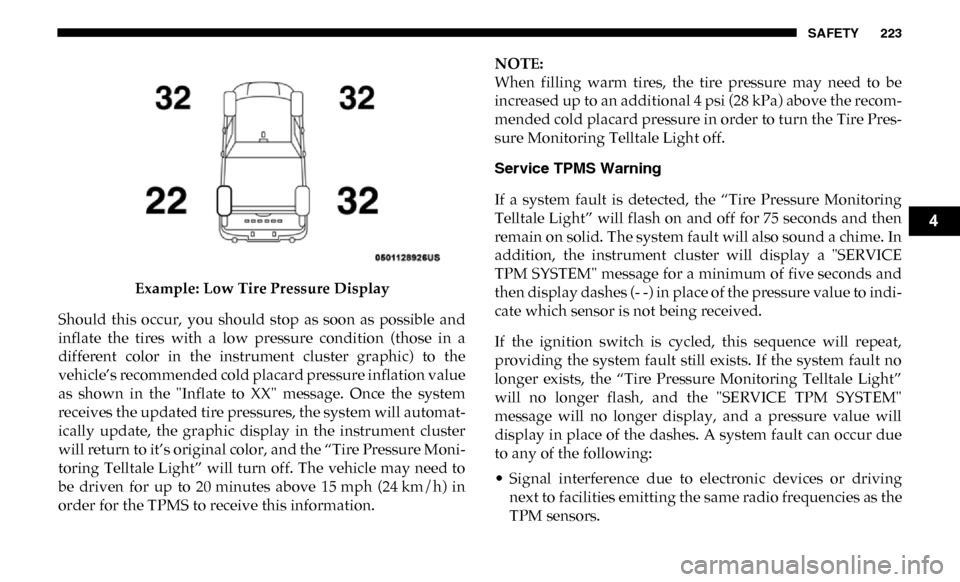
Example: Low Tire Pressure Display
Should this occur, you should stop as soon as possible and
inflate the tires with a low pressure condition (those in a
different color in the instrument cluster graphic) to the
vehicle’s recommended cold placard pressure inflation value
as shown in the "Inflate to XX" message. Once the system
receives the updated tire pressures, the system will automat -
ically update, the graphic display in the instrument cluster
will return to it’s original color, and the “Tire Pressure Moni -
toring Telltale Light” will turn off. The vehicle may need to
be driven for up to 20 minutes above 15 mph (24 km/h) in
order for the TPMS to receive this information. NOTE:
When filling warm tires, the tire pressure may need to be
increased up to an additional 4 psi (28 kPa) above the recom
-
mended cold placard pressure in order to turn the Tire Pres -
sure Monitoring Telltale Light off.
Service TPMS Warning
If a system fault is detected, the “Tire Pressure Monitoring
Telltale Light” will flash on and off for 75 seconds and then
remain on solid. The system fault will also sound a chime. In
addition, the instrument cluster will display a "SERVICE
TPM SYSTEM" message for a minimum of five seconds and
then display dashes (- -) in place of the pressure value to indi -
cate which sensor is not being received.
If the ignition switch is cycled, this sequence will repeat,
providing the system fault still exists. If the system fault no
longer exists, the “Tire Pressure Monitoring Telltale Light”
will no longer flash, and the "SERVICE TPM SYSTEM"
message will no longer display, and a pressure value will
display in place of the dashes. A system fault can occur due
to any of the following:
• Signal interference due to electronic devices or driving next to facilities emitting the same radio frequencies as the
TPM sensors.
4
Page 226 of 696

224 SAFETY
• Installing aftermarket window tinting that contains mate-
rials that may block radio wave signals.
• Accumulation of snow or ice around the wheels or wheel housings.
• Using tire chains on the vehicle.
• Using wheels/tires not equipped with TPM sensors.
A system fault may occur due to an incorrect TPM sensor
location condition. When a system fault occurs due to an
incorrect TPM sensor location, the “Tire Pressure Monitoring
Telltale Light” will flash on and off for 75 seconds and then
remain on solid. The system fault will also sound a chime. In
addition, the instrument cluster will display a “Tire Pressure
Temporarily Unavailable” message in place of the tire pres -
sure display screen. If the ignition switch is cycled, this
sequence will repeat, providing the system fault still exists. If
the system fault no longer exists, the “Tire Pressure Moni -
toring Telltale Light” will no longer flash and the tire pres -
sure display screen will be displayed showing the tire
pressure values the correct locations. Vehicles With Non Matching Full Size Spare Or Compact
Spare
• The non matching full size spare or compact spare tire
does not have a TPM sensor. Therefore, the TPMS will not
monitor the pressure in the non matching full size spare or
compact spare tire.
• If you install the non matching full size spare or compact spare tire in place of a road tire that has a pressure below
the low-pressure warning limit, upon the next ignition
switch cycle, the TPM Telltale Light and a “LOW TIRE”
message will remain ON and a chime will sound. In addi -
tion, the graphic in the instrument cluster will still display
a pressure value in a different color and an “Inflate to XX”
message.
• After driving the vehicle for up to 20 minutes above 15 mph (24 km/h), the TPM Telltale Light will flash on
and off for 75 seconds and then remain on solid. In addi -
tion, the instrument cluster will display a "SERVICE TPM
SYSTEM" message for a minimum of five seconds and then
display dashes (- -) in place of the pressure value.
Page 227 of 696

SAFETY 225
• For each subsequent ignition switch cycle, a chime willsound, the TPM Telltale Light will flash on and off for 75
seconds and then remain on solid, and the instrument
cluster will display a "SERVICE TPM SYSTEM" message for
a minimum of five seconds and then display dashes (- -) in
place of the pressure value.
• Once you repair or replace the original road tire and rein -
stall it on the vehicle in place of the non matching full size
spare or compact spare, the TPMS will update automati -
cally. In addition, the TPM Telltale Light will turn OFF and
the graphic in the instrument cluster will display a new
pressure value instead of dashes (- -), as long as no tire
pressure is below the low-pressure warning limit in any of
the four active road tires. The vehicle may need to be
driven for up to 20 minutes above 15 mph (24 km/h) in
order for the TPMS to receive this information.
Trailer Tire Pressure Monitoring System (TTPMS)
The Trailer Tire Pressure Monitoring System (TTPMS) is a
feature that will display the trailer tire pressure values and
warn the driver of a low trailer tire pressure, based on the
drivers set target tire pressure value, through the Instrument
Cluster (IC). The TTPMS monitors the pressure of each tire and warns the
driver, through the IC, when either a low tire pressure condi
-
tion or a TPM sensor or system malfunction condition exists.
The IC will display the actual tire pressure or dashes for each
of the trailer tires in the correct trailer position, based on
trailer configuration.
The TTPMS consist of the following components:
• Trailer Receiver Module
• Trailer Interface Module
• Two to twelve tire pressure monitoring sensors depending on trailer configuration
The TTPMS is configured though the trailer settings menu in
the Uconnect system by selecting the desired trailer number
(up to four trailers can be configured), the number of axles (1
- 3), the number of trailer tires (2, 4, 6, 8, or 12), and the set
trailer tire pressure. Refer to “Uconnect Settings” in “Multi -
media” for further information.
4
Page 228 of 696

226 SAFETY
Tire Pressure Monitoring Low Pressure Warnings
When a tire pressure low in one or more of the active road
tires is detected a chime will sound. In addition, the instru-
ment cluster will display a graphic showing the pressure
values of each tire with the low tire pressure values in a
different color. An “Inflate to XXX” message will also be
displayed.
NOTE:
"XXX" = TPM trailer tire target pressure value programmed
by the customer
Should this occur, you should stop as soon as possible and
inflate the tires with a low pressure condition (those in a
different color in the instrument cluster graphic) to the
customer programmed target tire pressure value as shown in
the “Inflate to XXX” message. Once the system receives the
updated tire pressures, the system will automatically update
the graphic display in the instrument cluster will return to
it’s original color. The vehicle may need to be driven for up
to 10 minutes above 15 mph (24 km/h) in order for the
TTPMS to receive the updated information.Service TTPMS Warning
If a system fault is detected, the system fault will sound a
chime and the instrument cluster will display a “Trailer Tire
Pressure System Service Required” message for a minimum
of five seconds and then display dashes (- -) in place of the
pressure value to indicate which sensor is not being received.
Once the system fault is corrected the "Trailer Tire Pressure
System Service Required" message will no longer be
displayed and the dashes will be replaced by pressure
values. The vehicle may need to be driven for up to
10 minutes above 15 mph (24 km/h) in order for the TTPMS
to receive the updated information.
Trailer Tire Pressure System Not Configured
A “Trailer Tire Pressure System Not Configured” message
will be displayed in the Instrument Cluster when a trailer
number is selected that does not have configuration values
entered for the (Number of Tires, Number of Axles, SET
Target Tire Pressure, trailer TPM sensor ID's).
To correct this condition the (Number of Tires, Number of
Axles, and SET Target Tire Pressure) values must be entered
in the radio for the trailer number selected. The trailer
sensors must also be paired to the trailer. Refer to the “Ucon -
nect Settings” in “Multimedia” for further information.
Page 231 of 696

SAFETY 229
Tire Pressure Information System (TPIS) 3500 Series
Trucks
Your vehicle may be equipped with a Tire Pressure Informa-
tion System (TPIS).
The Tire Pressure Information System (TPIS) uses wireless
technology with wheel rim mounted electronic sensors to
transmit tire pressure levels. Sensors mounted to each wheel
as part of the valve stem transmit tire pressure readings to
the receiver module.
NOTE:
It is particularly important for you to check the tire pressure
in all of the tires on your vehicle monthly and to maintain the
proper pressure.
The TPIS consists of the following components:
• Receiver module
• Four TPM sensors (Single Rear Wheel (SRW) applications)
• Six TPM sensors (Dual Rear Wheel (DRW) applications)
• Pressure display in the instrument cluster
The TPIS system will display all four (Single Rear Wheel
(SRW) applications) or six (Dual Rear Wheel (DRW) applica -
tions) tire pressure values in the instrument cluster display. If a system fault is detected, the instrument cluster will
display a "SERVICE TPM SYSTEM" message for a minimum
of five seconds and then display dashes (- -) in place of the
pressure value to indicate which sensor is not being received.
If the ignition switch is cycled, this sequence will repeat,
providing the system fault still exists. If the system fault no
longer exists, the "SERVICE TPM SYSTEM" message will no
longer be displayed, and a pressure value will display in
place of the dashes. A system fault can occur due to any of
the following:
• Signal interference due to electronic devices or driving
next to facilities emitting the same radio frequencies as the
TPM sensors.
• Installing aftermarket window tinting that contains mate -
rials that may block radio wave signals.
• Accumulation of snow or ice around the wheels or wheel housings.
• Using tire chains on the vehicle.
• Using wheels/tires not equipped with TPM sensors.
4
Page 233 of 696

SAFETY 231
4. Never allow children to slide the shoulder belt behindthem or under their arm.
5. You should read the instructions provided with your child restraint to make sure that you are using it properly.
6. All occupants should always wear their lap and shoulder belts properly.
7. The driver and front passenger seats should be moved back as far as practical to allow the front air bags room to
inflate.
8. Do not lean against the door or window. If your vehicle has side air bags, and deployment occurs, the side air
bags will inflate forcefully into the space between occu -
pants and the door and occupants could be injured.
9. If the air bag system in this vehicle needs to be modified to accommodate a disabled person, refer to the
“Customer Assistance” section for customer service
contact information.
Seat Belt Systems
Buckle up even though you are an excellent driver, even on
short trips. Someone on the road may be a poor driver and
could cause a collision that includes you. This can happen far
away from home or on your own street.
Research has shown that seat belts save lives, and they can
reduce the seriousness of injuries in a collision. Some of the
worst injuries happen when people are thrown from the
vehicle. Seat belts reduce the possibility of ejection and the
risk of injury caused by striking the inside of the vehicle.
Everyone in a motor vehicle should be belted at all times.
WARNING!
• Never place a rear-facing child restraint in front of an air bag. A deploying passenger front air bag can cause
death or serious injury to a child 12 years or younger,
including a child in a rear-facing child restraint.
• Never install a rear-facing child restraint in the front seat of a vehicle. Only use a rear-facing child restraint
in the rear seat. If the vehicle does not have a rear seat,
do not transport a rear-facing child restraint in that
vehicle.
4