service Ram 3500 2019 Workshop Manual
[x] Cancel search | Manufacturer: RAM, Model Year: 2019, Model line: 3500, Model: Ram 3500 2019Pages: 696, PDF Size: 13.89 MB
Page 326 of 696

324 STARTING AND OPERATING
and left halves of the bar must be aligned. This alignment
may require that the vehicle be driven onto level ground or
rocked from side to side.
To return to the On-Road mode; push the SWAY BAR button
again.
SAFE OFF-ROAD DRIVING — POWER WAGON ONLY
Off-Road Driving Tips And Vehicle Characteristics
Your vehicle has excellent on and off-road capabilities. These
off-road capabilities will allow you to explore those wilder-
ness trails where few travel, providing a source of exciting
and satisfying recreation. Before you venture out, you
should contact your local governmental agency to determine
the designated off-road vehicle (ORV) trails or recreation areas. You should always tread lightly and only use estab
-
lished roads, trails or ORV recreational areas.
The National Forest Service, Bureau of Land Management,
or local Department of Natural Resources are a wealth of
information and usually have maps with marked trails.
Skid Plates And Underbody Protection
Steel skid plates protect the major driveline components of
the truck including the fuel tank, transfer case and steering
damper. In addition, this vehicle is equipped with boxed
cross members and fore/aft rails. This additional protection
allows the vehicle to be utilized in severe off-road situations
that would be considered impassable by a normal truck.
Ramp Travel Index (RTI)
The ramp travel index is the distance, in inches, that you can
drive your vehicle with one wheel on a 20-degree ramp
without lifting any other wheel off the ground. This distance
up the ramp divided by the wheelbase of the vehicle and
multiplied by 1,000 is the RTI. This vehicle has an RTI of 510,
which means you can articulate one front wheel 26 inches (66
cm) in the air while the other three wheels remain in contact
with the ground.
WARNING!
If the stabilizer/sway bar will not return to On-Road
mode, vehicle stability is reduced. Do not attempt to
drive the vehicle over 18 mph (29 km/h). Driving faster
than 18 mph (29 km/h) may cause loss of control of the
vehicle, which could result in serious injury or death.
Contact your local service center for assistance.
Page 338 of 696

336 STARTING AND OPERATING
After Driving Off-Road
Off-road operation puts more stress on your vehicle than
does most on-road driving. After going off-road, it is always
a good idea to check for damage. That way you can get any
problems taken care of right away and have your vehicle
ready when you need it.
• Completely inspect the underbody of your vehicle. Checktires, body structure, steering, suspension, and exhaust
system for damage.
• Inspect the radiator for mud and debris and clean as required.
• Check threaded fasteners for looseness, particularly on the chassis, drivetrain components, steering, and suspension.
Retighten them, if required, and torque to the values spec -
ified in the Service Manual.
• Check for accumulations of plants or brush. These things could be a fire hazard. They might hide damage to fuel
lines, brake hoses, axle pinion seals, and propeller shafts. • After extended operation in mud, sand, water, or similar
dirty conditions, have the radiator, fan, brake rotors,
wheels, brake linings, and axle yokes inspected and
cleaned as soon as possible.
• If you experience unusual vibration after driving in mud, slush or similar conditions, check the wheels for impacted
material. Impacted material can cause a wheel imbalance
and freeing the wheels of it will correct the situation.
WARNING!
Abrasive material in any part of the brakes may cause
excessive wear or unpredictable braking. You might not
have full braking power when you need it to prevent a
collision. If you have been operating your vehicle in
dirty conditions, get your brakes checked and cleaned as
necessary.
Page 373 of 696

STARTING AND OPERATING 371
The “ACC/FCW Limited Functionality Clean Front Wind-
shield” message can sometimes be displayed while driving
in adverse weather conditions. The ACC/FCW system will
recover after the vehicle has left these areas. Under rare
conditions, when the camera is not tracking any vehicles or
objects in its path this warning may temporarily occur.
If weather conditions are not a factor, the driver should
examine the windshield and the camera located on the back
side of the inside rear view mirror. They may require
cleaning or removal of an obstruction.
When the condition that created limited functionality is no
longer present, the system will return to full functionality.
NOTE:
If the “ACC/FCW Limited Functionality Clean Front Wind -
shield” message occurs frequently (e.g. more than once on
every trip) without any snow, rain, mud, or other obstruc -
tion, have the windshield and forward facing camera
inspected at your authorized dealer. Service ACC/FCW Warning
If the system turns off, and the instrument cluster displays
“ACC/FCW Unavailable Service Required” or “Cruise/
FCW Unavailable Service Required”, there may be an
internal system fault or a temporary malfunction that limits
ACC functionality. Although the vehicle is still drivable
under normal conditions, ACC will be temporarily unavail
-
able. If this occurs, try activating ACC again later, following
an ignition cycle. If the problem persists, see your authorized
dealer.
Precautions While Driving With ACC
In certain driving situations, ACC may have detection issues.
In these cases, ACC may brake late or unexpectedly. The
driver needs to stay alert and may need to intervene.
NOTE:
• Aftermarket add-ons such as snow plows, lift kits, and brush/grille bars can hinder module performance. Ensure
the radar/camera has no obstructions in the field of view.
• Height modifications can limit module performance and functionality.
5
Page 387 of 696

STARTING AND OPERATING 385
Enabling And Disabling ParkSense
ParkSense can be enabled and disabled with the ParkSense
switch.When the gear selector is moved to REVERSE and
the system is disabled, the instrument cluster
display will show the vehicle graphic with “Off”
over the arcs for as long as the vehicle is in REVERSE.
NOTE:
The ParkSense system will automatically disable when the
system detects that a trailer with trailer brakes has been
connected to the Integrated Trailer Brake Module. The
instrument cluster display will show an “Off” message over
the arcs if the ParkSense system is off, or a “Trailer” message
if the system is on, for as long as the vehicle is in REVERSE.
The ParkSense switch LED will be on when ParkSense is
disabled or defective. The ParkSense switch LED will be off
when the system is enabled.
If the ParkSense switch is pushed, and the system is disabled
or requires service, the ParkSense switch LED will blink
momentarily, and then the LED will be on.
Service The ParkSense Rear Park Assist System
During vehicle start up, when the Rear ParkSense System
has detected a faulted condition, the instrument cluster
display will show the "Rear ParkSense Unavailable Service
Required" or the "Rear ParkSense Unavailable Wipe Sensors"
message.
When the gear selector is moved into REVERSE, a vehicle
graphic will show in the instrument cluster display, along
with the display overlay “Rear ParkSense Unavailable Wipe
Sensors.” If the system needs service, the display overlay will
read “Rear ParkSense Unavailable Service Required” Under
this condition, ParkSense will not operate.
If "Rear ParkSense Unavailable Wipe Sensors" appears in the
instrument cluster display make sure the outer surface and
the underside of the rear fascia/bumper is clean and clear of
snow, ice, mud, dirt or other obstruction, and then cycle the
ignition. If the message continues to appear, see an autho -
rized dealer.
If "Rear ParkSense Unavailable Service Required" appears in
the instrument cluster display, see an authorized dealer.
5
Page 388 of 696

386 STARTING AND OPERATING
(Continued)
Cleaning The ParkSense System
Clean the ParkSense sensors with water, car wash soap and
a soft cloth. Do not use rough or hard cloths. Do not scratch
or poke the sensors. Otherwise, you could damage the
sensors.
ParkSense System Usage Precautions
NOTE:
• Ensure that the rear bumper is free of snow, ice, mud, dirtand debris to keep the ParkSense system operating prop -
erly.
• Jackhammers, large trucks, and other vibrations could affect the performance of ParkSense.
• When you move the gear selector into REVERSE with ParkSense turned off, the instrument cluster display will
show "Off" on the vehicle graphic arcs for as long as the
vehicle is in REVERSE.
• ParkSense, when on, will reduce the volume of the radio when it is sounding a tone.
• Clean the ParkSense sensors regularly, taking care not to scratch or damage them. The sensors must not be covered
with ice, snow, slush, mud, dirt or debris. Failure to do so
can result in the system not working properly. The Park -Sense system might not detect an obstacle behind the
fascia/bumper, or it could provide a false indication that
an obstacle is behind the fascia/bumper.
• Ensure the ParkSense system is OFF if objects such as bicycle carriers, trailer hitches, etc., are placed within
18 inches (45 cm) of the rear fascia/bumper while driving
the vehicle. Failure to do so can result in the system misin -
terpreting a close obstacle as a sensor problem, causing the
"Rear ParkSense Unavailable Service Required" message
to appear in the instrument cluster display.
• On vehicles equipped with a tailgate, ParkSense should be disabled when the tailgate is in the lowered or open posi -
tion and the vehicle is in REVERSE. A lowered tailgate
could provide a false indication that an obstacle is behind
the vehicle.
WARNING!
• Drivers must be careful when backing up even when using ParkSense. Always check carefully behind your
vehicle, look behind you, and be sure to check for
pedestrians, animals, other vehicles, obstructions, and
blind spots before backing up. You are responsible for
safety and must continue to pay attention to your
surroundings. Failure to do so can result in serious
injury or death.
Page 396 of 696
394 STARTING AND OPERATING
Enabling And Disabling Front And/Or Rear ParkSense
Front ParkSense can be enabled and disabled with the Front
ParkSense switch.
Rear ParkSense can be enabled and disabled with the Rear
ParkSense switch.When the gear selector is moved to REVERSE and
the Front or Rear system is disabled, the instrument
cluster display will show the “Off” message. This
vehicle graphic will be displayed for as long as the vehicle is
in REVERSE.
The Front or Rear ParkSense switch LED will be on when
Front or Rear ParkSense is disabled or requires service. The
Front or Rear ParkSense switch LED will be off when the
Front or Rear system is enabled. If the Front or Rear Park -
Sense switch is pushed, and the system requires service, the
Front or Rear ParkSense switch LED will blink momentarily,
and then the LED will be on.
Service The ParkSense Front/Rear Park Assist
System
During vehicle start up, when the Front/Rear ParkSense
System has detected a faulted condition, the instrument
cluster display will show the "Front/Rear ParkSense
Unavailable Service Required" or the "Front/Rear ParkSense
Unavailable Wipe Sensors" message.
When the gear selector is moved into REVERSE, a vehicle graphic
will show in the instrument cluster display, along with the display
overlay “Front/Rear ParkSense Unavailable Wipe Sensors.” If the
system needs service, the display overlay will read “Front/Rear
ParkSense Unavailable Service Required.” Under this condition,
ParkSense will not operate.
If "Front/Rear ParkSense Unavailable Wipe Sensors"
appears in the instrument cluster display make sure the
outer surface and the underside of the rear fascia/bumper is
clean and clear of snow, ice, mud, dirt or other obstruction,
and then cycle the ignition. If the message continues to
appear, see an authorized dealer.
If "Front/Rear ParkSense Unavailable Service Required"
appears in the instrument cluster display, see an authorized
dealer.
Page 397 of 696

STARTING AND OPERATING 395
Cleaning The ParkSense System
Clean the ParkSense sensors with water, car wash soap and
a soft cloth. Do not use rough or hard cloths. Do not scratch
or poke the sensors. Otherwise, you could damage the
sensors.
ParkSense System Usage Precautions
NOTE:
• Ensure that the front and rear bumpers are free of snow,ice, mud, dirt and debris to keep the ParkSense system
operating properly.
• Jackhammers, large trucks, and other vibrations could affect the performance of ParkSense.
• When you move the gear selector to the REVERSE position and Front or Rear ParkSense is turned off, the instrument
cluster display will show "Off" on the vehicle graphic arcs.
This vehicle graphic will be displayed for as long as the
vehicle is in REVERSE.
• ParkSense, when on, will reduce the volume of the radio when it is sounding a tone. • Clean the ParkSense sensors regularly, taking care not to
scratch or damage them. The sensors must not be covered
with ice, snow, slush, mud, dirt or debris. Failure to do so
can result in the system not working properly. The Park -
Sense system might not detect an obstacle behind or in
front of the fascia/bumper, or it could provide a false indi -
cation that an obstacle is behind or in front of the fascia/
bumper.
• Use the ParkSense switch to turn the ParkSense system off if obstacles such as bicycle carriers, trailer hitches, etc. are
placed within 18 inches (45 cm) from the rear fascia/
bumper. Failure to do so can result in the system misinter -
preting a close obstacle as a sensor problem, causing the
“Front/Rear ParkSense Unavailable Service Required”
message to be appear in the instrument cluster display.
• On vehicles equipped with a tailgate, ParkSense should be disabled when the tailgate is in the lowered or open posi -
tion. A lowered tailgate could provide a false indication
that an obstacle is behind the vehicle.
5
Page 441 of 696

STARTING AND OPERATING 439
After Driving Off-Road
Off-road operation puts more stress on your vehicle than
does most on-road driving. After going off-road, it is always
a good idea to check for damage. That way you can get any
problems taken care of right away and have your vehicle
ready when you need it.
• Completely inspect the underbody of your vehicle. Checktires, body structure, steering, suspension, and exhaust
system for damage.
• Inspect the radiator for mud and debris and clean as required.
• Check threaded fasteners for looseness, particularly on the chassis, drivetrain components, steering, and suspension.
Retighten them, if required, and torque to the values spec -
ified in the Service Manual.
• Check for accumulations of plants or brush. These things could be a fire hazard. They might hide damage to fuel
lines, brake hoses, axle pinion seals, and propeller shafts. • After extended operation in mud, sand, water, or similar
dirty conditions, have the radiator, fan, brake rotors,
wheels, brake linings, and axle yokes inspected and
cleaned as soon as possible.
• If you experience unusual vibration after driving in mud, slush or similar conditions, check the wheels for impacted
material. Impacted material can cause a wheel imbalance
and freeing the wheels of it will correct the situation.
WARNING!
Abrasive material in any part of the brakes may cause
excessive wear or unpredictable braking. You might not
have full braking power when you need it to prevent a
collision. If you have been operating your vehicle in
dirty conditions, get your brakes checked and cleaned as
necessary.
5
Page 443 of 696
IN CASE OF EMERGENCY 441
ASSIST AND SOS SYSTEM — IF EQUIPPED
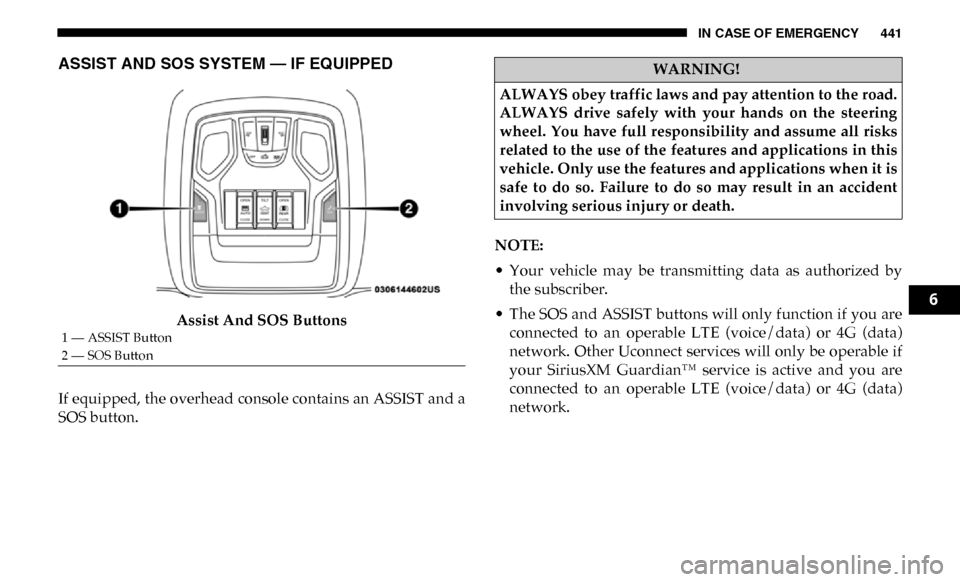
Assist And SOS Buttons
If equipped, the overhead console contains an ASSIST and a
SOS button. NOTE:
• Your vehicle may be transmitting data as authorized by
the subscriber.
• The SOS and ASSIST buttons will only function if you are connected to an operable LTE (voice/data) or 4G (data)
network. Other Uconnect services will only be operable if
your SiriusXM Guardian™ service is active and you are
connected to an operable LTE (voice/data) or 4G (data)
network.
1 — ASSIST Button
2 — SOS Button
WARNING!
ALWAYS obey traffic laws and pay attention to the road.
ALWAYS drive safely with your hands on the steering
wheel. You have full responsibility and assume all risks
related to the use of the features and applications in this
vehicle. Only use the features and applications when it is
safe to do so. Failure to do so may result in an accident
involving serious injury or death.
6
Page 445 of 696

IN CASE OF EMERGENCY 443
(Continued)
NOTE:
• Your vehicle may be transmitting data as authorized bythe subscriber.
• Once a connection is made between the vehicle’s SOS Call system and the SOS operator, the SOS operator may be
able to open a voice connection with the vehicle to deter -
mine if additional help is needed. Once the SOS operator
opens a voice connection with the vehicle’s SOS Call
system, the operator should be able to speak with you or
other vehicle occupants and hear sounds occurring in the
vehicle. The vehicle’s SOS Call system will attempt to
remain connected with the SOS operator until the SOS
operator terminates the connection.
5. The SOS operator may attempt to contact appropriate emergency responders and provide them with important
vehicle information and GPS coordinates.
WARNING!
• If anyone in the vehicle could be in danger (e.g., fire or smoke is visible, dangerous road conditions or loca -
tion), do not wait for voice contact from an Emergency
Services Agent. All occupants should exit the vehicle
immediately and move to a safe location.
• Never place anything on or near the vehicle’s operable network and GPS antennas. You could prevent oper -
able network and GPS signal reception, which can
prevent your vehicle from placing an emergency call.
An operable network and GPS signal reception is
required for the SOS Call system to function properly.
• The SOS Call system is embedded into the vehicle’s elec -
trical system. Do not add aftermarket electrical equipment
to the vehicle’s electrical system. This may prevent your
vehicle from sending a signal to initiate an emergency call.
To avoid interference that can cause the SOS Call system to
fail, never add aftermarket equipment (e.g., two-way
mobile radio, CB radio, data recorder, etc.) to your vehicle’s
electrical system or modify the antennas on your vehicle. IF
YOUR VEHICLE LOSES BATTERY POWER FOR ANY
REASON (INCLUDING DURING OR AFTER AN ACCI -
DENT), THE UCONNECT FEATURES, APPS AND
SERVICES, AMONG OTHERS, WILL NOT OPERATE.
• Modifications to any part of the SOS Call system could cause the air bag system to fail when you need it. You
could be injured if the air bag system is not there to
help protect you.
WARNING! (Continued)
6