brake light Ram 3500 Chassis Cab 2019 Owner's Guide
[x] Cancel search | Manufacturer: RAM, Model Year: 2019, Model line: 3500 Chassis Cab, Model: Ram 3500 Chassis Cab 2019Pages: 607, PDF Size: 10.72 MB
Page 245 of 607

SAFETY 243
Periodic Safety Checks You Should Make Outside
The Vehicle
Tires
Examine tires for excessive tread wear and uneven wear
patterns. Check for stones, nails, glass, or other objects
lodged in the tread or sidewall. Inspect the tread for cuts and
cracks. Inspect sidewalls for cuts, cracks, and bulges. Check
the wheel bolts for tightness. Check the tires (including
spare) for proper cold inflation pressure.
Lights
Have someone observe the operation of brake lights and
exterior lights while you work the controls. Check turn
signal and high beam indicator lights on the instrument
panel.
Door Latches
Check for proper closing, latching, and locking.
Fluid Leaks
Check area under the vehicle after overnight parking for
fuel, coolant, oil, or other fluid leaks. Also, if gasoline fumes
are detected or if fuel, or brake fluid leaks are suspected. The
cause should be located and corrected immediately.
• ALWAYS make sure objects cannot fall or slide into the
driver’s side floor area when the vehicle is moving.
Objects can become trapped under accelerator, brake,
or clutch pedals and could cause a loss of vehicle
control.
• NEVER place any objects under the floor mat (e.g., towels, keys, etc.). These objects could change the posi -
tion of the floor mat and may cause interference with
the accelerator, brake, or clutch pedals.
• If the vehicle carpet has been removed and re-installed, always properly attach carpet to the floor and check the
floor mat fasteners are secure to the vehicle carpet.
Fully depress each pedal to check for interference with
the accelerator, brake, or clutch pedals then re-install
the floor mats.
• It is recommended to only use mild soap and water to clean your floor mats. After cleaning, always check
your floor mat has been properly installed and is
secured to your vehicle using the floor mat fasteners by
lightly pulling mat.
WARNING! (Continued)
4
Page 254 of 607
252 STARTING AND OPERATING
NOTE:
A new engine may consume some oil during its first few
thousand miles (kilometers) of operation. This should be
considered a normal part of the break-in and not interpreted
as a problem. Please check your oil level with the engine oil
indicator often during the break in period. Add oil as
required.
PARKING BRAKE
Before leaving the vehicle, make sure that the parking brake
is fully applied. Also, be certain to leave the transmission in
PARK.
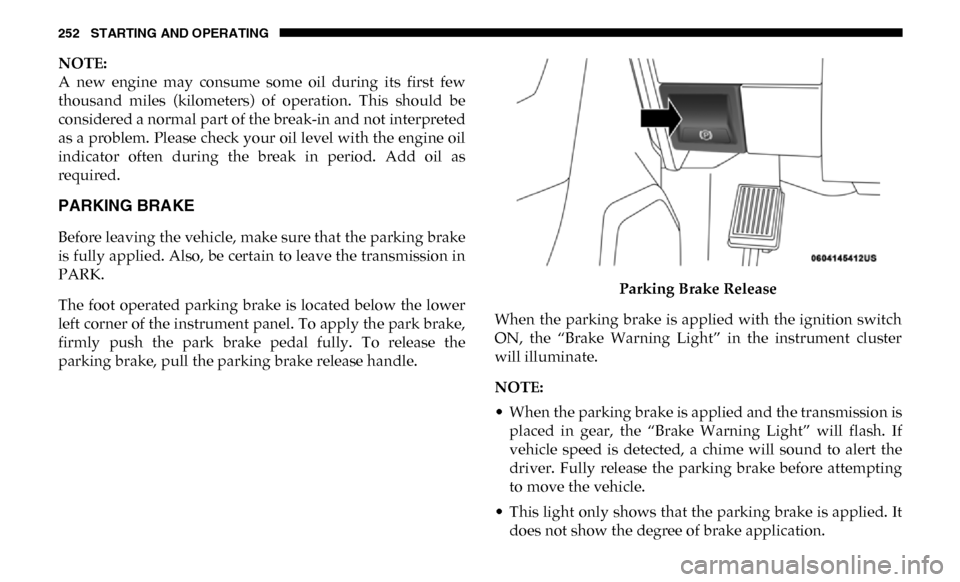
The foot operated parking brake is located below the lower
left corner of the instrument panel. To apply the park brake,
firmly push the park brake pedal fully. To release the
parking brake, pull the parking brake release handle.Parking Brake Release
When the parking brake is applied with the ignition switch
ON, the “Brake Warning Light” in the instrument cluster
will illuminate.
NOTE:
• When the parking brake is applied and the transmission is placed in gear, the “Brake Warning Light” will flash. If
vehicle speed is detected, a chime will sound to alert the
driver. Fully release the parking brake before attempting
to move the vehicle.
• This light only shows that the parking brake is applied. It does not show the degree of brake application.
Page 255 of 607

STARTING AND OPERATING 253
(Continued)
When parking on a hill, it is important to turn the front
wheels toward the curb on a downhill grade and away from
the curb on an uphill grade. Apply the parking brake before
placing the gear selector in PARK, otherwise the load on the
transmission locking mechanism may make it difficult to
move the gear selector out of PARK. The parking brake
should always be applied whenever the driver is not in the
vehicle.
WARNING!
• Never use the PARK position as a substitute for the parking brake. Always apply the parking brake fully
when parked to guard against vehicle movement and
possible injury or damage.
• Never leave children alone in a vehicle, or with access to an unlocked vehicle. Leaving unattended children in
a vehicle is dangerous for a number of reasons. A child
or others could be seriously or fatally injured.
• Do not leave the key fob in or near the vehicle, or in a location accessible to children, and do not leave a
vehicle equipped with Keyless Enter-N-Go in the ACC
or ON/RUN mode. A child could operate power
windows, other controls, or move the vehicle.
• Be sure the parking brake is fully disengaged beforedriving; failure to do so can lead to brake failure and a
collision.
• Always fully apply the parking brake when leaving your vehicle or it may roll and cause damage or injury.
Also, be certain to leave the transmission in PARK.
Failure to do so may cause the vehicle to roll and cause
damage or injury.
CAUTION!
If the Brake System Warning Light remains on with the
parking brake released, a brake system malfunction is
indicated. Have the brake system serviced by an
authorized dealer immediately.
WARNING! (Continued)
5
Page 262 of 607

260 STARTING AND OPERATING
NEUTRAL (N)
Use this range when the vehicle is standing for prolonged
periods with the engine running. The engine may be started
in this range. Apply the parking brake and shift the transmis-
sion into PARK if you must exit the vehicle.
DRIVE (D)
This range should be used for most city and highway
driving. It provides the smoothest upshifts and downshifts, and the best fuel economy. The transmission automatically
upshifts through underdrive first, second, and third gears,
direct fourth gear and overdrive fifth and sixth gears. The
DRIVE position provides optimum driving characteristics
under all normal operating conditions.
When frequent transmission shifting occurs (such as when
operating the vehicle under heavy loading conditions, in
hilly terrain, traveling into strong head winds, or while
towing a heavy trailer), use the Electronic Range Select (ERS)
shift control (refer to “Electronic Range Select (ERS) Opera
-
tion” in this section for further information) to select a lower
gear range. Under these conditions, using a lower gear range
will improve performance and extend transmission life by
reducing excessive shifting and heat buildup.
If the transmission temperature exceeds normal operating
limits, the powertrain controller will modify the transmis -
sion shift schedule and expand the range of torque converter
clutch engagement. This is done to prevent transmission
damage due to overheating.
If the transmission becomes extremely hot or is in danger of
overheating, the “Transmission Temperature Warning
Light” may illuminate and the transmission may operate
differently until the transmission cools down.
WARNING!
Do not coast in NEUTRAL and never turn off the
ignition to coast down a hill. These are unsafe practices
that limit your response to changing traffic or road
conditions. You might lose control of the vehicle and
have a collision.
CAUTION!
Towing the vehicle, coasting, or driving for any other
reason with the transmission in NEUTRAL can cause
severe transmission damage. Refer to “Recreational
Towing” in “Starting And Operating” and “Towing A
Disabled Vehicle” in “In Case Of Emergency” for further
information.
Page 265 of 607

STARTING AND OPERATING 263
NOTE:
To select the proper gear position for maximum deceleration
(engine braking), simply push and hold the ERS (-) switch.
The transmission will shift to the range from which the
vehicle can best be slowed down.
Overdrive Operation
The automatic transmission includes an electronically
controlled Overdrive (fifth and sixth gears). The transmis-
sion will automatically shift into Overdrive if the following
conditions are present:
• The gear selector is in the DRIVE position.
• The transmission fluid has reached an adequate temperature.
• The engine coolant has reached an adequate temperature.
• Vehicle speed is sufficiently high.
• The TOW/HAUL switch has not been activated.
• The driver is not heavily pressing the accelerator.
Torque Converter Clutch
A feature designed to improve fuel economy has been
included in the automatic transmission on your vehicle. A
clutch within the torque converter engages automatically at
calibrated speeds. This may result in a slightly different
feeling or response during normal operation in the upper
gears. When the vehicle speed drops or during some acceler
-
ations, the clutch automatically disengages.
NOTE:
• The torque converter clutch will not engage, until the transmission fluid and engine coolant are warm [usually
after 1 to 3 miles (2 to 5 km) of driving]. Because engine
speed is higher when the torque converter clutch is not
engaged, it may seem as if the transmission is not shifting
properly when cold. This is normal. Using the Electronic
Range Select (ERS) shift control, when the transmission is
sufficiently warm, will demonstrate that the transmission
is able to shift into and out of Overdrive.
WARNING!
Do not downshift for additional engine braking on a
slippery surface. The drive wheels could lose their grip
and the vehicle could skid, causing a collision or
personal injury.
CAUTION!
When using ERS for engine braking while descending
steep grades, be careful not to overspeed the engine.
Apply the brakes as needed to prevent engine overspeed.
5
Page 277 of 607

STARTING AND OPERATING 275
3. When the shift is complete, the indicator light for theselected position will stop flashing and remain ON.
If One Or More Of The Following Shift Conditions Are
Not Met:
1. The indicator light for the current position will remain ON.
2. The newly selected position indicator light will continue to flash.
3. The transfer case will not shift.
NOTE:
Before retrying a selection, make certain that all the neces -
sary requirements for selecting a new transfer case position
have been met. To retry the selection, push the current posi -
tion, wait five seconds, and retry selection. To find the shift
requirements, refer to the "Shifting Procedure" for your
transfer case, located in this section.
The “SVC 4WD Warning Light” monitors the electronic shift
four-wheel drive system. If this light remains on after engine
start up or illuminates during driving, it means that the
four-wheel drive system is not functioning properly and that
service is required. NOTE:
Do not attempt to make a shift while only the front or rear
wheels are spinning. This could cause damage to driveline
components.
When operating your vehicle in 4WD LOW, the engine
speed is approximately three times that of the 2WD or 4WD
HIGH positions at a given road speed. Take care not to over
-
speed the engine and do not exceed 25 mph (40 km/h).
Proper operation of four-wheel drive vehicles depends on
tires of equal size, type and circumference on each wheel.
Any difference in tire size can cause damage to the drive -
train.
Because four-wheel drive provides improved traction, there
is a tendency to exceed safe turning and stopping speeds. Do
not go faster than road conditions permit.WARNING!
Always engage the parking brake when powering down
the vehicle if the “SVC 4WD Warning Light” is
illuminated. Not engaging the parking brake may allow
the vehicle to roll which may cause personal injury or
death.
5
Page 282 of 607

280 STARTING AND OPERATING
Shifting Procedure — Manually Shifted Transfer Case
2H To 4H
Shifting between 2H and 4H can be made with the vehicle
stopped or in motion. If the vehicle is in motion, shifts can be
made up to 55 mph (88 km/h). With the vehicle in motion,
the transfer case will engage/disengage faster if you
momentarily release the accelerator pedal after completing
the shift. Apply a constant force when shifting the transfer
case lever.
2H Or 4H To 4L
NOTE:
When shifting into or out of 4L some gear noise may be
heard. This noise is normal and is not detrimental to the
vehicle or occupants.
With the vehicle rolling at 2 to 3 mph (3 to 5 km/h), shift the
transmission into NEUTRAL. While the vehicle is coasting at
2 to 3 mph (3 to 5 km/h), shift the transfer case lever firmly
to the desired position. Do not pause in transfer case
NEUTRAL.NOTE:
• Pausing in transfer case NEUTRAL in vehicles equipped
with an automatic transmission may require shutting the
engine OFF to avoid gear clash while completing the shift.
If difficulty occurs, shift the transmission into NEUTRAL,
hold your foot on the brake, and turn the engine OFF.
Complete the range shift to the desired mode.
• Shifting into or out of 4L is possible with the vehicle completely stopped, however difficulty may occur due to
the mating clutch teeth not being properly aligned. Several
attempts may be required for clutch teeth alignment and
shift completion to occur. The preferred method is with the
vehicle rolling 2 to 3 mph (3 to 5 km/h). Avoid attempting
to engage or disengage 4L with the vehicle moving faster
than 2 to 3 mph (3 to 5 km/h).
• Do not attempt to shift into or out of 4L while the transmis -
sion is in gear.
Transfer Case Position Indicator Light
The “Transfer Case Position Indicator Light” in the instru-
ment cluster is used to alert the driver that the front axle is
fully engaged and all four wheels are driving.
Page 283 of 607

STARTING AND OPERATING 281
LIMITED-SLIP DIFFERENTIAL
The limited-slip differential provides additional traction on
snow, ice, mud, sand and gravel, particularly when there is
a difference between the traction characteristics of the
surface under the right and left rear wheels. During normal
driving and cornering, the limited-slip unit performs simi-
larly to a conventional differential. On slippery surfaces,
however, the differential delivers more of the driving effort
to the rear wheel having the better traction.
The limited-slip differential is especially helpful during slip -
pery driving conditions. With both rear wheels on a slippery
surface, a slight application of the accelerator will supply
maximum traction. When starting with only one rear wheel
on an excessively slippery surface, slight momentary appli -
cation of the parking brake may be necessary to gain
maximum traction. Care should be taken to avoid sudden accelerations when
both rear wheels are on a slippery surface. This could cause
both rear wheels to spin, and allow the vehicle to slide side
-
ways on the crowned surface of a road or in a turn.
POWER TAKE OFF OPERATION — IF EQUIPPED
(CHASSIS CAB ONLY)
This vehicle when equipped with PTO Prep and the AS66RC
automatic six-speed, will allow for an aftermarket upfit with
a transmission driven PTO (power take off). The customer
will have the ability to operate the PTO in either a
“stationary” or “mobile” mode. The vehicles will be factory
set to the “stationary” mode. To select “mobile” mode, you
will need to enter the commercial vehicle menu on the instru-
ment cluster screen and select mobile PTO mode. Details of
the PTO selection modes and further PTO information is
available at the Ram Truck Bodybuilders web site:
www.rambodybuilder.com .
AS66RC Six-Speed Automatic Transmission Only
The PTO drive gear (part of the AS66RC) operates at torque
converter turbine speed. The turbine speed will be less than
engine speed when the torque converter clutch is not
engaged and will be same as engine speed when the torque
converter clutch is engaged.
WARNING!
On vehicles equipped with a limited-slip differential
never run the engine with one rear wheel off the ground
since the vehicle may drive through the rear wheel
remaining on the ground. You could lose control of the
vehicle.
5
Page 290 of 607

288 STARTING AND OPERATING
To Resume Speed
To resume a previously set speed, push the RES (+) button
and release. Resume can be used at any speed above 20 mph
(32 km/h).
To Deactivate
A soft tap on the brake pedal, pushing the CANCEL button,
or normal brake pressure while slowing the vehicle will
deactivate the Speed Control without erasing the set speed
from memory.
Pushing the On/Off button, or returning the ignition to OFF,
erases the set speed from memory.
ADAPTIVE CRUISE CONTROL (ACC) — IF EQUIPPED
Adaptive Cruise Control (ACC) increases the driving conve-
nience provided by cruise control while traveling on high -
ways and major roadways. However, it is not a safety system
and not designed to prevent collisions. Speed Control func-
tion performs differently. Please refer to the proper section
within this chapter.
ACC will allow you to keep cruise control engaged in light
to moderate traffic conditions without the constant need to
reset your cruise control. ACC utilizes a radar sensor and a forward facing camera designed to detect a vehicle directly
ahead of you.
NOTE:
• If the sensor does not detect a vehicle ahead of you, ACC
will maintain a fixed set speed.
• If the ACC sensor detects a vehicle ahead, ACC will apply limited braking or accelerate (not to exceed the original set
speed) automatically to maintain a preset following
distance, while matching the speed of the vehicle ahead.
The Cruise Control system has two control modes:
• Adaptive Cruise Control mode for maintaining an appro -
priate distance between vehicles.
• Normal (Fixed Speed) Cruise Control mode for cruising at a constant preset speed. For additional information, refer
to “Normal (Fixed Speed) Cruise Control Mode” in this
section.
NOTE:
Normal (Fixed Speed) Cruise Control will not react to
preceding vehicles. Always be aware of the mode selected.
You can change the mode by using the Cruise Control
buttons. The two control modes function differently. Always
confirm which mode is selected.
Page 299 of 607

STARTING AND OPERATING 297
Distance Setting 1 Bar (Short)
The system automatically defaults to the longest distance
setting. To decrease the distance setting, push the Distance
Button and release. Each time the button is pushed, the
distance setting decreases by one bar. Once the shortest
setting is reached, if the button is pushed again it will reset
to the default setting (longest).
If there is no vehicle ahead, the vehicle will maintain the set
speed. If a slower moving vehicle is detected in the same
lane, the instrument cluster displays the “Sensed Vehicle
Indicator” icon, and the system adjusts vehicle speed auto -
matically to maintain the distance setting, regardless of the
set speed. The vehicle will then maintain the set distance until:
• The vehicle ahead accelerates to a speed above the set
speed.
• The vehicle ahead moves out of your lane or view of the sensor.
• The distance setting is changed.
• The system disengages. (Refer to the information on ACC Activation).
The maximum braking applied by ACC is limited; however,
the driver can always apply the brakes manually, if neces -
sary.
NOTE:
The brake lights will illuminate whenever the ACC system
applies the brakes.
A Proximity Warning will alert the driver if ACC predicts
that its maximum braking level is not sufficient to maintain
the set distance. If this occurs, a visual alert “BRAKE” will
flash in the instrument cluster display and a chime will
sound while ACC continues to apply its maximum braking
capacity.5