brake light Ram 3500 Chassis Cab 2019 Service Manual
[x] Cancel search | Manufacturer: RAM, Model Year: 2019, Model line: 3500 Chassis Cab, Model: Ram 3500 Chassis Cab 2019Pages: 607, PDF Size: 10.72 MB
Page 389 of 607

IN CASE OF EMERGENCY 387
F74–20 Amp Yellow Brake Vacuum Pump Gas/Diesel – If Equipped (DS 1500
Only)
F74 –10 Amp Red Backup Alarm – If Equipped (HD Only)
F75 –10 Amp Red ATMM / Coil-SCR Module RLY– If Equipped
(HD Only)
Coolant Temperature Valve – If Equipped
(DS 1500 Only)
F76 –10 Amp Red Electronic Stability Control (HD Only)
Brake System Module / Stop Lamp Switch / Electric
Park Brake / Clutch Pedal Switch (DS 1500 Only)
F77 –10 Amp Red Drivetrain Control Module / Front Axle Disconnect
Module / TCM (HD Only)
Drivetrain Control Module / ELSD / Front Axle
Disconnect Module / Transmission Control Relay /
RDM / Power Take Off Unit – If Equipped (DS 1500
Only)
F78 –10 Amp Red Engine Control Module / Powertrain Control Module /
Electric Power Steering (DS 1500 Only)
F78 –15 Amp Blue Engine Control Module / Powertrain Control Module /
AEB RACM MOD / Feed To AUX PDC Relay Coils (HD
Only)
F79 –15 Amp Blue ID / Clearance Lights
Cavity Cartridge Fuse
Micro FuseDescription
6
Page 401 of 607
IN CASE OF EMERGENCY 399
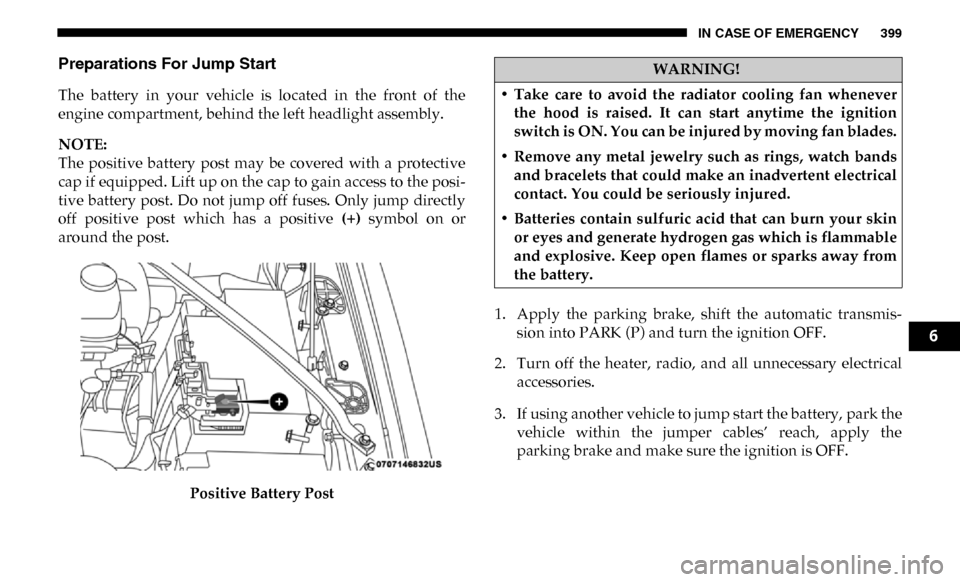
Preparations For Jump Start
The battery in your vehicle is located in the front of the
engine compartment, behind the left headlight assembly.
NOTE:
The positive battery post may be covered with a protective
cap if equipped. Lift up on the cap to gain access to the posi-
tive battery post. Do not jump off fuses. Only jump directly
off positive post which has a positive (+) symbol on or
around the post.
Positive Battery Post 1. Apply the parking brake, shift the automatic transmis-
sion into PARK (P) and turn the ignition OFF.
2. Turn off the heater, radio, and all unnecessary electrical accessories.
3. If using another vehicle to jump start the battery, park the vehicle within the jumper cables’ reach, apply the
parking brake and make sure the ignition is OFF.
WARNING!
• Take care to avoid the radiator cooling fan whenever the hood is raised. It can start anytime the ignition
switch is ON. You can be injured by moving fan blades.
• Remove any metal jewelry such as rings, watch bands and bracelets that could make an inadvertent electrical
contact. You could be seriously injured.
• Batteries contain sulfuric acid that can burn your skin or eyes and generate hydrogen gas which is flammable
and explosive. Keep open flames or sparks away from
the battery.
6
Page 413 of 607

SERVICING AND MAINTENANCE 411
Once A Month Or Before A Long Trip:
• Check engine oil level.
• Check windshield washer fluid level.
• Check the tire inflation pressures and look for unusualwear or damage. Rotate at the first sign of irregular wear.
• Check the fluid levels of the coolant reservoir, brake master cylinder, power steering and automatic transmis -
sion (six-speed only), and fill as needed.
• Check function of all interior and exterior lights.Maintenance Plan
Required Maintenance
Refer to the maintenance plan on the following pages for
required maintenance.
At Every Oil Change Interval As Indicated By Oil Change Indicator System:
• Change oil and filter.
• Rotate the tires. Rotate at the first sign of irregular wear, even if it occurs before the oil indicator system turns on.
• Inspect engine cooling system protection and hoses.
• Inspect exhaust system.
• Inspect engine air cleaner if using in dusty or off-road conditions.
• Inspect battery and clean and tighten terminals as required.
• Inspect automatic transmission fluid if equipped with dipstick.
• Inspect brake pads, shoes, rotors, drums, hoses and park brake.
• Inspect front end, and lubricate — If equipped with serviceable fittings.
7
Page 478 of 607

476 TECHNICAL SPECIFICATIONS
BRAKE SYSTEM
If power assist is lost for any reason (for example, repeated
brake applications with the engine off), the brakes will still
function. However, you will experience a substantial
increase in braking effort to stop the vehicle.
If either the front or rear hydraulic system loses normal
braking capability, the remaining system will still function
with some loss of overall braking effectiveness. This will be
evident by increased pedal travel during application, greater
pedal force required to slow or stop, and activation of the
“Brake Warning Light” and the “ABS Warning Light” (if
equipped) during brake use.
The brake system power assist is provided by a hydro-boost
unit which shares fluid with the power steering system. You
may experience some clicking or hissing noises from the
hydro-boost system during hard braking conditions.
NOTE:
Under cold temperatures, pedal effort will be higher than
normal until the power steering fluid reaches operating
temperature.
Hydraulic Brake Assist
The brake system power assist is provided by a hydro-boost
unit which shares fluid with the power steering system. You
may experience some clicking or hissing noises from the
hydro-boost system during hard braking conditions.
NOTE:
Under cold temperatures, pedal effort will be higher than
normal until the power steering fluid reaches operating
temperature.
WHEEL AND TIRE TORQUE SPECIFICATIONS
Proper lug nut/bolt torque is very important to ensure that
the wheel is properly mounted to the vehicle. Any time a
wheel has been removed and reinstalled on the vehicle, the
lug nuts/bolts should be torqued using a properly calibrated
torque wrench using a high quality six sided (hex) deep wall
socket.
Page 492 of 607

490 MULTIMEDIA
UCONNECT SETTINGS
The Uconnect system uses a combination of buttons on the
touchscreen and buttons on the faceplate located on the
center of the instrument panel that allows you to access and
change the customer programmable features. Many features
can vary by vehicle.
Uconnect 3 Settings
Uconnect 3 With 5–inch Display Buttons On The Touch-
screen And Buttons On The Faceplate Push the MORE or SETTINGS button on the faceplate, then
press the “Settings” button on the touchscreen (if equipped)
to display the settings menu screen. In this mode the Ucon
-
nect system allows you to access programmable features that
may be equipped such as Display, Units, Voice, Clock, Safety
& Driving Assistance, Lights, Doors & Locks, Power Side
Steps, Auto-On Comfort (if equipped), Engine Off Options,
Suspension, Trailer Brake, Audio, Compass Settings, Phone/
Bluetooth, SiriusXM Setup (if equipped), Restore Settings,
Clear Personal Data and System Information.
NOTE:
Only one category may be selected at a time.
When making a selection, press the button on the touch -
screen to enter the desired mode. Once in the desired mode,
press and release the preferred setting until the button is
highlighted. Once the setting is complete, either press the
back arrow or the “Done” button on the touchscreen or push
the Back button on the faceplate to return to the previous
menu. Pressing the Up or Down Arrow buttons on the touch -
screen on the right side of the screen will allow you to toggle
up or down through the list of available settings.
NOTE:
All settings should be changed with the ignition in the RUN
position.
1 — Uconnect Buttons On The Touchscreen
2 — Uconnect Buttons On The Faceplate
Page 504 of 607

502 MULTIMEDIA
Trailer Brake
After pressing the “Trailer Brake” button on the touchscreen, the following settings will be available:
Audio
After pressing the “Audio” button on the touchscreen, the following settings will be available:Setting Name
Selectable Options
Trailer Select Trailer 1Trailer 2Trailer 3Trailer 4
Trailer Brake Type Light ElectricHeavy Electric Light EOH Heavy EOH
Trailer Name List of Trailer Names Available
NOTE:
You can select and personalize your trailer name depending on the type of trailer you are hauling. Select the trailer name
from the following list: trailer, boat, car, cargo, dump, equipment, flatbed, gooseneck, horse, livestock, motorcycle, snow
mobile, travel, utility, and 5th wheel.
Setting Name Selectable Options
Balance/Fade FrontBackLeftRight
NOTE:
The “Balance/Fade” feature allows you to adjust the Balance and Fade settings. Press and drag the speaker icon or use the
arrows to adjust, tap the “C” icon to readjust to the center.
Equalizer + –
NOTE:
When in the “Equalizer” display you may adjust the Bass, Mid and Treble settings.
Speed Adjusted Volume
Off123
Page 518 of 607

516 MULTIMEDIA
NOTE:
When the “CHMSL Camera Dynamic Centerline” feature is selected, it will assist in backing up for trailer alignment and
hook up.
Forward Collision Warning
— If EquippedOff
Warning OnlyWarning & Braking
NOTE:
Apples brakes to slow the vehicle in case of potential forward collision, or applies brakes and a warning.
Forward Collision Warning
Sensitivity — If Equipped Near
MedFar
NOTE:
Sets the distance in which a Forward Collision Warning occurs.
Front ParkSense Volume LowMedHigh
Rear ParkSense Volume LowMedHigh
Power Side Steps — If
Equipped Auto
Store
Blind Spot Alert OffLightsLights & Chime
Setting Name
Selectable Options
Page 519 of 607

MULTIMEDIA 517
Mirrors & Wipers
After pressing the “Mirrors & Wipers” button on the touchscreen, the following settings will be available:NOTE:
Brakes the vehicle while in reverse if potential rear collision is detected.
Hill Start Assist — If
Equipped
On
Off
Tire Fill Assist — If
Equipped On
Off
Setting Name
Selectable Options
Setting NameSelectable Options
Tilt Side Mirrors In Reverse — If
Equipped On
Off
NOTE:
When the “Tilt Side Mirrors In Reverse” feature is selected, the outside side-view mirrors will tilt downward when the igni -
tion is in the RUN position and the transmission gear selector is in the REVERSE position. The mirrors will move back to
their previous position when the transmission is shifted out of REVERSE.
Rain Sensing Auto Wipers — If
Equipped On
Off
NOTE:
Automatically adjusts the wiper speed based on the amount of precipitation.
Headlights with Wipers OnOff
9
Page 526 of 607

524 MULTIMEDIA
Trailer Brake
After pressing the “Trailer” button on the touchscreen, the following settings will be available:NOTE:
Before performing a wheel alignment, the “Wheel Alignment Mode” must be enabled. Refer to an authorized dealer for
further information.
Four Corner Air Suspension Modes — If Equipped Tire Jack Mode
Transport Mode Wheel Alignment Mode
NOTE:
There are four air suspension modes designed to protect the system in unique situations. Tire Jack Mode is selected to assist
in changing a spare tire. Transport Mode is selected to assist when the vehicle is being flat bed towed. Wheel Alignment
Mode is selected before performing a wheel alignment, refer to an authorized dealer for information. Setting Name
Selectable Options
Setting NameSelectable Options
Trailer Select Trailer 1Trailer 2Trailer 3 Trailer 4
Trailer Brake Type Light Electric Heavy Electric Light EOHHeavy EOH
Trailer Name List of Trailer Names Available
NOTE:
You can select and personalize your trailer name depending on the type of trailer you are hauling. Select the trailer name
from the following list: trailer, boat, car, cargo, dump, equipment, flatbed, gooseneck, horse, livestock, motorcycle, snow
mobile, travel, utility, and 5th wheel.
Page 538 of 607

536 MULTIMEDIA
Safety & Driving Assistance
After pressing the “Safety & Driving Assistance” button on the touchscreen, the following settings will be available:Setting Name Selectable Options
Forward Collision Warning
— If Equipped Off
Warning OnlyWarning & Active Braking
NOTE:
Applies brakes to slow the vehicle in case of potential forward collision, or applies brakes and a warning.
Forward Collision Warning
Sensitivity — If Equipped Near
MedFar
NOTE:
Sets the distance in which a Forward Collision Warning occurs.
Front ParkSense Volume LowMedHigh
Rear ParkSense Volume LowMedHigh
Blind Spot Alert OffLightsLights & Chime
Power Side Step — If
Equipped Auto
Store
Hill Start Assist — If
Equipped On
Off
Tire Fill Assist — If
Equipped On
Off