radio Ram 3500 Chassis Cab 2019 Owner's Guide
[x] Cancel search | Manufacturer: RAM, Model Year: 2019, Model line: 3500 Chassis Cab, Model: Ram 3500 Chassis Cab 2019Pages: 607, PDF Size: 10.72 MB
Page 324 of 607

322 STARTING AND OPERATING
The vehicle is close to the obstacle when the display shows one flashing arc and sounds a continuous tone. The following chart
shows the warning alert operation when the system is detecting an obstacle:WARNING ALERTS FOR REAR
Rear Distance (inches/cm) Greater than
79 inches (200 cm) 79-59 inches
(200-150 cm) 59-47 inches
(150-120 cm) 47-39 inches
(120-100 cm) 39-25 inches
(100-65 cm) 25-12 inches
(65-30 cm) Less than
12 inches (30 cm)
Audible Alert Chime NoneSingle 1/2
Second Tone Slow Slow Fast
Fast Continuous
Arcs-Left None None None None None 2nd Flashing 1st Flashing
Arcs-Center None 6th Solid 5th Solid 4th Solid 3rd Flashing 2nd Flashing 1st Flashing Arcs-Right None None None None None 2nd Flashing 1st Flashing Radio
Volume
Reduced No
Yes YesYesYesYesYes
WARNING ALERTS FOR FRONT
Front Distance (inches/cm) Greater than
47 inches (120 cm) 47-39 inches
(120-100 cm) 39-25 inches
(100-65 cm) 25-12 inches
(65-30 cm) Less than 12 inches
(30 cm)
Audible Alert Chime None
NoneNone FastContinuous
Arcs-Left NoneNoneNone2nd Flashing 1st Flashing
Page 325 of 607
STARTING AND OPERATING 323
NOTE:
ParkSense will reduce the volume of the radio, if on, when
the system is sounding an audio tone.
Front Park Assist Audible Alerts
ParkSense will turn off the Front Park Assist audible alert
(chime) after approximately three seconds when an obstacle
has been detected, the vehicle is stationary, and brake pedal
is applied.
Adjustable Chime Volume Settings
The Front and Rear chime volume settings are program-
mable through the Uconnect system. Refer to “Uconnect
Settings” in “Multimedia” for further information.
The chime volume settings include low, medium, and high.
The factory default volume is medium.Enabling And Disabling Front And/Or Rear ParkSense
Front ParkSense can be enabled and disabled with the Front
ParkSense switch.
Rear ParkSense can be enabled and disabled with the Rear
ParkSense switch.
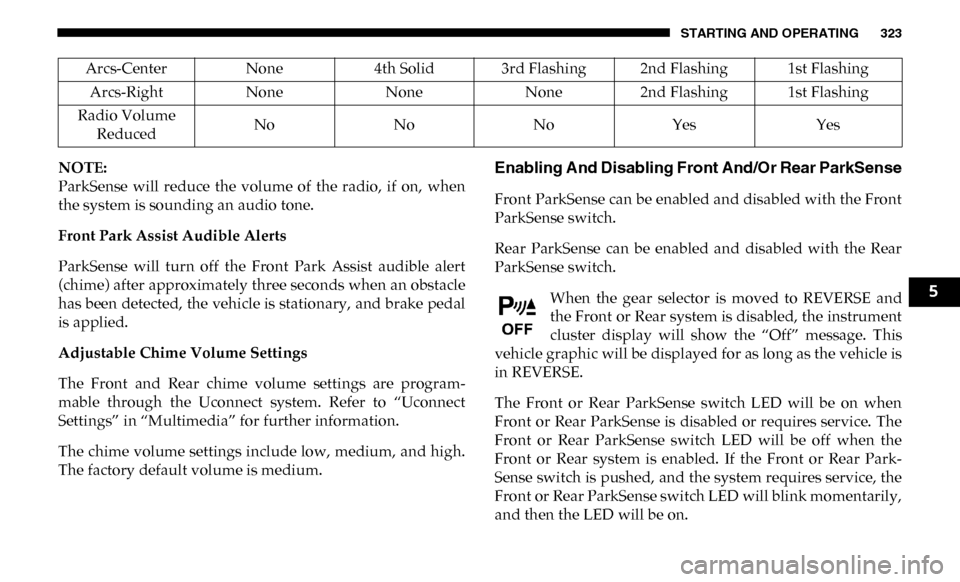
When the gear selector is moved to REVERSE and
the Front or Rear system is disabled, the instrument
cluster display will show the “Off” message. This
vehicle graphic will be displayed for as long as the vehicle is
in REVERSE.
The Front or Rear ParkSense switch LED will be on when
Front or Rear ParkSense is disabled or requires service. The
Front or Rear ParkSense switch LED will be off when the
Front or Rear system is enabled. If the Front or Rear Park -
Sense switch is pushed, and the system requires service, the
Front or Rear ParkSense switch LED will blink momentarily,
and then the LED will be on.
Arcs-Center
None4th Solid 3rd Flashing 2nd Flashing 1st Flashing
Arcs-Right NoneNoneNone2nd Flashing 1st Flashing
Radio Volume Reduced No
NoNoYes Yes
5
Page 326 of 607

324 STARTING AND OPERATING
Service The ParkSense Front/Rear Park Assist
System
During vehicle start up, when the Front/Rear ParkSense
System has detected a faulted condition, the instrument
cluster display will show the "Front/Rear ParkSense
Unavailable Service Required" or the "Front/Rear ParkSense
Unavailable Wipe Sensors" message.
When the gear selector is moved into REVERSE, a vehicle
graphic will show in the instrument cluster display, along
with the display overlay “Front/Rear ParkSense Unavail-
able Wipe Sensors.” If the system needs service, the display
overlay will read “Front/Rear ParkSense Unavailable
Service Required.” Under this condition, ParkSense will not
operate.
If "Front/Rear ParkSense Unavailable Wipe Sensors"
appears in the instrument cluster display make sure the
outer surface and the underside of the rear fascia/bumper is
clean and clear of snow, ice, mud, dirt or other obstruction,
and then cycle the ignition. If the message continues to
appear, see an authorized dealer.
If "Front/Rear ParkSense Unavailable Service Required"
appears in the instrument cluster display, see an authorized
dealer.
Cleaning The ParkSense System
Clean the ParkSense sensors with water, car wash soap and
a soft cloth. Do not use rough or hard cloths. Do not scratch
or poke the sensors. Otherwise, you could damage the
sensors.
ParkSense System Usage Precautions
NOTE:
• Ensure that the front and rear bumpers are free of snow, ice, mud, dirt and debris to keep the ParkSense system
operating properly.
• Jackhammers, large trucks, and other vibrations could affect the performance of ParkSense.
• When you move the gear selector to the REVERSE position and Front or Rear ParkSense is turned off, the instrument
cluster display will show "Off" on the vehicle graphic arcs.
This vehicle graphic will be displayed for as long as the
vehicle is in REVERSE.
• ParkSense, when on, will reduce the volume of the radio when it is sounding a tone.
Page 368 of 607
366
IN CASE OF EMERGENCY
HAZARD WARNING FLASHERS
The Hazard Warning switch is located on the upper
switch bank just below the radio.
NOTE:
If your vehicle is equipped with a 12–inch Uconnect display,
the Hazard Warning switch is located above the display.
Push the switch to turn on the Hazard Warning flasher.
When the switch is activated, all directional turn signals will
flash on and off to warn oncoming traffic of an emergency.
Push the switch a second time to turn off the Hazard
Warning flashers.
This is an emergency warning system and it should not be
used when the vehicle is in motion. Use it when your vehicle
is disabled and it is creating a safety hazard for other motor -
ists.
When you must leave the vehicle to seek assistance, the
Hazard Warning flashers will continue to operate even
though the ignition is placed in the OFF position. NOTE:
With extended use the Hazard Warning flashers may wear
down your battery.
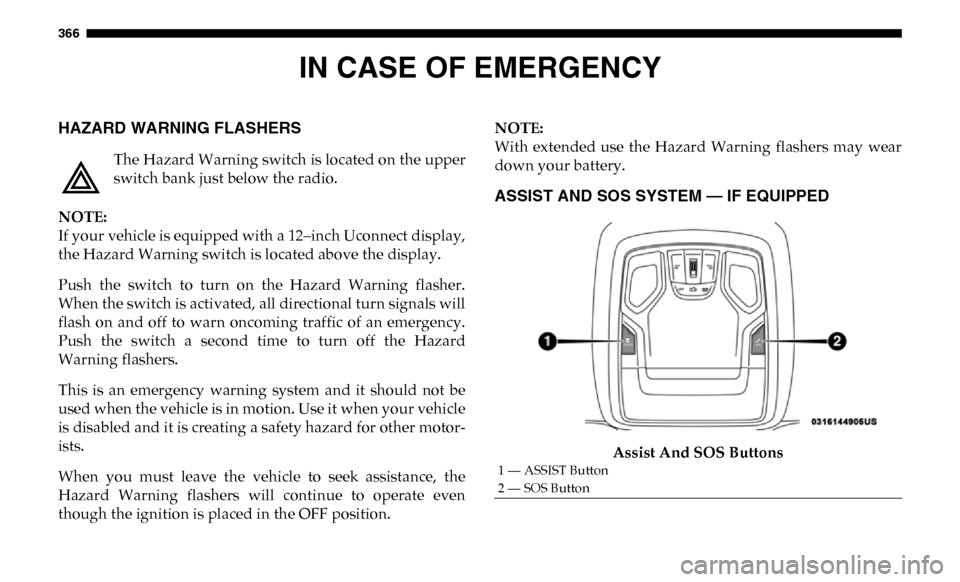
ASSIST AND SOS SYSTEM — IF EQUIPPED
Assist And SOS Buttons
1 — ASSIST Button
2 — SOS Button
Page 371 of 607
IN CASE OF EMERGENCY 369
(Continued)
SOS Call System Limitations
Vehicles sold in Mexico DO NOT have SOS Call system
capabilities.
SOS or other emergency line operators in Mexico may not
answer or respond to SOS system calls.
If the SOS Call system detects a malfunction, any of the
following may occur at the time the malfunction is detected,
and at the beginning of each ignition cycle:
• The overhead console light located between the ASSIST and SOS buttons will continuously be illuminated red.
• The Device Screen will display the following message: “Vehicle device requires service. Please contact your
dealer.”
• An In-Vehicle Audio message will state “Vehicle device requires service. Please contact your dealer.”
• Never place anything on or near the vehicle’s operable
network and GPS antennas. You could prevent oper -
able network and GPS signal reception, which can
prevent your vehicle from placing an emergency call.
An operable network and GPS signal reception is
required for the SOS Call system to function properly.
• The SOS Call system is embedded into the vehicle’s electrical system. Do not add aftermarket electrical
equipment to the vehicle’s electrical system. This may
prevent your vehicle from sending a signal to initiate
an emergency call. To avoid interference that can cause
the SOS Call system to fail, never add aftermarket
equipment (e.g., two-way mobile radio, CB radio, data
recorder, etc.) to your vehicle’s electrical system or
modify the antennas on your vehicle. IF YOUR
VEHICLE LOSES BATTERY POWER FOR ANY
REASON (INCLUDING DURING OR AFTER AN
ACCIDENT), THE UCONNECT FEATURES, APPS
AND SERVICES, AMONG OTHERS, WILL NOT
OPERATE.
WARNING! (Continued)
• Modifications to any part of the SOS Call system could
cause the air bag system to fail when you need it. You
could be injured if the air bag system is not there to
help protect you.
WARNING! (Continued)
6
Page 387 of 607

IN CASE OF EMERGENCY 385
F50–20 Amp Yellow Air Suspension Control Module – If Equipped
F51 –10 Amp Red Ignition Node Module / Keyless Ignition Node Module,
Radio Frequency Hub Module / Electric Steering
Column Lock - If Equipped
F52 –5 Amp Tan Battery Sensor
F53 –20 Amp Yellow Trailer Tow – Left Turn/Stop Lights - If Equipped
F54 –20 Amp Yellow Non Memory Adjustable Pedals - If Equipped
F56 –15 Amp Blue Additional Diesel Content - If Equipped (DS 1500 Only)
F57 –20 Amp Yellow TCM/PCM / Solenoid Trans Pressure SW (RFE Trans
Only) – If Equipped (HD Only)
Transmission (DS 1500 Only)
F58 –10 Amp Red Bed Lighting (LED) – If Equipped (HD Only)
F60 –15 Amp Blue Underhood Lamp / TCM – If Equipped (DS 1500 Only)
F61 –10 Amp Red UREA Sensor / PM Sensor – If Equipped (DS 1500 LD
Diesel & Cummins Diesel)
F62 –10 Amp Red Air Conditioning Clutch
F63 –20 Amp Yellow Ignition Coils (Gas), Ignition Coils Capacitors (Gas) /
Short Runner Valve Actuator / Urea Heater Control
Unit (DS 1500 LD Diesel) / RLY Coil Feed-SCR (DS 1500
LD Diesel)
Cavity Cartridge Fuse
Micro FuseDescription
6
Page 401 of 607
IN CASE OF EMERGENCY 399
Preparations For Jump Start
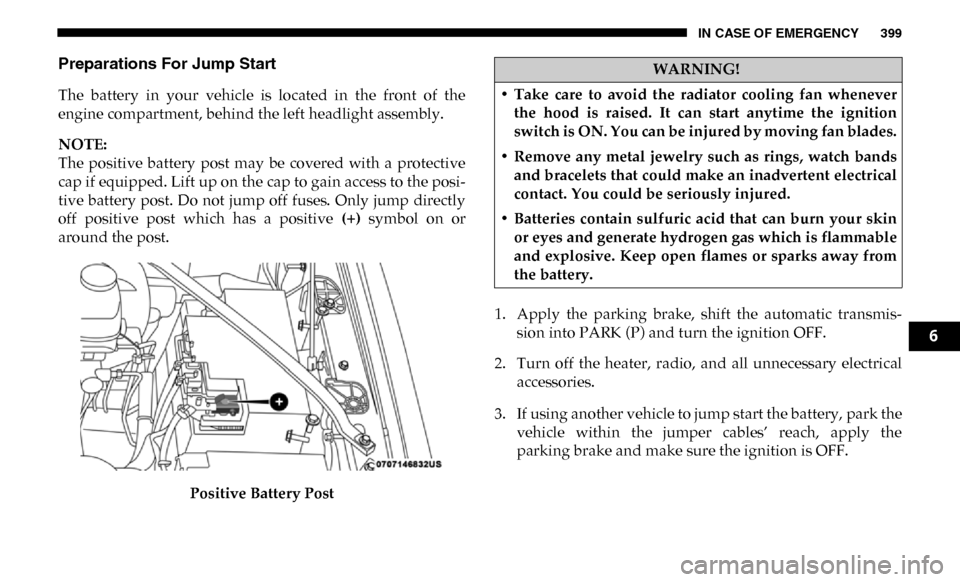
The battery in your vehicle is located in the front of the
engine compartment, behind the left headlight assembly.
NOTE:
The positive battery post may be covered with a protective
cap if equipped. Lift up on the cap to gain access to the posi-
tive battery post. Do not jump off fuses. Only jump directly
off positive post which has a positive (+) symbol on or
around the post.
Positive Battery Post 1. Apply the parking brake, shift the automatic transmis-
sion into PARK (P) and turn the ignition OFF.
2. Turn off the heater, radio, and all unnecessary electrical accessories.
3. If using another vehicle to jump start the battery, park the vehicle within the jumper cables’ reach, apply the
parking brake and make sure the ignition is OFF.
WARNING!
• Take care to avoid the radiator cooling fan whenever the hood is raised. It can start anytime the ignition
switch is ON. You can be injured by moving fan blades.
• Remove any metal jewelry such as rings, watch bands and bracelets that could make an inadvertent electrical
contact. You could be seriously injured.
• Batteries contain sulfuric acid that can burn your skin or eyes and generate hydrogen gas which is flammable
and explosive. Keep open flames or sparks away from
the battery.
6
Page 476 of 607

474 SERVICING AND MAINTENANCE
Leather Parts
Mopar Total Clean is specifically recommended for leather
upholstery.
Your leather upholstery can be best preserved by regular
cleaning with a damp soft cloth. Small particles of dirt can act
as an abrasive and damage the leather upholstery and
should be removed promptly with a damp cloth. Stubborn
soils can be removed easily with a soft cloth and Mopar Total
Clean. Care should be taken to avoid soaking your leather
upholstery with any liquid. Please do not use polishes, oils,
cleaning fluids, solvents, detergents, or ammonia-based
cleaners to clean your leather upholstery. Application of a
leather conditioner is not required to maintain the original
condition.
NOTE:
If equipped with light colored leather, it tends to show any
foreign material, dirt, and fabric dye transfer more so than
darker colors. The leather is designed for easy cleaning, and
FCA recommends Mopar total care leather cleaner applied
on a cloth to clean the leather seats as needed.
Glass Surfaces
All glass surfaces should be cleaned on a regular basis with
Mopar Glass Cleaner, or any commercial household-type
glass cleaner. Never use an abrasive type cleaner. Use
caution when cleaning the inside rear window equipped
with electric defrosters or windows equipped with radio
antennas. Do not use scrapers or other sharp instruments
that may scratch the elements.
When cleaning the rear view mirror, spray cleaner on the
towel or cloth that you are using. Do not spray cleaner
directly on the mirror.CAUTION!
Do not use Alcohol and Alcohol-based and/or Ketone
based cleaning products to clean leather upholstery, as
damage to the upholstery may result.
Page 496 of 607

494 MULTIMEDIA
Surround View Camera
Delay — If EquippedOn
Off
NOTE:
The “Surround View Camera Delay” setting determines whether or not the screen will display the 360 degree view image
with guidelines for up to ten seconds after the vehicle is shifted out of REVERSE. This delay will be canceled if the vehicle’s
speed exceeds 8 mph (13 km/h), the transmission is shifted into PARK, or the ignition is switched to the OFF position.
Surround View Camera
Guidelines — If Equipped On
Off
NOTE:
The “Surround View Rear Back Up Camera Active Guidelines” feature allows you to see active guidelines over the Surround
View camera display whenever the gear selector is put into REVERSE or the Surround View button on the touchscreen is
pressed. The image will be displayed on the radio touchscreen display.
ParkView Backup Camera
Active Guidelines On
Off
NOTE:
Your vehicle may be equipped with the ParkView Rear Back Up Camera Active Guidelines that allows you to see active
guidelines over the ParkView Back up camera display whenever the gear selector is put into REVERSE. The image will be
displayed on the radio touchscreen display along with a caution note to “check entire surroundings” across the top of the
screen. After five seconds, this note disappears.
ParkView Backup Camera
Delay On
Off
Setting Name
Selectable Options
Page 509 of 607

MULTIMEDIA 507
Restore Default Settings
After pressing the “Restore Default Settings” button on the touchscreen, the following settings will be available:NOTE:
New vehicle purchasers or lessees will receive a free limited time subscription to SiriusXM Satellite Radio with your radio.
Following the expiration of the free services, it will be necessary to access the information on the Subscription Information
screen to re-subscribe.
1. Press the “Subscription Info” button on the touchscreen to access the Subscription Information screen.
2. Write down the SIRIUS ID numbers for your receiver. To reactivate your service, either call the number listed on the
screen or visit the provider online. Setting Name
Selectable Options
Setting NameSelectable Options
Restore Default Settings YesCancel
NOTE:
When the “Restore Default Settings” feature is selected it will reset the Display, Clock, Audio, and Radio Settings to their
default settings. If “Yes” is selected a pop-up will appear asking "Are you sure you want to reset your settings to default?”
select “Yes” to restore, or “Cancel” to exit.
9