wheel Ram 3500 Chassis Cab 2019 Repair Manual
[x] Cancel search | Manufacturer: RAM, Model Year: 2019, Model line: 3500 Chassis Cab, Model: Ram 3500 Chassis Cab 2019Pages: 607, PDF Size: 10.72 MB
Page 282 of 607

280 STARTING AND OPERATING
Shifting Procedure — Manually Shifted Transfer Case
2H To 4H
Shifting between 2H and 4H can be made with the vehicle
stopped or in motion. If the vehicle is in motion, shifts can be
made up to 55 mph (88 km/h). With the vehicle in motion,
the transfer case will engage/disengage faster if you
momentarily release the accelerator pedal after completing
the shift. Apply a constant force when shifting the transfer
case lever.
2H Or 4H To 4L
NOTE:
When shifting into or out of 4L some gear noise may be
heard. This noise is normal and is not detrimental to the
vehicle or occupants.
With the vehicle rolling at 2 to 3 mph (3 to 5 km/h), shift the
transmission into NEUTRAL. While the vehicle is coasting at
2 to 3 mph (3 to 5 km/h), shift the transfer case lever firmly
to the desired position. Do not pause in transfer case
NEUTRAL.NOTE:
• Pausing in transfer case NEUTRAL in vehicles equipped
with an automatic transmission may require shutting the
engine OFF to avoid gear clash while completing the shift.
If difficulty occurs, shift the transmission into NEUTRAL,
hold your foot on the brake, and turn the engine OFF.
Complete the range shift to the desired mode.
• Shifting into or out of 4L is possible with the vehicle completely stopped, however difficulty may occur due to
the mating clutch teeth not being properly aligned. Several
attempts may be required for clutch teeth alignment and
shift completion to occur. The preferred method is with the
vehicle rolling 2 to 3 mph (3 to 5 km/h). Avoid attempting
to engage or disengage 4L with the vehicle moving faster
than 2 to 3 mph (3 to 5 km/h).
• Do not attempt to shift into or out of 4L while the transmis -
sion is in gear.
Transfer Case Position Indicator Light
The “Transfer Case Position Indicator Light” in the instru-
ment cluster is used to alert the driver that the front axle is
fully engaged and all four wheels are driving.
Page 283 of 607

STARTING AND OPERATING 281
LIMITED-SLIP DIFFERENTIAL
The limited-slip differential provides additional traction on
snow, ice, mud, sand and gravel, particularly when there is
a difference between the traction characteristics of the
surface under the right and left rear wheels. During normal
driving and cornering, the limited-slip unit performs simi-
larly to a conventional differential. On slippery surfaces,
however, the differential delivers more of the driving effort
to the rear wheel having the better traction.
The limited-slip differential is especially helpful during slip -
pery driving conditions. With both rear wheels on a slippery
surface, a slight application of the accelerator will supply
maximum traction. When starting with only one rear wheel
on an excessively slippery surface, slight momentary appli -
cation of the parking brake may be necessary to gain
maximum traction. Care should be taken to avoid sudden accelerations when
both rear wheels are on a slippery surface. This could cause
both rear wheels to spin, and allow the vehicle to slide side
-
ways on the crowned surface of a road or in a turn.
POWER TAKE OFF OPERATION — IF EQUIPPED
(CHASSIS CAB ONLY)
This vehicle when equipped with PTO Prep and the AS66RC
automatic six-speed, will allow for an aftermarket upfit with
a transmission driven PTO (power take off). The customer
will have the ability to operate the PTO in either a
“stationary” or “mobile” mode. The vehicles will be factory
set to the “stationary” mode. To select “mobile” mode, you
will need to enter the commercial vehicle menu on the instru-
ment cluster screen and select mobile PTO mode. Details of
the PTO selection modes and further PTO information is
available at the Ram Truck Bodybuilders web site:
www.rambodybuilder.com .
AS66RC Six-Speed Automatic Transmission Only
The PTO drive gear (part of the AS66RC) operates at torque
converter turbine speed. The turbine speed will be less than
engine speed when the torque converter clutch is not
engaged and will be same as engine speed when the torque
converter clutch is engaged.
WARNING!
On vehicles equipped with a limited-slip differential
never run the engine with one rear wheel off the ground
since the vehicle may drive through the rear wheel
remaining on the ground. You could lose control of the
vehicle.
5
Page 286 of 607

284 STARTING AND OPERATING
NOTE:
• Increased noise levels at the end of the steering wheeltravel are considered normal and do not indicate that there
is a problem with the power steering system.
• Upon initial start-up in cold weather, the power steering pump may make noise for a short amount of time. This is
due to the cold, thick fluid in the steering system. This
noise should be considered normal, and it does not in any
way damage the steering system.
Power Steering Fluid Check
Checking the power steering fluid level at a defined service
interval is not required. The fluid should only be checked if
a leak is suspected, abnormal noises are apparent, and/or
the system is not functioning as anticipated. Check fluid level when the engine is cold and off. Coordinate inspection
efforts through an authorized dealer.
If necessary, add fluid to restore to the proper indicated
level. With a clean cloth, wipe any spilled fluid from all
surfaces. Refer to “Fluids And Lubricants” in “Technical
Specifications” for further information.
CAUTION!
Prolonged operation of the steering system at the end of
the steering wheel travel will increase the steering fluid
temperature and it should be avoided when possible.
Damage to the power steering pump may occur.
WARNING!
Fluid level should be checked on a level surface and with
the engine off to prevent injury from moving parts and
to ensure accurate fluid level reading. Do not overfill.
Use only manufacturer's recommended power steering
fluid.
CAUTION!
Do not use chemical flushes in your power steering
system as the chemicals can damage your power steering
components. Such damage is not covered by the New
Vehicle Limited Warranty.
Page 287 of 607
STARTING AND OPERATING 285
SPEED CONTROL
When engaged, the Speed Control takes over accelerator
operations at speeds greater than 20 mph (32 km/h).
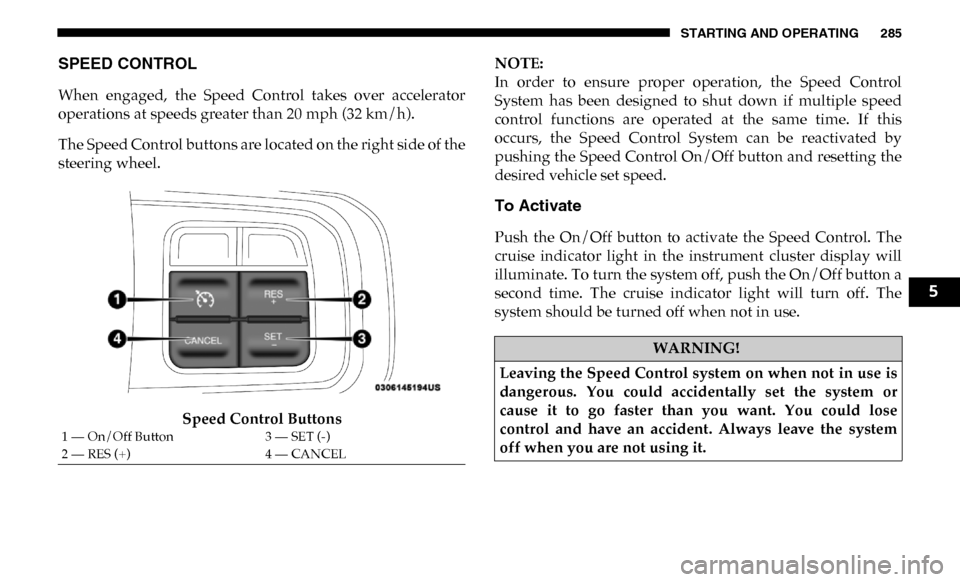
The Speed Control buttons are located on the right side of the
steering wheel.Speed Control Buttons NOTE:
In order to ensure proper operation, the Speed Control
System has been designed to shut down if multiple speed
control functions are operated at the same time. If this
occurs, the Speed Control System can be reactivated by
pushing the Speed Control On/Off button and resetting the
desired vehicle set speed.
To Activate
Push the On/Off button to activate the Speed Control. The
cruise indicator light in the instrument cluster display will
illuminate. To turn the system off, push the On/Off button a
second time. The cruise indicator light will turn off. The
system should be turned off when not in use.
1 — On/Off Button
3 — SET (-)
2 — RES (+) 4 — CANCEL
WARNING!
Leaving the Speed Control system on when not in use is
dangerous. You could accidentally set the system or
cause it to go faster than you want. You could lose
control and have an accident. Always leave the system
off when you are not using it.
5
Page 291 of 607

STARTING AND OPERATING 289
(Continued)
WARNING!
• Adaptive Cruise Control (ACC) is a convenience system. It is not a substitute for active driving involve -
ment. It is always the driver’s responsibility to be atten -
tive of road, traffic, and weather conditions, vehicle
speed, distance to the vehicle ahead; and, most impor -
tantly, brake operation to ensure safe operation of the
vehicle under all road conditions. Your complete atten -
tion is always required while driving to maintain safe
control of your vehicle. Failure to follow these warn -
ings can result in a collision and death or serious
personal injury.
• The ACC system: • Does not react to pedestrians, oncoming vehicles,and stationary objects (e.g., a stopped vehicle in a
traffic jam or a disabled vehicle).
• Cannot take street, traffic, and weather conditions into account, and may be limited upon adverse sight
distance conditions.
• Does not always fully recognize complex driving conditions, which can result in wrong or missing
distance warnings.
• Will bring the vehicle to a complete stop whilefollowing a target vehicle and hold the vehicle for
approximately two seconds in the stop position. At
this point, there will be an “ACC may cancel soon”
chime and warning to the driver. When ACC is
cancelled, the system will release the brakes and the
driver must take over braking. The system can be
resumed when the target vehicle drives off by
releasing the brake and pushing the resume button
on the steering wheel.
You should switch off the ACC system:
• When driving in fog, heavy rain, heavy snow, sleet, heavy traffic, and complex driving situations (i.e., in
highway construction zones).
• When entering a turn lane or highway off ramp; when driving on roads that are winding, icy, snow-covered,
slippery, or have steep uphill or downhill slopes.
• When towing a trailer up or down steep slopes.
• When circumstances do not allow safe driving at a constant speed.
WARNING! (Continued)
5
Page 292 of 607
290 STARTING AND OPERATING
Adaptive Cruise Control (ACC) Operation
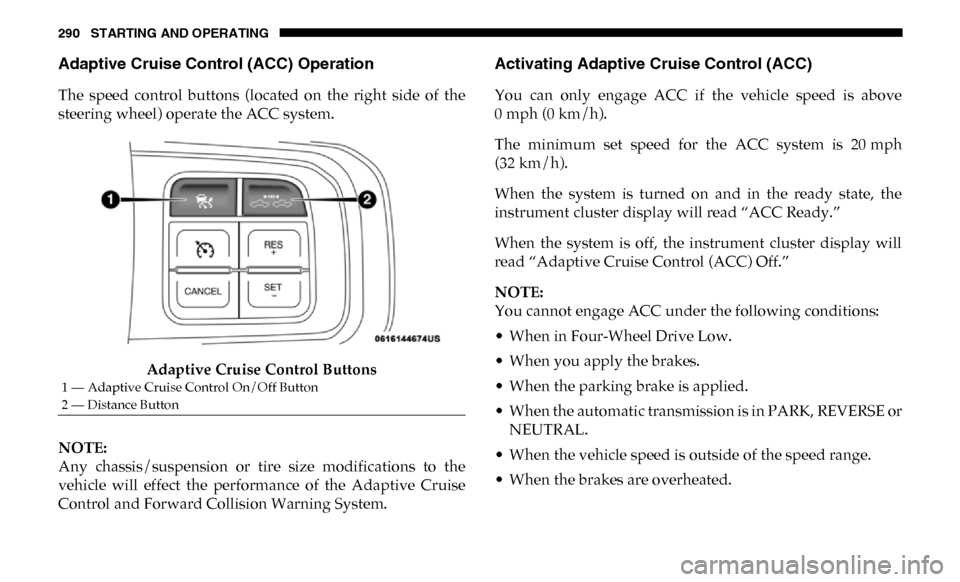
The speed control buttons (located on the right side of the
steering wheel) operate the ACC system.Adaptive Cruise Control Buttons
NOTE:
Any chassis/suspension or tire size modifications to the
vehicle will effect the performance of the Adaptive Cruise
Control and Forward Collision Warning System.
Activating Adaptive Cruise Control (ACC)
You can only engage ACC if the vehicle speed is above
0 mph (0 km/h).
The minimum set speed for the ACC system is 20 mph
(32 km/h).
When the system is turned on and in the ready state, the
instrument cluster display will read “ACC Ready.”
When the system is off, the instrument cluster display will
read “Adaptive Cruise Control (ACC) Off.”
NOTE:
You cannot engage ACC under the following conditions:
• When in Four-Wheel Drive Low.
• When you apply the brakes.
• When the parking brake is applied.
• When the automatic transmission is in PARK, REVERSE or NEUTRAL.
• When the vehicle speed is outside of the speed range.
• When the brakes are overheated.
1 — Adaptive Cruise Control On/Off Button
2 — Distance Button
Page 295 of 607

STARTING AND OPERATING 293
To Turn Off
The system will turn off and clear the set speed in memory if:
• The Adaptive Cruise Control (ACC) on/off button ispushed.
• The Normal (Fixed Speed) Cruise Control on/off button is pushed.
• The ignition is turned OFF.
• You switch to Four-Wheel Drive Low.
To Resume
If there is a set speed in memory push the RES (+) button and
then remove your foot from the accelerator pedal. The instru-
ment cluster display will display the last set speed.
NOTE:
• If your vehicle stays at standstill for longer than two seconds, the driver will have to push the RES (+) button to
reengage the ACC to the existing set speed.
• ACC cannot be resumed if there is a stationary vehicle in-front of your vehicle in close proximity.
To Vary The Speed Setting
To Increase Speed
While ACC is set, you can increase the set speed by pushing
the RES (+) button.
The speed increment shown is dependant on the chosen
speed unit of U.S. (mph) or Metric (km/h):
U.S. Speed (mph)
• Pushing the RES (+) button once will result in a 1 mph increase in set speed. Each subsequent tap of the button
results in an increase of 1 mph.
WARNING!
The Resume function should only be used if traffic and
road conditions permit. Resuming a set speed that is too
high or too low for prevailing traffic and road conditions
could cause the vehicle to accelerate or decelerate too
sharply for safe operation. Failure to follow these
warnings can result in a collision and death or serious
personal injury.
5
Page 300 of 607
298 STARTING AND OPERATING
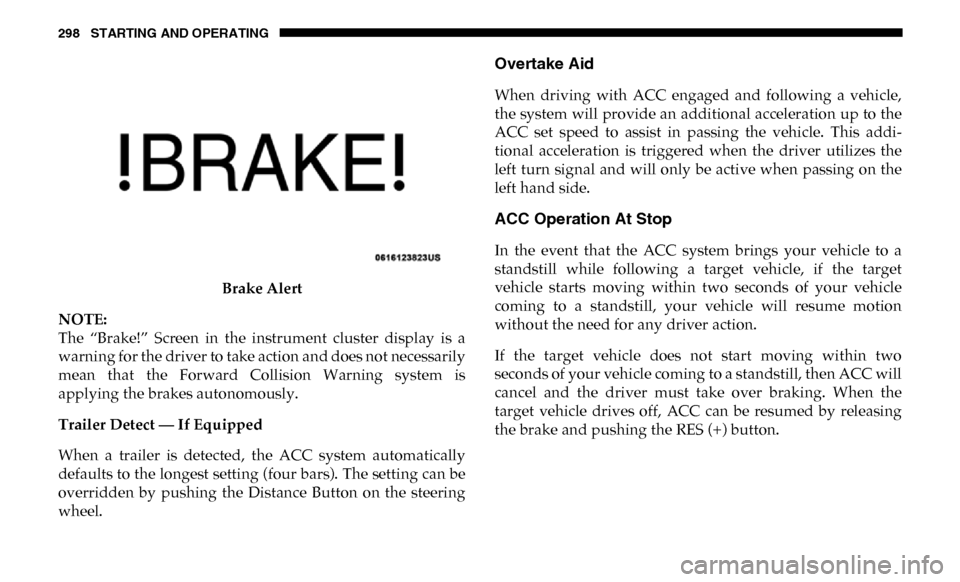
Brake Alert
NOTE:
The “Brake!” Screen in the instrument cluster display is a
warning for the driver to take action and does not necessarily
mean that the Forward Collision Warning system is
applying the brakes autonomously.
Trailer Detect — If Equipped
When a trailer is detected, the ACC system automatically
defaults to the longest setting (four bars). The setting can be
overridden by pushing the Distance Button on the steering
wheel.
Overtake Aid
When driving with ACC engaged and following a vehicle,
the system will provide an additional acceleration up to the
ACC set speed to assist in passing the vehicle. This addi -
tional acceleration is triggered when the driver utilizes the
left turn signal and will only be active when passing on the
left hand side.
ACC Operation At Stop
In the event that the ACC system brings your vehicle to a
standstill while following a target vehicle, if the target
vehicle starts moving within two seconds of your vehicle
coming to a standstill, your vehicle will resume motion
without the need for any driver action.
If the target vehicle does not start moving within two
seconds of your vehicle coming to a standstill, then ACC will
cancel and the driver must take over braking. When the
target vehicle drives off, ACC can be resumed by releasing
the brake and pushing the RES (+) button.
Page 301 of 607

STARTING AND OPERATING 299
NOTE:
After the ACC system holds your vehicle at a standstill for
approximately two seconds, a chime will sound and an
“ACC may cancel soon” warning will display. The brakes
will release when ACC is cancelled and the driver must take
over braking.
While ACC is holding your vehicle at a standstill, if the
driver seatbelt is unbuckled or the driver door is opened, the
parking brake will be activated, and the ACC system will be
cancelled.
Adaptive Cruise Control (ACC) Menu
The instrument cluster display will show the current ACC
system settings. The instrument cluster display is located in
the center of the instrument cluster. The information it
displays depends on ACC system status.Push the Adaptive Cruise Control (ACC) on/off button
(located on the steering wheel) until one of the following
appears in the instrument cluster display:
Adaptive Cruise Control Off
When ACC is deactivated, the display will read “Adaptive
Cruise Control Off.”
Adaptive Cruise Control Ready
When ACC is activated, but the vehicle speed setting has not
been selected, the display will read “Adaptive Cruise
Control Ready.”
Adaptive Cruise Control Set
When the RES (+) or the SET(-) button (located on the
steering wheel) is pushed, the display will read “ACC SET.”
When ACC is set, the set speed will show in the instrument
cluster display.
WARNING!
When the ACC system is resumed, the driver must
ensure that there are no pedestrians, vehicles or objects
in the path of the vehicle. Failure to follow these
warnings can result in a collision and death or serious
personal injury.5
Page 311 of 607

STARTING AND OPERATING 309
To Cancel
The following conditions will cancel the Normal (Fixed
Speed) Cruise Control without clearing the memory:
• The brake pedal is applied.
• The CANC button is pushed.
• The Electronic Stability Control/Traction Control System(ESC/TCS) activates.
• The vehicle parking brake is applied.
• The braking temperature exceeds normal range (over -
heated).
• The gear selector is removed from the DRIVE position.
• The driver switches ESC to full-off mode.
To Resume Speed
To resume a previously set speed, push the RES (+) button
and release. Resume can be used at any speed above 20 mph
(32 km/h). To Turn Off
The system will turn off and erase the set speed in memory if:
• The Normal (Fixed Speed) Cruise Control on/off button is
pushed.
• The ignition is turned OFF.
• You engage Four-Wheel Drive Low.
• The Adaptive Cruise Control (ACC) on/off button is pushed.
PARKSENSE REAR PARK ASSIST — IF EQUIPPED
The ParkSense Rear Park Assist system provides visual and
audible indications of the distance between the rear fascia
and a detected obstacle when backing up, e.g. during a
parking maneuver. Refer to “ParkSense System Usage
Precautions” in this section for limitations of this system and
recommendations.
ParkSense will retain the last system state (enabled or
disabled) from the last ignition cycle when the ignition is
changed to the ON/RUN position.5