lock RAM CHASSIS CAB 2009 Owner's Guide
[x] Cancel search | Manufacturer: RAM, Model Year: 2009, Model line: CHASSIS CAB, Model: RAM CHASSIS CAB 2009Pages: 429, PDF Size: 3.51 MB
Page 124 of 429
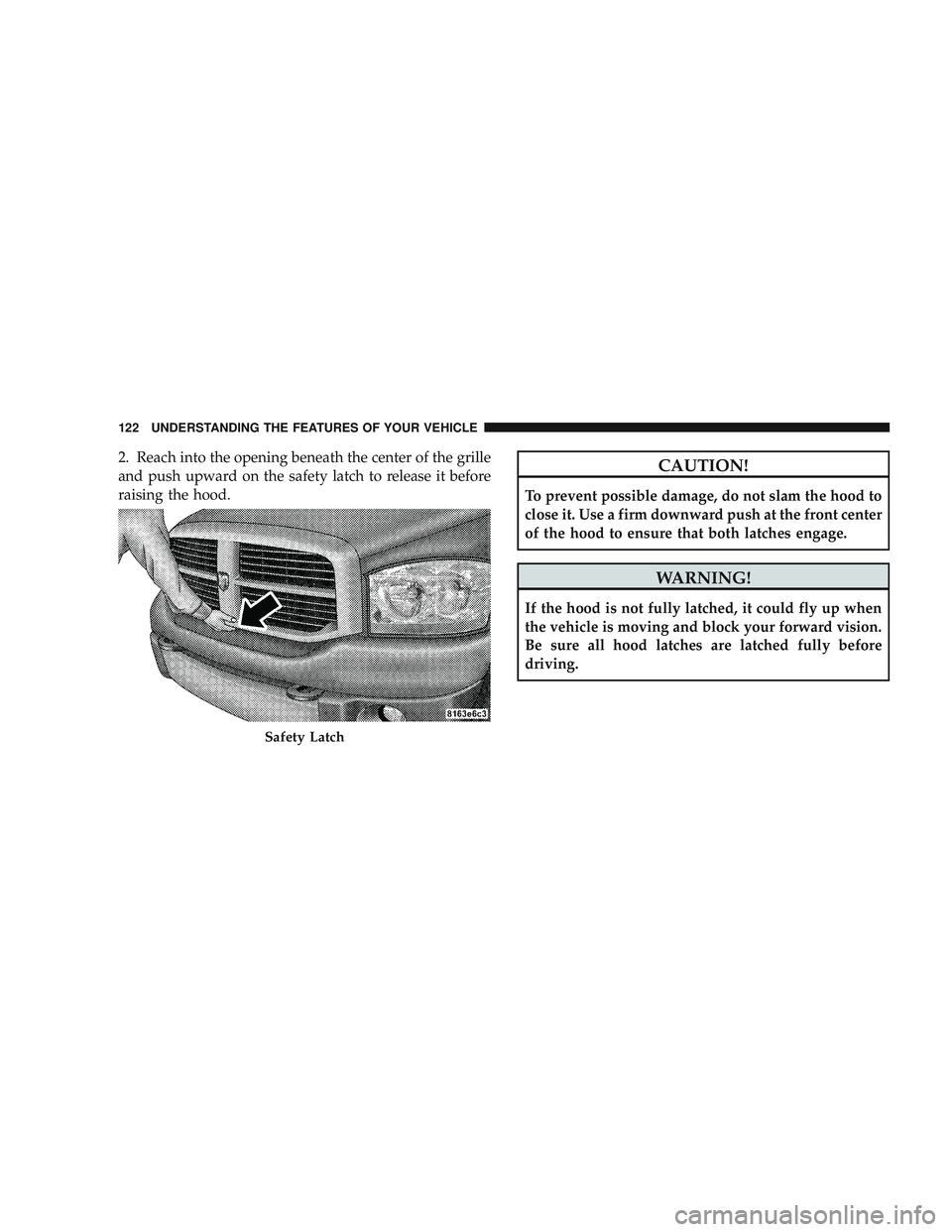
2. Reach into the opening beneath the center of the grille
and push upward on the safety latch to release it before
raising the hood.CAUTION!
To prevent possible damage, do not slam the hood to
close it. Use a firm downward push at the front center
of the hood to ensure that both latches engage.
WARNING!
If the hood is not fully latched, it could fly up when
the vehicle is moving and block your forward vision.
Be sure all hood latches are latched fully before
driving.
Safety Latch
122 UNDERSTANDING THE FEATURES OF YOUR VEHICLE
Page 125 of 429

LIGHTS
The headlight switch is located on the left side of the
instrument panel next to the steering wheel.
Interior Lights
Courtesy and dome lights are turned on when the front
doors are opened, when the dimmer control (rotatingwheel on the right side of the switch) is rotated to the
upward detent position, or if equipped, when the UN-
LOCK button is pressed on the Remote Keyless Entry
(RKE) transmitter. When a door is open and the interior
lights are on, rotating the dimmer control all the way
down to the OFF detent will cause all the interior lights to
go out. This is also known as the
\6Party\6mode because it
allows the doors to stay open for extended periods of
time without discharging the vehicle’s battery.
The brightness of the instrument panel lighting can be
regulated by rotating the dimmer control up (brighter) or
down (dimmer). When the headlights are on you can
supplement the brightness of the odometer, trip odom-
eter, radio and overhead console by rotating the control
up until you hear a click. This feature is termed the
“Parade” mode and is useful when headlights are re-
quired during the day.
Headlight Switch Location
UNDERSTANDING THE FEATURES OF YOUR VEHICLE 123
3
Page 132 of 429
WARNING!
Sudden loss of visibility through the windshield
could lead to an accident. You might not see other
vehicles or other obstacles. To avoid sudden icing of
the windshield during freezing weather, warm the
windshield with the defroster before and during
windshield washer use.
Windshield Washers
To use the washer, push in on the washer knob on the end
of the multifunction lever and hold while spray is
desired. If the washer knob is depressed while in the
delay range, the wiper will operate for several seconds
after the washer knob is released. It will then resume the
intermittent interval previously selected. If the washer
knob is pushed for a period greater than one second
while in the off position, the wiper will cycle approxi-
mately three times after the wash knob is released.
TILT STEERING COLUMN
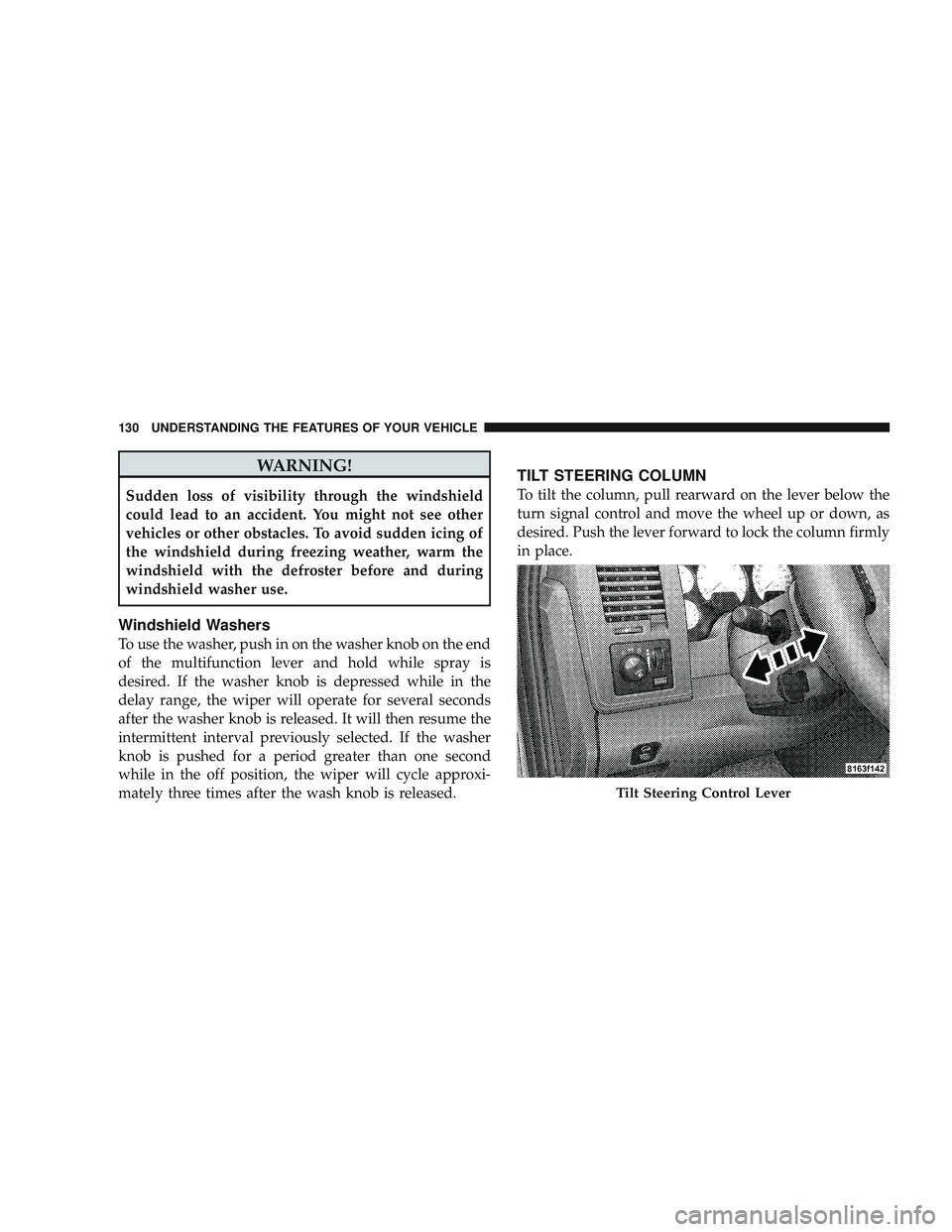
To tilt the column, pull rearward on the lever below the
turn signal control and move the wheel up or down, as
desired. Push the lever forward to lock the column firmly
in place.
Tilt Steering Control Lever
130 UNDERSTANDING THE FEATURES OF YOUR VEHICLE
Page 133 of 429
WARNING!
Tilting the steering column while the vehicle is
moving is dangerous. Without a stable steering col-
umn, you could lose control of the vehicle and have
an accident. Adjust the column only while the ve-
hicle is stopped. Be sure it is locked before driving.
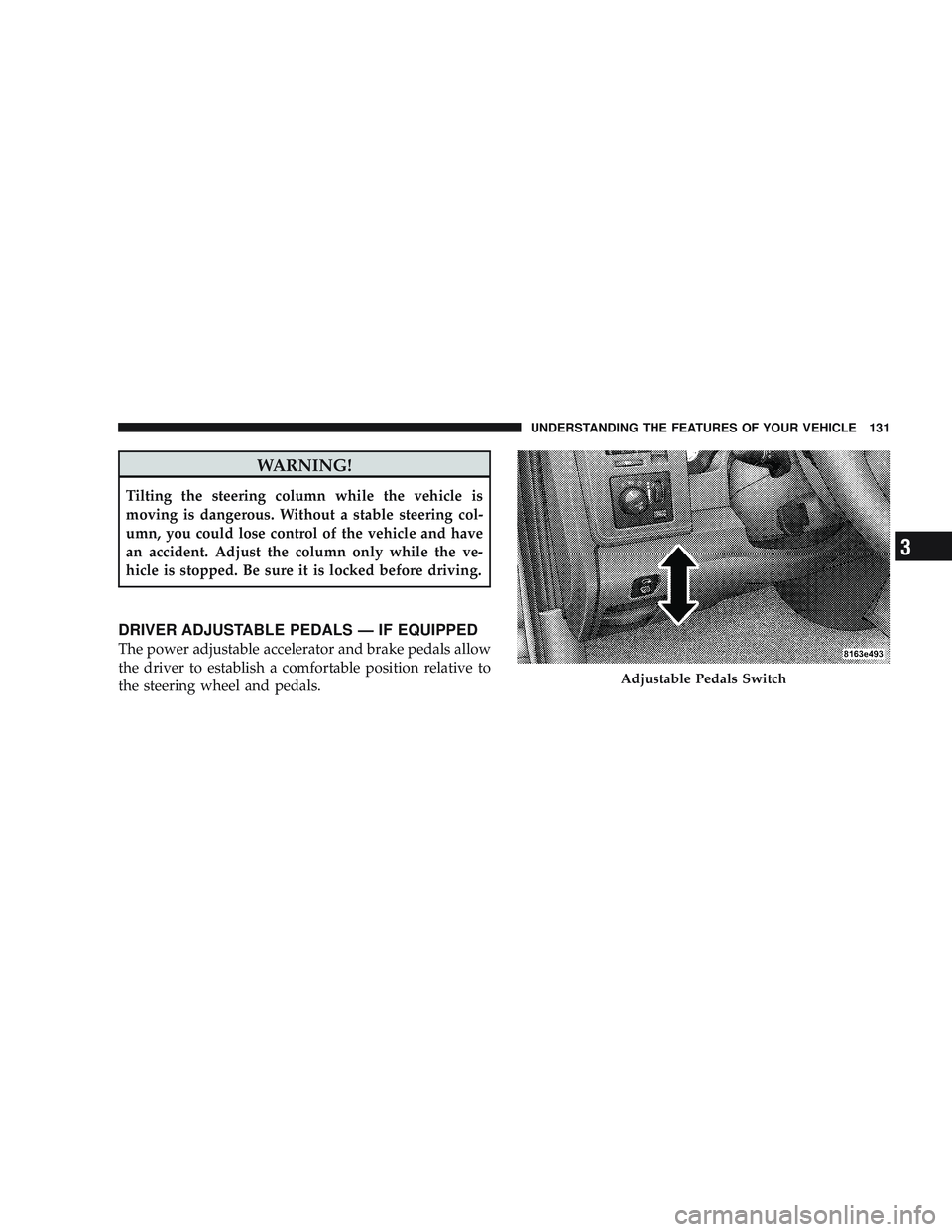
DRIVER ADJUSTABLE PEDALS — IF EQUIPPED
The power adjustable accelerator and brake pedals allow
the driver to establish a comfortable position relative to
the steering wheel and pedals.
Adjustable Pedals Switch
UNDERSTANDING THE FEATURES OF YOUR VEHICLE 131
3
Page 156 of 429

Power Sliding Rear Window — If Equipped
The power sliding rear window switch is located on the
instrument panel below the climate controls. Press the
right side of the switch to open the glass and the left side
of the switch to close the glass.
Sliding Rear Window — If Equipped
A locking device in the center of the window helps to
prevent entry from the rear of the vehicle. Squeeze the
lock to release the window.
FOLD FLAT LOAD FLOOR — IF EQUIPPED
Quad Cab\3models with a 60/40 rear seat may be
equipped with a folding load floor.
WARNING!
Do not operate the vehicle with loose items stored on
the load floor. While driving or in an accident you
may experience abrupt stopping, rapid acceleration,
or sharp turns. Loose objects stored on the load floor
may move around with force and strike occupants,
resulting in serious or fatal injury.
Power Sliding Rear Window Switch
154 UNDERSTANDING THE FEATURES OF YOUR VEHICLE
Page 159 of 429
UNDERSTANDING YOUR INSTRUMENT PANEL
CONTENTS
\2Instrument Panel Features ............... 160
\2 Instrument Cluster .................... 161
\2 Instrument Cluster Description ............ 162
\2 Electronic Digital Clock ................. 172
\4 Clock Setting Procedure ............... 172
\2 Sales Code RAQ – AM/FM/CD (6-Disc) Radio
With Optional Satellite Radio, Hands Free
Phone, And Video Entertainment Systems
(VES)™ Capabilities .................... 173
\4 Operating Instructions - Radio Mode ...... 173\4
Operation Instructions - (CD Mode For CD
Audio Play) ........................ 179
\4 Load/Eject Button (CD Mode For CD Audio
Play) ............................. 180
\4 Notes On Playing MP3 Files ............ 182
\4 Operation Instructions - (CD Mode For MP3
Audio Play) ........................ 184
\4 Load/Eject Button
(CD Mode For MP3 Play) .............. 1854
Page 160 of 429
\2Sales Code REF — AM/FM/CD (Single-Disc)
Radio With Optional Satellite Radio And
Hands-Free Phone Capability .............. 187
\4 Operating Instructions - Radio Mode ...... 187
\4 Operating Instructions - CD Mode ........ 191
\4 Operating Instructions - Auxiliary Mode .... 192
\4 Operating Instructions - Hands-Free Phone
— If Equipped ...................... 194
\4 Operating Instructions - Satellite Radio —
If Equipped ........................ 194
\2 Sales Code REC — AM/FM/CD (6–Disc)
Radio With Navigation System ............. 194
\4 Operating Instructions — Satellite Radio —
If Equipped ........................ 195
\4 REC Setting The Clock ................ 195 \2
Satellite Radio — If Equipped ............. 197
\4 System Activation .................... 197
\4 Electronic Serial Number/Sirius
Identification Number (ESN/SID) ......... 198
\4 Selecting Satellite Mode In REF, RAQ, And
RAK Radios ........................ 199
\4 Selecting A Channel .................. 199
\4 Storing And Selecting Preset Channels ..... 200
\4 Using The PTY (Program Type) Button —
If Equipped ........................ 200
\4 PTY Button Scan ..................... 200
\4 PTY Button Seek ..................... 200
\4 Satellite Antenna ..................... 200
\4 Reception Quality .................... 201
158 UNDERSTANDING YOUR INSTRUMENT PANEL
Page 169 of 429

button down for a period of six seconds. The odometer
will change to trip value first, then it will display the
engine hour value. The engine hours will be displayed
for a period of 30 seconds until the ignition is turned off
or the engine is started.
Change Oil Message
Your vehicle is equipped with an engine oil change
indicator system. The “Change Oil” message will flash in
the instrument cluster odometer for approximately
12 seconds after a single chime has sounded to indicate
the next scheduled oil change interval. The engine oil
change indicator system is duty cycle based, which
means the engine oil change interval may fluctuate
dependent upon your personal driving style.
Unless reset, this message will continue to display each
time you turn the ignition switch to the ON/RUN
position. To turn off the message temporarily, press and
release the Trip Odometer button on the instrumentcluster. To reset the oil change indicator system (after
performing the scheduled maintenance) refer to the fol-
lowing procedure.
1. Turn the ignition switch to the ON position. (Do not
start the engine.)
2. Fully depress the accelerator pedal slowly three
times within 10 seconds.
3. Turn the ignition switch to the OFF/LOCK position.
NOTE: If the indicator message illuminates when you
start the vehicle, the oil change indicator system did not
reset. If necessary repeat this procedure.
17. Front Fog Light Indicator — If Equipped This light shows when the front fog lights are ON.
UNDERSTANDING YOUR INSTRUMENT PANEL 167
4
Page 170 of 429

18. Malfunction Indicator Light (MIL)The Malfunction Indicator Light (MIL) is part of
an onboard diagnostic system which monitors
the emissions and engine control system. If the
vehicle is ready for emissions testing the light will come
on when the ignition is first turned on and remain on, as
a bulb check, until the engine is started. If the vehicle is
not ready for emissions testing the light will come on
when the ignition is first turned on and remain on for
15 seconds, then blink for five seconds, and remain on
until the vehicle is started. If the bulb does not come on
during starting, have the condition investigated
promptly.
If this light comes on and remains on while driving, it
suggests a potential engine control problem and the need
for system service. Although your vehicle will usually be drivable and not
need towing, see your authorized dealer for service as
soon as possible.
CAUTION!
Prolonged driving with the MIL on could cause
damage to the engine control system. It also could
affect fuel economy and drivability.
If the MIL is flashing, severe catalytic converter
damage and power loss will soon occur. Immediate
service is required.
19. Brake Warning Light This light monitors various brake functions,
including brake fluid level and parking brake
application. If the brake light turns on, it may
indicate that the parking brake is applied, that
the brake fluid level is low, or that there is a problem with
the anti-lock brake system reservoir.
168 UNDERSTANDING YOUR INSTRUMENT PANEL
Page 171 of 429

If the light remains on when the parking brake has been
disengaged, and the fluid level is at the full mark on the
master cylinder reservoir, it indicates a possible brake
hydraulic system malfunction or a problem with the
Brake Booster has been detected by the Anti-Lock Brake
System (ABS) / Electronic Stability Program (ESP) sys-
tem. In this case, the light will remain on until the
condition has been corrected. If the problem is related to
the brake booster, the ABS pump will run when applying
the brake and a brake pedal pulsation may be felt during
each stop.
The dual brake system provides a reserve braking capac-
ity in the event of a failure to a portion of the hydraulic
system. A leak in either half of the dual brake system is
indicated by the Brake Warning Light, which will turn on
when the brake fluid level in the master cylinder has
dropped below a specified level.
The light will remain on until the cause is corrected.NOTE:
The light may flash momentarily during sharp
cornering maneuvers, which change fluid level condi-
tions. The vehicle should have service performed, and
the brake fluid level checked.
If brake failure is indicated, immediate repair is neces-
sary.
WARNING!
Driving a vehicle with the red brake light on is
dangerous. Part of the brake system may have failed.
It will take longer to stop the vehicle. You could have
an accident. Have the vehicle checked immediately.
Vehicles equipped with the Anti-Lock Brake System
(ABS), are also equipped with Electronic Brake Force
Distribution (EBD). In the event of an EBD failure, the
Brake Warning Light will turn on along with the ABS
Light. Immediate repair to the ABS system is required.
UNDERSTANDING YOUR INSTRUMENT PANEL 169
4