seats RAM CHASSIS CAB 2021 User Guide
[x] Cancel search | Manufacturer: RAM, Model Year: 2021, Model line: CHASSIS CAB, Model: RAM CHASSIS CAB 2021Pages: 463, PDF Size: 21.5 MB
Page 67 of 463

GETTING TO KNOW YOUR VEHICLE65
CLIMATE VOICE RECOGNITION
Adjust vehicle temperatures hands-free and
keep everyone comfortable while you keep
moving ahead.
Push the VR button on the steering wheel. After
the beep, say one of the following commands:
“Set driver temperature to 70 degrees ”
“Set passenger temperature to 70 degrees ”
Did you know: Voice Command for Climate may only
be used to adjust the interior temperature of your
vehicle. Voice Command will not work to adjust the
heated seats or steering wheel if equipped.
OPERATING TIPS
NOTE:
Refer to the chart at the end of this section for
suggested control settings for various weather
conditions.
Summer Operation
The engine cooling system must be protected
with a high-quality antifreeze coolant to provide
proper corrosion protection and to protect
against engine overheating. OAT coolant
(conforming to MS.90032) is recommended.
Winter Operation
To ensure the best possible heater and defroster
performance, make sure the engine cooling
system is functioning properly and the proper
amount, type, and concentration of coolant is
used. Use of the Air Recirculation mode during
Winter months is not recommended, because it
may cause window fogging.
Vacation/Storage
For information on maintaining the Climate
Control system when the vehicle is being stored
for an extended period of time, see
Ú
page 427.
Window Fogging
Vehicle windows tend to fog on the inside in mild,
rainy, and/or humid weather. To clear the
windows, select Defrost or Mix mode and
increase the front blower speed. Do not use the
Recirculation mode without A/C for long periods,
as fogging may occur.
Outside Air Intake
Make sure the air intake, located directly in
front of the windshield, is free of obstructions,
such as leaves. Leaves collected in the air
intake may reduce airflow, and if they enter
the plenum, they could plug the water drains. In Winter months, make sure the air intake is
clear of ice, slush, and snow.
Cabin Air Filter
The climate control system filters out dust and
pollen from the air. Contact an authorized
dealer to service your cabin air filter, and to
have it replaced when needed.
Operating Tips Chart
WEATHER CONTROL SETTINGS
Hot Weather And
Vehicle Interior Is Very Hot Set the mode control
to , on, and blower on high. Roll down the
windows for a minute to flush out the hot air.
Adjust the controls as needed to achieve comfort.
Warm Weather Turn on and set the
mode control to the position.
Cool Sunny Operate in position.
2
21_DPF_OM_EN_USC_t.book Page 65
Page 69 of 463
GETTING TO KNOW YOUR VEHICLE67
(Continued)
Center Storage Compartment — If
Equipped
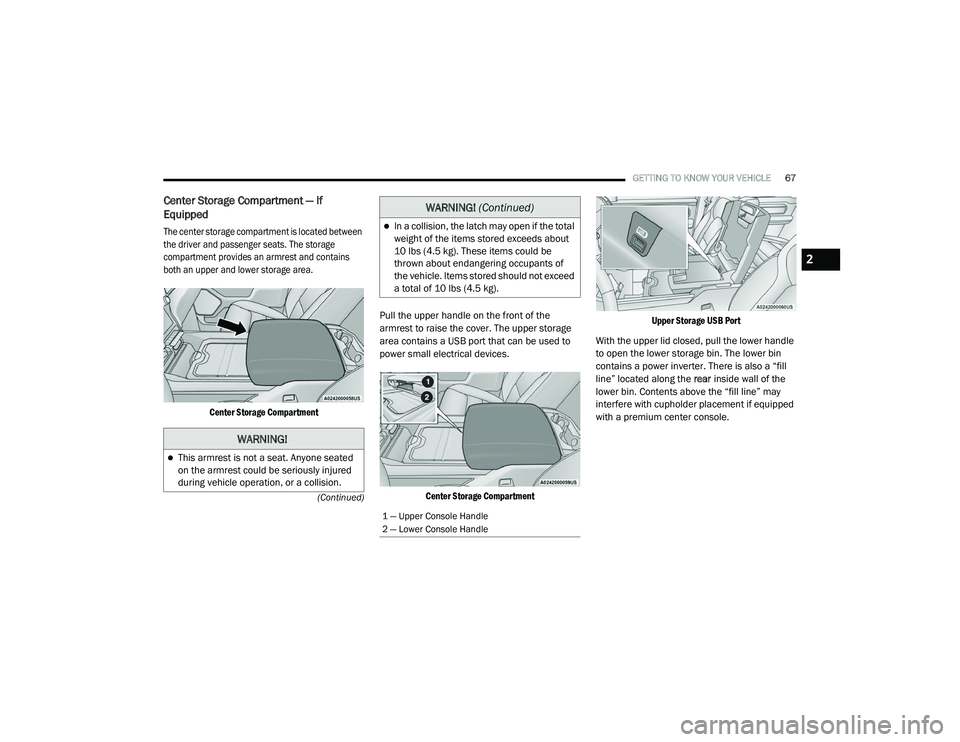
The center storage compartment is located between
the driver and passenger seats. The storage
compartment provides an armrest and contains
both an upper and lower storage area.
Center Storage Compartment
Pull the upper handle on the front of the
armrest to raise the cover. The upper storage
area contains a USB port that can be used to
power small electrical devices.
Center Storage Compartment Upper Storage USB Port
With the upper lid closed, pull the lower handle
to open the lower storage bin. The lower bin
contains a power inverter. There is also a “fill
line” located along the rear inside wall of the
lower bin. Contents above the “fill line” may
interfere with cupholder placement if equipped
with a premium center console.
WARNING!
This armrest is not a seat. Anyone seated
on the armrest could be seriously injured
during vehicle operation, or a collision.
In a collision, the latch may open if the total
weight of the items stored exceeds about
10 lbs (4.5 kg). These items could be
thrown about endangering occupants of
the vehicle. Items stored should not exceed
a total of 10 lbs (4.5 kg).
1 — Upper Console Handle
2 — Lower Console Handle
WARNING! (Continued)
2
21_DPF_OM_EN_USC_t.book Page 67
Page 72 of 463

70GETTING TO KNOW YOUR VEHICLE
Seatback Storage — If Equipped
Located in the back of both the driver and
passenger front seats are pockets that can be
used for storage.
Driver’s Side Seatback Storage
Storage Bin (Regular Cab)
The storage bin is located behind the front
seats and runs the length of the cab.
Storage Bin
Fold Flat Load Floor — If Equipped
Crew Cab models with a 60/40 rear seat may
be equipped with a folding load floor.Unfolding The Load Floor/Crew Cab
1. Lift the 60/40 seat cushion(s) to the
upward position.
Load Floor Legs In Stowed Position
2. Unfold both the legs using the straps.
Load Floor Legs In Opened Position
WARNING!
Do not operate the vehicle with loose items
stored on the load floor. While driving or in an
accident you may experience abrupt stopping,
rapid acceleration, or sharp turns. Loose
objects stored on the load floor may move
around with force and strike occupants,
resulting in serious or fatal injury.
21_DPF_OM_EN_USC_t.book Page 70
Page 73 of 463

GETTING TO KNOW YOUR VEHICLE71
3. Lift the front panel until the load floor
unfolds into position.
Load Floor In Open Position
4. Reverse the procedure to store the load floor.
Positioning The Load Floor For Storage Access
Under The Seat
1. Lift the 60/40 seat cushion(s) to the upward position.
2. Unsnap the securing snap located at either side of the load floor.
3. Lift the load floor up to access storage under the load floor.
Load Floor Securing Straps/Crew Cab
4. Reverse the procedure to put the load floor back in the secured down position before
you operate the vehicle.Below Rear Seat Storage (Crew Cab)
The Crew Cab models provide additional
storage under the rear seats. Lift the seats to
access the storage compartment.
To open the storage compartments, unsnap the
securing snap located at either side of the load
floor and lift upward on the fold flat lid.
Crew Cab Storage
NOTE:
For more information on storage and the fold
flat floor, refer to “Fold Flat Load Floor” in the
previous section.WARNING!
Do not drive with the load floor in the up
position. When stopping fast or in an
accident, the load floor could move to the
down position causing serious injury.
2
21_DPF_OM_EN_USC_t.book Page 71
Page 108 of 463
106GETTING TO KNOW YOUR INSTRUMENT PANEL
NOTE:
The charging system is independent from
load reduction. The charging system
performs a diagnostic on the charging
system continuously.
If the Battery Charge Warning Light is on it
may indicate a problem with the charging
system Úpage 108.
The electrical loads that may be switched off
(if equipped), and vehicle functions which can
be affected by load reduction:
Heated Seats/Vented Seats/Heated Wheel
Rear Defroster And Heated Mirrors
HVAC System
115 Volt AC Power Inverter System
Audio and Telematics System
Loss of the battery charge may indicate one or
more of the following conditions:
The charging system cannot deliver enough
electrical power to the vehicle system because
the electrical loads are larger than the capa -
bility of charging system. The charging system
is still functioning properly.
Turning on all possible vehicle electrical
loads (e.g. HVAC to max settings, exterior
and interior lights, overloaded power outlets
+12 Volts, 115 Volt AC, USB ports) during
certain driving conditions (city driving,
towing, frequent stopping).
Installing options like additional lights,
upfitter electrical accessories, audio
systems, alarms and similar devices.
Unusual driving cycles (short trips separated
by long parking periods).
The vehicle was parked for an extended
period of time (weeks, months).
The battery was recently replaced and was
not charged completely.
The battery was discharged by an electrical
load left on when the vehicle was parked.
The battery was used for an extended period
with the engine not running to supply radio,
lights, chargers, +12 Volt portable appli -
ances like vacuum cleaners, game consoles
and similar devices. What to do when an electrical load reduction
action message is present (“Battery Saver On”
or “Battery Saver Mode”)
During a trip:
Reduce power to unnecessary loads if
possible:
Turn off redundant lights (interior or exterior).
Check what may be plugged in to power
outlets +12 Volts, 115 Volt AC, USB ports.
Check HVAC settings (blower, temperature).
Check the audio settings (volume).
After a trip:
Check if any aftermarket equipment was
installed (additional lights, upfitter electrical
accessories, audio systems, alarms) and
review specifications if any (load and Ignition
Off Draw currents).
Evaluate the latest driving cycles (distance,
driving time and parking time).
The vehicle should have service performed if the
message is still present during consecutive trips
and the evaluation of the vehicle and driving
pattern did not help to identify the cause.
21_DPF_OM_EN_USC_t.book Page 106
Page 240 of 463

238MULTIMEDIA
Power Side Steps
When the Power Side Steps button is pressed on the touchscreen, the system will display the setting related to the lowering of the power side steps.
Seats & Comfort/Auto-On Comfort
When Seats & Comfort/Auto-On Comfort button is pressed on the touchscreen, the system displays the options related to the vehicle’s comfort systems
when remote start has been activated or the vehicle has been started.
Setting Name Description
Power Side Steps
This setting will raise and lower or stow the power side steps. The available options are “Automatic” to
raise and lower the power side steps and “Stow” to deactivate the power side steps.
Setting Name
Description
Auto-On Driver Heated/Ventilated Seat & Heated
Steering Wheel With Vehicle Start
This setting will activate the vehicle’s comfort systems and heated seats (if equipped) or
heated steering wheel (if equipped) when the vehicle is remote started or ignition is started.
The “Off” setting will not activate the comfort systems. The “Remote Start” setting will only
activate the comfort systems when using Remote Start. The “All Start” setting will activate the
comfort systems whenever the vehicle is started.
Easy Exit Seats This setting will automatically move the driver seat rearward when the engine is shut off.
The available settings are “On” and “Off”.
21_DPF_OM_EN_USC_t.book Page 238
Page 241 of 463

MULTIMEDIA239
Key Off Options/Engine Off Options
When the Key Off Options/Engine Off Options button is pressed on the touchscreen, the system displays the options related to vehicle shutoff. These
settings will only activate when the ignition is set to OFF.
Suspension/Air Suspension
When the Suspension/Air Suspension button is pressed on the touchscreen, the system will display settings related to the vehicle’s air suspension.
Setting Name Description
Easy Exit SeatThis setting adjusts the seats to make exiting the vehicle easier.
Key Off/Engine Off Power Delay This setting will keep certain electrical features running after the engine is turned off.
When any door is opened, the electronics will deactivate. The available settings are “0 sec”,
“45 sec”, “5 min”, and “10 min”.
Headlight Off Delay This setting will allow you to set the amount of time the headlights remain on after the vehicle
has been turned off. The “+” will increase the amount of time. The “-” will decrease the
amount of time.
Auto Entry/Exit This setting will automatically lower the vehicle ride height for easier entry and exit of the
vehicle.
Setting Name
Description
Sound Horn With LowerThis setting will sound the horn when the Lower button is pressed on the key fob.
Flash Lights With Lower This setting will flash the lights when the Lower button is pressed on the key fob.
Display Suspension Messages This setting will display suspension messages in the Instrument Cluster Display. The “All”
setting will display all available messages. The “Warnings Only” setting will only display
warning messages.
5
21_DPF_OM_EN_USC_t.book Page 239
Page 295 of 463
SAFETY293
IMPORTANT SAFETY PRECAUTIONS
Please pay close attention to the information in
this section. It tells you how to use your restraint
system properly, to keep you and your
passengers as safe as possible.
Here are some simple steps you can take to
minimize the risk of harm from a deploying air bag:
1. Children 12 years old and under should
always ride buckled up in the rear seat of a
vehicle with a rear seat.
2. A child who is not big enough to wear the vehicle seat belt properly must be secured
in the appropriate child restraint or
belt-positioning booster seat in a rear
seating position Ú page 312.
3. If a child from 2 to 12 years old (not in a rear-facing child restraint) must ride in the
front passenger seat, move the seat as far
back as possible and use the proper child
restraint Ú page 312.
4. Never allow children to slide the shoulder belt behind them or under their arm. 5. You should read the instructions provided
with your child restraint to make sure that
you are using it properly.
6. All occupants should always wear their lap and shoulder belts properly.
7. The driver and front passenger seats should be moved back as far as practical to allow
the front air bags room to inflate.
8. Do not lean against the door or window. If your vehicle has side air bags, and
deployment occurs, the side air bags will
inflate forcefully into the space between
occupants and the door and occupants
could be injured.
9. If the air bag system in this vehicle needs to be modified to accommodate a disabled
person, see Ú page 445 for customer
service contact information.
SEAT BELT SYSTEMS
Buckle up even though you are an excellent
driver, even on short trips. Someone on the road
may be a poor driver and could cause a collision
that includes you. This can happen far away
from home or on your own street.
WARNING!
Never place a rear-facing child restraint in front
of an air bag. A deploying passenger front air
bag can cause death or serious injury to a child
12 years or younger, including a child in a
rear-facing child restraint.
Never install a rear-facing child restraint
in the front seat of a vehicle. Only use a
rear-facing child restraint in the rear seat.
If the vehicle does not have a rear seat, do
not transport a rear-facing child restraint in
that vehicle.
6
21_DPF_OM_EN_USC_t.book Page 293
Page 297 of 463
SAFETY295
(Continued)
(Continued)
(Continued)
Lap/Shoulder Belts
All seating positions except the Crew Cab front
center seating position have combination lap/
shoulder belts.
The seat belt webbing retractor will lock only
during very sudden stops or collisions. This
feature allows the shoulder part of the seat belt
to move freely with you under normal conditions.
However, in a collision the seat belt will lock and
reduce your risk of striking the inside of the
vehicle or being thrown out of the vehicle.
WARNING!
Relying on the air bags alone could lead to
more severe injuries in a collision. The air
bags work with your seat belt to restrain you
properly. In some collisions, the air bags
won’t deploy at all. Always wear your seat
belt even though you have air bags.
In a collision, you and your passengers can
suffer much greater injuries if you are not
properly buckled up. You can strike the inte -
rior of your vehicle or other passengers, or
you can be thrown out of the vehicle. Always
be sure you and others in your vehicle are
buckled up properly.
It is dangerous to ride in a cargo area,
inside or outside of a vehicle. In a collision,
people riding in these areas are more likely
to be seriously injured or killed.
Do not allow people to ride in any area of
your vehicle that is not equipped with seats
and seat belts.
Be sure everyone in your vehicle is in a seat
and using a seat belt properly. Occupants,
including the driver, should always wear
their seat belts whether or not an air bag is
also provided at their seating position to
minimize the risk of severe injury or death
in the event of a crash.
Wearing your seat belt incorrectly could
make your injuries in a collision much
worse. You might suffer internal injuries, or
you could even slide out of the seat belt.
Follow these instructions to wear your seat
belt safely and to keep your passengers
safe, too.
WARNING! (Continued)
Two people should never be belted into a
single seat belt. People belted together can
crash into one another in a collision, hurting
one another badly. Never use a lap/
shoulder belt or a lap belt for more than one
person, no matter what their size.
WARNING!
A lap belt worn too high can increase the
risk of injury in a collision. The seat belt
forces won’t be at the strong hip and pelvic
bones, but across your abdomen. Always
wear the lap part of your seat belt as low as
possible and keep it snug.
A twisted seat belt may not protect you
properly. In a collision, it could even cut into
you. Be sure the seat belt is flat against
your body, without twists. If you can’t
straighten a seat belt in your vehicle, take it
to an authorized dealer immediately and
have it fixed.
WARNING! (Continued)
6
21_DPF_OM_EN_USC_t.book Page 295
Page 299 of 463

SAFETY297
4. Position the lap belt so that it is snug and lies
low across your hips, below your abdomen.
To remove slack in the lap belt portion, pull
up on the shoulder belt. To loosen the lap belt
if it is too tight, tilt the latch plate and pull on
the lap belt. A snug seat belt reduces the risk
of sliding under the seat belt in a collision.
Positioning The Lap Belt
5. Position the shoulder belt across the shoulder and chest with minimal, if any
slack so that it is comfortable and not
resting on your neck. The retractor will
withdraw any slack in the shoulder belt.
6. To release the seat belt, push the red button
on the buckle. The seat belt will automatically
retract to its stowed position. If necessary,
slide the latch plate down the webbing to
allow the seat belt to retract fully.
Lap/Shoulder Belt Untwisting Procedure
Use the following procedure to untwist a twisted
lap/shoulder belt.
1. Position the latch plate as close as possible to the anchor point.
2. At about 6 to 12 inches (15 to 30 cm) above the latch plate, grab and twist the seat belt
webbing 180 degrees to create a fold that
begins immediately above the latch plate.
3. Slide the latch plate upward over the folded webbing. The folded webbing must enter
the slot at the top of the latch plate.
4. Continue to slide the latch plate up until it clears the folded webbing and the seat belt
is no longer twisted.
Adjustable Upper Shoulder Belt Anchorage
In the driver and outboard front passenger
seats, the top of the shoulder belt can be
adjusted upward or downward to position the
seat belt away from your neck. Push or squeeze
the anchorage button to release the anchorage,
and move it up or down to the position that
serves you best.
Adjustable Anchorage
As a guide, if you are shorter than average, you
will prefer the shoulder belt anchorage in a lower
position, and if you are taller than average, you
will prefer the shoulder belt anchorage in a higher
position. After you release the anchorage button,
try to move it up or down to make sure that it is
locked in position.
6
21_DPF_OM_EN_USC_t.book Page 297