tire pressure RAM CHASSIS CAB 2021 Owners Manual
[x] Cancel search | Manufacturer: RAM, Model Year: 2021, Model line: CHASSIS CAB, Model: RAM CHASSIS CAB 2021Pages: 463, PDF Size: 21.5 MB
Page 7 of 463
5
LANESENSE — IF EQUIPPED ........................... 183 LaneSense Operation ................................183Turning LaneSense On Or Off ...................184LaneSense Warning Message ..................184
Changing LaneSense Status .....................186
PARKVIEW REAR BACK UP CAMERA ............ 186
AUX Camera — If Equipped .......................188
SURROUND VIEW CAMERA SYSTEM — IF
EQUIPPED ........................................................... 189
AUX Camera — If Equipped .......................194
ENGINE RUNAWAY ............................................ 195
REFUELING THE VEHICLE — GASOLINE
ENGINE ................................................................ 195
Loose Fuel Filler Cap Message ................196
REFUELING THE VEHICLE — DIESEL
ENGINE ............................................................... 196
Diesel Exhaust Fluid ..................................196
VEHICLE LOADING ............................................ 199
Gross Vehicle Weight Rating (GVWR) ......199Payload .......................................................199Gross Axle Weight Rating (GAWR) ............200
Tire Size ......................................................200
Rim Size......................................................200
Inflation Pressure ......................................200
Curb Weight................................................200
Loading .......................................................200 TRAILER TOWING ............................................... 200
Common Towing Definitions ..................... 201Trailer Hitch Type and Maximum Trailer
Weight ........................................................ 204 Trailer Towing Weights (Maximum Trailer
Weight Ratings) ......................................... 205 Trailer And Tongue Weight ....................... 205
Towing Requirements ............................... 205Towing Tips ................................................ 211
SNOWPLOW — IF EQUIPPED ............................ 212
Before Plowing ........................................... 212
Snowplow Prep Package Model
Availability .................................................. 212 Over The Road Operation With Snowplow
Attached ..................................................... 213 Operating Tips ............................................ 213General Maintenance................................ 213
RECREATIONAL TOWING (BEHIND
MOTORHOME) ...................................................214
Towing This Vehicle Behind Another
Vehicle ........................................................ 214 Recreational Towing — Two-Wheel Drive
Models ........................................................ 215 Recreational Towing — Four-Wheel Drive
Models ........................................................ 215
DRIVING TIPS ...................................................... 218
Driving On Slippery Surfaces ................... 218
Driving Through Water .............................. 218
MULTIMEDIA
UCONNECT SYSTEMS ....................................... 220
CYBERSECURITY ............................................... 220
UCONNECT 3.0 ................................................... 221 Introduction................................................ 221
Radio Mode ................................................ 222
Media Mode ............................................... 224
Phone Mode............................................... 225
UCONNECT SETTINGS ....................................... 228
Customer Programmable Features .......... 228
UCONNECT INTRODUCTION.............................. 244
System Overview ...................................... 244
Safety And General Information ............... 246
UCONNECT MODES ........................................... 247
Steering Wheel Audio Controls ................. 247
Radio Mode ............................................... 247
Media Mode .............................................. 255Phone Mode .............................................. 258
RADIO OPERATION AND MOBILE PHONES.... 269
Regulatory And Safety Information .......... 269
OFF-ROAD PAGES — IF EQUIPPED .................. 270
Off-Road Pages Status Bar ....................... 270Vehicle Dynamics ...................................... 271
Accessory Gauge ....................................... 271
Pitch & Roll................................................. 272Forward Facing Camera ............................ 272
21_DPF_OM_EN_USC_t.book Page 5
Page 8 of 463
6
SAFETY
SAFETY FEATURES ............................................ 273
Anti-Lock Brake System (ABS) ................. 273
Electronic Brake Control (EBC) System ...274
AUXILIARY DRIVING SYSTEMS ........................ 281
Forward Collision Warning (FCW) With
Mitigation — If Equipped............................281 Tire Pressure Monitoring
System (TPMS) ..........................................284
OCCUPANT RESTRAINT SYSTEMS .................. 292
Occupant Restraint Systems Features ....292
Important Safety Precautions ...................293Seat Belt Systems ..................................... 293Supplemental Restraint Systems (SRS) ...302Child Restraints..........................................312
SAFETY TIPS ...................................................... 330
Transporting Passengers ..........................330
Transporting Pets ......................................330
Safety Checks You Should Make Inside
The Vehicle ................................................330 Periodic Safety Checks You Should Make
Outside The Vehicle ...................................332 Exhaust Gas ...............................................333Carbon Monoxide Warnings ......................333
IN CASE OF EMERGENCY
HAZARD WARNING FLASHERS .......................334
ASSIST AND SOS SYSTEM — IF EQUIPPED..... 335
JACKING AND TIRE CHANGING ........................339
4500/5500 Models .................................. 339Preparations For Jacking........................... 339
Jacking Instructions 4500 And
5500 Series ............................................... 340 To Stow The Flat Or Spare —
If Equipped ................................................ 343 Hub Caps/Wheel Covers — If Equipped ... 343
JUMP STARTING ................................................ 344
Preparations For Jump Start ..................... 344Jump Starting Procedure .......................... 345
IF YOUR ENGINE OVERHEATS .........................346
GEAR SELECTOR OVERRIDE — 6–SPEED
TRANSMISSION ................................................. 347
MANUAL PARK RELEASE — 8 – SPEED
TRANSMISSION ................................................. 348
FREEING A STUCK VEHICLE .............................349
TOWING A DISABLED VEHICLE ........................350 Two-Wheel Drive Models ........................... 351
Four-Wheel Drive Models .......................... 351Emergency Tow Hooks — If Equipped ...... 352
ENHANCED ACCIDENT RESPONSE
SYSTEM (EARS) ................................................. 352
EVENT DATA RECORDER (EDR) .......................352
SERVICING AND MAINTENANCE
SCHEDULED SERVICING — GASOLINE
ENGINE ................................................................ 353
Maintenance Plan ..................................... 354
SCHEDULED SERVICING — DIESEL ENGINE .. 357
Oil Change Indicator System — Cummins
Diesel.......................................................... 357 Perform Service Indicator — Cummins
Diesel ......................................................... 358 Maintenance Plan — Cummins Diesel
Engine ....................................................... 359
ENGINE COMPARTMENT .................................. 364
6.4L Engine ............................................... 364
6.7L Engine ................................................ 365
Checking Oil Level ..................................... 366
Adding Washer Fluid ................................. 366Maintenance-Free Battery ....................... 366Pressure Washing...................................... 367
VEHICLE MAINTENANCE .................................. 367
Engine Oil .................................................. 368
Engine Oil Filter.......................................... 369
Engine Air Cleaner Filter ........................... 369
Air Conditioner Maintenance ................... 371
Accessory Drive Belt Inspection ............... 374Draining Fuel/Water Separator Filter....... 375Engine Mounted Fuel Filter
Replacement.............................................. 376
21_DPF_OM_EN_USC_t.book Page 6
Page 14 of 463
12
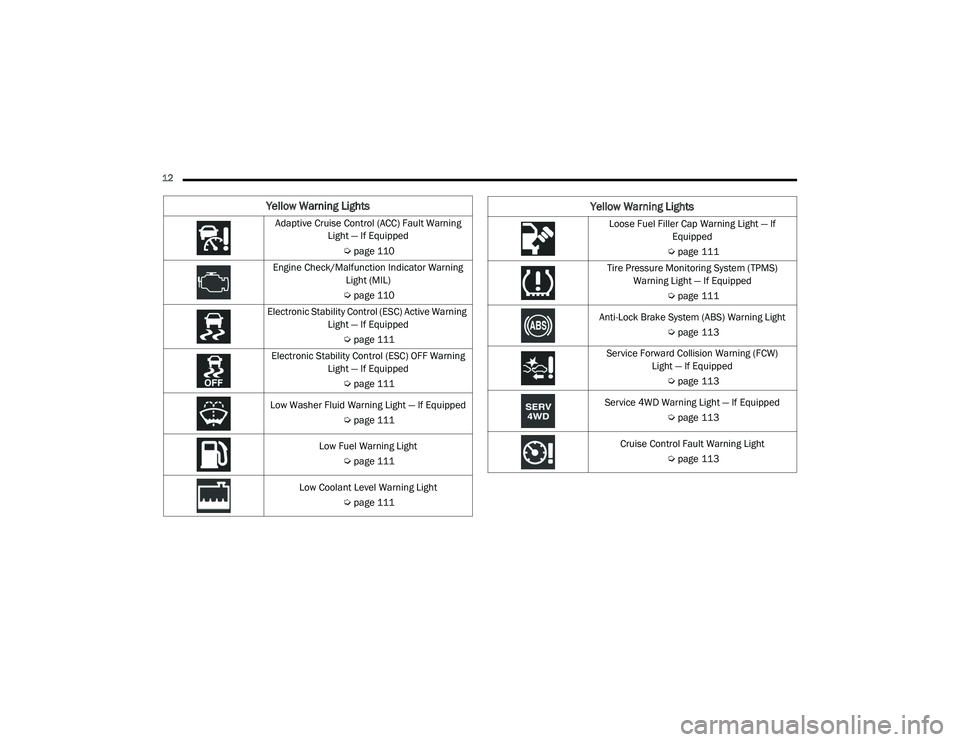
Yellow Warning Lights
Adaptive Cruise Control (ACC) Fault Warning Light — If Equipped
Úpage 110
Engine Check/Malfunction Indicator Warning Light (MIL)
Ú page 110
Electronic Stability Control (ESC) Active Warning Light — If Equipped
Úpage 111
Electronic Stability Control (ESC) OFF Warning Light — If Equipped
Úpage 111
Low Washer Fluid Warning Light — If Equipped Úpage 111
Low Fuel Warning Light Úpage 111
Low Coolant Level Warning Light Úpage 111Loose Fuel Filler Cap Warning Light — If
Equipped
Ú page 111
Tire Pressure Monitoring System (TPMS) Warning Light — If Equipped
Úpage 111
Anti-Lock Brake System (ABS) Warning Light Úpage 113
Service Forward Collision Warning (FCW) Light — If Equipped
Úpage 113
Service 4WD Warning Light — If Equipped Úpage 113
Cruise Control Fault Warning Light Úpage 113
Yellow Warning Lights
21_DPF_OM_EN_USC_t.book Page 12
Page 94 of 463

92GETTING TO KNOW YOUR INSTRUMENT PANEL
4. Push and hold the right arrow button to
select “Reset”.
5. Push and release the down arrow button
to select “Yes,” then push and release the
right arrow button to reset the Oil Life to
100%.
6. Push and release the up arrow button to
exit the instrument cluster display screen.
Secondary Method Of Resetting Engine Oil Life
1. Without pressing the brake pedal, push the ENGINE START/STOP button and place the
ignition to the ON/RUN position (do not
start the engine).
2. Fully press the accelerator pedal, slowly, three times within ten seconds.
3. Without pushing the brake pedal, push the ENGINE START/STOP button once to return
the ignition to the OFF/LOCK position.
NOTE:
If the indicator message illuminates when
you start the vehicle, the oil change indicator
system did not reset. If necessary, repeat this
procedure.DISPLAY MENU ITEMS
Push and release the up or down arrow
button until the desired selectable menu icon is
highlighted in the instrument cluster display.
Speedometer
Push and release the up or down arrow
button until the speedometer menu item is
highlighted in the instrument cluster display.
Push and release the right arrow button to
cycle the display between mph and km/h.
Vehicle Info
Push and release the up or down arrow
button until the Vehicle Info menu item is
highlighted in the instrument cluster display.
Push and release the right arrow button to
enter the submenus items of Vehicle Info.
Follow the directional prompts to access or
reset any of the following Vehicle Info submenu
items:
Tire Pressure
Coolant Temperature
Transmission Temperature — If Equipped
Oil Temperature
Oil Pressure
Exhaust Brake — If Equipped
Boost Pressure — If Equipped
Diesel Particulate Filter (DPF) — If Equipped
Oil Life
Fuel Filter Life — If Equipped
Battery Voltage
Gauge Summary
Engine Hours
Off-Road
Push and release the up or down arrow
button until the Off-Road menu icon is displayed
in the instrument cluster display. Push and
release the left or right arrow button to
scroll through the information submenus.
Drivetrain
Front Wheel Angle: displays the graphical
and numerical value of calculated
average front wheel angle from the
steering wheel orientation.
21_DPF_OM_EN_USC_t.book Page 92
Page 96 of 463

94GETTING TO KNOW YOUR INSTRUMENT PANEL
Fuel Economy
Push and release the up or down arrow
button until the Fuel Economy menu item is
highlighted in the instrument cluster display.
Push and Hold the right arrow button to reset
Average Fuel Economy.
Current Fuel Economy Gauge
Average Fuel Economy Value
Range To Empty
Fuel Tank Levels — If Equipped
Trip A/Trip B
Push and release the up or down arrow
button until the Trip menu item is highlighted
in the instrument cluster display. Push and
release the right arrow button to enter the
submenus of Trip A and Trip B. The Trip A or Trip
B information will display the following:
Distance
Average Fuel Economy
Elapsed Time
Push and hold right arrow button to reset all
information.
Trailer Tow
Push and release the up or down arrow
button until the Trailer Tow menu item is
highlighted in the instrument cluster display.
Push and release the right or left arrow
button to cycle through the following trailer tow
information:
Trip (trailer specific) Distance: Push and hold
the OK button to reset the distance.
Integrated Trailer Brake Module (ITBM):
Braking Output
Trailer Type
ITBM Gain
Trailer Light Check: Push and hold the
OK button to begin the Trailer Light Test
sequence Ú page 209.
Trailer Tire Pressure Monitoring: The Instru-
ment Cluster Display will display the Trailer
Tire Pressure for a connected trailer with
sensors that match the active trailer profile.
When a low tire is present, the low tire value
will be displayed in red, and the affected low tire will have a red glow. “Trailer Tire Low“ will
be displayed on the center bottom of the
Instrument Cluster Display screen.
Audio
Push and release the
up or down arrow
button until the Audio Menu icon/title is
highlighted in the instrument cluster display.
This menu will display the audio source
information, including the Song name, Artist
name, and audio source with an accompanying
graphic.
Phone Call Status
When a call is incoming, a Phone Call Status
pop-up will display on the screen. The pop-up
will remain until the phone is answered or
ignored.
NOTE:
The call status will temporarily replace the
previous media source information displayed
on the screen. When the pop-up is no longer
displayed, the display will return to the last used
screen.
21_DPF_OM_EN_USC_t.book Page 94
Page 113 of 463

GETTING TO KNOW YOUR INSTRUMENT PANEL111
Electronic Stability Control (ESC) Active
Warning Light — If Equipped
This warning light will indicate when
the ESC system is Active. The ESC
Indicator Light in the instrument
cluster will come on when the ignition
is placed in the ON/RUN or ACC/ON/RUN
position, and when ESC is activated. It should go
out with the engine running. If the ESC Indicator
Light comes on continuously with the engine
running, a malfunction has been detected in
the ESC system. If this warning light remains
on after several ignition cycles, and the vehicle
has been driven several miles (kilometers) at
speeds greater than 30 mph (48 km/h), see an
authorized dealer as soon as possible to have the
problem diagnosed and corrected.
The ESC OFF Indicator Light and the ESC Indi -
cator Light come on momentarily each time
the ignition is placed in the ON/RUN or
ACC/ON/RUN position.
The ESC system will make buzzing or clicking
sounds when it is active. This is normal; the
sounds will stop when ESC becomes inactive.
This light will come on when the vehicle is in
an ESC event.
Electronic Stability Control (ESC) OFF
Warning Light — If Equipped
This warning light indicates the ESC is
off.
Each time the ignition is turned to ON/RUN or
ACC/ON/RUN, the ESC system will be on, even
if it was turned off previously.
Low Washer Fluid Warning Light — If
Equipped
This warning light will illuminate when
the windshield washer fluid is low
Ú page 364.
Low Fuel Warning Light
When the fuel level reaches
approximately 3.2 gal (12 L) this light
will turn on, and remain on until fuel is
added.
A single warning chime will sound with Low Fuel
Warning.
Low Coolant Level Warning Light
This telltale will turn on to indicate
the vehicle coolant level is low
Ú page 367.
Loose Fuel Filler Cap Warning Light — If
Equipped
This warning light will illuminate when
the fuel filler cap is loose. Properly
close the filler cap to disengage the
light. If the light does not turn off,
please see an authorized dealer.
Tire Pressure Monitoring System (TPMS)
Warning Light — If Equipped
The warning light switches on and a
message is displayed to indicate that
the tire pressure is lower than the
recommended value and/or that slow
pressure loss is occurring. In these cases,
optimal tire duration and fuel consumption may
not be guaranteed.
Should one or more tires be in the condition
mentioned above, the display will show the
indications corresponding to each tire.
3
21_DPF_OM_EN_USC_t.book Page 111
Page 114 of 463

112GETTING TO KNOW YOUR INSTRUMENT PANEL
Each tire, including the spare (if provided),
should be checked monthly when cold and
inflated to the inflation pressure recommended
by the vehicle manufacturer on the vehicle
placard or tire inflation pressure label. If your
vehicle has tires of a different size than the size
indicated on the vehicle placard or tire inflation
pressure label, you should determine the
proper tire inflation pressure for those tires.
As an added safety feature, your vehicle has
been equipped with a TPMS that illuminates
a low tire pressure telltale when one or more
of your tires is significantly underinflated.
Accordingly, when the low tire pressure telltale
illuminates, you should stop and check your
tires as soon as possible, and inflate them to
the proper pressure. Driving on a significantly underinflated tire causes the tire to overheat
and can lead to tire failure. Under inflation also
reduces fuel efficiency and tire tread life, and
may affect the vehicle’s handling and stopping
ability.
Please note that the TPMS is not a substitute for
proper tire maintenance, and it is the driver’s
responsibility to maintain correct tire pressure,
even if under inflation has not reached the level
to trigger illumination of the TPMS low tire
pressure telltale.
Your vehicle has also been equipped with a TPMS
malfunction indicator to indicate when the
system is not operating properly. The TPMS
malfunction indicator is combined with the
low tire pressure telltale. When the system
detects a malfunction, the telltale will flash for
approximately one minute and then remain
continuously illuminated. This sequence will
continue upon subsequent vehicle start-ups
as long as the malfunction exists. When the
malfunction indicator is illuminated, the system
may not be able to detect or signal low tire
pressure as intended. TPMS malfunctions may
occur for a variety of reasons, including the
installation of replacement or alternate tires or
wheels on the vehicle that prevent the TPMS from
functioning properly. Always check the TPMS
malfunction telltale after replacing one or more
tires or wheels on your vehicle to ensure that the
replacement or alternate tires and wheels allow
the TPMS to continue to function properly.
CAUTION!
Do not continue driving with one or more
flat tires as handling may be compromised.
Stop the vehicle, avoiding sharp braking and
steering. If a tire puncture occurs, repair
immediately using the dedicated tire repair
kit and contact an authorized dealer as soon
as possible.
CAUTION!
The TPMS has been optimized for the original
equipment tires and wheels. TPMS pressures
and warning have been established for the tire
size equipped on your vehicle. Undesirable
system operation or sensor damage may
result when using replacement equipment that
is not of the same size, type, and/or style.
Aftermarket wheels can cause sensor damage.
Using aftermarket tire sealants may cause the
Tire Pressure Monitoring System (TPMS)
sensor to become inoperable. After using an
aftermarket tire sealant it is recommended
that you take your vehicle to an authorized
dealer to have your sensor function checked.
21_DPF_OM_EN_USC_t.book Page 112
Page 136 of 463

134STARTING AND OPERATING
PROGRAMMABLE MAXIMUM VEHICLE
S
PEED
This feature allows the owner to set a maximum
vehicle speed for the vehicle. The 2500 and
3500 Series maximum vehicle speed can be set
between 40 mph to 87 mph (64 km/h to
140 km/h). The 4500/5500 Series maximum
vehicle speed can be set between 40 mph to
85 mph (64 km/h to 136 km/h). See an
authorized dealer to enable this feature.
NOTE:
DO NOT set the maximum vehicle speed to a
value greater than what the vehicle tires are
rated for.
OPERATING PRECAUTIONS
Avoid Overheating The Engine
The temperature of the engine coolant
(antifreeze: a mixture of 50% ethylene-glycol and
50% water) must not exceed the normal range
of the temperature gauge 240°F (116°C) with a
21 psi (145 kPa) coolant pressure cap.
Usually the engine coolant (antifreeze)
temperature indicated during operation will be
to the left of center in the normal range of the
gauge.
Avoid Low Coolant Temperature Operation
Continual operation at low engine coolant
(antifreeze) temperature below the normal
range on the gauge 140°F (60°C) can be
harmful to the engine. Low engine coolant
(antifreeze) temperature can cause incomplete
combustion which allows carbon and varnish to form on piston rings and injector nozzles.
Also, the unburned fuel can enter the
crankcase, diluting the lubricating oil and
causing rapid wear to the engine.
COOLING SYSTEM TIPS
To reduce potential for engine and transmission
overheating in high ambient temperature
conditions, take the following actions:
City Driving — When stopped, shift the trans
-
mission into NEUTRAL and increase engine
idle speed.
Highway Driving — Reduce your speed.
Up Steep Hills — Select a lower transmission
gear.
Air Conditioning — Turn it off temporarily.
21_DPF_OM_EN_USC_t.book Page 134
Page 163 of 463

STARTING AND OPERATING161
The 4H and 4L positions are intended for loose,
slippery road surfaces only. Driving in the 4H
and 4L positions on dry, hard surfaced roads
may cause increased tire wear and damage to
the driveline components.
The “Transfer Case Position Indicator Light” in
the instrument cluster will alert the driver that
the vehicle is in four-wheel drive and that the
front and rear driveshafts are locked together.
This light will illuminate when the transfer case
is shifted into either the 4H or 4L position. There
is no light for the 2H or N (Neutral) positions on
some models.
When operating your vehicle in 4L, the engine
speed is approximately three times that of the
4H or 4L positions at a given road speed. Take
care not to overspeed the engine and do not
exceed 25 mph (40 km/h).
Proper operation of four-wheel drive vehicles
depends on tires of equal size, type and
circumference on each wheel. Any difference
will adversely affect shifting and can cause
damage to the drivetrain. NOTE:
Do not attempt to make a shift while only the
front or rear wheels are spinning, as this can
cause damage to driveline components.
Because four-wheel drive provides improved
traction, there is a tendency to exceed safe
turning and stopping speeds. Do not go faster
than road conditions permit.
NOTE:
Delayed shifts out of four-wheel drive may be
experienced due to uneven tire wear, low or
uneven tire pressures, excessive vehicle
loading, or cold temperatures.Shifting Procedure — Manually Shifted
Transfer Case
2H To 4H
Shifting between 2H and 4H can be made with
the vehicle stopped or in motion. If the vehicle
is in motion, shifts can be made up to 55 mph
(88 km/h). With the vehicle in motion, the
transfer case will engage/disengage faster if
you momentarily release the accelerator pedal
after completing the shift. Apply a constant
force when shifting the transfer case lever.
2WD High Or 4WD High To 4WD Low
NOTE:
When shifting into or out of 4L some gear noise
may be heard. This noise is normal and is not
detrimental to the vehicle or occupants.
With the vehicle rolling at 2 to 3 mph (3 to
5 km/h), shift the transmission into NEUTRAL.
While the vehicle is coasting at 2 to 3 mph (3 to
5 km/h), shift the transfer case lever firmly to
the desired position. Do not pause in transfer
case Neutral.
WARNING!
You or others could be injured or killed if you
leave the vehicle unattended with the transfer
case in the N (NEUTRAL) position without first
fully engaging the parking brake. The transfer
case N (NEUTRAL) position disengages both the
front and rear drive shafts from the powertrain
and will allow the vehicle to roll, even if the
transmission is in PARK. The parking brake
should always be applied when the driver is
not in the vehicle.
4
21_DPF_OM_EN_USC_t.book Page 161
Page 202 of 463

200STARTING AND OPERATING
GROSS AXLE WEIGHT RATING (GAWR)
The GAWR is the maximum permissible load
on the front and rear axles. The load must be
distributed in the cargo area so that the GAWR
of each axle is not exceeded.
Each axle GAWR is determined by the
components in the system with the lowest load
carrying capacity (axle, springs, tires or wheels).
Heavier axles or suspension components
sometimes specified by purchasers for increased
durability does not necessarily increase the
vehicle's GVWR.
TIRE SIZE
The tire size on the Vehicle Certification Label
represents the actual tire size on your vehicle.
Replacement tires must be equal to the load
capacity of this tire size.
RIM SIZE
This is the rim size that is appropriate for the tire
size listed.
INFLATION PRESSURE
This is the cold tire inflation pressure for your
vehicle for all loading conditions up to full GAWR.
CURB WEIGHT
The curb weight of a vehicle is defined as the
total weight of the vehicle with all fluids, including
vehicle fuel, at full capacity conditions, and with
no occupants or cargo loaded into the vehicle.
The front and rear curb weight values are
determined by weighing your vehicle on a
commercial scale before any occupants or
cargo are added.
LOADING
The actual total weight and the weight of the
front and rear of your vehicle at the ground can
best be determined by weighing it when it is
loaded and ready for operation.
The entire vehicle should first be weighed on a
commercial scale to ensure that the GVWR has
not been exceeded. The weight on the front and
rear of the vehicle should then be determined
separately to be sure that the load is properly
distributed over the front and rear axles.
Weighing the vehicle may show that the GAWR
of either the front or rear axle has been
exceeded but the total load is within the
specified GVWR. If so, weight must be shifted
from front to rear or rear to front as appropriate
until the specified weight limitations are met. Store the heavier items down low and be sure
that the weight is distributed equally. Stow all
loose items securely before driving.
Improper weight distributions can have an
adverse effect on the way your vehicle steers
and handles and the way the brakes operate.
TRAILER TOWING
In this section you will find safety tips and
information on limits to the type of towing you
can reasonably do with your vehicle. Before
towing a trailer, carefully review this information
to tow your load as efficiently and safely as
possible.
To maintain the New Vehicle Limited Warranty
coverage, follow the requirements and
recommendations in this manual concerning
vehicles used for trailer towing.
CAUTION!
Do not load your vehicle any heavier than the
GVWR or the maximum front and rear GAWR. If
you do, parts on your vehicle can break, or it
can change the way your vehicle handles.
This could cause you to lose control. Also
overloading can shorten the life of your vehicle.
21_DPF_OM_EN_USC_t.book Page 200